> ## Documentation Index
> Fetch the complete documentation index at: https://notes.kodekloud.com/llms.txt
> Use this file to discover all available pages before exploring further.
# Components
> This guide explains how to define and use components in Kustomize for packaging optional features into reusable configuration blocks.
In this guide, you’ll learn how to define and consume **components** in Kustomize. Components let you package optional features—such as additional resources, patches, ConfigMaps, or Secrets—into self-contained units. You can then import them in selected overlays without duplicating code, ensuring consistency and reducing configuration drift.
## When to Use Components
Use components when an application offers optional features that only apply to some overlays. If a feature is required in **all** overlays, include it in your base. For features needed by only a **subset**, bundle them as components to avoid repetition.
## Visual Example
Consider three deployment environments:
* **dev** (development)
* **premium** (for premium customers)
* **standalone** (self-hosted)
Our shared **base/** folder holds common resources. We also have two optional features:
* **Caching** (backed by Redis) — enabled in **premium** and **standalone**
* **External DB** (Postgres) — enabled in **dev** and **premium**
Where should we place the Redis and Postgres manifests so only the right overlays include them?
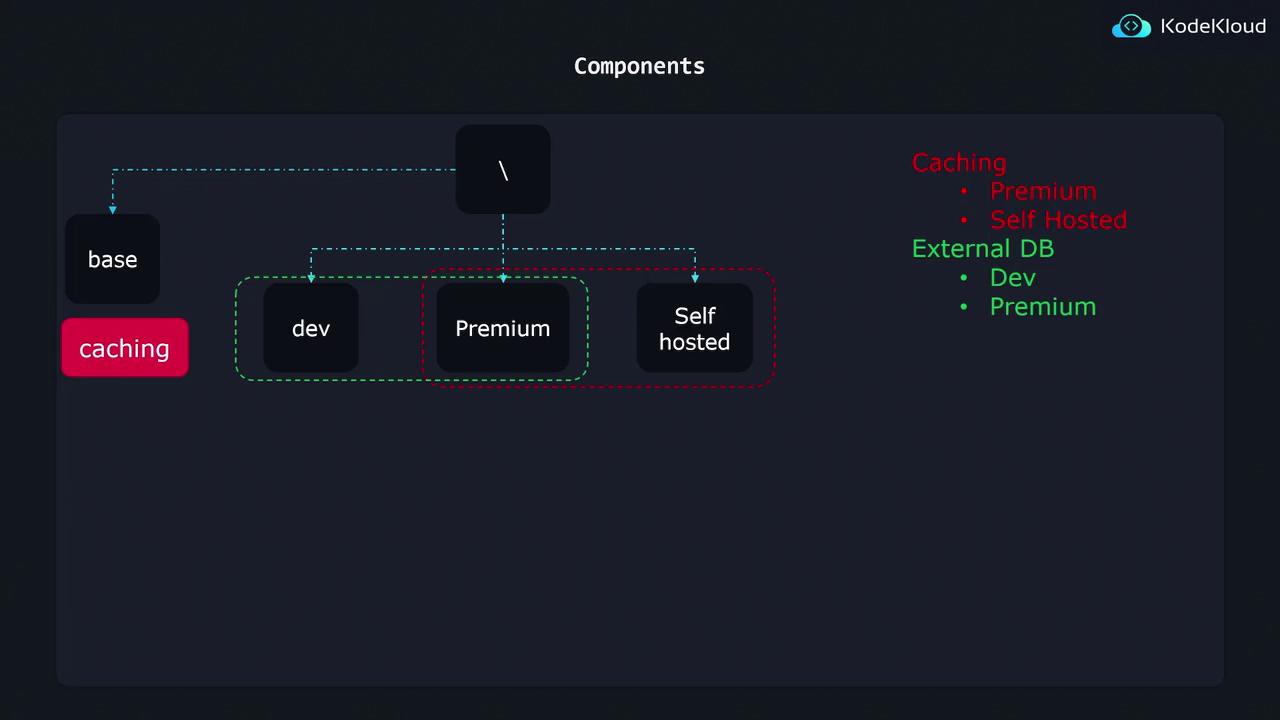
Instead of duplicating manifests in overlays—or adding unwanted features to **base**—we create two components (`caching` and `db`) and import them selectively.
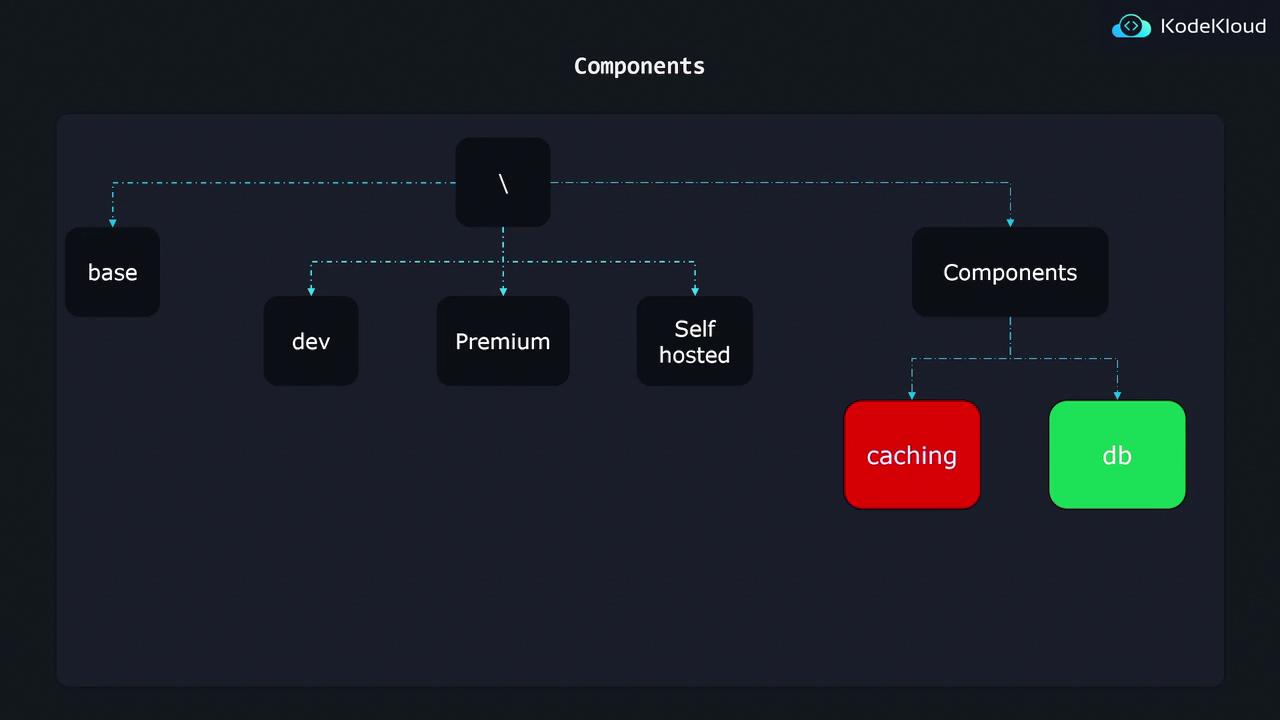
## Component Features Table
| Component | Purpose | Overlays |
| ------------- | -------------------------------- | ------------------- |
| caching | Redis Deployment & service | premium, standalone |
| db (External) | Postgres Deployment & DB secrets | dev, premium |
## Project Structure
```plaintext theme={null}
k8s/
├── base/
│ ├── api-depl.yaml
│ └── kustomization.yaml
├── components/
│ ├── caching/
│ │ ├── kustomization.yaml
│ │ ├── deployment-patch.yaml
│ │ └── redis-depl.yaml
│ └── db/
│ ├── kustomization.yaml
│ ├── deployment-patch.yaml
│ └── postgres-depl.yaml
└── overlays/
├── dev/
│ └── kustomization.yaml
├── premium/
│ └── kustomization.yaml
└── standalone/
└── kustomization.yaml
```
* **base/**: Common resources (e.g., API Deployment)
* **components/**: Feature directories (`caching/`, `db/`)
* **overlays/**: Environment-specific kustomizations
***
## Database Component
The **db** component adds a Postgres deployment, a Secret for credentials, and patches your API Deployment.
### `postgres-depl.yaml`
```yaml theme={null}
apiVersion: apps/v1
kind: Deployment
metadata:
name: postgres-deployment
spec:
replicas: 1
selector:
matchLabels:
component: postgres
template:
metadata:
labels:
component: postgres
spec:
containers:
- name: postgres
image: postgres:latest
```
Components require `kind: Component` with the `v1alpha1` API. Ensure you’re running Kustomize v4.x or later.
### `kustomization.yaml` (Component)
```yaml theme={null}
apiVersion: kustomize.config.k8s.io/v1alpha1
kind: Component
resources:
- postgres-depl.yaml
secretGenerator:
- name: postgres-cred
literals:
- password=postgres123
patches:
- deployment-patch.yaml
```
### `deployment-patch.yaml`
This strategic merge patch injects the `DB_PASSWORD` from the Secret into your API Deployment:
```yaml theme={null}
apiVersion: apps/v1
kind: Deployment
metadata:
name: api-deployment
spec:
template:
spec:
containers:
- name: api
env:
- name: DB_PASSWORD
valueFrom:
secretKeyRef:
name: postgres-cred
key: password
```
***
## Overlay Configuration
Each overlay’s `kustomization.yaml` pulls in `base` plus the desired components.
### Example: Dev Overlay
```yaml theme={null}
apiVersion: kustomize.config.k8s.io/v1beta1
kind: Kustomization
resources:
- ../../base
components:
- ../../components/db
```
* **premium** overlay adds both `../../components/db` and `../../components/caching`.
* **standalone** overlay adds only `../../components/caching`.
With Kustomize components, you can define optional feature logic once and enable it in any overlay by adding a single entry.
## Links and References
* [Kustomize Documentation](https://kubectl.docs.kubernetes.io/references/kustomize/)
* [Kubernetes Concepts: Overlays](https://kubernetes.io/docs/concepts/cluster-administration/manage-deployment/#kustomize-overlays)
* [Redis Official Image](https://hub.docker.com/_/redis)
* [Postgres Official Image](https://hub.docker.com/_/postgres)