> ## Documentation Index
> Fetch the complete documentation index at: https://notes.kodekloud.com/llms.txt
> Use this file to discover all available pages before exploring further.
# Dealing with Memory
> Explains adding persistent long term memory to LLM applications using external datastores like Redis, managing session histories, RunnableWithMessageHistory, and best practices for privacy and cost management.
In this lesson we’ll demonstrate how to add long-term memory to large language model (LLM) applications.
Short-term "memory" is typically kept in-process as a sequence of messages and passed into a prompt using a `MessagesPlaceholder`. The example below shows an in-memory conversation history that is injected into the prompt on each invocation:
```python theme={null}
from langchain_core.prompts import ChatPromptTemplate, MessagesPlaceholder
from langchain_openai.chat_models import ChatOpenAI
model = ChatOpenAI()
prompt = ChatPromptTemplate.from_messages(
[
("system", "You're an assistant who's good at {ability}. Respond in 20 words or fewer"),
MessagesPlaceholder(variable_name="history"),
("human", "{input}"),
]
)
base_chain = prompt | model
history = [
("human", "What's a right-angled triangle?"),
("ai", "A right-angled triangle has one angle of 90 degrees, with the other two angles summing to 90 degrees."),
]
# Invoke the chain by passing the history directly
base_chain.invoke(
{"ability": "math", "input": "What are the other types?", "history": history},
)
```
This returns a single response that used the provided `history` (short-term, in-memory). Short-term memory is fast but volatile — it lives in process and disappears when the process stops.
Persisting conversation history across processes and over time (long-term memory) requires externalizing the message history to a datastore such as Redis, SQLite, or MySQL. LangChain provides a Redis-backed chat message history implementation plus a runnable wrapper that automatically reads and writes history when executing the chain. Below is an example integrating `RedisChatMessageHistory` with `RunnableWithMessageHistory`:
```python theme={null}
from langchain_core.prompts import ChatPromptTemplate, MessagesPlaceholder
from langchain_openai.chat_models import ChatOpenAI
from langchain_community.chat_message_histories import RedisChatMessageHistory
from langchain_core.runnables.history import RunnableWithMessageHistory
# Prompt + model (same as before)
model = ChatOpenAI()
prompt = ChatPromptTemplate.from_messages(
[
("system", "You're an assistant who's good at {ability}. Respond in 20 words or fewer"),
MessagesPlaceholder(variable_name="history"),
("human", "{input}"),
]
)
base_chain = prompt | model
# Redis connection for persisting message history
REDIS_URL = "redis://localhost:6379/0"
def get_message_history(session_id: str) -> RedisChatMessageHistory:
return RedisChatMessageHistory(session_id, url=REDIS_URL)
# Wrap the base chain so it reads/writes history automatically
redis_chain = RunnableWithMessageHistory(
base_chain,
get_message_history,
input_messages_key="input",
history_messages_key="history",
)
```
Make sure your [Redis](https://redis.io/) instance is reachable at `REDIS_URL`. In lab environments the URL may differ. The `session_id` is used as the key for the message history (for example: `math-thread1`).
Invoke the `redis_chain` and pass a configurable `session_id` so each session/thread maps to its own persisted history. The `config` parameter is passed as the second argument to `invoke`:
```python theme={null}
# Create (or reuse) a math session and ask about cosine
redis_chain.invoke(
{"ability": "math", "input": "What does cosine mean?"},
config={"configurable": {"session_id": "math-thread1"}},
)
# Follow up in the same session; the chain will include the stored history
redis_chain.invoke(
{"ability": "math", "input": "Tell me more!"},
config={"configurable": {"session_id": "math-thread1"}},
)
# Create a separate physics session
redis_chain.invoke(
{"ability": "physics", "input": "What is the theory of relativity?"},
config={"configurable": {"session_id": "phy-thread1"}},
)
# Follow up in the physics session
redis_chain.invoke(
{"ability": "physics", "input": "Tell me more!"},
config={"configurable": {"session_id": "phy-thread1"}},
)
```
Example responses (illustrative):
```python theme={null}
AIMessage(content='Cosine is a trigonometric function that represents the ratio of the adjacent side to the hypotenuse in a right triangle.', ...)
AIMessage(content='Cosine is used in trigonometry to calculate angles and distances in right triangles, circles, and periodic phenomena.', ...)
AIMessage(content="Einstein's theory describes gravity as a curvature in spacetime caused by mass, leading to phenomena like time dilation and black holes.", ...)
AIMessage(content="General relativity explains gravity as a curvature in spacetime caused by mass. It predicts phenomena like time dilation and gravitational waves.", ...)
```
This demonstrates using a persistent store to maintain multiple independent conversation threads. Each `session_id` corresponds to an independent history that the runnable wrapper reads and writes to populate the prompt for subsequent invocations.
You can inspect the persisted data directly in Redis. For example, if you run Redis in Docker, use the Redis CLI to list keys and view stored lists:
```bash theme={null}
~ > docker ps
CONTAINER ID IMAGE COMMAND CREATED STATUS PORTS
043f6234a599 redis/redis-stack:latest "/entrypoint.sh" 44 minutes ago Up 44 minutes 0.0.0.0:6379->6379/tcp, 0.0.0.0:8001->8001/tcp cool_engelbart
~ > docker exec -it 043f6234a599 /bin/sh
# redis-cli
127.0.0.1:6379> KEYS *
1) "message_store:math-thread1"
2) "message_store:phy-thread1"
127.0.0.1:6379>
```
List entries for a session with `LRANGE`:
```bash theme={null}
127.0.0.1:6379> LRANGE message_store:math-thread1 0 -1
1) "{\"type\":\"ai\",\"data\":{\"content\":\"Cosine is used in trigonometry to calculate angles and distances in right triangles, circles, and periodic phenomena.\",\"additional_kwargs\":{},\"response_metadata\":{\"token_usage\":{\"completion_tokens\":23,\"prompt_tokens\":147,\"total_tokens\":170},\"model_name\":\"gpt-3.5-turbo\",\"system_fingerprint\":\"fp_3b956da36b\"}},\"example\":false,\"tool_calls\":[],\"invalid_tool_calls\":[]}"
2) "{\"type\":\"human\",\"data\":{\"content\":\"Tell me more!\",\"additional_kwargs\":{},\"example\":false}}"
3) "{\"type\":\"ai\",\"data\":{\"content\":\"Cosine is a trigonometric function that represents the ratio of the adjacent side to the hypotenuse in a right triangle.\",\"additional_kwargs\":{},\"response_metadata\":{\"token_usage\":{\"completion_tokens\":26,\"prompt_tokens\":135,\"total_tokens\":161},\"model_name\":\"gpt-3.5-turbo\",\"system_fingerprint\":\"fp_3b956da36b\",\"finish_reason\":\"stop\"}},\"example\":false}"
4) "{\"type\":\"human\",\"data\":{\"content\":\"What does cosine mean?\",\"additional_kwargs\":{},\"example\":false}}"
5) "{\"type\":\"ai\",\"data\":{\"content\":\"Cosine is used to calculate angles and distances in geometry and physics. It's core to the fundamental trigonometric functions.\",\"additional_kwargs\":{},\"response_metadata\":{\"token_usage\":{\"completion_tokens\":25,\"prompt_tokens\":96},\"model_name\":\"gpt-3.5-turbo\",\"system_fingerprint\":\"fp_3b956da36b\"}}}"
```
Likewise for the physics thread:
```bash theme={null}
127.0.0.1:6379> LRANGE message_store:phy-thread1 0 -1
1) "{\"type\": \"ai\", \"data\": {\"content\": \"Einstein's theory describes gravity as a curvature in spacetime caused by mass, leading to phenomena like time dilation and black holes.\", \"additional_kwargs\": {}, \"response_metadata\": {\"token_usage\": {\"completion_tokens\": 26, \"prompt_tokens\": 156, \"total_tokens\": 182}, \"model_name\": \"gpt-3.5-turbo\", \"system_fingerprint\": \"fp_3b956da36b\", \"finish_reason\": \"stop\"}}}"
2) "{\"type\": \"human\", \"data\": {\"content\": \"Tell me more!\", \"additional_kwargs\": {}}}"
3) "{\"type\": \"ai\", \"data\": {\"content\": \"Explains how gravity affects space and time. Includes special relativity (constant light speed) and general relativity (gravity warps spacetime).\", \"additional_kwargs\": {}, \"response_metadata\": {\"token_usage\": {\"completion_tokens\": 29,\"prompt_tokens\": 115, \"total_tokens\": 144}, \"model_name\": \"gpt-3.5-turbo\", \"system_fingerprint\": \"fp_3b956da36b\", \"finish_reason\": \"stop\"}}}"
4) "{\"type\": \"human\", \"data\": {\"content\": \"What is the theory of relativity?\", \"additional_kwargs\": {}}}"
5) "{\"type\": \"ai\", \"data\": {\"content\": \"Einstein's theory of relativity has two parts: special relativity (constant speed of light) and general relativity (gravity warps spacetime).\", \"additional_kwargs\": {}, \"response_metadata\": {}, \"model_name\": \"gpt-3.5-turbo\", \"system_fingerprint\": \"fp_3b956da36b\"}}"
```
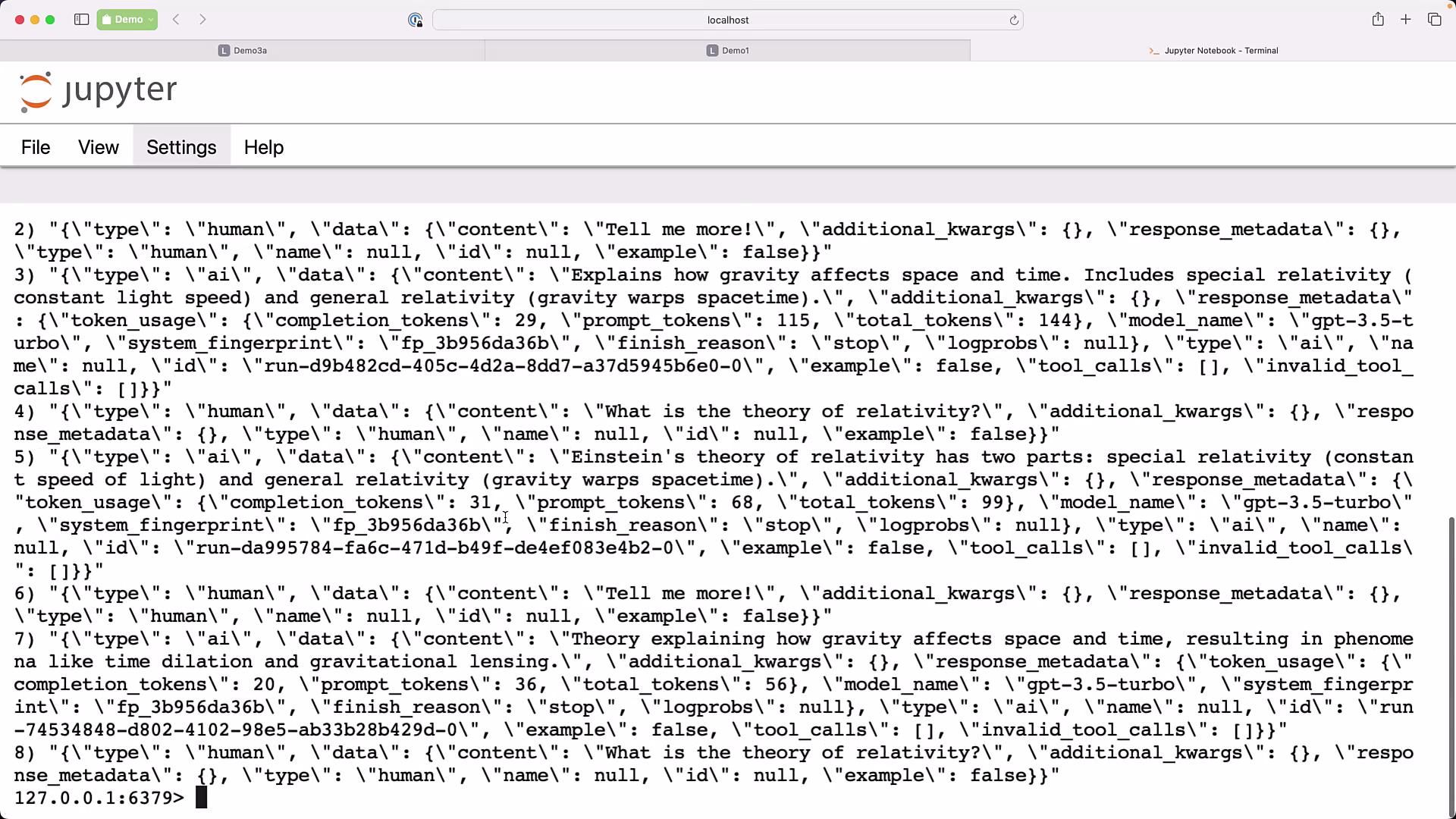 All conversation history is persisted outside your application. You can use [Redis](https://redis.io/), [SQLite](https://www.sqlite.org/), [MySQL](https://www.mysql.com/), or any other persistent datastore. The pattern remains the same: replace `RedisChatMessageHistory` with the appropriate history class for your chosen store, and provide a function that returns the message history for a given `session_id`.
Quick recap:
| Memory Type | Storage Location | When to use | Key points |
| ---------------------- | ----------------------------------------------- | ---------------------------------------------------------------- | -------------------------------------------------------------------------------------------------------------------------- |
| Short-term (volatile) | In-process list passed to the prompt | Single-run interactions or small context windows | Fast, ephemeral; example: `history` passed directly into `base_chain.invoke()` |
| Long-term (persistent) | External datastore (Redis, SQLite, MySQL, etc.) | Multi-session apps, conversational history, multi-tenant threads | Use `RunnableWithMessageHistory` + storage-backed history (`RedisChatMessageHistory`); identify sessions with `session_id` |
Be careful about storing sensitive or personally identifiable information (PII) in persistent conversation history. Persisted messages may be retained long-term and could be accessible by other systems or team members. Consider encryption, redaction, and retention policies.
Best practices and tips:
* Use descriptive and unique `session_id` values (for example: `user-1234-chat`, `tenantA-session-01`) so each conversation maps to the correct history.
* If you switch datastores, implement or use the corresponding `*ChatMessageHistory` class for your storage backend.
* Monitor token usage and costs in persisted responses (`response_metadata`) to manage budget and optimization.
* For large knowledge or documents, combine persistent chat history with retrieval-augmented generation (RAG) to provide the model with external knowledge at runtime.
Retrieval-augmented generation (RAG) and retrieval systems are important for combining external knowledge stores with LLMs, allowing your assistant to reference large documents or knowledge bases without inflating prompt size.
Links and references:
* [Redis](https://redis.io/)
* [Docker](https://www.docker.com/)
* [Redis CLI](https://redis.io/docs/management/cli/)
* [SQLite](https://www.sqlite.org/)
* [MySQL](https://www.mysql.com/)
* LangChain docs and examples (search for `RunnableWithMessageHistory`, `*ChatMessageHistory`)
All conversation history is persisted outside your application. You can use [Redis](https://redis.io/), [SQLite](https://www.sqlite.org/), [MySQL](https://www.mysql.com/), or any other persistent datastore. The pattern remains the same: replace `RedisChatMessageHistory` with the appropriate history class for your chosen store, and provide a function that returns the message history for a given `session_id`.
Quick recap:
| Memory Type | Storage Location | When to use | Key points |
| ---------------------- | ----------------------------------------------- | ---------------------------------------------------------------- | -------------------------------------------------------------------------------------------------------------------------- |
| Short-term (volatile) | In-process list passed to the prompt | Single-run interactions or small context windows | Fast, ephemeral; example: `history` passed directly into `base_chain.invoke()` |
| Long-term (persistent) | External datastore (Redis, SQLite, MySQL, etc.) | Multi-session apps, conversational history, multi-tenant threads | Use `RunnableWithMessageHistory` + storage-backed history (`RedisChatMessageHistory`); identify sessions with `session_id` |
Be careful about storing sensitive or personally identifiable information (PII) in persistent conversation history. Persisted messages may be retained long-term and could be accessible by other systems or team members. Consider encryption, redaction, and retention policies.
Best practices and tips:
* Use descriptive and unique `session_id` values (for example: `user-1234-chat`, `tenantA-session-01`) so each conversation maps to the correct history.
* If you switch datastores, implement or use the corresponding `*ChatMessageHistory` class for your storage backend.
* Monitor token usage and costs in persisted responses (`response_metadata`) to manage budget and optimization.
* For large knowledge or documents, combine persistent chat history with retrieval-augmented generation (RAG) to provide the model with external knowledge at runtime.
Retrieval-augmented generation (RAG) and retrieval systems are important for combining external knowledge stores with LLMs, allowing your assistant to reference large documents or knowledge bases without inflating prompt size.
Links and references:
* [Redis](https://redis.io/)
* [Docker](https://www.docker.com/)
* [Redis CLI](https://redis.io/docs/management/cli/)
* [SQLite](https://www.sqlite.org/)
* [MySQL](https://www.mysql.com/)
* LangChain docs and examples (search for `RunnableWithMessageHistory`, `*ChatMessageHistory`)