> ## Documentation Index
> Fetch the complete documentation index at: https://notes.kodekloud.com/llms.txt
> Use this file to discover all available pages before exploring further.
# Building Blocks of an LLM Application
> Overview of core components and interactions of LLM applications including UI, prompts, models, contextual retrieval, responses, and conversation history for building production-grade generative AI systems
Before building production-grade applications with [LangChain](https://learn.kodekloud.com/user/courses/langchain) and [OpenAI](https://learn.kodekloud.com/user/courses/introduction-to-openai), it's crucial to understand the foundational building blocks that power any large language model (LLM) application.
This lesson provides an overview of the components and interactions you’ll find in most successful generative AI systems. If you’ve used assistants like Microsoft Copilot, Google Gemini, or OpenAI’s ChatGPT, you’ll recognize the same core elements: a user-facing interface, prompt construction, an LLM, contextual inputs, and conversation history.
Let’s dive into the key building blocks and the flow between them.
So, when you look at the key building blocks of an LLM
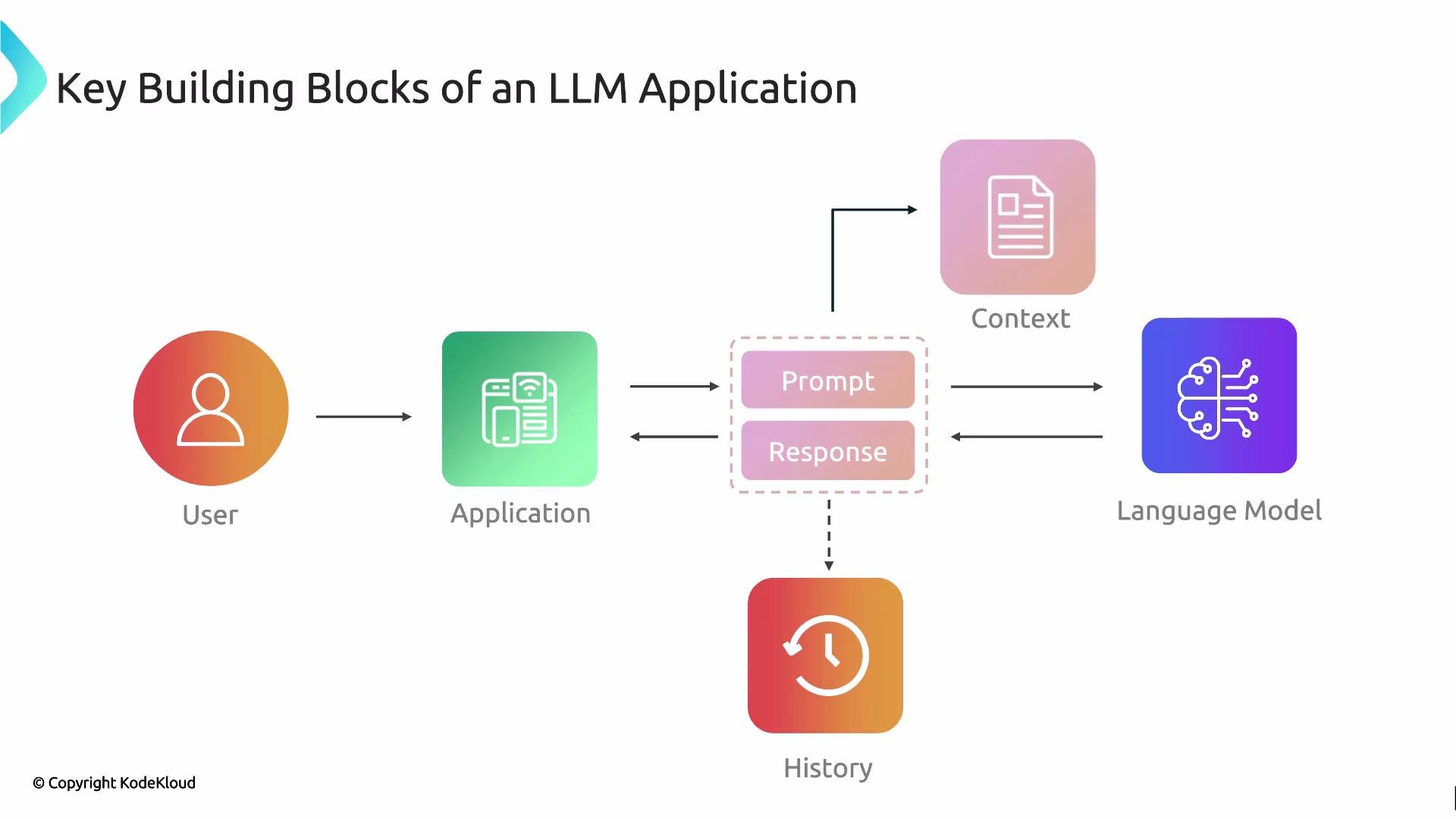 application, these are the core components you will typically encounter:
* User interface (UI): The front-end where users enter queries, upload files, or interact via forms and buttons.
* Prompt: The text or structured input composed by the application and/or the user and sent to the LLM.
* Language model (LLM): The model (e.g., GPT family) that consumes the prompt and generates a response.
* Context (external data): Documents, knowledge bases, or files used to ground the model’s output and reduce hallucinations.
* Response: The LLM’s generated text, or structured data, returned to the application.
* History (conversation state): Stored interactions and metadata that enable multi-turn conversations and continuity.
Typical request flow (high level):
1. User interacts with the UI.
2. The application constructs a prompt—optionally enriching it with context and conversation history.
3. The prompt is sent to the LLM.
4. The LLM returns a response.
5. The application persists relevant parts of the exchange to history (for retrieval, analytics, or future turns).
Design tip: Always plan how context and history will be retrieved and injected into prompts. Proper retrieval and prompt management are key to reducing hallucinations and maintaining conversational continuity.
Now let's map these building blocks to a familiar example: ChatGPT.
Consider how ChatGPT exposes the same components in its UI.
application, these are the core components you will typically encounter:
* User interface (UI): The front-end where users enter queries, upload files, or interact via forms and buttons.
* Prompt: The text or structured input composed by the application and/or the user and sent to the LLM.
* Language model (LLM): The model (e.g., GPT family) that consumes the prompt and generates a response.
* Context (external data): Documents, knowledge bases, or files used to ground the model’s output and reduce hallucinations.
* Response: The LLM’s generated text, or structured data, returned to the application.
* History (conversation state): Stored interactions and metadata that enable multi-turn conversations and continuity.
Typical request flow (high level):
1. User interacts with the UI.
2. The application constructs a prompt—optionally enriching it with context and conversation history.
3. The prompt is sent to the LLM.
4. The LLM returns a response.
5. The application persists relevant parts of the exchange to history (for retrieval, analytics, or future turns).
Design tip: Always plan how context and history will be retrieved and injected into prompts. Proper retrieval and prompt management are key to reducing hallucinations and maintaining conversational continuity.
Now let's map these building blocks to a familiar example: ChatGPT.
Consider how ChatGPT exposes the same components in its UI.
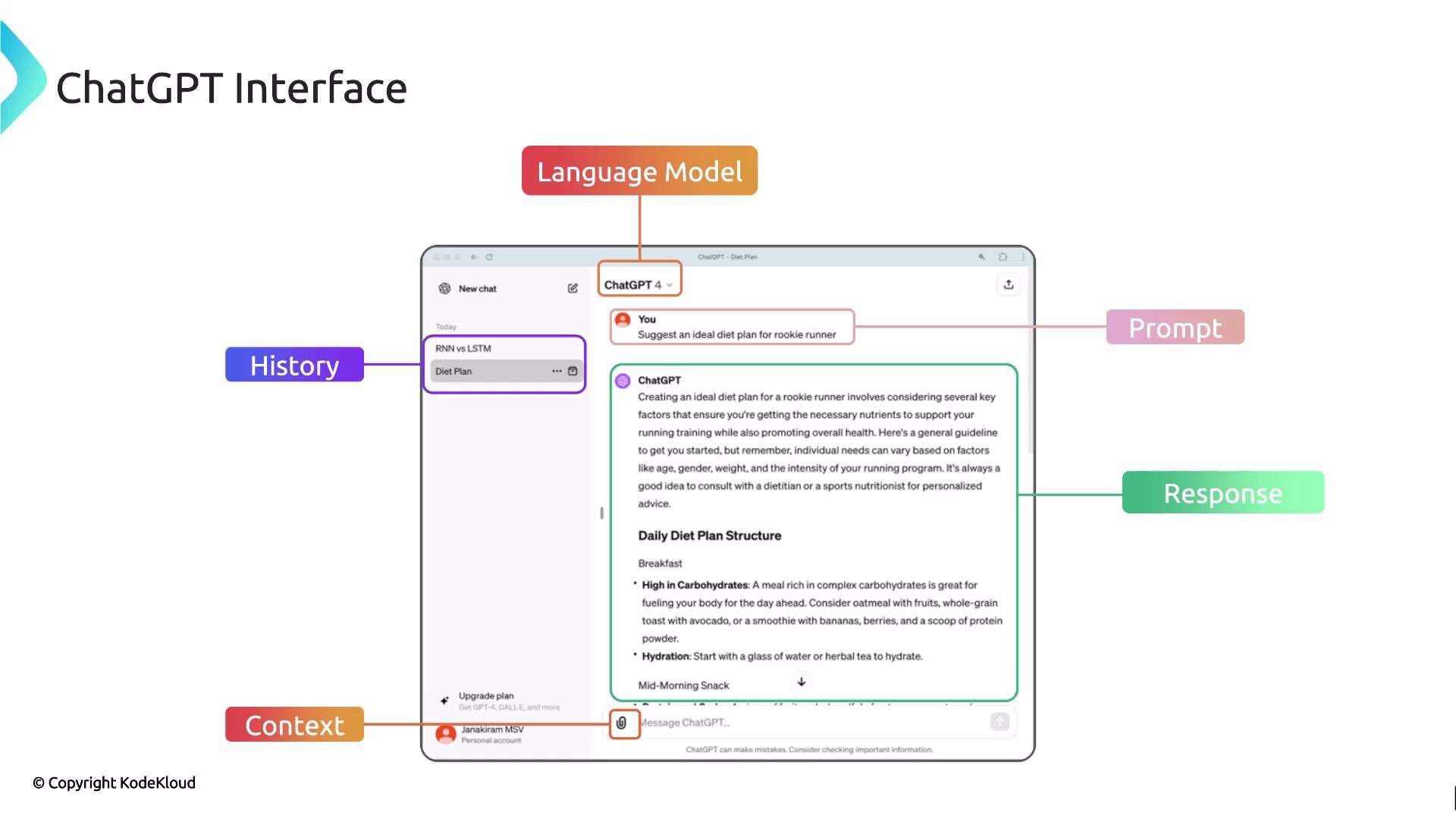 How the ChatGPT interface corresponds to building blocks:
* Language model: Selectable models (e.g., GPT-3.5, GPT-4) — this is the LLM producing responses.
* Prompt: The user-entered query (for example, “ideal diet plan for a rookie runner”).
* Context: Uploaded files (PDFs, docs) or connected data sources that provide domain facts and constraints.
* Response: The model-generated recommendations, instructions, or answers.
* History: Saved conversations you can re-open to continue a multi-turn dialog.
Table — Building blocks mapped to purpose and examples:
| Component | Purpose | Example |
| ----------------------- | ------------------------------------------------ | --------------------------------------------- |
| User Interface (UI) | Accept user input and present responses | Chat window, file upload button |
| Prompt | Instruct the LLM with a question or task | `"Create a 4-week beginner running plan"` |
| Language Model (LLM) | Generate text or structured output | `GPT-4`, `gpt-3.5-turbo` |
| Context (external data) | Ground responses with facts and documents | Uploaded `PDF` of medical notes, knowledge DB |
| Response | Output presented to the user | Plan text, JSON, or summary |
| History | Preserve conversation state for multi-turn flows | Conversation threads, turn metadata |
By combining prompt design, appropriate model selection, contextual retrieval, and persistent history, applications achieve both conversational continuity and higher factual relevance. Mastering how each component interacts is an essential step before you start building production-grade GenAI applications.
Next: we’ll examine each building block in depth and explore design patterns for integrating them in scalable, production systems.
Links and references
* [LangChain course (KodeKloud)](https://learn.kodekloud.com/user/courses/langchain)
* [Introduction to OpenAI (KodeKloud)](https://learn.kodekloud.com/user/courses/introduction-to-openai)
* [Kubernetes Basics](https://kubernetes.io/docs/concepts/overview/what-is-kubernetes/)
How the ChatGPT interface corresponds to building blocks:
* Language model: Selectable models (e.g., GPT-3.5, GPT-4) — this is the LLM producing responses.
* Prompt: The user-entered query (for example, “ideal diet plan for a rookie runner”).
* Context: Uploaded files (PDFs, docs) or connected data sources that provide domain facts and constraints.
* Response: The model-generated recommendations, instructions, or answers.
* History: Saved conversations you can re-open to continue a multi-turn dialog.
Table — Building blocks mapped to purpose and examples:
| Component | Purpose | Example |
| ----------------------- | ------------------------------------------------ | --------------------------------------------- |
| User Interface (UI) | Accept user input and present responses | Chat window, file upload button |
| Prompt | Instruct the LLM with a question or task | `"Create a 4-week beginner running plan"` |
| Language Model (LLM) | Generate text or structured output | `GPT-4`, `gpt-3.5-turbo` |
| Context (external data) | Ground responses with facts and documents | Uploaded `PDF` of medical notes, knowledge DB |
| Response | Output presented to the user | Plan text, JSON, or summary |
| History | Preserve conversation state for multi-turn flows | Conversation threads, turn metadata |
By combining prompt design, appropriate model selection, contextual retrieval, and persistent history, applications achieve both conversational continuity and higher factual relevance. Mastering how each component interacts is an essential step before you start building production-grade GenAI applications.
Next: we’ll examine each building block in depth and explore design patterns for integrating them in scalable, production systems.
Links and references
* [LangChain course (KodeKloud)](https://learn.kodekloud.com/user/courses/langchain)
* [Introduction to OpenAI (KodeKloud)](https://learn.kodekloud.com/user/courses/introduction-to-openai)
* [Kubernetes Basics](https://kubernetes.io/docs/concepts/overview/what-is-kubernetes/)