> ## Documentation Index
> Fetch the complete documentation index at: https://notes.kodekloud.com/llms.txt
> Use this file to discover all available pages before exploring further.
# Using Retrieval Chain
> Guide to building a retrieval augmented generation pipeline using embeddings, FAISS vector store, and an LLM constrained to retrieved document context for accurate question answering
In this lesson we'll build a simple retrieval-augmented generation (RAG) pipeline that constrains a language model to answer using only retrieved documents. We'll use two TechCrunch articles as the source documents:
* "Anthropic claims its new models beat GPT-4" (March)
* "AI21 Labs' new text-generating AI model is more efficient than most" (March)
Workflow overview: load the articles from the web, split them into smaller chunks, create embeddings for those chunks, index them in an in-memory `FAISS` vector store, and then run a retrieval chain that supplies retrieved context to an LLM with instructions to answer only from that context.
Key benefits of this pattern:
* Keeps LLM input within the model context window.
* Reduces hallucination by restricting answers to retrieved text.
* Makes long-document QA, summarization, and fact-checking more reliable.
Below is a consolidated, corrected, and cleaned-up implementation that follows the same sequence as the original lesson.
```python theme={null}
# Imports
from langchain_core.prompts import PromptTemplate
from langchain_openai import ChatOpenAI, OpenAIEmbeddings
from langchain_community.document_loaders import WebBaseLoader
from langchain.text_splitter import RecursiveCharacterTextSplitter
from langchain.chains.combine_documents import create_stuff_documents_chain
from langchain.chains import create_retrieval_chain
from langchain_community.vectorstores import FAISS
# URLs to load
URL1 = "https://techcrunch.com/2024/03/04/anthropic-claims-its-new-models-beat-gpt-4/"
URL2 = "https://techcrunch.com/2024/03/28/ai21-labs-new-text-generating-ai-model-is-more-efficient-than-most/"
# 1) Load documents from the web
loader = WebBaseLoader([URL1, URL2])
data = loader.load()
# 2) Split documents into chunks (tune chunk_size/overlap for your documents)
text_splitter = RecursiveCharacterTextSplitter(chunk_size=200, chunk_overlap=50)
chunks = text_splitter.split_documents(data)
# 3) Create embeddings for the chunks
embeddings = OpenAIEmbeddings(model="text-embedding-3-large")
# 4) Build an in-memory FAISS vector store and get a retriever
# Note: FAISS is in-memory by default (non-persistent).
vector = FAISS.from_documents(chunks, embeddings)
retriever = vector.as_retriever()
# 5) Define a prompt template that forces the LLM to answer only from context
prompt_template = """Answer the question {input} based solely on the context below:
{context}
If you can't find an answer, say "I don't know."
"""
prompt = PromptTemplate.from_template(prompt_template)
# 6) Initialize the LLM with low temperature to reduce creativity/hallucination
llm = ChatOpenAI(model="gpt-3.5-turbo", temperature=0.0)
# 7) Create the documents combiner chain and the retrieval chain
combine_docs_chain = create_stuff_documents_chain(llm, prompt)
chain = create_retrieval_chain(retriever, combine_docs_chain)
# 8) Invoke the chain with a question that restricts answers to Anthropic and Meta only
result = chain.invoke({
"input": "List the models and their token size of models only from Anthropic and Meta"
})
# 9) Print the returned answer
print(result["answer"])
```
`FAISS` (Facebook AI Similarity Search) is an in-memory vector index that provides fast nearest-neighbor search. It is non-persistent by default—use a disk-backed store (for example, [Chroma](https://www.trychroma.com/)) or persist FAISS manually for production workflows that need durability.
What the retrieval chain does
* The retriever issues a nearest-neighbor search over the vector store to find the most relevant chunks for a query.
* The combiner (here, a “stuff” chain) concatenates the retrieved chunks into the `context` variable passed to the `PromptTemplate`.
* The LLM then answers the user query constrained by that context and the template instruction.
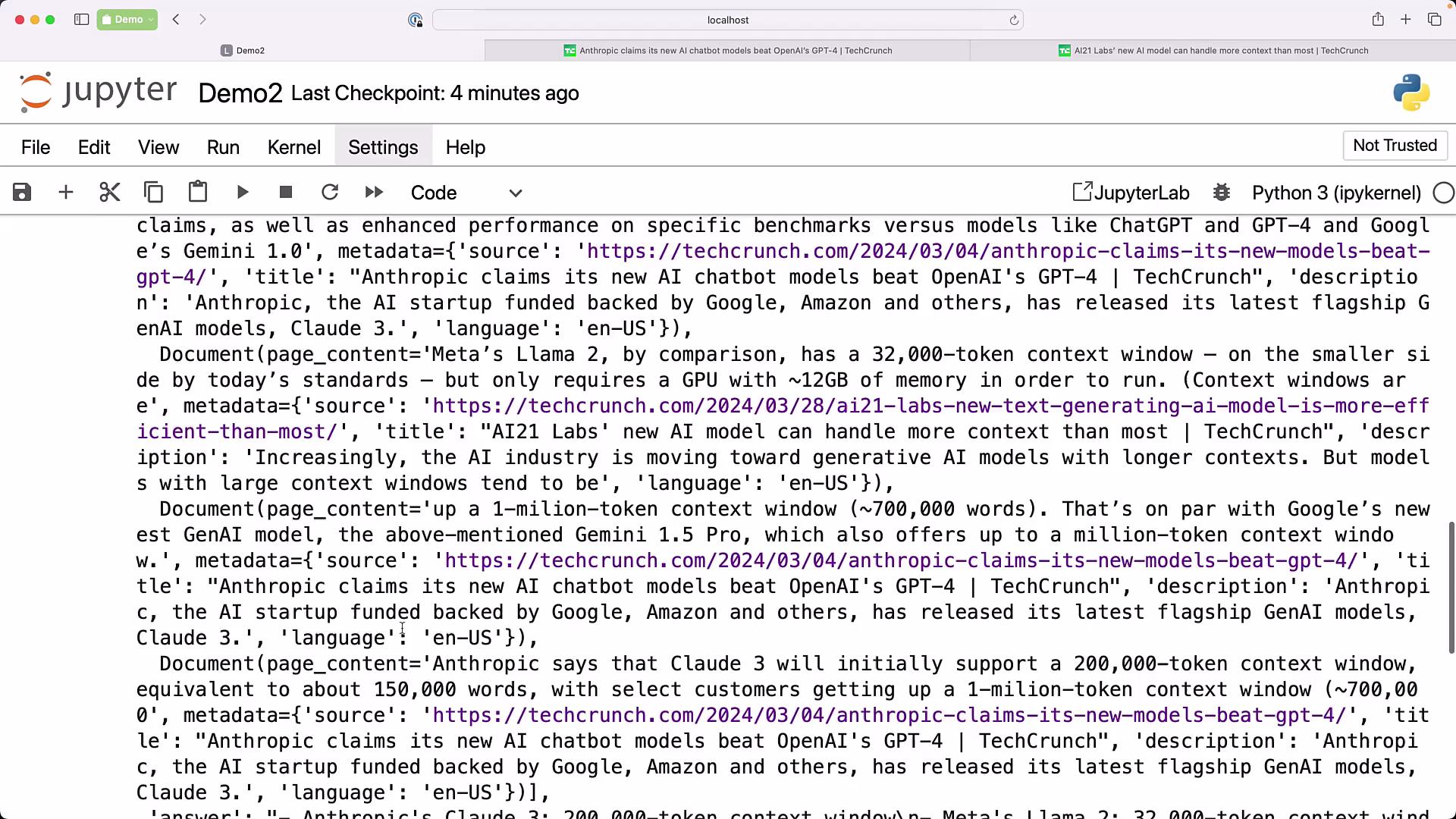
Example expected output (from the provided TechCrunch articles):
```text theme={null}
- Anthropic's Claude 3: 200,000-token context window
- Meta's Llama 2: 32,000-token context window
```
The chain returns the model's answer together with metadata (for example, which chunks were retrieved), which helps with debugging and traceability. This mirrors the standard RAG pattern: retrieve relevant context, then synthesize the response using the LLM.
 Best practices and tuning
* Chunk sizing:
* Default example: `chunk_size=200`, `chunk_overlap=50`.
* For long, dense documents, increase `chunk_size`. For short or highly topical documents, use smaller chunks.
* Temperature:
* Use `temperature=0.0` for deterministic answers constrained to retrieved context.
* Increase temperature only for creative tasks where you are not strictly relying on retrieved facts.
* Persistence and scaling:
* For experiments and prototypes, in-memory `FAISS` is convenient.
* For production or multi-run persistence, use a disk-backed or managed vector database.
* Prompt flexibility:
* Construct `prompt_template` programmatically when you need to inject dynamic instructions or system messages before creating the `PromptTemplate` and chain.
Tuning quick reference
| Component | Purpose | Suggested settings |
| ---------------- | ---------------------------- | ------------------------------------------------------------------------------ |
| Text splitter | Create searchable chunks | `chunk_size=200`, `chunk_overlap=50` (tune per-doc) |
| Embeddings model | Semantic vectorization | `text-embedding-3-large` (example) |
| Vector store | Nearest-neighbor search | `FAISS` (in-memory) or disk-backed `Chroma` for persistence |
| LLM | Answer synthesis | `ChatOpenAI(model="gpt-3.5-turbo", temperature=0.0)` for deterministic replies |
| Prompt | Constrain answers to context | Use a template with explicit instructions and `` injection |
Links and references
* [Retrieval-augmented generation (RAG) — Wikipedia](https://en.wikipedia.org/wiki/Retrieval-augmented_generation)
* [FAISS — GitHub](https://github.com/facebookresearch/faiss)
* [Chroma — Vector DB](https://www.trychroma.com/)
Notes
* The example focuses on a minimal, reproducible retrieval chain using LangChain-style primitives. Adapt components (loader, splitter, embeddings, vector store, combiner) to your infrastructure and scale requirements.
* Always test with your target documents and queries to find the best chunk size, overlap, and retriever configuration for accuracy and latency.
Best practices and tuning
* Chunk sizing:
* Default example: `chunk_size=200`, `chunk_overlap=50`.
* For long, dense documents, increase `chunk_size`. For short or highly topical documents, use smaller chunks.
* Temperature:
* Use `temperature=0.0` for deterministic answers constrained to retrieved context.
* Increase temperature only for creative tasks where you are not strictly relying on retrieved facts.
* Persistence and scaling:
* For experiments and prototypes, in-memory `FAISS` is convenient.
* For production or multi-run persistence, use a disk-backed or managed vector database.
* Prompt flexibility:
* Construct `prompt_template` programmatically when you need to inject dynamic instructions or system messages before creating the `PromptTemplate` and chain.
Tuning quick reference
| Component | Purpose | Suggested settings |
| ---------------- | ---------------------------- | ------------------------------------------------------------------------------ |
| Text splitter | Create searchable chunks | `chunk_size=200`, `chunk_overlap=50` (tune per-doc) |
| Embeddings model | Semantic vectorization | `text-embedding-3-large` (example) |
| Vector store | Nearest-neighbor search | `FAISS` (in-memory) or disk-backed `Chroma` for persistence |
| LLM | Answer synthesis | `ChatOpenAI(model="gpt-3.5-turbo", temperature=0.0)` for deterministic replies |
| Prompt | Constrain answers to context | Use a template with explicit instructions and `` injection |
Links and references
* [Retrieval-augmented generation (RAG) — Wikipedia](https://en.wikipedia.org/wiki/Retrieval-augmented_generation)
* [FAISS — GitHub](https://github.com/facebookresearch/faiss)
* [Chroma — Vector DB](https://www.trychroma.com/)
Notes
* The example focuses on a minimal, reproducible retrieval chain using LangChain-style primitives. Adapt components (loader, splitter, embeddings, vector store, combiner) to your infrastructure and scale requirements.
* Always test with your target documents and queries to find the best chunk size, overlap, and retriever configuration for accuracy and latency.