> ## Documentation Index
> Fetch the complete documentation index at: https://notes.kodekloud.com/llms.txt
> Use this file to discover all available pages before exploring further.
# RAG with PDFs
> Step-by-step guide to building a PDF-based RAG pipeline with LangChain, covering PDF loading, chunking, embeddings, Chroma indexing, retrieval, prompt composition, and LCEL chain for document-grounded QA.
This guide demonstrates an end-to-end Retrieval-Augmented Generation (RAG) pipeline using a single notebook. You will load a PDF, split it into chunks, embed those chunks, index them in a vector database, create a retriever, stitch retrieved passages into context, and run a LangChain Expression Language (LCEL) chain that answers user questions strictly from the document content.
This lesson connects document loaders, chunking strategy, embedding models, and vector stores to build a document-grounded Q\&A assistant.
## Key libraries and imports
Use the following imports in your notebook:
```python theme={null}
from langchain_community.document_loaders import PyPDFLoader
from langchain.text_splitter import RecursiveCharacterTextSplitter
from langchain_openai import OpenAIEmbeddings
from langchain_chroma import Chroma
from langchain_openai import ChatOpenAI
from langchain.prompts import PromptTemplate
from langchain_core.runnables import RunnablePassthrough
from langchain_core.output_parsers import StrOutputParser
```
## High-level workflow
1. Load the PDF and split it into pages.
2. Chunk pages into smaller passages to control context length.
3. Embed chunks with an embeddings model.
4. Index embeddings into a vector store (Chroma).
5. Create a retriever from the vector store to fetch relevant passages at query time.
6. Format retrieved passages into a single context string.
7. Compose an LCEL chain: retriever -> formatter -> prompt -> LLM -> output parser.
8. Ask questions; the chain returns answers grounded in the document.
## Step-by-step implementation
### 1) Load the PDF and split into page documents
```python theme={null}
loader = PyPDFLoader("data/handbook.pdf")
pages = loader.load_and_split()
```
This produces a list of page-level Document objects that preserve page content and metadata.
### 2) Create chunks from the pages
```python theme={null}
text_splitter = RecursiveCharacterTextSplitter(chunk_size=200, chunk_overlap=50)
chunks = text_splitter.split_documents(pages)
```
Use chunking to ensure passages are short enough for the embeddings model and downstream LLM context. Adjust `chunk_size` and `chunk_overlap` based on your LLM's context window and the granularity you need.
### 3) Initialize embeddings and index chunks into Chroma
```python theme={null}
embeddings = OpenAIEmbeddings(model="text-embedding-3-large")
vectorstore = Chroma.from_documents(documents=chunks, embedding=embeddings)
```
Chroma stores vector representations for each chunk so you can retrieve the most relevant passages at query time.
### 4) Create a retriever from the vector store
```python theme={null}
retriever = vectorstore.as_retriever()
```
The retriever provides a simple API to fetch top-k relevant documents for a user query.
### 5) Helper to format retrieved docs into a single context string
```python theme={null}
def format_docs(docs):
return "\n\n".join(doc.page_content for doc in docs)
```
This helper concatenates retrieved passages into a single context block that will be passed to the prompt. You can extend this to include source citations or metadata.
### 6) Set up the LLM and prompt template
```python theme={null}
llm = ChatOpenAI()
template = """SYSTEM: You are a question answer bot.
Be factual in your response.
Respond to the following question: {question} only from the below context: {context}.
If you don't know the answer, just say that you don't know.
"""
prompt = PromptTemplate.from_template(template)
```
This prompt explicitly instructs the model to answer only from the provided `context`, reducing hallucinations.
Tip: You can expand the prompt to include explicit formatting requirements, a maximum answer length, or citation formatting (e.g., "Answer with the source page number in brackets after each sentence").
### 7) Build the LCEL chain that connects retriever -> formatter -> prompt -> LLM -> output parser
The LCEL pipeline retrieves relevant chunks at runtime, formats them, fills the prompt template, calls the LLM, and parses the output into a string.
```python theme={null}
chain = (
{"context": retriever | format_docs, "question": RunnablePassthrough()}
| prompt
| llm
| StrOutputParser()
)
```
This runnable pipeline takes a question as input, runs retrieval, and returns a parsed string answer.
Warning: Retrieval quality depends on chunking strategy, embedding model, and vector store configuration. Also monitor API usage and costs when calling embedding and LLM endpoints.
### 8) Invoke the chain with user questions
Example 1 — ask about sick leaves:
```python theme={null}
response = chain.invoke("How many sick leaves are allowed in a year?")
# Expected output: 'You are eligible for 10 days of paid sick leave per year.'
```
Example 2 — ask about unpaid personal leave:
```python theme={null}
response = chain.invoke("How many unpaid leaves are allowed in a year?")
# response -> (answer extracted from the document, e.g., 'You are eligible for up to 10 days of unpaid personal leave per year.')
```
Example 3 — ask for the sick leave policy:
```python theme={null}
response = chain.invoke("What's the sick leave policy?")
# response -> 'You are eligible for 10 days of paid sick leave per year, which can be used for any illness or injury that prevents you from working.'
```
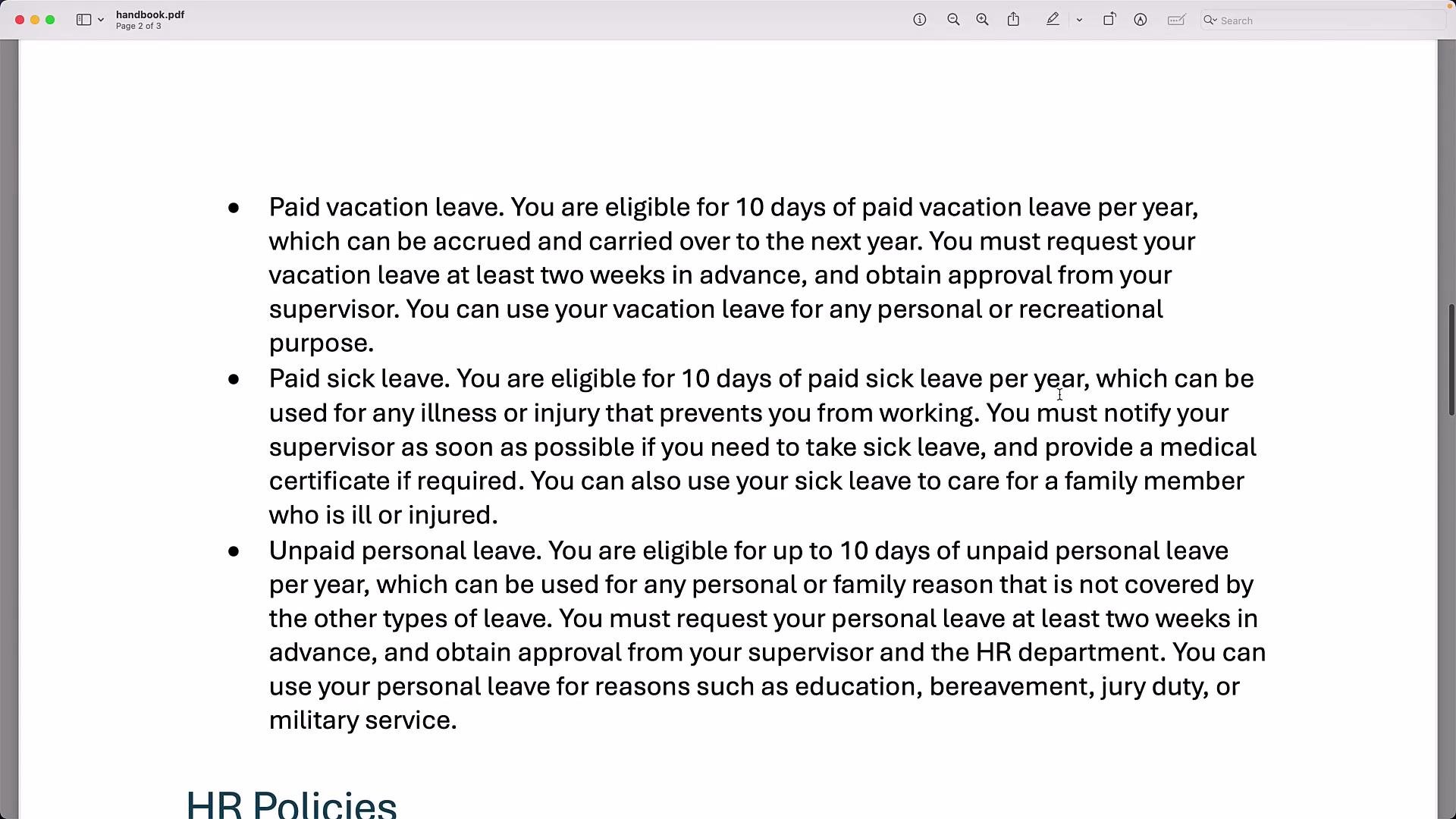 When run against the employee handbook, the chain retrieves relevant passages and returns factual answers extracted from the document text:
```python theme={null}
# Example run
response = chain.invoke("How many sick leaves are allowed in a year?")
# response -> 'You are eligible for 10 days of paid sick leave per year.'
```
## Quick reference: Steps & commands
| Step | Purpose | Example command/snippet |
| ---------- | ------------------------------------ | ------------------------------------------------------------------ |
| Load PDF | Create page-level documents | `PyPDFLoader("data/handbook.pdf").load_and_split()` |
| Chunking | Split pages into manageable passages | `RecursiveCharacterTextSplitter(chunk_size=200, chunk_overlap=50)` |
| Embeddings | Vectorize chunks | `OpenAIEmbeddings(model="text-embedding-3-large")` |
| Indexing | Store vectors for retrieval | `Chroma.from_documents(documents=chunks, embedding=embeddings)` |
| Retriever | Fetch relevant passages | `vectorstore.as_retriever()` |
| Formatting | Build context string for prompt | `format_docs(docs)` |
| LCEL chain | Connect retriever -> prompt -> LLM | `chain = ({...} \| prompt \| llm \| StrOutputParser())` |
## Summary
* Load PDFs with a document loader (PyPDFLoader) and split them into pages.
* Chunk pages with a TextSplitter (RecursiveCharacterTextSplitter) for reliable retrieval.
* Embed chunks using OpenAIEmbeddings and index them in Chroma.
* Use the vector store’s retriever to fetch relevant passages at query time.
* Format retrieved passages into a context string and pass it to the LLM via an LCEL chain so the LLM answers strictly from the document.
* This RAG pattern reduces hallucinations and enables document-grounded chatbots. Extend it by adding a UI, supporting arbitrary PDF uploads, or integrating advanced retrieval (reranking, hybrid search) and QA techniques.
## Links and References
* [LangChain — Learn LangChain](https://learn.kodekloud.com/user/courses/langchain)
* Chroma documentation: [https://www.trychroma.com/](https://www.trychroma.com/)
* OpenAI embeddings & models: [https://platform.openai.com/docs/models](https://platform.openai.com/docs/models)
When run against the employee handbook, the chain retrieves relevant passages and returns factual answers extracted from the document text:
```python theme={null}
# Example run
response = chain.invoke("How many sick leaves are allowed in a year?")
# response -> 'You are eligible for 10 days of paid sick leave per year.'
```
## Quick reference: Steps & commands
| Step | Purpose | Example command/snippet |
| ---------- | ------------------------------------ | ------------------------------------------------------------------ |
| Load PDF | Create page-level documents | `PyPDFLoader("data/handbook.pdf").load_and_split()` |
| Chunking | Split pages into manageable passages | `RecursiveCharacterTextSplitter(chunk_size=200, chunk_overlap=50)` |
| Embeddings | Vectorize chunks | `OpenAIEmbeddings(model="text-embedding-3-large")` |
| Indexing | Store vectors for retrieval | `Chroma.from_documents(documents=chunks, embedding=embeddings)` |
| Retriever | Fetch relevant passages | `vectorstore.as_retriever()` |
| Formatting | Build context string for prompt | `format_docs(docs)` |
| LCEL chain | Connect retriever -> prompt -> LLM | `chain = ({...} \| prompt \| llm \| StrOutputParser())` |
## Summary
* Load PDFs with a document loader (PyPDFLoader) and split them into pages.
* Chunk pages with a TextSplitter (RecursiveCharacterTextSplitter) for reliable retrieval.
* Embed chunks using OpenAIEmbeddings and index them in Chroma.
* Use the vector store’s retriever to fetch relevant passages at query time.
* Format retrieved passages into a context string and pass it to the LLM via an LCEL chain so the LLM answers strictly from the document.
* This RAG pattern reduces hallucinations and enables document-grounded chatbots. Extend it by adding a UI, supporting arbitrary PDF uploads, or integrating advanced retrieval (reranking, hybrid search) and QA techniques.
## Links and References
* [LangChain — Learn LangChain](https://learn.kodekloud.com/user/courses/langchain)
* Chroma documentation: [https://www.trychroma.com/](https://www.trychroma.com/)
* OpenAI embeddings & models: [https://platform.openai.com/docs/models](https://platform.openai.com/docs/models)