> ## Documentation Index
> Fetch the complete documentation index at: https://notes.kodekloud.com/llms.txt
> Use this file to discover all available pages before exploring further.
# Practical Application Building a Chatbot With Summarizing Messages
> Building a stateful chatbot that summarizes older conversation turns to manage context, reduce tokens, and preserve important facts using hybrid short-term messages and compressed summary
In this lesson we apply message-summarization techniques to build a stateful chatbot that handles long conversations without exhausting the model's context window. Instead of sending the entire message history on every turn, the chatbot periodically compresses older turns into a concise summary and continues the conversation using only the essential context.
This pattern keeps the model focused, reduces token and latency costs, and preserves important facts and decisions across long-running sessions.
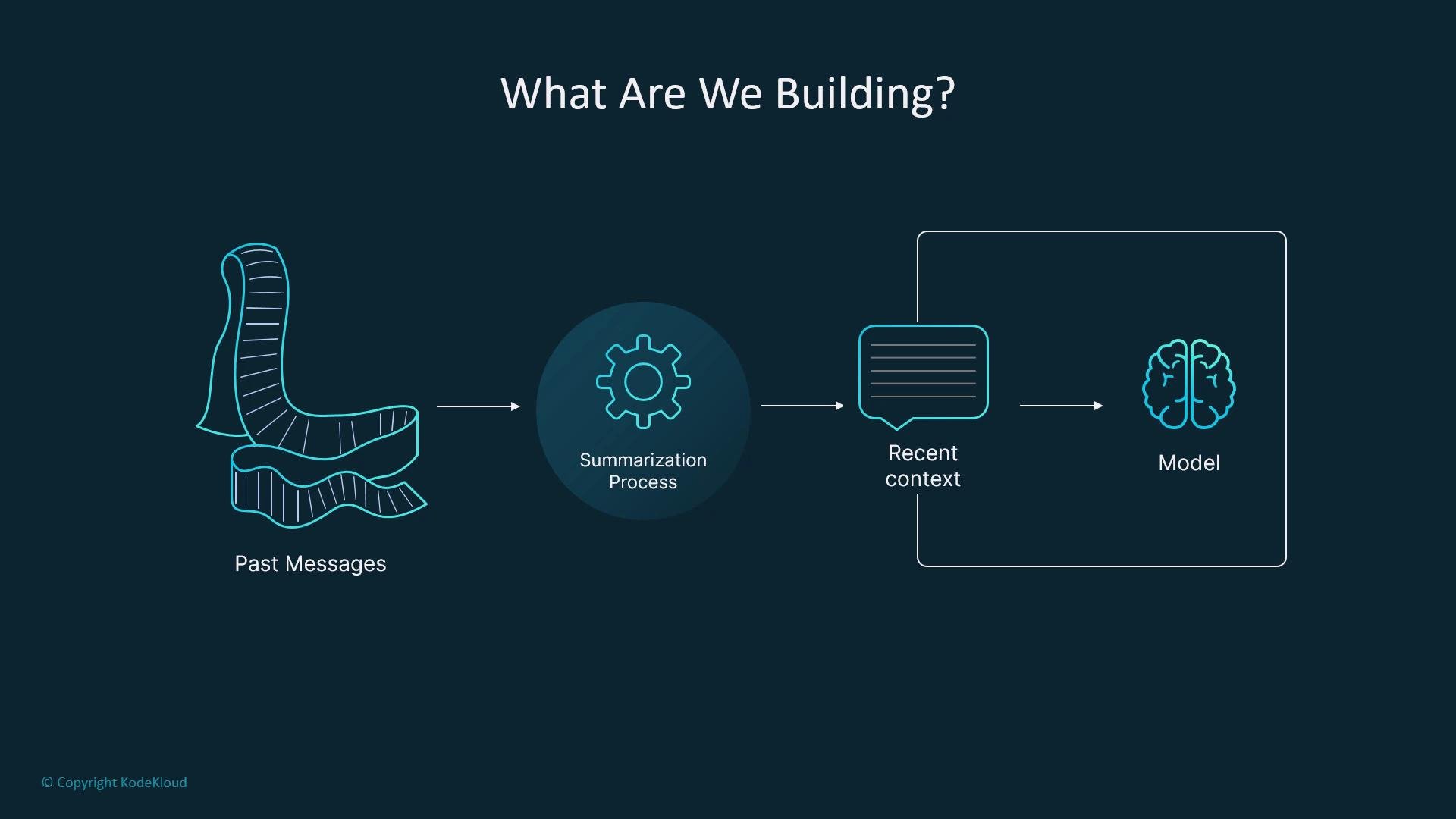 Use case example: customer-support agents often summarize a ticket's history rather than repeating every past exchange. Our chatbot follows the same approach—summarize older turns and retain the immediacy of recent messages.
 ## Architecture overview
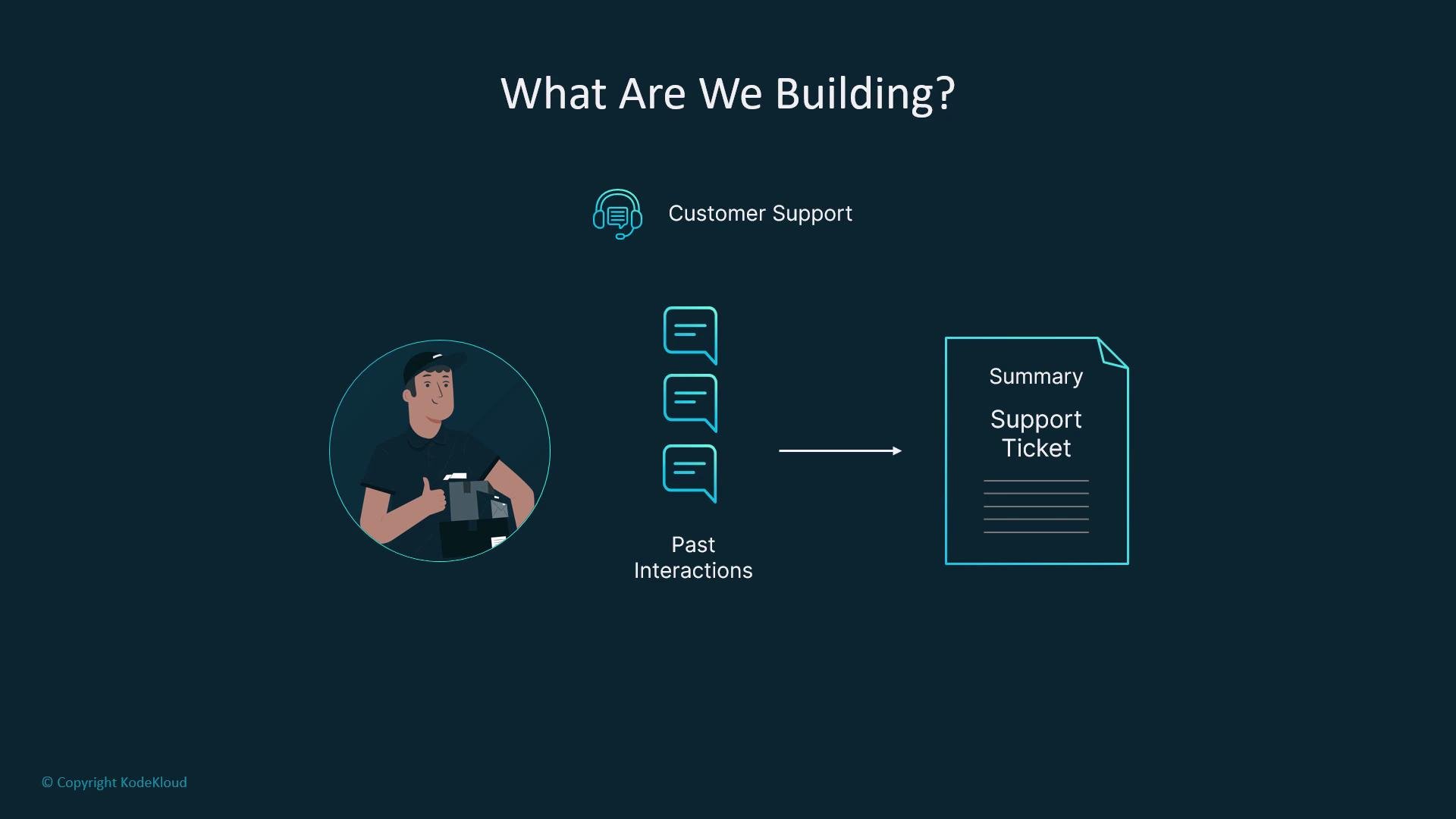
High-level flow:
* User input → short-term messages (working memory) → LLM node produces a reply.
* A summarization node compresses older messages after a threshold and stores that compressed text in the graph state.
* For generation, the LLM prompt is built from the stored summary plus recent messages (not the entire history).
This hybrid memory strategy combines long-term compressed context with a short-term working window.
## State design
In LangGraph the graph state is the single shared memory object passed between nodes. The state defines what every node reads, writes, and routes on, so its shape is a primary architectural decision.
A compact ChatState schema (using TypedDict) looks like:
```python theme={null}
from typing import TypedDict, List
from langchain_core.messages import BaseMessage, SystemMessage, HumanMessage, AIMessage
class ChatState(TypedDict):
messages: List[BaseMessage] # Recent message history (short-term working memory)
summary: str # Compressed summary of older history (long-term memory)
turn_count: int # Integer counter to trigger summarization or other actions
```
Table: ChatState fields and purpose
| Field | Purpose | Example |
| ------------ | ------------------------------------------------------------------------------ | --------------------------------------------------------------------------- |
| `messages` | Short-term working memory containing the most recent `BaseMessage` objects | `["HumanMessage(...)", "AIMessage(...)"]` |
| `summary` | Compressed long-term context; contains facts, decisions, and important details | `"Customer prefers email; issue: login failure; tried resetting password."` |
| `turn_count` | Control counter to trigger summarization, retries, or routing | `0` |
This schema gives a balanced memory architecture: short-term context for immediacy, compressed long-term memory for historical facts, and control logic (the counter) to determine when to compress.
## Summarization node
The summarization node compresses the `messages` into a concise `summary` and updates the state. Typical responsibilities:
* Build a summarization prompt that preserves facts, decisions, deadlines, and requested actions.
* Invoke a model to produce a summary.
* Merge the new summary with the existing summary (optionally), trim `messages`, and reset or adjust counters.
Example summarization node (concise):
```python theme={null}
from langchain_core.messages import SystemMessage
from typing import List
# Example model interface; replace with your model client
class Model:
def invoke(self, messages: List[SystemMessage]):
# returns an object with `.content`
...
model = Model()
def summarize_node(state: ChatState, keep_last_k: int = 0) -> ChatState:
"""
Compress current state['messages'] into a summary, optionally keep last_k recent messages.
"""
if not state.get("messages"):
return state # nothing to summarize
prompt = [
SystemMessage(content="You are a summarizer. Summarize the following conversation concisely, preserving facts and decisions:"),
*state["messages"]
]
result = model.invoke(prompt)
# Merge new summary with any existing summary to preserve history
combined_summary = (state.get("summary") or "") + "\n\n" + result.content if state.get("summary") else result.content
# Optionally retain the last K messages to preserve immediate continuity
kept_messages = state["messages"][-keep_last_k:] if keep_last_k > 0 else []
return {
"summary": combined_summary,
"messages": kept_messages,
"turn_count": 0 # reset the turn counter after compression
}
```
Key points:
* The system instruction defines the summarization objective (preserve facts/decisions).
* Save the model’s output to `state["summary"]`.
* Trim `state["messages"]` (or keep the last N messages) to avoid unbounded token growth.
* Reset or adjust `turn_count` after compression.
This transforms memory by extracting meaning, not merely trimming tokens.
## Injecting compressed memory back into prompts
When generating replies, include the `summary` as part of the system-level context and then append the recent `messages`. This hybrid prompt keeps long-term facts available while maintaining immediacy.
```python theme={null}
from langchain_core.messages import SystemMessage
def build_prompt(state: ChatState):
system_msg = SystemMessage(
content=f"Conversation summary so far:\n{state.get('summary','')}"
)
return [system_msg] + state.get("messages", [])
```
Extend this to add role instructions, user metadata, domain constraints, or tone controls as needed.
## Counters: a control lever for routing and summarization
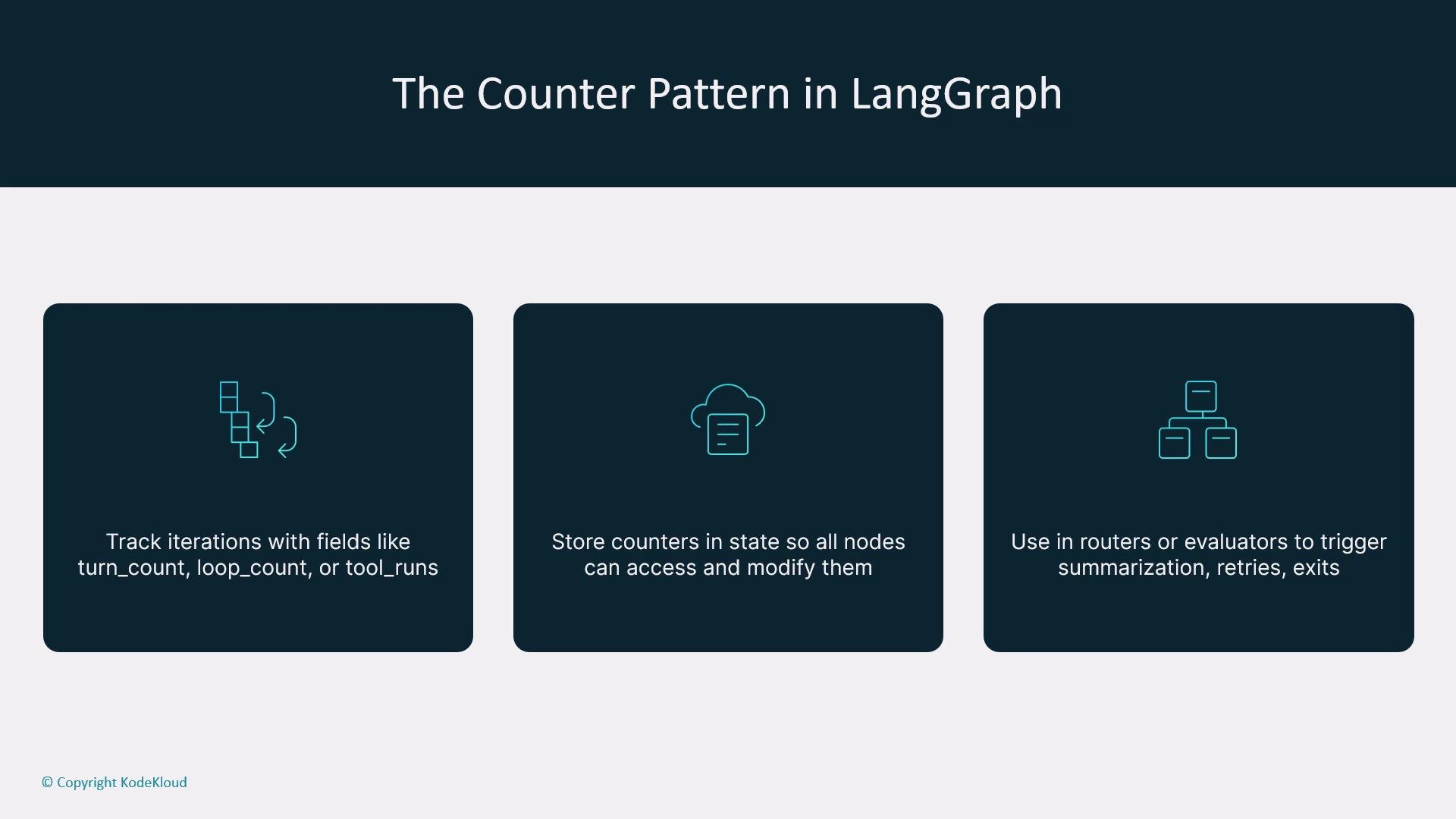
A simple integer in state can drive a lot of behavior. Use `turn_count` to:
* Trigger summarization after N turns.
* Limit retries or loop iterations.
* Influence router/evaluator branching.
Example helper functions:
```json theme={null}
{"turn_count": 0}
```
```python theme={null}
def increment_turn(state: dict) -> dict:
state["turn_count"] = state.get("turn_count", 0) + 1
return state
def should_summarize(state: dict, threshold: int = 4) -> bool:
return state.get("turn_count", 0) >= threshold
```
Best practices:
* Initialize the counter when a conversation starts.
* Increment after each user+assistant exchange.
* Use `should_summarize` in routing logic to decide when to call the summarization node.
* Reset or archive the counter as part of the summary operation.
## Architecture overview
High-level flow:
* User input → short-term messages (working memory) → LLM node produces a reply.
* A summarization node compresses older messages after a threshold and stores that compressed text in the graph state.
* For generation, the LLM prompt is built from the stored summary plus recent messages (not the entire history).
This hybrid memory strategy combines long-term compressed context with a short-term working window.
## State design
In LangGraph the graph state is the single shared memory object passed between nodes. The state defines what every node reads, writes, and routes on, so its shape is a primary architectural decision.
A compact ChatState schema (using TypedDict) looks like:
```python theme={null}
from typing import TypedDict, List
from langchain_core.messages import BaseMessage, SystemMessage, HumanMessage, AIMessage
class ChatState(TypedDict):
messages: List[BaseMessage] # Recent message history (short-term working memory)
summary: str # Compressed summary of older history (long-term memory)
turn_count: int # Integer counter to trigger summarization or other actions
```
Table: ChatState fields and purpose
| Field | Purpose | Example |
| ------------ | ------------------------------------------------------------------------------ | --------------------------------------------------------------------------- |
| `messages` | Short-term working memory containing the most recent `BaseMessage` objects | `["HumanMessage(...)", "AIMessage(...)"]` |
| `summary` | Compressed long-term context; contains facts, decisions, and important details | `"Customer prefers email; issue: login failure; tried resetting password."` |
| `turn_count` | Control counter to trigger summarization, retries, or routing | `0` |
This schema gives a balanced memory architecture: short-term context for immediacy, compressed long-term memory for historical facts, and control logic (the counter) to determine when to compress.
## Summarization node
The summarization node compresses the `messages` into a concise `summary` and updates the state. Typical responsibilities:
* Build a summarization prompt that preserves facts, decisions, deadlines, and requested actions.
* Invoke a model to produce a summary.
* Merge the new summary with the existing summary (optionally), trim `messages`, and reset or adjust counters.
Example summarization node (concise):
```python theme={null}
from langchain_core.messages import SystemMessage
from typing import List
# Example model interface; replace with your model client
class Model:
def invoke(self, messages: List[SystemMessage]):
# returns an object with `.content`
...
model = Model()
def summarize_node(state: ChatState, keep_last_k: int = 0) -> ChatState:
"""
Compress current state['messages'] into a summary, optionally keep last_k recent messages.
"""
if not state.get("messages"):
return state # nothing to summarize
prompt = [
SystemMessage(content="You are a summarizer. Summarize the following conversation concisely, preserving facts and decisions:"),
*state["messages"]
]
result = model.invoke(prompt)
# Merge new summary with any existing summary to preserve history
combined_summary = (state.get("summary") or "") + "\n\n" + result.content if state.get("summary") else result.content
# Optionally retain the last K messages to preserve immediate continuity
kept_messages = state["messages"][-keep_last_k:] if keep_last_k > 0 else []
return {
"summary": combined_summary,
"messages": kept_messages,
"turn_count": 0 # reset the turn counter after compression
}
```
Key points:
* The system instruction defines the summarization objective (preserve facts/decisions).
* Save the model’s output to `state["summary"]`.
* Trim `state["messages"]` (or keep the last N messages) to avoid unbounded token growth.
* Reset or adjust `turn_count` after compression.
This transforms memory by extracting meaning, not merely trimming tokens.
## Injecting compressed memory back into prompts
When generating replies, include the `summary` as part of the system-level context and then append the recent `messages`. This hybrid prompt keeps long-term facts available while maintaining immediacy.
```python theme={null}
from langchain_core.messages import SystemMessage
def build_prompt(state: ChatState):
system_msg = SystemMessage(
content=f"Conversation summary so far:\n{state.get('summary','')}"
)
return [system_msg] + state.get("messages", [])
```
Extend this to add role instructions, user metadata, domain constraints, or tone controls as needed.
## Counters: a control lever for routing and summarization
A simple integer in state can drive a lot of behavior. Use `turn_count` to:
* Trigger summarization after N turns.
* Limit retries or loop iterations.
* Influence router/evaluator branching.
Example helper functions:
```json theme={null}
{"turn_count": 0}
```
```python theme={null}
def increment_turn(state: dict) -> dict:
state["turn_count"] = state.get("turn_count", 0) + 1
return state
def should_summarize(state: dict, threshold: int = 4) -> bool:
return state.get("turn_count", 0) >= threshold
```
Best practices:
* Initialize the counter when a conversation starts.
* Increment after each user+assistant exchange.
* Use `should_summarize` in routing logic to decide when to call the summarization node.
* Reset or archive the counter as part of the summary operation.
 ## When to summarize
Summarization has a cost. Choose triggers that balance currency and efficiency.
Two common strategies:
* Time-based: after a fixed number of turns (e.g., 4–6).
* Event-based: when a significant event occurs (topic shift, long message, new decision, etc.).
Comparison table
| Strategy | Trigger example | Pros | Cons |
| ----------- | ------------------------------------- | ------------------------- | ----------------------------- |
| Time-based | Every N turns (`turn_count >= 4`) | Simple, predictable | Might summarize mid-topic |
| Event-based | Topic change or long message detected | Preserves topic coherence | Requires detection heuristics |
Typical pattern:
1. Increment `turn_count` after each exchange.
2. If `should_summarize` is true, route to the summarization node.
3. Persist the updated summary, reset the counter, and continue.
This hybrid approach (summary + recent messages) keeps continuity while remaining within token limits.
## Conversation flow
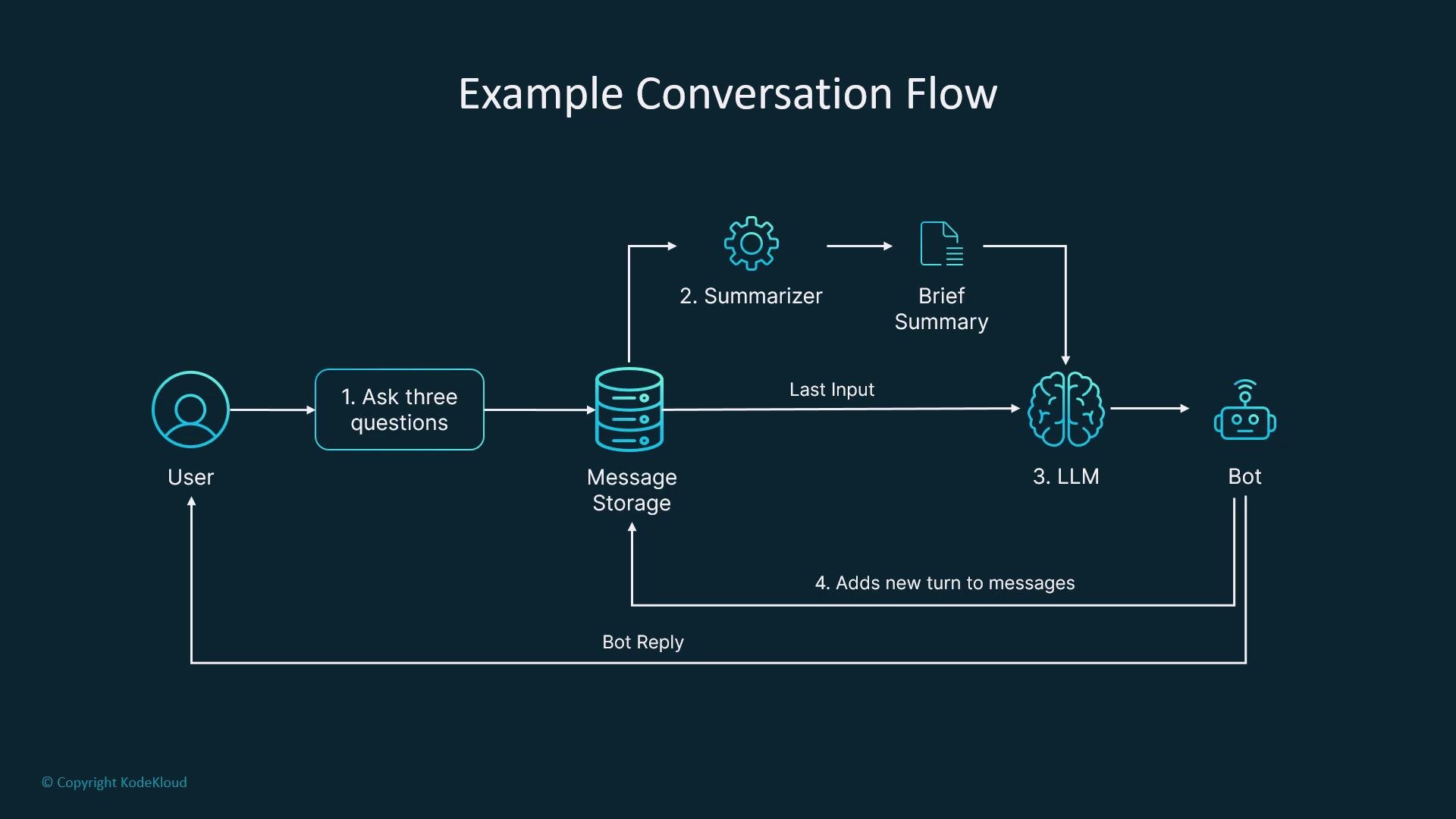
After several exchanges, trigger summarization. Older messages are compressed into `summary`; recent messages are kept in `messages`. The next LLM prompt uses this cleaned-up state, so the model sees a compact, focused context instead of the entire conversation history.
## When to summarize
Summarization has a cost. Choose triggers that balance currency and efficiency.
Two common strategies:
* Time-based: after a fixed number of turns (e.g., 4–6).
* Event-based: when a significant event occurs (topic shift, long message, new decision, etc.).
Comparison table
| Strategy | Trigger example | Pros | Cons |
| ----------- | ------------------------------------- | ------------------------- | ----------------------------- |
| Time-based | Every N turns (`turn_count >= 4`) | Simple, predictable | Might summarize mid-topic |
| Event-based | Topic change or long message detected | Preserves topic coherence | Requires detection heuristics |
Typical pattern:
1. Increment `turn_count` after each exchange.
2. If `should_summarize` is true, route to the summarization node.
3. Persist the updated summary, reset the counter, and continue.
This hybrid approach (summary + recent messages) keeps continuity while remaining within token limits.
## Conversation flow
After several exchanges, trigger summarization. Older messages are compressed into `summary`; recent messages are kept in `messages`. The next LLM prompt uses this cleaned-up state, so the model sees a compact, focused context instead of the entire conversation history.
 ## Production considerations and extensions
* Keep the last 1–3 messages verbatim for conversational continuity when appropriate.
* Persist summaries in an external store (document DB, vector DB) for retrieval and audit trails.
* Generate structured summaries (bullet points, actions, deadlines, named entities) to make downstream reasoning easier.
* Combine time-based and event-based triggers for robust behavior.
* Tune the summarization prompt to preserve facts, decisions, and action items.
* Use observability tools (LangGraph Studio / [LangSmith](https://learn.kodekloud.com/user/courses/langsmith)) to inspect state evolution and verify critical facts are retained.
Always test by printing or inspecting the state after each node to ensure summaries preserve key facts and that retained recent messages provide the necessary context for correct responses.
## Why this pattern matters
Treat summarization as a first-class architectural component. By modeling memory explicitly in the graph state and using counter-driven routing, you can move from a simple prompt-based bot to a structured, long-running conversational system that scales gracefully and maintains high-quality responses.
## Production considerations and extensions
* Keep the last 1–3 messages verbatim for conversational continuity when appropriate.
* Persist summaries in an external store (document DB, vector DB) for retrieval and audit trails.
* Generate structured summaries (bullet points, actions, deadlines, named entities) to make downstream reasoning easier.
* Combine time-based and event-based triggers for robust behavior.
* Tune the summarization prompt to preserve facts, decisions, and action items.
* Use observability tools (LangGraph Studio / [LangSmith](https://learn.kodekloud.com/user/courses/langsmith)) to inspect state evolution and verify critical facts are retained.
Always test by printing or inspecting the state after each node to ensure summaries preserve key facts and that retained recent messages provide the necessary context for correct responses.
## Why this pattern matters
Treat summarization as a first-class architectural component. By modeling memory explicitly in the graph state and using counter-driven routing, you can move from a simple prompt-based bot to a structured, long-running conversational system that scales gracefully and maintains high-quality responses.