> ## Documentation Index
> Fetch the complete documentation index at: https://notes.kodekloud.com/llms.txt
> Use this file to discover all available pages before exploring further.
# StateGraph Fundamentals
> Explains StateGraph, a graph-based pattern for building modular workflows where nodes read and update a shared state to compose LLM-driven and human-in-the-loop processes.
This lesson explains the core concepts of StateGraph — the graph-based pattern at the heart of LangGraph that structures complex agent workflows as modular steps (nodes) that read and update a shared state.
What is a state graph?
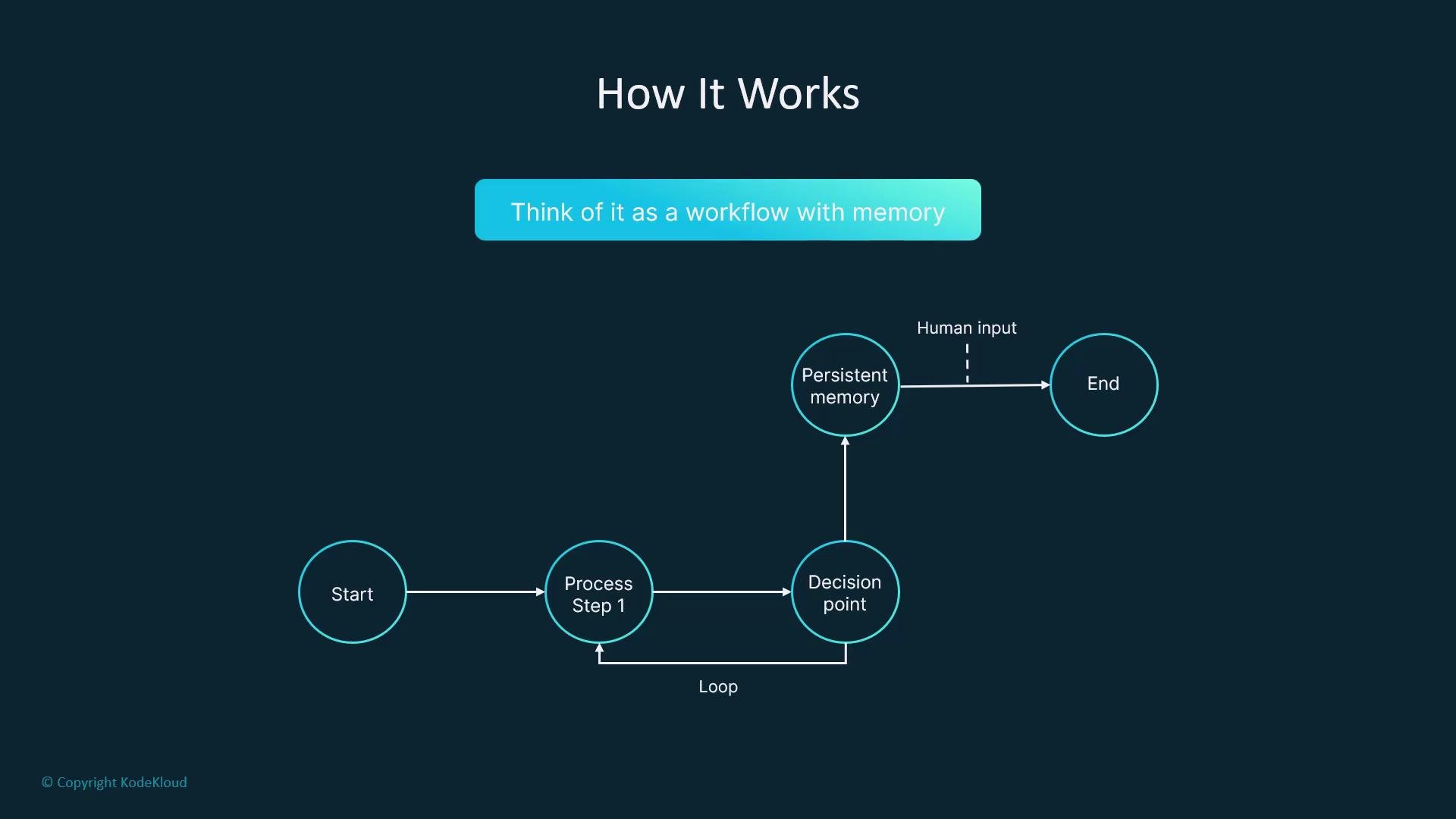
A state graph models workflows as connected nodes that pass along and mutate a central state object. Think of Ravi the messenger: his map is smart and updates itself as he travels. Every stop is a node, the roads are edges, and the bag he carries is the state.
At each stop Ravi:
* checks his bag (reads state),
* the map chooses the next road (transition),
* he performs the task (node logic),
* updates his bag (state mutation),
* and repeats until a finish point is reached.
This persistent, self-updating workflow with memory — including loops, branches, persisted memory, and human-in-the-loop pauses — is what a StateGraph provides.
 Core concepts
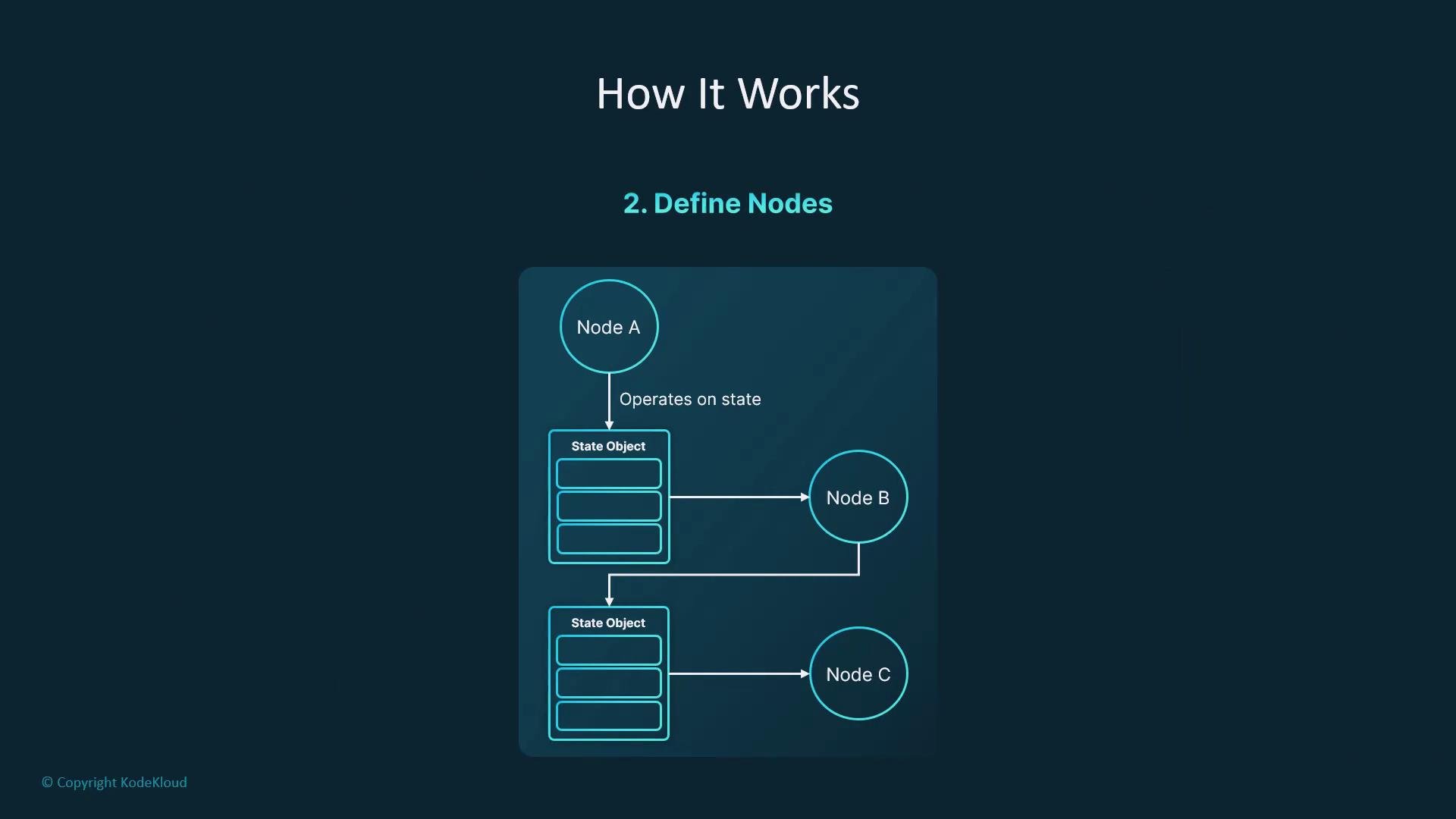
* State: a dictionary-like object that carries inputs, outputs, and contextual variables through the graph.
* Node: a function that reads the state and returns an object with the keys it updates.
* Transition (edge): the directed connection between nodes that determines the next node to run.
* Entry / Finish points: the graph’s start and end nodes.
* Compile / Invoke: produce a runnable app from the graph and execute it with an initial state.
Core concepts
* State: a dictionary-like object that carries inputs, outputs, and contextual variables through the graph.
* Node: a function that reads the state and returns an object with the keys it updates.
* Transition (edge): the directed connection between nodes that determines the next node to run.
* Entry / Finish points: the graph’s start and end nodes.
* Compile / Invoke: produce a runnable app from the graph and execute it with an initial state.
 At a glance: StateGraph components
| Component | Purpose | Example |
| ---------- | -----------------------------------: | -------------------------------------------------------------- |
| State | Carries data across nodes | `{"question": "What is the capital of France?", "answer": ""}` |
| Node | Reads state and returns updated keys | `def node(state): return {"answer": "Paris"}` |
| Transition | Connects nodes and controls flow | entry -> qa -> finish |
Minimal working StateGraph that answers a question
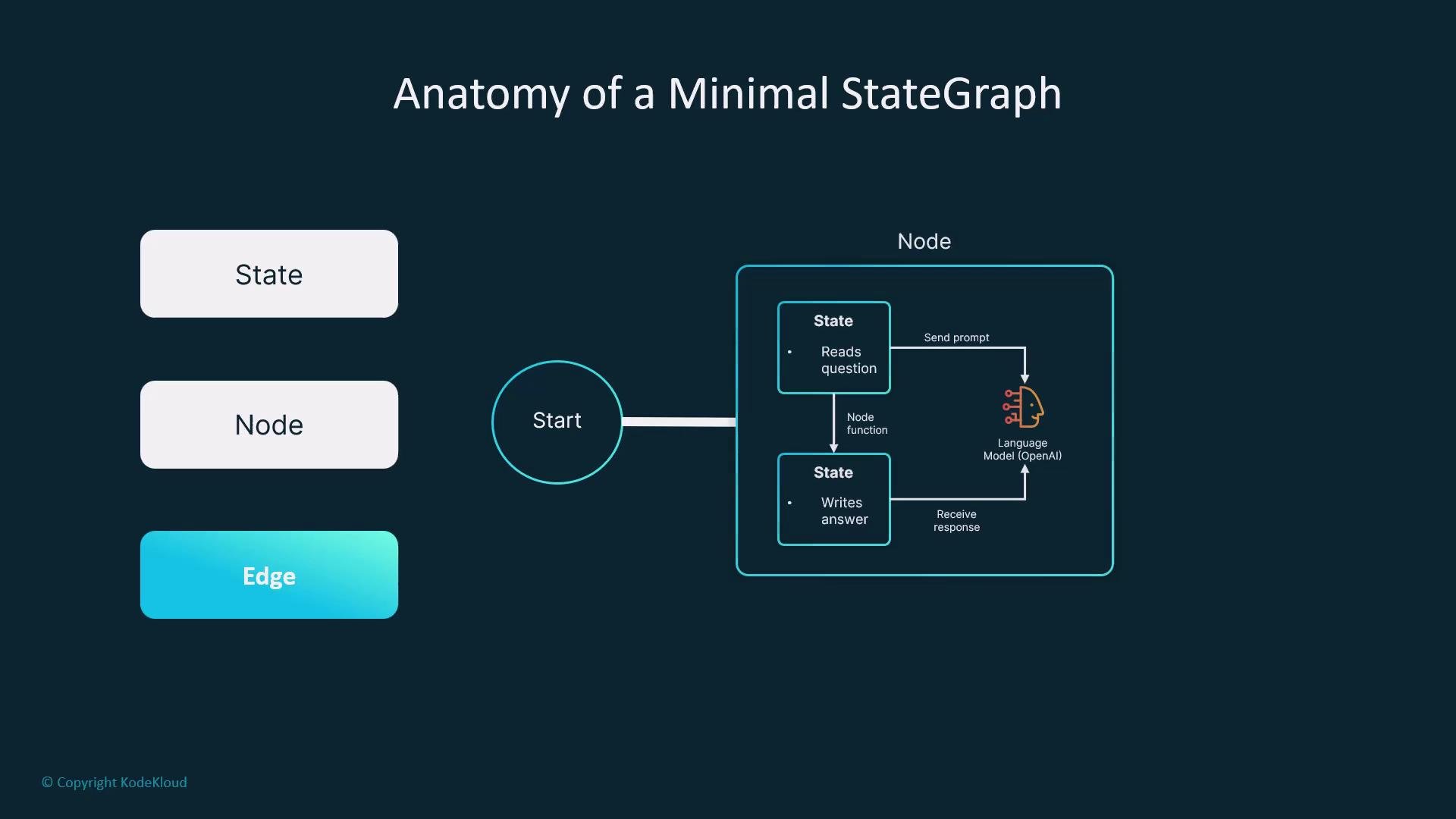
We’ll build a tiny single-node graph that takes a `question` and writes an `answer` produced by an LLM.
State shape
Define the state using Python type hints to make shapes explicit and enable early type checks. Use `TypedDict` to declare expected keys and types.
```python theme={null}
from typing import TypedDict
from langgraph.graph import StateGraph
class QAState(TypedDict):
question: str
answer: str
```
Using `TypedDict` makes your state shape explicit and helps catch type errors early during development.
Node function
A node receives the current state, invokes an LLM (OpenAI, Anthropic, etc.), and returns only the keys it updates. Keep node logic modular and testable — you can call any API or library within the node (LangChain, raw HTTP, etc.) as long as it returns the updated state fragment.
```python theme={null}
def answer_question(state: QAState) -> dict:
# `llm` should be an object you configure that returns a string for a given prompt.
response = llm.invoke(state["question"])
# Return only the keys that this node updates.
return {"answer": response}
```
Wire the graph
Create a `StateGraph` with the `QAState` type, register the node, set entry and finish points, and compile the graph to a runnable app.
```python theme={null}
graph = StateGraph(QAState)
graph.add_node("qa", answer_question)
graph.set_entry_point("qa")
graph.set_finish_point("qa")
app = graph.compile()
```
Invoke the app
Call the compiled app with an initial state; the returned state will include the populated `answer`.
```python theme={null}
result = app.invoke({"question": "What is the capital of France?"})
print(result)
# Example output:
# {'question': 'What is the capital of France?', 'answer': 'Paris'}
```
Quick reference: common StateGraph methods
| Method | Purpose | Example |
| ------------------------ | ----------------------------------: | --------------------------------------- |
| `add_node(name, fn)` | Register a node function | `graph.add_node("qa", answer_question)` |
| `set_entry_point(name)` | Set the starting node | `graph.set_entry_point("qa")` |
| `set_finish_point(name)` | Set the terminal node | `graph.set_finish_point("qa")` |
| `compile()` | Produce an executable app | `app = graph.compile()` |
| `app.invoke(state)` | Run the graph with an initial state | `app.invoke({"question": "..."})` |
Scaling your graph
The same pattern — define a state, write nodes that read/update it, and connect nodes into a graph — scales to more advanced workflows:
* Branching and conditional transitions
* Loops and retries
* Persisted memory between runs
* Human-in-the-loop steps or approvals
* Observability and testing of individual nodes
At a glance: StateGraph components
| Component | Purpose | Example |
| ---------- | -----------------------------------: | -------------------------------------------------------------- |
| State | Carries data across nodes | `{"question": "What is the capital of France?", "answer": ""}` |
| Node | Reads state and returns updated keys | `def node(state): return {"answer": "Paris"}` |
| Transition | Connects nodes and controls flow | entry -> qa -> finish |
Minimal working StateGraph that answers a question
We’ll build a tiny single-node graph that takes a `question` and writes an `answer` produced by an LLM.
State shape
Define the state using Python type hints to make shapes explicit and enable early type checks. Use `TypedDict` to declare expected keys and types.
```python theme={null}
from typing import TypedDict
from langgraph.graph import StateGraph
class QAState(TypedDict):
question: str
answer: str
```
Using `TypedDict` makes your state shape explicit and helps catch type errors early during development.
Node function
A node receives the current state, invokes an LLM (OpenAI, Anthropic, etc.), and returns only the keys it updates. Keep node logic modular and testable — you can call any API or library within the node (LangChain, raw HTTP, etc.) as long as it returns the updated state fragment.
```python theme={null}
def answer_question(state: QAState) -> dict:
# `llm` should be an object you configure that returns a string for a given prompt.
response = llm.invoke(state["question"])
# Return only the keys that this node updates.
return {"answer": response}
```
Wire the graph
Create a `StateGraph` with the `QAState` type, register the node, set entry and finish points, and compile the graph to a runnable app.
```python theme={null}
graph = StateGraph(QAState)
graph.add_node("qa", answer_question)
graph.set_entry_point("qa")
graph.set_finish_point("qa")
app = graph.compile()
```
Invoke the app
Call the compiled app with an initial state; the returned state will include the populated `answer`.
```python theme={null}
result = app.invoke({"question": "What is the capital of France?"})
print(result)
# Example output:
# {'question': 'What is the capital of France?', 'answer': 'Paris'}
```
Quick reference: common StateGraph methods
| Method | Purpose | Example |
| ------------------------ | ----------------------------------: | --------------------------------------- |
| `add_node(name, fn)` | Register a node function | `graph.add_node("qa", answer_question)` |
| `set_entry_point(name)` | Set the starting node | `graph.set_entry_point("qa")` |
| `set_finish_point(name)` | Set the terminal node | `graph.set_finish_point("qa")` |
| `compile()` | Produce an executable app | `app = graph.compile()` |
| `app.invoke(state)` | Run the graph with an initial state | `app.invoke({"question": "..."})` |
Scaling your graph
The same pattern — define a state, write nodes that read/update it, and connect nodes into a graph — scales to more advanced workflows:
* Branching and conditional transitions
* Loops and retries
* Persisted memory between runs
* Human-in-the-loop steps or approvals
* Observability and testing of individual nodes
 Links and references
* LangGraph (project docs / repo)
* OpenAI — [https://openai.com](https://openai.com)
* Anthropic — [https://www.anthropic.com](https://www.anthropic.com)
* LangChain — [https://langchain.dev](https://langchain.dev)
By following this minimal pattern you can build robust, maintainable agent workflows: make state explicit, keep node logic isolated, and compose nodes into clear, testable graphs.
Links and references
* LangGraph (project docs / repo)
* OpenAI — [https://openai.com](https://openai.com)
* Anthropic — [https://www.anthropic.com](https://www.anthropic.com)
* LangChain — [https://langchain.dev](https://langchain.dev)
By following this minimal pattern you can build robust, maintainable agent workflows: make state explicit, keep node logic isolated, and compose nodes into clear, testable graphs.