> ## Documentation Index
> Fetch the complete documentation index at: https://notes.kodekloud.com/llms.txt
> Use this file to discover all available pages before exploring further.
# Understanding YAML
> This article provides a comprehensive guide on YAML, focusing on its use in Ansible playbooks and explaining key concepts like key-value pairs, arrays, and dictionaries.
Welcome to this comprehensive guide on YAML, a vital component when writing Ansible playbooks. If you are already comfortable with YAML, feel free to skip ahead. Otherwise, gaining a solid understanding of YAML is essential, as it will set the foundation for mastering Ansible.
Ansible playbooks are plain text configuration files written in YAML. If you have experience with other data formats such as XML or JSON, you’ll find that YAML is more intuitive and human-readable. Even if you’re new to these data structures, the practical labs in this lesson will have you up and running in no time.
Below is a basic YAML example that represents a simple server configuration:
```yaml theme={null}
Servers:
- name: Server1
owner: John
created: 12232012
status: active
```
This snippet demonstrates how YAML organizes data in a structured, human-readable format. While similar data can be represented in XML or JSON, YAML focuses on simplicity and minimalism.
Let’s explore some fundamental YAML constructs:
## Key-Value Pairs
In YAML, key-value pairs are defined using a colon followed by a space. For example:
```yaml theme={null}
Fruit: Apple
Vegetable: Carrot
Liquid: Water
Meat: Chicken
```
## Arrays (Lists)
To define a list, start with a key and then list each item on a new line prefixed by a dash:
```yaml theme={null}
Fruits:
- Orange
- Apple
- Banana
Vegetables:
- Carrot
- Cauliflower
- Tomato
```
## Dictionaries (Maps)
Dictionaries group related properties under a single key. Below is an example that provides nutritional information for fruits:
```yaml theme={null}
Banana:
Calories: 105
Fat: 0.4 g
Carbs: 27 g
Grapes:
Calories: 62
Fat: 0.3 g
Carbs: 16 g
```
Ensure that you maintain consistent spacing and indentation throughout your YAML files. Inconsistent indentation can lead to errors by causing YAML parsers to misinterpret the data structure.
YAML can also handle more complex structures, such as lists that contain dictionaries. For instance, here is a list of fruits where each element details its nutritional information:
```yaml theme={null}
Fruits:
- Banana:
Calories: 105
Fat: 0.4 g
Carbs: 27 g
- Grape:
Calories: 62
Fat: 0.3 g
Carbs: 16 g
```
## Practical Example: Representing a Car
Consider using a dictionary to represent a car and its properties such as color, model, transmission, and price. If you need additional details—like breaking the model into name and year—you can nest a dictionary within another dictionary:
```yaml theme={null}
Color: Blue
Model:
Name: Corvette
Year: 1995
Transmission: Manual
Price: "$20,000"
```
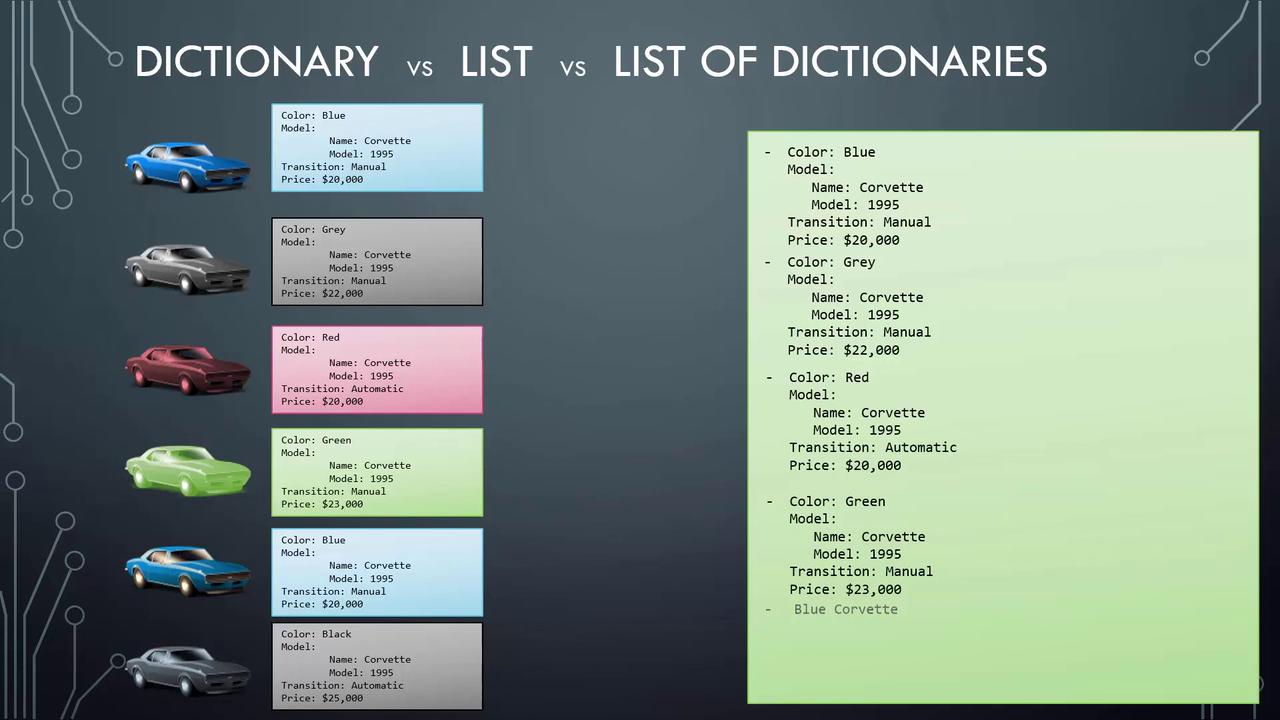
When managing data for multiple items, such as a collection of cars, the approach varies. For a simple list of car names, a list of strings is sufficient. However, if you need to capture detailed information about each car, a list of dictionaries is ideal, as it allows for multiple properties to be stored per item.
The diagram below compares various data structures—dictionary, list, and list of dictionaries—using car attributes like color, model, transmission, and price:
* A dictionary is an unordered collection, which means the sequence of key-value pairs does not impact the data's meaning. For example, the order of nutritional attributes for a fruit is irrelevant as long as the pairs are correct.
* In contrast, a list is always ordered. This means that the elements are processed in the sequence they appear.
Consider this simple ordered list of fruits:
```yaml theme={null}
Fruits:
- Orange
- Apple
- Banana
```
Lastly, any line in a YAML file that starts with a hash (#) is treated as a comment. Comments are useful for describing the content:
```yaml theme={null}
# List of Fruits
Fruits:
- Orange
- Apple
- Banana
```
By familiarizing yourself with key-value pairs, lists, dictionaries, and the importance of proper indentation, you are now well-equipped to delve into coding exercises and start working with YAML files. Enjoy your exploration and happy coding!