> ## Documentation Index
> Fetch the complete documentation index at: https://notes.kodekloud.com/llms.txt
> Use this file to discover all available pages before exploring further.
# MCP AWS CloudFormation
> Describes using the Model Context Protocol with an AWS CloudFormation MCP server to expose typed tools so LLM agents integrate AWS without custom plumbing
Model Context Protocol (MCP) and AWS CloudFormation
Stop hand-writing plumbing and start plugging in purpose-built connectors.
When you want an LLM-based agent like Claude to interact with external systems — AWS, a database, or a monitoring platform — the usual pattern is to write glue: a few boto3 calls, error handling, pagination, and retries. That works until APIs change, your integration surface grows, or you add more services. Then the agent becomes a brittle mess of plumbing instead of a reasoning engine.
The Model Context Protocol (MCP) solves this by moving integration logic out of the agent and into small, reusable servers. Instead of embedding AWS knowledge directly in your agent, you point the agent at an MCP server that already speaks AWS. Plug it in and the agent can call high-level, typed tools without you writing wrappers.
Why this matters
* Keeps the agent focused on reasoning and orchestration.
* Lets integrations handle authentication, retries, and API shapes.
* Makes it easy to add or replace external systems without changing agent code.
Example of the kind of glue code MCP avoids (illustrative only):
```python theme={null}
# example: direct boto3 usage (for illustration)
import boto3
from botocore.exceptions import ClientError
cfn = boto3.client("cloudformation")
try:
response = cfn.list_stacks()
except ClientError:
# implement retry logic here
retry()
# boto3 returns native Python dicts; no manual json.loads is normally required.
# You still often need to handle pagination and error shapes.
```
Minimal local registration example (how you might tell the SDK to launch a server):
```python theme={null}
mcp_servers = {
"cfn": {"command": "uvx", "args": ["awslabs.cfn-mcp-server"], "env": {}}
}
```
What is an MCP server?
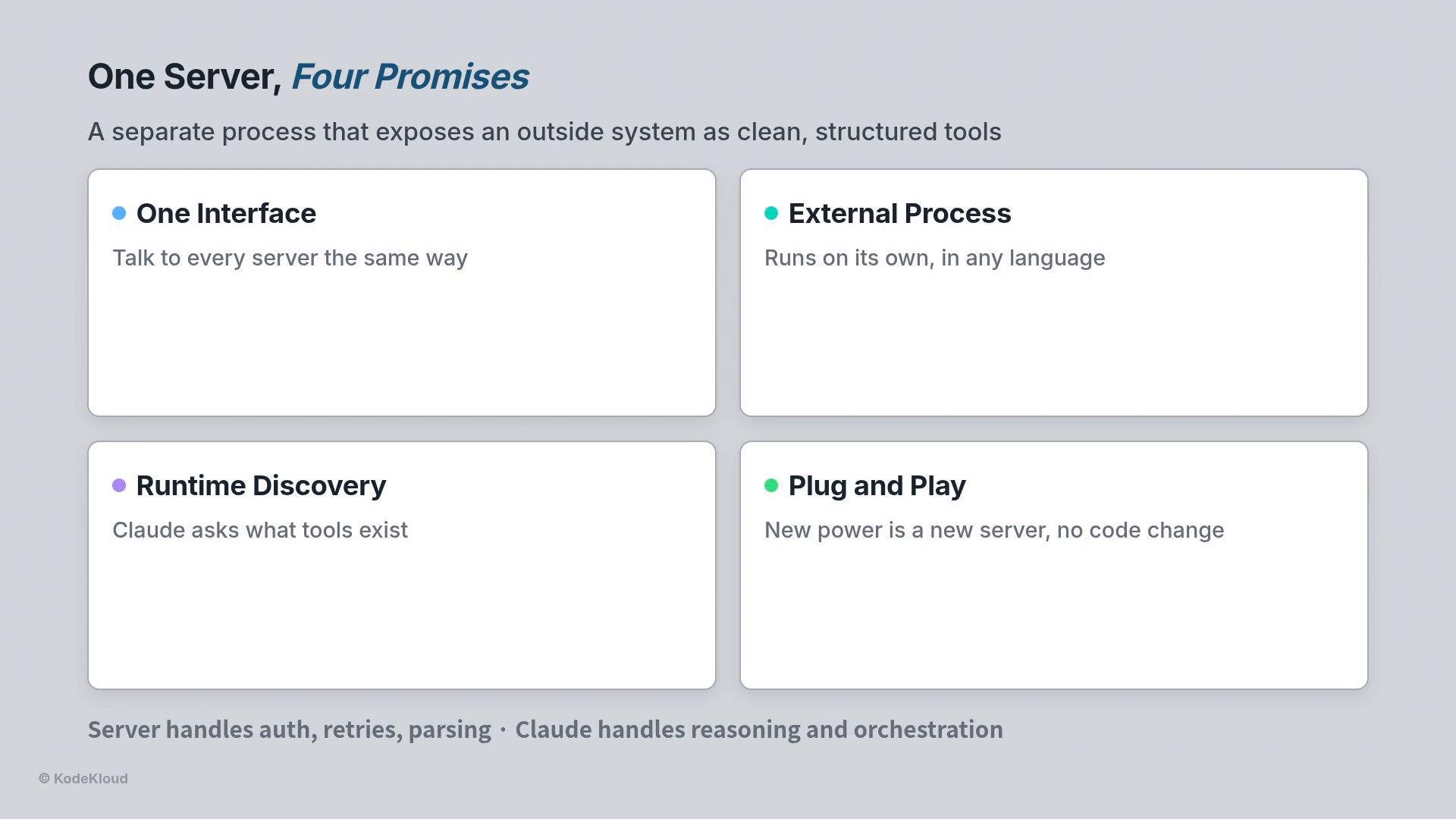
An MCP server is a separate process that exposes an external system as a set of typed, discoverable tools. Core principles:
* One standard interface for every server so agents interact uniformly.
* Each server runs as an independent process and may be implemented in any language.
* Servers expose their tools at runtime; the agent discovers them automatically.
* Add new capabilities by plugging in servers — no changes to the agent.
The server handles the messy details (auth, retries, parsing, pagination). The agent uses the clean tool surface to reason and orchestrate.
 Registering MCP servers in ClaudeAgentOptions
You declare MCP servers in a single `ClaudeAgentOptions` field named `mcp_servers`. Each key is the server name; the value describes how to launch it (command, args, env). The server name becomes the namespace prefix for all tools it provides.
Important behaviors:
* You never register individual tools. Once a server runs, the agent discovers its tools automatically.
* The server name prefixes every tool: `mcp__{server_name}__{tool_name}`.
Naming convention and examples
| Concept | Pattern | Example |
| - | - | - |
| Tool name format | `mcp__{server_name}__{tool_name}` | `mcp__cfn__list_resources` |
| Resource type example | — | `AWS::CloudFormation::Stack` |
| Whitelist all tools for a server | — | `["mcp__cfn__*"]` |
| Whitelist a single tool | — | `["mcp__cfn__list_resources"]` |
Whitelisting (allowed\_tools) enforces least privilege. You can allow all tools from a server with a wildcard or grant only specific operations for read-only jobs.
```python theme={null}
# Whitelist examples
allowed_tools = ["mcp__cfn__*"]
# or a single tool
allowed_tools = ["mcp__cfn__list_resources"]
```
Pointing Claude at AWS CloudFormation
CloudFormation is AWS's infrastructure-as-code service. Instead of a monolithic `createStack` tool, the AWS Labs CloudFormation MCP server models resources as typed entities and exposes focused operations such as:
* `list_resources`
* `get_resource`
* `get_resource_schema_information`
Each operation expects a resource type to specify intent. Examples:
* To list all stacks: call `mcp__cfn__list_resources` with resource type `AWS::CloudFormation::Stack`.
* To inspect an S3 bucket: call `mcp__cfn__get_resource` with resource type `AWS::S3::Bucket`.
Because the MCP server returns structured errors and typed responses, the agent can interpret failures and present user-friendly explanations instead of raw stack traces.
Example console run (trimmed):
```bash theme={null}
$ python3 task_3_list_stacks.py
☒ uvx awslabs.cfn-mcp-server@latest → cfn server ready
☒ mcp__cfn__list_resources
resource_type: AWS::CloudFormation::Stack
→ mcp-demo-s3-stack-a1b9c CREATE_COMPLETE
→ mcp-test-s3-stack-7f2e0 CREATE_COMPLETE
☒ mcp__cfn__get_resource AWS::S3::Bucket
read-only – inspects, never changes
```
Architectural benefits
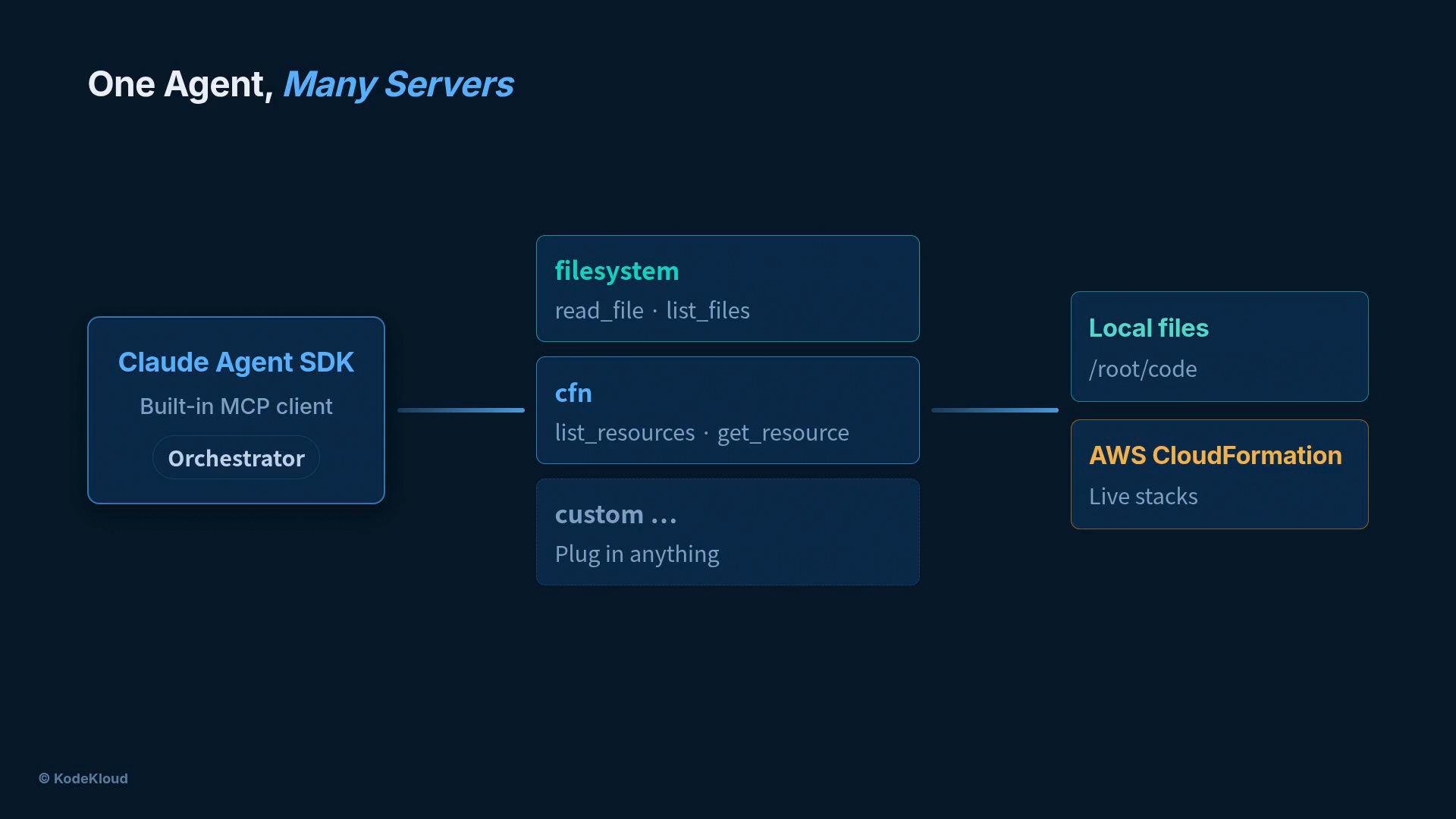
* One agent can connect to many servers. Tools are namespaced by server name so there is no collision between different integrations.
* Each server runs independently. A failure in one server does not bring down others.
* To give the agent new capability, plug in a server and update the whitelist — no agent rewrite required.
* Combine servers for complex workflows (e.g., compare a local CloudFormation template on a filesystem server with the live stack from the CloudFormation server).
Registering MCP servers in ClaudeAgentOptions
You declare MCP servers in a single `ClaudeAgentOptions` field named `mcp_servers`. Each key is the server name; the value describes how to launch it (command, args, env). The server name becomes the namespace prefix for all tools it provides.
Important behaviors:
* You never register individual tools. Once a server runs, the agent discovers its tools automatically.
* The server name prefixes every tool: `mcp__{server_name}__{tool_name}`.
Naming convention and examples
| Concept | Pattern | Example |
| - | - | - |
| Tool name format | `mcp__{server_name}__{tool_name}` | `mcp__cfn__list_resources` |
| Resource type example | — | `AWS::CloudFormation::Stack` |
| Whitelist all tools for a server | — | `["mcp__cfn__*"]` |
| Whitelist a single tool | — | `["mcp__cfn__list_resources"]` |
Whitelisting (allowed\_tools) enforces least privilege. You can allow all tools from a server with a wildcard or grant only specific operations for read-only jobs.
```python theme={null}
# Whitelist examples
allowed_tools = ["mcp__cfn__*"]
# or a single tool
allowed_tools = ["mcp__cfn__list_resources"]
```
Pointing Claude at AWS CloudFormation
CloudFormation is AWS's infrastructure-as-code service. Instead of a monolithic `createStack` tool, the AWS Labs CloudFormation MCP server models resources as typed entities and exposes focused operations such as:
* `list_resources`
* `get_resource`
* `get_resource_schema_information`
Each operation expects a resource type to specify intent. Examples:
* To list all stacks: call `mcp__cfn__list_resources` with resource type `AWS::CloudFormation::Stack`.
* To inspect an S3 bucket: call `mcp__cfn__get_resource` with resource type `AWS::S3::Bucket`.
Because the MCP server returns structured errors and typed responses, the agent can interpret failures and present user-friendly explanations instead of raw stack traces.
Example console run (trimmed):
```bash theme={null}
$ python3 task_3_list_stacks.py
☒ uvx awslabs.cfn-mcp-server@latest → cfn server ready
☒ mcp__cfn__list_resources
resource_type: AWS::CloudFormation::Stack
→ mcp-demo-s3-stack-a1b9c CREATE_COMPLETE
→ mcp-test-s3-stack-7f2e0 CREATE_COMPLETE
☒ mcp__cfn__get_resource AWS::S3::Bucket
read-only – inspects, never changes
```
Architectural benefits
* One agent can connect to many servers. Tools are namespaced by server name so there is no collision between different integrations.
* Each server runs independently. A failure in one server does not bring down others.
* To give the agent new capability, plug in a server and update the whitelist — no agent rewrite required.
* Combine servers for complex workflows (e.g., compare a local CloudFormation template on a filesystem server with the live stack from the CloudFormation server).
 Putting it all together
With:
* skills defining what Claude can do,
* sub-agents defining who does the work,
* and MCP defining where tools live,
you get a stable, extensible platform that can plan and deploy real infrastructure without embedding provider-specific plumbing inside the agent itself.
MCP shifts infrastructure integration out of the agent and into small, focused servers. That keeps agent code stable and lets you add or replace external integrations without touching the agent.
Links and references
* AWS CloudFormation documentation: [https://docs.aws.amazon.com/AWSCloudFormation/latest/UserGuide/](https://docs.aws.amazon.com/AWSCloudFormation/latest/UserGuide/)
* Model Context Protocol (MCP) pattern — architecting LLM agents with external tool servers
* Example MCP server: awslabs CloudFormation MCP server (`awslabs.cfn-mcp-server`)
This documentation is built and hosted on [Mintlify](https://mintlify.com), a developer documentation platform.
Putting it all together
With:
* skills defining what Claude can do,
* sub-agents defining who does the work,
* and MCP defining where tools live,
you get a stable, extensible platform that can plan and deploy real infrastructure without embedding provider-specific plumbing inside the agent itself.
MCP shifts infrastructure integration out of the agent and into small, focused servers. That keeps agent code stable and lets you add or replace external integrations without touching the agent.
Links and references
* AWS CloudFormation documentation: [https://docs.aws.amazon.com/AWSCloudFormation/latest/UserGuide/](https://docs.aws.amazon.com/AWSCloudFormation/latest/UserGuide/)
* Model Context Protocol (MCP) pattern — architecting LLM agents with external tool servers
* Example MCP server: awslabs CloudFormation MCP server (`awslabs.cfn-mcp-server`)
This documentation is built and hosted on [Mintlify](https://mintlify.com), a developer documentation platform.