> ## Documentation Index
> Fetch the complete documentation index at: https://notes.kodekloud.com/llms.txt
> Use this file to discover all available pages before exploring further.
# Capstone Deploying a 3 Tier Web App on AWS
> Guide to deploying a resilient multi‑AZ three‑tier web application on AWS using agentized automation, sub‑agents, reusable skills, and a CloudFormation MCP for repeatable infrastructure.
The capstone brings everything together: you’ll deploy a production-grade, three-tier web application on AWS using the capabilities you developed earlier. This project demonstrates how small, composable agent powers combine to run infrastructure end-to-end.
High-level goals:
* Implement a resilient, multi-AZ three‑tier architecture.
* Keep the web tier public and stateless.
* Place the application tier in private subnets.
* Harden and isolate the database tier with the strictest controls.
* Automate and validate each stage using agent features (stateful conversations, sub-agents, skills, MCP).
The entire application runs inside a VPC and is spread across two Availability Zones to tolerate a zone failure without downtime.
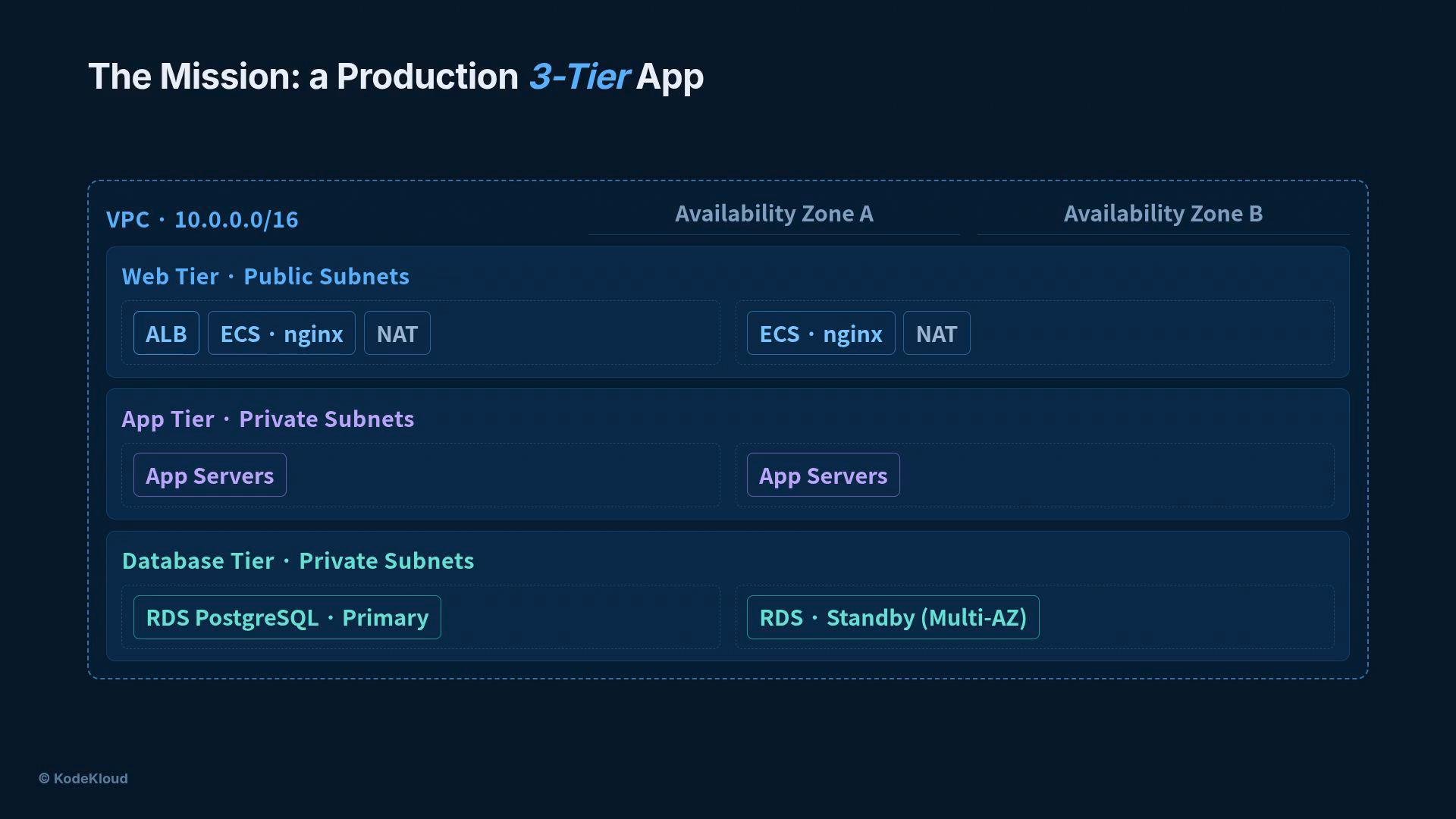 Architecture summary:
* Public subnets: Application Load Balancer (ALB) + stateless web or edge containers.
* Private subnets: Application servers (ECS/Fargate tasks or EC2) and PostgreSQL RDS instances.
* NAT gateways (one per AZ) allow outbound internet access for private resources without exposing them.
* Internet Gateway provides inbound/outbound for public subnets.
* Multi‑AZ RDS with a primary and standby for high availability.
Before you begin, ensure you have an AWS account with permissions to create VPCs, subnets, NAT gateways, RDS, ECS (Fargate), ALBs, and CloudFormation stacks. Use least-privilege credentials and avoid embedding long-lived secrets in code or prompts.
Now let's build it. The implementation is split into five focused tasks, each showcasing a capability you’ve learned.
Summary of the five tasks
| Task | Purpose | Key capabilities |
| - | - | - |
| 1 — Planning | Research architecture and cost, produce CIDRs/security groups | Stateful client + web search |
| 2 — Deploy VPC | Create VPC, subnets, routing, NATs | Sub-agents (specialists) |
| 3 — Deploy RDS | Deploy production Postgres with backups and encryption | Reusable skill files |
| 4 — Deploy container tier | Provision ECS/Fargate, ALB via CloudFormation | MCP (CloudFormation server) |
| 5 — Full deployment | Add monitoring, validate end-to-end, report | Combined capabilities (state, skills, sub-agents, MCP) |
Task 1 — Planning (stateful client + web search)
* Objective: Use a stateful conversation plus web search to research best practices, produce a concrete architecture design with CIDRs and security groups, then estimate monthly cost.
* Why stateful? Memory preserves earlier answers across multiple turns so the planning agent can refine a design and then price it without losing context.
* Example flow: three conversational turns (research, design, price) carried out by a stateful agent with web search enabled.
```python theme={null}
from claude_agent_sdk import ClaudeSDKClient, ClaudeAgentOptions
options = ClaudeAgentOptions(
model="claude-sonnet-4-20250514",
allowed_tools=["WebSearch", "Bash"],
)
async with ClaudeSDKClient(options=options) as client:
# Turn 1: research Well-Architected patterns for 3-tier apps
await client.query("Research Well-Architected 3-tier apps")
# Turn 2: design a VPC, RDS, and ECS architecture with concrete CIDR blocks and security groups
await client.query("Design VPC, RDS, and ECS from it")
# Turn 3: estimate monthly AWS cost for the proposed design
await client.query("Estimate the monthly AWS cost")
```
Task 2 — Deploy the VPC (sub-agents)
* Objective: Delegate network and security responsibilities to focused sub-agents so each specialist can own a well-defined part of deployment.
* Example sub-agents:
* Network configurator: creates VPC, subnets, route tables, NAT gateways, and route propagation.
* Security specialist: defines security groups, network ACLs, and least-privilege rules. Mark this agent `use_proactively` so it can be invoked automatically when needed.
* Benefit: Mirrors a real-world DevOps team separation of duties and limits tool access by role (e.g., only `Bash` and `Read` for some specialists).
Task 3 — Deploy the database (skills)
* Objective: Produce a reusable skill file (e.g., `skills/SKILL.md`) that encapsulates RDS operational knowledge so the agent applies best practices consistently.
* What goes in the skill:
* The exact `aws rds create-db-instance` command (templated with placeholders).
* Recommended instance class (e.g., `db.t3.small` for low-cost test/proof-of-concept; choose production classes as needed).
* Backup retention policy (e.g., 7 days) and enable automated backups.
* Encryption at rest (KMS) and Multi‑AZ configuration.
* A deployment checklist: parameter groups, maintenance window, monitoring, and snapshots.
* Reusability: The `skills/` folder lets the agent discover and apply the RDS skill on any run without bloating the main prompt.
Example (templated) CLI snippet you can keep in the skill file:
```bash theme={null}
aws rds create-db-instance \
--db-instance-identifier mydb \
--db-instance-class db.t3.small \
--engine postgres \
--allocated-storage 20 \
--backup-retention-period 7 \
--storage-encrypted \
--multi-az \
--master-username admin \
--master-user-password '' \
--vpc-security-group-ids sg-0123456789abcdef0 \
--db-subnet-group-name mydb-subnet-group
```
Task 4 — Deploy the container tier (MCP)
* Objective: Use an MCP (Model Context Protocol) CloudFormation server to produce, validate, and deploy an ECS (Fargate) stack without embedding CloudFormation tooling inside the agent.
* How it works:
* The SDK launches a separate `cfn-mcp` process that exposes tools like `create_stack`, `validate_template`, and `describe_stack`.
* The agent asks the MCP server to author a CloudFormation template for the ECS web tier: cluster, Fargate task (NGINX, 256 CPU units, 512 MB memory, port 80), desired count 2, and an ALB with health checks.
* Agent validates the template via MCP, then deploys the stack.
* Benefit: Keeps CloudFormation logic out of the agent and makes deployment reproducible and auditable.
```text theme={null}
cfn-mcp
A separate process, launched by the SDK
create_stack validate_template describe_stack
CloudFormation → ECS Stack
ECS Cluster · Fargate
nginx · 256 CPU · 512 MB · port 80
Service · desired count 2
Application Load Balancer · health checks
validate_template → deploy the stack
```
Task 5 — Full deployment (everything together)
* Objective: Run the full deployment pipeline: monitoring, deployment, verification, and a final report using the combined capabilities of the SDK.
* Configuration: Enable a stateful client with web search, the `skills/` folder, a monitoring specialist sub-agent, and the MCP CloudFormation server.
* Three ordered turns the orchestrator executes:
1. Research CloudWatch best practices (web search + memory).
2. Build the monitoring layer: CloudWatch alarms (CPU, memory, storage), a dashboard, SNS/notifications, and Container Insights. The agent uses the monitoring sub-agent and MCP to author and deploy CloudFormation for observability.
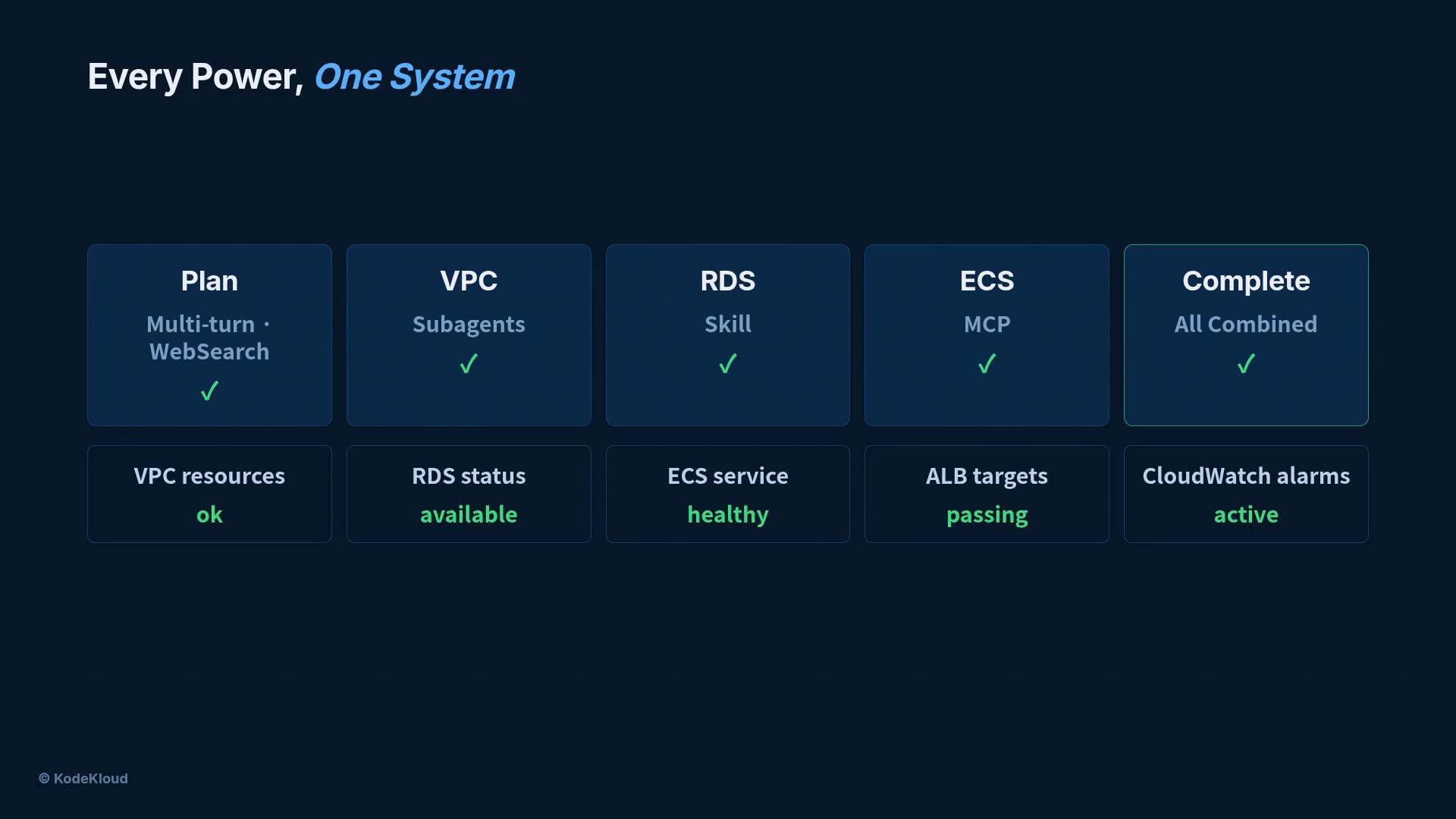
3. Verify the full stack end-to-end: confirm VPC resources, check RDS status, verify ECS service health, test ALB target health, and confirm alarms are firing. Generate a deployment report with findings and remediation steps.
Verification checklist (example):
* VPC and route tables configured for two AZs
* Subnets public/private and NAT gateways per AZ
* RDS status: available and Multi‑AZ active
* ECS service: desired and running counts match
* ALB: all registered targets healthy
* CloudWatch: alarms active, dashboard present
Architecture summary:
* Public subnets: Application Load Balancer (ALB) + stateless web or edge containers.
* Private subnets: Application servers (ECS/Fargate tasks or EC2) and PostgreSQL RDS instances.
* NAT gateways (one per AZ) allow outbound internet access for private resources without exposing them.
* Internet Gateway provides inbound/outbound for public subnets.
* Multi‑AZ RDS with a primary and standby for high availability.
Before you begin, ensure you have an AWS account with permissions to create VPCs, subnets, NAT gateways, RDS, ECS (Fargate), ALBs, and CloudFormation stacks. Use least-privilege credentials and avoid embedding long-lived secrets in code or prompts.
Now let's build it. The implementation is split into five focused tasks, each showcasing a capability you’ve learned.
Summary of the five tasks
| Task | Purpose | Key capabilities |
| - | - | - |
| 1 — Planning | Research architecture and cost, produce CIDRs/security groups | Stateful client + web search |
| 2 — Deploy VPC | Create VPC, subnets, routing, NATs | Sub-agents (specialists) |
| 3 — Deploy RDS | Deploy production Postgres with backups and encryption | Reusable skill files |
| 4 — Deploy container tier | Provision ECS/Fargate, ALB via CloudFormation | MCP (CloudFormation server) |
| 5 — Full deployment | Add monitoring, validate end-to-end, report | Combined capabilities (state, skills, sub-agents, MCP) |
Task 1 — Planning (stateful client + web search)
* Objective: Use a stateful conversation plus web search to research best practices, produce a concrete architecture design with CIDRs and security groups, then estimate monthly cost.
* Why stateful? Memory preserves earlier answers across multiple turns so the planning agent can refine a design and then price it without losing context.
* Example flow: three conversational turns (research, design, price) carried out by a stateful agent with web search enabled.
```python theme={null}
from claude_agent_sdk import ClaudeSDKClient, ClaudeAgentOptions
options = ClaudeAgentOptions(
model="claude-sonnet-4-20250514",
allowed_tools=["WebSearch", "Bash"],
)
async with ClaudeSDKClient(options=options) as client:
# Turn 1: research Well-Architected patterns for 3-tier apps
await client.query("Research Well-Architected 3-tier apps")
# Turn 2: design a VPC, RDS, and ECS architecture with concrete CIDR blocks and security groups
await client.query("Design VPC, RDS, and ECS from it")
# Turn 3: estimate monthly AWS cost for the proposed design
await client.query("Estimate the monthly AWS cost")
```
Task 2 — Deploy the VPC (sub-agents)
* Objective: Delegate network and security responsibilities to focused sub-agents so each specialist can own a well-defined part of deployment.
* Example sub-agents:
* Network configurator: creates VPC, subnets, route tables, NAT gateways, and route propagation.
* Security specialist: defines security groups, network ACLs, and least-privilege rules. Mark this agent `use_proactively` so it can be invoked automatically when needed.
* Benefit: Mirrors a real-world DevOps team separation of duties and limits tool access by role (e.g., only `Bash` and `Read` for some specialists).
Task 3 — Deploy the database (skills)
* Objective: Produce a reusable skill file (e.g., `skills/SKILL.md`) that encapsulates RDS operational knowledge so the agent applies best practices consistently.
* What goes in the skill:
* The exact `aws rds create-db-instance` command (templated with placeholders).
* Recommended instance class (e.g., `db.t3.small` for low-cost test/proof-of-concept; choose production classes as needed).
* Backup retention policy (e.g., 7 days) and enable automated backups.
* Encryption at rest (KMS) and Multi‑AZ configuration.
* A deployment checklist: parameter groups, maintenance window, monitoring, and snapshots.
* Reusability: The `skills/` folder lets the agent discover and apply the RDS skill on any run without bloating the main prompt.
Example (templated) CLI snippet you can keep in the skill file:
```bash theme={null}
aws rds create-db-instance \
--db-instance-identifier mydb \
--db-instance-class db.t3.small \
--engine postgres \
--allocated-storage 20 \
--backup-retention-period 7 \
--storage-encrypted \
--multi-az \
--master-username admin \
--master-user-password '' \
--vpc-security-group-ids sg-0123456789abcdef0 \
--db-subnet-group-name mydb-subnet-group
```
Task 4 — Deploy the container tier (MCP)
* Objective: Use an MCP (Model Context Protocol) CloudFormation server to produce, validate, and deploy an ECS (Fargate) stack without embedding CloudFormation tooling inside the agent.
* How it works:
* The SDK launches a separate `cfn-mcp` process that exposes tools like `create_stack`, `validate_template`, and `describe_stack`.
* The agent asks the MCP server to author a CloudFormation template for the ECS web tier: cluster, Fargate task (NGINX, 256 CPU units, 512 MB memory, port 80), desired count 2, and an ALB with health checks.
* Agent validates the template via MCP, then deploys the stack.
* Benefit: Keeps CloudFormation logic out of the agent and makes deployment reproducible and auditable.
```text theme={null}
cfn-mcp
A separate process, launched by the SDK
create_stack validate_template describe_stack
CloudFormation → ECS Stack
ECS Cluster · Fargate
nginx · 256 CPU · 512 MB · port 80
Service · desired count 2
Application Load Balancer · health checks
validate_template → deploy the stack
```
Task 5 — Full deployment (everything together)
* Objective: Run the full deployment pipeline: monitoring, deployment, verification, and a final report using the combined capabilities of the SDK.
* Configuration: Enable a stateful client with web search, the `skills/` folder, a monitoring specialist sub-agent, and the MCP CloudFormation server.
* Three ordered turns the orchestrator executes:
1. Research CloudWatch best practices (web search + memory).
2. Build the monitoring layer: CloudWatch alarms (CPU, memory, storage), a dashboard, SNS/notifications, and Container Insights. The agent uses the monitoring sub-agent and MCP to author and deploy CloudFormation for observability.
3. Verify the full stack end-to-end: confirm VPC resources, check RDS status, verify ECS service health, test ALB target health, and confirm alarms are firing. Generate a deployment report with findings and remediation steps.
Verification checklist (example):
* VPC and route tables configured for two AZs
* Subnets public/private and NAT gateways per AZ
* RDS status: available and Multi‑AZ active
* ECS service: desired and running counts match
* ALB: all registered targets healthy
* CloudWatch: alarms active, dashboard present
 Wrap-up
What you’ve just built is a pattern for safe, repeatable infrastructure automation:
* Planning uses memory and search to produce a viable design and cost estimate.
* Sub-agents isolate responsibilities for safe delegation.
* Skills encapsulate and reuse operational knowledge (e.g., RDS best practices).
* MCP servers let agents interact with toolchains (CloudFormation) in a controlled way.
* The orchestrator coordinates everything and validates the final system.
This demonstration is intended for learning. For production use, review IAM policies, rotate credentials, use parameter stores or secrets managers for sensitive values, and perform security audits and penetration testing before exposing workloads to the internet.
Links and references
* AWS VPC: [https://aws.amazon.com/vpc/](https://aws.amazon.com/vpc/)
* Application Load Balancer: [https://aws.amazon.com/elasticloadbalancing/application-load-balancer/](https://aws.amazon.com/elasticloadbalancing/application-load-balancer/)
* NAT Gateway: [https://docs.aws.amazon.com/vpc/latest/userguide/vpc-nat-gateway.html](https://docs.aws.amazon.com/vpc/latest/userguide/vpc-nat-gateway.html)
* AWS RDS: [https://aws.amazon.com/rds/](https://aws.amazon.com/rds/)
* AWS ECS / Fargate: [https://aws.amazon.com/ecs/](https://aws.amazon.com/ecs/) and [https://aws.amazon.com/fargate/](https://aws.amazon.com/fargate/)
* CloudFormation: [https://aws.amazon.com/cloudformation/](https://aws.amazon.com/cloudformation/)
* CloudWatch best practices: [https://docs.aws.amazon.com/AmazonCloudWatch/latest/monitoring/monitoring\_best\_practices.html](https://docs.aws.amazon.com/AmazonCloudWatch/latest/monitoring/monitoring_best_practices.html)
* CloudWatch Container Insights: [https://docs.aws.amazon.com/AmazonCloudWatch/latest/monitoring/Container-Insights.html](https://docs.aws.amazon.com/AmazonCloudWatch/latest/monitoring/Container-Insights.html)
This documentation is built and hosted on [Mintlify](https://mintlify.com), a developer documentation platform.
Wrap-up
What you’ve just built is a pattern for safe, repeatable infrastructure automation:
* Planning uses memory and search to produce a viable design and cost estimate.
* Sub-agents isolate responsibilities for safe delegation.
* Skills encapsulate and reuse operational knowledge (e.g., RDS best practices).
* MCP servers let agents interact with toolchains (CloudFormation) in a controlled way.
* The orchestrator coordinates everything and validates the final system.
This demonstration is intended for learning. For production use, review IAM policies, rotate credentials, use parameter stores or secrets managers for sensitive values, and perform security audits and penetration testing before exposing workloads to the internet.
Links and references
* AWS VPC: [https://aws.amazon.com/vpc/](https://aws.amazon.com/vpc/)
* Application Load Balancer: [https://aws.amazon.com/elasticloadbalancing/application-load-balancer/](https://aws.amazon.com/elasticloadbalancing/application-load-balancer/)
* NAT Gateway: [https://docs.aws.amazon.com/vpc/latest/userguide/vpc-nat-gateway.html](https://docs.aws.amazon.com/vpc/latest/userguide/vpc-nat-gateway.html)
* AWS RDS: [https://aws.amazon.com/rds/](https://aws.amazon.com/rds/)
* AWS ECS / Fargate: [https://aws.amazon.com/ecs/](https://aws.amazon.com/ecs/) and [https://aws.amazon.com/fargate/](https://aws.amazon.com/fargate/)
* CloudFormation: [https://aws.amazon.com/cloudformation/](https://aws.amazon.com/cloudformation/)
* CloudWatch best practices: [https://docs.aws.amazon.com/AmazonCloudWatch/latest/monitoring/monitoring\_best\_practices.html](https://docs.aws.amazon.com/AmazonCloudWatch/latest/monitoring/monitoring_best_practices.html)
* CloudWatch Container Insights: [https://docs.aws.amazon.com/AmazonCloudWatch/latest/monitoring/Container-Insights.html](https://docs.aws.amazon.com/AmazonCloudWatch/latest/monitoring/Container-Insights.html)
This documentation is built and hosted on [Mintlify](https://mintlify.com), a developer documentation platform.