> ## Documentation Index
> Fetch the complete documentation index at: https://notes.kodekloud.com/llms.txt
> Use this file to discover all available pages before exploring further.
# Production Hardening Safe Deployment Advanced
> Guide to hardening AWS deployments by removing plaintext secrets, adding AWS WAF, enforcing least privilege, enabling ECS autoscaling, detecting CloudFormation drift, and using safe reversible deployment patterns.
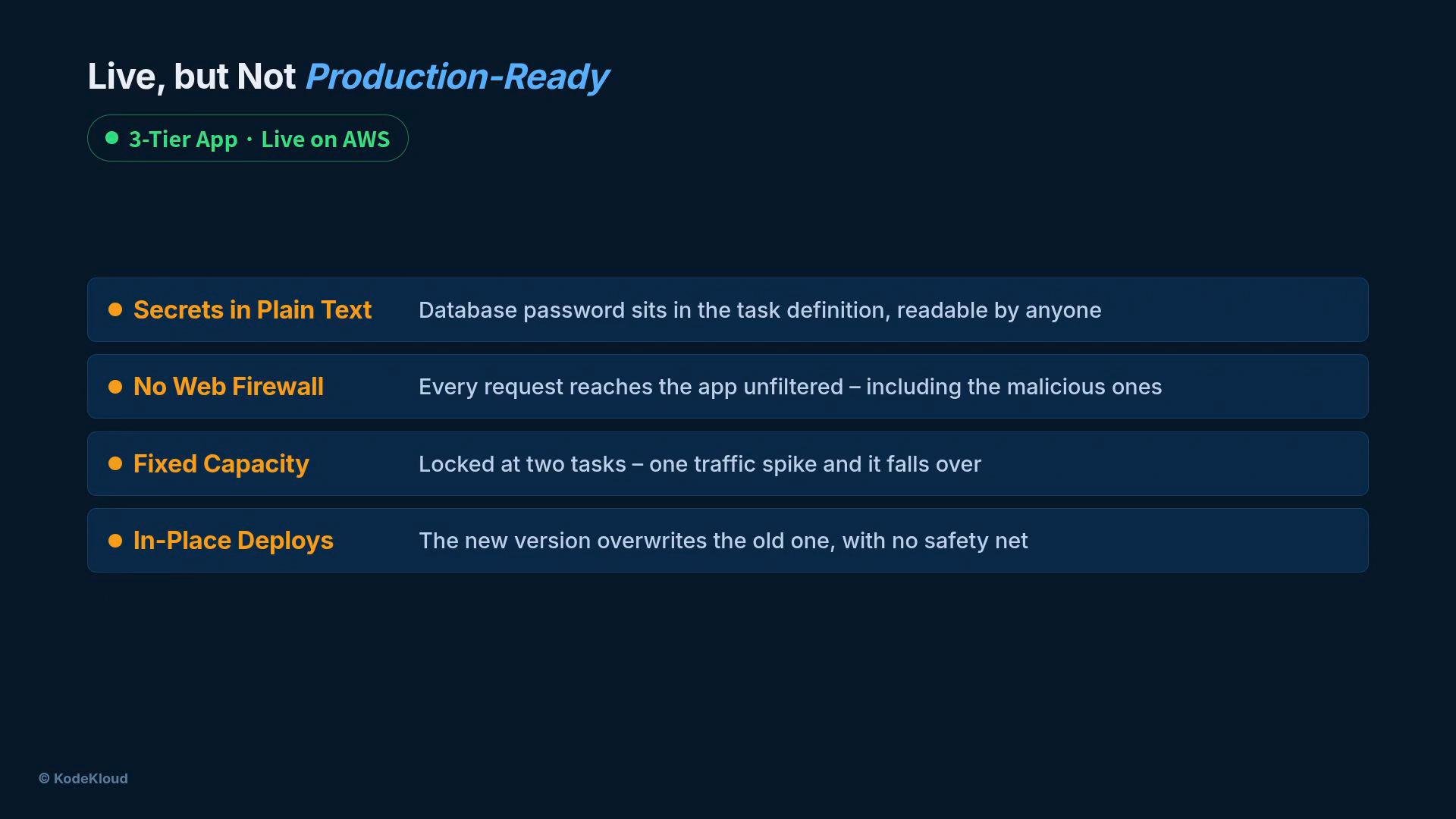
Your app is live on AWS, but "live" isn't the same as production-ready. Inspecting the running environment reveals five gaps that commonly cause outages or security incidents in production.
The most urgent issues:
* Secrets stored in plaintext inside the `ECS` task definition.
* No web firewall in front of the load balancer (AWS WAF).
* Fixed capacity (two tasks) that can't follow demand.
* In-place deploys with no safety net.
* Drift between the infrastructure template and the running environment.
These problems may not show up in a demo, but they will appear in production. We'll close them one-by-one and keep the change sequence and diagrams intact.
 ## Strategy: Narrow Ownership, Focused Fixes
Operate like a dedicated hardening specialist: limit the scope, apply minimal changes that materially reduce risk, and automate the checks.
### Quick summary of fixes
| Gap | Why it matters | What we do |
| - | - | - |
| Secrets in plaintext | Exposes credentials if repositories or artifacts leak | Move secrets to `AWS Secrets Manager`, reference by ARN from the ECS task via the `secrets` field |
| No edge firewall | Malicious traffic reaches the LB and containers | Attach an `AWS WAF` web ACL with managed rules to the ALB |
| Fixed capacity | Over- or under-provisioning causes latency or waste | Use ECS Service Auto Scaling with target-tracking on average CPU |
| Unsafe deploys | A bad release can take down service | Use blue/green or rolling deployments with health checks and ECS deployment circuit breaker |
| Stack drift | Manual changes hide divergence from IaC | Run CloudFormation drift detection and reconcile or roll back drifted resources |
Focus fixes on what reduces the most risk quickly: secrets, edge protection, least-privilege permissions, autoscaling, drift detection, and safe deploys.
## Secrets: Remove plaintext credentials
* Move the database password and any other secrets into AWS Secrets Manager.
* Update the `ECS` task definition so it does not contain secret values. Instead:
* Reference the secret by ARN and populate runtime environment variables using the task definition’s `secrets` field, or read secrets from Secrets Manager at runtime using the SDK.
* Remove plaintext secrets from source control, CI artifacts, and container images.
References:
* AWS Secrets Manager: [https://docs.aws.amazon.com/secretsmanager/latest/userguide/intro.html](https://docs.aws.amazon.com/secretsmanager/latest/userguide/intro.html)
* ECS task secrets field: [https://docs.aws.amazon.com/AmazonECS/latest/developerguide/specifying-sensitive-data.html](https://docs.aws.amazon.com/AmazonECS/latest/developerguide/specifying-sensitive-data.html)
## Firewall: Block bad traffic at the edge
* Create an AWS WAF web ACL and attach it to your load balancer (ALB).
* Add an AWS-managed ruleset to block common malicious requests so most bad traffic stops before it reaches containers.
References:
* AWS WAF web ACL: [https://docs.aws.amazon.com/waf/latest/developerguide/web-acl.html](https://docs.aws.amazon.com/waf/latest/developerguide/web-acl.html)
* AWS managed rule groups: [https://docs.aws.amazon.com/waf/latest/developerguide/aws-managed-rule-groups.html](https://docs.aws.amazon.com/waf/latest/developerguide/aws-managed-rule-groups.html)
## Permissions: Apply least privilege
* Restrict the ECS task role to only the IAM actions the application needs (e.g., read a specific secret, publish metrics, read S3 objects if required).
* Avoid broad policies such as `*` or `AdministratorAccess` for runtime roles.
## Capacity: Let load drive the task count
Autoscale your ECS service using target-tracking on average CPU to keep utilization near a chosen target (example below uses 70%). With target tracking, you declare the objective rather than the exact task count.
* Example policy: target-tracking on metric `ECSServiceAverageCPUUtilization`, target 70%, minimum 2 tasks, maximum 10 tasks.
## Strategy: Narrow Ownership, Focused Fixes
Operate like a dedicated hardening specialist: limit the scope, apply minimal changes that materially reduce risk, and automate the checks.
### Quick summary of fixes
| Gap | Why it matters | What we do |
| - | - | - |
| Secrets in plaintext | Exposes credentials if repositories or artifacts leak | Move secrets to `AWS Secrets Manager`, reference by ARN from the ECS task via the `secrets` field |
| No edge firewall | Malicious traffic reaches the LB and containers | Attach an `AWS WAF` web ACL with managed rules to the ALB |
| Fixed capacity | Over- or under-provisioning causes latency or waste | Use ECS Service Auto Scaling with target-tracking on average CPU |
| Unsafe deploys | A bad release can take down service | Use blue/green or rolling deployments with health checks and ECS deployment circuit breaker |
| Stack drift | Manual changes hide divergence from IaC | Run CloudFormation drift detection and reconcile or roll back drifted resources |
Focus fixes on what reduces the most risk quickly: secrets, edge protection, least-privilege permissions, autoscaling, drift detection, and safe deploys.
## Secrets: Remove plaintext credentials
* Move the database password and any other secrets into AWS Secrets Manager.
* Update the `ECS` task definition so it does not contain secret values. Instead:
* Reference the secret by ARN and populate runtime environment variables using the task definition’s `secrets` field, or read secrets from Secrets Manager at runtime using the SDK.
* Remove plaintext secrets from source control, CI artifacts, and container images.
References:
* AWS Secrets Manager: [https://docs.aws.amazon.com/secretsmanager/latest/userguide/intro.html](https://docs.aws.amazon.com/secretsmanager/latest/userguide/intro.html)
* ECS task secrets field: [https://docs.aws.amazon.com/AmazonECS/latest/developerguide/specifying-sensitive-data.html](https://docs.aws.amazon.com/AmazonECS/latest/developerguide/specifying-sensitive-data.html)
## Firewall: Block bad traffic at the edge
* Create an AWS WAF web ACL and attach it to your load balancer (ALB).
* Add an AWS-managed ruleset to block common malicious requests so most bad traffic stops before it reaches containers.
References:
* AWS WAF web ACL: [https://docs.aws.amazon.com/waf/latest/developerguide/web-acl.html](https://docs.aws.amazon.com/waf/latest/developerguide/web-acl.html)
* AWS managed rule groups: [https://docs.aws.amazon.com/waf/latest/developerguide/aws-managed-rule-groups.html](https://docs.aws.amazon.com/waf/latest/developerguide/aws-managed-rule-groups.html)
## Permissions: Apply least privilege
* Restrict the ECS task role to only the IAM actions the application needs (e.g., read a specific secret, publish metrics, read S3 objects if required).
* Avoid broad policies such as `*` or `AdministratorAccess` for runtime roles.
## Capacity: Let load drive the task count
Autoscale your ECS service using target-tracking on average CPU to keep utilization near a chosen target (example below uses 70%). With target tracking, you declare the objective rather than the exact task count.
* Example policy: target-tracking on metric `ECSServiceAverageCPUUtilization`, target 70%, minimum 2 tasks, maximum 10 tasks.
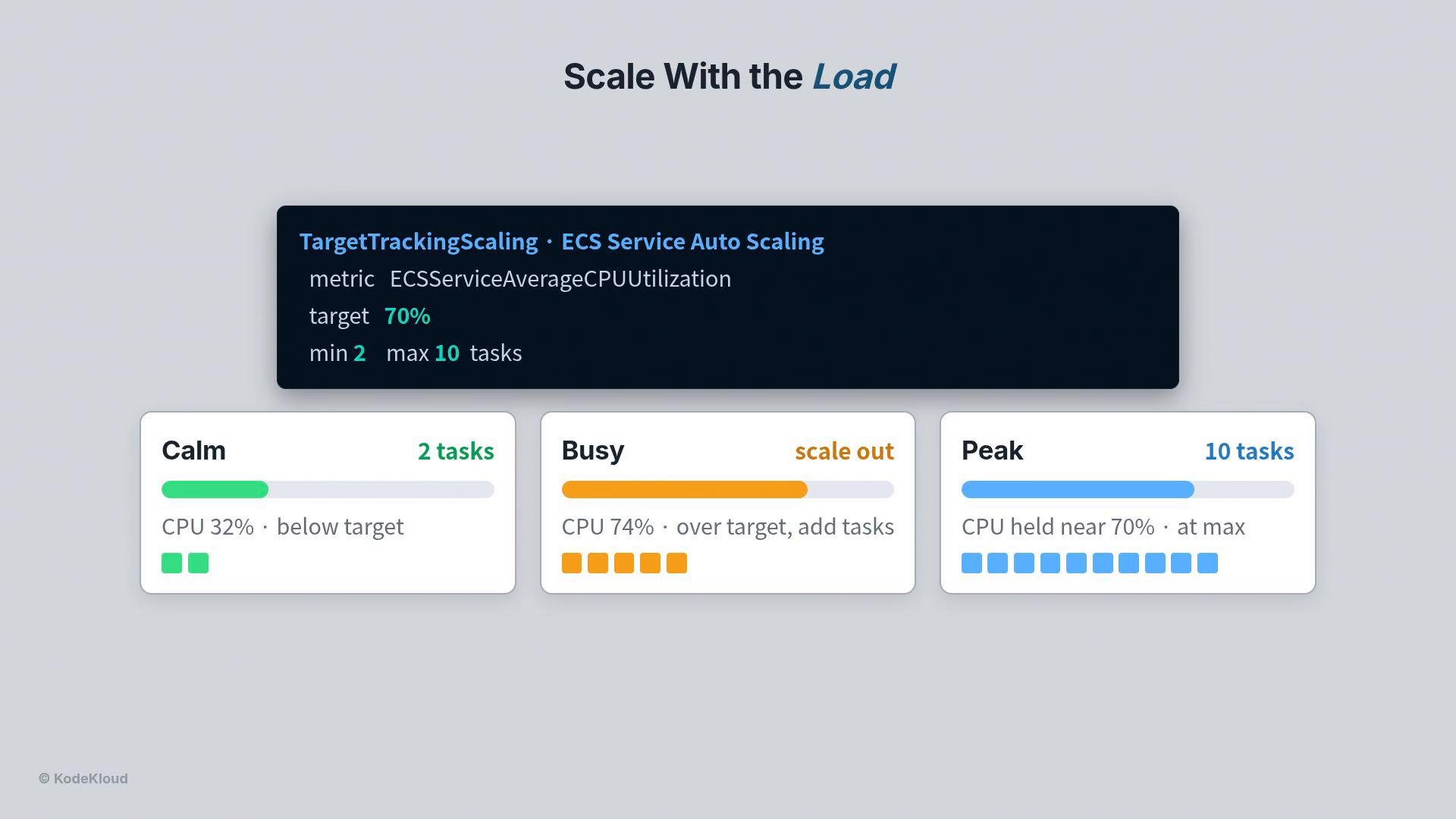 You don't pick exact task counts—AWS adjusts capacity to meet the objective and follow real traffic.
## Drift detection: Keep IaC and live infra aligned
* Manual edits during incidents cause drift, which leads to configuration sprawl and fragile environments.
* Run CloudFormation drift detection (for example via a lightweight CloudFormation MCP server) to compare live resources against your stack templates.
* Drifted resources are flagged so you can decide to incorporate the hand change into the template or revert the change.
Typical output:
* Resources that match the template: IN\_SYNC
* Resources that differ: DRIFTED
Example output from a simple drift detection run:
```bash theme={null}
$ python detect_drift.py
☒ cfn-mcp CloudFormation MCP server ready
☒ Bash aws cloudformation detect-stack-drift --stack-name prod-3tier
describe-stack-drift-detection-status → DETECTION_COMPLETE
ALB · web tier IN_SYNC
ECS service · app tier IN_SYNC
RDS instance · db tier IN_SYNC
Security group DRIFTED # port 22 opened by hand
StackDriftStatus: DRIFTED (1 of 4 resources)
```
Reference: CloudFormation drift detection — [https://docs.aws.amazon.com/AWSCloudFormation/latest/UserGuide/using-cfn-stack-drift.html](https://docs.aws.amazon.com/AWSCloudFormation/latest/UserGuide/using-cfn-stack-drift.html)
## Safe deployments: Make rollouts reversible
Never replace a running version blindly. Use deployment patterns and features that ensure a failed release does not cause downtime:
* Bring the new version up alongside the old version.
* Let the load balancer perform health checks on the new tasks.
* Only shift traffic after the new tasks are healthy.
* If a deployment fails, ECS’s deployment circuit breaker can halt the rollout and automatically roll back.
* The old version continues serving users until the new version is verified.
Example CLI to enable ECS deployment circuit breaker and safe deployment parameters:
```bash theme={null}
aws ecs update-service \
--deployment-configuration deploymentCircuitBreaker={enable=true,rollback=true} \
--maximumPercent 200 \
--minimumHealthyPercent 100
```
Always test deployment behavior in a staging environment that mirrors production health checks and scaling behavior before applying to production.
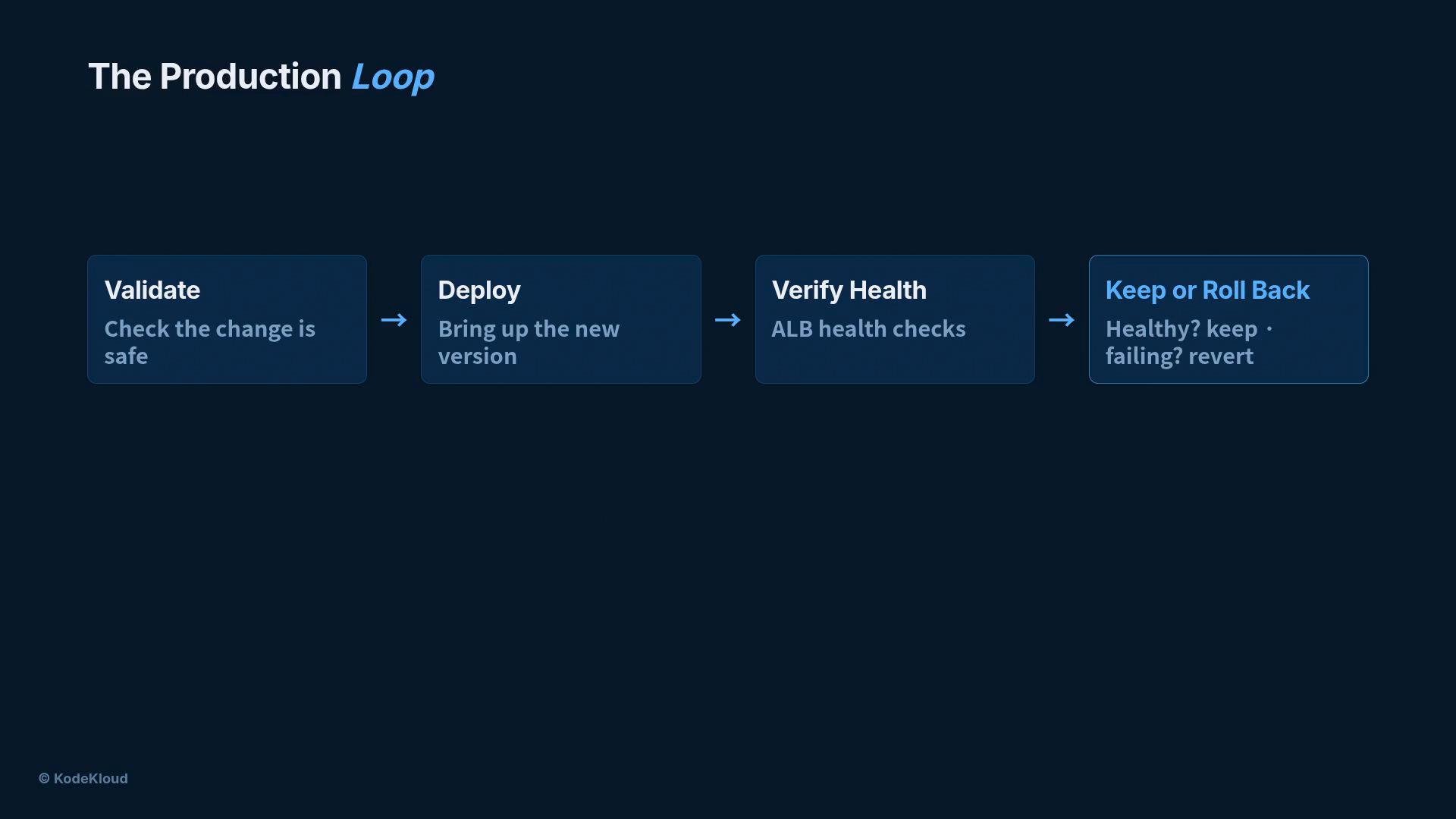
### The production loop
Every change should follow a short, repeatable loop:
1. Validate the change (safety checks, policy, automated tests).
2. Deploy safely (bring up new tasks alongside the old version).
3. Verify health with real checks (ALB health checks and application-level probes).
4. Keep the change if healthy, or roll back if not.
You don't pick exact task counts—AWS adjusts capacity to meet the objective and follow real traffic.
## Drift detection: Keep IaC and live infra aligned
* Manual edits during incidents cause drift, which leads to configuration sprawl and fragile environments.
* Run CloudFormation drift detection (for example via a lightweight CloudFormation MCP server) to compare live resources against your stack templates.
* Drifted resources are flagged so you can decide to incorporate the hand change into the template or revert the change.
Typical output:
* Resources that match the template: IN\_SYNC
* Resources that differ: DRIFTED
Example output from a simple drift detection run:
```bash theme={null}
$ python detect_drift.py
☒ cfn-mcp CloudFormation MCP server ready
☒ Bash aws cloudformation detect-stack-drift --stack-name prod-3tier
describe-stack-drift-detection-status → DETECTION_COMPLETE
ALB · web tier IN_SYNC
ECS service · app tier IN_SYNC
RDS instance · db tier IN_SYNC
Security group DRIFTED # port 22 opened by hand
StackDriftStatus: DRIFTED (1 of 4 resources)
```
Reference: CloudFormation drift detection — [https://docs.aws.amazon.com/AWSCloudFormation/latest/UserGuide/using-cfn-stack-drift.html](https://docs.aws.amazon.com/AWSCloudFormation/latest/UserGuide/using-cfn-stack-drift.html)
## Safe deployments: Make rollouts reversible
Never replace a running version blindly. Use deployment patterns and features that ensure a failed release does not cause downtime:
* Bring the new version up alongside the old version.
* Let the load balancer perform health checks on the new tasks.
* Only shift traffic after the new tasks are healthy.
* If a deployment fails, ECS’s deployment circuit breaker can halt the rollout and automatically roll back.
* The old version continues serving users until the new version is verified.
Example CLI to enable ECS deployment circuit breaker and safe deployment parameters:
```bash theme={null}
aws ecs update-service \
--deployment-configuration deploymentCircuitBreaker={enable=true,rollback=true} \
--maximumPercent 200 \
--minimumHealthyPercent 100
```
Always test deployment behavior in a staging environment that mirrors production health checks and scaling behavior before applying to production.
### The production loop
Every change should follow a short, repeatable loop:
1. Validate the change (safety checks, policy, automated tests).
2. Deploy safely (bring up new tasks alongside the old version).
3. Verify health with real checks (ALB health checks and application-level probes).
4. Keep the change if healthy, or roll back if not.
 ## Put it all together
A production-hardened system includes:
* Secrets stored in `AWS Secrets Manager` and removed from plaintext artifacts.
* A web firewall (AWS WAF) protecting the edge.
* Tight task-role permissions (least privilege).
* Capacity that auto-scales with demand.
* Drift detection that surfaces manual changes immediately.
* Safe, reversible deployments that avoid downtime.
Production must survive the unexpected. Applying these focused, automated controls turns a demo into a resilient, production-ready system.
## Links & References
* AWS Secrets Manager: [https://docs.aws.amazon.com/secretsmanager/latest/userguide/intro.html](https://docs.aws.amazon.com/secretsmanager/latest/userguide/intro.html)
* ECS task definitions and secrets: [https://docs.aws.amazon.com/AmazonECS/latest/developerguide/task\_definitions.html](https://docs.aws.amazon.com/AmazonECS/latest/developerguide/task_definitions.html)
* AWS WAF web ACLs: [https://docs.aws.amazon.com/waf/latest/developerguide/web-acl.html](https://docs.aws.amazon.com/waf/latest/developerguide/web-acl.html)
* ECS Service Auto Scaling: [https://docs.aws.amazon.com/AmazonECS/latest/developerguide/service-auto-scaling.html](https://docs.aws.amazon.com/AmazonECS/latest/developerguide/service-auto-scaling.html)
* CloudFormation drift detection: [https://docs.aws.amazon.com/AWSCloudFormation/latest/UserGuide/using-cfn-stack-drift.html](https://docs.aws.amazon.com/AWSCloudFormation/latest/UserGuide/using-cfn-stack-drift.html)
This documentation is built and hosted on [Mintlify](https://mintlify.com), a developer documentation platform.
## Put it all together
A production-hardened system includes:
* Secrets stored in `AWS Secrets Manager` and removed from plaintext artifacts.
* A web firewall (AWS WAF) protecting the edge.
* Tight task-role permissions (least privilege).
* Capacity that auto-scales with demand.
* Drift detection that surfaces manual changes immediately.
* Safe, reversible deployments that avoid downtime.
Production must survive the unexpected. Applying these focused, automated controls turns a demo into a resilient, production-ready system.
## Links & References
* AWS Secrets Manager: [https://docs.aws.amazon.com/secretsmanager/latest/userguide/intro.html](https://docs.aws.amazon.com/secretsmanager/latest/userguide/intro.html)
* ECS task definitions and secrets: [https://docs.aws.amazon.com/AmazonECS/latest/developerguide/task\_definitions.html](https://docs.aws.amazon.com/AmazonECS/latest/developerguide/task_definitions.html)
* AWS WAF web ACLs: [https://docs.aws.amazon.com/waf/latest/developerguide/web-acl.html](https://docs.aws.amazon.com/waf/latest/developerguide/web-acl.html)
* ECS Service Auto Scaling: [https://docs.aws.amazon.com/AmazonECS/latest/developerguide/service-auto-scaling.html](https://docs.aws.amazon.com/AmazonECS/latest/developerguide/service-auto-scaling.html)
* CloudFormation drift detection: [https://docs.aws.amazon.com/AWSCloudFormation/latest/UserGuide/using-cfn-stack-drift.html](https://docs.aws.amazon.com/AWSCloudFormation/latest/UserGuide/using-cfn-stack-drift.html)
This documentation is built and hosted on [Mintlify](https://mintlify.com), a developer documentation platform.