> ## Documentation Index
> Fetch the complete documentation index at: https://notes.kodekloud.com/llms.txt
> Use this file to discover all available pages before exploring further.
# Foundations of Agentic AI with the Claude Agent SDK
> Guide to building and running agentic AI with the Claude Agent SDK, explaining the agent loop, streaming tool execution, configuration, security, and an AWS example
Build your first agent with the Claude Agent SDK and see how an AI that talks becomes an AI that does.
You've used chatbots: you type a question and get an answer. A chatbot is useful for explanations and drafting text, but it cannot act on your environment. An agent is different: it can run commands, read and write files, and use tools on its own to complete tasks from start to finish. The key difference is not a “smarter” model — it’s that the agent has hands. Ask an agent what’s in your folder and it will run the command, read the output, and tell you what it finds.
How does an agent actually get work done? Through a repeating cycle called the agent loop.
* Think: the agent parses your instruction and plans the next step.
* Act: the agent chooses a tool (e.g., Bash, Read, Write) and the SDK runs it.
* Observe: the agent inspects the tool’s output.
* Decide: determine if the job is complete or if the loop repeats.
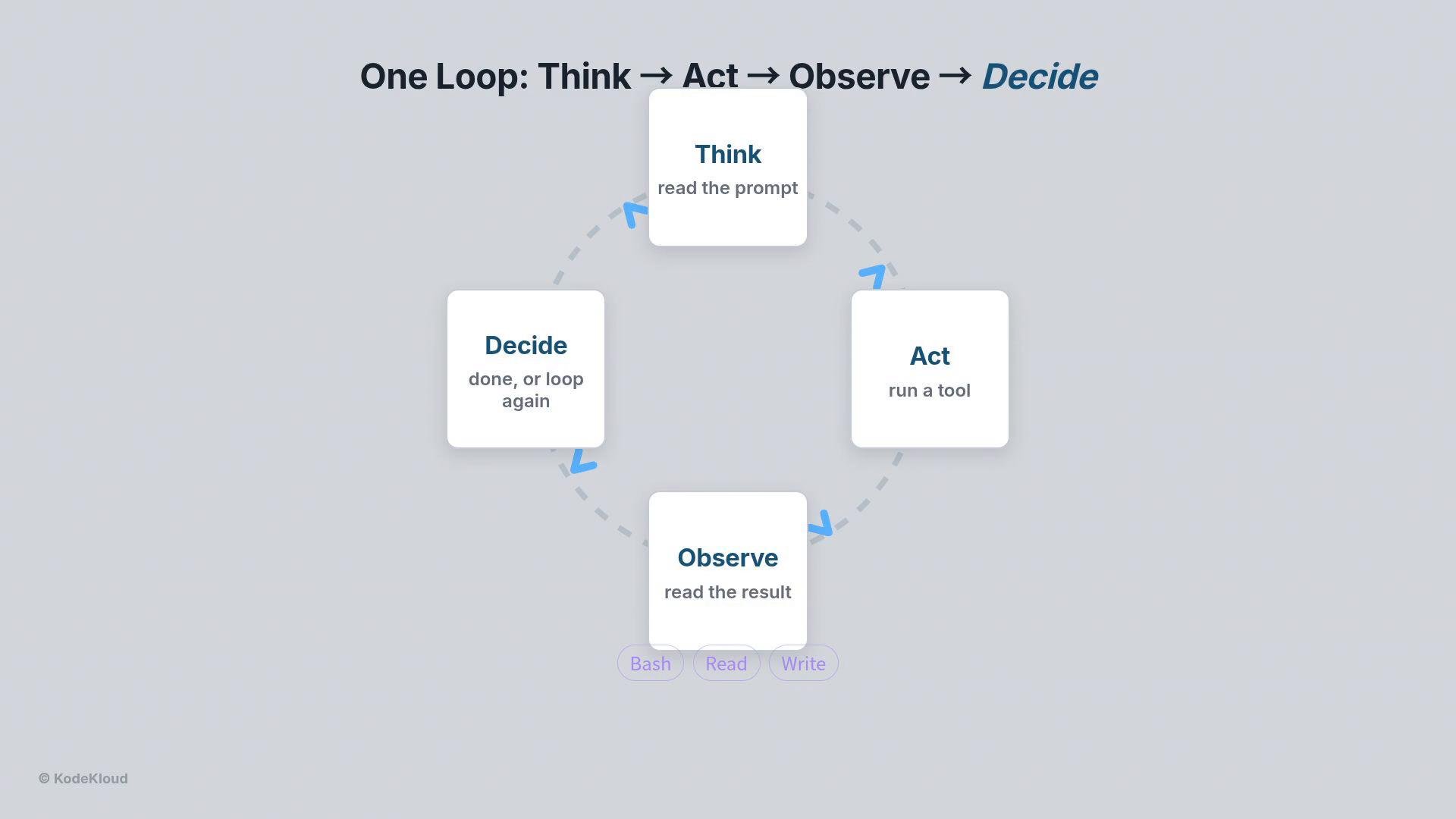 You never write this loop yourself when using the Claude Agent SDK — it runs inside the library. The SDK streams each step back to you as structured messages so you can inspect and debug the agent in real time.
Why use the SDK instead of calling the raw API?
* Less boilerplate: the SDK manages message history and tool execution.
* Built-in tooling: automatic tool invocation and secure whitelisting.
* Streaming: inspect decision steps as they happen.
* Cost & performance tracking: summary stats are returned at the end of every run.
Quick streaming example (the loop, tools, and cost/perf tracking are handled by the SDK):
```python theme={null}
# the loop, tools, streaming, cost — built in
import asyncio
from claude_agent_sdk import query
async def run(prompt, options):
async for m in query(prompt, options):
print(m)
# In real use, call asyncio.run(run(prompt, options))
```
Agent configuration and common imports
You typically import these four items from the SDK:
* `query`: runs a single agent turn and streams structured messages.
* `ClaudeAgentOptions`: configuration object for the agent.
* `AssistantMessage`: container for the assistant’s content and reasoning.
* `TextBlock`: text content within assistant messages.
Also commonly used: `asyncio` for asynchronous execution and `os` for environment variables.
Configure the agent by constructing a `ClaudeAgentOptions` object. The most important fields:
| Field | Purpose | Example |
| - | - | - |
| `env` | Credentials and environment variables the agent needs | `{"ANTHROPIC_API_KEY": os.getenv("ANTHROPIC_API_KEY")}` |
| `model` | Which Claude model to use | `"claude-sonnet-4-6"` |
| `allowed_tools` | Security whitelist of tools the agent may invoke | `["Bash"]` |
| `permission_mode` | How the agent should treat tool permissions | `"acceptEdits"` (auto-run whitelisted tools) |
Setting `permission_mode="acceptEdits"` allows the agent to execute whitelisted tools without prompting each time. Use this in trusted automation contexts only.
A minimal, complete example that streams the assistant's textual response blocks:
```python theme={null}
import asyncio
import os
from claude_agent_sdk import (
query,
ClaudeAgentOptions,
AssistantMessage,
TextBlock,
)
# Configure the agent
options = ClaudeAgentOptions(
env={"ANTHROPIC_API_KEY": os.getenv("ANTHROPIC_API_KEY")},
model="claude-sonnet-4-6",
allowed_tools=["Bash"], # safety whitelist
permission_mode="acceptEdits",
)
# A simple plain-English task
prompt = "Use the Bash tool to run `aws sts get-caller-identity` and show me the AWS account information."
async def main():
# query is asynchronous and streams structured messages
async for message in query(prompt, options):
# Filter for the assistant's content and print text blocks
if isinstance(message, AssistantMessage):
for block in message.content:
if isinstance(block, TextBlock):
print(block.text)
# Run the async main function
asyncio.run(main())
```
Understanding the streaming message types
Because `query` streams structured messages rather than returning one string, you’ll receive different message types during a run. Inspect these types to follow the agent loop and debug:
| Message Type | Purpose | Example contents |
| - | - | - |
| AssistantMessage | Agent reasoning, plan, and textual output | Text blocks and structured content (`TextBlock`) |
| ToolUseBlock | The agent’s decision to invoke a tool; the SDK will run it | Shows which tool and the arguments/command |
| SystemMessage | Logs, status updates, and error messages | Runtime logs or error traces |
| ResultMessage | Final summary of the run with performance and cost | Duration, cost, token counts, and final text |
You never write this loop yourself when using the Claude Agent SDK — it runs inside the library. The SDK streams each step back to you as structured messages so you can inspect and debug the agent in real time.
Why use the SDK instead of calling the raw API?
* Less boilerplate: the SDK manages message history and tool execution.
* Built-in tooling: automatic tool invocation and secure whitelisting.
* Streaming: inspect decision steps as they happen.
* Cost & performance tracking: summary stats are returned at the end of every run.
Quick streaming example (the loop, tools, and cost/perf tracking are handled by the SDK):
```python theme={null}
# the loop, tools, streaming, cost — built in
import asyncio
from claude_agent_sdk import query
async def run(prompt, options):
async for m in query(prompt, options):
print(m)
# In real use, call asyncio.run(run(prompt, options))
```
Agent configuration and common imports
You typically import these four items from the SDK:
* `query`: runs a single agent turn and streams structured messages.
* `ClaudeAgentOptions`: configuration object for the agent.
* `AssistantMessage`: container for the assistant’s content and reasoning.
* `TextBlock`: text content within assistant messages.
Also commonly used: `asyncio` for asynchronous execution and `os` for environment variables.
Configure the agent by constructing a `ClaudeAgentOptions` object. The most important fields:
| Field | Purpose | Example |
| - | - | - |
| `env` | Credentials and environment variables the agent needs | `{"ANTHROPIC_API_KEY": os.getenv("ANTHROPIC_API_KEY")}` |
| `model` | Which Claude model to use | `"claude-sonnet-4-6"` |
| `allowed_tools` | Security whitelist of tools the agent may invoke | `["Bash"]` |
| `permission_mode` | How the agent should treat tool permissions | `"acceptEdits"` (auto-run whitelisted tools) |
Setting `permission_mode="acceptEdits"` allows the agent to execute whitelisted tools without prompting each time. Use this in trusted automation contexts only.
A minimal, complete example that streams the assistant's textual response blocks:
```python theme={null}
import asyncio
import os
from claude_agent_sdk import (
query,
ClaudeAgentOptions,
AssistantMessage,
TextBlock,
)
# Configure the agent
options = ClaudeAgentOptions(
env={"ANTHROPIC_API_KEY": os.getenv("ANTHROPIC_API_KEY")},
model="claude-sonnet-4-6",
allowed_tools=["Bash"], # safety whitelist
permission_mode="acceptEdits",
)
# A simple plain-English task
prompt = "Use the Bash tool to run `aws sts get-caller-identity` and show me the AWS account information."
async def main():
# query is asynchronous and streams structured messages
async for message in query(prompt, options):
# Filter for the assistant's content and print text blocks
if isinstance(message, AssistantMessage):
for block in message.content:
if isinstance(block, TextBlock):
print(block.text)
# Run the async main function
asyncio.run(main())
```
Understanding the streaming message types
Because `query` streams structured messages rather than returning one string, you’ll receive different message types during a run. Inspect these types to follow the agent loop and debug:
| Message Type | Purpose | Example contents |
| - | - | - |
| AssistantMessage | Agent reasoning, plan, and textual output | Text blocks and structured content (`TextBlock`) |
| ToolUseBlock | The agent’s decision to invoke a tool; the SDK will run it | Shows which tool and the arguments/command |
| SystemMessage | Logs, status updates, and error messages | Runtime logs or error traces |
| ResultMessage | Final summary of the run with performance and cost | Duration, cost, token counts, and final text |
 That final ResultMessage is why cost and performance tracking come for free: the SDK includes those numbers automatically at the end of each run.
Concrete example: fetching AWS account information
Task: ask Claude to run the AWS CLI command `aws sts get-caller-identity` and summarize the account details. You simply provide a plain-English instruction and the agent handles planning, tool invocation, observation, and summarization.
Loop walkthrough:
1. Think — Claude decides it needs the Bash tool.
2. Act — Claude emits a ToolUseBlock instructing the SDK to run `aws sts get-caller-identity`.
3. Observe — the SDK runs the command and provides the JSON output to Claude.
4. Decide — Claude parses the JSON (account ID, user ID, ARN) and writes a clean summary.
You do not need to call the AWS SDK, parse JSON manually, or manage the loop: describe the goal and the agent executes it.
Security and operational notes
Do not hardcode credentials. Keep your API keys and AWS credentials in environment variables or a secure secrets manager. Only enable `permission_mode="acceptEdits"` in trusted environments where the listed `allowed_tools` are safe to run.
Next steps and extensibility
* Add more tools (e.g., Git, HTTP, file read/write) to `allowed_tools` to expand capabilities.
* Use richer prompts or system instructions to guide multi-step plans.
* Inspect `SystemMessage` logs and the `ResultMessage` summary to optimize cost and performance.
Links and references
* Claude Agent SDK: [https://www.anthropic.com/](https://www.anthropic.com/)
* AWS CLI `sts get-caller-identity`: [https://docs.aws.amazon.com/cli/latest/reference/sts/get-caller-identity.html](https://docs.aws.amazon.com/cli/latest/reference/sts/get-caller-identity.html)
* Kubernetes Basics: [https://kubernetes.io/docs/concepts/overview/what-is-kubernetes/](https://kubernetes.io/docs/concepts/overview/what-is-kubernetes/)
This article introduced the agent loop, how the Claude Agent SDK manages that loop for you, a minimal streaming example, and a concrete task example. From here you can iterate on prompts, add tools, and integrate agents into automation pipelines — the SDK handles the loop, streaming, and metrics for each run.
This documentation is built and hosted on [Mintlify](https://mintlify.com), a developer documentation platform.
That final ResultMessage is why cost and performance tracking come for free: the SDK includes those numbers automatically at the end of each run.
Concrete example: fetching AWS account information
Task: ask Claude to run the AWS CLI command `aws sts get-caller-identity` and summarize the account details. You simply provide a plain-English instruction and the agent handles planning, tool invocation, observation, and summarization.
Loop walkthrough:
1. Think — Claude decides it needs the Bash tool.
2. Act — Claude emits a ToolUseBlock instructing the SDK to run `aws sts get-caller-identity`.
3. Observe — the SDK runs the command and provides the JSON output to Claude.
4. Decide — Claude parses the JSON (account ID, user ID, ARN) and writes a clean summary.
You do not need to call the AWS SDK, parse JSON manually, or manage the loop: describe the goal and the agent executes it.
Security and operational notes
Do not hardcode credentials. Keep your API keys and AWS credentials in environment variables or a secure secrets manager. Only enable `permission_mode="acceptEdits"` in trusted environments where the listed `allowed_tools` are safe to run.
Next steps and extensibility
* Add more tools (e.g., Git, HTTP, file read/write) to `allowed_tools` to expand capabilities.
* Use richer prompts or system instructions to guide multi-step plans.
* Inspect `SystemMessage` logs and the `ResultMessage` summary to optimize cost and performance.
Links and references
* Claude Agent SDK: [https://www.anthropic.com/](https://www.anthropic.com/)
* AWS CLI `sts get-caller-identity`: [https://docs.aws.amazon.com/cli/latest/reference/sts/get-caller-identity.html](https://docs.aws.amazon.com/cli/latest/reference/sts/get-caller-identity.html)
* Kubernetes Basics: [https://kubernetes.io/docs/concepts/overview/what-is-kubernetes/](https://kubernetes.io/docs/concepts/overview/what-is-kubernetes/)
This article introduced the agent loop, how the Claude Agent SDK manages that loop for you, a minimal streaming example, and a concrete task example. From here you can iterate on prompts, add tools, and integrate agents into automation pipelines — the SDK handles the loop, streaming, and metrics for each run.
This documentation is built and hosted on [Mintlify](https://mintlify.com), a developer documentation platform.