> ## Documentation Index
> Fetch the complete documentation index at: https://notes.kodekloud.com/llms.txt
> Use this file to discover all available pages before exploring further.
# Mastering Claude Agent SDK Tools
> Guide to using the Claude Agent SDK tools to enable deterministic file discovery, safe edits, command execution, and reporting for automated, auditable infrastructure workflows.
Turn a single-command chatbot into a dependable automation agent by giving it a toolbox of deterministic tools. With the Claude Agent SDK, tools convert model reasoning into repeatable actions: discover what’s wrong, change files safely, run commands to validate behavior, and record results.
Earlier you had one tool — Bash. That lets an agent run one command and return output. Real projects require workflows: find files, inspect contents, make surgical edits, run validation, and produce a report. Tools let the model orchestrate those steps while the deterministic operations (file reads, edits, shell commands) do the exact work.
Example quick trace
```bash theme={null}
Grep "public-read" → main.tf:14
Edit main.tf (missing brace fixed)
Edit main.tf (set acl = "private")
Bash terraform validate → Success!
```
Why tools matter
* A chatbot without tools only describes changes.
* An agent with tools can inspect real files, perform exact edits, run commands, and save evidence — turning description into operation.
* The SDK's allowed-tools mechanism enforces least privilege: give the agent only the tools needed for each step.
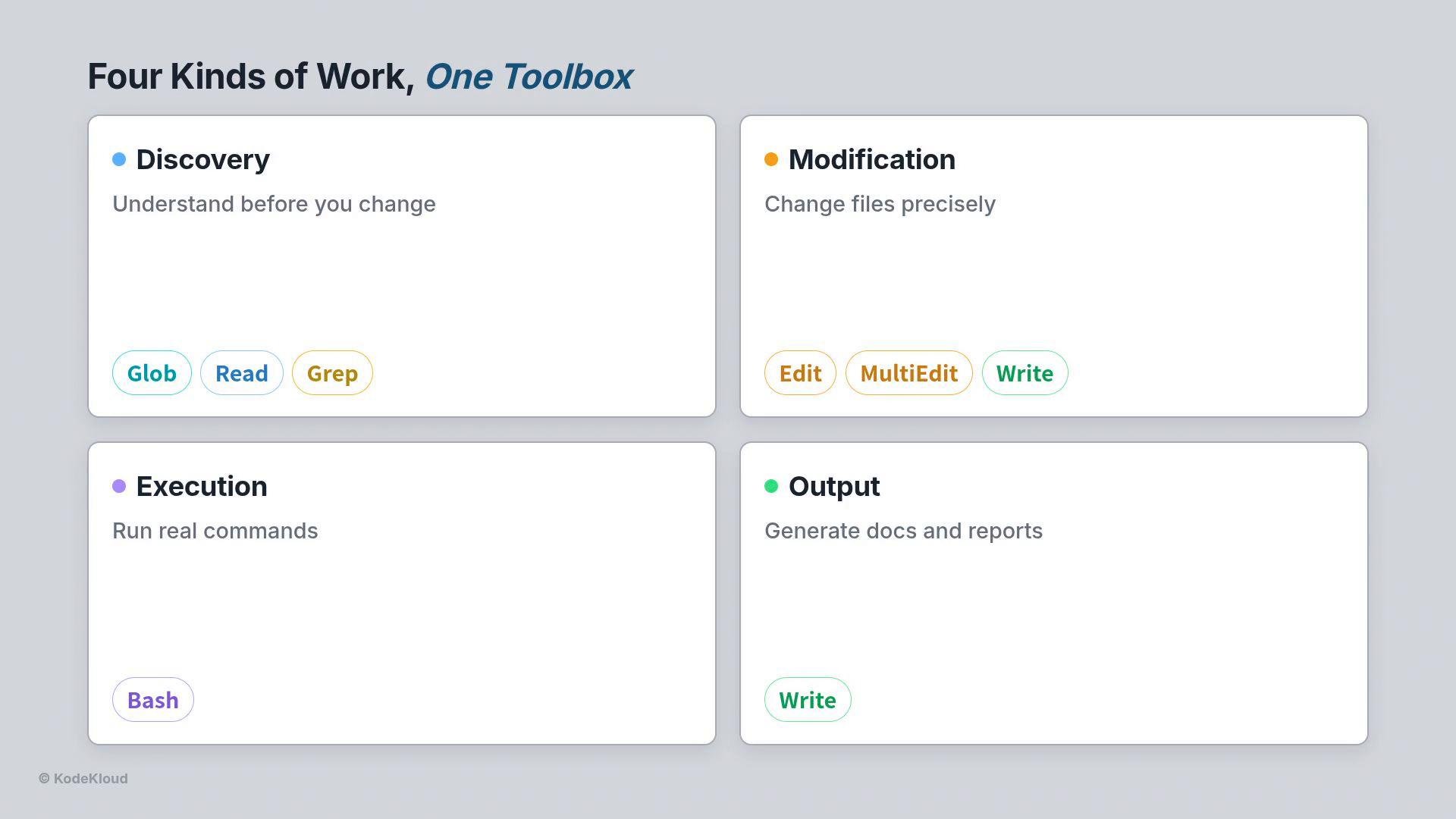
What tools do (four kinds of work)
* Discovery: find and read the project so the agent knows what to change.
* `Glob` — locate files by pattern.
* `Read` — open files with line numbers and partial reads for large files.
* `Grep` — search inside files and return matches with line numbers.
* Modification: edit or create files.
* `Edit` — one exact replacement; surgical and requires reading first.
* `MultiEdit` — apply a set of edits atomically (all succeed or none do).
* `Write` — create a new file from scratch.
* Execution:
* `Bash` — run shell commands (Terraform, AWS CLI, Git, tests).
* Output:
* `Write` — produce documentation, reports, or READMEs as final artifacts.
 How the agent gets access to tools
* Use an allowed tools list to control which tools are available for each step.
* Add a `cwd` option so every tool runs inside the correct project folder.
* This is a simple, strong safety control: a discovery step that only has `Read` and `Grep` cannot modify files.
Example options in Python
```python theme={null}
from claude_agent_sdk import ClaudeAgentOptions
options = ClaudeAgentOptions(
model="claude-sonnet-4-6",
allowed_tools=["Read", "Glob", "Grep"], # discovery only
permission_mode="acceptEdits",
cwd="/root/code/terraform-project", # run inside the project
)
```
Principle: Make production agents 99% deterministic and 1% reasoning. The model decides which tool to use and what to pass it (the 1%). The tools perform deterministic operations that don't hallucinate (the 99%): reading bytes from disk, returning grep matches with line numbers, and running the shell exactly as written.
Real example: fixing a broken Terraform project
1. Discover first
* `Glob` finds every `.tf` file in the folder.
* `Read` opens `main.tf` and shows a missing brace in a `lifecycle` block.
* `Grep` searches for risky settings (e.g., `public-read`) and returns matches with line numbers.
2. Plan edits
* Confirm the exact text to replace by reading the file (Edit requires an exact match).
* Decide whether changes are single-line fixes (`Edit`) or multiple related edits that must happen together (`MultiEdit`).
3. Make changes safely
* Use `Edit` for a precise, single replacement.
* Use `MultiEdit` when multiple updates must be atomic (for example, enabling encryption and versioning in the same commit).
Examples of edits
* Fix a stray missing brace in a `lifecycle` block:
```hcl theme={null}
lifecycle {
prevent_destroy = true
} # brace fixed
```
* Apply server-side encryption and enable versioning together (use `MultiEdit` so both changes land atomically):
```hcl theme={null}
server_side_encryption_configuration {
rule {
apply_server_side_encryption_by_default {
sse_algorithm = "AES256"
}
}
}
versioning {
enabled = true
}
```
When to use Edit vs MultiEdit
| Tool | Use case | Notes |
| - | - | - |
| `Edit` | Single targeted fixes | Requires exact text match — read the file first. |
| `MultiEdit` | Multiple related updates applied atomically | If one edit would fail, none are applied — prevents half-completed fixes. |
| `Write` | Create new artifacts (README, deployment report) | Use at the end to record findings and next steps. |
Validate and report — never auto-apply
* After edits, run `terraform validate` with `Bash`.
* Run `terraform plan` to produce a plan for human review.
* The agent should stop before `terraform apply`; leave the plan for a person to approve. This preserves professional Terraform workflow and safety.
Typical workflow (end-to-end)
* Discovery: `Glob`, `Read`, `Grep`.
* Fix: `Edit` and `MultiEdit`.
* Validate: `Bash` → `terraform validate` and `terraform plan`.
* Document: `Write` → deployment report or README.
* Human: review plan, then `terraform apply` manually.
Example run output
```bash theme={null}
$ python terraform_workflow.py
✓ Edit · MultiEdit main.tf → 3 errors fixed
✓ Bash: terraform validate
Success! The configuration is valid.
✓ Bash: terraform plan → 2 to add (bucket, versioning)
✓ Write deployment_report.txt - Safe to deploy
terraform apply ← stopped; a human reviews first
```
Best practices and safety controls
* Grant the least privilege: give the agent only the tools it needs per step.
* Always read before editing; `Edit` demands an exact match.
* Use `MultiEdit` for grouped changes so the repository never ends up in a half-broken state.
* Validate and plan automatically, but require human approval for apply/deploy stages.
* Keep `cwd` explicit so tools run inside the intended project directory.
References
* [Terraform Documentation](https://www.terraform.io/docs)
* [Anthropic Claude](https://www.anthropic.com)
This documentation is built and hosted on [Mintlify](https://mintlify.com), a developer documentation platform.
How the agent gets access to tools
* Use an allowed tools list to control which tools are available for each step.
* Add a `cwd` option so every tool runs inside the correct project folder.
* This is a simple, strong safety control: a discovery step that only has `Read` and `Grep` cannot modify files.
Example options in Python
```python theme={null}
from claude_agent_sdk import ClaudeAgentOptions
options = ClaudeAgentOptions(
model="claude-sonnet-4-6",
allowed_tools=["Read", "Glob", "Grep"], # discovery only
permission_mode="acceptEdits",
cwd="/root/code/terraform-project", # run inside the project
)
```
Principle: Make production agents 99% deterministic and 1% reasoning. The model decides which tool to use and what to pass it (the 1%). The tools perform deterministic operations that don't hallucinate (the 99%): reading bytes from disk, returning grep matches with line numbers, and running the shell exactly as written.
Real example: fixing a broken Terraform project
1. Discover first
* `Glob` finds every `.tf` file in the folder.
* `Read` opens `main.tf` and shows a missing brace in a `lifecycle` block.
* `Grep` searches for risky settings (e.g., `public-read`) and returns matches with line numbers.
2. Plan edits
* Confirm the exact text to replace by reading the file (Edit requires an exact match).
* Decide whether changes are single-line fixes (`Edit`) or multiple related edits that must happen together (`MultiEdit`).
3. Make changes safely
* Use `Edit` for a precise, single replacement.
* Use `MultiEdit` when multiple updates must be atomic (for example, enabling encryption and versioning in the same commit).
Examples of edits
* Fix a stray missing brace in a `lifecycle` block:
```hcl theme={null}
lifecycle {
prevent_destroy = true
} # brace fixed
```
* Apply server-side encryption and enable versioning together (use `MultiEdit` so both changes land atomically):
```hcl theme={null}
server_side_encryption_configuration {
rule {
apply_server_side_encryption_by_default {
sse_algorithm = "AES256"
}
}
}
versioning {
enabled = true
}
```
When to use Edit vs MultiEdit
| Tool | Use case | Notes |
| - | - | - |
| `Edit` | Single targeted fixes | Requires exact text match — read the file first. |
| `MultiEdit` | Multiple related updates applied atomically | If one edit would fail, none are applied — prevents half-completed fixes. |
| `Write` | Create new artifacts (README, deployment report) | Use at the end to record findings and next steps. |
Validate and report — never auto-apply
* After edits, run `terraform validate` with `Bash`.
* Run `terraform plan` to produce a plan for human review.
* The agent should stop before `terraform apply`; leave the plan for a person to approve. This preserves professional Terraform workflow and safety.
Typical workflow (end-to-end)
* Discovery: `Glob`, `Read`, `Grep`.
* Fix: `Edit` and `MultiEdit`.
* Validate: `Bash` → `terraform validate` and `terraform plan`.
* Document: `Write` → deployment report or README.
* Human: review plan, then `terraform apply` manually.
Example run output
```bash theme={null}
$ python terraform_workflow.py
✓ Edit · MultiEdit main.tf → 3 errors fixed
✓ Bash: terraform validate
Success! The configuration is valid.
✓ Bash: terraform plan → 2 to add (bucket, versioning)
✓ Write deployment_report.txt - Safe to deploy
terraform apply ← stopped; a human reviews first
```
Best practices and safety controls
* Grant the least privilege: give the agent only the tools it needs per step.
* Always read before editing; `Edit` demands an exact match.
* Use `MultiEdit` for grouped changes so the repository never ends up in a half-broken state.
* Validate and plan automatically, but require human approval for apply/deploy stages.
* Keep `cwd` explicit so tools run inside the intended project directory.
References
* [Terraform Documentation](https://www.terraform.io/docs)
* [Anthropic Claude](https://www.anthropic.com)
This documentation is built and hosted on [Mintlify](https://mintlify.com), a developer documentation platform.