> ## Documentation Index
> Fetch the complete documentation index at: https://notes.kodekloud.com/llms.txt
> Use this file to discover all available pages before exploring further.
# Prerequisites Bonus Video Lecture
> Introduction to Kyverno, a Kubernetes native policy engine that validates and mutates resources using CRDs to enforce governance and best practices
Hey everyone, it's Srinivas from KodeKloud. In this lesson we’ll learn about Kyverno — a Kubernetes-native policy engine that validates and mutates Kubernetes resources using familiar Kubernetes-style CRDs. Kyverno helps enforce organization policies (labels, image sources, resource limits, replica counts, network policies, etc.) so that resource creation and updates comply with governance and best practices.
We’ll cover:
* What Kyverno is
* How Kyverno works inside the API server admission flow
* Example policies (validation and mutation) and a short demo workflow
 ## Why use Kyverno?
Consider a simple Deployment manifest you might apply to a cluster:
```yaml theme={null}
apiVersion: apps/v1
kind: Deployment
metadata:
name: myapp
spec:
selector:
matchLabels:
app: myapp
template:
metadata:
labels:
app: myapp
spec:
containers:
- name: myapp
image: nginx
```
When you run `kubectl apply`, Kubernetes validates manifest syntax and authorizations, but it won't enforce organization-specific policies by default. Requiring labels, disallowing public registries, enforcing resource requests/limits, or rejecting `:latest` images manually is error-prone and hard to scale.
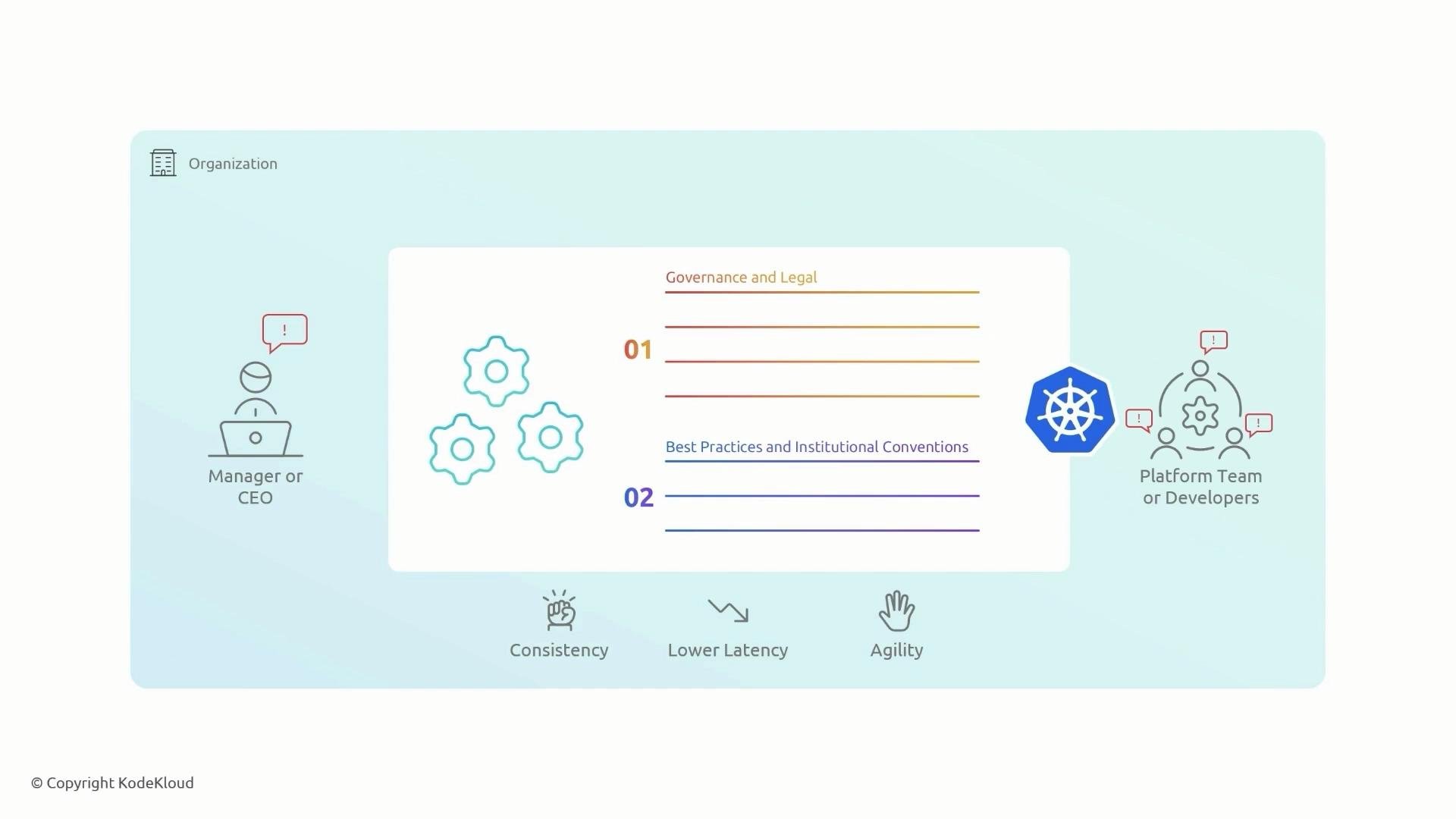
Automating policy enforcement with Kyverno ensures consistency, lowers developer feedback latency, and preserves compliance without slowing delivery.
## Why use Kyverno?
Consider a simple Deployment manifest you might apply to a cluster:
```yaml theme={null}
apiVersion: apps/v1
kind: Deployment
metadata:
name: myapp
spec:
selector:
matchLabels:
app: myapp
template:
metadata:
labels:
app: myapp
spec:
containers:
- name: myapp
image: nginx
```
When you run `kubectl apply`, Kubernetes validates manifest syntax and authorizations, but it won't enforce organization-specific policies by default. Requiring labels, disallowing public registries, enforcing resource requests/limits, or rejecting `:latest` images manually is error-prone and hard to scale.
Automating policy enforcement with Kyverno ensures consistency, lowers developer feedback latency, and preserves compliance without slowing delivery.
 ## Common policy examples
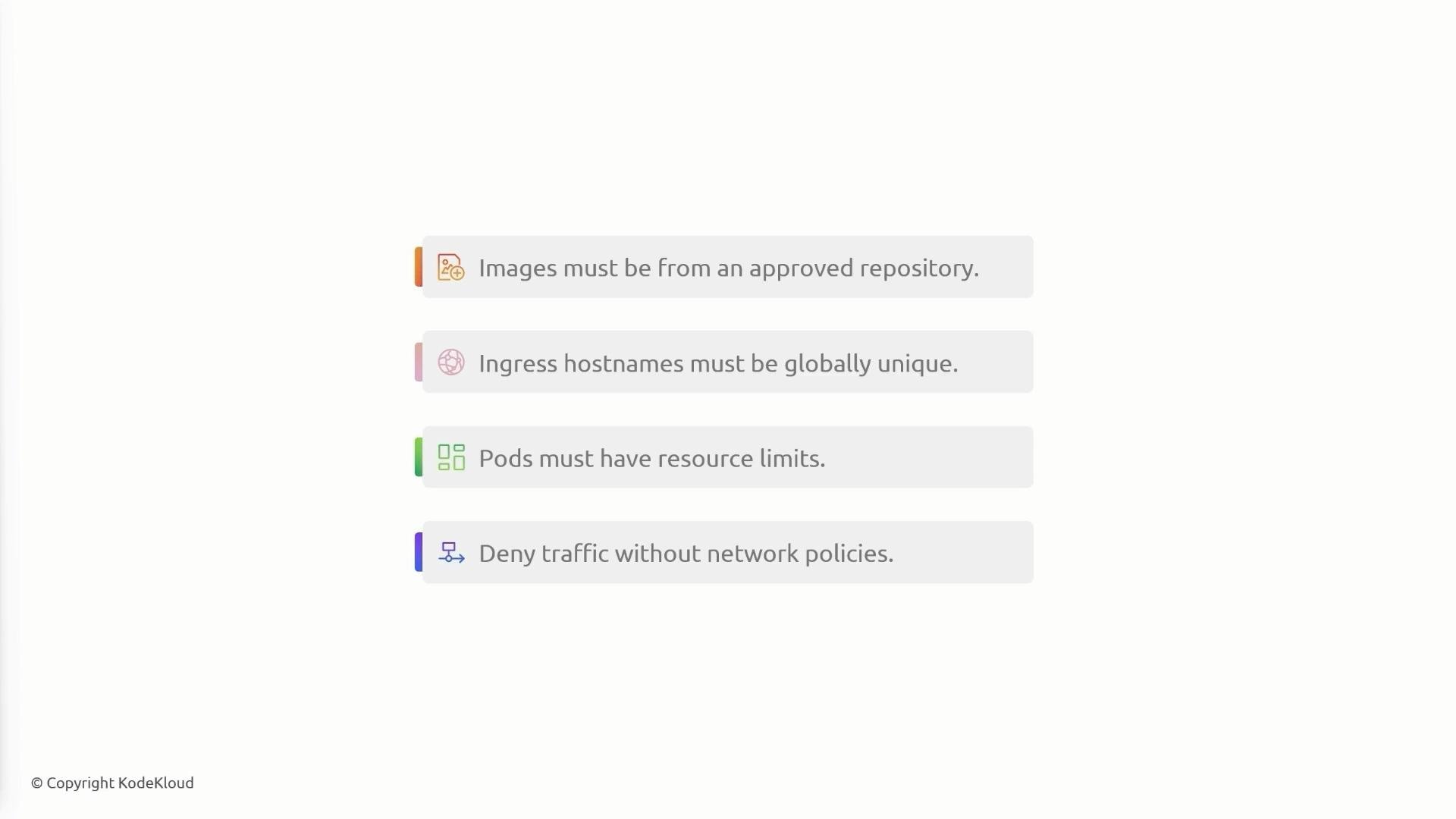
Below are typical policies organizations enforce via Kyverno:
| Policy intent | Target resource | Example pattern |
| ---------------------------------------------- | ---------------- | ------------------------------------------------------ |
| Require images from an approved registry | Pods/Deployments | `kodekloud.io/*` |
| Ensure globally unique Ingress hostnames | Ingress | (match host uniqueness via custom logic or validation) |
| Require resource requests/limits on containers | Pods/Deployments | validate `spec.containers[*].resources` |
| Deny traffic unless allowed by NetworkPolicy | Pods/Namespaces | deny when no NetworkPolicy applies |
You can adopt these examples to fit your environment (private registry prefix, minimum replicas, allowed namespaces, etc.).
## Common policy examples
Below are typical policies organizations enforce via Kyverno:
| Policy intent | Target resource | Example pattern |
| ---------------------------------------------- | ---------------- | ------------------------------------------------------ |
| Require images from an approved registry | Pods/Deployments | `kodekloud.io/*` |
| Ensure globally unique Ingress hostnames | Ingress | (match host uniqueness via custom logic or validation) |
| Require resource requests/limits on containers | Pods/Deployments | validate `spec.containers[*].resources` |
| Deny traffic unless allowed by NetworkPolicy | Pods/Namespaces | deny when no NetworkPolicy applies |
You can adopt these examples to fit your environment (private registry prefix, minimum replicas, allowed namespaces, etc.).
 ## Where Kyverno integrates with Kubernetes
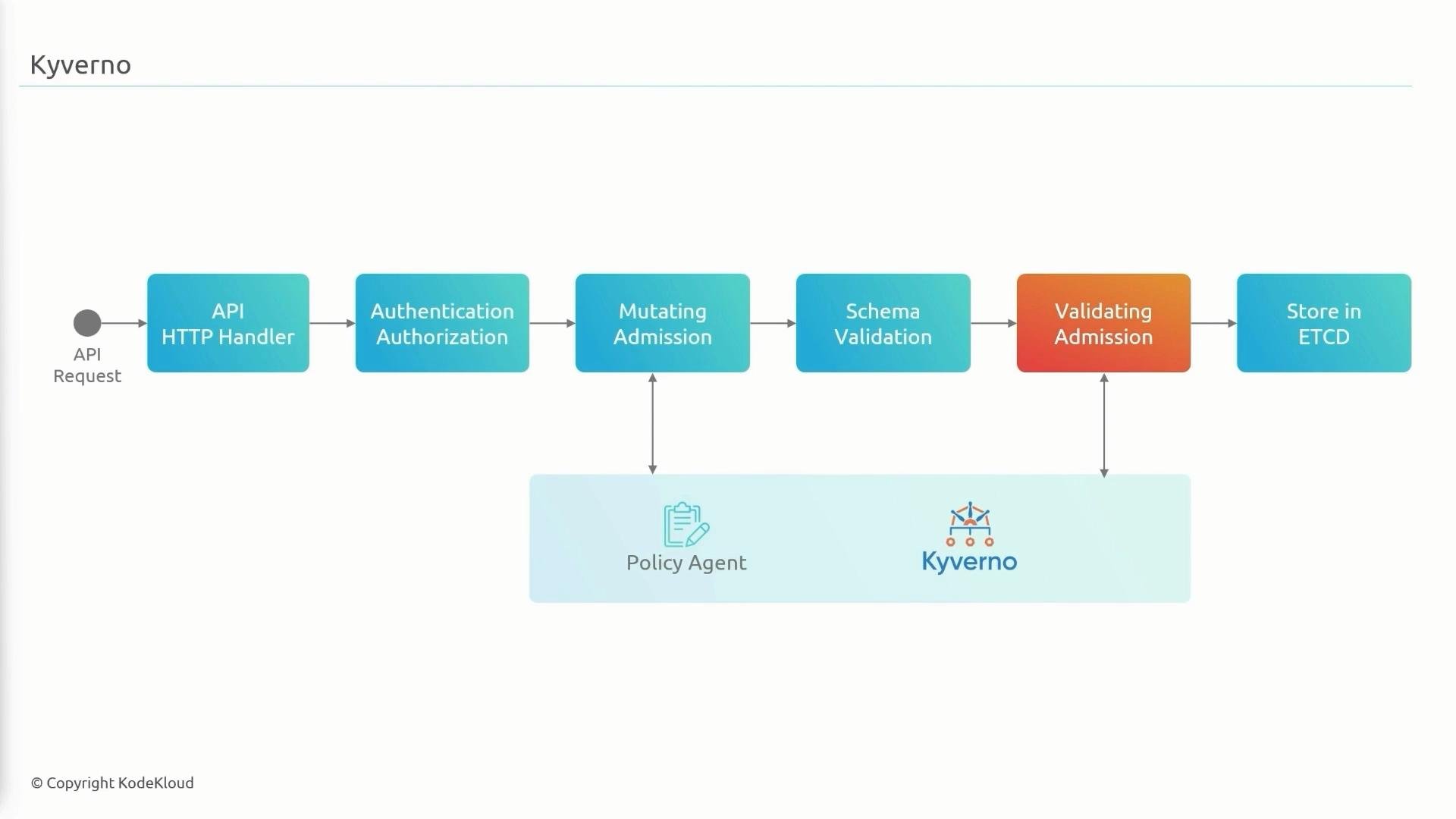
Incoming API requests pass through authentication and authorization, then the admission controller pipeline. Admission webhooks can mutate or validate requests before objects are persisted to etcd. Kyverno runs as an admission webhook (a third-party policy agent) and can perform mutations and validations in the mutating and validating admission stages.
If a request complies with Kyverno policies, the webhook allows it; otherwise it is denied or logged (depending on policy action).
## Where Kyverno integrates with Kubernetes
Incoming API requests pass through authentication and authorization, then the admission controller pipeline. Admission webhooks can mutate or validate requests before objects are persisted to etcd. Kyverno runs as an admission webhook (a third-party policy agent) and can perform mutations and validations in the mutating and validating admission stages.
If a request complies with Kyverno policies, the webhook allows it; otherwise it is denied or logged (depending on policy action).
 ## Installing Kyverno
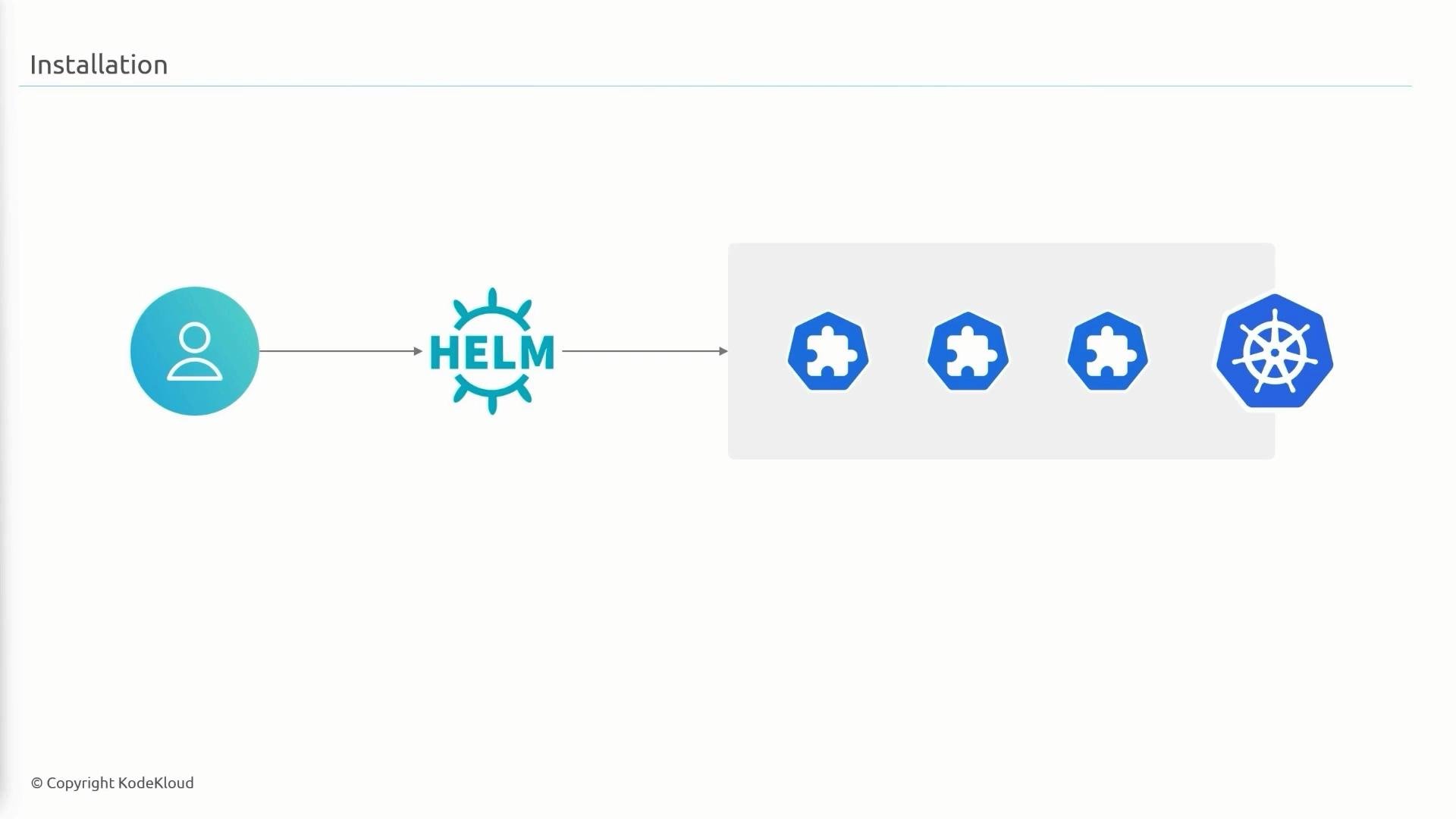
Kyverno is distributed via Helm. Installing creates the necessary CustomResourceDefinitions (CRDs) and deploys Kyverno controllers plus the admission webhook.
Add the Helm repo, refresh, and inspect the chart:
```bash theme={null}
helm repo add kyverno https://kyverno.github.io/kyverno/
helm repo update
helm search repo kyverno -l
```
A straightforward install (adjust replica counts for HA):
```bash theme={null}
helm install kyverno kyverno/kyverno -n kyverno --create-namespace \
--set admissionController.replicas=3 \
--set backgroundController.replicas=2 \
--set cleanupController.replicas=2 \
--set reportsController.replicas=2
```
Verify the Kyverno CRDs:
```bash theme={null}
kubectl get crd | grep kyverno
```
Kyverno also provides an optional chart that ships pre-configured policies implementing the Kubernetes Pod Security Standards:
```bash theme={null}
helm install kyverno-policies kyverno/kyverno-policies -n kyverno
```
## Policy basics (CRDs and actions)
Kyverno introduces CRDs such as `ClusterPolicy` and `Policy`. Policies can:
* Validate requests (deny or audit violations).
* Mutate requests before admission.
* Generate reports.
Use `validationFailureAction` to control enforcement:
Set `validationFailureAction` to `Enforce` to deny non-compliant requests, or `Audit` to allow requests but record violations for reporting.
### Example 1 — Require a `team` label on Deployments
ClusterPolicy that enforces a non-empty `team` label on Deployments:
```yaml theme={null}
apiVersion: kyverno.io/v1
kind: ClusterPolicy
metadata:
name: require-deployment-team-label
spec:
validationFailureAction: Enforce
rules:
- name: require-deployment-team-label
match:
any:
- resources:
kinds:
- Deployment
validate:
message: "You must have label `team` for all deployments"
pattern:
metadata:
labels:
team: "?*"
```
Key points:
* `match` targets resource kinds (here: `Deployment`).
* `validate.message` is returned when the rule is violated.
* The pattern `team: "?*"` requires a non-empty string for the `team` label.
Apply the policy and verify:
```bash theme={null}
kubectl apply -f label-policy.yaml
kubectl get clusterpolicy
```
Creating a Deployment without the `team` label will be denied by Kyverno’s admission webhook:
```bash theme={null}
kubectl apply -f deployment.yaml
# Example webhook response:
# admission webhook "validate.kyverno.svc" denied the request:
# resource Deployment/default/nginx-deployment was blocked due to the following policies
# require-deployment-team-label:
# require-deployment-team-label: 'validation error: You must have label `team` for all deployments. rule require-deployment-team-label failed at path /metadata/labels/team/'
```
Add `labels: { team: frontend }` to succeed.
### Example 2 — Minimum replicas validation
Require at least 3 replicas for Deployments:
```yaml theme={null}
apiVersion: kyverno.io/v1
kind: ClusterPolicy
metadata:
name: minimum-replicas
spec:
validationFailureAction: Enforce
rules:
- name: minimum-replicas
match:
any:
- resources:
kinds:
- Deployment
validate:
message: "Deployment must specify at least 3 replicas"
pattern:
spec:
replicas: ">=3"
```
Kyverno evaluates `spec.replicas` and denies requests with replicas \< 3.
### Mutation example — set imagePullPolicy when image uses :latest
Kyverno can mutate incoming requests. Example: set `imagePullPolicy` when a container uses the `:latest` tag:
```yaml theme={null}
apiVersion: kyverno.io/v1
kind: ClusterPolicy
metadata:
name: set-image-pull-policy
spec:
rules:
- name: set-image-pull-policy
match:
any:
- resources:
kinds:
- Pod
mutate:
patchStrategicMerge:
spec:
containers:
- (image): "*:latest"
imagePullPolicy: "IfNotPresent"
```
Notes:
* `mutate.patchStrategicMerge` merges values into the incoming object.
* The special key `(image): "*:latest"` matches container entries where `image` ends with `:latest` and sets `imagePullPolicy`.
## Demo workflow (commands)
1. Install Kyverno using the Helm commands above.
2. Create and apply example ClusterPolicy YAML files (labels, replicas, mutation).
3. Attempt to apply Deployments/Pods that violate policies to observe Kyverno denying them.
4. Switch `validationFailureAction` from `Audit` to `Enforce` after validating policy impact.
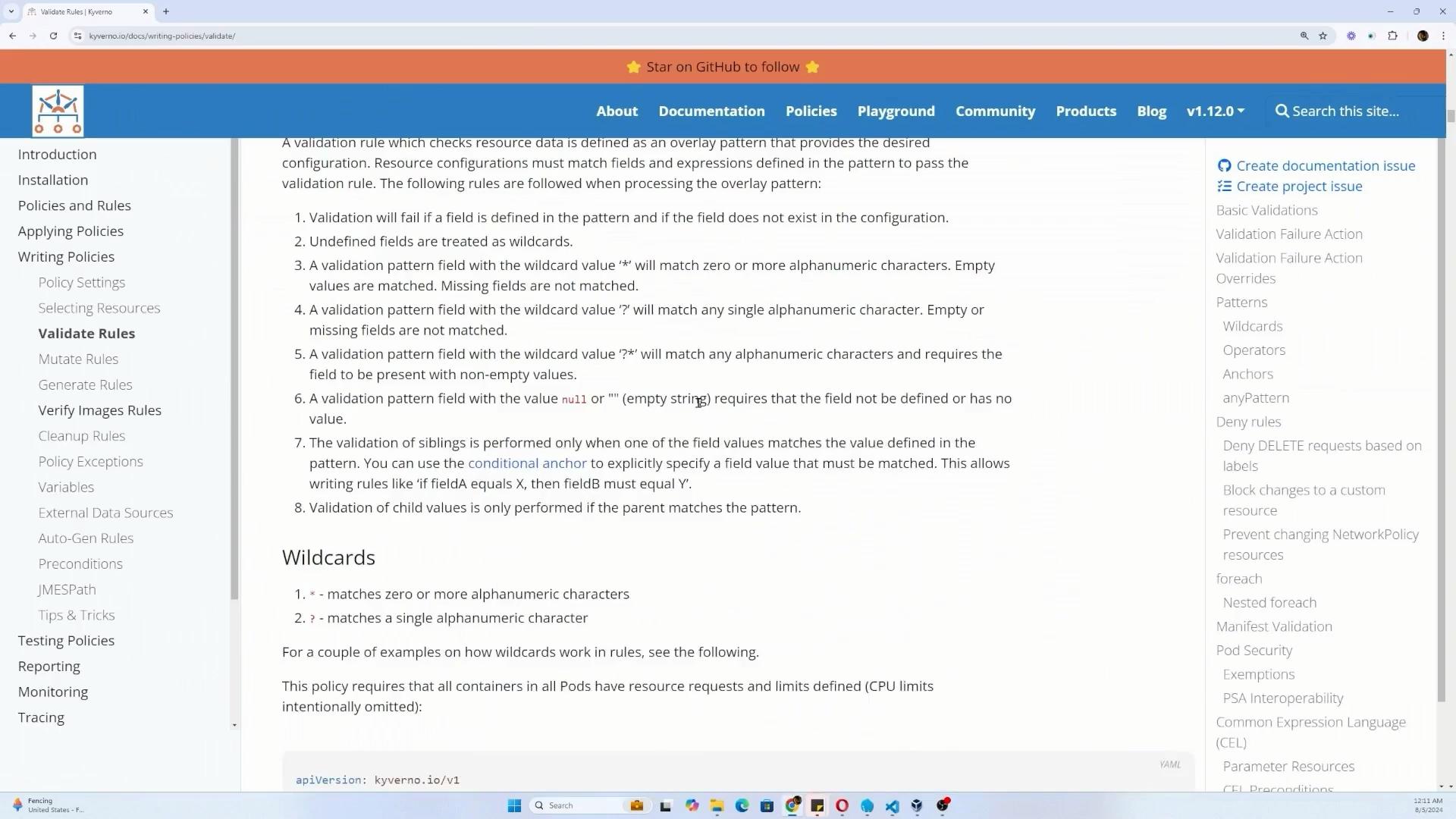
Kyverno documentation covers validate/mutate rules, wildcard patterns, strategic merge, and more. For pattern matching details see: [https://kyverno.io/docs/writing-policies/validate/](https://kyverno.io/docs/writing-policies/validate/)
## Installing Kyverno
Kyverno is distributed via Helm. Installing creates the necessary CustomResourceDefinitions (CRDs) and deploys Kyverno controllers plus the admission webhook.
Add the Helm repo, refresh, and inspect the chart:
```bash theme={null}
helm repo add kyverno https://kyverno.github.io/kyverno/
helm repo update
helm search repo kyverno -l
```
A straightforward install (adjust replica counts for HA):
```bash theme={null}
helm install kyverno kyverno/kyverno -n kyverno --create-namespace \
--set admissionController.replicas=3 \
--set backgroundController.replicas=2 \
--set cleanupController.replicas=2 \
--set reportsController.replicas=2
```
Verify the Kyverno CRDs:
```bash theme={null}
kubectl get crd | grep kyverno
```
Kyverno also provides an optional chart that ships pre-configured policies implementing the Kubernetes Pod Security Standards:
```bash theme={null}
helm install kyverno-policies kyverno/kyverno-policies -n kyverno
```
## Policy basics (CRDs and actions)
Kyverno introduces CRDs such as `ClusterPolicy` and `Policy`. Policies can:
* Validate requests (deny or audit violations).
* Mutate requests before admission.
* Generate reports.
Use `validationFailureAction` to control enforcement:
Set `validationFailureAction` to `Enforce` to deny non-compliant requests, or `Audit` to allow requests but record violations for reporting.
### Example 1 — Require a `team` label on Deployments
ClusterPolicy that enforces a non-empty `team` label on Deployments:
```yaml theme={null}
apiVersion: kyverno.io/v1
kind: ClusterPolicy
metadata:
name: require-deployment-team-label
spec:
validationFailureAction: Enforce
rules:
- name: require-deployment-team-label
match:
any:
- resources:
kinds:
- Deployment
validate:
message: "You must have label `team` for all deployments"
pattern:
metadata:
labels:
team: "?*"
```
Key points:
* `match` targets resource kinds (here: `Deployment`).
* `validate.message` is returned when the rule is violated.
* The pattern `team: "?*"` requires a non-empty string for the `team` label.
Apply the policy and verify:
```bash theme={null}
kubectl apply -f label-policy.yaml
kubectl get clusterpolicy
```
Creating a Deployment without the `team` label will be denied by Kyverno’s admission webhook:
```bash theme={null}
kubectl apply -f deployment.yaml
# Example webhook response:
# admission webhook "validate.kyverno.svc" denied the request:
# resource Deployment/default/nginx-deployment was blocked due to the following policies
# require-deployment-team-label:
# require-deployment-team-label: 'validation error: You must have label `team` for all deployments. rule require-deployment-team-label failed at path /metadata/labels/team/'
```
Add `labels: { team: frontend }` to succeed.
### Example 2 — Minimum replicas validation
Require at least 3 replicas for Deployments:
```yaml theme={null}
apiVersion: kyverno.io/v1
kind: ClusterPolicy
metadata:
name: minimum-replicas
spec:
validationFailureAction: Enforce
rules:
- name: minimum-replicas
match:
any:
- resources:
kinds:
- Deployment
validate:
message: "Deployment must specify at least 3 replicas"
pattern:
spec:
replicas: ">=3"
```
Kyverno evaluates `spec.replicas` and denies requests with replicas \< 3.
### Mutation example — set imagePullPolicy when image uses :latest
Kyverno can mutate incoming requests. Example: set `imagePullPolicy` when a container uses the `:latest` tag:
```yaml theme={null}
apiVersion: kyverno.io/v1
kind: ClusterPolicy
metadata:
name: set-image-pull-policy
spec:
rules:
- name: set-image-pull-policy
match:
any:
- resources:
kinds:
- Pod
mutate:
patchStrategicMerge:
spec:
containers:
- (image): "*:latest"
imagePullPolicy: "IfNotPresent"
```
Notes:
* `mutate.patchStrategicMerge` merges values into the incoming object.
* The special key `(image): "*:latest"` matches container entries where `image` ends with `:latest` and sets `imagePullPolicy`.
## Demo workflow (commands)
1. Install Kyverno using the Helm commands above.
2. Create and apply example ClusterPolicy YAML files (labels, replicas, mutation).
3. Attempt to apply Deployments/Pods that violate policies to observe Kyverno denying them.
4. Switch `validationFailureAction` from `Audit` to `Enforce` after validating policy impact.
Kyverno documentation covers validate/mutate rules, wildcard patterns, strategic merge, and more. For pattern matching details see: [https://kyverno.io/docs/writing-policies/validate/](https://kyverno.io/docs/writing-policies/validate/)
 ## Additional policy examples
* Deny `:latest` or require an explicit tag:
```yaml theme={null}
apiVersion: kyverno.io/v1
kind: ClusterPolicy
metadata:
name: no-latest-tag-policy
spec:
validationFailureAction: Enforce
rules:
- name: require-image-tag
match:
any:
- resources:
kinds:
- Pod
validate:
message: "Container image must include an explicit tag, e.g., image:nginx:1.23.0"
pattern:
spec:
containers:
- image: "*:*"
- name: disallow-latest-tag
match:
any:
- resources:
kinds:
- Pod
validate:
message: "Cannot use the `:latest` tag"
pattern:
spec:
containers:
- image: "!*:latest"
```
* Allow only images from a private registry (example uses `kodekloud.io`):
```yaml theme={null}
apiVersion: kyverno.io/v1
kind: ClusterPolicy
metadata:
name: deny-public-registries
spec:
validationFailureAction: Enforce
rules:
- name: allow-private-registry
match:
any:
- resources:
kinds:
- Pod
validate:
message: "Unknown image registry. Images must be pulled from kodekloud.io."
pattern:
spec:
containers:
- image: "kodekloud.io/*"
```
The pattern `kodekloud.io/*` enforces that the image string begins with the private registry prefix — replace with your registry (for example: `myregistry.internal/*`).
## Hands-on tips
* Start with `validationFailureAction: Audit` to measure impact before switching to `Enforce`.
* For lists like `containers`, Kyverno’s wildcard patterns and strategic merge keys (e.g., `(image)`) let you match items by key.
* Consider enabling Kyverno’s pre-configured Pod Security Standard policies to get a baseline. See Kubernetes Pod Security Standards: [https://kubernetes.io/docs/concepts/security/pod-security-standards/](https://kubernetes.io/docs/concepts/security/pod-security-standards/)
## Additional policy examples
* Deny `:latest` or require an explicit tag:
```yaml theme={null}
apiVersion: kyverno.io/v1
kind: ClusterPolicy
metadata:
name: no-latest-tag-policy
spec:
validationFailureAction: Enforce
rules:
- name: require-image-tag
match:
any:
- resources:
kinds:
- Pod
validate:
message: "Container image must include an explicit tag, e.g., image:nginx:1.23.0"
pattern:
spec:
containers:
- image: "*:*"
- name: disallow-latest-tag
match:
any:
- resources:
kinds:
- Pod
validate:
message: "Cannot use the `:latest` tag"
pattern:
spec:
containers:
- image: "!*:latest"
```
* Allow only images from a private registry (example uses `kodekloud.io`):
```yaml theme={null}
apiVersion: kyverno.io/v1
kind: ClusterPolicy
metadata:
name: deny-public-registries
spec:
validationFailureAction: Enforce
rules:
- name: allow-private-registry
match:
any:
- resources:
kinds:
- Pod
validate:
message: "Unknown image registry. Images must be pulled from kodekloud.io."
pattern:
spec:
containers:
- image: "kodekloud.io/*"
```
The pattern `kodekloud.io/*` enforces that the image string begins with the private registry prefix — replace with your registry (for example: `myregistry.internal/*`).
## Hands-on tips
* Start with `validationFailureAction: Audit` to measure impact before switching to `Enforce`.
* For lists like `containers`, Kyverno’s wildcard patterns and strategic merge keys (e.g., `(image)`) let you match items by key.
* Consider enabling Kyverno’s pre-configured Pod Security Standard policies to get a baseline. See Kubernetes Pod Security Standards: [https://kubernetes.io/docs/concepts/security/pod-security-standards/](https://kubernetes.io/docs/concepts/security/pod-security-standards/)
 ## Summary
Kyverno is a Kubernetes-native policy engine that integrates with the admission webhook pipeline to validate and mutate resources using native Kubernetes CRDs (`ClusterPolicy` and `Policy`). With Kyverno you can automate enforcement of labels, image registries and tags, resource constraints, replica counts, network controls, and more. Installing via Helm is simple, and Kyverno offers pre-built policy bundles for common best practices. Start with `Audit` mode to validate impact, then move to `Enforce` when ready.
Happy experimenting with Kyverno — it’s a practical way to automate policy enforcement across your cluster.
## Summary
Kyverno is a Kubernetes-native policy engine that integrates with the admission webhook pipeline to validate and mutate resources using native Kubernetes CRDs (`ClusterPolicy` and `Policy`). With Kyverno you can automate enforcement of labels, image registries and tags, resource constraints, replica counts, network controls, and more. Installing via Helm is simple, and Kyverno offers pre-built policy bundles for common best practices. Start with `Audit` mode to validate impact, then move to `Enforce` when ready.
Happy experimenting with Kyverno — it’s a practical way to automate policy enforcement across your cluster.