> ## Documentation Index
> Fetch the complete documentation index at: https://notes.kodekloud.com/llms.txt
> Use this file to discover all available pages before exploring further.
# Demo Claude Integration with MCP
> Guide to connecting Claude to MCP servers and desktop extensions, adding custom connectors, running MarkItDown to convert files to Markdown, and deployment and debugging tips
We already built MCP servers and a local server integrated with Claude successfully. This guide shows additional ways to connect Claude to MCP (Model Context Protocol) servers so you can automate day-to-day workflows — for example, converting documents to Markdown with a local connector.
Claude advertises that it "works with your favorite tools." From the Claude UI you can add connectors (Gmail, Google Drive, Linear, Square, Stripe, Zapier, and more) and grant the assistant access to reference or act on context from those apps.
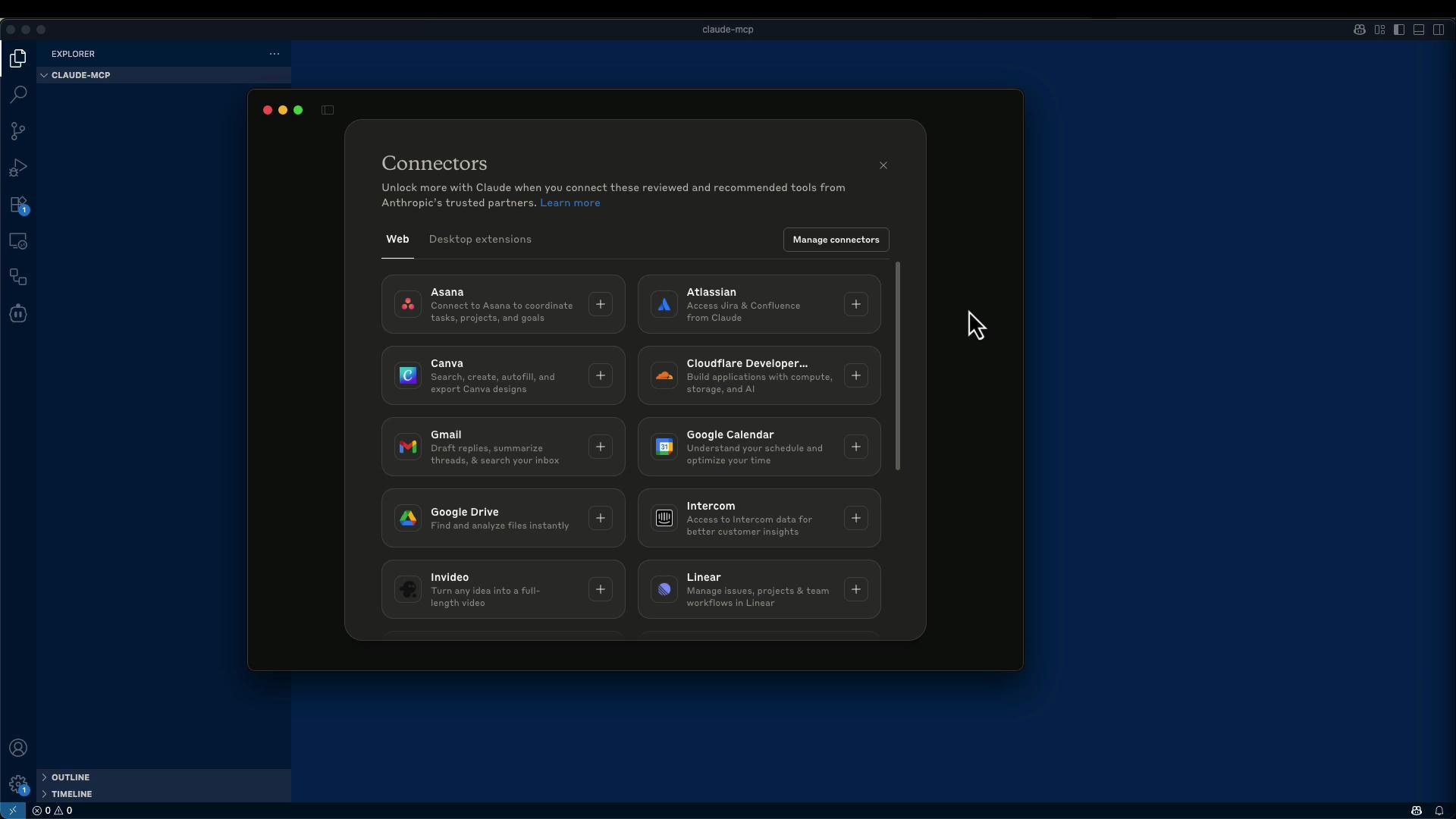 Claude also supports Desktop Extensions (local processes) that behave similarly to web connectors. The key distinction is:
* Web connectors → hosted HTTP MCP servers (accessible via URL).
* Desktop extensions → local processes running on your machine.
Claude also supports Desktop Extensions (local processes) that behave similarly to web connectors. The key distinction is:
* Web connectors → hosted HTTP MCP servers (accessible via URL).
* Desktop extensions → local processes running on your machine.
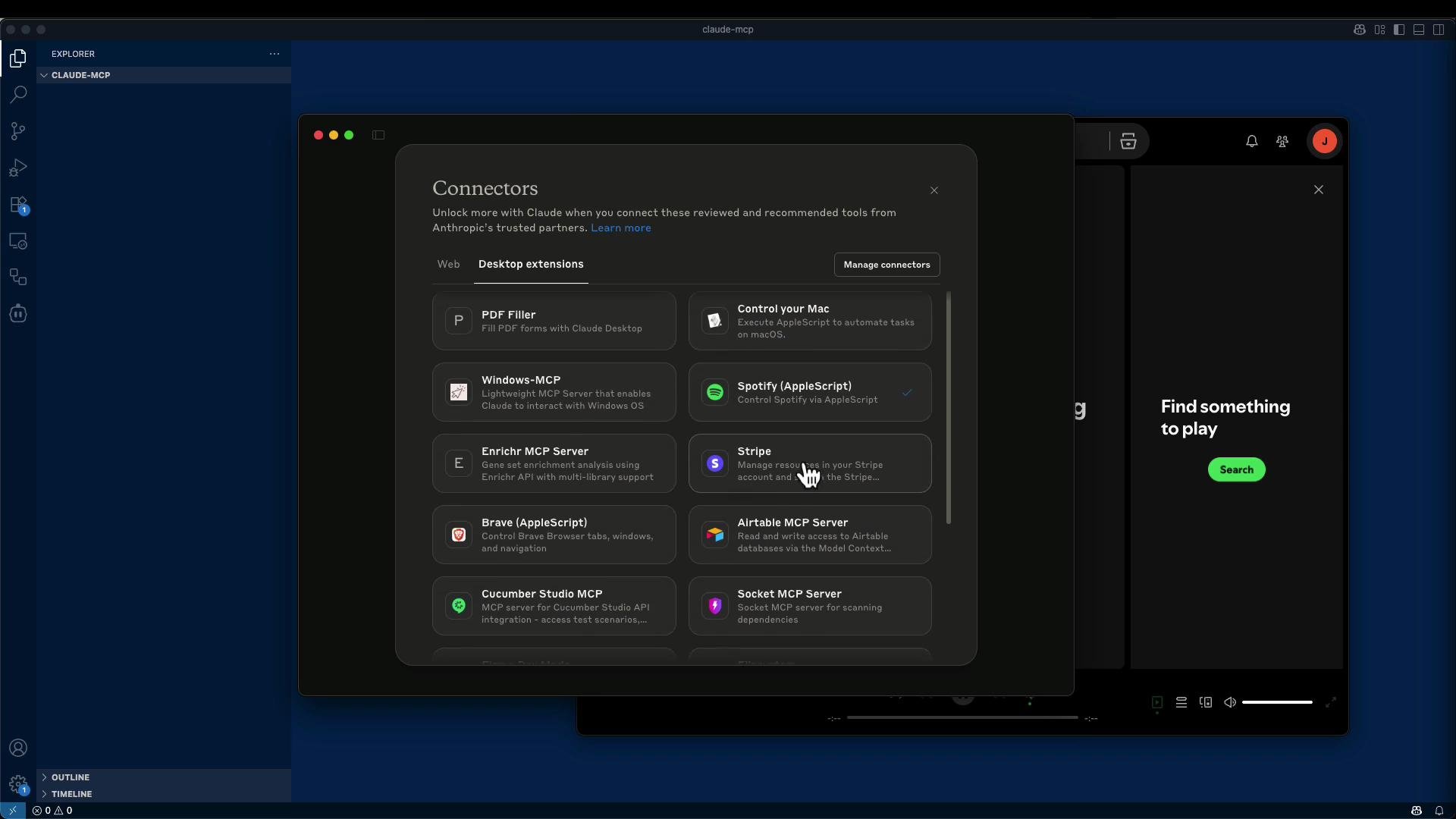 If a connector you need isn't listed, you can add a custom connector and point Claude to any MCP-compatible HTTP endpoint (local, on your network, or public).
Example: MarkItDown — a lightweight MCP server that converts documents to Markdown. You can install and run it locally (recommended inside a Python virtual environment) or run it in Docker.
Quick local install and run (recommended inside a venv)
```bash theme={null}
# create and activate a venv
python3 -m venv venv
source venv/bin/activate
# install the markitdown MCP package
pip install markitdown-mcp
# run an HTTP MCP server on localhost:3001
markitdown-mcp --http --host 127.0.0.1 --port 3001
```
Typical startup logs (representative):
```text theme={null}
INFO: Waiting for application startup.
StreamableHTTP session manager started
Application started with StreamableHTTP session manager!
INFO: Application startup complete.
INFO: Uvicorn running on http://127.0.0.1:3001 (Press CTRL+C to quit)
```
Docker-based usage and CLI configuration
If you prefer Docker, the MarkItDown README includes Docker instructions. Example Claude desktop MCP server configuration (JSON) that runs the MCP server in Docker:
```json theme={null}
{
"mcpServers": {
"markitdown": {
"command": "docker",
"args": [
"run",
"--rm",
"-i",
"markitdown-mcp:latest"
]
}
}
}
```
If you need to mount a work directory into the container, include a `-v` bind mount:
```json theme={null}
{
"mcpServers": {
"markitdown": {
"command": "docker",
"args": [
"run",
"--rm",
"-i",
"-v",
"/home/user/data:/workdir",
"markitdown-mcp:latest"
]
}
}
}
```
Build and run the Docker image locally:
```bash theme={null}
# build
docker build -t markitdown-mcp:latest .
# run interactively
docker run -it --rm markitdown-mcp:latest
# run with a mounted workdir
docker run -it --rm -v /home/user/data:/workdir markitdown-mcp:latest
```
Add a custom connector in Claude
1. Start your MCP server (example: `http://127.0.0.1:3001`).
2. In Claude go to Tools → Add connectors → Add custom connector.
3. Enter the MCP HTTP endpoint. Typical endpoints:
* Streamable HTTP: `http://127.0.0.1:3001/mcp`
* SSE: `http://127.0.0.1:3001/sse`
4. Confirm you trust the connector when prompted.
Once connected, upload a file in Claude and ask it to "Convert to Markdown." Claude will call your MCP server, which returns the converted Markdown content.
When adding a custom connector pointing to a local server, verify the MCP service is reachable at the URL you provide (correct host, port, and path). If you run behind a firewall or use a different network interface, update the host accordingly.
Inspector and developer tools
* Model Context Protocol (MCP) Inspector (npm): run `npx @modelcontextprotocol/inspector` and open `http://localhost:5173/` to inspect MCP traffic.
* Useful for debugging request/response flows, session management, and events.
Connector types you may encounter
| Connector Type | Description | Typical Endpoint / Example |
| ------------------------- | ------------------------------------------------------: | --------------------------- |
| STDIO-backed MCP servers | Local processes invoked by the desktop client | N/A (process-level) |
| Streamable HTTP endpoints | HTTP endpoints supporting Streamable HTTP sessions | `http://127.0.0.1:3001/mcp` |
| SSE endpoints | Server-Sent Events endpoints used for streaming updates | `http://127.0.0.1:3001/sse` |
Deployment and operational suggestions
| Goal | Recommendation |
| -------------------------- | -------------------------------------------------------------------------------------------- |
| Keep services up long-term | Run MCP servers as background services (systemd, launchd) |
| Isolate dependencies | Run MCP servers in Docker containers |
| Team/internal access | Host MCP servers on an internal network, or expose public endpoints only after securing them |
Do not expose MCP endpoints publicly unless you understand and have implemented proper authentication, TLS, and access controls. Exposing local connectors without protection can leak sensitive data.
Troubleshooting checklist
* Is the MCP server running? Check logs for successful startup.
* Is the URL/path correct? Confirm whether the server expects `/mcp` (Streamable HTTP) or `/sse`.
* Is the host reachable from the machine running Claude? Replace `127.0.0.1` with the machine's IP if necessary for networked setups.
* Use the MCP Inspector to view session traffic and errors.
Conclusion
Claude integrates with many web and desktop connectors by default. When a connector isn’t available, you can implement a custom MCP server—locally, on your network, or in Docker—and register it as a custom connector in Claude to perform tasks such as converting documents to Markdown. Community registries list many community MCP servers you can adapt or reuse.
Links and references
* Claude: [https://claude.ai](https://claude.ai)
* Model Context Protocol Inspector (npm): [https://www.npmjs.com/package/@modelcontextprotocol/inspector](https://www.npmjs.com/package/@modelcontextprotocol/inspector)
* OpenTools (community registries): [https://opentools.com](https://opentools.com)
* Docker: [https://www.docker.com](https://www.docker.com)
* Python venv: [https://docs.python.org/3/library/venv.html](https://docs.python.org/3/library/venv.html)
If a connector you need isn't listed, you can add a custom connector and point Claude to any MCP-compatible HTTP endpoint (local, on your network, or public).
Example: MarkItDown — a lightweight MCP server that converts documents to Markdown. You can install and run it locally (recommended inside a Python virtual environment) or run it in Docker.
Quick local install and run (recommended inside a venv)
```bash theme={null}
# create and activate a venv
python3 -m venv venv
source venv/bin/activate
# install the markitdown MCP package
pip install markitdown-mcp
# run an HTTP MCP server on localhost:3001
markitdown-mcp --http --host 127.0.0.1 --port 3001
```
Typical startup logs (representative):
```text theme={null}
INFO: Waiting for application startup.
StreamableHTTP session manager started
Application started with StreamableHTTP session manager!
INFO: Application startup complete.
INFO: Uvicorn running on http://127.0.0.1:3001 (Press CTRL+C to quit)
```
Docker-based usage and CLI configuration
If you prefer Docker, the MarkItDown README includes Docker instructions. Example Claude desktop MCP server configuration (JSON) that runs the MCP server in Docker:
```json theme={null}
{
"mcpServers": {
"markitdown": {
"command": "docker",
"args": [
"run",
"--rm",
"-i",
"markitdown-mcp:latest"
]
}
}
}
```
If you need to mount a work directory into the container, include a `-v` bind mount:
```json theme={null}
{
"mcpServers": {
"markitdown": {
"command": "docker",
"args": [
"run",
"--rm",
"-i",
"-v",
"/home/user/data:/workdir",
"markitdown-mcp:latest"
]
}
}
}
```
Build and run the Docker image locally:
```bash theme={null}
# build
docker build -t markitdown-mcp:latest .
# run interactively
docker run -it --rm markitdown-mcp:latest
# run with a mounted workdir
docker run -it --rm -v /home/user/data:/workdir markitdown-mcp:latest
```
Add a custom connector in Claude
1. Start your MCP server (example: `http://127.0.0.1:3001`).
2. In Claude go to Tools → Add connectors → Add custom connector.
3. Enter the MCP HTTP endpoint. Typical endpoints:
* Streamable HTTP: `http://127.0.0.1:3001/mcp`
* SSE: `http://127.0.0.1:3001/sse`
4. Confirm you trust the connector when prompted.
Once connected, upload a file in Claude and ask it to "Convert to Markdown." Claude will call your MCP server, which returns the converted Markdown content.
When adding a custom connector pointing to a local server, verify the MCP service is reachable at the URL you provide (correct host, port, and path). If you run behind a firewall or use a different network interface, update the host accordingly.
Inspector and developer tools
* Model Context Protocol (MCP) Inspector (npm): run `npx @modelcontextprotocol/inspector` and open `http://localhost:5173/` to inspect MCP traffic.
* Useful for debugging request/response flows, session management, and events.
Connector types you may encounter
| Connector Type | Description | Typical Endpoint / Example |
| ------------------------- | ------------------------------------------------------: | --------------------------- |
| STDIO-backed MCP servers | Local processes invoked by the desktop client | N/A (process-level) |
| Streamable HTTP endpoints | HTTP endpoints supporting Streamable HTTP sessions | `http://127.0.0.1:3001/mcp` |
| SSE endpoints | Server-Sent Events endpoints used for streaming updates | `http://127.0.0.1:3001/sse` |
Deployment and operational suggestions
| Goal | Recommendation |
| -------------------------- | -------------------------------------------------------------------------------------------- |
| Keep services up long-term | Run MCP servers as background services (systemd, launchd) |
| Isolate dependencies | Run MCP servers in Docker containers |
| Team/internal access | Host MCP servers on an internal network, or expose public endpoints only after securing them |
Do not expose MCP endpoints publicly unless you understand and have implemented proper authentication, TLS, and access controls. Exposing local connectors without protection can leak sensitive data.
Troubleshooting checklist
* Is the MCP server running? Check logs for successful startup.
* Is the URL/path correct? Confirm whether the server expects `/mcp` (Streamable HTTP) or `/sse`.
* Is the host reachable from the machine running Claude? Replace `127.0.0.1` with the machine's IP if necessary for networked setups.
* Use the MCP Inspector to view session traffic and errors.
Conclusion
Claude integrates with many web and desktop connectors by default. When a connector isn’t available, you can implement a custom MCP server—locally, on your network, or in Docker—and register it as a custom connector in Claude to perform tasks such as converting documents to Markdown. Community registries list many community MCP servers you can adapt or reuse.
Links and references
* Claude: [https://claude.ai](https://claude.ai)
* Model Context Protocol Inspector (npm): [https://www.npmjs.com/package/@modelcontextprotocol/inspector](https://www.npmjs.com/package/@modelcontextprotocol/inspector)
* OpenTools (community registries): [https://opentools.com](https://opentools.com)
* Docker: [https://www.docker.com](https://www.docker.com)
* Python venv: [https://docs.python.org/3/library/venv.html](https://docs.python.org/3/library/venv.html)