> ## Documentation Index
> Fetch the complete documentation index at: https://notes.kodekloud.com/llms.txt
> Use this file to discover all available pages before exploring further.
# DemoPerforming Fine Tuning Part 1
> Learn to fine-tune an OpenAI model using the CLI, covering dataset preparation, data uploading, and fine-tune job monitoring.
In this lesson, you’ll learn how to fine-tune an OpenAI model using the CLI. We’ll cover:
* Preparing your dataset
* Uploading and formatting data
* Launching and monitoring a fine-tune job
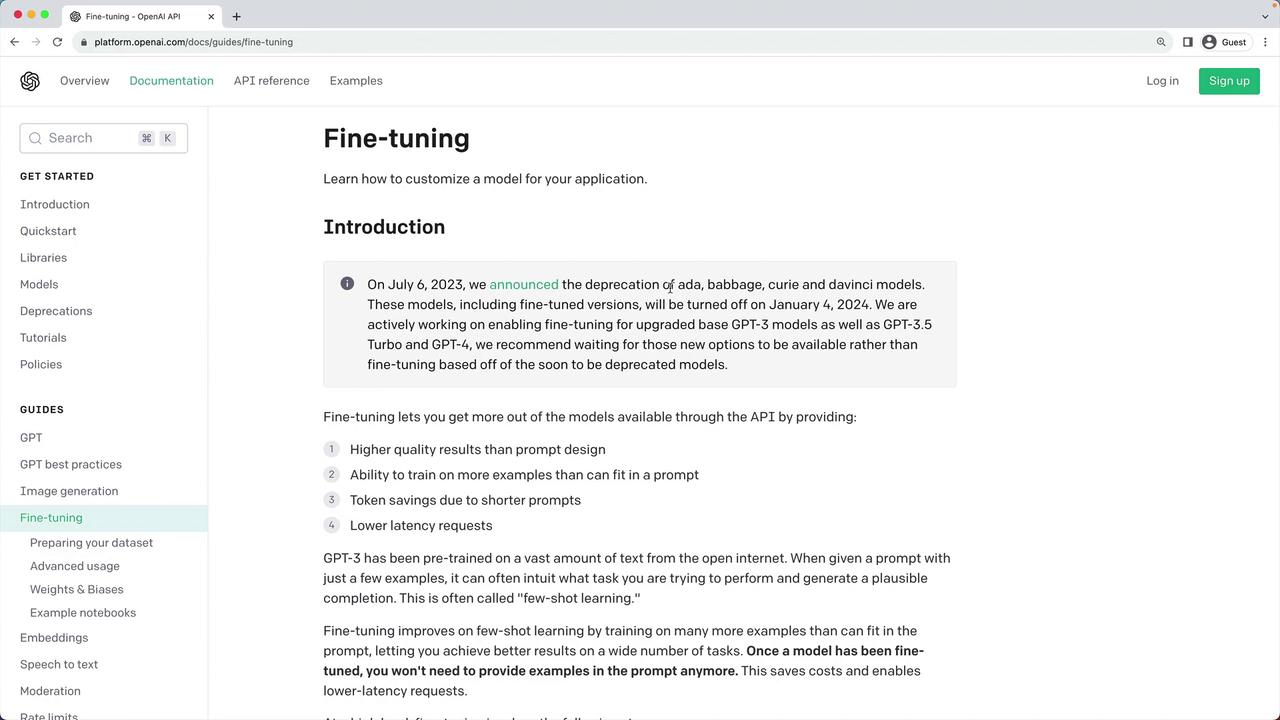
Although OpenAI is deprecating older fine-tuning models by January 4th and announcing GPT-3.5/GPT-4 support soon, the core workflow remains the same.
Most existing fine-tuning models (e.g., older Curie, Davinci) will retire by **January 4th**. It’s recommended to wait for GPT-3.5/GPT-4 fine-tuning, but you can continue experimenting with Ada, Babbage, Curie, and Davinci until then.
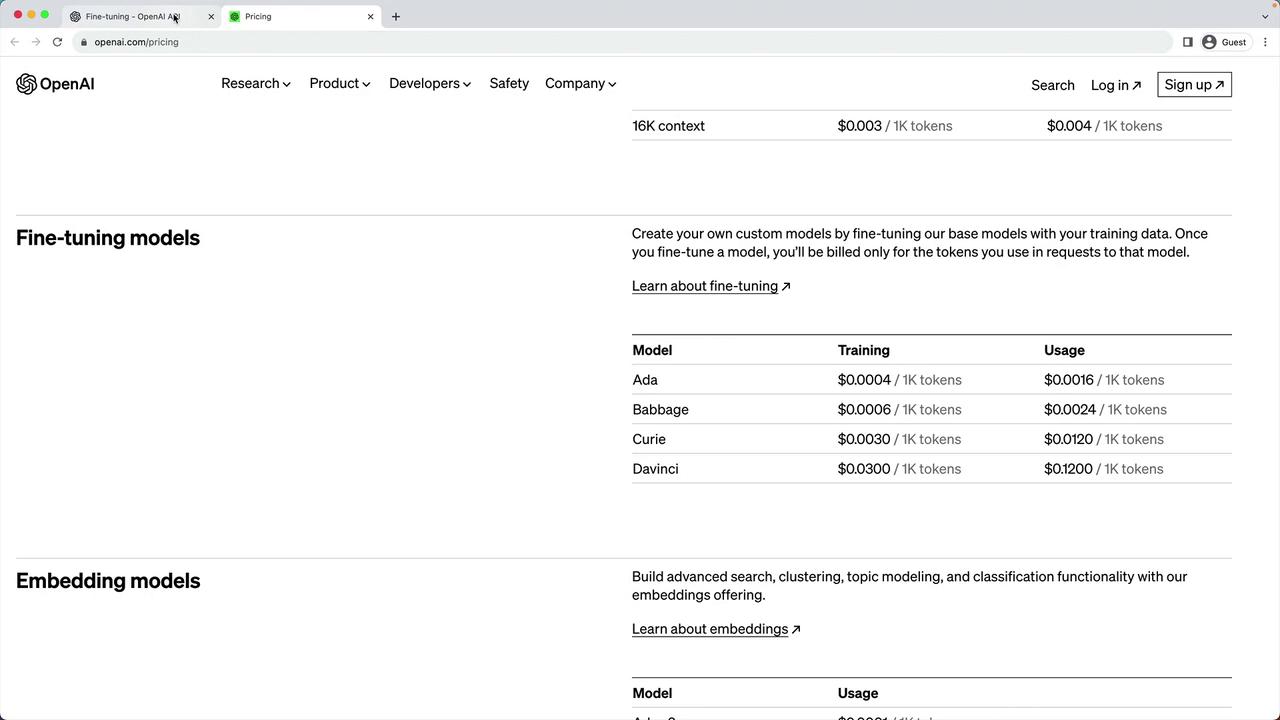
Pricing for fine-tuning varies by model. Ada remains the most cost-effective, while Davinci is the most expensive. Regardless of your budget, the process is identical across models.
## Use Case: State of the Union Q\&A Chatbot
We’ll build a simple chatbot that answers questions about President Biden’s February 7, 2023 State of the Union address. Since GPT-3.5’s knowledge cutoff is 2021, it won’t know this speech. We’ll fine-tune using a publicly available summary from the European Parliament.
## 1. Prepare the Raw JSONL Dataset
First, convert your prompt/completion pairs into JSON Lines format. Example `qna.jsonl`:
```jsonl theme={null}
{"prompt":"What did President Biden highlight about his interactions with Republicans?","completion":"President Biden highlighted his past interactions with Republicans as opportunities for bipartisan cooperation."}
{"prompt":"What did President Biden emphasize about finding common ground with Republicans?","completion":"President Biden emphasized the importance of finding common ground with Republicans to achieve legislative goals."}
{"prompt":"How did President Biden characterize the potential for compromise with Republicans?","completion":"President Biden characterized the potential for compromise with Republicans as achievable and essential for the country's progress."}
```
Save `qna.jsonl` alongside your PDF source:
```bash theme={null}
(venv) [Demo] > ls
SOTU.pdf qna.jsonl
```
## 2. Upload and Prepare the Dataset
Use the OpenAI CLI to validate, dedupe, and add separators:
```bash theme={null}
(venv) [Demo] > openai tools fine_tunes.prepare_data -f qna.jsonl
Analyzing...
- Your file contains 411 prompt-completion pairs
- 116 duplicated rows will be removed
- Prompts will get a suffix separator '\n\n###\n\n'
- Completions will get a suffix ending '***'
- Completions will start with a whitespace
Proceed? [Y/n] Y
> Wrote prepared file to qna_prepared.jsonl
```
Verify the new file:
```bash theme={null}
(venv) [Demo] > ls
SOTU.pdf qna.jsonl qna_prepared.jsonl
```
### Sample Entries in `qna_prepared.jsonl`
```jsonl theme={null}
{"prompt":"When did Joe Biden deliver his State of the Union address? ->\n\n###\n\n","completion":" Joe Biden delivered his State of the Union address on 7 February 2023.\n END***"}
{"prompt":"To whom did Joe Biden deliver his State of the Union address? ->\n\n###\n\n","completion":" Joe Biden delivered his State of the Union address to a joint session of the 118th US Congress (2023–2024).\n END***"}
{"prompt":"What was the difference in the government's composition between 2022 and 2023? ->\n\n###\n\n","completion":" In 2022, the US had a 'united' government with Democrats holding a majority in both chambers; in 2023, it became 'divided' with a Republican-led House of Representatives.\n END***"}
```
## 3. Create the Fine-Tuning Job
Select a base model (ada, babbage, curie, or davinci) and start fine-tuning:
```bash theme={null}
(venv) [Demo] > openai api fine_tunes.create \
-t qna_prepared.jsonl \
-m davinci
```
You’ll see upload progress and receive a fine-tune ID:
```plaintext theme={null}
Upload progress: 100%|████████████| 78.2k/78.2k [00:00<00:00]
Uploaded file: file-XXXXXXXXXXXX
Created fine-tune: ft-YYYYYYYYYYYY
Streaming events until fine-tuning is complete...
```
### Model Comparison
| Model | Cost (fine-tuning) | Status |
| ------- | -------------------- | --------------------- |
| Ada | \$0.0008 / 1K tokens | Supported until Jan 4 |
| Babbage | \$0.0016 / 1K tokens | Supported until Jan 4 |
| Curie | \$0.0032 / 1K tokens | Supported until Jan 4 |
| Davinci | \$0.012 / 1K tokens | Supported until Jan 4 |
## 4. Monitor and Complete
Follow the job status:
```bash theme={null}
(venv) [Demo] > openai api fine_tunes.follow -i ft-YYYYYYYYYYYY
```
Example output:
```plaintext theme={null}
[2023-08-13 12:16:31] Fine-tune enqueued. Queue number: 0
[2023-08-13 12:16:32] Fine-tune started
[2023-08-13 12:20:49] Completed epoch 1/4
[2023-08-13 12:22:11] Completed epoch 2/4
[2023-08-13 12:23:53] Completed epoch 3/4
[2023-08-13 12:25:24] Completed epoch 4/4
[2023-08-13 12:25:30] Fine-tune succeeded
```
After completion, note the recommended `openai api completions.create` command in the CLI output to invoke your fine-tuned model.
## 5. Invoke Your Fine-Tuned Model
Once the job succeeds, run:
```bash theme={null}
openai api completions.create \
-m davinci:ft-your-org-2023-08-13-06-56-03 \
-p "When did Joe Biden deliver his State of the Union address?"
```
The model will respond based on your custom SOTU Q\&A dataset. Adjust the model choice and epochs to balance **accuracy** vs. **cost**.
## Links and References
* [OpenAI Fine-Tuning Guide](https://platform.openai.com/docs/guides/fine-tuning)
* [OpenAI CLI Reference](https://platform.openai.com/docs/cli-reference)