> ## Documentation Index
> Fetch the complete documentation index at: https://notes.kodekloud.com/llms.txt
> Use this file to discover all available pages before exploring further.
# Demo Explore and Trigger Jenkins Projects 1
> Walkthrough of two Jenkins jobs, a Freestyle ASCII artwork job and a scripted Pipeline, demonstrating job behavior and migration considerations to GitHub Actions
In this lesson we explore and trigger two Jenkins projects to inspect their configuration and runtime behavior: a Freestyle job that renders ASCII artwork, and a scripted Pipeline job that demonstrates basic stage flow. Both jobs are configured inline in Jenkins (no SCM and no automated triggers), making them ideal examples for understanding job structure and migrating Jenkins logic to other CI/CD systems.
## Overview
| Project | Type | SCM | Triggers | Key utilities |
| ---------------------: | ----------------- | ---: | -------: | ------------------------------------------------- |
| Generate ASCII Artwork | Freestyle | None | None | `curl`, `jq`, `cowsay` |
| scripted-pipeline | Scripted Pipeline | None | None | Jenkins Pipeline steps (node, stage, echo, sleep) |
This walkthrough helps you understand how simple shell-driven Freestyle jobs compare to scripted Pipelines, which is useful when planning migrations (for example, to GitHub Actions).
***
## Generate ASCII Artwork (Freestyle)
This Freestyle job calls the adviceslip API to fetch an advice message, validates the message length using `jq` and shell tests, and—if the message is long enough—renders it as ASCII art using the `cowsay` utility.
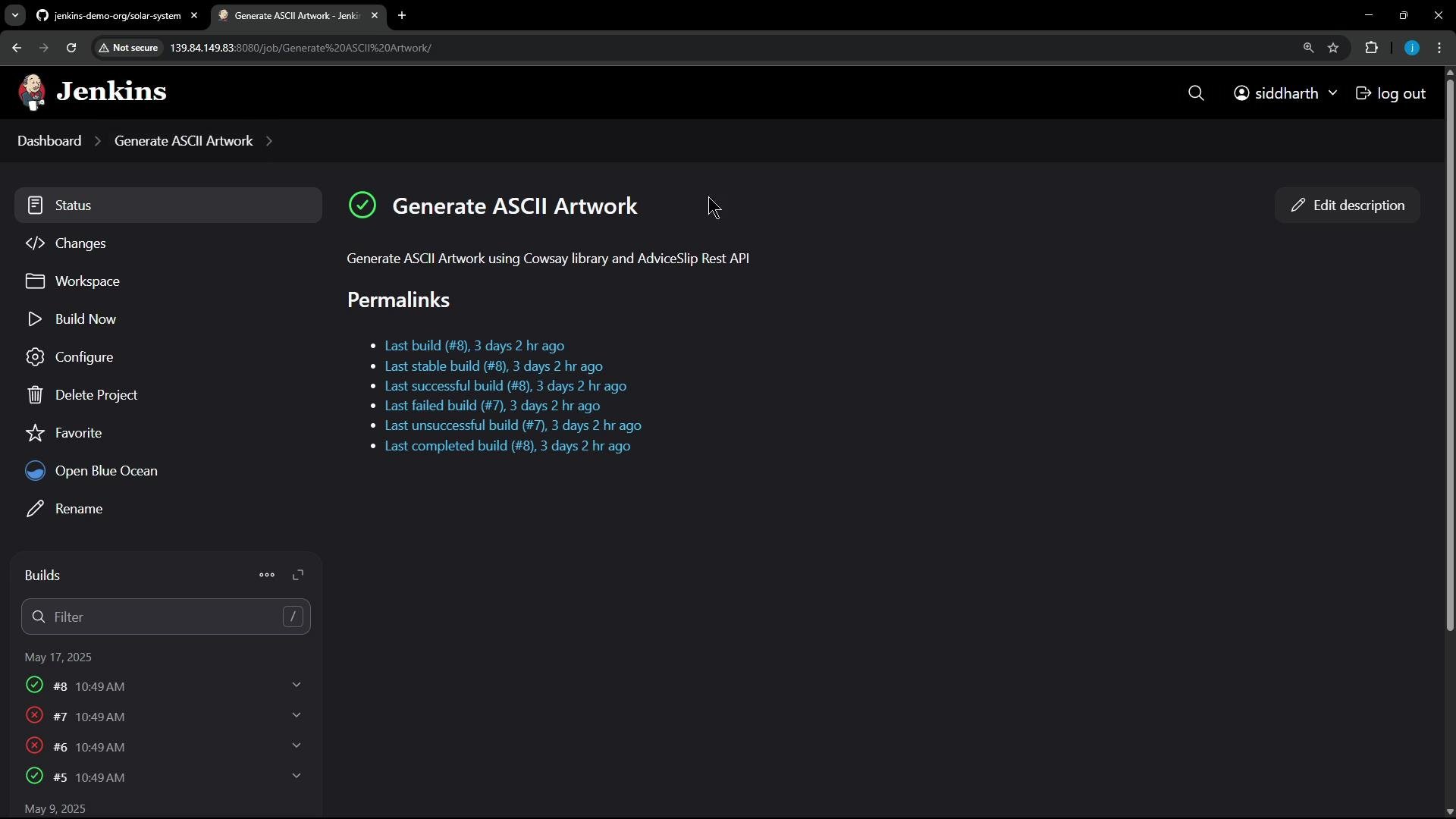 Configuration notes:
* No Source Code Management (job is configured without SCM).
* No automated triggers.
* Single build step: Execute shell, which performs three logical phases: build, test, deploy.
Configuration notes:
* No Source Code Management (job is configured without SCM).
* No automated triggers.
* Single build step: Execute shell, which performs three logical phases: build, test, deploy.
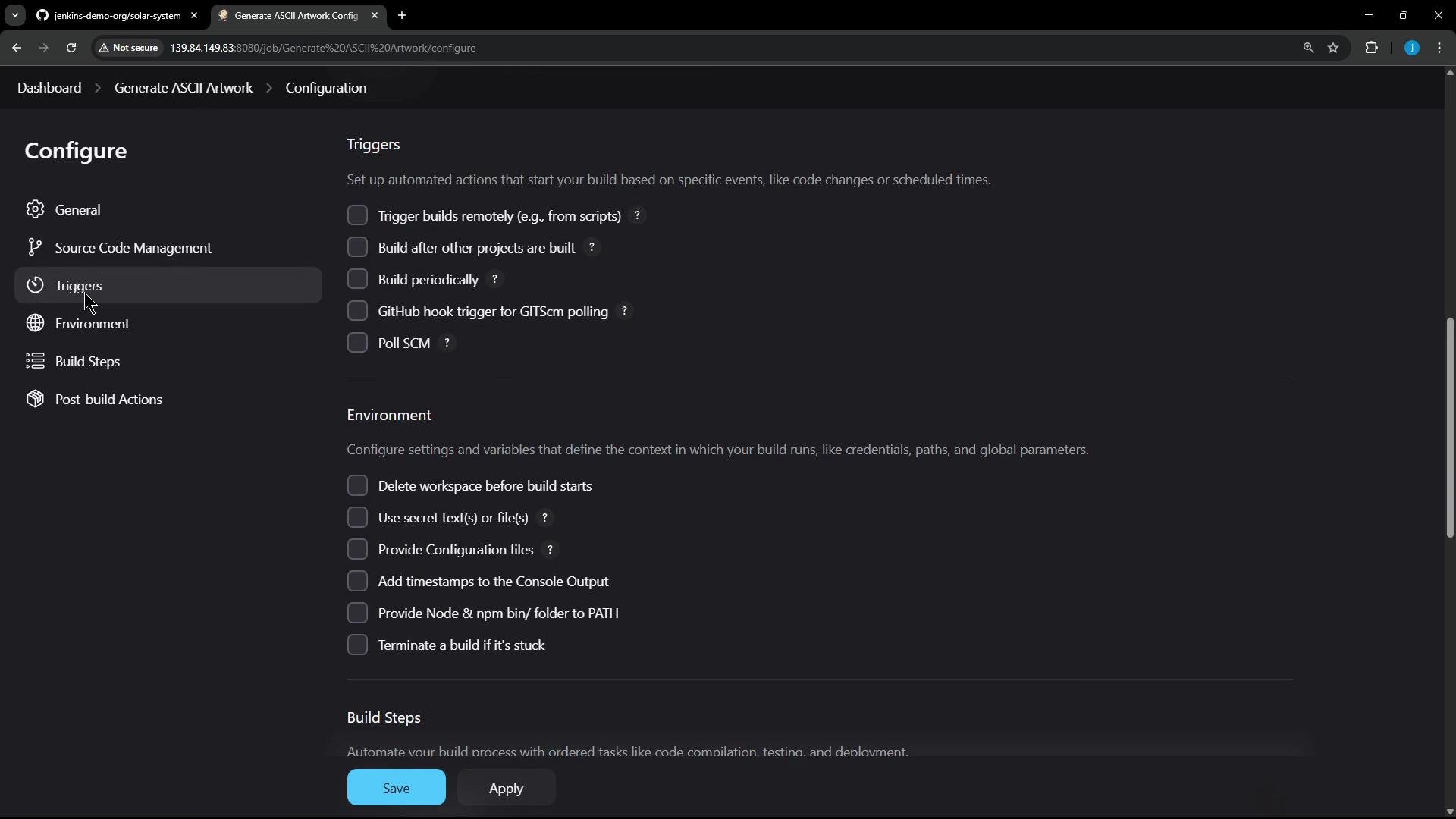 High-level step behavior:
* Build: fetch an advice message from adviceslip API and save it to `advice.json`.
* Test: extract message with `jq` and assert it contains more than 5 words; otherwise exit non‑zero to mark the build as failed.
* Deploy: install and run `cowsay` (Debian/Ubuntu example) and pipe the advice into a randomly-selected cowfile.
Shell script used in the job:
```bash theme={null}
# Build — fetch an advice message
curl -s https://api.adviceslip.com/advice > advice.json
cat advice.json
# Extract advice text
# Requires jq to be installed on the agent. Install on Debian/Ubuntu with:
# sudo apt-get update -y && sudo apt-get install -y jq
jq -r .slip.advice < advice.json > advice.message
# Test — ensure the advice has more than 5 words
if [ "$(wc -w < advice.message)" -gt 5 ]; then
echo "Advice has more than 5 words"
else
echo "Advice - $(cat advice.message) has 5 words or less"
exit 1
fi
# Deploy — install cowsay (Debian/Ubuntu example; on other OSes use the appropriate package manager)
# Note: Installing packages requires the Jenkins user to have sudo privileges or to run on an agent with cowsay preinstalled.
sudo apt-get update -y
sudo apt-get install cowsay -y
# Ensure /usr/games and /usr/local/games are on PATH for the current run
export PATH="$PATH:/usr/games:/usr/local/games"
cat advice.message | cowsay -f "$(ls /usr/share/cowsay/cows | shuf -n 1)"
```
The script assumes `jq` and `cowsay` are available or can be installed with `sudo`. Installing packages on shared agents can have security and stability implications—prefer pre-baked agent images or containerized runners when possible.
Triggering the job multiple times shows success and failure runs depending on the advice length.
Example console output for a successful run (truncated):
```text theme={null}
Started by user siddharth
Running as SYSTEM
Building on the built-in node in workspace /var/lib/jenkins/workspace/Generate ASCII Artwork
[Generate ASCII Artwork] $ /bin/sh -xe /tmp/jenkins-script.sh
+ curl -s https://api.adviceslip.com/advice
+ cat advice.json
{"slip": { "id": 167, "advice": "No one knows anyone else in the way you do."}}
+ jq -r .slip.advice < advice.json
+ wc -w < advice.message
+ [ 10 -gt 5 ]
+ echo Advice has more than 5 words
Advice has more than 5 words
+ sudo apt-get update -y
+ sudo apt-get install cowsay -y
Reading package lists...
Building dependency tree...
Reading state information...
cowsay is already the newest version (3.03+dfsg2-8).
0 upgraded, 0 newly installed, 0 to remove and 18 not upgraded.
+ export PATH=/usr/local/sbin:/usr/local/bin:/usr/sbin:/usr/bin:/snap/bin:/usr/games:/usr/local/games
+ cat advice.message
No one knows anyone else in the way you do.
+ ls /usr/share/cowsay/cows
+ shuf -n 1
+ cowsay -f three-eyes.cow
/ No one knows anyone else in the way you \
\ do. /
-------------------------------
\ ^__^
\ (oo)\_______
(__)\ )\/\
||----w |
|| ||
```
Example console output when the advice is too short and the build fails:
```text theme={null}
Started by user siddharth
Running as SYSTEM
Building on the built-in node in workspace /var/lib/jenkins/workspace/Generate ASCII Artwork
[Generate ASCII Artwork] $ /bin/sh -xe /tmp/jenkins-script.sh
+ curl -s https://api.adviceslip.com/advice
+ cat advice.json
{"slip": {"id": 3, "advice": "Don't eat non-snow-coloured snow."}}
+ jq -r .slip.advice < advice.json
+ wc -w < advice.message
+ [ 4 -gt 5 ]
+ echo Advice - Don't eat non-snow-coloured snow. has 5 words or less
Advice - Don't eat non-snow-coloured snow. has 5 words or less
+ exit 1
Build step 'Execute shell' marked build as failure
Finished: FAILURE
```
This Freestyle job demonstrates:
* How simple shell logic can control build success/failure.
* How external APIs and small utility tools (`jq`, `cowsay`) are often used in quick demo jobs.
* Why migrating these jobs may require translating shell steps into equivalent workflow actions or containerized steps.
***
## Scripted Pipeline
Next, inspect a scripted Pipeline job that contains a small hardcoded pipeline script in the Jenkins job configuration (again, no SCM and no triggers). The pipeline shows a simple three-stage flow: Greet, Build, and Results.
The pipeline activity page with recent runs:
High-level step behavior:
* Build: fetch an advice message from adviceslip API and save it to `advice.json`.
* Test: extract message with `jq` and assert it contains more than 5 words; otherwise exit non‑zero to mark the build as failed.
* Deploy: install and run `cowsay` (Debian/Ubuntu example) and pipe the advice into a randomly-selected cowfile.
Shell script used in the job:
```bash theme={null}
# Build — fetch an advice message
curl -s https://api.adviceslip.com/advice > advice.json
cat advice.json
# Extract advice text
# Requires jq to be installed on the agent. Install on Debian/Ubuntu with:
# sudo apt-get update -y && sudo apt-get install -y jq
jq -r .slip.advice < advice.json > advice.message
# Test — ensure the advice has more than 5 words
if [ "$(wc -w < advice.message)" -gt 5 ]; then
echo "Advice has more than 5 words"
else
echo "Advice - $(cat advice.message) has 5 words or less"
exit 1
fi
# Deploy — install cowsay (Debian/Ubuntu example; on other OSes use the appropriate package manager)
# Note: Installing packages requires the Jenkins user to have sudo privileges or to run on an agent with cowsay preinstalled.
sudo apt-get update -y
sudo apt-get install cowsay -y
# Ensure /usr/games and /usr/local/games are on PATH for the current run
export PATH="$PATH:/usr/games:/usr/local/games"
cat advice.message | cowsay -f "$(ls /usr/share/cowsay/cows | shuf -n 1)"
```
The script assumes `jq` and `cowsay` are available or can be installed with `sudo`. Installing packages on shared agents can have security and stability implications—prefer pre-baked agent images or containerized runners when possible.
Triggering the job multiple times shows success and failure runs depending on the advice length.
Example console output for a successful run (truncated):
```text theme={null}
Started by user siddharth
Running as SYSTEM
Building on the built-in node in workspace /var/lib/jenkins/workspace/Generate ASCII Artwork
[Generate ASCII Artwork] $ /bin/sh -xe /tmp/jenkins-script.sh
+ curl -s https://api.adviceslip.com/advice
+ cat advice.json
{"slip": { "id": 167, "advice": "No one knows anyone else in the way you do."}}
+ jq -r .slip.advice < advice.json
+ wc -w < advice.message
+ [ 10 -gt 5 ]
+ echo Advice has more than 5 words
Advice has more than 5 words
+ sudo apt-get update -y
+ sudo apt-get install cowsay -y
Reading package lists...
Building dependency tree...
Reading state information...
cowsay is already the newest version (3.03+dfsg2-8).
0 upgraded, 0 newly installed, 0 to remove and 18 not upgraded.
+ export PATH=/usr/local/sbin:/usr/local/bin:/usr/sbin:/usr/bin:/snap/bin:/usr/games:/usr/local/games
+ cat advice.message
No one knows anyone else in the way you do.
+ ls /usr/share/cowsay/cows
+ shuf -n 1
+ cowsay -f three-eyes.cow
/ No one knows anyone else in the way you \
\ do. /
-------------------------------
\ ^__^
\ (oo)\_______
(__)\ )\/\
||----w |
|| ||
```
Example console output when the advice is too short and the build fails:
```text theme={null}
Started by user siddharth
Running as SYSTEM
Building on the built-in node in workspace /var/lib/jenkins/workspace/Generate ASCII Artwork
[Generate ASCII Artwork] $ /bin/sh -xe /tmp/jenkins-script.sh
+ curl -s https://api.adviceslip.com/advice
+ cat advice.json
{"slip": {"id": 3, "advice": "Don't eat non-snow-coloured snow."}}
+ jq -r .slip.advice < advice.json
+ wc -w < advice.message
+ [ 4 -gt 5 ]
+ echo Advice - Don't eat non-snow-coloured snow. has 5 words or less
Advice - Don't eat non-snow-coloured snow. has 5 words or less
+ exit 1
Build step 'Execute shell' marked build as failure
Finished: FAILURE
```
This Freestyle job demonstrates:
* How simple shell logic can control build success/failure.
* How external APIs and small utility tools (`jq`, `cowsay`) are often used in quick demo jobs.
* Why migrating these jobs may require translating shell steps into equivalent workflow actions or containerized steps.
***
## Scripted Pipeline
Next, inspect a scripted Pipeline job that contains a small hardcoded pipeline script in the Jenkins job configuration (again, no SCM and no triggers). The pipeline shows a simple three-stage flow: Greet, Build, and Results.
The pipeline activity page with recent runs:
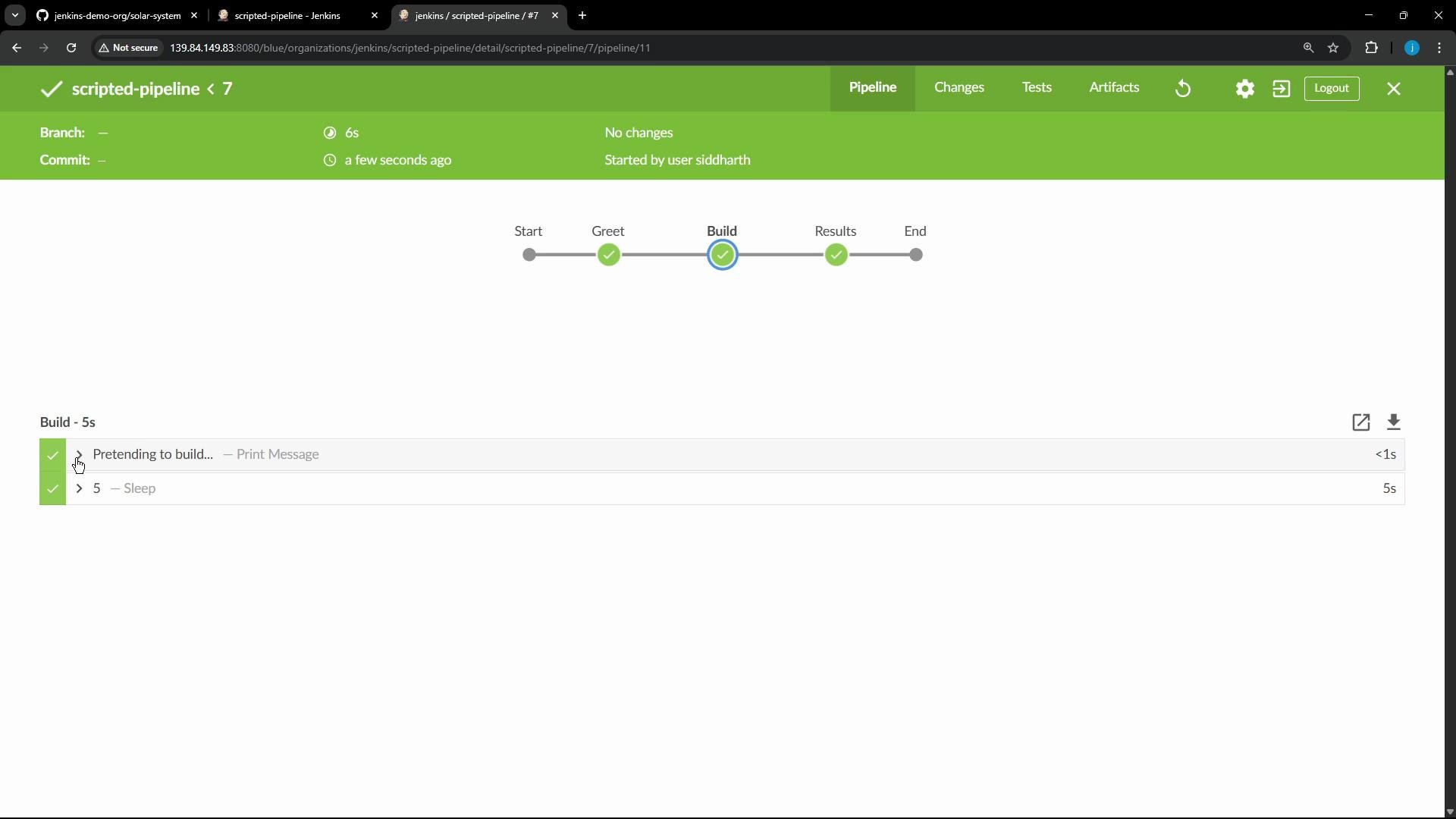
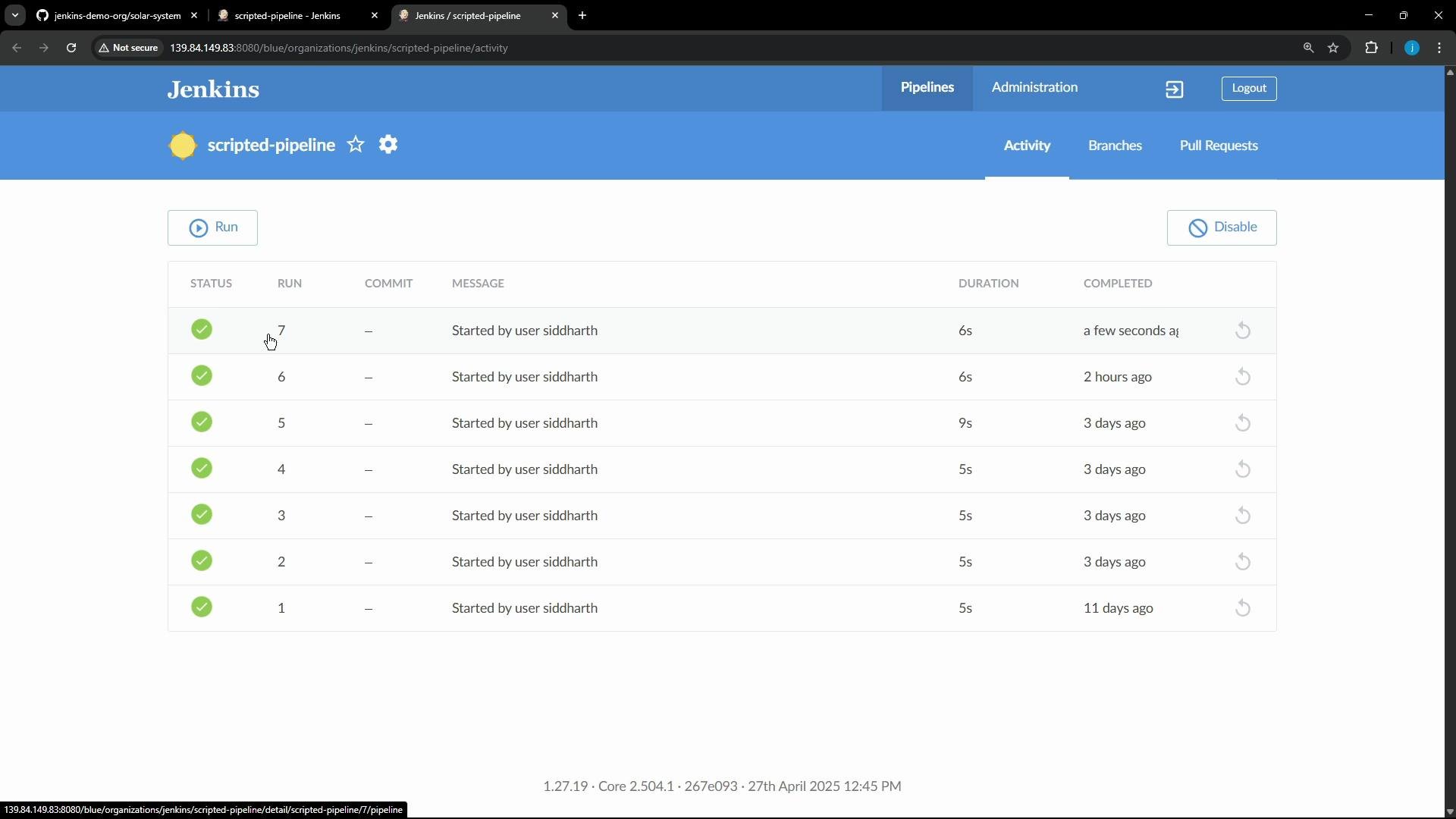 Opening a run shows the stage visualization and console output. The Build stage simulates work with `sleep`, and Results prints the completion time.
 Scripted Pipeline used in the job:
```groovy theme={null}
node { // Runs on any available agent
stage('Greet') {
echo 'Hello, World!'
}
stage('Build') {
echo 'Pretending to build...'
sleep 5 // Simulate work
}
stage('Results') {
def now = new Date()
echo "Job completed at ${now}"
}
}
```
When executed:
* The console shows the greeting, a simulated build pause (5 seconds), and the completion timestamp.
* The stage view makes it easy to visualize progress and success/failure per stage.
***
## Next steps and migration considerations
* Later lessons will cover how to migrate these Jenkins jobs (Freestyle and scripted Pipeline) to GitHub Actions and how to express the same logic in workflow files.
* When planning migration, consider:
* Translating shell-driven Freestyle steps to individual CI actions or container steps.
* Replacing inline package installs with prebuilt images or setup actions to avoid privileged operations on runners.
* Converting scripted Pipeline stages into YAML-based workflows and grouping steps into reusable actions.
References:
* [adviceslip API](https://api.adviceslip.com/)
* [jq — JSON processor](https://stedolan.github.io/jq/)
* [cowsay](https://en.wikipedia.org/wiki/Cowsay)
* [Migrating Jenkins Pipelines to GitHub Actions](https://learn.kodekloud.com/user/courses/migrating-jenkins-pipelines-to-github-actions)
Scripted Pipeline used in the job:
```groovy theme={null}
node { // Runs on any available agent
stage('Greet') {
echo 'Hello, World!'
}
stage('Build') {
echo 'Pretending to build...'
sleep 5 // Simulate work
}
stage('Results') {
def now = new Date()
echo "Job completed at ${now}"
}
}
```
When executed:
* The console shows the greeting, a simulated build pause (5 seconds), and the completion timestamp.
* The stage view makes it easy to visualize progress and success/failure per stage.
***
## Next steps and migration considerations
* Later lessons will cover how to migrate these Jenkins jobs (Freestyle and scripted Pipeline) to GitHub Actions and how to express the same logic in workflow files.
* When planning migration, consider:
* Translating shell-driven Freestyle steps to individual CI actions or container steps.
* Replacing inline package installs with prebuilt images or setup actions to avoid privileged operations on runners.
* Converting scripted Pipeline stages into YAML-based workflows and grouping steps into reusable actions.
References:
* [adviceslip API](https://api.adviceslip.com/)
* [jq — JSON processor](https://stedolan.github.io/jq/)
* [cowsay](https://en.wikipedia.org/wiki/Cowsay)
* [Migrating Jenkins Pipelines to GitHub Actions](https://learn.kodekloud.com/user/courses/migrating-jenkins-pipelines-to-github-actions)