> ## Documentation Index
> Fetch the complete documentation index at: https://notes.kodekloud.com/llms.txt
> Use this file to discover all available pages before exploring further.
# Demo Review Existing Jenkins Instance
> Reviewing and inventorying an existing Jenkins controller, jobs, agents, plugins, and credentials to plan migration to GitHub Actions or other CI platforms
Before migrating pipelines or running migrations, perform a focused review of the existing Jenkins controller, its job types, agents, plugins, and credentials. This helps identify compatibility issues, credentials that must be re-created, and any agent configuration needed when migrating to GitHub Actions or other CI platforms.
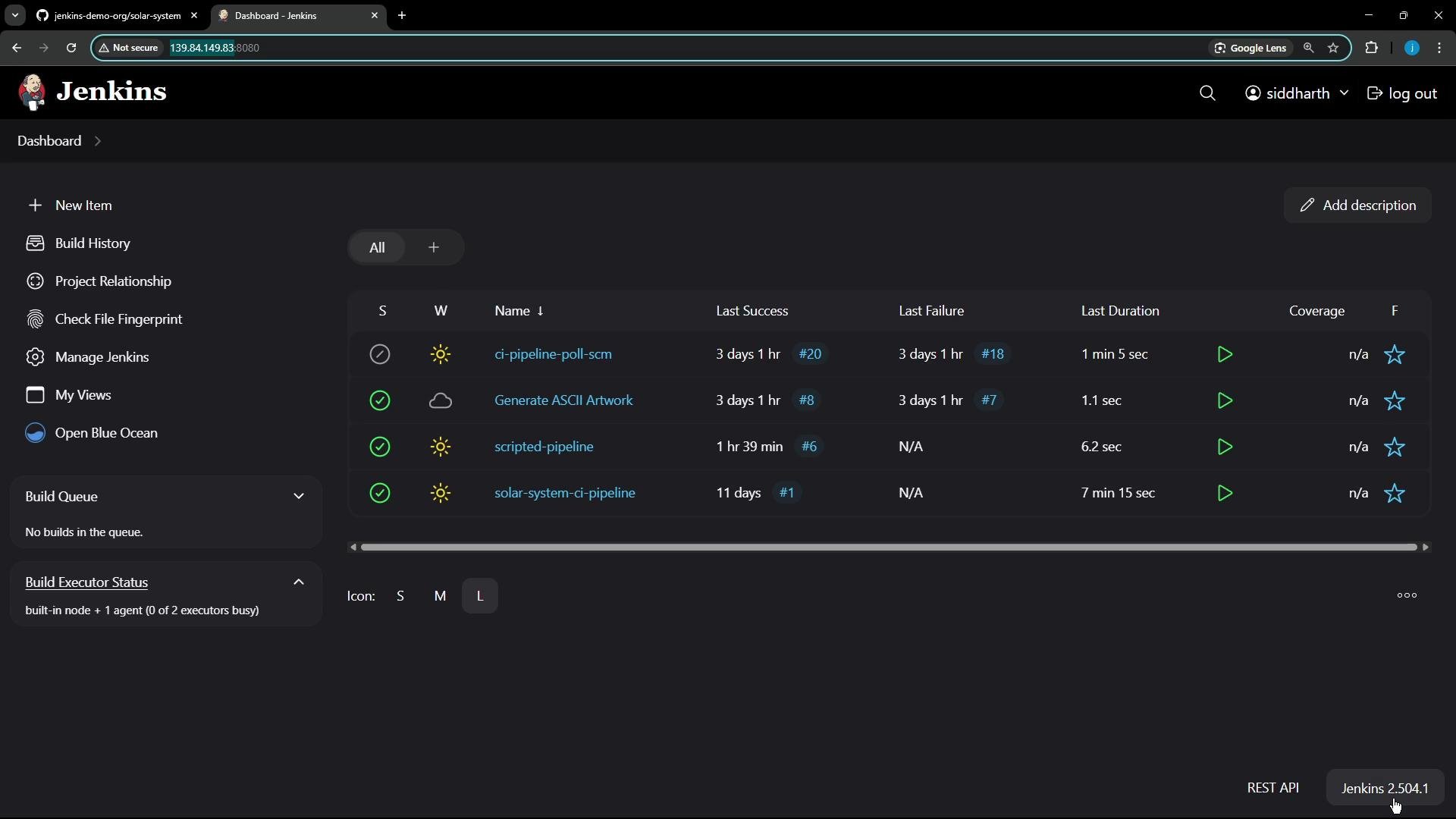
I’m running Jenkins on a VM reachable at `http://139.84.149.70:8080` and the controller version is 2.504.1. The instance hosts roughly four projects of mixed types (Freestyle, Declarative Pipeline, Scripted Pipeline) with various triggers (poll-based and SCM-based).
Here’s the Jenkins process observed on the host (Java flags shown):
```bash theme={null}
root@jenkins:~#
ps aux | grep -i jenkins
jenkins 940 0.5 10.0 6892276 1649636 ? Ssl May19 5:56 /usr/bin/java -Xms1G -Xmx2G -Djava.awt.headless=true -jar /usr/share/java/jenkins.war --webroot=/var/cache/jenkins/war --httpPort=8080
root 28174 0.0 0.0 6544 2304 pts/0 S+ 12:45 0:00 grep --color=auto -i jenkins
```
The dashboard shows several pipelines and jobs (visible statuses, last build times, durations):
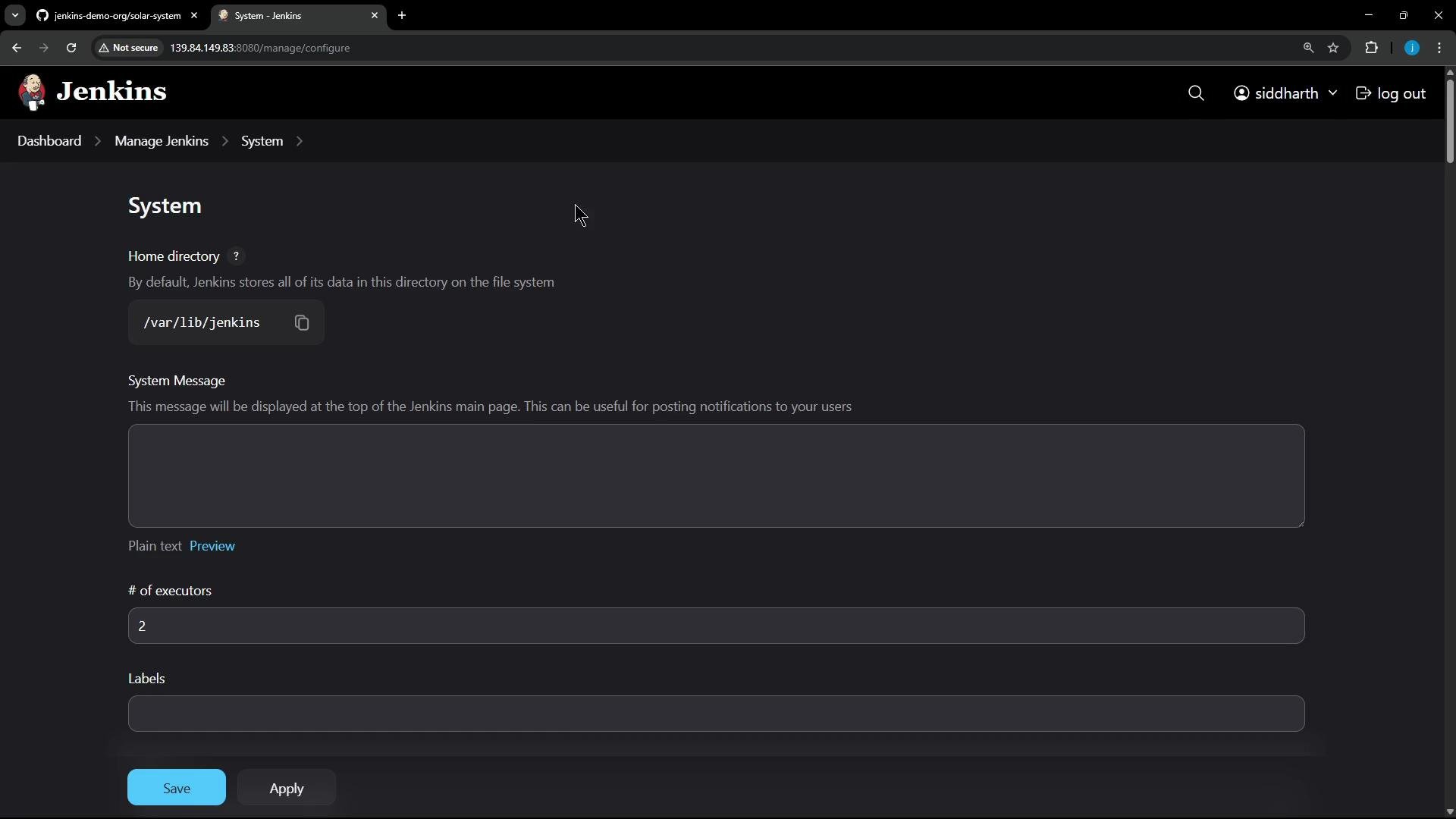
 ## Quick configuration summary
| Item | Value |
| ---------------------- | -------------------------------------------------- |
| Jenkins home directory | `/var/lib/jenkins` |
| Controller executors | `2` |
| Jenkins URL | Configured in System Settings (UI) |
| Controller version | `2.504.1` |
| Common job types | Freestyle, Declarative Pipeline, Scripted Pipeline |
| Typical triggers | Poll SCM, SCM webhooks |
## Quick configuration summary
| Item | Value |
| ---------------------- | -------------------------------------------------- |
| Jenkins home directory | `/var/lib/jenkins` |
| Controller executors | `2` |
| Jenkins URL | Configured in System Settings (UI) |
| Controller version | `2.504.1` |
| Common job types | Freestyle, Declarative Pipeline, Scripted Pipeline |
| Typical triggers | Poll SCM, SCM webhooks |
 ## Installed tools and notable plugins
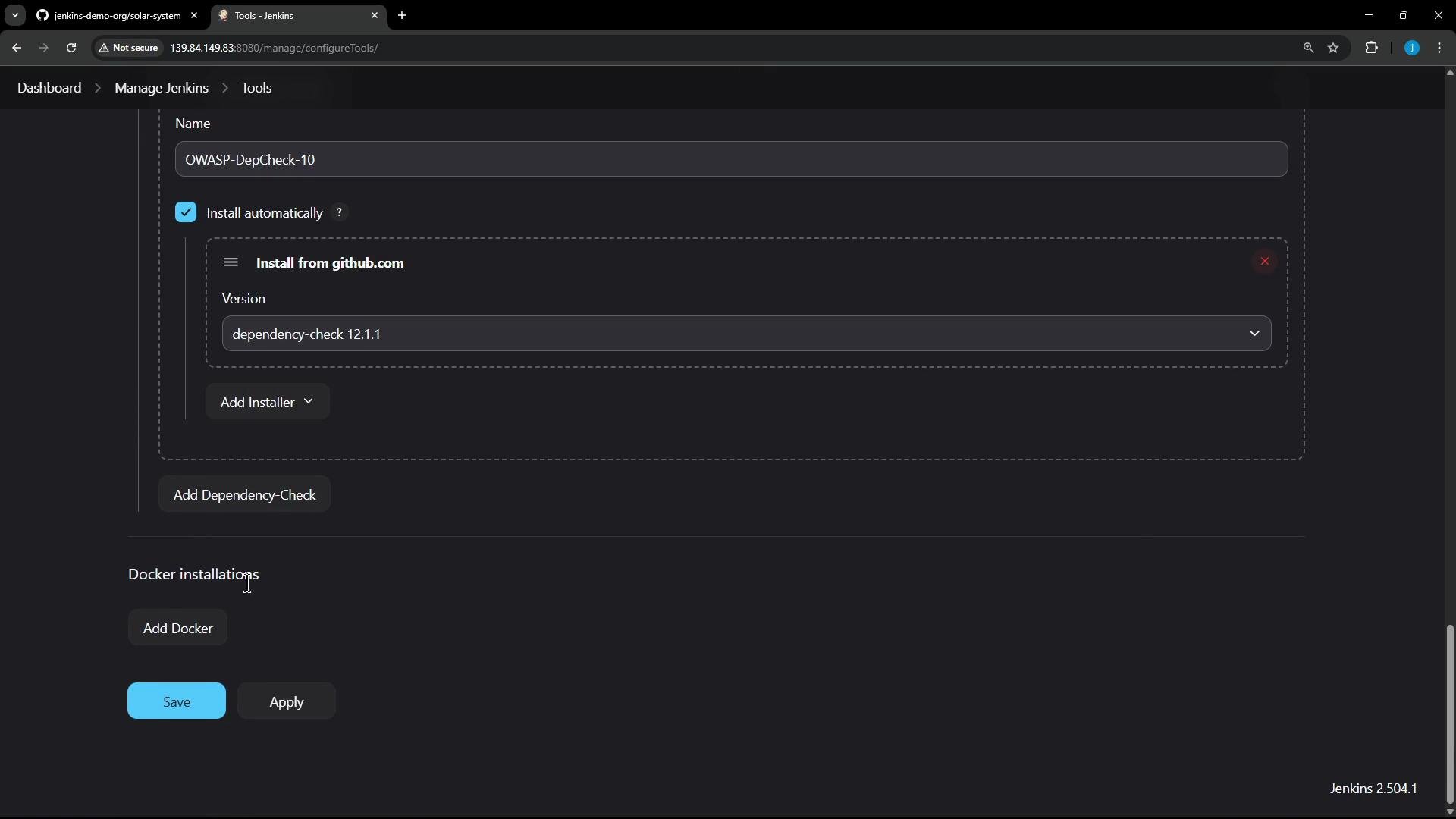
This environment is primarily used for Node.js-based pipelines. High-level tools and plugins observed:
| Tool / Plugin | Purpose |
| -------------------------------------------------- | --------------------------------------------------------- |
| Node.js installer | Provides Node runtime for builds |
| OWASP Dependency-Check (`dependency-check 12.1.1`) | Dependency vulnerability scanning |
| Sysdig-related tool | Security/monitoring integrations |
| Local Docker | Image build/push during pipelines |
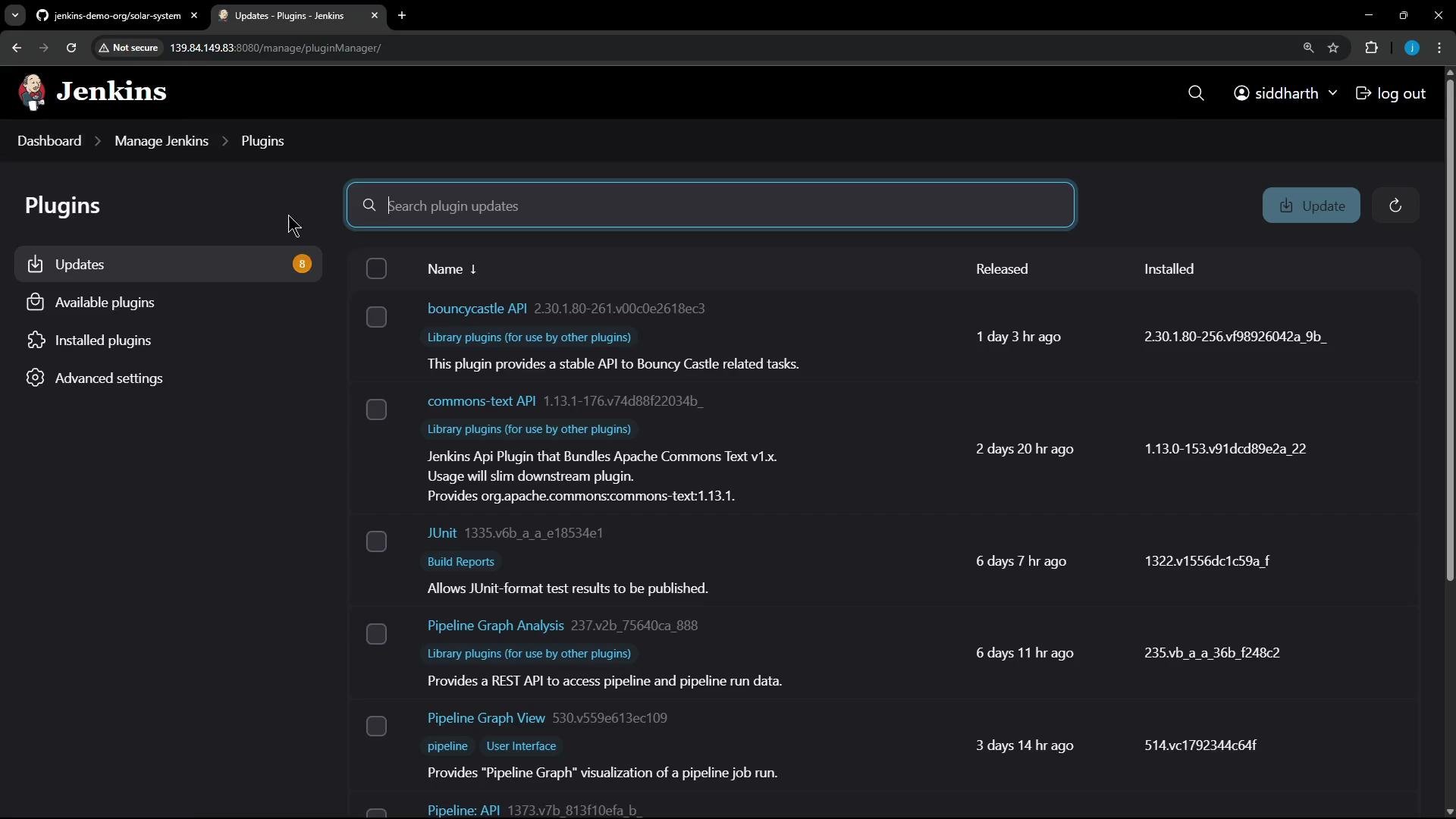
| Various Jenkins plugins | Pipeline, SCM, JUnit, and others (some updates available) |
## Installed tools and notable plugins
This environment is primarily used for Node.js-based pipelines. High-level tools and plugins observed:
| Tool / Plugin | Purpose |
| -------------------------------------------------- | --------------------------------------------------------- |
| Node.js installer | Provides Node runtime for builds |
| OWASP Dependency-Check (`dependency-check 12.1.1`) | Dependency vulnerability scanning |
| Sysdig-related tool | Security/monitoring integrations |
| Local Docker | Image build/push during pipelines |
| Various Jenkins plugins | Pipeline, SCM, JUnit, and others (some updates available) |
 Plugin updates are visible in the UI; consider reviewing change logs before upgrading plugins during a migration:
 ## Nodes and agents
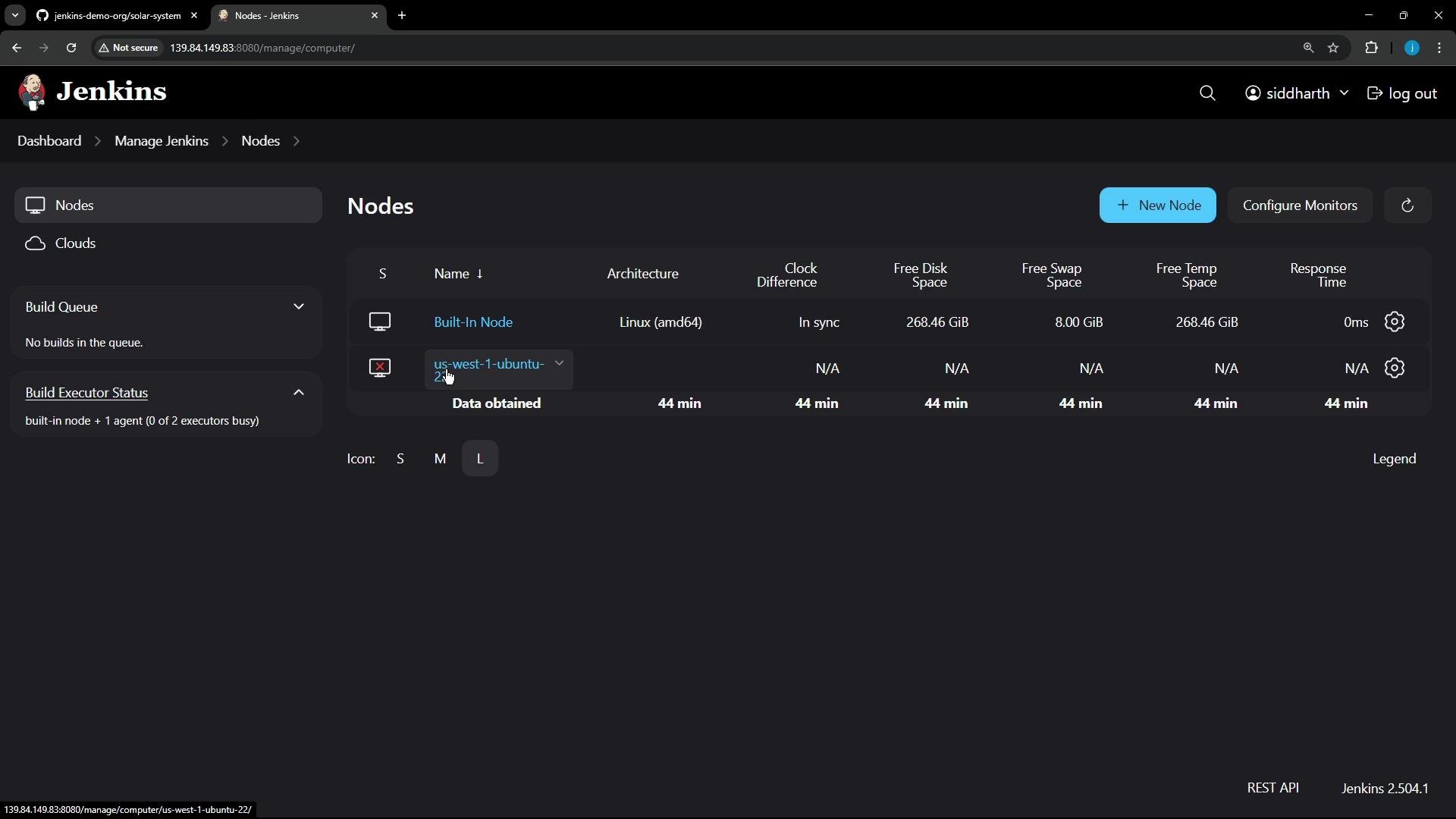
* The built-in controller node provides two executors.
* There is an additional agent named `us-west-1-ubuntu-22`, which was offline at the time of inspection.
## Nodes and agents
* The built-in controller node provides two executors.
* There is an additional agent named `us-west-1-ubuntu-22`, which was offline at the time of inspection.
 ### Connecting the agent manually
In this environment the controller is not configured for HTTPS agent communication, so the agent is launched manually using the agent JAR. On the agent host:
```bash theme={null}
# Download the agent jar from the controller
curl -sO http://139.84.149.70:8080/jnlpJars/agent.jar
# Store the agent secret in a file (replace with the real secret, securely)
echo "REPLACE_WITH_AGENT_SECRET" > secret-file
# Start the agent using the secret stored in a file
java -jar agent.jar -url http://139.84.149.70:8080/ -secret @secret-file -name "us-west-1-ubuntu-22" -webSocket -workDir "/home/jenkins-agent"
```
Never commit agent secrets, API tokens, or other credentials into source control. Use credential managers, secret stores, or environment-specific secret injection. Limit token scope and expiry.
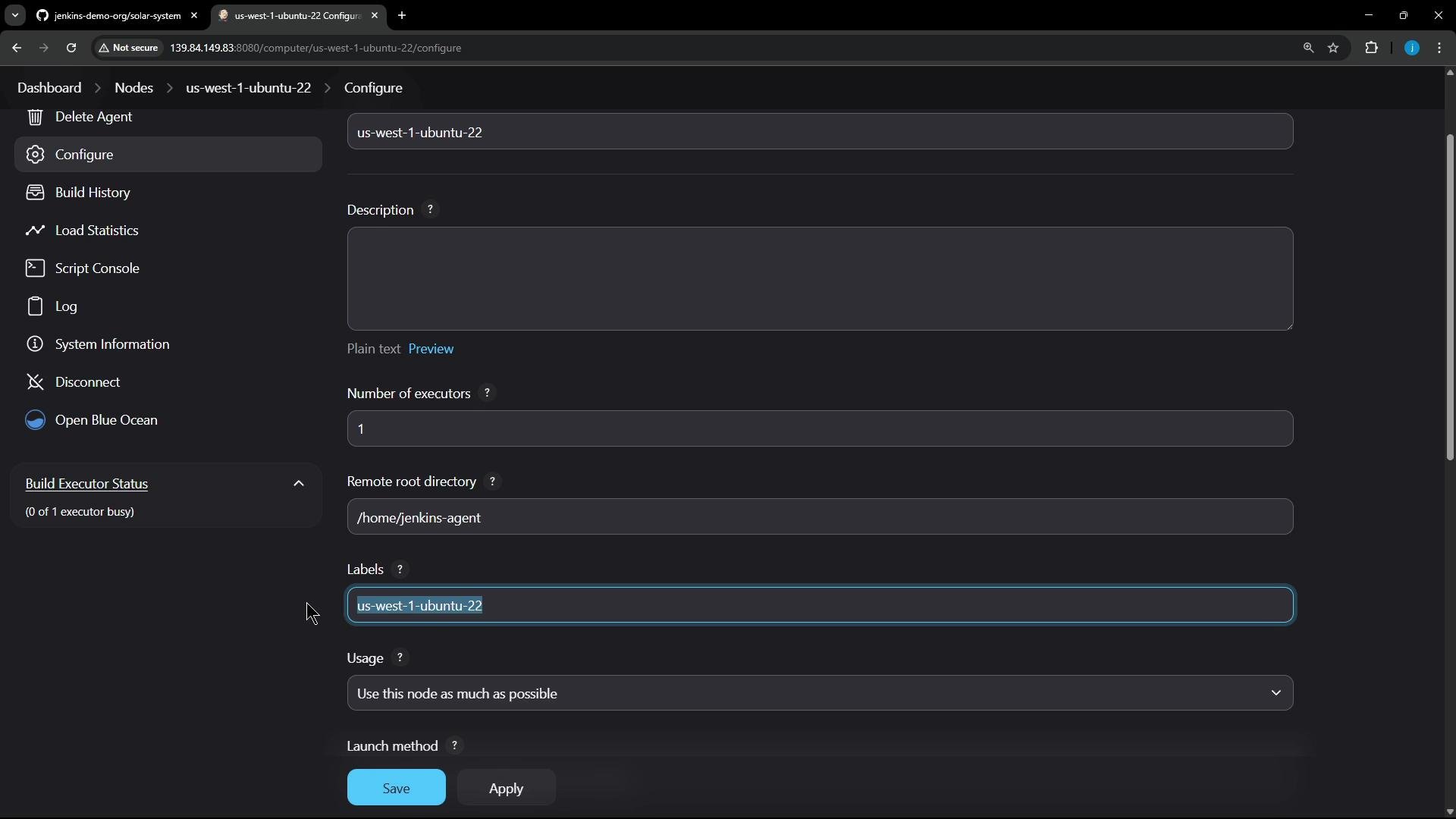
After starting the agent it should connect and report a single executor, its remote root directory, and labels. Jobs targeting the agent label will run on this node.
### Connecting the agent manually
In this environment the controller is not configured for HTTPS agent communication, so the agent is launched manually using the agent JAR. On the agent host:
```bash theme={null}
# Download the agent jar from the controller
curl -sO http://139.84.149.70:8080/jnlpJars/agent.jar
# Store the agent secret in a file (replace with the real secret, securely)
echo "REPLACE_WITH_AGENT_SECRET" > secret-file
# Start the agent using the secret stored in a file
java -jar agent.jar -url http://139.84.149.70:8080/ -secret @secret-file -name "us-west-1-ubuntu-22" -webSocket -workDir "/home/jenkins-agent"
```
Never commit agent secrets, API tokens, or other credentials into source control. Use credential managers, secret stores, or environment-specific secret injection. Limit token scope and expiry.
After starting the agent it should connect and report a single executor, its remote root directory, and labels. Jobs targeting the agent label will run on this node.
 ## Security and credentials
* Authentication: Jenkins own user database (internal user store).
* Current UI user: `Siddharth`.
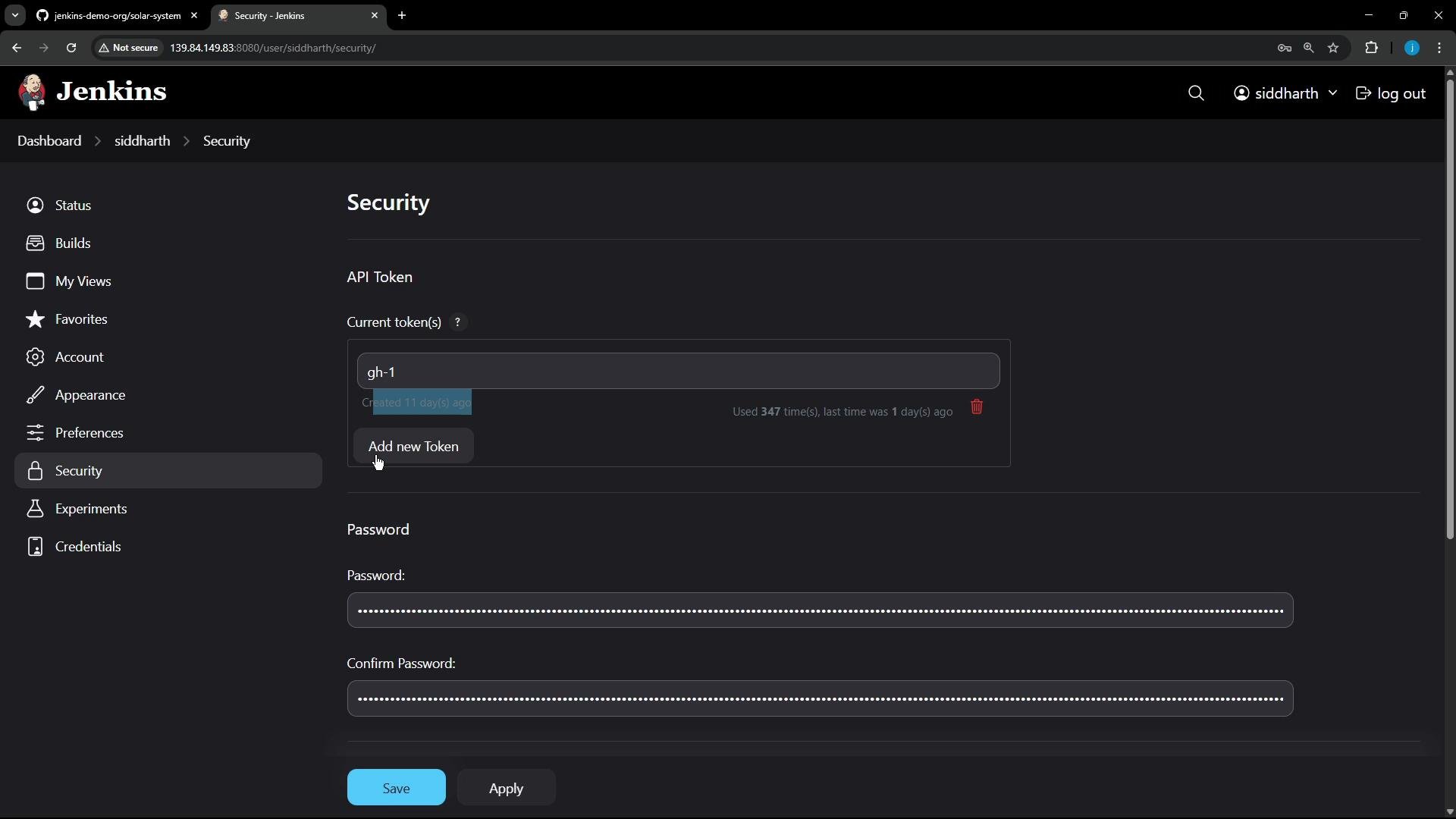
* API tokens in use to authenticate automation (e.g., tokens named `gh-1`).
## Security and credentials
* Authentication: Jenkins own user database (internal user store).
* Current UI user: `Siddharth`.
* API tokens in use to authenticate automation (e.g., tokens named `gh-1`).
 ### Credentials stored in Jenkins
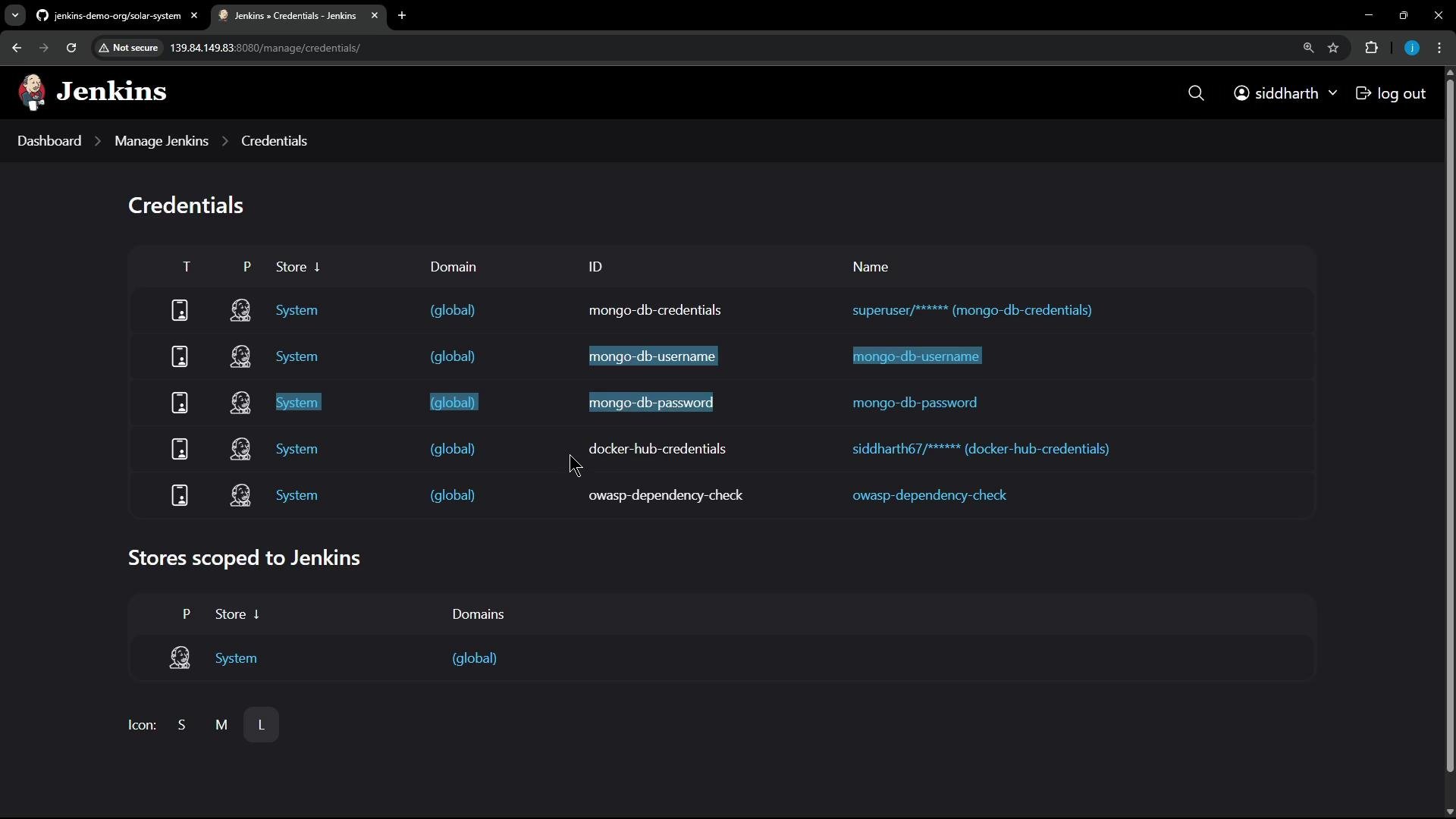
Several credentials are scoped in Jenkins credential stores and referenced by pipelines:
| Credential | Use |
| ----------------------------------------: | --------------------------------------- |
| `mongo-db-credentials` (user/password) | Used in unit tests and coverage stages |
| `mongo-db-username` / `mongo-db-password` | Test DB access |
| `docker-hub-credentials` | Pushing Docker images |
| OWASP DepCheck credential | Used by Dependency-Check where required |
### Credentials stored in Jenkins
Several credentials are scoped in Jenkins credential stores and referenced by pipelines:
| Credential | Use |
| ----------------------------------------: | --------------------------------------- |
| `mongo-db-credentials` (user/password) | Used in unit tests and coverage stages |
| `mongo-db-username` / `mongo-db-password` | Test DB access |
| `docker-hub-credentials` | Pushing Docker images |
| OWASP DepCheck credential | Used by Dependency-Check where required |
 When migrating pipelines to GitHub Actions (or another CI), plan to:
* Re-create necessary secrets in the target CI secrets store.
* Avoid copying credentials verbatim—rotate tokens where possible.
* Map Jenkins credentials to corresponding environment names (e.g., `DOCKERHUB_TOKEN`, `MONGO_USER`, `MONGO_PASS`).
Tip: Inventory every credential referenced by jobs (check pipeline scripts and Freestyle build steps). Use a spreadsheet or small manifest to record each credential name, where it’s used, required scope, and a recommended replacement in the target CI.
## Summary and next steps
* The controller is a standard Jenkins installation with one connected agent (and one offline agent at audit time).
* Key tools and plugins (Node.js installer, Dependency-Check, Docker) are in use; some plugins show available updates.
* Credentials and API tokens exist and will need to be re-created in the target CI. Do not migrate secrets directly—use secure secret tooling and rotate credentials after migration.
* Next: inspect each project in turn, run representative builds to validate behavior, then begin mapping pipeline steps to GitHub Actions workflows or the target CI solution.
## Links and references
* Jenkins Agents & Remoting: [https://www.jenkins.io/doc/book/using/agents/](https://www.jenkins.io/doc/book/using/agents/)
* Jenkins JNLP agent details: [https://www.jenkins.io/doc/book/managing/nodes/](https://www.jenkins.io/doc/book/managing/nodes/)
* OWASP Dependency-Check: [https://owasp.org/www-project-dependency-check/](https://owasp.org/www-project-dependency-check/)
* Jenkins Plugins: [https://www.jenkins.io/doc/book/managing/plugins/](https://www.jenkins.io/doc/book/managing/plugins/)
* Secure secret management: GitHub Actions Secrets — [https://docs.github.com/actions/security-guides/encrypted-secrets](https://docs.github.com/actions/security-guides/encrypted-secrets)
When migrating pipelines to GitHub Actions (or another CI), plan to:
* Re-create necessary secrets in the target CI secrets store.
* Avoid copying credentials verbatim—rotate tokens where possible.
* Map Jenkins credentials to corresponding environment names (e.g., `DOCKERHUB_TOKEN`, `MONGO_USER`, `MONGO_PASS`).
Tip: Inventory every credential referenced by jobs (check pipeline scripts and Freestyle build steps). Use a spreadsheet or small manifest to record each credential name, where it’s used, required scope, and a recommended replacement in the target CI.
## Summary and next steps
* The controller is a standard Jenkins installation with one connected agent (and one offline agent at audit time).
* Key tools and plugins (Node.js installer, Dependency-Check, Docker) are in use; some plugins show available updates.
* Credentials and API tokens exist and will need to be re-created in the target CI. Do not migrate secrets directly—use secure secret tooling and rotate credentials after migration.
* Next: inspect each project in turn, run representative builds to validate behavior, then begin mapping pipeline steps to GitHub Actions workflows or the target CI solution.
## Links and references
* Jenkins Agents & Remoting: [https://www.jenkins.io/doc/book/using/agents/](https://www.jenkins.io/doc/book/using/agents/)
* Jenkins JNLP agent details: [https://www.jenkins.io/doc/book/managing/nodes/](https://www.jenkins.io/doc/book/managing/nodes/)
* OWASP Dependency-Check: [https://owasp.org/www-project-dependency-check/](https://owasp.org/www-project-dependency-check/)
* Jenkins Plugins: [https://www.jenkins.io/doc/book/managing/plugins/](https://www.jenkins.io/doc/book/managing/plugins/)
* Secure secret management: GitHub Actions Secrets — [https://docs.github.com/actions/security-guides/encrypted-secrets](https://docs.github.com/actions/security-guides/encrypted-secrets)