> ## Documentation Index
> Fetch the complete documentation index at: https://notes.kodekloud.com/llms.txt
> Use this file to discover all available pages before exploring further.
# Demo Custom Transformer Docker Push withDockerRegistry
> Shows how to transform Jenkins withDockerRegistry and docker push into GitHub Actions steps using docker/login-action and docker/build-push-action with variable substitution.
This article demonstrates how to create a custom transformer that converts Jenkins' `withDockerRegistry` step into equivalent GitHub Actions steps (Docker login + build/push). In Jenkins, `withDockerRegistry` provides Docker credentials so the pipeline can log in (e.g., to Docker Hub) and run `docker push`. When migrating to GitHub Actions, the common equivalent is `docker/login-action` (authentication) and `docker/build-push-action` (build + push), or a separate `docker build` step with a subsequent push.
What you'll learn
* How `withDockerRegistry` maps to GitHub Actions.
* How to extract the `docker push` command from the imported Jenkins JSON.
* How to write a concise custom transformer (example in Ruby) that emits Actions steps with proper variable substitution.
* How to prepare GitHub repository variables and secrets needed by the converted workflow.
## Relevant Jenkins pipeline excerpt
```groovy theme={null}
pipeline {
agent any
stages {
stage('Code Coverage') {
agent {
docker {
image 'node:24'
args '-u root:root'
}
}
steps {
catchError(buildResult: 'SUCCESS', message: 'Oops! it will be fixed in future releases', stageResult: 'UNSTABLE') {
sh 'npm run coverage'
}
publishHTML([allowMissing: true, alwaysLinkToLastBuild: true, keepAll: true, reportDir: 'coverage'])
}
}
stage('Build Publish Image') {
steps {
sh 'docker build -t siddharth67/solar-system:$GIT_COMMIT .'
withDockerRegistry(credentialsId: 'docker-hub-credentials', url: "") {
sh 'docker push siddharth67/solar-system:$GIT_COMMIT'
}
}
}
stage('Trivy Vulnerability Scanner') {
steps {
sh '''trivy image siddharth67/solar-system:$GIT_COMMIT --severity CRITICAL --exit-code 1 --quiet'''
sh '''trivy convert --format template --template "@/usr/local/share/trivy/templates/html.tpl" -o trivy-report.html'''
publishHTML([allowMissing: true, alwaysLinkToLastBuild: true, keepAll: true, reportDir: './', reportFiles: 'trivy-report.html', reportName: 'Trivy Report'])
}
}
}
}
```
## What `withDockerRegistry` does
* Supplies Docker credentials (from Jenkins credentials store) to allow `docker push`.
* For migration, the natural mapping in GitHub Actions is:
* `docker/login-action` — to authenticate to a registry.
* `docker/build-push-action` — to build and push images (can also be split into `docker build` + `docker push`).
## Marketplace actions and references
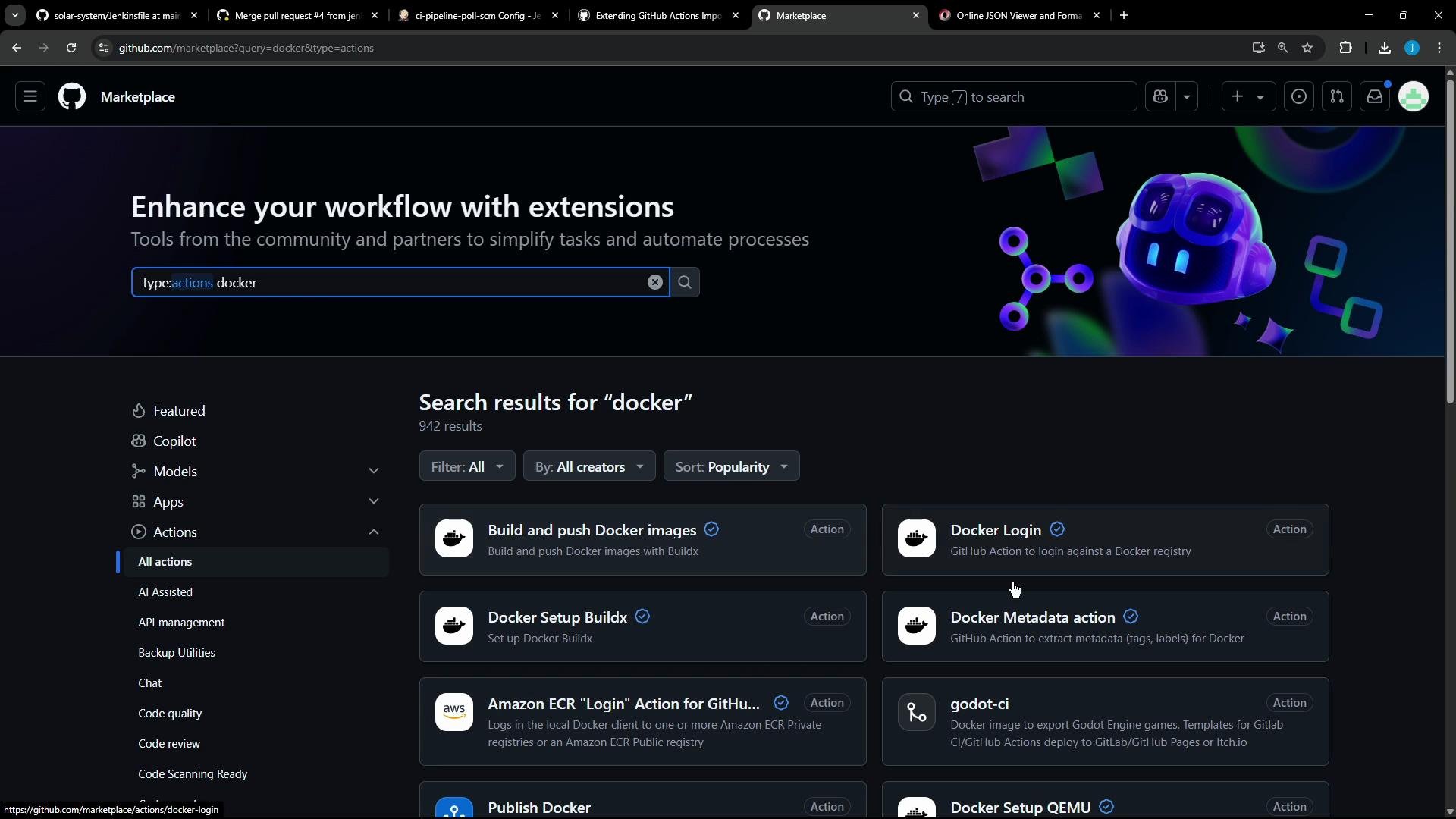
Search the GitHub Actions Marketplace for Docker-related actions. Typical choices:
* `docker/login-action@v3` — login to Docker Hub (or other registries).
* `docker/build-push-action@v6` — build and push images.
 Useful links
* docker/login-action: [https://github.com/docker/login-action](https://github.com/docker/login-action)
* docker/build-push-action: [https://github.com/docker/build-push-action](https://github.com/docker/build-push-action)
* Trivy: [https://aquasecurity.github.io/trivy/latest/](https://aquasecurity.github.io/trivy/latest/)
## Minimal GitHub Actions job example
If you need to both build and push in one job, the typical pattern is:
```yaml theme={null}
name: ci
on:
push:
jobs:
docker:
runs-on: ubuntu-latest
steps:
- name: Login to Docker Hub
uses: docker/login-action@v3
with:
username: ${{ vars.DOCKERHUB_USERNAME }}
password: ${{ secrets.DOCKERHUB_PASSWORD }}
- name: Set up QEMU
uses: docker/setup-qemu-action@v3
- name: Set up Docker Buildx
uses: docker/setup-buildx-action@v3
- name: Build and push
uses: docker/build-push-action@v6
with:
push: true
tags: user/app:latest
```
If your Jenkins pipeline already performed `docker build` earlier, you can issue only the login and `docker push` steps (or use `build-push-action` to only push an already built image).
## What the importer produced (problem)
The importer emitted a job with an unrecognized `withDockerRegistry` node in the Jenkins JSON. The children included an `sh` step with `docker push :$GIT_COMMIT`, but no existing transformer handled it — so we create one.
Example simplified JSON snippet the transformer receives
```yaml theme={null}
name: Build Publish Image
runs-on:
- ubuntu-latest
needs: Code_Coverage
steps:
- name: checkout
uses: actions/checkout@v4.1.0
- name: Build Docker image
run: docker build -t ${{ vars.DOCKERHUB_USERNAME }}/${{ vars.IMAGE_NAME }}:${{ github.sha }} .
shell: bash
# This item has no matching transformer
# - withDockerRegistry:
# - key: credentialsId
# value:
# isLiteral: true
# value: docker-hub-credentials
# - key: url
# value:
# isLiteral: true
# value: ''
```
## Transformer goals
The transformer should:
1. Extract the `docker push` command from the child `sh` step.
2. Parse the image name and tag from that push command.
3. Replace Jenkins-specific variables and hardcoded values:
* `$GIT_COMMIT` → `${{ github.sha }}`
* Hardcoded username/image → use GitHub Actions variables like `${{ vars.DOCKERHUB_USERNAME }}` and `${{ vars.IMAGE_NAME }}`
4. Emit steps for:
* Docker login (`docker/login-action@v3`)
* Build and push (`docker/build-push-action@v6`) or a push-only step if the image is already built
Mapping summary (Jenkins → GitHub Actions)
| Jenkins step | GitHub Actions equivalent | Notes |
| ---------------------------------- | ----------------------------------------------------------- | -------------------------------------------------------------------------------------- |
| `withDockerRegistry` (credentials) | `docker/login-action@v3` | Use repository-level `vars` and `secrets` to store username and password respectively. |
| `docker build` + `docker push` | `docker/build-push-action@v6` | Can both build and push. If build already exists, you can run push only. |
| Jenkins env `$GIT_COMMIT` | `${{ github.sha }}` | Use GitHub predefined contexts. |
| Hardcoded user/image | `${{ vars.DOCKERHUB_USERNAME }}` / `${{ vars.IMAGE_NAME }}` | Add as repo variables for reuse. |
## Example custom transformer (Ruby) — concise
This Ruby transformer (for the importer’s transformer DSL) extracts the push command, rewrites variables, and emits Actions steps for login and build+push:
```ruby theme={null}
transform "withDockerRegistry" do |item|
# Extract the push command from the child step
push_command = item["children"].first["arguments"].find { |arg| arg["key"] == "script" }["value"]["value"]
# Get the last token from "docker push "
image_tag = push_command.split(' ').last # => "siddharth67/solar-system:$GIT_COMMIT"
# Build the GitHub Actions steps
[
{
"name" => "Login to Docker Hub",
"uses" => "docker/login-action@v3",
"with" => {
"username" => "${{ vars.DOCKERHUB_USERNAME }}",
"password" => "${{ secrets.DOCKERHUB_PASSWORD }}"
}
},
{
"name" => "Build and push",
"uses" => "docker/build-push-action@v6",
"with" => {
"push" => true,
# Substitute Jenkins variables/hardcoded names to GitHub Actions variables
"tags" => image_tag.gsub('$GIT_COMMIT', '${{ github.sha }}')
.gsub('siddharth67', '${{ vars.DOCKERHUB_USERNAME }}')
.gsub('solar-system', '${{ vars.IMAGE_NAME }}')
}
}
]
end
```
Notes about the transformer
* The transformer replaces Jenkins credential references (`credentialsId`) with GitHub Actions variables and secrets:
* `username` → `${{ vars.DOCKERHUB_USERNAME }}`
* `password` → `${{ secrets.DOCKERHUB_PASSWORD }}`
* `image name` → `${{ vars.IMAGE_NAME }}`
* If the importer already produced an earlier `docker build` step, you can emit a push-only action or leave the build step and use `build-push-action` in push-only mode.
## Resulting GitHub Actions job (after transformer)
```yaml theme={null}
name: Code Coverage HTML Report
path: coverage/lcov-report
Build Publish Image:
name: Build Publish Image
runs-on:
- ubuntu-latest
needs: Code_Coverage
steps:
- name: checkout
uses: actions/checkout@v4.1.0
- name: Build Docker image
run: docker build -t ${{ vars.DOCKERHUB_USERNAME }}/${{ vars.IMAGE_NAME }}:${{ github.sha }} .
shell: bash
- name: Login to Docker Hub
uses: docker/login-action@v3
with:
username: "${{ vars.DOCKERHUB_USERNAME }}"
password: "${{ secrets.DOCKERHUB_PASSWORD }}"
- name: Build and push
uses: docker/build-push-action@v6
with:
push: true
tags: "${{ vars.DOCKERHUB_USERNAME }}/${{ vars.IMAGE_NAME }}:${{ github.sha }}"
Trivy_Vulnerability_Scanner:
name: Trivy Vulnerability Scanner
runs-on:
- ubuntu-latest
needs: Build_Publish_Image
steps:
- name: checkout
uses: actions/checkout@v4.1.0
```
## Run the importer (dry-run and migrate)
Dry-run (inspect generated workflows):
```bash theme={null}
gh actions-importer dry-run jenkins \
--source-url http://139.84.149.83:8080/job/ci-pipeline-poll-scm/ \
--output-dir tmp/dry-run \
--custom-transformers ss-pipeline-transformer.rb
```
Example dry-run output:
```bash theme={null}
[2025-05-23 10:42:08] Output file(s):
[2025-05-23 10:42:08] tmp/dry-run/ci-pipeline-poll-scm/.github/workflows/ci-pipeline-poll-scm.yml
```
To migrate and create a PR:
```bash theme={null}
gh actions-importer migrate jenkins \
--target-url https://github.com/jenkins-demo-org/solar-system \
--output-dir tmp/migrate \
--source-url http://139.84.149.83:8080/job/ci-pipeline-poll-scm/ \
--custom-transformers ss-pipeline-transformer.rb
```
Example migrate output:
```text theme={null}
[2025-05-23 10:43:11] Pull request: 'https://github.com/jenkins-demo-org/solar-system/pull/5'
```
## Add required repository variables and secrets
Before merging the PR and running workflows, create the required repository-level variables and secrets.
Recommended repository variables and secrets
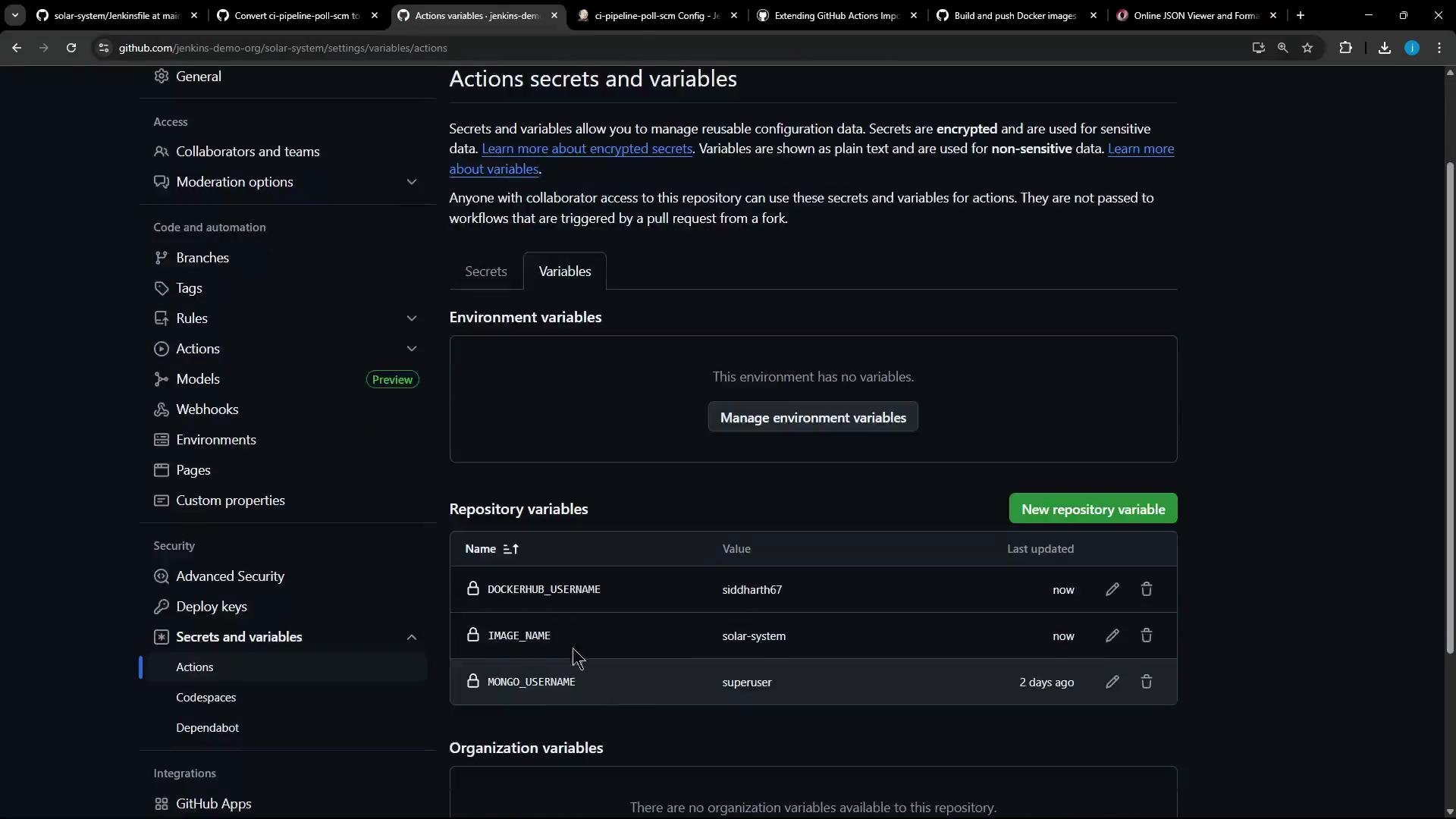
| Name | Type | Purpose | Example value |
| -------------------- | -------- | -------------------------------------------------------- | -------------- |
| `DOCKERHUB_USERNAME` | variable | Docker Hub username used in tags | `siddharth67` |
| `IMAGE_NAME` | variable | Image repository name used in tags | `solar-system` |
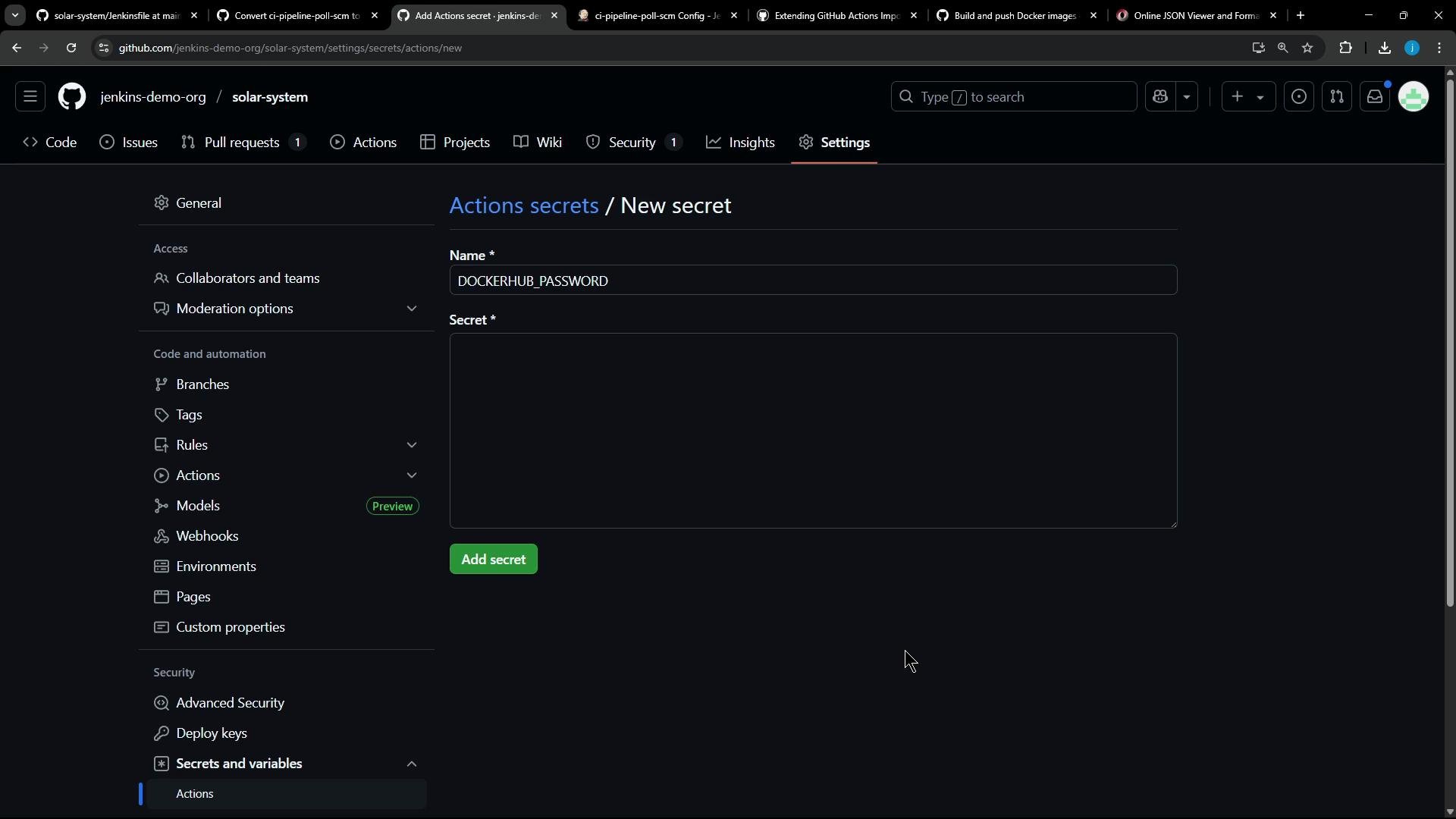
| `DOCKERHUB_PASSWORD` | secret | Docker Hub password (or token) for `docker/login-action` | — |
Add them in the repository Settings → Actions → Secrets and variables. After creation, they will appear in the repository's Actions > Secrets and variables settings.
Useful links
* docker/login-action: [https://github.com/docker/login-action](https://github.com/docker/login-action)
* docker/build-push-action: [https://github.com/docker/build-push-action](https://github.com/docker/build-push-action)
* Trivy: [https://aquasecurity.github.io/trivy/latest/](https://aquasecurity.github.io/trivy/latest/)
## Minimal GitHub Actions job example
If you need to both build and push in one job, the typical pattern is:
```yaml theme={null}
name: ci
on:
push:
jobs:
docker:
runs-on: ubuntu-latest
steps:
- name: Login to Docker Hub
uses: docker/login-action@v3
with:
username: ${{ vars.DOCKERHUB_USERNAME }}
password: ${{ secrets.DOCKERHUB_PASSWORD }}
- name: Set up QEMU
uses: docker/setup-qemu-action@v3
- name: Set up Docker Buildx
uses: docker/setup-buildx-action@v3
- name: Build and push
uses: docker/build-push-action@v6
with:
push: true
tags: user/app:latest
```
If your Jenkins pipeline already performed `docker build` earlier, you can issue only the login and `docker push` steps (or use `build-push-action` to only push an already built image).
## What the importer produced (problem)
The importer emitted a job with an unrecognized `withDockerRegistry` node in the Jenkins JSON. The children included an `sh` step with `docker push :$GIT_COMMIT`, but no existing transformer handled it — so we create one.
Example simplified JSON snippet the transformer receives
```yaml theme={null}
name: Build Publish Image
runs-on:
- ubuntu-latest
needs: Code_Coverage
steps:
- name: checkout
uses: actions/checkout@v4.1.0
- name: Build Docker image
run: docker build -t ${{ vars.DOCKERHUB_USERNAME }}/${{ vars.IMAGE_NAME }}:${{ github.sha }} .
shell: bash
# This item has no matching transformer
# - withDockerRegistry:
# - key: credentialsId
# value:
# isLiteral: true
# value: docker-hub-credentials
# - key: url
# value:
# isLiteral: true
# value: ''
```
## Transformer goals
The transformer should:
1. Extract the `docker push` command from the child `sh` step.
2. Parse the image name and tag from that push command.
3. Replace Jenkins-specific variables and hardcoded values:
* `$GIT_COMMIT` → `${{ github.sha }}`
* Hardcoded username/image → use GitHub Actions variables like `${{ vars.DOCKERHUB_USERNAME }}` and `${{ vars.IMAGE_NAME }}`
4. Emit steps for:
* Docker login (`docker/login-action@v3`)
* Build and push (`docker/build-push-action@v6`) or a push-only step if the image is already built
Mapping summary (Jenkins → GitHub Actions)
| Jenkins step | GitHub Actions equivalent | Notes |
| ---------------------------------- | ----------------------------------------------------------- | -------------------------------------------------------------------------------------- |
| `withDockerRegistry` (credentials) | `docker/login-action@v3` | Use repository-level `vars` and `secrets` to store username and password respectively. |
| `docker build` + `docker push` | `docker/build-push-action@v6` | Can both build and push. If build already exists, you can run push only. |
| Jenkins env `$GIT_COMMIT` | `${{ github.sha }}` | Use GitHub predefined contexts. |
| Hardcoded user/image | `${{ vars.DOCKERHUB_USERNAME }}` / `${{ vars.IMAGE_NAME }}` | Add as repo variables for reuse. |
## Example custom transformer (Ruby) — concise
This Ruby transformer (for the importer’s transformer DSL) extracts the push command, rewrites variables, and emits Actions steps for login and build+push:
```ruby theme={null}
transform "withDockerRegistry" do |item|
# Extract the push command from the child step
push_command = item["children"].first["arguments"].find { |arg| arg["key"] == "script" }["value"]["value"]
# Get the last token from "docker push "
image_tag = push_command.split(' ').last # => "siddharth67/solar-system:$GIT_COMMIT"
# Build the GitHub Actions steps
[
{
"name" => "Login to Docker Hub",
"uses" => "docker/login-action@v3",
"with" => {
"username" => "${{ vars.DOCKERHUB_USERNAME }}",
"password" => "${{ secrets.DOCKERHUB_PASSWORD }}"
}
},
{
"name" => "Build and push",
"uses" => "docker/build-push-action@v6",
"with" => {
"push" => true,
# Substitute Jenkins variables/hardcoded names to GitHub Actions variables
"tags" => image_tag.gsub('$GIT_COMMIT', '${{ github.sha }}')
.gsub('siddharth67', '${{ vars.DOCKERHUB_USERNAME }}')
.gsub('solar-system', '${{ vars.IMAGE_NAME }}')
}
}
]
end
```
Notes about the transformer
* The transformer replaces Jenkins credential references (`credentialsId`) with GitHub Actions variables and secrets:
* `username` → `${{ vars.DOCKERHUB_USERNAME }}`
* `password` → `${{ secrets.DOCKERHUB_PASSWORD }}`
* `image name` → `${{ vars.IMAGE_NAME }}`
* If the importer already produced an earlier `docker build` step, you can emit a push-only action or leave the build step and use `build-push-action` in push-only mode.
## Resulting GitHub Actions job (after transformer)
```yaml theme={null}
name: Code Coverage HTML Report
path: coverage/lcov-report
Build Publish Image:
name: Build Publish Image
runs-on:
- ubuntu-latest
needs: Code_Coverage
steps:
- name: checkout
uses: actions/checkout@v4.1.0
- name: Build Docker image
run: docker build -t ${{ vars.DOCKERHUB_USERNAME }}/${{ vars.IMAGE_NAME }}:${{ github.sha }} .
shell: bash
- name: Login to Docker Hub
uses: docker/login-action@v3
with:
username: "${{ vars.DOCKERHUB_USERNAME }}"
password: "${{ secrets.DOCKERHUB_PASSWORD }}"
- name: Build and push
uses: docker/build-push-action@v6
with:
push: true
tags: "${{ vars.DOCKERHUB_USERNAME }}/${{ vars.IMAGE_NAME }}:${{ github.sha }}"
Trivy_Vulnerability_Scanner:
name: Trivy Vulnerability Scanner
runs-on:
- ubuntu-latest
needs: Build_Publish_Image
steps:
- name: checkout
uses: actions/checkout@v4.1.0
```
## Run the importer (dry-run and migrate)
Dry-run (inspect generated workflows):
```bash theme={null}
gh actions-importer dry-run jenkins \
--source-url http://139.84.149.83:8080/job/ci-pipeline-poll-scm/ \
--output-dir tmp/dry-run \
--custom-transformers ss-pipeline-transformer.rb
```
Example dry-run output:
```bash theme={null}
[2025-05-23 10:42:08] Output file(s):
[2025-05-23 10:42:08] tmp/dry-run/ci-pipeline-poll-scm/.github/workflows/ci-pipeline-poll-scm.yml
```
To migrate and create a PR:
```bash theme={null}
gh actions-importer migrate jenkins \
--target-url https://github.com/jenkins-demo-org/solar-system \
--output-dir tmp/migrate \
--source-url http://139.84.149.83:8080/job/ci-pipeline-poll-scm/ \
--custom-transformers ss-pipeline-transformer.rb
```
Example migrate output:
```text theme={null}
[2025-05-23 10:43:11] Pull request: 'https://github.com/jenkins-demo-org/solar-system/pull/5'
```
## Add required repository variables and secrets
Before merging the PR and running workflows, create the required repository-level variables and secrets.
Recommended repository variables and secrets
| Name | Type | Purpose | Example value |
| -------------------- | -------- | -------------------------------------------------------- | -------------- |
| `DOCKERHUB_USERNAME` | variable | Docker Hub username used in tags | `siddharth67` |
| `IMAGE_NAME` | variable | Image repository name used in tags | `solar-system` |
| `DOCKERHUB_PASSWORD` | secret | Docker Hub password (or token) for `docker/login-action` | — |
Add them in the repository Settings → Actions → Secrets and variables. After creation, they will appear in the repository's Actions > Secrets and variables settings.
 Confirm the variables and secrets are visible in Settings:
 ## Merge the PR and verify the workflow run
* Merge the pull request created by the importer.
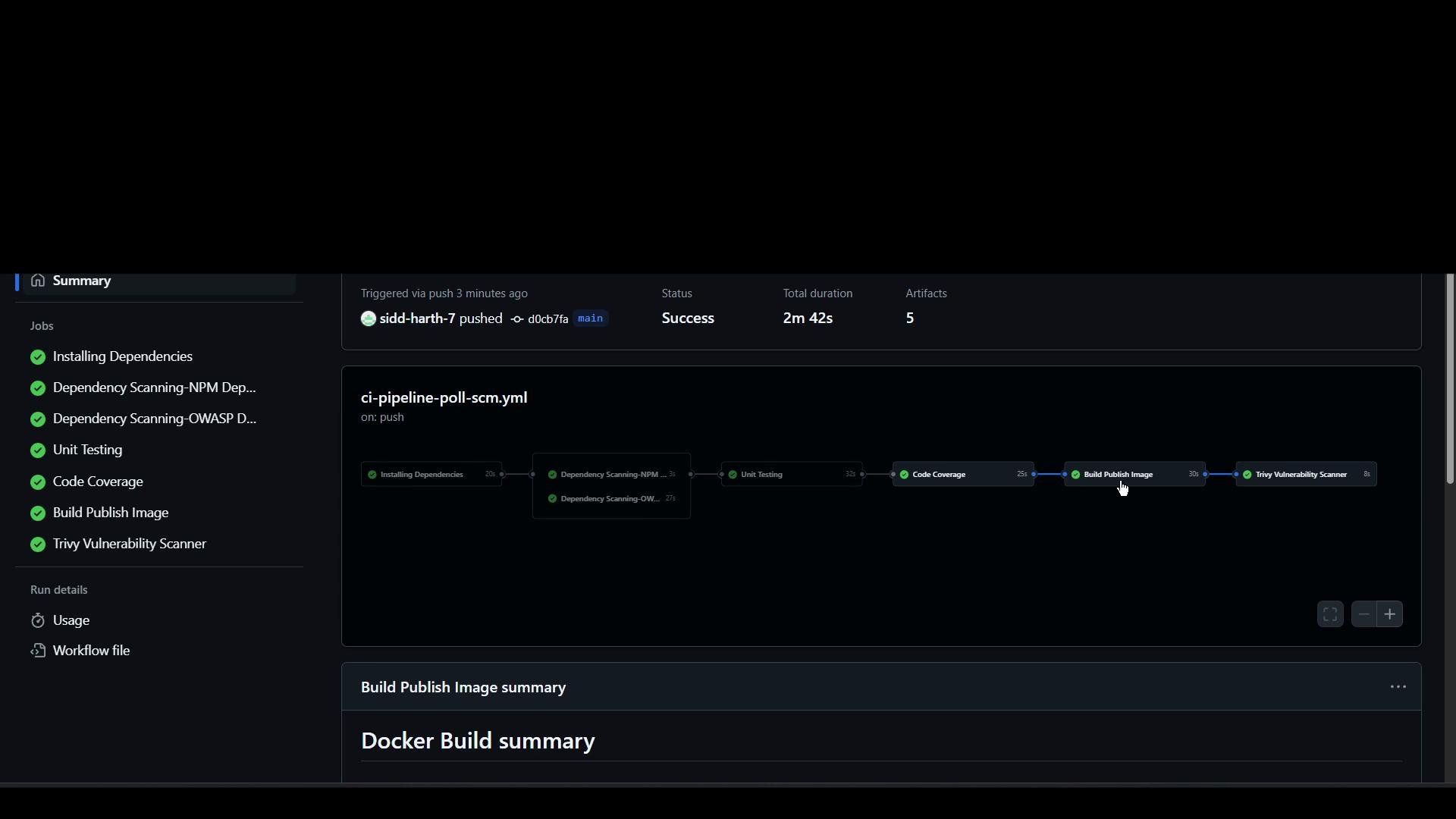
* The merged workflow should trigger and perform: checkout, build (if configured), Docker login, and push to the registry (depending on the emitted job).
Pipeline run status (example):
## Merge the PR and verify the workflow run
* Merge the pull request created by the importer.
* The merged workflow should trigger and perform: checkout, build (if configured), Docker login, and push to the registry (depending on the emitted job).
Pipeline run status (example):
 Selected sanitized log excerpts
```bash theme={null}
# Docker build layers and outputs
#11 exporting to image
#11 writing image sha256:23477645c2700016966e753711f30f266d39258e8699e503fceb1cc7c91836ad done
#11 naming to docker.io/siddharth67/solar-system:d0cb7fad07e69cb5ea62c886e785aabb86e72349 done
1 warning found (use docker --debug to expand):
- SecretsUsedInArgOrEnv: Do not use ARG or ENV instructions for sensitive data (ENV "MONGO_PASSWORD") (line 13)
# Docker login
Run docker/login-action@v3
11 Logging into Docker Hub...
12 Login Succeeded!
# docker/build-push-action process
Run docker/build-push-action@v6
/usr/bin/docker buildx build --iidfile /home/runner/work/_temp/.../build-iidfile.txt --tag siddharth67/solar-system:d0cb7fad07e69cb5ea62c886e785aabb86e72349 --push https://github.com/jenkins-demo-org/solar-system.git#d0cb7fad07e69cb5ea62c886e785aabb86e72349
#10 pushing layer ... done
#10 DONE 5.7s
```
## Key takeaways
* Jenkins `withDockerRegistry` cleanly maps to `docker/login-action` + `docker/build-push-action` in GitHub Actions.
* Custom transformers should:
* Extract `docker push` (or credential info) from the Jenkins JSON,
* Substitute Jenkins variables with GitHub contexts and repository variables,
* Emit the appropriate Actions steps (login and build/push or push-only).
* Create repository-level variables and secrets prior to running the workflow:
* `DOCKERHUB_USERNAME` and `IMAGE_NAME` (variables).
* `DOCKERHUB_PASSWORD` (secret).
* `docker/build-push-action` can both build and push—adjust emitted steps if a build is already present.
Remember to create repository variables (`DOCKERHUB_USERNAME`, `IMAGE_NAME`) and repository secrets (`DOCKERHUB_PASSWORD`) before merging; otherwise the workflow will fail at runtime when trying to access those values.
We will cover how to migrate and map the Trivy vulnerability scanner stage into GitHub Actions in a follow-up article. Depending on your preference and requirements, the Trivy step can be implemented as a shell step or via a dedicated action.
Selected sanitized log excerpts
```bash theme={null}
# Docker build layers and outputs
#11 exporting to image
#11 writing image sha256:23477645c2700016966e753711f30f266d39258e8699e503fceb1cc7c91836ad done
#11 naming to docker.io/siddharth67/solar-system:d0cb7fad07e69cb5ea62c886e785aabb86e72349 done
1 warning found (use docker --debug to expand):
- SecretsUsedInArgOrEnv: Do not use ARG or ENV instructions for sensitive data (ENV "MONGO_PASSWORD") (line 13)
# Docker login
Run docker/login-action@v3
11 Logging into Docker Hub...
12 Login Succeeded!
# docker/build-push-action process
Run docker/build-push-action@v6
/usr/bin/docker buildx build --iidfile /home/runner/work/_temp/.../build-iidfile.txt --tag siddharth67/solar-system:d0cb7fad07e69cb5ea62c886e785aabb86e72349 --push https://github.com/jenkins-demo-org/solar-system.git#d0cb7fad07e69cb5ea62c886e785aabb86e72349
#10 pushing layer ... done
#10 DONE 5.7s
```
## Key takeaways
* Jenkins `withDockerRegistry` cleanly maps to `docker/login-action` + `docker/build-push-action` in GitHub Actions.
* Custom transformers should:
* Extract `docker push` (or credential info) from the Jenkins JSON,
* Substitute Jenkins variables with GitHub contexts and repository variables,
* Emit the appropriate Actions steps (login and build/push or push-only).
* Create repository-level variables and secrets prior to running the workflow:
* `DOCKERHUB_USERNAME` and `IMAGE_NAME` (variables).
* `DOCKERHUB_PASSWORD` (secret).
* `docker/build-push-action` can both build and push—adjust emitted steps if a build is already present.
Remember to create repository variables (`DOCKERHUB_USERNAME`, `IMAGE_NAME`) and repository secrets (`DOCKERHUB_PASSWORD`) before merging; otherwise the workflow will fail at runtime when trying to access those values.
We will cover how to migrate and map the Trivy vulnerability scanner stage into GitHub Actions in a follow-up article. Depending on your preference and requirements, the Trivy step can be implemented as a shell step or via a dedicated action.