> ## Documentation Index
> Fetch the complete documentation index at: https://notes.kodekloud.com/llms.txt
> Use this file to discover all available pages before exploring further.
# Demo Custom Transformer Unit Testing Retry
> Guide to adding a custom transformer that preserves Jenkins retry behavior when migrating unit test stages to GitHub Actions, ensuring dependencies are installed and tests retried.
In this guide you'll learn how to create a custom transformer that preserves Jenkins `retry` semantics when migrating pipelines to GitHub Actions. The migrated Unit Testing job originally failed because the Jenkins `options { retry(2) }` identifier had no transformer, and the migrated workflow ran `npm test` before installing dependencies—so Mocha wasn't available.
This article covers:
* why the failure happened,
* how to implement a `retry` transformer that wraps test execution with a retry action,
* how to avoid duplicate `sh` and `junit` steps,
* and how to validate the migration with dry-runs.
Problematic test run (excerpt)
```bash theme={null}
Run npm test
npm test
shell: bash --noprofile --norc -e -o pipefail {0}
env:
MONGO_URI: mongodb+srv://supercluster.d83jj.mongodb.net/superData
MONGO_USERNAME: superuser
MONGO_PASSWORD:
> Solar System@6.7.6 test
> mocha app-test.js --timeout 10000 --reporter mocha-junit-reporter --exit
sh: 1: mocha: not found
Error: Process completed with exit code 127.
```
Why this happened
* The Jenkinsfile contained `options { retry(2) }` in the Unit Testing stage, but the importer did not include a transformer for `retry`, so that option was dropped (or commented out) with no equivalent in the generated workflow.
* The migrated job executed `npm test` without a preceding `npm install` step, so dependencies (Mocha) were missing and tests failed.
Jenkins Unit Testing stage (snippet)
```groovy theme={null}
stage('Unit Testing') {
agent {
docker {
image 'node:24'
args '-u root:root'
}
}
options {
retry(2)
}
steps {
sh 'npm test'
junit allowEmptyResults: true, stdioRetention: '', testResults: 'test-results.xml'
}
}
```
Migrated job (excerpt from generated GitHub Actions YAML where `retry` had no transformer)
```yaml theme={null}
container:
image: node:24
# # This item has no matching transformer
# docker:
# key: args
# value:
# isLiteral: true
# value: "-u root:root"
needs:
- Dependency_Scanning_NPM_Dependency_Audit
- Dependency_Scanning_OWASP_Dependency_Check
steps:
# This item has no matching transformer
# - retry:
# name: retry
# arguments:
# - isLiteral: true
# value: 2
- name: checkout
uses: actions/checkout@v4.1.0
- name: sh
shell: bash
run: npm test
- name: Publish test results
uses: EnricoMi/publish-unit-test-result-action@v2.12.0
if: always()
with:
junit_files: test-results.xml
```
Plan (high level)
1. Add a transformer for the `retry` identifier so `retry(2)` becomes a set of GitHub Actions steps implementing retry semantics.
2. Ensure the repository is checked out and dependencies are installed before running tests.
3. Prevent duplicate `sh` and `junit` steps generated by the importer for the same test command and results.
4. Use an existing retry action from the Marketplace (for example: `nick-fields/retry@v3`) to implement retry behavior.
Selecting a Marketplace action
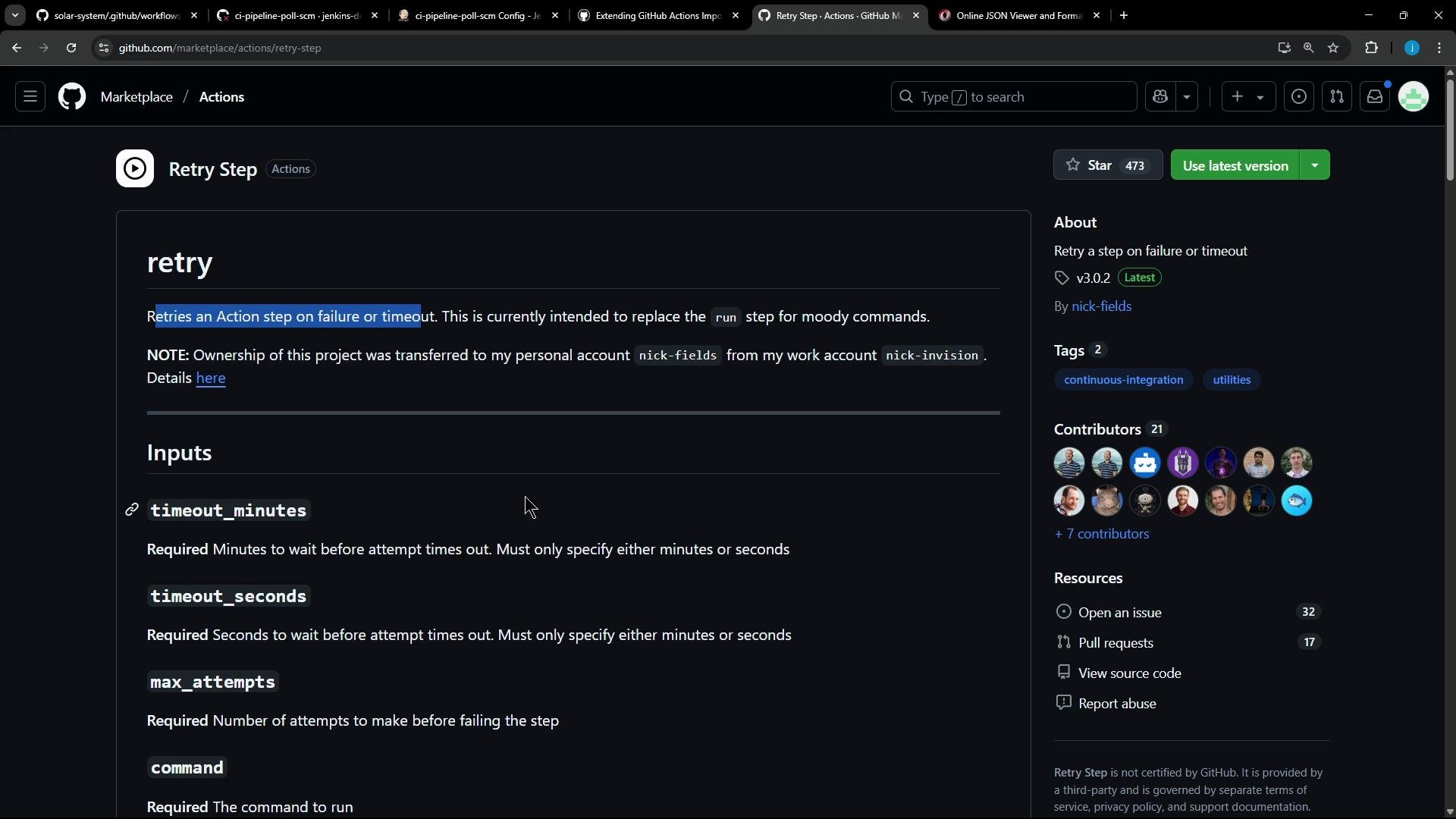
Use a Marketplace action that supports retrying commands with configurable attempts and timeouts. Example: Retry Step (`nick-fields/retry@v3`) supports inputs like `timeout_minutes`, `max_attempts`, `shell`, and `command`.
Example usage:
```yaml theme={null}
uses: nick-fields/retry@v3
with:
timeout_minutes: 10
max_attempts: 3
shell: pwsh
command: dir
```
 Transformer design
The transformer will emit the following sequence of steps for a Jenkins `retry` around unit tests:
| Step | Purpose | Example emitted step |
| ---- | ----------------------------- | ------------------------------------------------------------------------ |
| 1 | Checkout repository | `actions/checkout@v4` |
| 2 | Install dependencies | `run: npm install --no-audit` |
| 3 | Retry wrapper that runs tests | `uses: nick-fields/retry@v3` with `command: npm test` and `max_attempts` |
| 4 | Upload test results | `uses: actions/upload-artifact@v4.1.0` for `test-results.xml` |
Creating a custom transformer (Ruby)
Add a transformer to your custom transformers file (e.g., `ci-pipeline-transformer.rb`) that maps `retry` into the sequence above. This implementation extracts `max_attempts` robustly and emits the steps as Ruby hashes which the generator will convert to YAML:
```ruby theme={null}
# transform "retry" identifier and generate action steps
transform "retry" do |item|
# Extract max attempts robustly from the arguments array (first argument value)
max_attempts = item["arguments"][0]["value"]
# If the argument is wrapped as a hash with isLiteral/value keys, pull out the inner value
if max_attempts.is_a?(Hash) && max_attempts.key?("value")
max_attempts = max_attempts["value"]
end
max_attempts = max_attempts.to_i
[
{
"name" => "checkout",
"uses" => "actions/checkout@v4"
},
{
"name" => "install dependencies",
"run" => "npm install --no-audit"
},
{
"uses" => "nick-fields/retry@v3",
"with" => {
"timeout_minutes" => 60,
"max_attempts" => max_attempts,
"command" => "npm test"
}
},
{
"name" => "Publish Test Results",
"uses" => "actions/upload-artifact@v4.1.0",
"with" => {
"name" => "test-results",
"path" => "test-results.xml"
}
}
]
end
```
Notes on the transformer
* This example hard-codes `npm test` and `test-results.xml` because it targets a single Unit Testing retry usage. For broader usage, parse the corresponding Jenkins `sh` and `junit` items to extract the command and report path dynamically.
* Ensure numeric fields such as `max_attempts` are emitted as integers. If your generator quotes them as strings, adjust the generator to output raw integers.
Inspecting identifier JSON
A helper script (for example `helper_transformer.rb`) that prints identifiers can help you confirm the shape of items the importer provides. Example log lines:
```Ruby theme={null}
JSON for identifier: {"name"=>"dependencyCheck", "arguments"=>[{"key"=>"additionalArguments", "value"=>{"isLiteral"=>true, "value"=>"..."}}, ...]}
JSON for identifier: {"name"=>"dependencyCheckPublisher", "arguments"=>[...]}
JSON for identifier: {"name"=>"retry", "arguments"=>[{"isLiteral"=>true, "value"=>2}]}
```
Suppressing duplicate `sh` and `junit` steps
The importer may still generate `sh` (for `npm test`) and `junit` (for `test-results.xml`) steps. Add small transformers to return `nil` for those specific items so they are not emitted:
```ruby theme={null}
# Skip the original sh step if it is the npm test command already handled in retry
transform "sh" do |item|
next nil if item.dig("arguments", 0, "value", "value") == "npm test"
end
# Skip the junit step if it points to the test-results.xml already handled in retry
transform "junit" do |item|
next nil if item.dig("arguments", 0, "value", "value") == "test-results.xml"
end
```
Allow or block unverified actions
Some imports may reference unverified or older Marketplace actions. You can either allow them explicitly or replace them with maintained/verified alternatives.
If your pipeline uses unverified actions (for example `EnricoMi/publish-unit-test-result-action@v2`), either replace them with maintained verified alternatives (like `actions/upload-artifact@v4.1.0`) or run the importer with flags that allow unverified actions. Using unverified or deprecated actions can cause runtime failures.
Example CLI flag (restrict importer to verified actions)
```bash theme={null}
--allow-verified-actions true
```
Dry run and full migration
First run a dry-run to verify your custom transformers and inspect the generated workflow files:
```bash theme={null}
gh actions-importer dry-run jenkins \
--source-url http://139.84.149.83:8080/job/ci-pipeline-poll-scm/ \
--output-dir tmp/dry-run \
--custom-transformers ss-pipeline-transformer.rb
```
When satisfied, run the migration:
```bash theme={null}
gh actions-importer migrate jenkins \
--target-url https://github.com/jenkins-demo-org/solar-system \
--output-dir tmp/migrate \
--source-url http://139.84.149.83:8080/job/ci-pipeline-poll-scm/ \
--custom-transformers ss-pipeline-transformer.rb
```
Fixing action versions
If the workflow fails with messages like:
```bash theme={null}
Error: Missing download info for actions/upload-artifact@v3
```
update the transformer to reference a resolvable, current action tag—for example `actions/upload-artifact@v4.1.0`:
```ruby theme={null}
{
"name" => "Publish Test Results",
"uses" => "actions/upload-artifact@v4.1.0",
"with" => {
"name" => "test-results",
"path" => "test-results.xml"
}
}
```
Result after migration
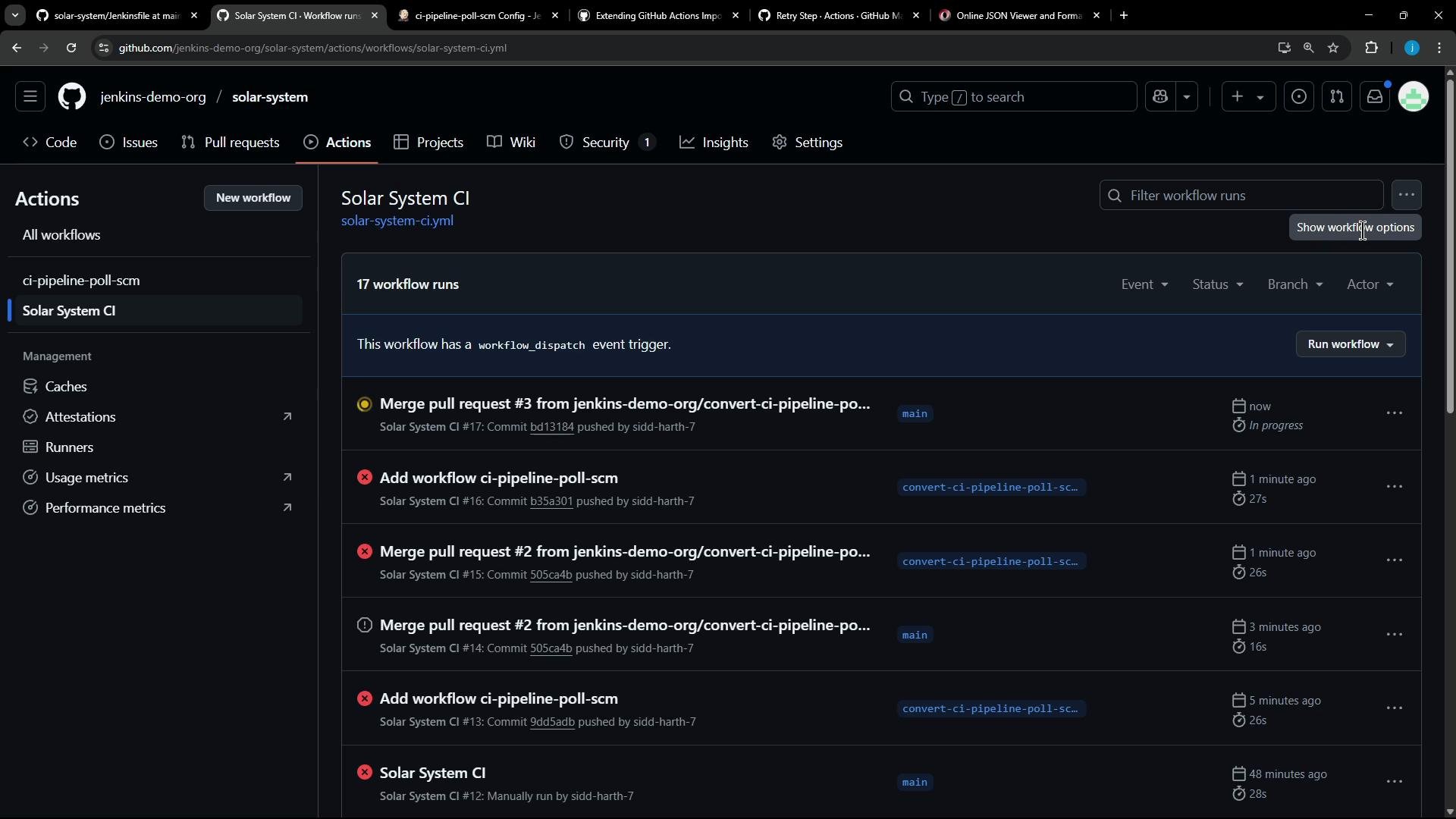
After adding the custom transformer, the generated Unit Testing job should contain:
* `actions/checkout@v4`
* an `npm install --no-audit` step
* `nick-fields/retry@v3` that executes `npm test` with `max_attempts` from Jenkins `retry`
* `actions/upload-artifact@v4.1.0` to upload `test-results.xml`
This ensures dependencies are available before test execution and retry semantics are preserved.
Example run output (success path):
```bash theme={null}
▶ Run nick-fields/retry@v3
...
▶ Attempt 1
Server successfully running on port - 3000
Command completed after 1 attempt(s).
Run actions/upload-artifact@v4.1.0
With the provided path, there will be 1 file uploaded
Artifact test-results has been successfully uploaded! Final size is 645 bytes.
Artifact download URL: https://github.com/jenkins-demo-org/solar-system/actions/runs/15204925226/artifacts/3183222708
```
Transformer design
The transformer will emit the following sequence of steps for a Jenkins `retry` around unit tests:
| Step | Purpose | Example emitted step |
| ---- | ----------------------------- | ------------------------------------------------------------------------ |
| 1 | Checkout repository | `actions/checkout@v4` |
| 2 | Install dependencies | `run: npm install --no-audit` |
| 3 | Retry wrapper that runs tests | `uses: nick-fields/retry@v3` with `command: npm test` and `max_attempts` |
| 4 | Upload test results | `uses: actions/upload-artifact@v4.1.0` for `test-results.xml` |
Creating a custom transformer (Ruby)
Add a transformer to your custom transformers file (e.g., `ci-pipeline-transformer.rb`) that maps `retry` into the sequence above. This implementation extracts `max_attempts` robustly and emits the steps as Ruby hashes which the generator will convert to YAML:
```ruby theme={null}
# transform "retry" identifier and generate action steps
transform "retry" do |item|
# Extract max attempts robustly from the arguments array (first argument value)
max_attempts = item["arguments"][0]["value"]
# If the argument is wrapped as a hash with isLiteral/value keys, pull out the inner value
if max_attempts.is_a?(Hash) && max_attempts.key?("value")
max_attempts = max_attempts["value"]
end
max_attempts = max_attempts.to_i
[
{
"name" => "checkout",
"uses" => "actions/checkout@v4"
},
{
"name" => "install dependencies",
"run" => "npm install --no-audit"
},
{
"uses" => "nick-fields/retry@v3",
"with" => {
"timeout_minutes" => 60,
"max_attempts" => max_attempts,
"command" => "npm test"
}
},
{
"name" => "Publish Test Results",
"uses" => "actions/upload-artifact@v4.1.0",
"with" => {
"name" => "test-results",
"path" => "test-results.xml"
}
}
]
end
```
Notes on the transformer
* This example hard-codes `npm test` and `test-results.xml` because it targets a single Unit Testing retry usage. For broader usage, parse the corresponding Jenkins `sh` and `junit` items to extract the command and report path dynamically.
* Ensure numeric fields such as `max_attempts` are emitted as integers. If your generator quotes them as strings, adjust the generator to output raw integers.
Inspecting identifier JSON
A helper script (for example `helper_transformer.rb`) that prints identifiers can help you confirm the shape of items the importer provides. Example log lines:
```Ruby theme={null}
JSON for identifier: {"name"=>"dependencyCheck", "arguments"=>[{"key"=>"additionalArguments", "value"=>{"isLiteral"=>true, "value"=>"..."}}, ...]}
JSON for identifier: {"name"=>"dependencyCheckPublisher", "arguments"=>[...]}
JSON for identifier: {"name"=>"retry", "arguments"=>[{"isLiteral"=>true, "value"=>2}]}
```
Suppressing duplicate `sh` and `junit` steps
The importer may still generate `sh` (for `npm test`) and `junit` (for `test-results.xml`) steps. Add small transformers to return `nil` for those specific items so they are not emitted:
```ruby theme={null}
# Skip the original sh step if it is the npm test command already handled in retry
transform "sh" do |item|
next nil if item.dig("arguments", 0, "value", "value") == "npm test"
end
# Skip the junit step if it points to the test-results.xml already handled in retry
transform "junit" do |item|
next nil if item.dig("arguments", 0, "value", "value") == "test-results.xml"
end
```
Allow or block unverified actions
Some imports may reference unverified or older Marketplace actions. You can either allow them explicitly or replace them with maintained/verified alternatives.
If your pipeline uses unverified actions (for example `EnricoMi/publish-unit-test-result-action@v2`), either replace them with maintained verified alternatives (like `actions/upload-artifact@v4.1.0`) or run the importer with flags that allow unverified actions. Using unverified or deprecated actions can cause runtime failures.
Example CLI flag (restrict importer to verified actions)
```bash theme={null}
--allow-verified-actions true
```
Dry run and full migration
First run a dry-run to verify your custom transformers and inspect the generated workflow files:
```bash theme={null}
gh actions-importer dry-run jenkins \
--source-url http://139.84.149.83:8080/job/ci-pipeline-poll-scm/ \
--output-dir tmp/dry-run \
--custom-transformers ss-pipeline-transformer.rb
```
When satisfied, run the migration:
```bash theme={null}
gh actions-importer migrate jenkins \
--target-url https://github.com/jenkins-demo-org/solar-system \
--output-dir tmp/migrate \
--source-url http://139.84.149.83:8080/job/ci-pipeline-poll-scm/ \
--custom-transformers ss-pipeline-transformer.rb
```
Fixing action versions
If the workflow fails with messages like:
```bash theme={null}
Error: Missing download info for actions/upload-artifact@v3
```
update the transformer to reference a resolvable, current action tag—for example `actions/upload-artifact@v4.1.0`:
```ruby theme={null}
{
"name" => "Publish Test Results",
"uses" => "actions/upload-artifact@v4.1.0",
"with" => {
"name" => "test-results",
"path" => "test-results.xml"
}
}
```
Result after migration
After adding the custom transformer, the generated Unit Testing job should contain:
* `actions/checkout@v4`
* an `npm install --no-audit` step
* `nick-fields/retry@v3` that executes `npm test` with `max_attempts` from Jenkins `retry`
* `actions/upload-artifact@v4.1.0` to upload `test-results.xml`
This ensures dependencies are available before test execution and retry semantics are preserved.
Example run output (success path):
```bash theme={null}
▶ Run nick-fields/retry@v3
...
▶ Attempt 1
Server successfully running on port - 3000
Command completed after 1 attempt(s).
Run actions/upload-artifact@v4.1.0
With the provided path, there will be 1 file uploaded
Artifact test-results has been successfully uploaded! Final size is 645 bytes.
Artifact download URL: https://github.com/jenkins-demo-org/solar-system/actions/runs/15204925226/artifacts/3183222708
```
 Testing failure + retry
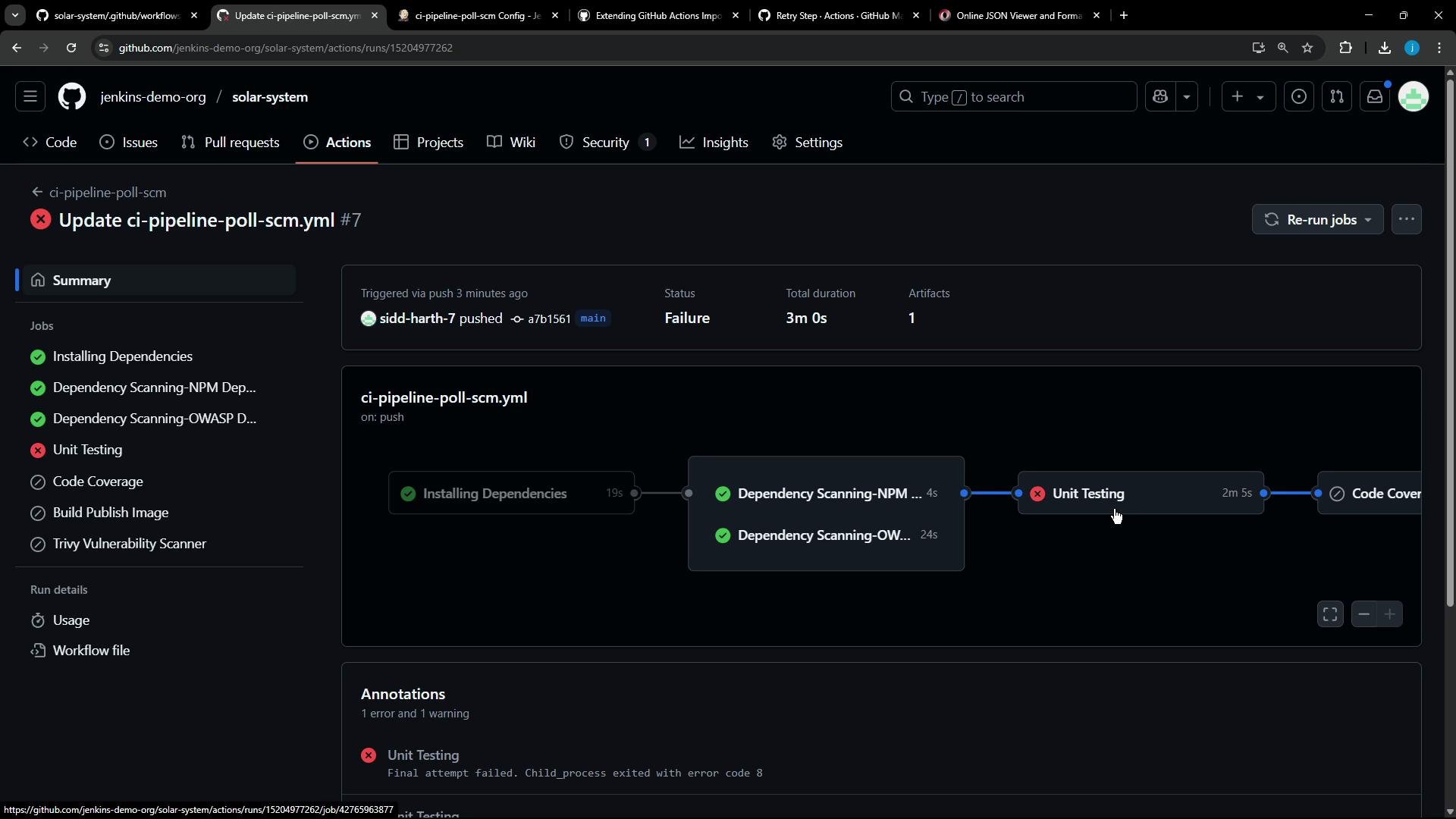
To validate the retry behavior, temporarily make tests fail (for example, remove required environment variables). The retry action will attempt the command up to `max_attempts`. Observations:
* Retry attempts appear in Actions logs (`Attempt 1`, `Attempt 2`, ...).
* If all attempts fail, the job fails after the final attempt and logs show "final attempt failed" or similar.
Failure example (screenshot)
Testing failure + retry
To validate the retry behavior, temporarily make tests fail (for example, remove required environment variables). The retry action will attempt the command up to `max_attempts`. Observations:
* Retry attempts appear in Actions logs (`Attempt 1`, `Attempt 2`, ...).
* If all attempts fail, the job fails after the final attempt and logs show "final attempt failed" or similar.
Failure example (screenshot)
 Final notes and best practices
* Ensure essential setup steps (checkout, install dependencies) are present before running tests to avoid missing binaries like Mocha.
* Extract dynamic values (commands, file names, retry counts) from Jenkins identifiers whenever possible so transformers apply across multiple contexts.
* Prefer verified and actively maintained action versions; the importer can be configured to allow only verified actions so unverified steps are commented out or flagged.
* Use `gh actions-importer` dry-run to iterate quickly and validate transformer output before migration.
References and further reading
* Retry Step Marketplace action: [https://github.com/nick-fields/retry](https://github.com/nick-fields/retry)
* GitHub Actions: [https://docs.github.com/actions](https://docs.github.com/actions)
* Jenkins Pipeline Syntax: [https://www.jenkins.io/doc/book/pipeline/syntax/](https://www.jenkins.io/doc/book/pipeline/syntax/)
* gh actions-importer CLI: [https://github.com/cli/gh-actions-importer](https://github.com/cli/gh-actions-importer) (see repo for usage and flags)
Final notes and best practices
* Ensure essential setup steps (checkout, install dependencies) are present before running tests to avoid missing binaries like Mocha.
* Extract dynamic values (commands, file names, retry counts) from Jenkins identifiers whenever possible so transformers apply across multiple contexts.
* Prefer verified and actively maintained action versions; the importer can be configured to allow only verified actions so unverified steps are commented out or flagged.
* Use `gh actions-importer` dry-run to iterate quickly and validate transformer output before migration.
References and further reading
* Retry Step Marketplace action: [https://github.com/nick-fields/retry](https://github.com/nick-fields/retry)
* GitHub Actions: [https://docs.github.com/actions](https://docs.github.com/actions)
* Jenkins Pipeline Syntax: [https://www.jenkins.io/doc/book/pipeline/syntax/](https://www.jenkins.io/doc/book/pipeline/syntax/)
* gh actions-importer CLI: [https://github.com/cli/gh-actions-importer](https://github.com/cli/gh-actions-importer) (see repo for usage and flags)