> ## Documentation Index
> Fetch the complete documentation index at: https://notes.kodekloud.com/llms.txt
> Use this file to discover all available pages before exploring further.
# Demo Installing the GitHub Actions Importer CLI Extension
> Guide to install and authenticate the GitHub CLI extension 'gh-actions-importer', configure Jenkins credentials, and run audit, dry-run, forecast, and migrate commands to convert Jenkins pipelines to GitHub Actions.
This walkthrough shows how to install the GitHub Actions Importer extension for the GitHub CLI (`gh`) on a virtual machine, authenticate `gh`, and verify the extension is available. The official documentation covers installation, credential configuration, and migration workflows for converting Jenkins pipelines to GitHub Actions: [https://docs.github.com/en/actions/migrating-to-github-actions/about-migrating-from-jenkins-with-github-actions-importer](https://docs.github.com/en/actions/migrating-to-github-actions/about-migrating-from-jenkins-with-github-actions-importer)
Summary of steps:
* Verify prerequisites
* Install the GitHub CLI (`gh`) if missing
* Authenticate `gh` with a GitHub Personal Access Token (PAT) or interactive login
* Install and verify the `gh-actions-importer` extension
* Configure the importer and run audit/dry-run/migrate commands
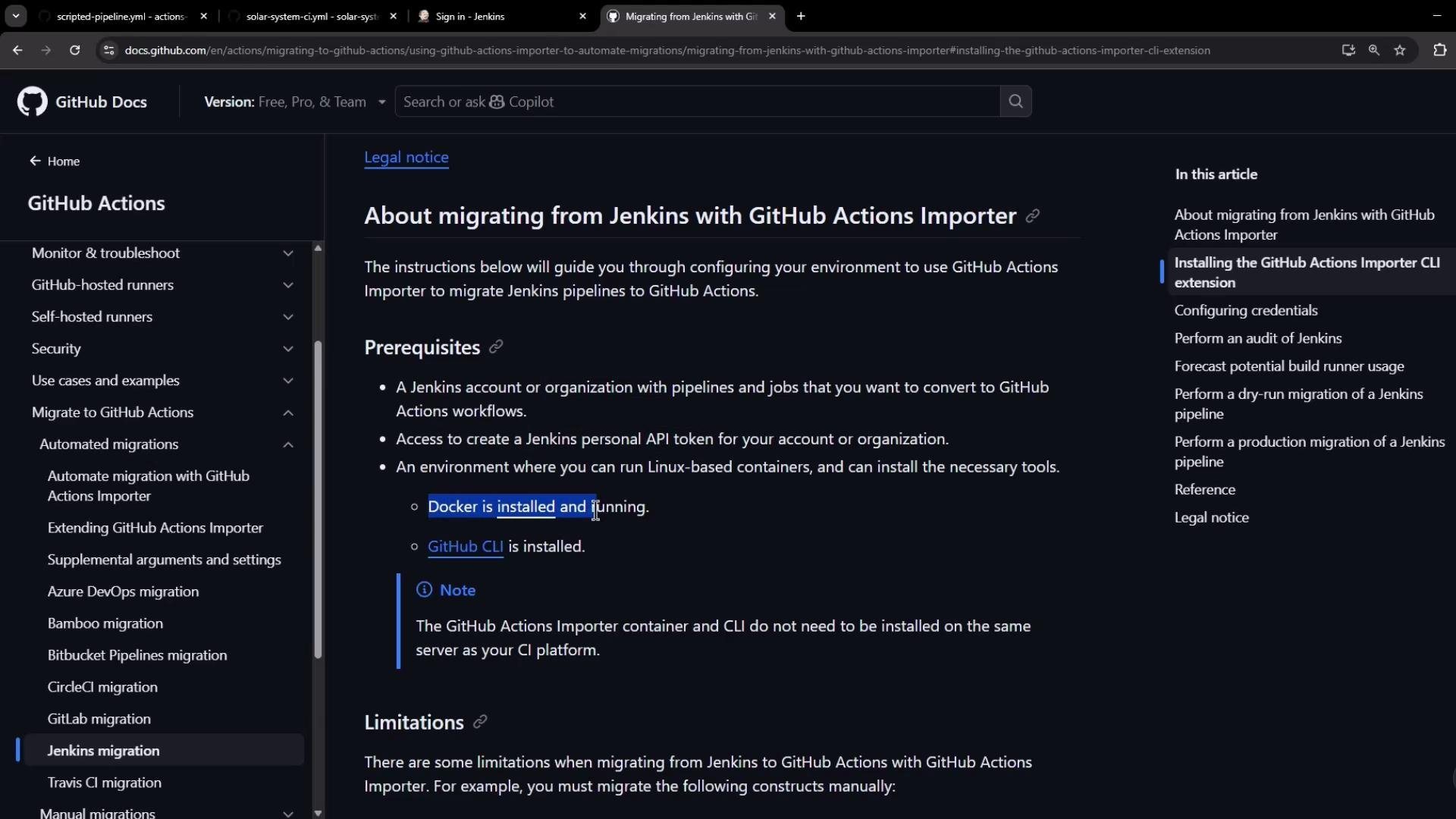
## Prerequisites
| Requirement | Purpose / Notes |
| ------------------------------------ | -------------------------------------------------- |
| Jenkins account/organization | Pipelines/jobs you plan to convert |
| Jenkins personal API token | Used by the importer to access Jenkins |
| Docker installed & running on the VM | Importer runs conversion containers |
| GitHub CLI (`gh`) installed | Required to install and run the importer extension |
 ## 1. Check for GitHub CLI (`gh`)
Confirm whether `gh` is already installed:
```bash theme={null}
root@jenkins in /home
❯ gh
bash: /usr/bin/gh: No such file or directory
```
If the command returns "No such file or directory," install `gh` on Debian/Ubuntu using the official repository and keyring. This single-line script adds the repository, imports the GPG keyring, updates apt, and installs `gh`:
```bash theme={null}
(type -p wget >/dev/null || (sudo apt update && sudo apt-get install wget -y)) \
&& sudo mkdir -p -m 755 /etc/apt/keyrings \
&& out=$(mktemp) && wget -nv -O$out https://cli.github.com/packages/githubcli-archive-keyring.gpg \
&& sudo tee /etc/apt/keyrings/githubcli-archive-keyring.gpg > /dev/null < $out \
&& sudo chmod go+r /etc/apt/keyrings/githubcli-archive-keyring.gpg \
&& echo "deb [arch=$(dpkg --print-architecture) signed-by=/etc/apt/keyrings/githubcli-archive-keyring.gpg] https://cli.github.com/packages stable main" | sudo tee /etc/apt/sources.list.d/github-cli.list > /dev/null \
&& sudo apt update \
&& sudo apt install gh -y
```
After installation, validate `gh` and inspect available top-level commands:
```bash theme={null}
root@jenkins in /home
❯ gh help
CORE COMMANDS
auth Authenticate gh and git with GitHub
browse Open repositories, issues, pull requests, and more in the browser
codespace Connect to and manage codespaces
gist Manage gists
issue Manage issues
org Manage organizations
pr Manage pull requests
project Work with GitHub Projects
release Manage releases
repo Manage repositories
GITHUB ACTIONS COMMANDS
cache Manage GitHub Actions caches
run View details about workflow runs
workflow View details about GitHub Actions workflows
ADDITIONAL COMMANDS
alias Create command shortcuts
api Make an authenticated GitHub API request
completion Generate shell completion scripts
config Manage configuration for gh
```
## 2. Install the GitHub Actions Importer extension
Attempt to install the extension:
```bash theme={null}
root@jenkins in /home
❯ gh extension install github/gh-actions-importer
To get started with GitHub CLI, please run: gh auth login
Alternatively, populate the GH_TOKEN environment variable with a GitHub API authentication token.
```
If `gh` is not authenticated, it will prompt you to authenticate first. Continue to the authentication section below.
## 3. Authenticate `gh` (interactive or token)
You can authenticate in two ways:
* Interactive login: `gh auth login` (recommended for interactive sessions)
* Environment token: set `GH_TOKEN` to a Personal Access Token (PAT) to allow non-interactive usage
Interactive login example:
```bash theme={null}
root@jenkins in /home
❯ gh auth login
? Where do you use GitHub? GitHub.com
? What is your preferred protocol for Git operations on this host? HTTPS
? How would you like to authenticate GitHub CLI? Paste an authentication token
Tip: you can generate a Personal Access Token at https://github.com/settings/tokens
The minimum required scopes are: 'repo', 'read:org', 'workflow'.
? Paste your authentication token:
```
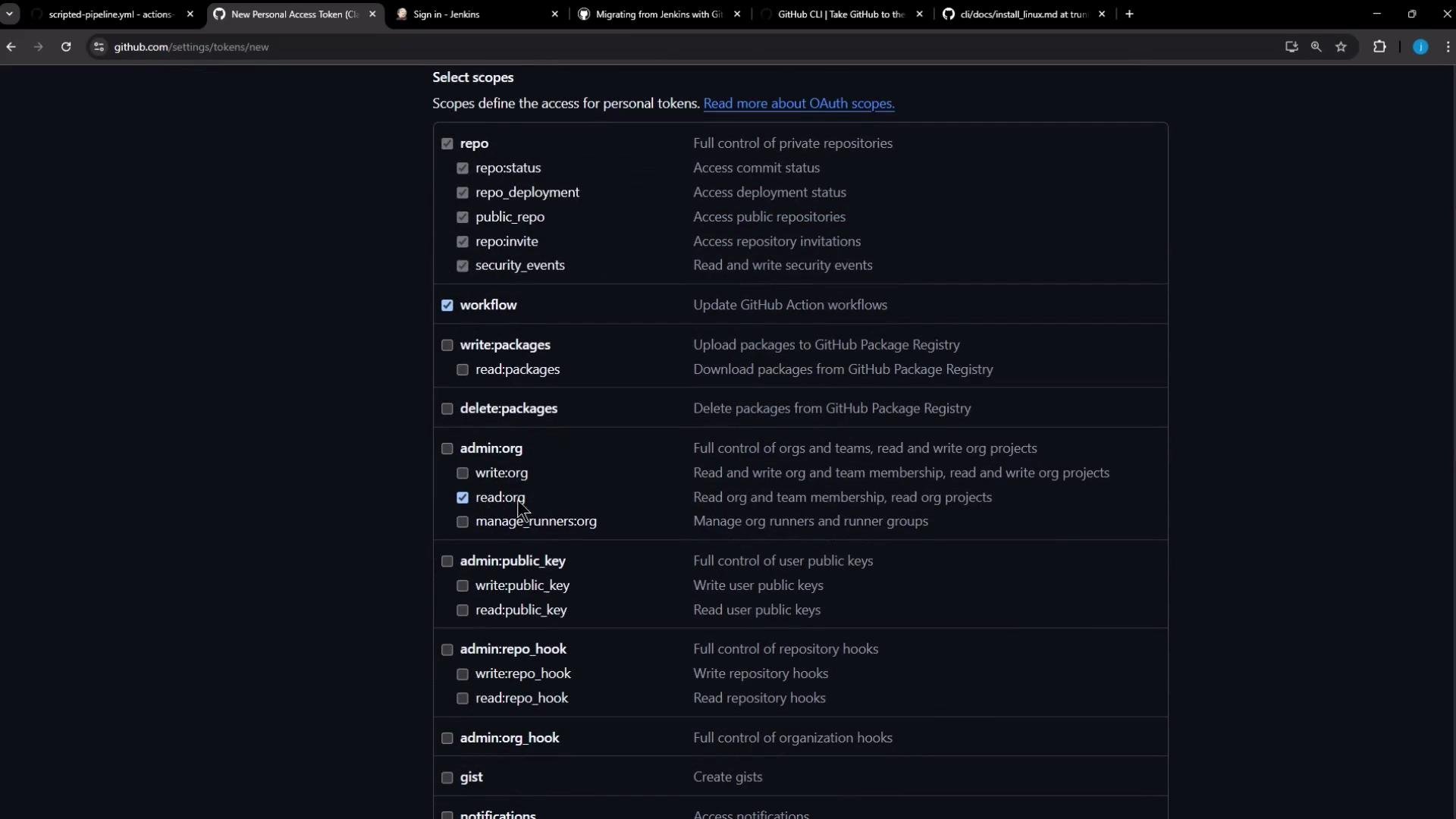
Generate a PAT in GitHub: Settings → Developer settings → Personal access tokens (classic). When creating the token, grant the importer the minimum required scopes.
Minimum required scopes for the importer are: `repo`, `read:org`, and `workflow`. Keep the token secure and consider setting an expiration.
To make scope/permissions clear, here's a quick reference:
| Scope | Why it's required |
| ---------- | ------------------------------------------------------------------------------------ |
| `repo` | Read/write access to repository contents (needed for creating PRs during migrations) |
| `read:org` | Read organization membership & teams if importer needs org-level context |
| `workflow` | Inspect and manage GitHub Actions workflows |
When you finish the interactive `gh auth login` flow, you should see confirmation:
```bash theme={null}
root@jenkins in /home
❯ gh auth login
... (authentication steps) ...
✓ Configured git protocol
! Authentication credentials saved in plain text
✓ Logged in as
```
Verify status:
```bash theme={null}
root@jenkins in /home
❯ gh auth status
github.com
✓ Logged in to github.com as (oauth_token)
✓ Git operations for github.com configured to use https protocol.
```
## 4. Install and verify the importer extension
With `gh` authenticated, install the importer extension:
```bash theme={null}
root@jenkins in /home
❯ gh extension install github/gh-actions-importer
✓ Installed extension github/gh-actions-importer
```
Check `gh` and the extension versions to ensure everything is up-to-date:
```bash theme={null}
root@jenkins in /home
❯ gh version
gh version 2.73.0 (2025-05-19)
root@jenkins in /home
❯ gh actions-importer version
gh actions-importer github/gh-actions-importer v1.3.6
actions-importer/cli:latest v1.3.22397
```
It’s good practice to update the importer extension and its container image periodically:
```bash theme={null}
root@jenkins in /home
❯ gh actions-importer update
Updating ghcr.io/actions-importer/cli:latest...
ghcr.io/actions-importer/cli:latest up-to-date
```
## 5. Explorer commands: what the importer can do
List available importer commands and options:
```bash theme={null}
root@jenkins in /home
❯ gh actions-importer -h
Options:
-?, -h, --help Show help and usage information
Commands:
update Update to the latest version of GitHub Actions Importer.
version Display the current version of GitHub Actions Importer.
configure Start an interactive prompt to configure credentials used to authenticate with your CI server(s).
audit Plan your CI/CD migration by analyzing your current CI/CD footprint.
forecast Forecast GitHub Actions usage from historical pipeline utilization.
dry-run Convert a pipeline to a GitHub Actions workflow and output its YAML file.
migrate Convert a pipeline to a GitHub Actions workflow and open a pull request with the changes.
list-features List the available feature flags for GitHub Actions Importer.
```
## 6. Configure the importer for Jenkins
Run the interactive configuration to store CI provider credentials and base URLs:
```bash theme={null}
root@jenkins in /home
❯ gh actions-importer configure
✓ Which CI providers are you configuring?: Jenkins
Enter the following values (leave empty to omit):
✓ Personal access token for GitHub: ***************
✓ Base url of the GitHub instance: https://github.com
✓ Personal access token for Jenkins: ***************
✓ Username of Jenkins user: admin
✓ Base url of the Jenkins instance: https://localhost
Environment variables successfully updated.
```
After configuring, you can run the following high-value commands:
* `gh actions-importer audit` — analyze your Jenkins CI/CD footprint and identify migration candidates
* `gh actions-importer forecast` — estimate GitHub Actions usage from historical pipeline data
* `gh actions-importer dry-run` — convert a pipeline and output workflow YAML without creating changes
* `gh actions-importer migrate` — convert a pipeline and open a pull request with the resulting workflow
## 7. Feature toggles
Inspect feature toggles that control importer behavior:
```bash theme={null}
root@jenkins in /home
❯ gh actions-importer list-features
Available feature toggles:
actions/cache (enabled):
Control usage of actions/cache inside of workflows. Outputs a comment if not enabled.
GitHub Enterprise Server >= ghes-3.5 required.
composite-actions (enabled):
Minimizes resulting workflow complexity through the use of composite actions. See https://docs.github.com/en/actions/creating-actions/creating-a-composite-action for more information.
GitHub Enterprise Server >= ghes-3.4 required.
reusable-workflows (enabled):
Avoid duplication by reusing existing workflows. See https://docs.github.com/en/actions/using-workflows/reusing-workflows for more information.
```
## 1. Check for GitHub CLI (`gh`)
Confirm whether `gh` is already installed:
```bash theme={null}
root@jenkins in /home
❯ gh
bash: /usr/bin/gh: No such file or directory
```
If the command returns "No such file or directory," install `gh` on Debian/Ubuntu using the official repository and keyring. This single-line script adds the repository, imports the GPG keyring, updates apt, and installs `gh`:
```bash theme={null}
(type -p wget >/dev/null || (sudo apt update && sudo apt-get install wget -y)) \
&& sudo mkdir -p -m 755 /etc/apt/keyrings \
&& out=$(mktemp) && wget -nv -O$out https://cli.github.com/packages/githubcli-archive-keyring.gpg \
&& sudo tee /etc/apt/keyrings/githubcli-archive-keyring.gpg > /dev/null < $out \
&& sudo chmod go+r /etc/apt/keyrings/githubcli-archive-keyring.gpg \
&& echo "deb [arch=$(dpkg --print-architecture) signed-by=/etc/apt/keyrings/githubcli-archive-keyring.gpg] https://cli.github.com/packages stable main" | sudo tee /etc/apt/sources.list.d/github-cli.list > /dev/null \
&& sudo apt update \
&& sudo apt install gh -y
```
After installation, validate `gh` and inspect available top-level commands:
```bash theme={null}
root@jenkins in /home
❯ gh help
CORE COMMANDS
auth Authenticate gh and git with GitHub
browse Open repositories, issues, pull requests, and more in the browser
codespace Connect to and manage codespaces
gist Manage gists
issue Manage issues
org Manage organizations
pr Manage pull requests
project Work with GitHub Projects
release Manage releases
repo Manage repositories
GITHUB ACTIONS COMMANDS
cache Manage GitHub Actions caches
run View details about workflow runs
workflow View details about GitHub Actions workflows
ADDITIONAL COMMANDS
alias Create command shortcuts
api Make an authenticated GitHub API request
completion Generate shell completion scripts
config Manage configuration for gh
```
## 2. Install the GitHub Actions Importer extension
Attempt to install the extension:
```bash theme={null}
root@jenkins in /home
❯ gh extension install github/gh-actions-importer
To get started with GitHub CLI, please run: gh auth login
Alternatively, populate the GH_TOKEN environment variable with a GitHub API authentication token.
```
If `gh` is not authenticated, it will prompt you to authenticate first. Continue to the authentication section below.
## 3. Authenticate `gh` (interactive or token)
You can authenticate in two ways:
* Interactive login: `gh auth login` (recommended for interactive sessions)
* Environment token: set `GH_TOKEN` to a Personal Access Token (PAT) to allow non-interactive usage
Interactive login example:
```bash theme={null}
root@jenkins in /home
❯ gh auth login
? Where do you use GitHub? GitHub.com
? What is your preferred protocol for Git operations on this host? HTTPS
? How would you like to authenticate GitHub CLI? Paste an authentication token
Tip: you can generate a Personal Access Token at https://github.com/settings/tokens
The minimum required scopes are: 'repo', 'read:org', 'workflow'.
? Paste your authentication token:
```
Generate a PAT in GitHub: Settings → Developer settings → Personal access tokens (classic). When creating the token, grant the importer the minimum required scopes.
Minimum required scopes for the importer are: `repo`, `read:org`, and `workflow`. Keep the token secure and consider setting an expiration.
To make scope/permissions clear, here's a quick reference:
| Scope | Why it's required |
| ---------- | ------------------------------------------------------------------------------------ |
| `repo` | Read/write access to repository contents (needed for creating PRs during migrations) |
| `read:org` | Read organization membership & teams if importer needs org-level context |
| `workflow` | Inspect and manage GitHub Actions workflows |
When you finish the interactive `gh auth login` flow, you should see confirmation:
```bash theme={null}
root@jenkins in /home
❯ gh auth login
... (authentication steps) ...
✓ Configured git protocol
! Authentication credentials saved in plain text
✓ Logged in as
```
Verify status:
```bash theme={null}
root@jenkins in /home
❯ gh auth status
github.com
✓ Logged in to github.com as (oauth_token)
✓ Git operations for github.com configured to use https protocol.
```
## 4. Install and verify the importer extension
With `gh` authenticated, install the importer extension:
```bash theme={null}
root@jenkins in /home
❯ gh extension install github/gh-actions-importer
✓ Installed extension github/gh-actions-importer
```
Check `gh` and the extension versions to ensure everything is up-to-date:
```bash theme={null}
root@jenkins in /home
❯ gh version
gh version 2.73.0 (2025-05-19)
root@jenkins in /home
❯ gh actions-importer version
gh actions-importer github/gh-actions-importer v1.3.6
actions-importer/cli:latest v1.3.22397
```
It’s good practice to update the importer extension and its container image periodically:
```bash theme={null}
root@jenkins in /home
❯ gh actions-importer update
Updating ghcr.io/actions-importer/cli:latest...
ghcr.io/actions-importer/cli:latest up-to-date
```
## 5. Explorer commands: what the importer can do
List available importer commands and options:
```bash theme={null}
root@jenkins in /home
❯ gh actions-importer -h
Options:
-?, -h, --help Show help and usage information
Commands:
update Update to the latest version of GitHub Actions Importer.
version Display the current version of GitHub Actions Importer.
configure Start an interactive prompt to configure credentials used to authenticate with your CI server(s).
audit Plan your CI/CD migration by analyzing your current CI/CD footprint.
forecast Forecast GitHub Actions usage from historical pipeline utilization.
dry-run Convert a pipeline to a GitHub Actions workflow and output its YAML file.
migrate Convert a pipeline to a GitHub Actions workflow and open a pull request with the changes.
list-features List the available feature flags for GitHub Actions Importer.
```
## 6. Configure the importer for Jenkins
Run the interactive configuration to store CI provider credentials and base URLs:
```bash theme={null}
root@jenkins in /home
❯ gh actions-importer configure
✓ Which CI providers are you configuring?: Jenkins
Enter the following values (leave empty to omit):
✓ Personal access token for GitHub: ***************
✓ Base url of the GitHub instance: https://github.com
✓ Personal access token for Jenkins: ***************
✓ Username of Jenkins user: admin
✓ Base url of the Jenkins instance: https://localhost
Environment variables successfully updated.
```
After configuring, you can run the following high-value commands:
* `gh actions-importer audit` — analyze your Jenkins CI/CD footprint and identify migration candidates
* `gh actions-importer forecast` — estimate GitHub Actions usage from historical pipeline data
* `gh actions-importer dry-run` — convert a pipeline and output workflow YAML without creating changes
* `gh actions-importer migrate` — convert a pipeline and open a pull request with the resulting workflow
## 7. Feature toggles
Inspect feature toggles that control importer behavior:
```bash theme={null}
root@jenkins in /home
❯ gh actions-importer list-features
Available feature toggles:
actions/cache (enabled):
Control usage of actions/cache inside of workflows. Outputs a comment if not enabled.
GitHub Enterprise Server >= ghes-3.5 required.
composite-actions (enabled):
Minimizes resulting workflow complexity through the use of composite actions. See https://docs.github.com/en/actions/creating-actions/creating-a-composite-action for more information.
GitHub Enterprise Server >= ghes-3.4 required.
reusable-workflows (enabled):
Avoid duplication by reusing existing workflows. See https://docs.github.com/en/actions/using-workflows/reusing-workflows for more information.
```
 ## Next steps
1. Run `gh actions-importer audit` to analyze your Jenkins pipelines and generate a migration plan.
2. Use `gh actions-importer dry-run` to preview converted workflow YAML files.
3. When ready, run `gh actions-importer migrate` to create pull requests with the migrated workflows.
References:
* GitHub Docs — Migrating from Jenkins with GitHub Actions Importer: [https://docs.github.com/en/actions/migrating-to-github-actions/about-migrating-from-jenkins-with-github-actions-importer](https://docs.github.com/en/actions/migrating-to-github-actions/about-migrating-from-jenkins-with-github-actions-importer)
* GitHub CLI installation: [https://github.com/cli/cli#installation](https://github.com/cli/cli#installation)
## Next steps
1. Run `gh actions-importer audit` to analyze your Jenkins pipelines and generate a migration plan.
2. Use `gh actions-importer dry-run` to preview converted workflow YAML files.
3. When ready, run `gh actions-importer migrate` to create pull requests with the migrated workflows.
References:
* GitHub Docs — Migrating from Jenkins with GitHub Actions Importer: [https://docs.github.com/en/actions/migrating-to-github-actions/about-migrating-from-jenkins-with-github-actions-importer](https://docs.github.com/en/actions/migrating-to-github-actions/about-migrating-from-jenkins-with-github-actions-importer)
* GitHub CLI installation: [https://github.com/cli/cli#installation](https://github.com/cli/cli#installation)