> ## Documentation Index
> Fetch the complete documentation index at: https://notes.kodekloud.com/llms.txt
> Use this file to discover all available pages before exploring further.
# Demo GitHub Actions Workflow 2
> Explains GitHub Actions workflow features including manual triggers, uploading and downloading artifacts to share files between jobs, ordering jobs with needs, and skipping CI on push
In this lesson we expand a simple GitHub Actions workflow to demonstrate:
* manual triggers (`workflow_dispatch`),
* transferring files between jobs using artifacts,
* avoiding race conditions by ordering jobs with `needs`,
* and how to skip CI when pushing changes.
This guide walks through the workflow step-by-step with practical YAML examples and troubleshooting tips.
## 1. Initial demo workflow (manual trigger)
This workflow, named `Demo-2`, runs only when manually triggered from the Actions tab (`workflow_dispatch`). It contains a single `build` job that creates `hello.txt`:
```yaml theme={null}
name: Demo-2
on:
workflow_dispatch:
jobs:
build:
runs-on: ubuntu-latest
steps:
- name: Create a text file
run: echo "Hello, world!" > hello.txt
```
After committing and pushing this file you must manually trigger it from the Actions tab because it does not run on `push` or other events.
## 2. Understanding existing CI workflows and skipping CI on push
If your repository already has another workflow that triggers on `push`, pushing commits can inadvertently trigger that existing workflow. To avoid triggering push-based workflows while you push changes, include `[skip CI]` or `[ci skip]` in your commit message.
Include `[skip CI]` (or `[ci skip]`) in the commit message to prevent workflows that trigger on `push` from running for that commit.
A common CI workflow configuration that supports both `push` and manual dispatch looks like this:
```yaml theme={null}
name: CI
on:
push:
workflow_dispatch:
jobs:
first_job:
runs-on: ubuntu-latest
steps:
- uses: actions/checkout@v4
- name: Welcome Message
run: echo "My first GitHub Action Job"
- name: List files on repo
run: ls
- name: Read File
run: cat README.md
```
## 3. Adding a second job (and the inter-job file-sharing problem)
Next, we add a `test` job that expects to read `hello.txt` created by the `build` job:
```yaml theme={null}
name: Demo-2
on:
workflow_dispatch:
jobs:
build:
runs-on: ubuntu-latest
steps:
- name: Create a text file
run: echo "Hello, world!" > hello.txt
test:
runs-on: ubuntu-latest
steps:
- name: List files
run: ls
- name: Test file
run: cat hello.txt | grep -i "Hello, world!"
```
Because each job runs on its own runner (a separate virtual machine), files produced in one job are not automatically available in another. The `test` job will typically fail with:
```text theme={null}
cat: hello.txt: No such file or directory
Error: Process completed with exit code 1.
```
## 4. Use artifacts to transfer files between jobs
To share files between jobs, use `actions/upload-artifact` in the producing job and `actions/download-artifact` in the consuming job. These actions are available in the [GitHub Marketplace](https://github.com/marketplace?type=actions\&q=artifact) (search for "artifact").
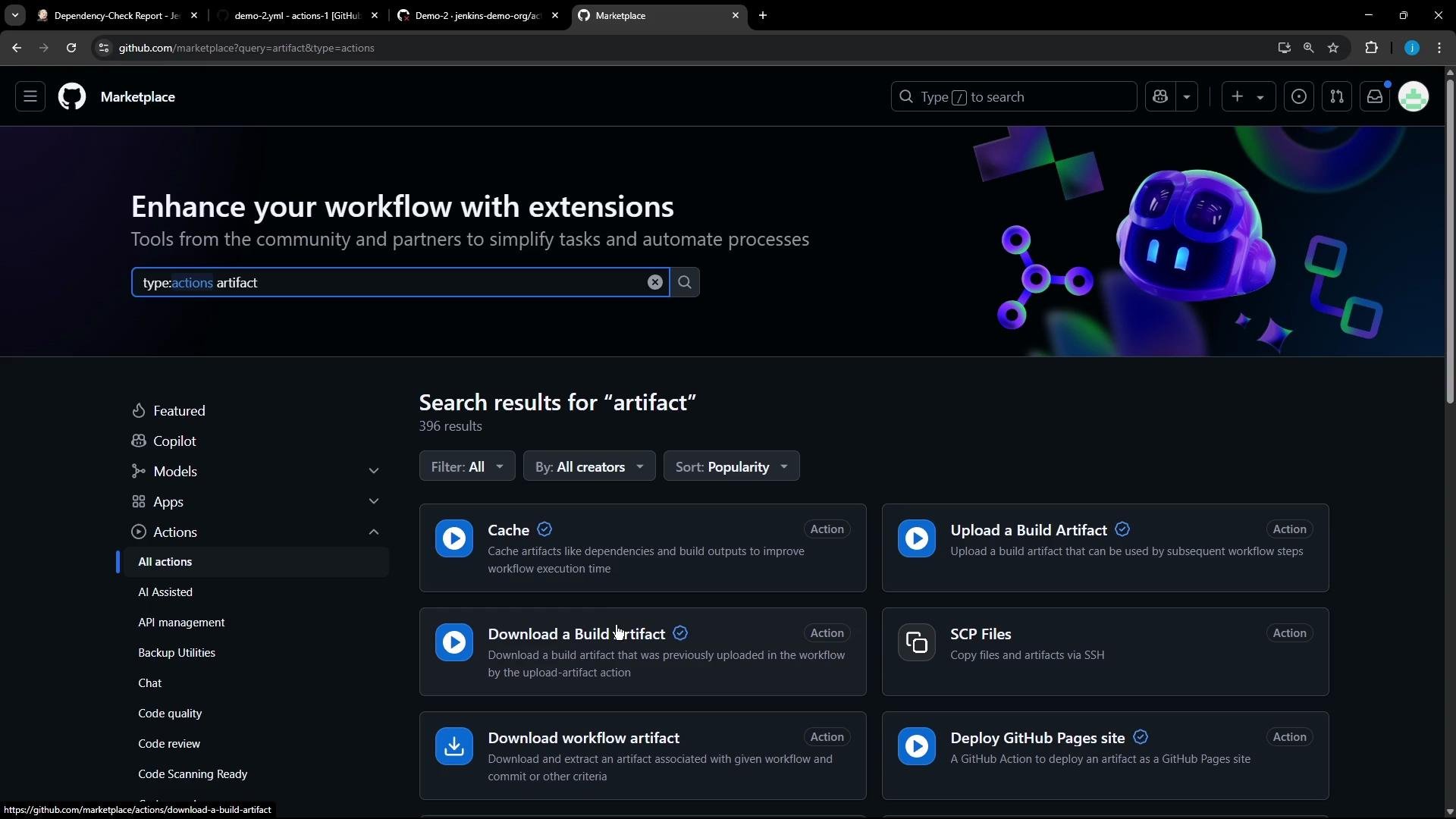 Example: upload the file in `build` and download it in `test`:
```yaml theme={null}
name: Demo-2
on:
workflow_dispatch:
jobs:
build:
runs-on: ubuntu-latest
steps:
- name: Create a text file
run: echo "Hello, world!" > hello.txt
- uses: actions/upload-artifact@v4
with:
name: hello-file
path: hello.txt
test:
runs-on: ubuntu-latest
steps:
- uses: actions/download-artifact@v4
with:
name: hello-file
- name: List files
run: ls
- name: Test file
run: grep -i "Hello, world!" hello.txt
```
Notes:
* `actions/upload-artifact@v4` creates a named artifact (`hello-file`) that persists for the run.
* `actions/download-artifact@v4` finds that artifact by name and restores the file(s) into the runner workspace.
## 5. Race condition when jobs run in parallel
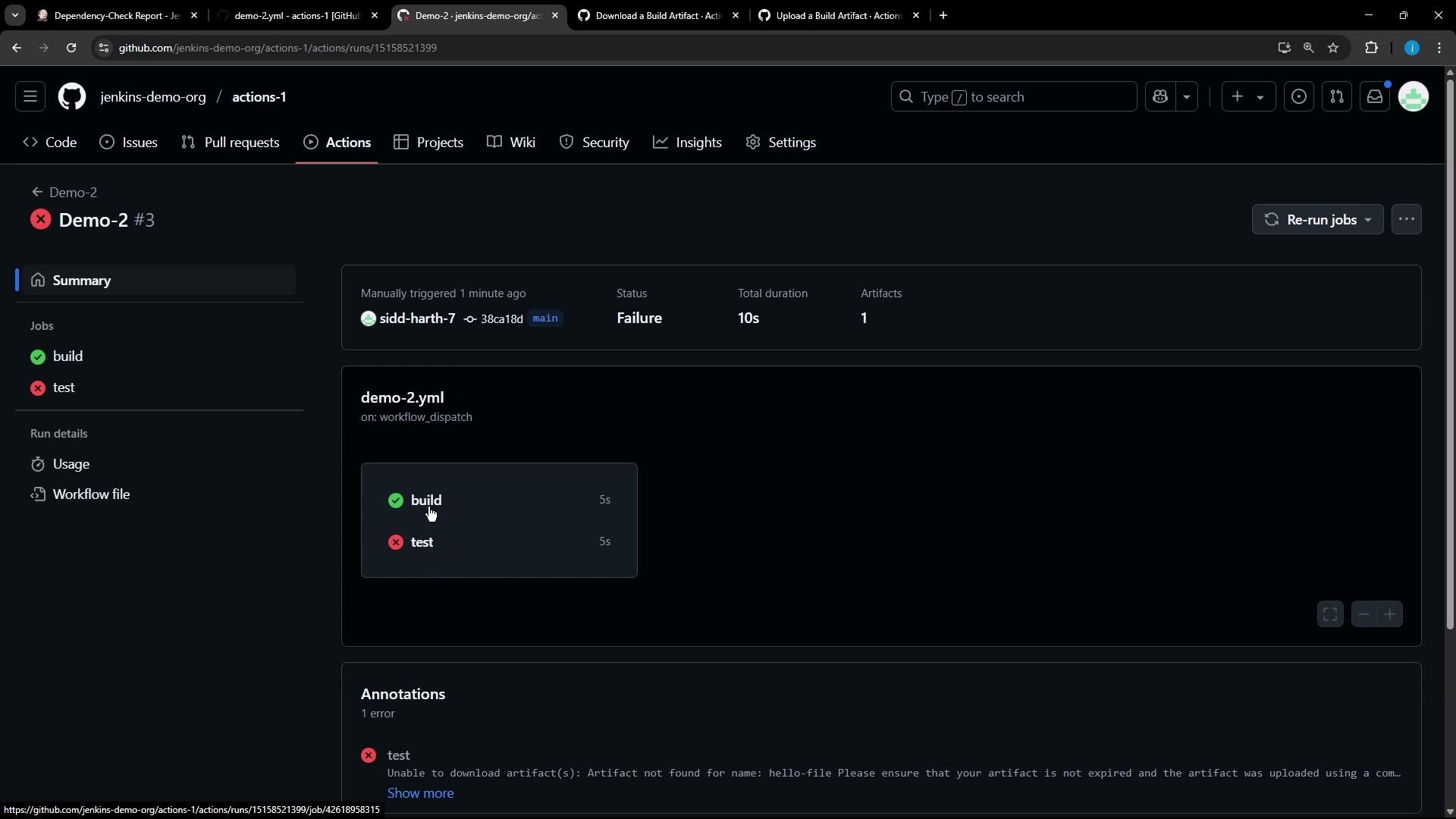
By default, jobs that have no explicit dependency may run in parallel. If `test` starts before `build` has finished uploading the artifact, the download will fail with an artifact-not-found error:
```text theme={null}
Run actions/download-artifact@v4
Downloading single artifact
Error: Unable to download artifact(s): Artifact not found for name: hello-file
Please ensure that your artifact is not expired and the artifact was uploaded using a compatible version of toolkit/upload-artifact.
```
This failure usually happens because the `test` job started before `build` finished:
Example: upload the file in `build` and download it in `test`:
```yaml theme={null}
name: Demo-2
on:
workflow_dispatch:
jobs:
build:
runs-on: ubuntu-latest
steps:
- name: Create a text file
run: echo "Hello, world!" > hello.txt
- uses: actions/upload-artifact@v4
with:
name: hello-file
path: hello.txt
test:
runs-on: ubuntu-latest
steps:
- uses: actions/download-artifact@v4
with:
name: hello-file
- name: List files
run: ls
- name: Test file
run: grep -i "Hello, world!" hello.txt
```
Notes:
* `actions/upload-artifact@v4` creates a named artifact (`hello-file`) that persists for the run.
* `actions/download-artifact@v4` finds that artifact by name and restores the file(s) into the runner workspace.
## 5. Race condition when jobs run in parallel
By default, jobs that have no explicit dependency may run in parallel. If `test` starts before `build` has finished uploading the artifact, the download will fail with an artifact-not-found error:
```text theme={null}
Run actions/download-artifact@v4
Downloading single artifact
Error: Unable to download artifact(s): Artifact not found for name: hello-file
Please ensure that your artifact is not expired and the artifact was uploaded using a compatible version of toolkit/upload-artifact.
```
This failure usually happens because the `test` job started before `build` finished:
 ## 6. Make one job depend on another with needs
To ensure `test` runs only after `build` completes, add the `needs` keyword to the `test` job:
```yaml theme={null}
name: Demo-2
on:
workflow_dispatch:
jobs:
build:
runs-on: ubuntu-latest
steps:
- name: Create a text file
run: echo "Hello, world!" > hello.txt
- uses: actions/upload-artifact@v4
with:
name: hello-file
path: hello.txt
test:
needs: build
runs-on: ubuntu-latest
steps:
- uses: actions/download-artifact@v4
with:
name: hello-file
- name: List files
run: ls
- name: Test file
run: grep -i "Hello, world!" hello.txt
```
* `needs: build` guarantees `test` will not start until `build` has completed (and the artifact is uploaded).
* `needs` accepts an array when a job depends on multiple jobs, for example: `needs: [build, job-xyz]`.
* If you specify a non-existent job in `needs`, the workflow will fail to parse or run.
Do not reference job names that don't exist in `needs` (for example: `needs: [build, job-xyz]` where `job-xyz` is not defined). That causes the workflow to fail to parse or execute.
## 7. Successful artifact download logs (example)
When `test` runs after `build` finishes, the `download-artifact` step will find and download the artifact. Example logs show the download flow and the restored file:
```text theme={null}
Run actions/download-artifact@v4
Downloading single artifact
Preparing to download the following artifacts:
- hello-file (ID: 3167026637, Size: 148, Expected Digest: sha256:...)
Redirecting to blob download url: https://...
Starting download of artifact to: /home/runner/work/repo/repo
SHA256 digest of downloaded artifact is ...
Artifact download completed successfully.
Total of 1 artifact(s) downloaded
Download artifact has finished successfully
Run ls
hello.txt
```
## Summary and quick reference
* Jobs run on separate runners and do not share the filesystem by default.
* Use `actions/upload-artifact@v4` to upload files from a job.
* Use `actions/download-artifact@v4` to download artifacts in subsequent jobs.
* Use `needs` to serialize jobs so a job waits for one or more other jobs to finish.
* Use `[skip CI]` or `[ci skip]` in commit messages to avoid triggering push-based workflows.
Quick reference table:
| Feature | Purpose | Example |
| ----------------- | ------------------------------------- | ------------------------------------------- |
| Manual trigger | Run workflow from Actions UI | `on: workflow_dispatch` |
| Upload artifact | Persist files from a job | `uses: actions/upload-artifact@v4` |
| Download artifact | Restore files in another job | `uses: actions/download-artifact@v4` |
| Job dependency | Ensure job order | `needs: build` or `needs: [build, job-xyz]` |
| Skip CI on push | Prevent `push` workflows from running | include `[skip CI]` in commit message |
## Links and references
* [GitHub Actions: upload-artifact action (marketplace)](https://github.com/marketplace/actions/upload-a-build-artifact)
* [GitHub Actions: download-artifact action (marketplace)](https://github.com/marketplace/actions/download-a-build-artifact)
* [GitHub Actions documentation — workflow syntax for GitHub Actions](https://docs.github.com/actions/using-workflows/workflow-syntax-for-github-actions)
* [GitHub Marketplace (search: artifact)](https://github.com/marketplace?type=actions\&q=artifact)
That covers uploading/downloading artifacts between jobs and controlling job order using `needs`.
## 6. Make one job depend on another with needs
To ensure `test` runs only after `build` completes, add the `needs` keyword to the `test` job:
```yaml theme={null}
name: Demo-2
on:
workflow_dispatch:
jobs:
build:
runs-on: ubuntu-latest
steps:
- name: Create a text file
run: echo "Hello, world!" > hello.txt
- uses: actions/upload-artifact@v4
with:
name: hello-file
path: hello.txt
test:
needs: build
runs-on: ubuntu-latest
steps:
- uses: actions/download-artifact@v4
with:
name: hello-file
- name: List files
run: ls
- name: Test file
run: grep -i "Hello, world!" hello.txt
```
* `needs: build` guarantees `test` will not start until `build` has completed (and the artifact is uploaded).
* `needs` accepts an array when a job depends on multiple jobs, for example: `needs: [build, job-xyz]`.
* If you specify a non-existent job in `needs`, the workflow will fail to parse or run.
Do not reference job names that don't exist in `needs` (for example: `needs: [build, job-xyz]` where `job-xyz` is not defined). That causes the workflow to fail to parse or execute.
## 7. Successful artifact download logs (example)
When `test` runs after `build` finishes, the `download-artifact` step will find and download the artifact. Example logs show the download flow and the restored file:
```text theme={null}
Run actions/download-artifact@v4
Downloading single artifact
Preparing to download the following artifacts:
- hello-file (ID: 3167026637, Size: 148, Expected Digest: sha256:...)
Redirecting to blob download url: https://...
Starting download of artifact to: /home/runner/work/repo/repo
SHA256 digest of downloaded artifact is ...
Artifact download completed successfully.
Total of 1 artifact(s) downloaded
Download artifact has finished successfully
Run ls
hello.txt
```
## Summary and quick reference
* Jobs run on separate runners and do not share the filesystem by default.
* Use `actions/upload-artifact@v4` to upload files from a job.
* Use `actions/download-artifact@v4` to download artifacts in subsequent jobs.
* Use `needs` to serialize jobs so a job waits for one or more other jobs to finish.
* Use `[skip CI]` or `[ci skip]` in commit messages to avoid triggering push-based workflows.
Quick reference table:
| Feature | Purpose | Example |
| ----------------- | ------------------------------------- | ------------------------------------------- |
| Manual trigger | Run workflow from Actions UI | `on: workflow_dispatch` |
| Upload artifact | Persist files from a job | `uses: actions/upload-artifact@v4` |
| Download artifact | Restore files in another job | `uses: actions/download-artifact@v4` |
| Job dependency | Ensure job order | `needs: build` or `needs: [build, job-xyz]` |
| Skip CI on push | Prevent `push` workflows from running | include `[skip CI]` in commit message |
## Links and references
* [GitHub Actions: upload-artifact action (marketplace)](https://github.com/marketplace/actions/upload-a-build-artifact)
* [GitHub Actions: download-artifact action (marketplace)](https://github.com/marketplace/actions/download-a-build-artifact)
* [GitHub Actions documentation — workflow syntax for GitHub Actions](https://docs.github.com/actions/using-workflows/workflow-syntax-for-github-actions)
* [GitHub Marketplace (search: artifact)](https://github.com/marketplace?type=actions\&q=artifact)
That covers uploading/downloading artifacts between jobs and controlling job order using `needs`.