> ## Documentation Index
> Fetch the complete documentation index at: https://notes.kodekloud.com/llms.txt
> Use this file to discover all available pages before exploring further.
# What are Actions
> Explains GitHub Actions as reusable workflow automation, how to reference and pin actions, types, security considerations, and best practices for safe, reproducible CI usage.
Actions are the reusable automation building blocks used inside GitHub Workflows. They encapsulate a single task—such as checking out source code, setting up a runtime, or publishing artifacts—and can be authored by you, by your organization, or by the broader community. Sharing actions enables consistent, composable automation across repositories and teams.
You can discover and evaluate actions on the GitHub Marketplace:
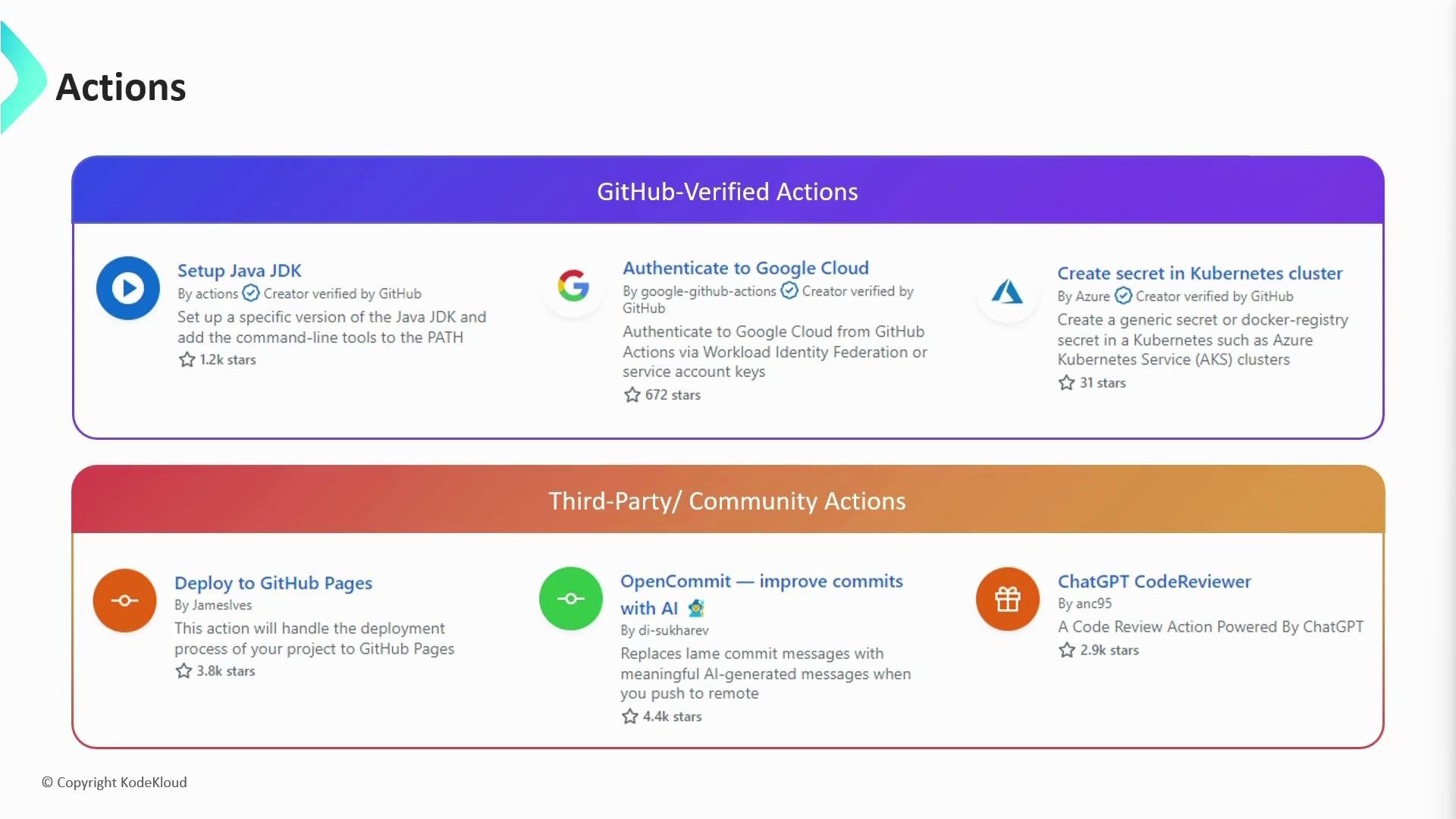 Actions in the Marketplace fall into two broad categories:
* GitHub-verified actions: maintained or verified by GitHub; carry a verified badge.
* Community (third-party) actions: created and maintained by individuals or organizations.
Always review an action’s source repository and the permissions it requests before adding it to production workflows—particularly any actions that will run against private repositories or that may receive secrets. Inspecting the action’s code helps prevent accidental leakage of secrets or sensitive data.
Before adding an action, verify its source and the permissions it requires. This minimizes risk of secret exposure and unexpected side effects in your workflows.
## How to reference an action in your workflow
Every action published in the Marketplace exposes a `uses` reference that you include in a job step. You can pin an action to a specific:
* Tag (recommended for controlled versioning)
* Branch (tracks latest on that branch)
* Commit SHA (immutable and most reproducible)
The differences are summarized below.
| Pinning method | What it points to | Typical example | Pros | Cons |
| -------------- | ----------------------------------: | --------------------------------- | ------------------------------------------------- | --------------------------------------------------------------- |
| Tag | A release tag (semantic versioning) | `actions/checkout@v3.6.0` | Easy to update, can follow major versions (`@v3`) | Tag updates can still introduce changes if not strictly managed |
| Branch | A branch name (e.g., `main`) | `actions/checkout@main` | Always gets latest changes on branch | Can introduce breaking changes unexpectedly |
| Commit SHA | A specific commit SHA | `actions/checkout@a8240080857...` | Immutable and reproducible | Harder to track when to update |
Referencing a branch (for example, `@main`) means the action may change without any changes to your workflow. This can introduce breaking behavior if the upstream branch receives incompatible updates.
Examples of referencing an action in a workflow:
```yaml theme={null}
# Using a tag (recommended for controlled versioning)
- name: Checkout
uses: actions/checkout@v3.6.0
```
```yaml theme={null}
# Using a branch (tracks the latest on that branch)
- name: Checkout
uses: actions/checkout@main
```
```yaml theme={null}
# Using a commit SHA (most stable / immutable)
- name: Checkout
uses: actions/checkout@a824008085750b8e136effc585c3cd6082bd575f
```
SHAs are immutable, making them the most dependable choice for reproducible workflows. Many teams adopt a practical compromise: pin to a stable major tag (for example `@v3`) or a specific release tag (for example `@v3.6.0`) and then periodically update to a new tag or SHA after validating the action in a test environment.
## Best practices
* Pin actions to a tag or SHA to avoid unexpected changes in CI.
* Prefer actions from verified authors or well-known maintainers.
* Review action source code (or vendor internal copies) for how secrets and repository data are handled.
* Use least-privilege permissions for workflow tokens and secrets; avoid granting excessive access to third-party actions.
## Links and references
* [GitHub Marketplace — Actions](https://github.com/marketplace/actions)
* [GitHub Actions documentation](https://docs.github.com/actions)
Additional security considerations for actions and workflows will be covered later in this course.
Actions in the Marketplace fall into two broad categories:
* GitHub-verified actions: maintained or verified by GitHub; carry a verified badge.
* Community (third-party) actions: created and maintained by individuals or organizations.
Always review an action’s source repository and the permissions it requests before adding it to production workflows—particularly any actions that will run against private repositories or that may receive secrets. Inspecting the action’s code helps prevent accidental leakage of secrets or sensitive data.
Before adding an action, verify its source and the permissions it requires. This minimizes risk of secret exposure and unexpected side effects in your workflows.
## How to reference an action in your workflow
Every action published in the Marketplace exposes a `uses` reference that you include in a job step. You can pin an action to a specific:
* Tag (recommended for controlled versioning)
* Branch (tracks latest on that branch)
* Commit SHA (immutable and most reproducible)
The differences are summarized below.
| Pinning method | What it points to | Typical example | Pros | Cons |
| -------------- | ----------------------------------: | --------------------------------- | ------------------------------------------------- | --------------------------------------------------------------- |
| Tag | A release tag (semantic versioning) | `actions/checkout@v3.6.0` | Easy to update, can follow major versions (`@v3`) | Tag updates can still introduce changes if not strictly managed |
| Branch | A branch name (e.g., `main`) | `actions/checkout@main` | Always gets latest changes on branch | Can introduce breaking changes unexpectedly |
| Commit SHA | A specific commit SHA | `actions/checkout@a8240080857...` | Immutable and reproducible | Harder to track when to update |
Referencing a branch (for example, `@main`) means the action may change without any changes to your workflow. This can introduce breaking behavior if the upstream branch receives incompatible updates.
Examples of referencing an action in a workflow:
```yaml theme={null}
# Using a tag (recommended for controlled versioning)
- name: Checkout
uses: actions/checkout@v3.6.0
```
```yaml theme={null}
# Using a branch (tracks the latest on that branch)
- name: Checkout
uses: actions/checkout@main
```
```yaml theme={null}
# Using a commit SHA (most stable / immutable)
- name: Checkout
uses: actions/checkout@a824008085750b8e136effc585c3cd6082bd575f
```
SHAs are immutable, making them the most dependable choice for reproducible workflows. Many teams adopt a practical compromise: pin to a stable major tag (for example `@v3`) or a specific release tag (for example `@v3.6.0`) and then periodically update to a new tag or SHA after validating the action in a test environment.
## Best practices
* Pin actions to a tag or SHA to avoid unexpected changes in CI.
* Prefer actions from verified authors or well-known maintainers.
* Review action source code (or vendor internal copies) for how secrets and repository data are handled.
* Use least-privilege permissions for workflow tokens and secrets; avoid granting excessive access to third-party actions.
## Links and references
* [GitHub Marketplace — Actions](https://github.com/marketplace/actions)
* [GitHub Actions documentation](https://docs.github.com/actions)
Additional security considerations for actions and workflows will be covered later in this course.