> ## Documentation Index
> Fetch the complete documentation index at: https://notes.kodekloud.com/llms.txt
> Use this file to discover all available pages before exploring further.
# Demo Convert Solar system pipeline to GA Workflow 3
> Explains how to run Node unit tests in GitHub Actions and upload JUnit XML test results as artifacts
This lesson shows how to upload unit test results from a CI job in GitHub Actions. We walk through a compact, production-ready GitHub Actions workflow that runs Node.js unit tests (Mocha/Jest) and uploads the JUnit-style XML output as an artifact. We also show an equivalent Jenkins declarative pipeline snippet and explain the key inputs for the `actions/upload-artifact@v4` action.
Use artifact uploads to preserve test outputs (JUnit XML, coverage reports, screenshots) for later inspection, release pipelines, or when adding richer PR annotations with a test-reporting action.
## Why upload test results as artifacts?
* Keeps test artifacts available after the run completes.
* Allows manual download for debugging failed runs.
* Enables downstream workflows or release jobs to consume test output.
* Works well with parsers that convert JUnit/Jest XML into GitHub annotations or PR test summaries.
Never commit secrets (e.g., full connection strings with credentials) into source control. Use GitHub `secrets` or `vars` as shown in the examples below.
## GitHub Actions: Solar System CI (unit-testing + upload artifact)
Below is the GitHub Actions workflow used for the "Solar System CI" job. It checks out the repository, installs Node dependencies, runs tests, and uploads the `test-results.xml` file as an artifact named `Mocha-Test-Results`.
```yaml theme={null}
name: Solar System CI
on:
push:
workflow_dispatch:
env:
MONGO_URI: "mongodb+srv://supercluster.d83jj.mongodb.net/superData"
MONGO_USERNAME: ${{ vars.MONGO_USERNAME }}
jobs:
unit-testing:
runs-on: ubuntu-latest
env:
MONGO_PASSWORD: ${{ secrets.MONGO_PASSWORD }}
steps:
- name: Checkout Repo
uses: actions/checkout@v4
- name: List repo files
run: ls -ltr
- uses: actions/setup-node@v4
with:
node-version: 22
- name: Installing Dependencies
run: npm install --no-audit
- name: Unit Testing
run: npm test
- name: Upload Mocha Test Results
uses: actions/upload-artifact@v4
with:
name: Mocha-Test-Results
path: test-results.xml
```
Notes:
* The workflow expects your test runner to emit a JUnit-style XML file (here `test-results.xml`). Configure your test runner (Mocha, Jest, etc.) to produce that XML.
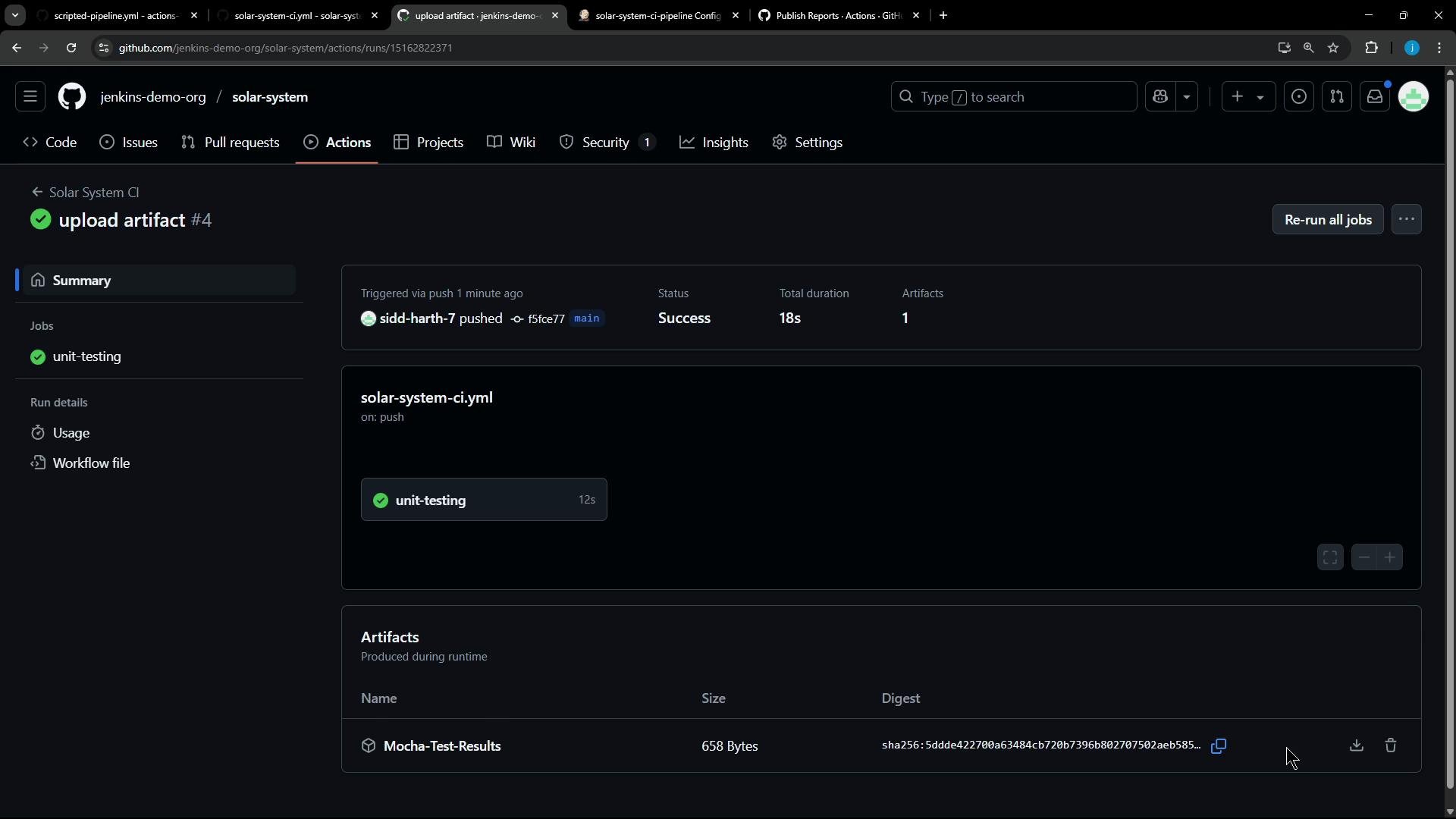
* The artifact name is `Mocha-Test-Results`, and it will appear in the workflow run UI under "Artifacts".
## Equivalent Jenkins Declarative Stage (for comparison)
If you are migrating from Jenkins pipelines, your Jenkinsfile may already have a stage that runs tests and archives JUnit XML results. This compact declarative snippet demonstrates the same behavior with the `junit` step publishing `test-results.xml`:
```groovy theme={null}
pipeline {
agent any
environment {
MONGO_USERNAME = credentials('mongo-db-username')
MONGO_PASSWORD = credentials('mongo-db-password')
}
stages {
stage('Installing Dependencies') {
agent {
docker {
image 'node:24'
args '-u root:root'
}
}
steps {
sh 'npm install --no-audit'
}
}
stage('Unit Testing') {
agent {
docker {
image 'node:24'
args '-u root:root'
}
}
options { retry(2) }
steps {
sh 'npm test'
// Publish JUnit-style results (test-results.xml)
junit allowEmptyResults: true, testResults: 'test-results.xml'
}
}
// other stages...
}
}
```
When migrating from Jenkins, keep the same test command and JUnit output filename to minimize changes: your GitHub Actions job can reuse the same reporting files as Jenkins did.
## actions/upload-artifact\@v4 — key inputs and behavior
The `actions/upload-artifact` action is used to persist files from a workflow run. Below is a concise reference for the most commonly used inputs:
| Input | Description | Example |
| ------------------- | ---------------------------------------------------------------------------------------------------- | -------------------- |
| `name` | The display name of the uploaded artifact. Optional; defaults to `artifact`. | `Mocha-Test-Results` |
| `path` | A file, directory or glob pattern describing what to upload. **Required.** | `test-results.xml` |
| `if-no-files-found` | Behavior when no files match the provided path. Options: `warn`, `error`, `ignore`. Default: `warn`. | `warn` |
| `retention-days` | Days until the artifact expires. `0` uses the repository default. Range `0-90`. | `30` |
| `compression-level` | Zlib compression level (0-9). Default: `6`. | `6` |
| `overwrite` | If `true`, deletes any existing artifact with the same name before uploading. Default: `false`. | `true` |
Use backticks for paths and file names when including CLI or code examples (e.g., `test-results.xml`).
## Reporting and PR annotations
If you want richer reporting (annotations, inline failures in PRs, or test summaries), consider adding a test reporter action from the GitHub Marketplace. Search for "JUnit", "Test Reporter", or "Test Results" to find actions that parse JUnit/Jest XML and create annotations or PR-level reports.
Recommended approaches:
* Use an action that creates GitHub annotations from JUnit XML to surface failing lines in the Pull Request.
* Upload XML artifacts and run a separate workflow to parse them and create a consolidated test report.
* Combine `upload-artifact` with a third-party action (marketplace) that both uploads and annotates test failures.
Relevant links:
* actions/upload-artifact: [https://github.com/actions/upload-artifact](https://github.com/actions/upload-artifact)
* GitHub Marketplace search for test reporters: [https://github.com/marketplace?type=actions\&query=JUnit](https://github.com/marketplace?type=actions\&query=JUnit)
## Viewing and downloading artifacts
After the workflow completes:
* The artifact appears in the workflow run UI under "Artifacts".
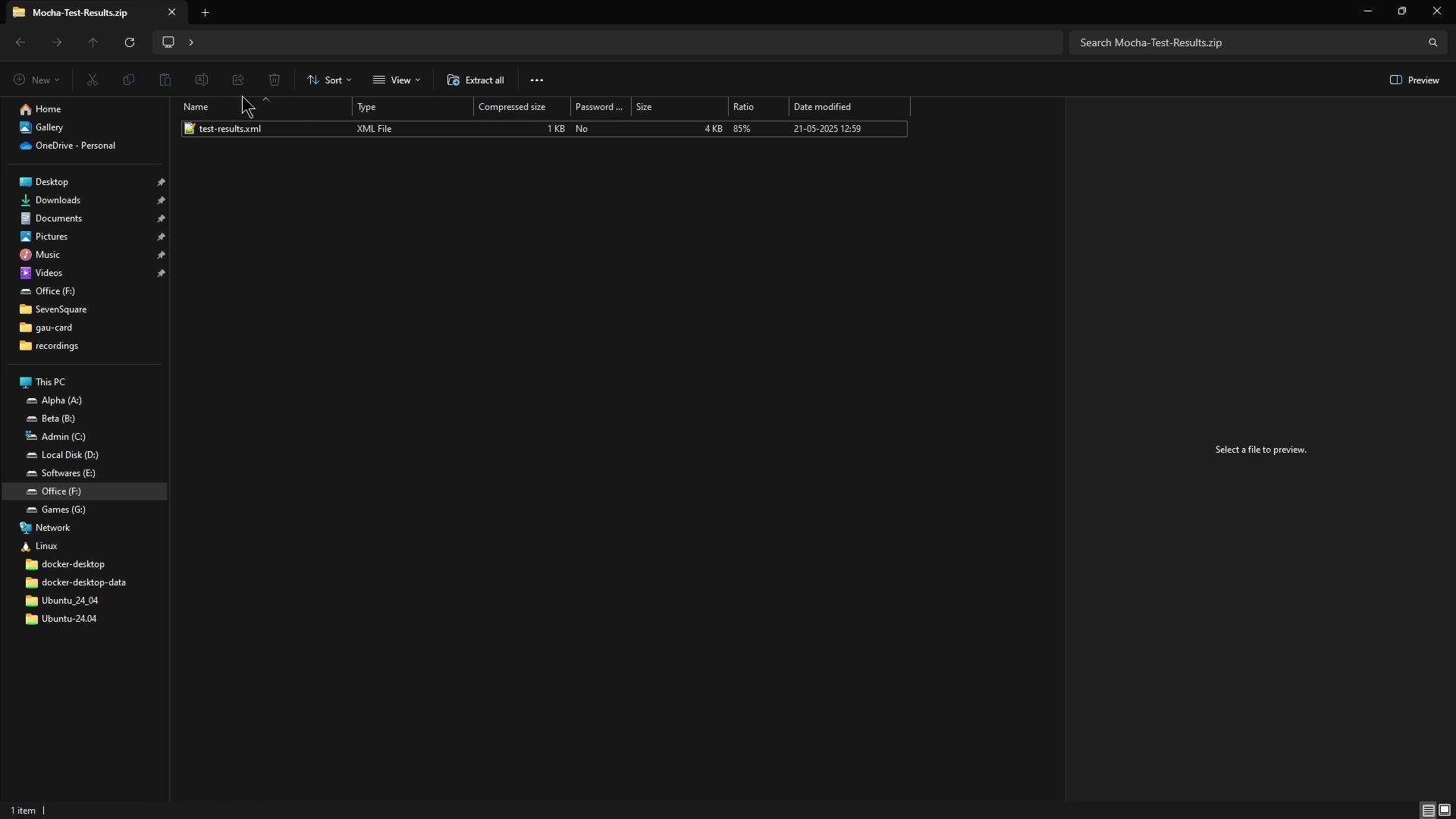
* Clicking the artifact downloads a ZIP file (e.g., `Mocha-Test-Results.zip`) that contains `test-results.xml`.
* You can also download artifacts programmatically using the GitHub REST API or the `gh` CLI.
When downloaded, the artifact archive typically contains the `test-results.xml` file:
 ## Example failing test output (illustrative)
When parsers or reporters create annotations, they often highlight the failing stack trace or assertion. Example raw failure output:
```text theme={null}
Error: expect(received).toStrictEqual(expected) // deep equality
Expected: null
Received: []
at /Users/gmazzola/Documents/publish-report-annotations/src/parsers/junitParser.test.ts:45:22
```
This shows how test failure details may appear after parsing JUnit/Jest XML for annotations or PR summaries.
## Triggering the workflow
To run the workflow on push, ensure the workflow contains the `push` trigger:
```yaml theme={null}
on: push
```
You can also run it manually from the Actions UI using `workflow_dispatch`.
## Links and references
* GitHub Actions: actions/upload-artifact — [https://github.com/actions/upload-artifact](https://github.com/actions/upload-artifact)
* GitHub Marketplace: Test reporter actions — [https://github.com/marketplace?type=actions\&query=JUnit](https://github.com/marketplace?type=actions\&query=JUnit)
* Jenkins documentation and pipeline plugins — [https://www.jenkins.io/doc/](https://www.jenkins.io/doc/)
That's all for this lesson — you now have a compact CI job that runs Node unit tests and preserves JUnit-style results as downloadable artifacts.
## Example failing test output (illustrative)
When parsers or reporters create annotations, they often highlight the failing stack trace or assertion. Example raw failure output:
```text theme={null}
Error: expect(received).toStrictEqual(expected) // deep equality
Expected: null
Received: []
at /Users/gmazzola/Documents/publish-report-annotations/src/parsers/junitParser.test.ts:45:22
```
This shows how test failure details may appear after parsing JUnit/Jest XML for annotations or PR summaries.
## Triggering the workflow
To run the workflow on push, ensure the workflow contains the `push` trigger:
```yaml theme={null}
on: push
```
You can also run it manually from the Actions UI using `workflow_dispatch`.
## Links and references
* GitHub Actions: actions/upload-artifact — [https://github.com/actions/upload-artifact](https://github.com/actions/upload-artifact)
* GitHub Marketplace: Test reporter actions — [https://github.com/marketplace?type=actions\&query=JUnit](https://github.com/marketplace?type=actions\&query=JUnit)
* Jenkins documentation and pipeline plugins — [https://www.jenkins.io/doc/](https://www.jenkins.io/doc/)
That's all for this lesson — you now have a compact CI job that runs Node unit tests and preserves JUnit-style results as downloadable artifacts.