> ## Documentation Index
> Fetch the complete documentation index at: https://notes.kodekloud.com/llms.txt
> Use this file to discover all available pages before exploring further.
# Demo Convert Solar system pipeline to GA Workflow 4
> Converts a single GitHub Actions or Jenkins job into a matrix workflow to run tests across multiple Node.js versions and operating systems.
This lesson explains the GitHub Actions matrix strategy and shows how to convert a single-job workflow (or a Jenkins multi-stage flow) into a matrix-driven GitHub Actions job that runs the same steps across multiple Node.js versions and operating systems.
What you'll learn:
* Why a matrix is useful for multi-version and multi-OS testing.
* How to define matrix axes and reference them in your job.
* How to keep artifacts and other outputs unique per matrix job.
## Current single-job workflow (one runner, one Node.js version)
This workflow runs tests on a single runner and one Node.js version:
```yaml theme={null}
on:
push:
workflow_dispatch:
env:
MONGO_URI: "mongodb+srv://supercluster.d83jj.mongodb.net/superData"
MONGO_USERNAME: ${{ vars.MONGO_USERNAME }}
jobs:
unit-testing:
runs-on: ubuntu-latest
env:
MONGO_PASSWORD: ${{ secrets.MONGO_PASSWORD }}
steps:
- name: Checkout Repo
uses: actions/checkout@v4
- name: List repo file
run: ls -ltr
- uses: actions/setup-node@v4
with:
node-version: 22
- name: Installing Dependencies
run: npm install --no-audit
- name: Unit Testing
run: npm test
- uses: actions/upload-artifact@v4
with:
name: Mocha-Test-Results
path: test-results.xml
```
This is similar to a single Jenkins pipeline stage that executes on one environment. In Jenkins, you might instead run multiple stages inside Docker agents to get coverage across versions and platforms.
## Example Jenkins pipeline (for context)
A Jenkins pipeline that uses Docker agents per stage could look like this:
```groovy theme={null}
pipeline {
agent any
environment {
MONGO_PASSWORD = credentials('mongo-db-password')
}
stages {
stage('Installing Dependencies') {
agent {
docker {
image 'node:24'
args '-u root:root'
}
}
steps {
sh 'npm install --no-audit'
}
}
stage('Dependency Scanning') {
steps {
echo 'Dependency scanning...'
}
}
stage('Unit Testing') {
agent {
docker {
image 'node:24'
args '-u root:root'
}
}
options {
retry(2)
}
steps {
sh 'npm test'
junit allowEmptyResults: true, testResults: 'test-results.xml'
}
}
stage('Code Coverage') {
steps {
echo 'Code coverage...'
}
}
stage('Build Publish Image') {
steps {
echo 'Build and publish image...'
}
}
}
}
```
## Why use a matrix in GitHub Actions?
If you need to run the same job across multiple Node.js versions and operating systems (for example, Ubuntu, macOS, and Windows), the matrix strategy lets GitHub Actions expand one job into many parallel jobs—one for each combination of matrix axes.
Minimal matrix example (from the GitHub Actions docs):
```yaml theme={null}
jobs:
example_matrix:
strategy:
matrix:
version: [10, 12, 14]
os: [ubuntu-latest, windows-latest]
```
This expands to 3 versions × 2 OS = 6 jobs (every combination).
### Visualizing matrix axes and combinations
| Axis | Example values | Notes |
| ------------------ | --------------------------------- | ---------------------------------------------- |
| Node.js versions | `[10, 12, 14]` | Each value becomes `matrix.version` in the job |
| Operating systems | `[ubuntu-latest, windows-latest]` | Use as `matrix.os` in `runs-on` |
| Total combinations | N/A | Product of axis lengths (e.g., `3 × 2 = 6`) |
## Applying matrix strategy to the Solar System workflow
To convert the earlier single-job workflow to run across multiple Node.js versions and OSes:
* Define a `strategy.matrix` with the Node.js versions and operating systems you want.
* Reference matrix values in `runs-on` and in action inputs like `node-version`.
* Make artifact names unique per-job by including matrix variables (for example, `Mocha-Test-Results-${{ matrix.nodejs-version }}-${{ matrix.operating-system }}`).
Here is the unit-testing workflow adapted with a matrix:
```yaml theme={null}
on:
push:
workflow_dispatch:
env:
MONGO_URI: "mongodb+srv://supercluster.d83jj.mongodb.net/superData"
MONGO_USERNAME: ${{ vars.MONGO_USERNAME }}
jobs:
unit-testing:
strategy:
matrix:
nodejs-version: [20, 21, 22]
operating-system: [ubuntu-latest, macos-latest]
runs-on: ${{ matrix.operating-system }}
env:
MONGO_PASSWORD: ${{ secrets.MONGO_PASSWORD }}
steps:
- name: Checkout Repo
uses: actions/checkout@v4
- name: List repo file
run: ls -ltr
- uses: actions/setup-node@v4
with:
node-version: ${{ matrix.nodejs-version }}
- name: Installing Dependencies
run: npm install --no-audit
- name: Unit Testing
run: npm test
- uses: actions/upload-artifact@v4
with:
name: Mocha-Test-Results-${{ matrix.nodejs-version }}-${{ matrix.operating-system }}
path: test-results.xml
```
The total number of parallel jobs equals the product of the lengths of each matrix axis. In the example above you will get 3 Node.js versions × 2 OS = 6 parallel jobs. Monitor concurrency and runner usage as matrices expand.
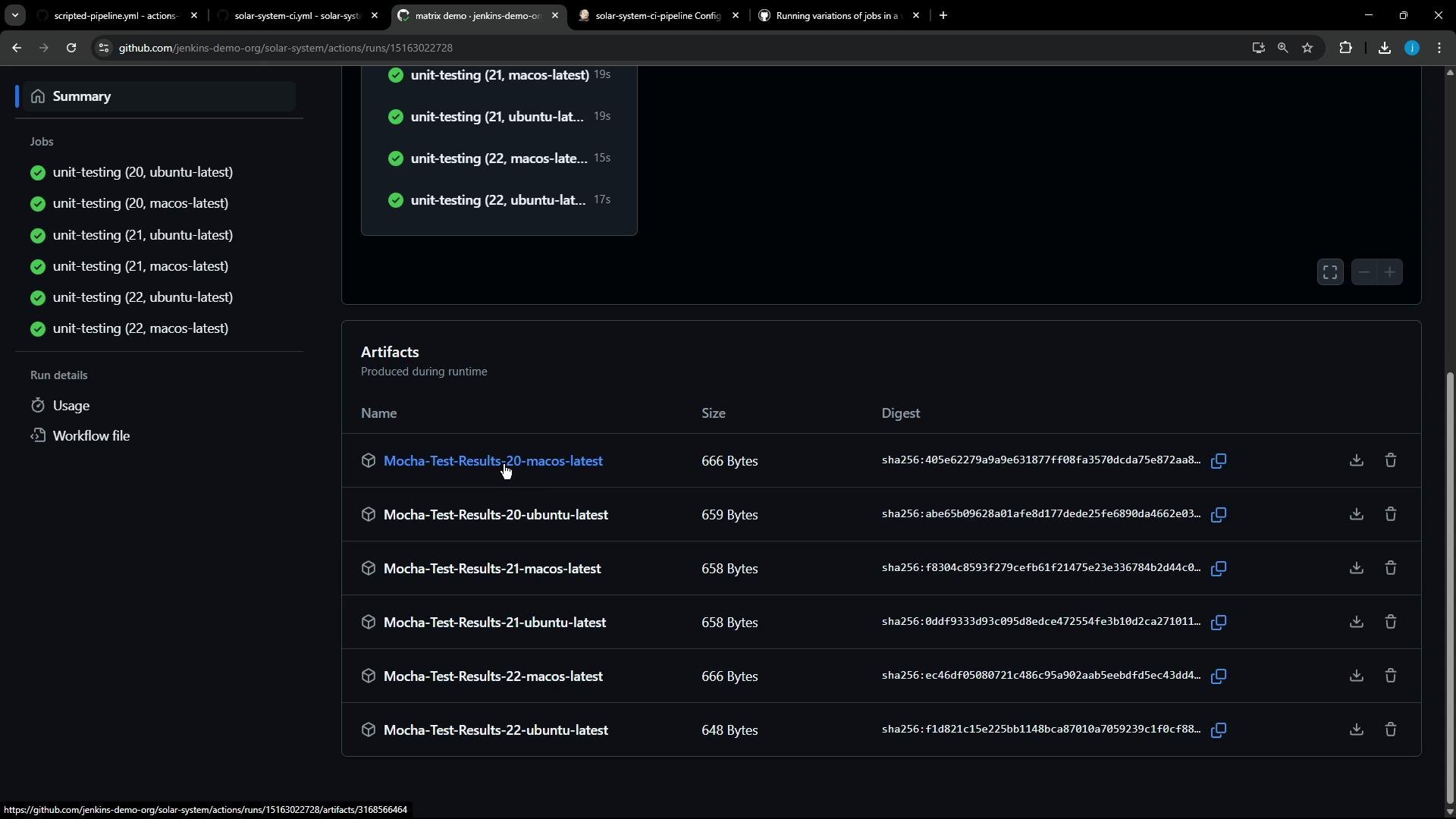
When this workflow runs, GitHub Actions creates a separate job for every combination (for example: Node.js 20 on `ubuntu-latest`, Node.js 20 on `macos-latest`, Node.js 21 on each OS, etc.). Each job runs independently and uploads its artifact using the unique name built from matrix variables.
Here is a screenshot showing multiple successful "unit-testing" jobs and their produced artifacts (note the artifact names include the OS/version combinations):
 ## Example: macOS runner header log
Inspecting a runner's logs (macOS example) helps you confirm the runner image and installed software. Example runner header output:
```text theme={null}
Current runner version: '2.324.0'
▾ Operating System
macOS
14.7.5
23H527
▾ Runner Image
Image: macos-14-arm64
Version: 20250505.1431
Included Software: https://github.com/actions/runner-images/blob/macos-14-arm64/20250505.1431/images/macos/macos-14-arm64-Readme.md
Image Release: https://github.com/actions/runner-images/releases/tag/macos-14-arm64%2F20250505.1431
▾ Runner Image Provisioner
▾ GITHUB_TOKEN Permissions
Secret source: Actions
Prepare workflow directory
Prepare all required actions
Getting action download info
▸ Download immutable action package 'actions/checkout@v4'
▸ Download immutable action package 'actions/setup-node@v4'
▸ Download immutable action package 'actions/upload-artifact@v4'
▸ Download immutable action package 'actions/cache@v4'
▸ Download immutable action package 'actions/runner-images/virtual-environments@v4'
Complete job name: unit-testing (22, macos-latest)
```
## Best practices and tips
* Use `strategy.matrix` to cover multiple combinations of versions and OSes.
* Reference matrix variables using `runs-on: ${{ matrix. }}` and action inputs like `node-version: ${{ matrix.nodejs-version }}`.
* Ensure artifacts and other per-job outputs include matrix variables in their names to prevent collisions.
* Be mindful of GitHub-hosted runner limits and costs—macOS runners are limited and costlier. Consider self-hosted runners for heavy parallelization.
Expanding matrix axes multiplies job count. Large matrices can quickly exhaust concurrency limits or increase billing. Test with a small matrix first and incrementally add axes.
## Quick reference
| Topic | Example |
| ---------------------------- | -------------------------------------------------------------------------------- |
| Use runs-on with matrix | `runs-on: ${{ matrix.operating-system }}` |
| Set node version from matrix | `node-version: ${{ matrix.nodejs-version }}` |
| Unique artifact name | `Mocha-Test-Results-${{ matrix.nodejs-version }}-${{ matrix.operating-system }}` |
## Links and references
* GitHub Actions matrix docs: [https://docs.github.com/en/actions/using-jobs/using-a-matrix-for-your-jobs](https://docs.github.com/en/actions/using-jobs/using-a-matrix-for-your-jobs)
* GitHub runner images: [https://github.com/actions/runner-images](https://github.com/actions/runner-images)
* Jenkins documentation: [https://www.jenkins.io/doc/](https://www.jenkins.io/doc/)
## Example: macOS runner header log
Inspecting a runner's logs (macOS example) helps you confirm the runner image and installed software. Example runner header output:
```text theme={null}
Current runner version: '2.324.0'
▾ Operating System
macOS
14.7.5
23H527
▾ Runner Image
Image: macos-14-arm64
Version: 20250505.1431
Included Software: https://github.com/actions/runner-images/blob/macos-14-arm64/20250505.1431/images/macos/macos-14-arm64-Readme.md
Image Release: https://github.com/actions/runner-images/releases/tag/macos-14-arm64%2F20250505.1431
▾ Runner Image Provisioner
▾ GITHUB_TOKEN Permissions
Secret source: Actions
Prepare workflow directory
Prepare all required actions
Getting action download info
▸ Download immutable action package 'actions/checkout@v4'
▸ Download immutable action package 'actions/setup-node@v4'
▸ Download immutable action package 'actions/upload-artifact@v4'
▸ Download immutable action package 'actions/cache@v4'
▸ Download immutable action package 'actions/runner-images/virtual-environments@v4'
Complete job name: unit-testing (22, macos-latest)
```
## Best practices and tips
* Use `strategy.matrix` to cover multiple combinations of versions and OSes.
* Reference matrix variables using `runs-on: ${{ matrix. }}` and action inputs like `node-version: ${{ matrix.nodejs-version }}`.
* Ensure artifacts and other per-job outputs include matrix variables in their names to prevent collisions.
* Be mindful of GitHub-hosted runner limits and costs—macOS runners are limited and costlier. Consider self-hosted runners for heavy parallelization.
Expanding matrix axes multiplies job count. Large matrices can quickly exhaust concurrency limits or increase billing. Test with a small matrix first and incrementally add axes.
## Quick reference
| Topic | Example |
| ---------------------------- | -------------------------------------------------------------------------------- |
| Use runs-on with matrix | `runs-on: ${{ matrix.operating-system }}` |
| Set node version from matrix | `node-version: ${{ matrix.nodejs-version }}` |
| Unique artifact name | `Mocha-Test-Results-${{ matrix.nodejs-version }}-${{ matrix.operating-system }}` |
## Links and references
* GitHub Actions matrix docs: [https://docs.github.com/en/actions/using-jobs/using-a-matrix-for-your-jobs](https://docs.github.com/en/actions/using-jobs/using-a-matrix-for-your-jobs)
* GitHub runner images: [https://github.com/actions/runner-images](https://github.com/actions/runner-images)
* Jenkins documentation: [https://www.jenkins.io/doc/](https://www.jenkins.io/doc/)