> ## Documentation Index
> Fetch the complete documentation index at: https://notes.kodekloud.com/llms.txt
> Use this file to discover all available pages before exploring further.
# Challenges in Migration
> Guide summarizing challenges and practical patterns for migrating Jenkins Groovy pipelines, plugins, secrets, and long running jobs to GitHub Actions YAML workflows
Both Jenkins and GitHub Actions let you author workflows to build, test, publish, release, and deploy code. Because Jenkins pipelines are Groovy-based while GitHub Actions uses YAML workflow files, migrating from Jenkins to GitHub Actions is feasible but requires careful mapping of concepts, plugins, secrets, and long-running behavior.
This guide summarizes the common migration challenges and provides practical patterns, code examples, and recommendations to help you plan a smooth migration from Jenkins to GitHub Actions.
Quick overview
* Jenkins: Groovy-based Declarative or Scripted Pipelines, rich plugin ecosystem, long-lived agents.
* GitHub Actions: YAML workflows with jobs, steps, marketplace actions, reusable workflows, and hosted or self-hosted runners.
Table: Common migration challenges and mitigation
| Challenge | Jenkins behavior | GitHub Actions equivalent | Migration guidance |
| -------------------------- | ----------------------------------------- | -------------------------------------------------------------- | --------------------------------------------------------------------------------------------------- |
| Pipeline syntax | Groovy Declarative/Scripted pipelines | YAML workflows with jobs/steps | Re-think flow control, break monoliths into scripts/actions, map steps to actions or shell commands |
| Plugins | Rich community/custom plugins | Marketplace actions, composite or custom actions | Use existing actions, combine actions, or author custom actions to replicate plugins |
| Secrets & credentials | `withCredentials(...)` bindings | `secrets` context and provider-specific actions | Prefer provider credential actions (AWS/Azure/GCP) or scoped secrets |
| Reuse & abstractions | Shared libraries, Groovy logic | Reusable workflows, composite actions, and scripts | Extract logic into composite actions or reusable workflows with defined inputs/outputs |
| Scheduling & triggers | SCM polling, cron triggers, manual builds | Event-based triggers, `schedule` (`cron`), `workflow_dispatch` | Convert cron/polling to `schedule` and use `needs` for job ordering |
| Long-running/stateful jobs | Long-lived agents | Hosted runner job timeout (6h); self-hosted up to 72h | Use self-hosted runners or decompose/externally persist state |
1. Pipeline syntax conversion
* Jenkins pipelines are Groovy-based and can be Declarative or Scripted. Scripted pipelines often include advanced Groovy logic that doesn't translate directly to YAML.
* Migration approach:
* Identify monolithic scripts and break them into smaller, testable units (shell scripts, Python/Node scripts).
* Use GitHub Actions steps to call these scripts or wrap them in composite/custom actions.
* When control flow is complex, express simple orchestration in YAML and move imperative logic into scripts or actions.
2. Custom plugins
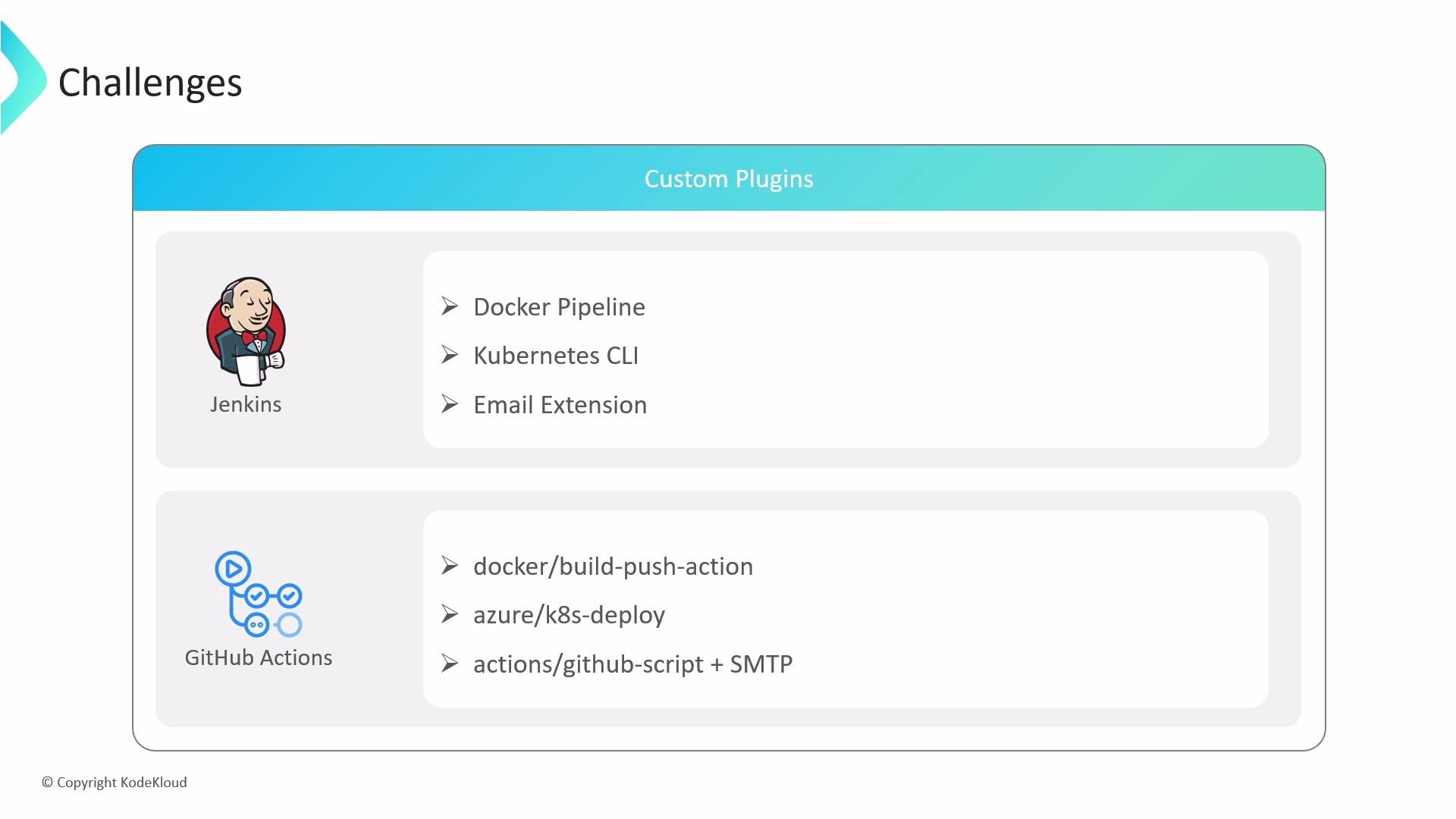
* Jenkins pipelines frequently depend on community or custom plugins (Docker, Kubernetes, notification plugins).
* In GitHub Actions, similar capabilities are attained using marketplace actions or by authoring custom actions.
 If a direct marketplace action is unavailable:
* Use well-maintained marketplace actions when possible (for example: `docker/build-push-action`, `azure/k8s-deploy`).
* Combine actions to achieve the desired behavior (for example `actions/github-script` plus an SMTP call for email).
* Author a composite action or a JavaScript/Docker action to encapsulate specific behavior and reuse it across workflows.
3. Environment variables and secrets
* Jenkins uses credential bindings such as `withCredentials(...) { ... }` to inject secrets safely into the pipeline.
* GitHub Actions uses repository, organization, or environment secrets, exposed via the `secrets` context. For cloud providers, prefer provider-specific credential actions.
Example Jenkins snippet (Groovy / Jenkinsfile):
```groovy theme={null}
withCredentials([usernamePassword(credentialsId: 'aws-creds', usernameVariable: 'AWS_USER', passwordVariable: 'AWS_PASS')]) {
sh 'aws s3 cp file.txt s3://my-bucket/'
}
```
Recommended GitHub Actions patterns (YAML):
* Use provider-specific credential action (recommended for AWS):
```yaml theme={null}
jobs:
deploy:
runs-on: ubuntu-latest
steps:
- uses: actions/checkout@v4
- uses: aws-actions/configure-aws-credentials@v2
with:
aws-access-key-id: ${{ secrets.AWS_ACCESS_KEY_ID }}
aws-secret-access-key: ${{ secrets.AWS_SECRET_ACCESS_KEY }}
aws-region: us-east-1
- run: aws s3 cp file.txt s3://my-bucket/
```
* Or inject secrets as environment variables for a step:
```yaml theme={null}
- name: Use AWS CLI
env:
AWS_ACCESS_KEY_ID: ${{ secrets.AWS_ACCESS_KEY_ID }}
AWS_SECRET_ACCESS_KEY: ${{ secrets.AWS_SECRET_ACCESS_KEY }}
run: aws s3 cp file.txt s3://my-bucket/
```
Always store credentials in GitHub Secrets or environment secrets. Prefer cloud-provider-specific credential actions (e.g., AWS, Azure, GCP) to minimize the risk of secret leakage in logs.
4. Complex pipeline logic and reuse
* Jenkins supports advanced conditional logic and shared libraries for complex abstractions.
* GitHub Actions supports reusable workflows and composite actions. These rely on declared inputs/outputs and are structured differently than arbitrary Groovy code.
Example: calling a reusable workflow in GitHub Actions:
```yaml theme={null}
jobs:
deploy:
uses: ./.github/workflows/deploy-shared.yml
with:
environment: production
```
Migration recommendations:
* Extract reusable parts into composite actions or standalone scripts (shell, Python, Node) that can be invoked from workflows.
* Use reusable workflows with well-defined inputs/outputs to capture pipeline-level composition and enforce consistent behavior across repositories.
5. Job scheduling and triggers
* Jenkins supports SCM polling, cron-style triggers, and manual triggers in the pipeline.
* GitHub Actions supports event-based triggers (push, pull\_request, etc.), scheduled triggers via `schedule` with a `cron`, and manual dispatch via `workflow_dispatch`.
Jenkins Declarative pipeline (cron/poll example):
```groovy theme={null}
pipeline {
agent any
triggers {
pollSCM('H/5 * * * *') // Polls SCM periodically
cron('H 2 * * *') // Cron-like scheduled trigger
}
stages {
stage('Build') { steps { sh 'make' } }
}
}
```
GitHub Actions equivalents:
```yaml theme={null}
on:
push:
pull_request:
schedule:
- cron: '*/5 * * * *' # run every 5 minutes (GitHub may limit frequency)
workflow_dispatch: # manual trigger
```
Use `needs` to express job dependency ordering in GitHub Actions:
```yaml theme={null}
jobs:
build:
runs-on: ubuntu-latest
steps: ...
test:
runs-on: ubuntu-latest
needs: build
steps: ...
deploy:
runs-on: ubuntu-latest
needs: [build, test]
steps: ...
```
6. Long-running or stateful jobs
* Jenkins agents can be long-lived and maintain state, which is helpful for extended tests or stateful jobs.
* GitHub Actions hosted runners have a hard timeout (6 hours per job). Self-hosted runners can extend timeouts (up to 72 hours depending on configuration).
If your pipelines depend on long-running jobs or persistent agent state, plan to use self-hosted runners or refactor jobs into smaller steps that persist state externally (artifacts, caches, or remote testbeds).
Migration checklist (practical steps)
* Inventory current Jenkins pipelines, plugins, and shared libraries.
* Identify long-running jobs and evaluate self-hosted runner needs.
* Replace plugin functionality with marketplace actions or author custom actions.
* Move imperative Groovy logic into scripts or composite actions.
* Centralize secrets in GitHub Secrets and use provider-specific credential actions.
* Implement reusable workflows and composite actions to capture shared behavior.
* Add monitoring and observability (logs, artifacts) to validate parity during rollout.
Summary
* Migrating from Jenkins to GitHub Actions involves translating Groovy pipeline constructs and plugins into YAML workflows, marketplace actions, composite/custom actions, and reusable workflows.
* Key focus areas: secure secret handling, replacing plugin functionality, refactoring complex logic, and addressing long-running job requirements.
* Use reusable workflows and composite actions for shared behavior and consider self-hosted runners or job decomposition for long-running/stateful workflows.
Further reading and references
* [GitHub Actions documentation](https://docs.github.com/actions)
* [Jenkins documentation](https://www.jenkins.io/doc/)
* Marketplace examples: `docker/build-push-action`, `aws-actions/configure-aws-credentials`, `azure/k8s-deploy`
If a direct marketplace action is unavailable:
* Use well-maintained marketplace actions when possible (for example: `docker/build-push-action`, `azure/k8s-deploy`).
* Combine actions to achieve the desired behavior (for example `actions/github-script` plus an SMTP call for email).
* Author a composite action or a JavaScript/Docker action to encapsulate specific behavior and reuse it across workflows.
3. Environment variables and secrets
* Jenkins uses credential bindings such as `withCredentials(...) { ... }` to inject secrets safely into the pipeline.
* GitHub Actions uses repository, organization, or environment secrets, exposed via the `secrets` context. For cloud providers, prefer provider-specific credential actions.
Example Jenkins snippet (Groovy / Jenkinsfile):
```groovy theme={null}
withCredentials([usernamePassword(credentialsId: 'aws-creds', usernameVariable: 'AWS_USER', passwordVariable: 'AWS_PASS')]) {
sh 'aws s3 cp file.txt s3://my-bucket/'
}
```
Recommended GitHub Actions patterns (YAML):
* Use provider-specific credential action (recommended for AWS):
```yaml theme={null}
jobs:
deploy:
runs-on: ubuntu-latest
steps:
- uses: actions/checkout@v4
- uses: aws-actions/configure-aws-credentials@v2
with:
aws-access-key-id: ${{ secrets.AWS_ACCESS_KEY_ID }}
aws-secret-access-key: ${{ secrets.AWS_SECRET_ACCESS_KEY }}
aws-region: us-east-1
- run: aws s3 cp file.txt s3://my-bucket/
```
* Or inject secrets as environment variables for a step:
```yaml theme={null}
- name: Use AWS CLI
env:
AWS_ACCESS_KEY_ID: ${{ secrets.AWS_ACCESS_KEY_ID }}
AWS_SECRET_ACCESS_KEY: ${{ secrets.AWS_SECRET_ACCESS_KEY }}
run: aws s3 cp file.txt s3://my-bucket/
```
Always store credentials in GitHub Secrets or environment secrets. Prefer cloud-provider-specific credential actions (e.g., AWS, Azure, GCP) to minimize the risk of secret leakage in logs.
4. Complex pipeline logic and reuse
* Jenkins supports advanced conditional logic and shared libraries for complex abstractions.
* GitHub Actions supports reusable workflows and composite actions. These rely on declared inputs/outputs and are structured differently than arbitrary Groovy code.
Example: calling a reusable workflow in GitHub Actions:
```yaml theme={null}
jobs:
deploy:
uses: ./.github/workflows/deploy-shared.yml
with:
environment: production
```
Migration recommendations:
* Extract reusable parts into composite actions or standalone scripts (shell, Python, Node) that can be invoked from workflows.
* Use reusable workflows with well-defined inputs/outputs to capture pipeline-level composition and enforce consistent behavior across repositories.
5. Job scheduling and triggers
* Jenkins supports SCM polling, cron-style triggers, and manual triggers in the pipeline.
* GitHub Actions supports event-based triggers (push, pull\_request, etc.), scheduled triggers via `schedule` with a `cron`, and manual dispatch via `workflow_dispatch`.
Jenkins Declarative pipeline (cron/poll example):
```groovy theme={null}
pipeline {
agent any
triggers {
pollSCM('H/5 * * * *') // Polls SCM periodically
cron('H 2 * * *') // Cron-like scheduled trigger
}
stages {
stage('Build') { steps { sh 'make' } }
}
}
```
GitHub Actions equivalents:
```yaml theme={null}
on:
push:
pull_request:
schedule:
- cron: '*/5 * * * *' # run every 5 minutes (GitHub may limit frequency)
workflow_dispatch: # manual trigger
```
Use `needs` to express job dependency ordering in GitHub Actions:
```yaml theme={null}
jobs:
build:
runs-on: ubuntu-latest
steps: ...
test:
runs-on: ubuntu-latest
needs: build
steps: ...
deploy:
runs-on: ubuntu-latest
needs: [build, test]
steps: ...
```
6. Long-running or stateful jobs
* Jenkins agents can be long-lived and maintain state, which is helpful for extended tests or stateful jobs.
* GitHub Actions hosted runners have a hard timeout (6 hours per job). Self-hosted runners can extend timeouts (up to 72 hours depending on configuration).
If your pipelines depend on long-running jobs or persistent agent state, plan to use self-hosted runners or refactor jobs into smaller steps that persist state externally (artifacts, caches, or remote testbeds).
Migration checklist (practical steps)
* Inventory current Jenkins pipelines, plugins, and shared libraries.
* Identify long-running jobs and evaluate self-hosted runner needs.
* Replace plugin functionality with marketplace actions or author custom actions.
* Move imperative Groovy logic into scripts or composite actions.
* Centralize secrets in GitHub Secrets and use provider-specific credential actions.
* Implement reusable workflows and composite actions to capture shared behavior.
* Add monitoring and observability (logs, artifacts) to validate parity during rollout.
Summary
* Migrating from Jenkins to GitHub Actions involves translating Groovy pipeline constructs and plugins into YAML workflows, marketplace actions, composite/custom actions, and reusable workflows.
* Key focus areas: secure secret handling, replacing plugin functionality, refactoring complex logic, and addressing long-running job requirements.
* Use reusable workflows and composite actions for shared behavior and consider self-hosted runners or job decomposition for long-running/stateful workflows.
Further reading and references
* [GitHub Actions documentation](https://docs.github.com/actions)
* [Jenkins documentation](https://www.jenkins.io/doc/)
* Marketplace examples: `docker/build-push-action`, `aws-actions/configure-aws-credentials`, `azure/k8s-deploy`