> ## Documentation Index
> Fetch the complete documentation index at: https://notes.kodekloud.com/llms.txt
> Use this file to discover all available pages before exploring further.
# Demo Reverse Proxy
> Configuring Nginx as a reverse proxy to load balance and forward HTTP requests on port 80 to multiple Flask backends running on port 5000, with firewall and testing steps.
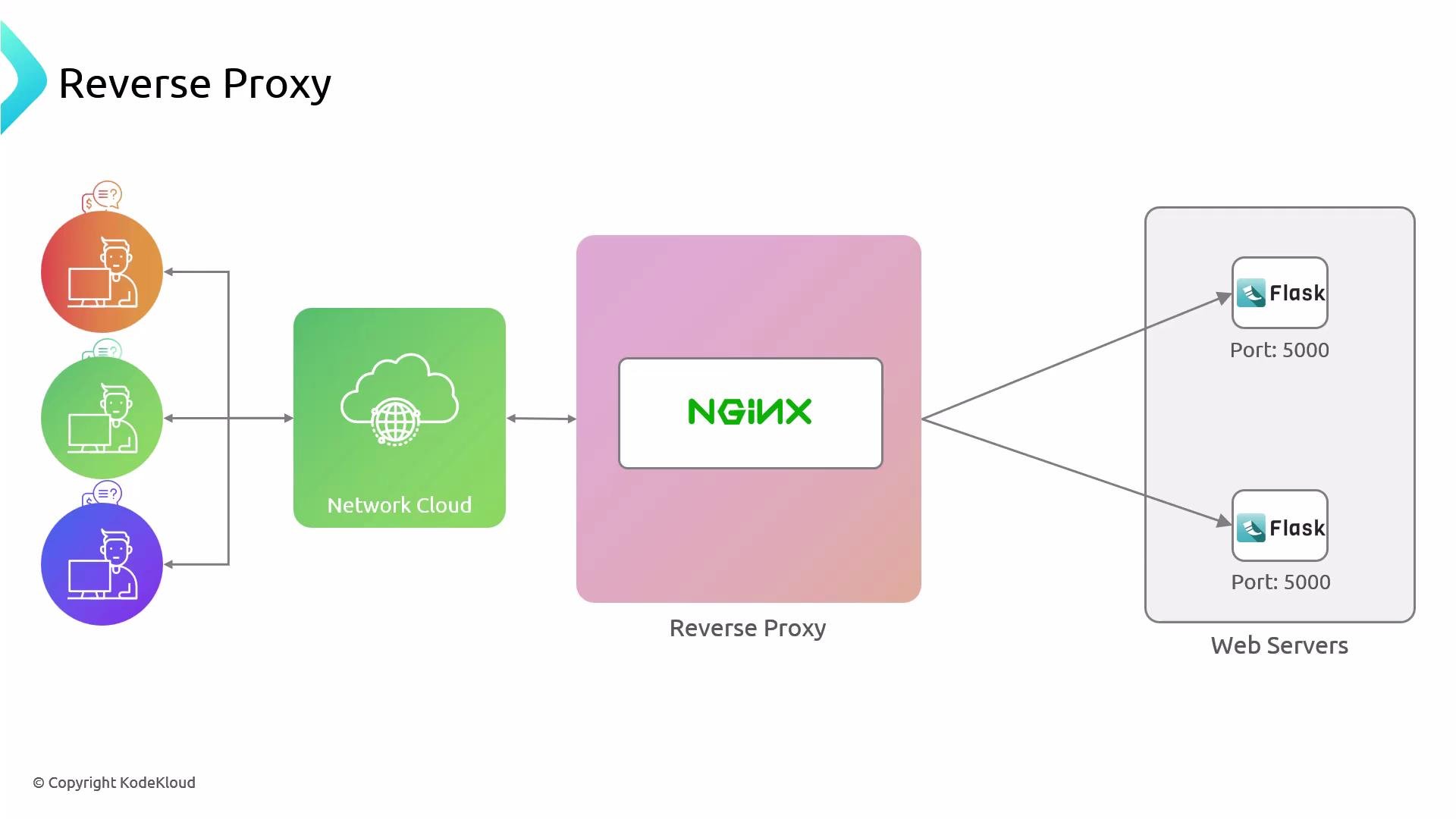
Welcome back. In this lesson you'll learn how to configure Nginx as a reverse proxy that forwards incoming HTTP requests (port 80) to two backend Flask applications listening on port 5000. This setup is useful when you want to expose a single public endpoint while running multiple backend apps, and you can host both Nginx and the Flask apps on the same machine to save resources.
A reverse proxy accepts client requests on port 80 (or 443) and forwards them to one or more backend servers (here, Flask apps on port 5000). A load balancer is conceptually similar, but the reverse proxy often runs on the same host as the entry Nginx instance.
 Why this matters (quick summary)
* Centralized entry point for multiple backends.
* Ability to scale or take down individual backends without exposing internal hosts.
* Offload SSL, caching, or compression to Nginx while keeping app logic in Flask.
Quick reference: hosts and ports
| Host | Role | Service | Port |
| --------- | ----------------- | ------------------- | ------ |
| `node01` | Backend Flask app | Flask app | `5000` |
| `node02` | Backend Flask app | Flask app | `5000` |
| `nginx` | Reverse proxy | Nginx (public) | `80` |
| any admin | SSH access | Open for management | `22` |
Prerequisites and links
* Nginx installed on the reverse proxy host — see [Nginx documentation](https://nginx.org/en/docs/).
* Flask app running on each backend host — see [Flask quickstart](https://flask.palletsprojects.com/en/latest/quickstart/).
* UFW (or your host firewall) configured to restrict backend access — see [UFW documentation](https://help.ubuntu.com/community/UFW).
Step-by-step walkthrough
1. Inspect backend node (node01)
Verify there is no HTTP server on port 80, and that the Flask app is listening on port 5000.
Check port 80 on node01:
```bash theme={null}
root@node01 ~ ✦ ➜ curl localhost
curl: (7) Failed to connect to localhost port 80 after 0 ms: Connection refused
```
Check the Flask app on port 5000:
```bash theme={null}
root@node01 ~ ✦ ➜ curl localhost:5000
Why this matters (quick summary)
* Centralized entry point for multiple backends.
* Ability to scale or take down individual backends without exposing internal hosts.
* Offload SSL, caching, or compression to Nginx while keeping app logic in Flask.
Quick reference: hosts and ports
| Host | Role | Service | Port |
| --------- | ----------------- | ------------------- | ------ |
| `node01` | Backend Flask app | Flask app | `5000` |
| `node02` | Backend Flask app | Flask app | `5000` |
| `nginx` | Reverse proxy | Nginx (public) | `80` |
| any admin | SSH access | Open for management | `22` |
Prerequisites and links
* Nginx installed on the reverse proxy host — see [Nginx documentation](https://nginx.org/en/docs/).
* Flask app running on each backend host — see [Flask quickstart](https://flask.palletsprojects.com/en/latest/quickstart/).
* UFW (or your host firewall) configured to restrict backend access — see [UFW documentation](https://help.ubuntu.com/community/UFW).
Step-by-step walkthrough
1. Inspect backend node (node01)
Verify there is no HTTP server on port 80, and that the Flask app is listening on port 5000.
Check port 80 on node01:
```bash theme={null}
root@node01 ~ ✦ ➜ curl localhost
curl: (7) Failed to connect to localhost port 80 after 0 ms: Connection refused
```
Check the Flask app on port 5000:
```bash theme={null}
root@node01 ~ ✦ ➜ curl localhost:5000
Hello, Human!
[Not Authenticated]
```
2. Confirm node02
Confirm node02 returns the same Flask response on port 5000 (omitted here for brevity). Both backends should serve the same application content so Nginx can load-balance between them.
3. Firewall: allow only the Nginx server to reach backends on port 5000
Only the reverse proxy host should be able to reach the backend Flask apps on port 5000. Keep SSH (port 22) open for management but lock down access to port 5000 to the reverse proxy IP (example IP used below: `192.230.206.12`).
Check current UFW status:
```bash theme={null}
root@node01 ~ ✦ ➜ ufw status
Status: active
To Action From
-- ------ ----
22/tcp ALLOW Anywhere
22/tcp (v6) ALLOW Anywhere (v6)
```
Allow traffic from the reverse proxy IP to port 5000:
```bash theme={null}
root@node01 ~ ✦ ➜ ufw allow from 192.230.206.12 proto tcp to any port 5000
Rule added
```
Verify the new rule:
```bash theme={null}
root@node01 ~ ✦ ➜ ufw status
Status: active
To Action From
-- ------ ----
22/tcp ALLOW Anywhere
5000/tcp ALLOW 192.230.206.12
22/tcp (v6) ALLOW Anywhere (v6)
```
When changing firewall rules, be careful not to lock yourself out. Confirm SSH access remains allowed before applying strict rules. Always test connectivity from the reverse proxy after adding rules.
4. On the Nginx reverse proxy host
Confirm Nginx is serving the default welcome page on port 80:
```bash theme={null}
root@nginx ~ ➜ curl localhost
Welcome to nginx!
...
```
Remove the default site and create a new site configuration. On the Nginx host, go to `/etc/nginx/sites-available/` and create a file named `helloworld`. Be consistent when creating the symlink in `/etc/nginx/sites-enabled/` later.
Create the Nginx site configuration `/etc/nginx/sites-available/helloworld`. This file defines an `upstream` pointing to the two backend Flask servers on port 5000 and proxies all requests to that upstream:
```nginx theme={null}
# Upstream configuration
upstream hello_world {
server 192.230.206.3:5000;
server 192.230.206.6:5000;
}
# Default server configuration
server {
listen 80;
root /var/www/html;
index index.html index.htm index.nginx-debian.html;
server_name helloworld.com;
location / {
proxy_pass http://hello_world;
}
}
```
Notes:
* The `upstream` block lists the backend Flask app IPs and port `5000`.
* `proxy_pass` points to the upstream name `http://hello_world`; Nginx will load-balance requests to the listed servers.
5. Enable the site and reload Nginx
Create a symlink to enable the site:
```bash theme={null}
root@nginx /etc/nginx/sites-available ➜ ln -s /etc/nginx/sites-available/helloworld /etc/nginx/sites-enabled/helloworld
```
Always test the Nginx configuration before reloading:
```bash theme={null}
root@nginx /etc/nginx/sites-available ➜ nginx -t
nginx: the configuration file /etc/nginx/nginx.conf syntax is ok
nginx: configuration file /etc/nginx/nginx.conf test is successful
root@nginx /etc/nginx/sites-available ➜ nginx -s reload
```
6. Test reverse proxy behavior using the Host header
When testing directly on the reverse proxy host, include the `Host` header so Nginx matches `server_name helloworld.com`.
Example requests:
```bash theme={null}
root@nginx /etc/nginx/sites-available ➜ curl --header "Host: helloworld.com" localhost
Hello, Human!
[Not Authenticated]
root@nginx /etc/nginx/sites-available ➜ curl --header "Host: helloworld.com" localhost/foo
Foo page
Do something and redirect
root@nginx /etc/nginx/sites-available ➜ curl --header "Host: helloworld.com" localhost/bar
Bar page
Do something and redirect
```
All client requests are sent to Nginx on port 80; Nginx forwards them to the Flask backends on port 5000.
7. Simulate a backend failure
To simulate one backend being unavailable, comment out its `server` line in the `upstream` block and reload Nginx. The remaining backend will continue to serve traffic.
Example: comment out the second backend:
```nginx theme={null}
# Upstream configuration
upstream hello_world {
server 192.230.206.3:5000;
# server 192.230.206.6:5000;
}
```
Reload Nginx and test again:
```bash theme={null}
root@nginx /etc/nginx/sites-available ➜ nginx -s reload
root@nginx /etc/nginx/sites-available ➜ curl --header "Host: helloworld.com" localhost
Hello, Human!
[Not Authenticated]
```
The reverse proxy continues to function, routing requests to the available backend.
Best practices and next steps
* Consider adding `proxy_set_header` directives (e.g., `Host`, `X-Real-IP`, `X-Forwarded-For`) in the `location` block for proper client IP and host propagation. See Nginx proxy docs: [NGINX proxy module](https://nginx.org/en/docs/http/ngx_http_proxy_module.html).
* For production, enable SSL/TLS on the Nginx host and redirect HTTP to HTTPS.
* Monitor backend health and use `max_fails`/`fail_timeout` or an upstream health-checking solution if you need automatic failover beyond simple server removal.
References
* [Nginx documentation — HTTP proxying](https://nginx.org/en/docs/http/ngx_http_proxy_module.html)
* [Flask documentation — Quickstart](https://flask.palletsprojects.com/en/latest/quickstart/)
* [UFW — Uncomplicated Firewall guide](https://help.ubuntu.com/community/UFW)
That's it for this demo on configuring a simple Nginx reverse proxy to forward requests to Flask applications running on port 5000.