> ## Documentation Index
> Fetch the complete documentation index at: https://notes.kodekloud.com/llms.txt
> Use this file to discover all available pages before exploring further.
# Load Balancer
> Explains NGINX load balancing concepts, supported algorithms, health checks, configuration examples, and testing methods to improve performance and fault tolerance.
A load balancer is software that distributes incoming network traffic across multiple backend servers to improve performance, availability, and fault tolerance. Without a load balancer, a website relies on a single server, which can quickly become a bottleneck for CPU, memory, disk, or network I/O as traffic grows. More importantly, a single server creates a single point of failure.
One key advantage of a load balancer is avoiding requests being forwarded to unhealthy backends. NGINX Open Source uses passive health checks by default: when a backend repeatedly fails to respond or returns errors, NGINX marks it unavailable and stops sending it new requests. Active health checks — where the load balancer proactively probes backends — are provided by NGINX Plus.
NGINX Open Source performs passive health checks by default (it detects failures from error responses/timeouts). Active health checks that periodically probe backends are available in NGINX Plus.
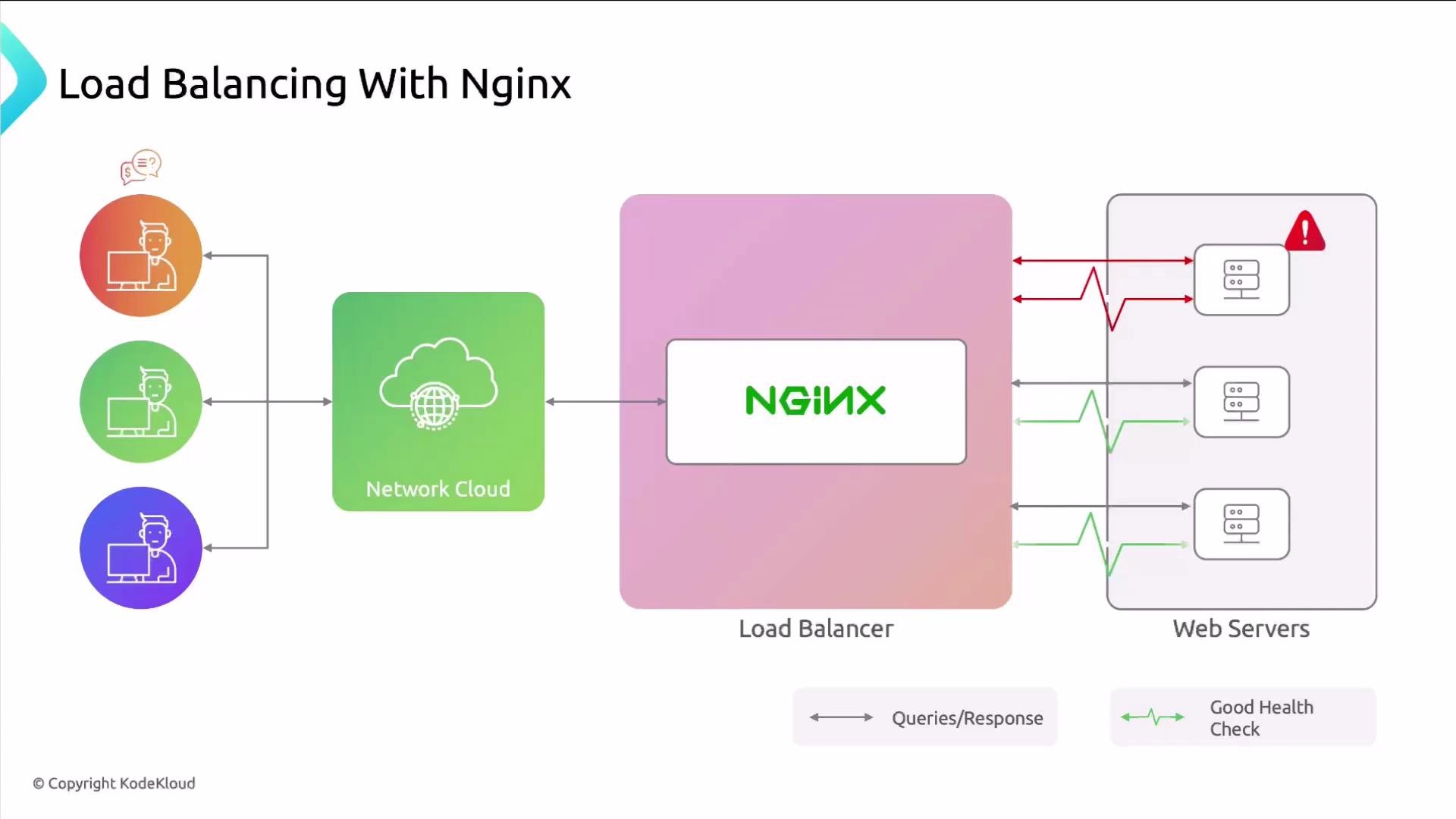 You can tune timeouts and failure-handling options in NGINX, but the default passive behavior ensures that unhealthy servers stop receiving traffic. If one or more web servers go down, the site remains available while you repair or replace the affected nodes.
## Load-balancing algorithms supported by NGINX
NGINX supports several algorithms. Choosing the right one depends on your application workload, server capacity, and session state requirements.
* Round Robin (default)
* Weighted Round Robin
* IP hash (sticky sessions)
* Least connections (`least_conn`)
* Least time (`least_time`, available in NGINX Plus)
### Round Robin
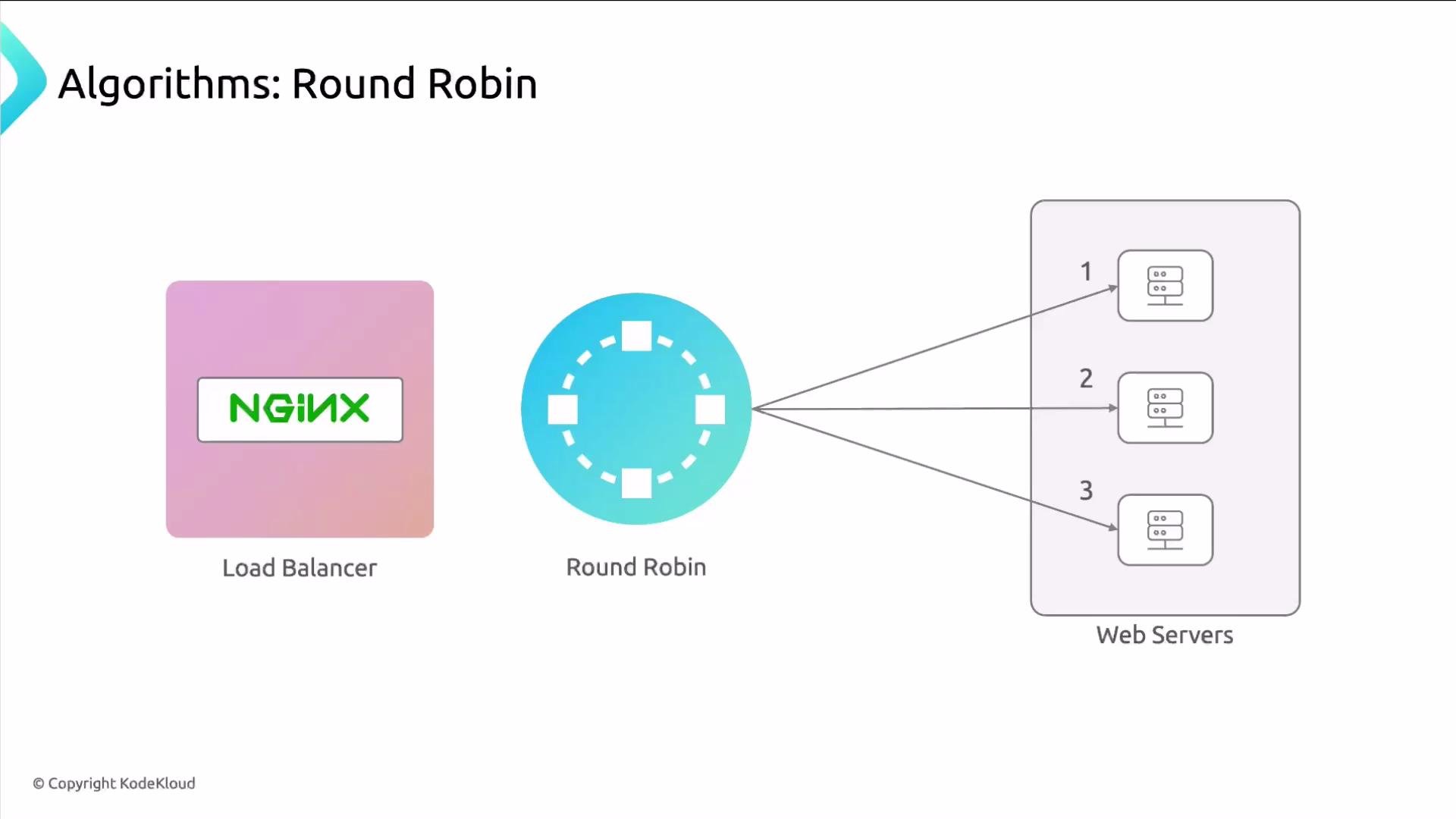
Round Robin distributes requests in a circular fashion: request 1 → server A, request 2 → server B, request 3 → server C, then back to A. It is the default algorithm and works well when backend servers have similar capacity and identical content.
You can tune timeouts and failure-handling options in NGINX, but the default passive behavior ensures that unhealthy servers stop receiving traffic. If one or more web servers go down, the site remains available while you repair or replace the affected nodes.
## Load-balancing algorithms supported by NGINX
NGINX supports several algorithms. Choosing the right one depends on your application workload, server capacity, and session state requirements.
* Round Robin (default)
* Weighted Round Robin
* IP hash (sticky sessions)
* Least connections (`least_conn`)
* Least time (`least_time`, available in NGINX Plus)
### Round Robin
Round Robin distributes requests in a circular fashion: request 1 → server A, request 2 → server B, request 3 → server C, then back to A. It is the default algorithm and works well when backend servers have similar capacity and identical content.
 Define a pool of backend servers in an `upstream` block (typically inside `http { ... }` or an included file) and reference that name with `proxy_pass` to forward requests:
```nginx theme={null}
upstream backend {
server 10.10.0.101:80;
server 10.10.0.102:80;
server 10.10.0.103:80;
}
server {
listen 80;
server_name example.com www.example.com;
location / {
proxy_pass http://backend/;
}
}
```
The `backend` name is arbitrary — it is only a handle for the pool. An `upstream` can include many servers, but 3–10 servers is often more maintainable.
### Weighted Round Robin
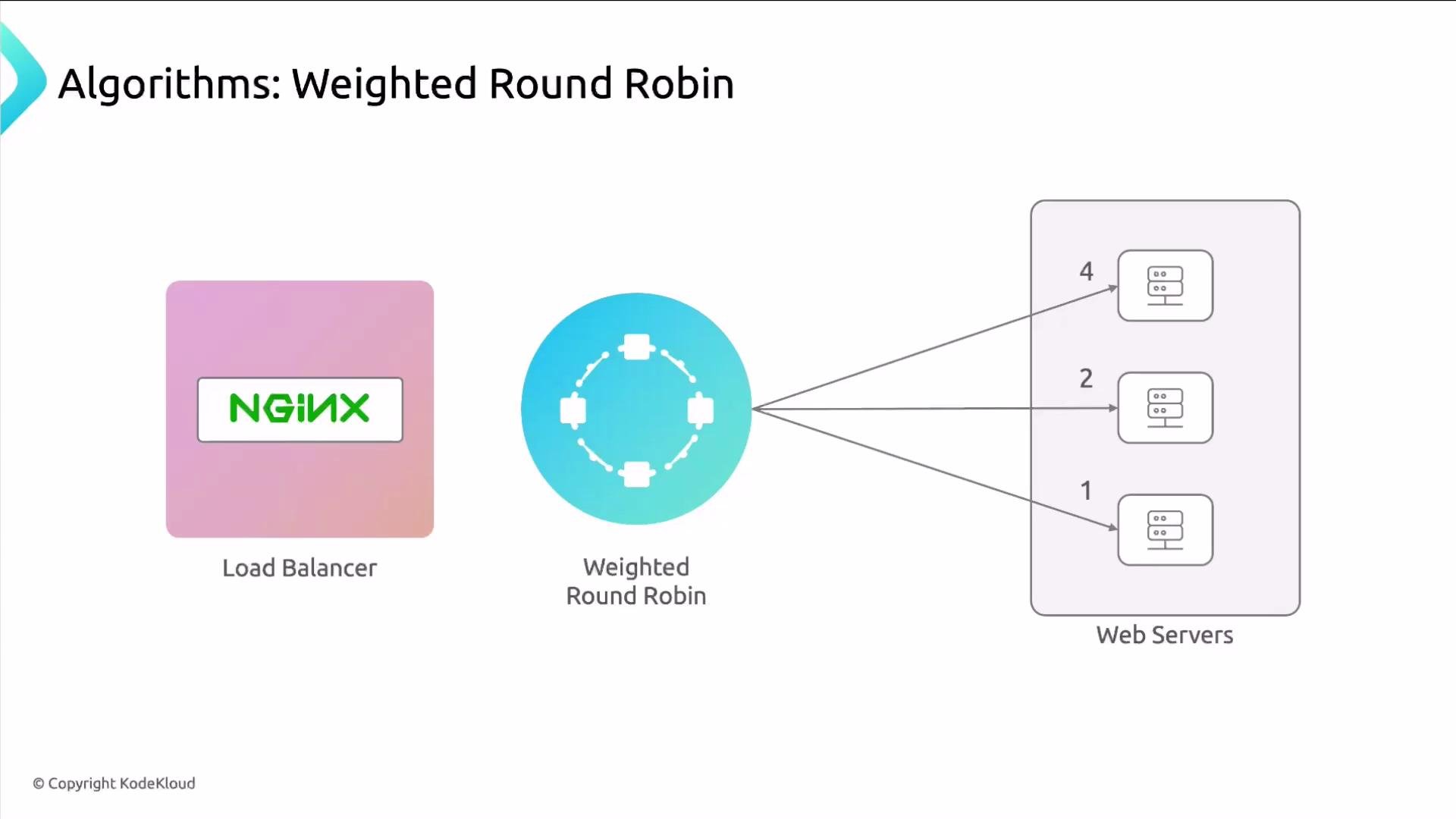
Weighted Round Robin allows assigning a `weight` to each server to control the relative share of requests. If server A has `weight=4`, B `weight=2`, and C `weight=1`, A receives four times as many requests as C.
Define a pool of backend servers in an `upstream` block (typically inside `http { ... }` or an included file) and reference that name with `proxy_pass` to forward requests:
```nginx theme={null}
upstream backend {
server 10.10.0.101:80;
server 10.10.0.102:80;
server 10.10.0.103:80;
}
server {
listen 80;
server_name example.com www.example.com;
location / {
proxy_pass http://backend/;
}
}
```
The `backend` name is arbitrary — it is only a handle for the pool. An `upstream` can include many servers, but 3–10 servers is often more maintainable.
### Weighted Round Robin
Weighted Round Robin allows assigning a `weight` to each server to control the relative share of requests. If server A has `weight=4`, B `weight=2`, and C `weight=1`, A receives four times as many requests as C.
 Use weights when backends have different hardware capacity or when some servers handle more load:
```nginx theme={null}
upstream backend {
server 10.10.0.101:80 weight=4;
server 10.10.0.102:80 weight=2;
server 10.10.0.103:80 weight=1;
}
server {
listen 80;
server_name example.com www.example.com;
location / {
proxy_pass http://backend/;
}
}
```
### Sticky sessions (`ip_hash`)
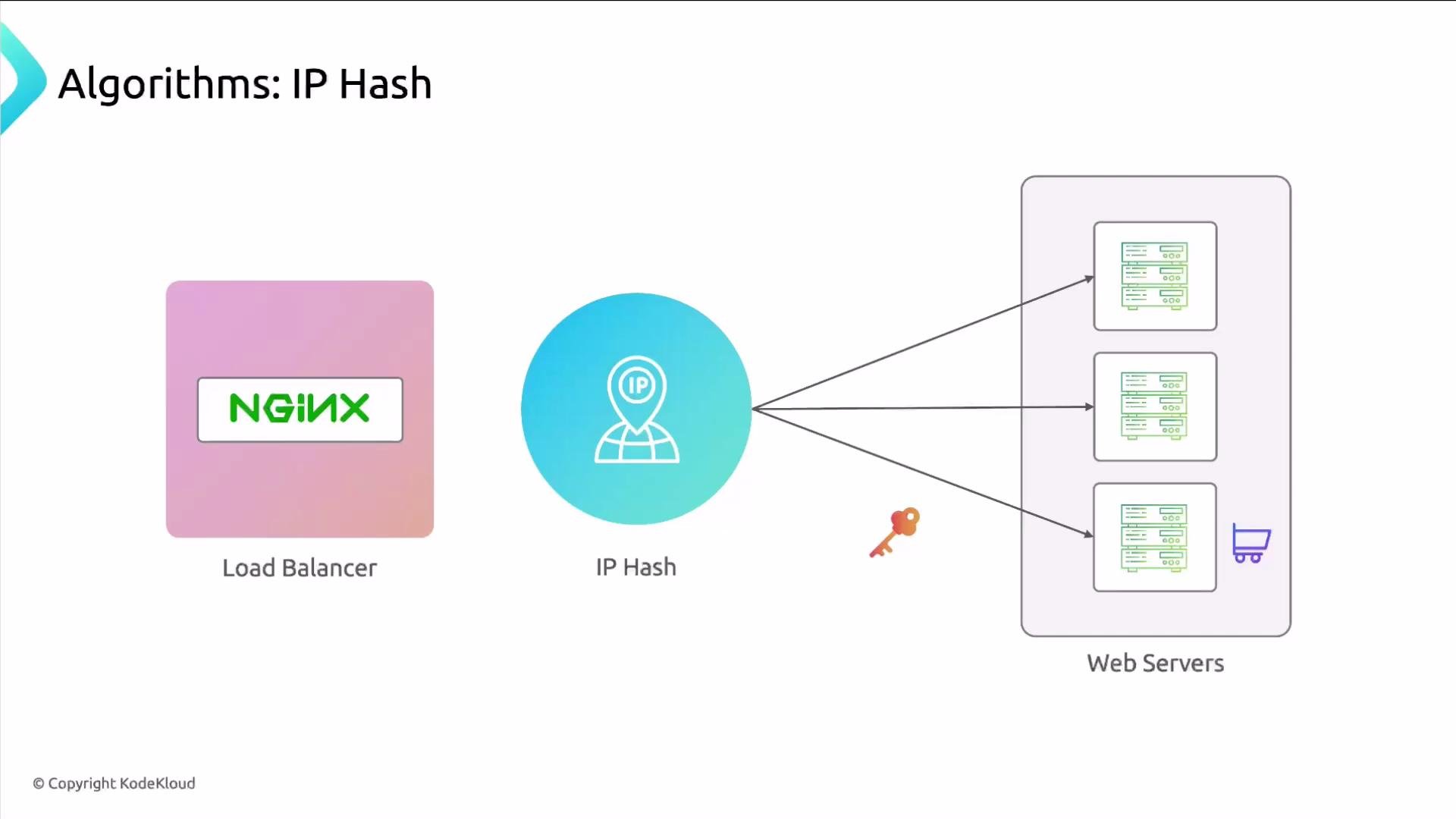
Some apps store session state locally (for example, shopping carts). To ensure a client is routed to the same backend across requests, enable `ip_hash`, which hashes the client IP to select a backend and provides sticky sessions.
Use weights when backends have different hardware capacity or when some servers handle more load:
```nginx theme={null}
upstream backend {
server 10.10.0.101:80 weight=4;
server 10.10.0.102:80 weight=2;
server 10.10.0.103:80 weight=1;
}
server {
listen 80;
server_name example.com www.example.com;
location / {
proxy_pass http://backend/;
}
}
```
### Sticky sessions (`ip_hash`)
Some apps store session state locally (for example, shopping carts). To ensure a client is routed to the same backend across requests, enable `ip_hash`, which hashes the client IP to select a backend and provides sticky sessions.
 ```nginx theme={null}
upstream backend {
ip_hash;
server 10.10.0.101:80;
server 10.10.0.102:80;
server 10.10.0.103:80;
}
server {
listen 80;
server_name example.com www.example.com;
location / {
proxy_pass http://backend/;
}
}
```
Note: `ip_hash` ties clients to backends by IP, which may be problematic behind NATs or shared proxies. For more flexible session affinity, consider application-level session stores (Redis, database) or cookies.
### Least connections
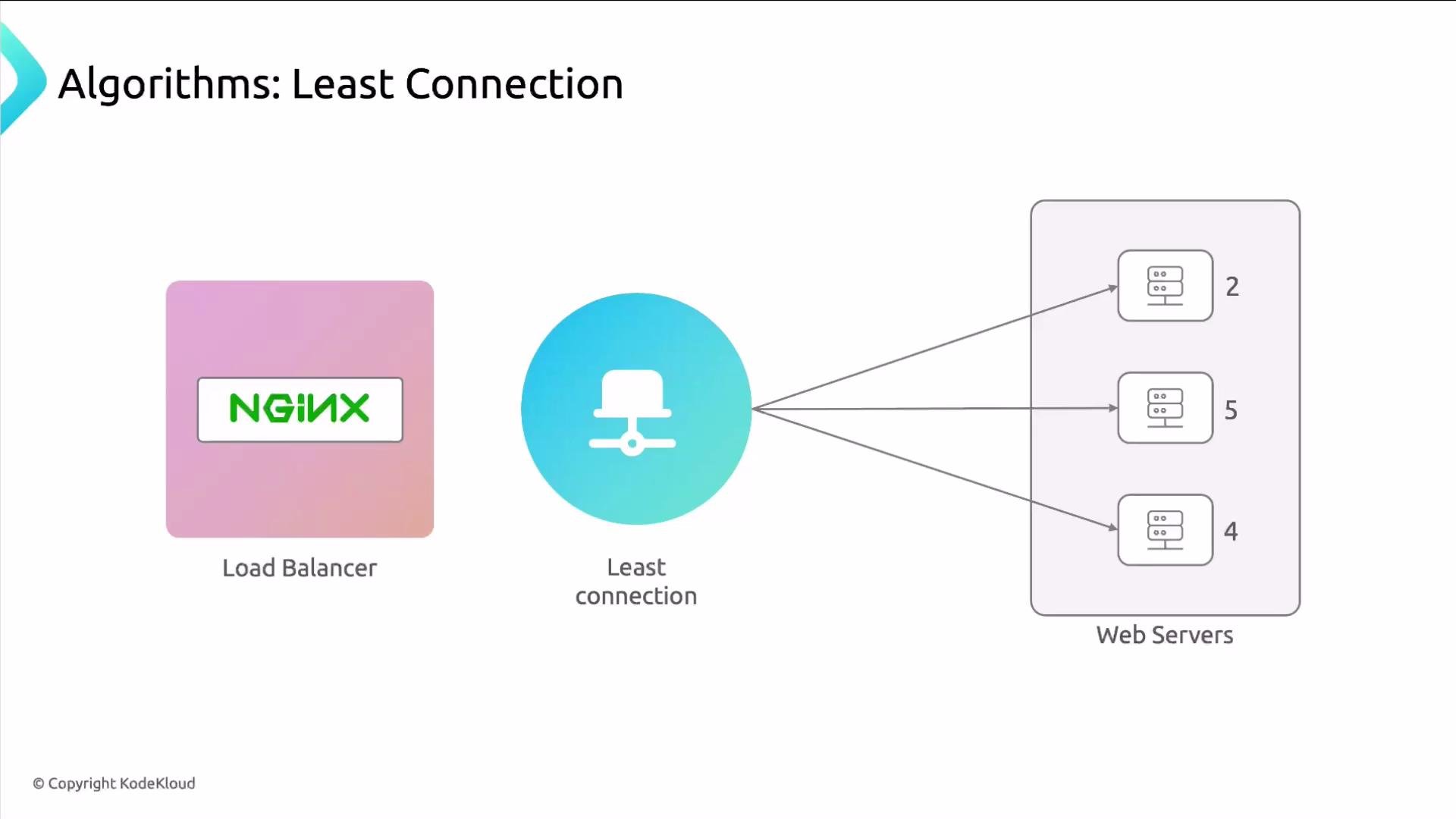
The `least_conn` algorithm sends a new request to the backend with the fewest active connections. It's effective when request durations vary, because it avoids overloading servers currently handling long-running connections.
```nginx theme={null}
upstream backend {
ip_hash;
server 10.10.0.101:80;
server 10.10.0.102:80;
server 10.10.0.103:80;
}
server {
listen 80;
server_name example.com www.example.com;
location / {
proxy_pass http://backend/;
}
}
```
Note: `ip_hash` ties clients to backends by IP, which may be problematic behind NATs or shared proxies. For more flexible session affinity, consider application-level session stores (Redis, database) or cookies.
### Least connections
The `least_conn` algorithm sends a new request to the backend with the fewest active connections. It's effective when request durations vary, because it avoids overloading servers currently handling long-running connections.
 ```nginx theme={null}
upstream backend {
least_conn;
server 10.10.0.101:80;
server 10.10.0.102:80;
server 10.10.0.103:80;
}
server {
listen 80;
server_name example.com www.example.com;
location / {
proxy_pass http://backend/;
}
}
```
### Least time (NGINX Plus)
The `least_time` algorithm selects the backend with the lowest recent response time. Options like `last_byte` or `header` control whether NGINX measures time until the last response byte or until the first byte, respectively. This method is available in NGINX Plus.
The `least_time` balancing method (and active health checks) are available in NGINX Plus — the commercial edition.
```nginx theme={null}
upstream backend {
least_time last_byte;
server 10.10.0.101:80;
server 10.10.0.102:80;
server 10.10.0.103:80;
}
server {
listen 80;
server_name example.com www.example.com;
location / {
proxy_pass http://backend/;
}
}
```
## Quick comparison: which algorithm to choose
| Algorithm | Best for | NGINX Edition |
| ------------------------------- | ---------------------------------------------- | ------------- |
| `round_robin` | Default; similar servers and identical content | Open Source |
| `weight` (weighted round robin) | Mixed-capacity servers | Open Source |
| `ip_hash` | Session affinity based on client IP | Open Source |
| `least_conn` | Requests with variable durations | Open Source |
| `least_time` | Minimize latency by response time (advanced) | NGINX Plus |
## Testing and next steps
To validate any load-balancing configuration, run controlled load tests and monitor backend metrics (CPU, memory, connection counts, response times). Popular tools:
* `ab` (ApacheBench) — simple HTTP load testing
* `wrk` — multi-threaded HTTP benchmarking for higher concurrency
* `siege`, `hey` — other lightweight tools
Example `wrk` command to generate load:
```bash theme={null}
wrk -t4 -c100 -d30s http://example.com/
```
References:
* NGINX documentation: [https://nginx.org/en/docs/](https://nginx.org/en/docs/)
* NGINX Plus features: [https://www.nginx.com/products/nginx/](https://www.nginx.com/products/nginx/)
* `wrk` — [https://github.com/wg/wrk](https://github.com/wg/wrk)
Now we'll implement a few of these algorithms in practice to see how they behave under load.
```nginx theme={null}
upstream backend {
least_conn;
server 10.10.0.101:80;
server 10.10.0.102:80;
server 10.10.0.103:80;
}
server {
listen 80;
server_name example.com www.example.com;
location / {
proxy_pass http://backend/;
}
}
```
### Least time (NGINX Plus)
The `least_time` algorithm selects the backend with the lowest recent response time. Options like `last_byte` or `header` control whether NGINX measures time until the last response byte or until the first byte, respectively. This method is available in NGINX Plus.
The `least_time` balancing method (and active health checks) are available in NGINX Plus — the commercial edition.
```nginx theme={null}
upstream backend {
least_time last_byte;
server 10.10.0.101:80;
server 10.10.0.102:80;
server 10.10.0.103:80;
}
server {
listen 80;
server_name example.com www.example.com;
location / {
proxy_pass http://backend/;
}
}
```
## Quick comparison: which algorithm to choose
| Algorithm | Best for | NGINX Edition |
| ------------------------------- | ---------------------------------------------- | ------------- |
| `round_robin` | Default; similar servers and identical content | Open Source |
| `weight` (weighted round robin) | Mixed-capacity servers | Open Source |
| `ip_hash` | Session affinity based on client IP | Open Source |
| `least_conn` | Requests with variable durations | Open Source |
| `least_time` | Minimize latency by response time (advanced) | NGINX Plus |
## Testing and next steps
To validate any load-balancing configuration, run controlled load tests and monitor backend metrics (CPU, memory, connection counts, response times). Popular tools:
* `ab` (ApacheBench) — simple HTTP load testing
* `wrk` — multi-threaded HTTP benchmarking for higher concurrency
* `siege`, `hey` — other lightweight tools
Example `wrk` command to generate load:
```bash theme={null}
wrk -t4 -c100 -d30s http://example.com/
```
References:
* NGINX documentation: [https://nginx.org/en/docs/](https://nginx.org/en/docs/)
* NGINX Plus features: [https://www.nginx.com/products/nginx/](https://www.nginx.com/products/nginx/)
* `wrk` — [https://github.com/wg/wrk](https://github.com/wg/wrk)
Now we'll implement a few of these algorithms in practice to see how they behave under load.