> ## Documentation Index
> Fetch the complete documentation index at: https://notes.kodekloud.com/llms.txt
> Use this file to discover all available pages before exploring further.
# Nginx Use Cases
> NGINX use cases and practical examples for load balancing, reverse and forward proxying, and caching to improve performance, reliability, and security.
In this lesson we’ll explore common NGINX use cases and practical examples you can apply to production systems. NGINX is more than a web server: it can act as a load balancer, reverse proxy, forward proxy, and cache — improving performance, reliability, and security for your applications.
Key topics covered:
* Load balancing with health checks and algorithms
* Reverse proxying with TLS termination and buffering
* Forward proxy functionality and module requirements
* Proxy caching and microcaching for high throughput
## Load balancing
A load balancer is like a restaurant manager who assigns incoming orders to multiple waiters so no single waiter becomes overwhelmed. NGINX can distribute client requests across multiple backend servers to improve availability and scale.
Typical NGINX load balancing setup uses an `upstream` block that lists backend servers and a frontend `server` block that proxies requests to that upstream. Common balancing methods include `round-robin`, `least_conn`, and `ip_hash`.
Example NGINX configuration (round-robin):
```nginx theme={null}
http {
upstream backend_servers {
server backend1.example.com;
server backend2.example.com;
server backend3.example.com;
}
server {
listen 80;
location / {
proxy_pass http://backend_servers;
proxy_set_header Host $host;
proxy_set_header X-Real-IP $remote_addr;
}
}
}
```
Passive failure detection (open-source NGINX) can be configured per server using `max_fails` and `fail_timeout`:
```nginx theme={null}
upstream backend_servers {
server backend1.example.com max_fails=3 fail_timeout=30s;
server backend2.example.com max_fails=3 fail_timeout=30s;
}
```
For active health checks and advanced monitoring, consider NGINX Plus, which includes built-in active health checks and other enterprise features.
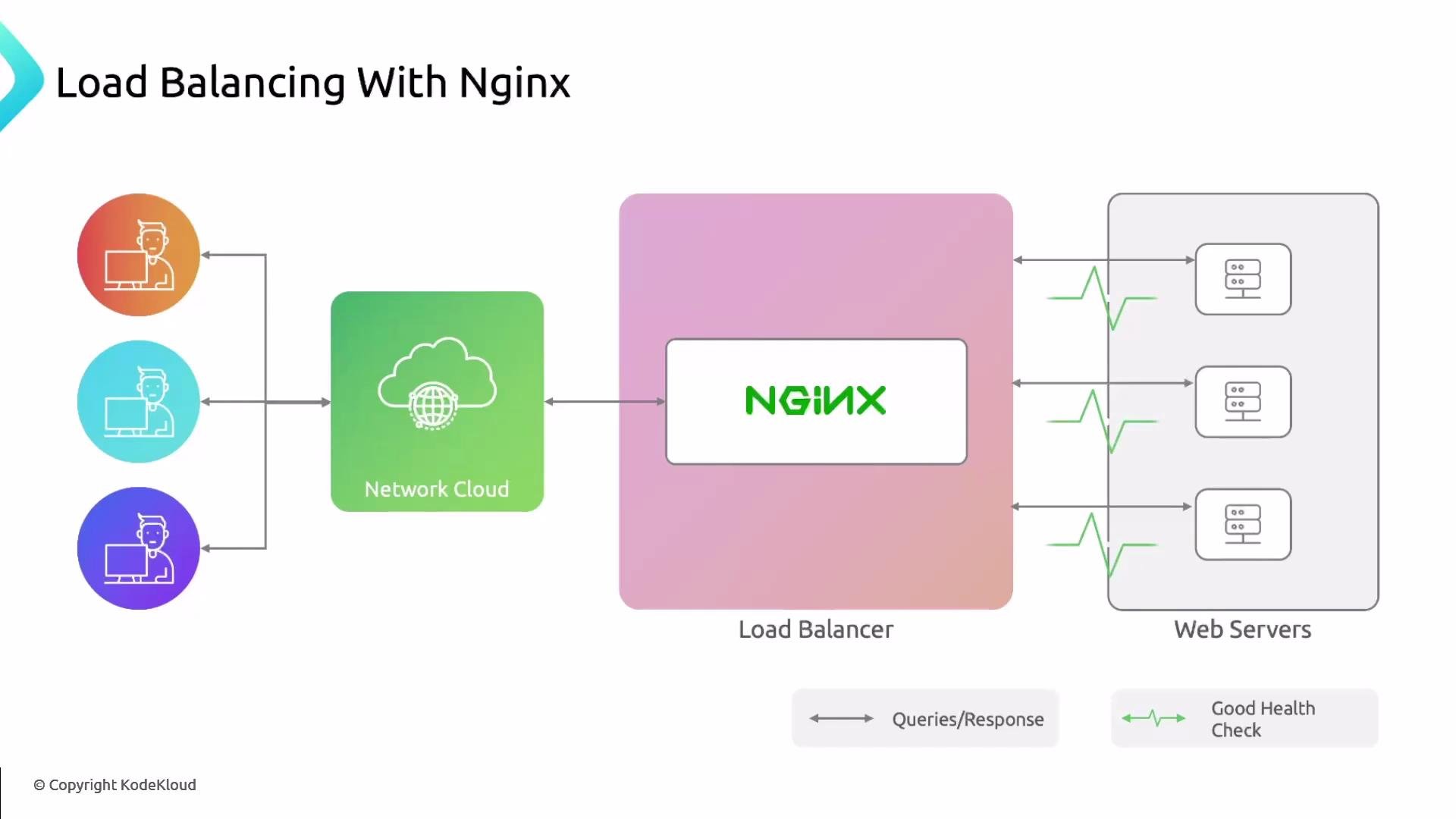 Because the load balancer only forwards to healthy backends, the site remains available even if a node fails — provided at least one backend remains reachable.
Load balancing algorithms (when to use each):
| Algorithm | Use Case |
| ------------- | ---------------------------------------------------------------------------- |
| `round-robin` | Simple distribution for evenly capable backend servers. |
| `least_conn` | Prefer servers with fewer active connections (good for long-lived requests). |
| `ip_hash` | Route same client IP to the same backend (session persistence). |
References:
* [NGINX Load Balancing Basics](https://docs.nginx.com/nginx/)
## Reverse proxy
A reverse proxy sits in front of your backend servers and forwards incoming client requests. Think of it as a postal clerk who receives a package and decides which courier delivers it — the clerk is the reverse proxy; the courier is the backend server.
Benefits of using NGINX as a reverse proxy:
* Central TLS termination (offloads HTTPS from backends)
* Request buffering and compression
* Caching of responses
* Access control and rate limiting
* Serving static content directly from the proxy
Example: TLS termination and proxying to an internal backend:
```nginx theme={null}
server {
listen 443 ssl;
server_name www.example.com;
ssl_certificate /etc/nginx/certs/fullchain.pem;
ssl_certificate_key /etc/nginx/certs/privkey.pem;
location / {
proxy_pass http://internal_backend:8080;
proxy_set_header Host $host;
proxy_set_header X-Forwarded-For $proxy_add_x_forwarded_for;
proxy_buffering on;
gzip on;
}
}
```
A reverse proxy can also distribute requests across multiple backends; in that case the roles of reverse proxy and load balancer overlap.
Because the load balancer only forwards to healthy backends, the site remains available even if a node fails — provided at least one backend remains reachable.
Load balancing algorithms (when to use each):
| Algorithm | Use Case |
| ------------- | ---------------------------------------------------------------------------- |
| `round-robin` | Simple distribution for evenly capable backend servers. |
| `least_conn` | Prefer servers with fewer active connections (good for long-lived requests). |
| `ip_hash` | Route same client IP to the same backend (session persistence). |
References:
* [NGINX Load Balancing Basics](https://docs.nginx.com/nginx/)
## Reverse proxy
A reverse proxy sits in front of your backend servers and forwards incoming client requests. Think of it as a postal clerk who receives a package and decides which courier delivers it — the clerk is the reverse proxy; the courier is the backend server.
Benefits of using NGINX as a reverse proxy:
* Central TLS termination (offloads HTTPS from backends)
* Request buffering and compression
* Caching of responses
* Access control and rate limiting
* Serving static content directly from the proxy
Example: TLS termination and proxying to an internal backend:
```nginx theme={null}
server {
listen 443 ssl;
server_name www.example.com;
ssl_certificate /etc/nginx/certs/fullchain.pem;
ssl_certificate_key /etc/nginx/certs/privkey.pem;
location / {
proxy_pass http://internal_backend:8080;
proxy_set_header Host $host;
proxy_set_header X-Forwarded-For $proxy_add_x_forwarded_for;
proxy_buffering on;
gzip on;
}
}
```
A reverse proxy can also distribute requests across multiple backends; in that case the roles of reverse proxy and load balancer overlap.
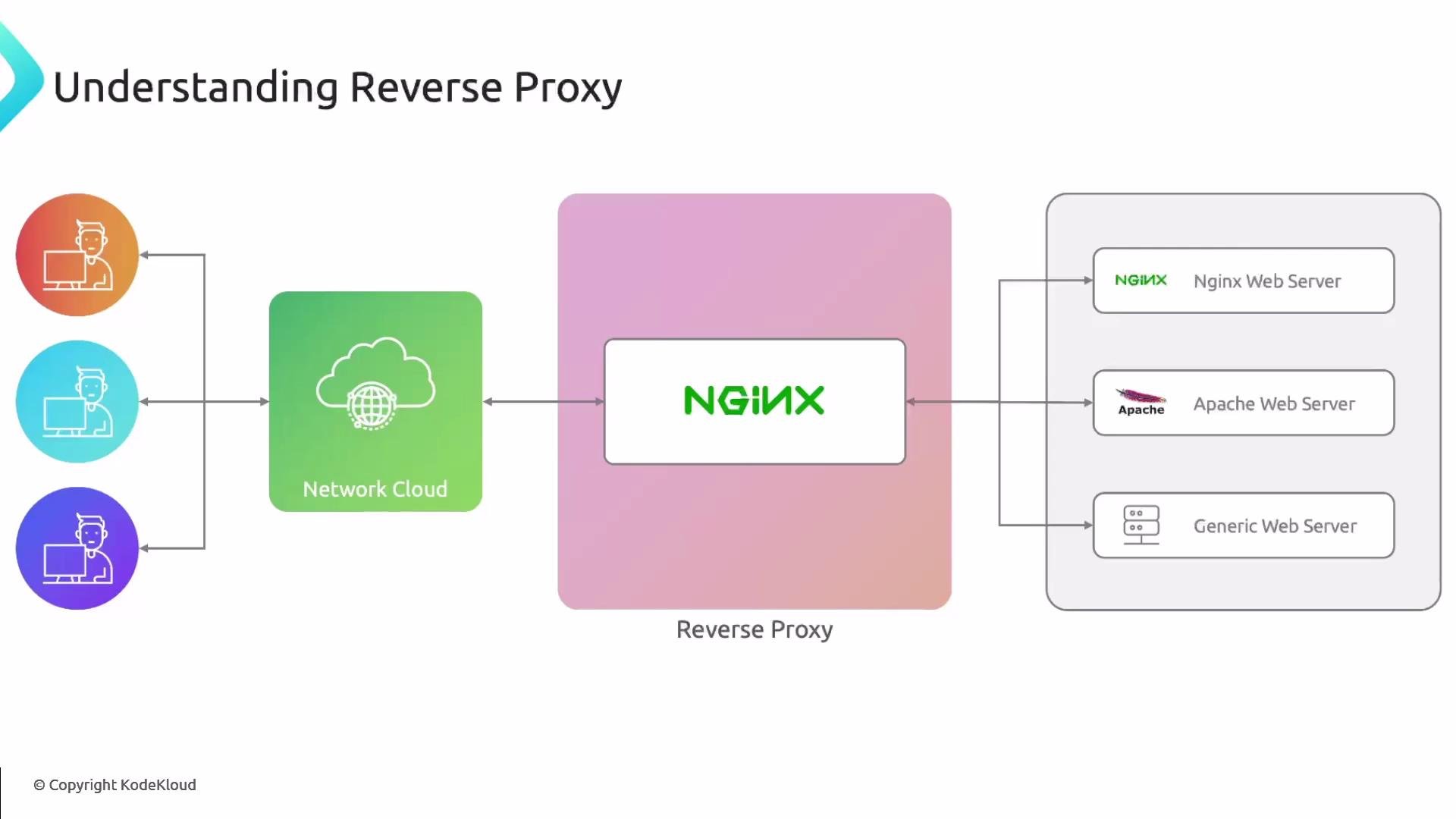 Difference between a reverse proxy and a load balancer: a load balancer’s primary job is to distribute traffic across multiple backends to prevent overload; a reverse proxy’s primary role is to act as the intermediary that forwards client requests to backend servers. In practice, NGINX can be configured to perform both roles simultaneously.
## Forward proxy
A forward proxy sits between internal clients and the Internet, forwarding outgoing client requests to remote servers. Use cases include content filtering, access control, caching outbound responses, and client anonymization (hiding client IPs).
Note about NGINX forward proxy support:
* Default NGINX is primarily designed for reverse proxying.
* Supporting HTTPS forward proxying (CONNECT tunneling) typically requires additional modules such as `ngx_http_proxy_connect_module` or third-party solutions.
NGINX does not natively support full forward-proxy CONNECT handling in the open-source distribution. Implementing a forward proxy for HTTPS usually requires third‑party modules or custom builds. Evaluate security implications carefully before exposing a forward proxy.
Minimal example for a basic (HTTP-only) forward proxy:
```nginx theme={null}
server {
listen 3128;
resolver 8.8.8.8;
location / {
proxy_pass $scheme://$http_host$request_uri;
proxy_set_header Host $http_host;
proxy_set_header X-Real-IP $remote_addr;
}
}
```
For HTTPS CONNECT support, research the required modules and use hardened access controls and authentication.
## Caching
Caching is like brewing coffee in advance and keeping it ready: repeated requests are served faster because the proxy returns a stored response instead of contacting the backend.
NGINX proxy cache reduces backend load and latency. Important caching controls include cache keys, TTLs, cache zones, and purge policies. Microcaching (very short TTLs, e.g., 1–5 seconds) can significantly increase throughput for high-traffic dynamic sites.
Example proxy cache configuration:
```nginx theme={null}
http {
proxy_cache_path /var/cache/nginx levels=1:2 keys_zone=my_cache:10m max_size=1g inactive=60m use_temp_path=off;
server {
location / {
proxy_pass http://backend_servers;
proxy_cache my_cache;
proxy_cache_key "$scheme$request_method$host$request_uri";
proxy_cache_valid 200 302 60s;
proxy_cache_valid 404 1m;
add_header X-Proxy-Cache $upstream_cache_status;
}
}
}
```
Best practices:
* Use `proxy_cache_key` to avoid cache collisions
* Respect `Cache-Control` and `Expires` headers from backends where appropriate
* Use `proxy_cache_bypass` and `proxy_no_cache` for authenticated or dynamic content
* Implement purge mechanisms if you need immediate invalidation
## Use case summary
| Use Case | Primary Benefit | Example NGINX feature |
| -------------- | --------------------------------------------------- | ------------------------------------------ |
| Load balancing | Distribute requests, increase availability | `upstream`, `least_conn`, `ip_hash` |
| Reverse proxy | Centralize TLS, buffering, static content | `proxy_pass`, TLS termination, compression |
| Forward proxy | Control outbound access, caching, anonymize clients | Requires additional modules for HTTPS |
| Caching | Reduce backend load, lower latency | `proxy_cache`, microcaching |
Further reading and references:
* [NGINX Official Documentation](https://docs.nginx.com/)
* [NGINX Plus Load Balancing](https://www.nginx.com/products/nginx/)
* [Proxy Cache and Caching Guide](https://docs.nginx.com/nginx/admin-guide/content-cache/content-caching/)
Later in this lesson series we will implement hands-on examples for load balancing, reverse proxying, and caching so you can test these patterns in a lab environment.
Difference between a reverse proxy and a load balancer: a load balancer’s primary job is to distribute traffic across multiple backends to prevent overload; a reverse proxy’s primary role is to act as the intermediary that forwards client requests to backend servers. In practice, NGINX can be configured to perform both roles simultaneously.
## Forward proxy
A forward proxy sits between internal clients and the Internet, forwarding outgoing client requests to remote servers. Use cases include content filtering, access control, caching outbound responses, and client anonymization (hiding client IPs).
Note about NGINX forward proxy support:
* Default NGINX is primarily designed for reverse proxying.
* Supporting HTTPS forward proxying (CONNECT tunneling) typically requires additional modules such as `ngx_http_proxy_connect_module` or third-party solutions.
NGINX does not natively support full forward-proxy CONNECT handling in the open-source distribution. Implementing a forward proxy for HTTPS usually requires third‑party modules or custom builds. Evaluate security implications carefully before exposing a forward proxy.
Minimal example for a basic (HTTP-only) forward proxy:
```nginx theme={null}
server {
listen 3128;
resolver 8.8.8.8;
location / {
proxy_pass $scheme://$http_host$request_uri;
proxy_set_header Host $http_host;
proxy_set_header X-Real-IP $remote_addr;
}
}
```
For HTTPS CONNECT support, research the required modules and use hardened access controls and authentication.
## Caching
Caching is like brewing coffee in advance and keeping it ready: repeated requests are served faster because the proxy returns a stored response instead of contacting the backend.
NGINX proxy cache reduces backend load and latency. Important caching controls include cache keys, TTLs, cache zones, and purge policies. Microcaching (very short TTLs, e.g., 1–5 seconds) can significantly increase throughput for high-traffic dynamic sites.
Example proxy cache configuration:
```nginx theme={null}
http {
proxy_cache_path /var/cache/nginx levels=1:2 keys_zone=my_cache:10m max_size=1g inactive=60m use_temp_path=off;
server {
location / {
proxy_pass http://backend_servers;
proxy_cache my_cache;
proxy_cache_key "$scheme$request_method$host$request_uri";
proxy_cache_valid 200 302 60s;
proxy_cache_valid 404 1m;
add_header X-Proxy-Cache $upstream_cache_status;
}
}
}
```
Best practices:
* Use `proxy_cache_key` to avoid cache collisions
* Respect `Cache-Control` and `Expires` headers from backends where appropriate
* Use `proxy_cache_bypass` and `proxy_no_cache` for authenticated or dynamic content
* Implement purge mechanisms if you need immediate invalidation
## Use case summary
| Use Case | Primary Benefit | Example NGINX feature |
| -------------- | --------------------------------------------------- | ------------------------------------------ |
| Load balancing | Distribute requests, increase availability | `upstream`, `least_conn`, `ip_hash` |
| Reverse proxy | Centralize TLS, buffering, static content | `proxy_pass`, TLS termination, compression |
| Forward proxy | Control outbound access, caching, anonymize clients | Requires additional modules for HTTPS |
| Caching | Reduce backend load, lower latency | `proxy_cache`, microcaching |
Further reading and references:
* [NGINX Official Documentation](https://docs.nginx.com/)
* [NGINX Plus Load Balancing](https://www.nginx.com/products/nginx/)
* [Proxy Cache and Caching Guide](https://docs.nginx.com/nginx/admin-guide/content-cache/content-caching/)
Later in this lesson series we will implement hands-on examples for load balancing, reverse proxying, and caching so you can test these patterns in a lab environment.