> ## Documentation Index
> Fetch the complete documentation index at: https://notes.kodekloud.com/llms.txt
> Use this file to discover all available pages before exploring further.
# Web Servers
> Overview of web servers, how browsers load webpages, networking details, deployment patterns, server models, popular servers, and related concepts like CDNs, reverse proxies, and TLS.
## What is a web server?
A web server is a machine running software that accepts requests from clients (usually web browsers), processes those requests, and returns web pages and related resources (HTML, CSS, JavaScript, images, etc.). Every time you type a domain such as `kodekloud.com` into your browser, a web server is involved in returning the page you see. Multiple coordinated steps happen behind the scenes to make that interaction work.
## How a browser loads a web page — step by step
1. DNS lookup: Your browser resolves the human-friendly domain name to an IP address using DNS (Domain Name System). Think of DNS as a phone book that maps names to IP addresses.
2. TCP connection: With the IP address, the browser opens a TCP connection to the server.
3. TLS handshake (if HTTPS): For secure sites, the browser and server complete a TLS handshake to establish an encrypted session.
4. HTTP request: The browser sends an HTTP or HTTPS request for the resource (for example, the home page).
5. Server retrieves or generates resources: The web server locates or generates the requested content — HTML, CSS, JavaScript, images, etc.
6. Response: The server sends the response back to the browser.
7. Rendering: The browser renders the content and displays the page to the user.
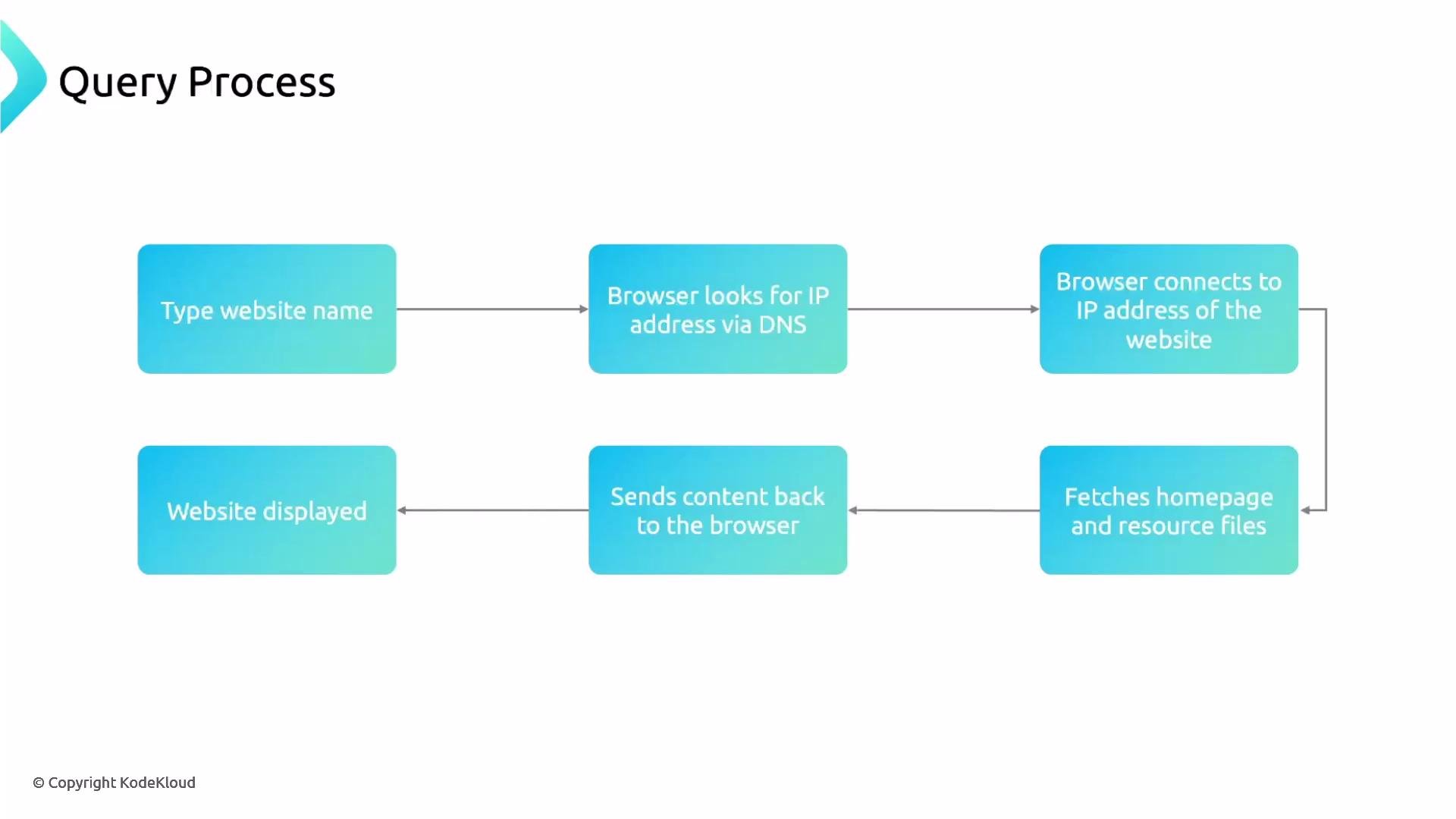 When you try `https://kodekloud.com`, the browser first resolves `kodekloud.com` via DNS, then establishes a TCP connection, performs a TLS handshake (for HTTPS), and finally issues the HTTP request to fetch the site content.
## Important networking details
* Ports: HTTP typically uses port 80 and HTTPS uses port 443.
* DNS responses can point to a single server, a load balancer, or a Content Delivery Network (CDN) edge node.
* HTTPS means HTTP over TLS — traffic is encrypted after a successful TLS handshake.
| Item | Description | Example |
| ----------------- | ------------------------ | ------------------------------------ |
| Domain resolution | Maps domain to IP | `kodekloud.com → 203.0.113.10` |
| Protocols | Unencrypted vs encrypted | `HTTP (port 80)`, `HTTPS (port 443)` |
| Quick test | Inspect HTTP headers | `curl -I https://kodekloud.com` |
## Modern deployment patterns
* DNS can return addresses for a CDN or a load balancer instead of a single host. CDNs cache and serve static assets close to users to reduce latency.
* Load balancers and reverse proxies accept client connections and distribute requests across a pool of backend servers. This improves throughput, availability, and fault tolerance.
* Reverse proxy examples include NGINX, HAProxy, and cloud-managed load balancers.
## Web server models: process-per-connection vs event-driven
* Traditional model (process/thread per connection): Historically used by servers like Apache HTTP Server (with prefork MPM). Each connection may consume a process or thread, which can be heavy under high concurrency.
* Event-driven/asynchronous model: Modern web servers like NGINX use an event loop and asynchronous I/O to handle many concurrent connections with much lower memory and CPU overhead.
Process-per-connection servers can exhaust CPU and memory under high load. For high-concurrency scenarios, prefer event-driven servers (e.g., NGINX) or scalable architectures with load balancers and CDNs.
## Popular web servers and related projects
* NGINX — event-driven, high-concurrency web server and reverse proxy
* Apache HTTP Server — feature-rich, historically process/thread-based
* OpenResty — NGINX extended with Lua scripting
* LiteSpeed — commercial, performance-oriented server
* Caddy — automatic HTTPS and simple configuration
* IIS (Microsoft) — web server for Windows environments
## Quick glossary
* CDN (Content Delivery Network): Distributed cache of assets to speed up delivery.
* Reverse proxy: A server that sits between clients and backend servers, forwarding client requests.
* Load balancer: Distributes incoming requests across multiple backend servers.
* TLS: Transport Layer Security protocol used to encrypt HTTPS traffic.
## Next steps
We will next explore NGINX in detail — its architecture, configuration, and practical examples to get you started.
## Links and references
* [DNS — Domain Name System](https://en.wikipedia.org/wiki/Domain_Name_System)
* [HTTP](https://en.wikipedia.org/wiki/Hypertext_Transfer_Protocol)
* [HTTPS](https://en.wikipedia.org/wiki/HTTPS)
* [TLS — Transport Layer Security](https://en.wikipedia.org/wiki/Transport_Layer_Security)
* [NGINX](https://nginx.org/)
* [Apache HTTP Server](https://httpd.apache.org/)
* [Content Delivery Network (CDN)](https://en.wikipedia.org/wiki/Content_delivery_network)
* [Reverse proxy](https://en.wikipedia.org/wiki/Reverse_proxy)
* [Load balancing](https://en.wikipedia.org/wiki/Load_balancing_\(computing\))
When you try `https://kodekloud.com`, the browser first resolves `kodekloud.com` via DNS, then establishes a TCP connection, performs a TLS handshake (for HTTPS), and finally issues the HTTP request to fetch the site content.
## Important networking details
* Ports: HTTP typically uses port 80 and HTTPS uses port 443.
* DNS responses can point to a single server, a load balancer, or a Content Delivery Network (CDN) edge node.
* HTTPS means HTTP over TLS — traffic is encrypted after a successful TLS handshake.
| Item | Description | Example |
| ----------------- | ------------------------ | ------------------------------------ |
| Domain resolution | Maps domain to IP | `kodekloud.com → 203.0.113.10` |
| Protocols | Unencrypted vs encrypted | `HTTP (port 80)`, `HTTPS (port 443)` |
| Quick test | Inspect HTTP headers | `curl -I https://kodekloud.com` |
## Modern deployment patterns
* DNS can return addresses for a CDN or a load balancer instead of a single host. CDNs cache and serve static assets close to users to reduce latency.
* Load balancers and reverse proxies accept client connections and distribute requests across a pool of backend servers. This improves throughput, availability, and fault tolerance.
* Reverse proxy examples include NGINX, HAProxy, and cloud-managed load balancers.
## Web server models: process-per-connection vs event-driven
* Traditional model (process/thread per connection): Historically used by servers like Apache HTTP Server (with prefork MPM). Each connection may consume a process or thread, which can be heavy under high concurrency.
* Event-driven/asynchronous model: Modern web servers like NGINX use an event loop and asynchronous I/O to handle many concurrent connections with much lower memory and CPU overhead.
Process-per-connection servers can exhaust CPU and memory under high load. For high-concurrency scenarios, prefer event-driven servers (e.g., NGINX) or scalable architectures with load balancers and CDNs.
## Popular web servers and related projects
* NGINX — event-driven, high-concurrency web server and reverse proxy
* Apache HTTP Server — feature-rich, historically process/thread-based
* OpenResty — NGINX extended with Lua scripting
* LiteSpeed — commercial, performance-oriented server
* Caddy — automatic HTTPS and simple configuration
* IIS (Microsoft) — web server for Windows environments
## Quick glossary
* CDN (Content Delivery Network): Distributed cache of assets to speed up delivery.
* Reverse proxy: A server that sits between clients and backend servers, forwarding client requests.
* Load balancer: Distributes incoming requests across multiple backend servers.
* TLS: Transport Layer Security protocol used to encrypt HTTPS traffic.
## Next steps
We will next explore NGINX in detail — its architecture, configuration, and practical examples to get you started.
## Links and references
* [DNS — Domain Name System](https://en.wikipedia.org/wiki/Domain_Name_System)
* [HTTP](https://en.wikipedia.org/wiki/Hypertext_Transfer_Protocol)
* [HTTPS](https://en.wikipedia.org/wiki/HTTPS)
* [TLS — Transport Layer Security](https://en.wikipedia.org/wiki/Transport_Layer_Security)
* [NGINX](https://nginx.org/)
* [Apache HTTP Server](https://httpd.apache.org/)
* [Content Delivery Network (CDN)](https://en.wikipedia.org/wiki/Content_delivery_network)
* [Reverse proxy](https://en.wikipedia.org/wiki/Reverse_proxy)
* [Load balancing](https://en.wikipedia.org/wiki/Load_balancing_\(computing\))