> ## Documentation Index
> Fetch the complete documentation index at: https://notes.kodekloud.com/llms.txt
> Use this file to discover all available pages before exploring further.
# Demo HTTP Headers
> Configuring NGINX to add security HTTP headers, terminate TLS, load balance to Apache backends, forward proxy headers, and update Apache logs to record original client information.
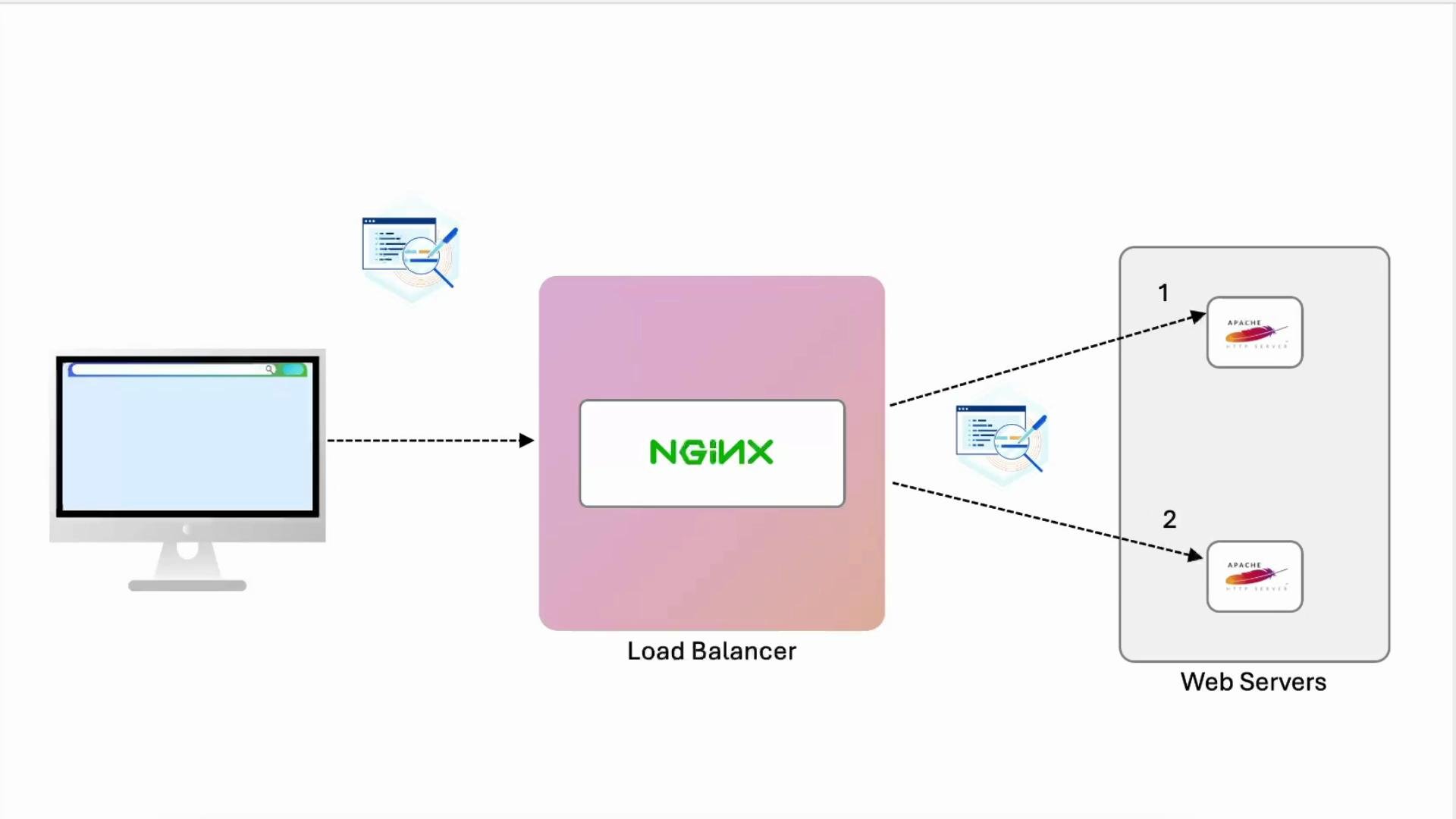
In this lesson we configure an NGINX server to return a set of security HTTP headers, then extend that configuration to act as a TLS-terminating load balancer that forwards requests to two Apache backend servers. We also pass useful proxy headers so the Apache backends can log the original client information for debugging and auditing.
Flow overview:
* Inspect current response headers from the site.
* Add security headers to the TLS (`listen 443 ssl`) server block.
* Configure an `upstream` block and proxy traffic to two Apache backends.
* Add `proxy_set_header` directives so the backend sees the original client IP and scheme.
* Update Apache logging to include forwarded headers or use `mod_remoteip`.
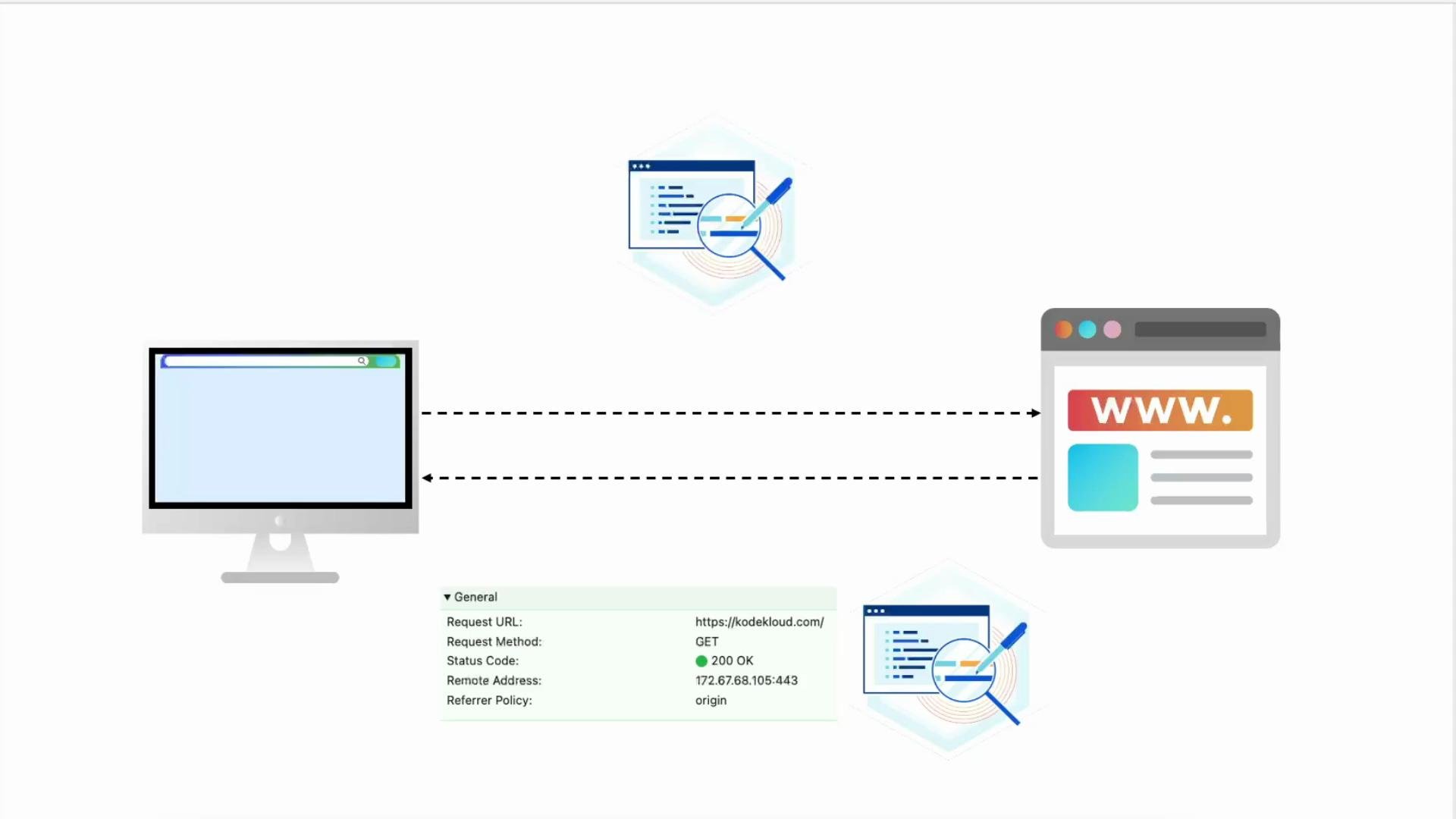 We will then configure NGINX as a load balancer to distribute traffic to two backend Apache servers and include proxy headers so the Apache logs record useful client information (instead of all requests appearing to come from the load balancer).
 ***
## 1) Initial checks — inspect current headers
I added an internal DNS entry for `example.com` pointing to loopback. For example, your `/etc/hosts` may include:
```bash theme={null}
root@nginx ~ ➜ cat /etc/hosts
127.0.0.1 localhost
::1 localhost ip6-localhost ip6-loopback
fe00::0 ip6-localnet
ff00::0 ip6-mcastprefix
ff02::1 ip6-allnodes
ff02::2 ip6-allrouters
192.231.70.6 nginx
127.0.0.1 example.com
```
Check headers with curl:
```bash theme={null}
root@nginx ~ ➜ curl --head https://example.com
HTTP/1.1 200 OK
Server: nginx/1.18.0 (Ubuntu)
Date: Wed, 12 Feb 2025 19:24:14 GMT
Content-Type: text/html
Content-Length: 8710
Last-Modified: Wed, 12 Feb 2025 18:42:19 GMT
Connection: keep-alive
ETag: "67aceb8b-2206"
Accept-Ranges: bytes
```
In the browser: open DevTools → Network → select a resource to view response headers. At this point the server returns standard headers such as `Server` and `Date`, but no custom security headers yet.
***
## 2) Add security headers in NGINX (TLS server block)
Edit your site config (e.g., `/etc/nginx/sites-available/example-https`) and add the security headers inside the `server { listen 443 ssl; ... }` block.
Example configuration:
```nginx theme={null}
# /etc/nginx/sites-available/example-https
server {
listen 80;
server_name example.com;
return 301 https://$host$request_uri;
}
server {
listen 443 ssl;
server_name example.com;
ssl_certificate /etc/ssl/certs/example.com.pem;
ssl_certificate_key /etc/ssl/certs/example.com-key.pem;
root /var/www/html;
add_header Strict-Transport-Security "max-age=31536000; includeSubDomains; preload";
add_header X-Frame-Options "SAMEORIGIN";
add_header Content-Security-Policy "default-src 'self'";
add_header Referrer-Policy origin;
# Add index.php to the list if you are using PHP
index index.html index.htm index.nginx-debian.html;
location / {
# First attempt to serve request as file, then as directory,
# then fall back to displaying a 404.
try_files $uri $uri/ =404;
}
}
```
Save, test and reload NGINX:
```bash theme={null}
root@nginx /etc/nginx/sites-available ➜ nginx -t
nginx: the configuration file /etc/nginx/nginx.conf syntax is ok
nginx: configuration file /etc/nginx/nginx.conf test is successful
root@nginx /etc/nginx/sites-available ➜ nginx -s reload
```
Re-check response headers:
```bash theme={null}
root@nginx /etc/nginx/sites-available ➜ curl --head https://example.com
HTTP/1.1 200 OK
Server: nginx/1.18.0 (Ubuntu)
Date: Wed, 12 Feb 2025 19:28:15 GMT
Content-Type: text/html
Content-Length: 8710
Last-Modified: Wed, 12 Feb 2025 18:42:19 GMT
Connection: keep-alive
ETag: "67aceb8b-2206"
Strict-Transport-Security: max-age=31536000; includeSubDomains; preload
X-Frame-Options: SAMEORIGIN
Content-Security-Policy: default-src 'self'
Referrer-Policy: origin
Accept-Ranges: bytes
```
You should now see `Strict-Transport-Security`, `X-Frame-Options`, `Content-Security-Policy`, and `Referrer-Policy` in DevTools → Network for resource responses.
Strict-Transport-Security (HSTS) instructs browsers to access the site only over HTTPS. When testing, use a conservative `max-age` (for example, a few hours) before committing a long duration or adding `preload`. For more, see the HSTS specification and browser docs.
Quick reference — common security headers:
| Header | Purpose |
| --------------------------- | -------------------------------------------------- |
| `Strict-Transport-Security` | Enforce HTTPS (HSTS) |
| `X-Frame-Options` | Prevent clickjacking (`SAMEORIGIN`) |
| `Content-Security-Policy` | Control allowed resource origins to mitigate XSS |
| `Referrer-Policy` | Control referrer information sent to third parties |
***
## 3) Configure NGINX as a load balancer (upstream block)
Add an `upstream` block and change the site `location /` to proxy requests to the `example` upstream. Initially this will forward traffic, but backends will only see the load balancer IP unless we forward proxy headers.
Example:
```nginx theme={null}
# Upstream configuration
upstream example {
server node01:443;
server node02:443;
}
server {
listen 80;
server_name example.com;
return 301 https://$host$request_uri;
}
server {
listen 443 ssl;
server_name example.com;
ssl_certificate /etc/ssl/certs/example.com.pem;
ssl_certificate_key /etc/ssl/certs/example.com-key.pem;
root /var/www/html;
add_header Strict-Transport-Security "max-age=31536000; includeSubDomains; preload";
add_header X-Frame-Options "SAMEORIGIN";
add_header Content-Security-Policy "default-src 'self'";
add_header Referrer-Policy origin;
index index.html index.htm index.nginx-debian.html;
location / {
proxy_pass https://example;
}
}
```
Test and reload NGINX after editing.
***
## 4) Forward proxy headers so backends see original client info
To ensure Apache backends can log and act on the original client IP and protocol, set the appropriate proxy headers inside the `location` block.
Update `location /`:
```nginx theme={null}
location / {
proxy_set_header X-Real-IP $remote_addr;
proxy_set_header Host $host;
proxy_set_header X-Forwarded-For $proxy_add_x_forwarded_for;
proxy_set_header X-Forwarded-Proto $scheme;
proxy_pass https://example;
}
```
Notes:
* `X-Real-IP` sends the immediate client IP as seen by NGINX (`$remote_addr`).
* `X-Forwarded-For` accumulates client IPs across hops; `$proxy_add_x_forwarded_for` appends the current hop.
* `X-Forwarded-Proto` tells the backend whether the original request used `http` or `https`.
* Always end directives with semicolons.
Test and reload:
```bash theme={null}
root@nginx /etc/nginx/sites-available ➜ nginx -t
nginx: the configuration file /etc/nginx/nginx.conf syntax is ok
nginx: configuration file /etc/nginx/nginx.conf test is successful
root@nginx /etc/nginx/sites-available ➜ nginx -s reload
```
***
## 5) Inspect backend Apache logs and include proxy headers in log format
On the Apache backend nodes, check access logs:
```bash theme={null}
root@node01 /var/log/apache2 ➜ ll
total 20
drwxr-x--- 2 root adm 4096 Feb 12 18:42 ./
drwxr-xr-x 1 root root 4096 Feb 12 18:42 ../
-rw-r----- 1 root adm 626 Feb 12 19:30 access.log
-rw-r----- 1 root adm 1411 Feb 12 19:16 error.log
-rw-r----- 1 root adm 101 Feb 12 18:43 other_vhosts_access.log
```
Tail the access log to observe incoming requests:
```bash theme={null}
root@node01 /var/log/apache2 ➜ tail -f access.log
example.com:443 127.0.0.1 - - [12/Feb/2025:19:17:52 +0000] "GET / HTTP/1.1" 200 11223 "-" "curl/7.81.0"
example.com:443 192.231.70.4 - - [12/Feb/2025:19:30:42 +0000] "GET / HTTP/1.0" 200 3621 "https://k32e7jpvqa7xtxil.kk-lab-dev.kodekloud.com/" "Mozilla/5.0 (Macintosh; ...)"
```
To log the proxy headers forwarded by NGINX, add or update an Apache `LogFormat` (often in `/etc/apache2/apache2.conf` or an included `conf-enabled` file).
Example `LogFormat` additions:
```apache theme={null}
LogFormat "%v:%p %h %l %u %t \"%r\" %>s %O \"%{Referer}i\" \"%{User-Agent}i\"" vhost_combined
# Extended format including proxy headers forwarded by NGINX
LogFormat "%v:%p \"%{X-Real-IP}i\" \"%{X-Forwarded-For}i\" \"%{X-Forwarded-Proto}i\" %h %l %u %t \"%r\" %>s %O \"%{Referer}i\" \"%{User-Agent}i\"" vhost_combined
```
Test and restart Apache:
```bash theme={null}
root@node01 /etc/apache2 ➜ apachectl -t
# Warnings about undefined config variables may appear; ensure your config is correct.
Syntax OK
root@node01 /etc/apache2 ➜ systemctl restart apache2
```
If you prefer the `remote host` (`%h`) to reflect the original client IP automatically, consider using Apache's `mod_remoteip` which rewrites the client IP based on trusted proxy headers.
If you receive `X-Forwarded-For` from trusted proxies, enable Apache's `mod_remoteip` (see the official docs) so `%h` and access control reflect the real client IP. Only enable this when you trust the upstream proxies.
Relevant links:
* NGINX proxy headers and variables: [https://nginx.org/en/docs/http/ngx\_http\_proxy\_module.html](https://nginx.org/en/docs/http/ngx_http_proxy_module.html)
* Apache mod\_remoteip: [https://httpd.apache.org/docs/2.4/mod/mod\_remoteip.html](https://httpd.apache.org/docs/2.4/mod/mod_remoteip.html)
***
## 6) Compare log output (before and after)
Before forwarding proxy headers, Apache access logs typically show the load balancer IP:
```text theme={null}
example.com:443 192.231.70.6 - - [12/Feb/2025:19:37:22 +0000] "GET /images/logo.svg HTTP/1.0" 200 3223 "https://443-port-k32e7jpvqa7txtil.kk-lab-dev.kodekloud.com/" "Mozilla/5.0 (...)"
```
After adding `proxy_set_header` and an extended `LogFormat`, log lines can include the forwarded IPs and protocol, improving traceability:
```text theme={null}
example.com:443 "192.231.70.4" "174.0.252.84, 34.117.152.159, 169.254.169.126, 192.168.1.144, 192.231.70.4" "https" 192.231.70.4 - - [12/Feb/2025:19:37:22 +0000] "GET / HTTP/1.0" 200 3621 "https://k32e7jpvqa7xtxil.kk-lab-dev.kodekloud.com/" "Mozilla/5.0 (...)"
```
Field meanings:
* First quoted field: `X-Real-IP` (immediate client IP seen by NGINX).
* Long comma-separated list: `X-Forwarded-For` (client IP chain across proxies).
* Next quoted field: `X-Forwarded-Proto` (original request scheme, e.g., `https`).
This makes it much easier to trace request origin and diagnose issues across multiple proxy layers.
***
## 7) Recap and next steps
* Inspected default response headers and added security headers in the NGINX TLS server block.
* Implemented an `upstream` with two Apache backend nodes and proxied TLS traffic.
* Added `proxy_set_header` directives (`X-Real-IP`, `X-Forwarded-For`, `Host`, `X-Forwarded-Proto`) so backends can see the original client context.
* Updated Apache `LogFormat` to include forwarded headers or considered `mod_remoteip` to rewrite `%h`.
Recommended next topics:
* Enforce stricter Content-Security-Policy rules and test with CSP reports.
* Harden TLS with modern ciphers and TLS versions (see Mozilla SSL configuration guide).
* Add caching, compression, and authentication at the NGINX edge.
* Monitor and alert on access logs and security header violations.
Thanks for following along.
Further reading and references:
* NGINX documentation: [https://nginx.org/en/docs/](https://nginx.org/en/docs/)
* Apache HTTP Server documentation: [https://httpd.apache.org/docs/](https://httpd.apache.org/docs/)
* Mozilla SSL Configuration Generator: [https://ssl-config.mozilla.org/](https://ssl-config.mozilla.org/)
***
## 1) Initial checks — inspect current headers
I added an internal DNS entry for `example.com` pointing to loopback. For example, your `/etc/hosts` may include:
```bash theme={null}
root@nginx ~ ➜ cat /etc/hosts
127.0.0.1 localhost
::1 localhost ip6-localhost ip6-loopback
fe00::0 ip6-localnet
ff00::0 ip6-mcastprefix
ff02::1 ip6-allnodes
ff02::2 ip6-allrouters
192.231.70.6 nginx
127.0.0.1 example.com
```
Check headers with curl:
```bash theme={null}
root@nginx ~ ➜ curl --head https://example.com
HTTP/1.1 200 OK
Server: nginx/1.18.0 (Ubuntu)
Date: Wed, 12 Feb 2025 19:24:14 GMT
Content-Type: text/html
Content-Length: 8710
Last-Modified: Wed, 12 Feb 2025 18:42:19 GMT
Connection: keep-alive
ETag: "67aceb8b-2206"
Accept-Ranges: bytes
```
In the browser: open DevTools → Network → select a resource to view response headers. At this point the server returns standard headers such as `Server` and `Date`, but no custom security headers yet.
***
## 2) Add security headers in NGINX (TLS server block)
Edit your site config (e.g., `/etc/nginx/sites-available/example-https`) and add the security headers inside the `server { listen 443 ssl; ... }` block.
Example configuration:
```nginx theme={null}
# /etc/nginx/sites-available/example-https
server {
listen 80;
server_name example.com;
return 301 https://$host$request_uri;
}
server {
listen 443 ssl;
server_name example.com;
ssl_certificate /etc/ssl/certs/example.com.pem;
ssl_certificate_key /etc/ssl/certs/example.com-key.pem;
root /var/www/html;
add_header Strict-Transport-Security "max-age=31536000; includeSubDomains; preload";
add_header X-Frame-Options "SAMEORIGIN";
add_header Content-Security-Policy "default-src 'self'";
add_header Referrer-Policy origin;
# Add index.php to the list if you are using PHP
index index.html index.htm index.nginx-debian.html;
location / {
# First attempt to serve request as file, then as directory,
# then fall back to displaying a 404.
try_files $uri $uri/ =404;
}
}
```
Save, test and reload NGINX:
```bash theme={null}
root@nginx /etc/nginx/sites-available ➜ nginx -t
nginx: the configuration file /etc/nginx/nginx.conf syntax is ok
nginx: configuration file /etc/nginx/nginx.conf test is successful
root@nginx /etc/nginx/sites-available ➜ nginx -s reload
```
Re-check response headers:
```bash theme={null}
root@nginx /etc/nginx/sites-available ➜ curl --head https://example.com
HTTP/1.1 200 OK
Server: nginx/1.18.0 (Ubuntu)
Date: Wed, 12 Feb 2025 19:28:15 GMT
Content-Type: text/html
Content-Length: 8710
Last-Modified: Wed, 12 Feb 2025 18:42:19 GMT
Connection: keep-alive
ETag: "67aceb8b-2206"
Strict-Transport-Security: max-age=31536000; includeSubDomains; preload
X-Frame-Options: SAMEORIGIN
Content-Security-Policy: default-src 'self'
Referrer-Policy: origin
Accept-Ranges: bytes
```
You should now see `Strict-Transport-Security`, `X-Frame-Options`, `Content-Security-Policy`, and `Referrer-Policy` in DevTools → Network for resource responses.
Strict-Transport-Security (HSTS) instructs browsers to access the site only over HTTPS. When testing, use a conservative `max-age` (for example, a few hours) before committing a long duration or adding `preload`. For more, see the HSTS specification and browser docs.
Quick reference — common security headers:
| Header | Purpose |
| --------------------------- | -------------------------------------------------- |
| `Strict-Transport-Security` | Enforce HTTPS (HSTS) |
| `X-Frame-Options` | Prevent clickjacking (`SAMEORIGIN`) |
| `Content-Security-Policy` | Control allowed resource origins to mitigate XSS |
| `Referrer-Policy` | Control referrer information sent to third parties |
***
## 3) Configure NGINX as a load balancer (upstream block)
Add an `upstream` block and change the site `location /` to proxy requests to the `example` upstream. Initially this will forward traffic, but backends will only see the load balancer IP unless we forward proxy headers.
Example:
```nginx theme={null}
# Upstream configuration
upstream example {
server node01:443;
server node02:443;
}
server {
listen 80;
server_name example.com;
return 301 https://$host$request_uri;
}
server {
listen 443 ssl;
server_name example.com;
ssl_certificate /etc/ssl/certs/example.com.pem;
ssl_certificate_key /etc/ssl/certs/example.com-key.pem;
root /var/www/html;
add_header Strict-Transport-Security "max-age=31536000; includeSubDomains; preload";
add_header X-Frame-Options "SAMEORIGIN";
add_header Content-Security-Policy "default-src 'self'";
add_header Referrer-Policy origin;
index index.html index.htm index.nginx-debian.html;
location / {
proxy_pass https://example;
}
}
```
Test and reload NGINX after editing.
***
## 4) Forward proxy headers so backends see original client info
To ensure Apache backends can log and act on the original client IP and protocol, set the appropriate proxy headers inside the `location` block.
Update `location /`:
```nginx theme={null}
location / {
proxy_set_header X-Real-IP $remote_addr;
proxy_set_header Host $host;
proxy_set_header X-Forwarded-For $proxy_add_x_forwarded_for;
proxy_set_header X-Forwarded-Proto $scheme;
proxy_pass https://example;
}
```
Notes:
* `X-Real-IP` sends the immediate client IP as seen by NGINX (`$remote_addr`).
* `X-Forwarded-For` accumulates client IPs across hops; `$proxy_add_x_forwarded_for` appends the current hop.
* `X-Forwarded-Proto` tells the backend whether the original request used `http` or `https`.
* Always end directives with semicolons.
Test and reload:
```bash theme={null}
root@nginx /etc/nginx/sites-available ➜ nginx -t
nginx: the configuration file /etc/nginx/nginx.conf syntax is ok
nginx: configuration file /etc/nginx/nginx.conf test is successful
root@nginx /etc/nginx/sites-available ➜ nginx -s reload
```
***
## 5) Inspect backend Apache logs and include proxy headers in log format
On the Apache backend nodes, check access logs:
```bash theme={null}
root@node01 /var/log/apache2 ➜ ll
total 20
drwxr-x--- 2 root adm 4096 Feb 12 18:42 ./
drwxr-xr-x 1 root root 4096 Feb 12 18:42 ../
-rw-r----- 1 root adm 626 Feb 12 19:30 access.log
-rw-r----- 1 root adm 1411 Feb 12 19:16 error.log
-rw-r----- 1 root adm 101 Feb 12 18:43 other_vhosts_access.log
```
Tail the access log to observe incoming requests:
```bash theme={null}
root@node01 /var/log/apache2 ➜ tail -f access.log
example.com:443 127.0.0.1 - - [12/Feb/2025:19:17:52 +0000] "GET / HTTP/1.1" 200 11223 "-" "curl/7.81.0"
example.com:443 192.231.70.4 - - [12/Feb/2025:19:30:42 +0000] "GET / HTTP/1.0" 200 3621 "https://k32e7jpvqa7xtxil.kk-lab-dev.kodekloud.com/" "Mozilla/5.0 (Macintosh; ...)"
```
To log the proxy headers forwarded by NGINX, add or update an Apache `LogFormat` (often in `/etc/apache2/apache2.conf` or an included `conf-enabled` file).
Example `LogFormat` additions:
```apache theme={null}
LogFormat "%v:%p %h %l %u %t \"%r\" %>s %O \"%{Referer}i\" \"%{User-Agent}i\"" vhost_combined
# Extended format including proxy headers forwarded by NGINX
LogFormat "%v:%p \"%{X-Real-IP}i\" \"%{X-Forwarded-For}i\" \"%{X-Forwarded-Proto}i\" %h %l %u %t \"%r\" %>s %O \"%{Referer}i\" \"%{User-Agent}i\"" vhost_combined
```
Test and restart Apache:
```bash theme={null}
root@node01 /etc/apache2 ➜ apachectl -t
# Warnings about undefined config variables may appear; ensure your config is correct.
Syntax OK
root@node01 /etc/apache2 ➜ systemctl restart apache2
```
If you prefer the `remote host` (`%h`) to reflect the original client IP automatically, consider using Apache's `mod_remoteip` which rewrites the client IP based on trusted proxy headers.
If you receive `X-Forwarded-For` from trusted proxies, enable Apache's `mod_remoteip` (see the official docs) so `%h` and access control reflect the real client IP. Only enable this when you trust the upstream proxies.
Relevant links:
* NGINX proxy headers and variables: [https://nginx.org/en/docs/http/ngx\_http\_proxy\_module.html](https://nginx.org/en/docs/http/ngx_http_proxy_module.html)
* Apache mod\_remoteip: [https://httpd.apache.org/docs/2.4/mod/mod\_remoteip.html](https://httpd.apache.org/docs/2.4/mod/mod_remoteip.html)
***
## 6) Compare log output (before and after)
Before forwarding proxy headers, Apache access logs typically show the load balancer IP:
```text theme={null}
example.com:443 192.231.70.6 - - [12/Feb/2025:19:37:22 +0000] "GET /images/logo.svg HTTP/1.0" 200 3223 "https://443-port-k32e7jpvqa7txtil.kk-lab-dev.kodekloud.com/" "Mozilla/5.0 (...)"
```
After adding `proxy_set_header` and an extended `LogFormat`, log lines can include the forwarded IPs and protocol, improving traceability:
```text theme={null}
example.com:443 "192.231.70.4" "174.0.252.84, 34.117.152.159, 169.254.169.126, 192.168.1.144, 192.231.70.4" "https" 192.231.70.4 - - [12/Feb/2025:19:37:22 +0000] "GET / HTTP/1.0" 200 3621 "https://k32e7jpvqa7xtxil.kk-lab-dev.kodekloud.com/" "Mozilla/5.0 (...)"
```
Field meanings:
* First quoted field: `X-Real-IP` (immediate client IP seen by NGINX).
* Long comma-separated list: `X-Forwarded-For` (client IP chain across proxies).
* Next quoted field: `X-Forwarded-Proto` (original request scheme, e.g., `https`).
This makes it much easier to trace request origin and diagnose issues across multiple proxy layers.
***
## 7) Recap and next steps
* Inspected default response headers and added security headers in the NGINX TLS server block.
* Implemented an `upstream` with two Apache backend nodes and proxied TLS traffic.
* Added `proxy_set_header` directives (`X-Real-IP`, `X-Forwarded-For`, `Host`, `X-Forwarded-Proto`) so backends can see the original client context.
* Updated Apache `LogFormat` to include forwarded headers or considered `mod_remoteip` to rewrite `%h`.
Recommended next topics:
* Enforce stricter Content-Security-Policy rules and test with CSP reports.
* Harden TLS with modern ciphers and TLS versions (see Mozilla SSL configuration guide).
* Add caching, compression, and authentication at the NGINX edge.
* Monitor and alert on access logs and security header violations.
Thanks for following along.
Further reading and references:
* NGINX documentation: [https://nginx.org/en/docs/](https://nginx.org/en/docs/)
* Apache HTTP Server documentation: [https://httpd.apache.org/docs/](https://httpd.apache.org/docs/)
* Mozilla SSL Configuration Generator: [https://ssl-config.mozilla.org/](https://ssl-config.mozilla.org/)