> ## Documentation Index
> Fetch the complete documentation index at: https://notes.kodekloud.com/llms.txt
> Use this file to discover all available pages before exploring further.
# HTTP Headers
> Guide explaining HTTP headers, categories, examples, security, caching, CORS, proxy usage, and NGINX configuration to set and forward headers
HTTP headers are the metadata "envelope" that travels with every request and response on the web. They are simple key-value pairs (format: `Key: value`) that tell clients, servers, and intermediaries how to handle the payload and connection. Think of headers like the address, postage, and delivery instructions on a physical envelope — they don't contain the letter (body) but they tell everyone how to process it.
This guide explains the most common HTTP header categories, shows realistic examples, and demonstrates how to configure headers in NGINX. It maintains the original examples while improving readability and structure for quick reference.
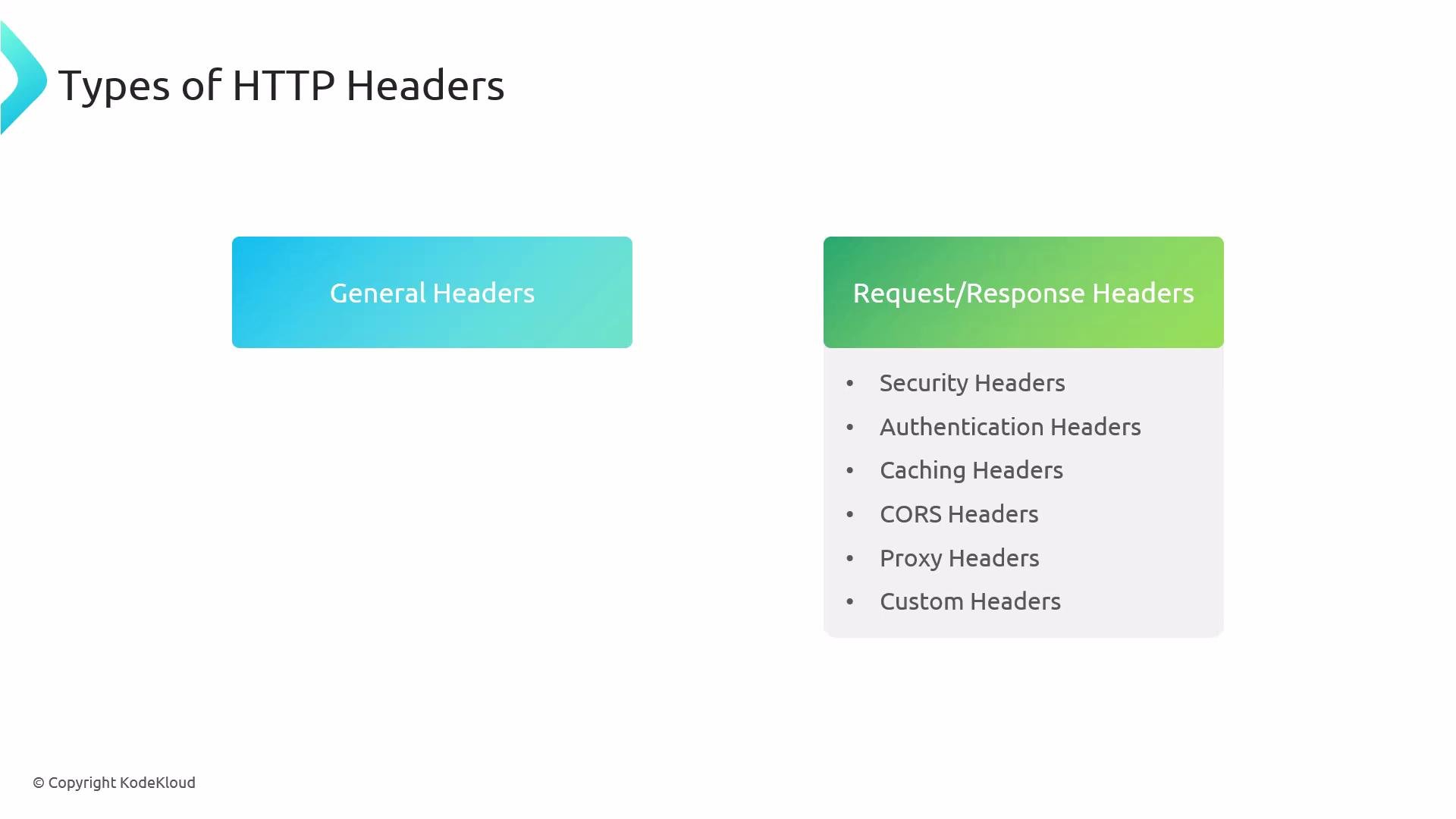 ## Quick overview: header categories
| Category | Purpose | Examples |
| ---------------------- | ----------------------------------------------------------------- | ------------------------------------------------------------- |
| General headers | Metadata used in both requests and responses | `Date`, `Connection` |
| Request headers | Sent by the client to describe the request or client capabilities | `Accept`, `User-Agent`, `Cookie`, `Accept-Language` |
| Response headers | Sent by the server to describe the response | `Content-Type`, `Cache-Control`, `Set-Cookie` |
| Security headers | Help mitigate XSS, clickjacking, MIME sniffing, etc. | `Content-Security-Policy`, `X-Frame-Options` |
| Authentication headers | Carry credentials or tokens | `Authorization: Basic ...`, `Authorization: Bearer ...` |
| Caching headers | Control caching behavior across browsers and CDNs | `Cache-Control`, `Etag`, `Expires`, `Vary` |
| CORS headers | Control cross-origin resource access for browsers | `Access-Control-Allow-Origin`, `Access-Control-Allow-Methods` |
| Proxy headers | Preserve original client info when traffic flows through proxies | `X-Forwarded-For`, `X-Forwarded-Proto` |
| Custom headers | Application-specific metadata | `X-Custom-Build`, `X-Feature-Flag` |
## Request example (HTTP/1.1)
A typical browser request contains many request headers that describe the client, acceptable media types, language, caching preferences, and more.
```http theme={null}
GET / HTTP/1.1
Host: example.com
User-Agent: Mozilla/5.0 (Windows NT 10.0; Win64; x64) Firefox/103.0
Accept: text/html
Accept-Language: en-US
Connection: keep-alive
Pragma: no-cache
Cache-Control: no-cache
```
Key points:
* `Host` identifies the target host (required for virtual hosting).
* `User-Agent` identifies the client software and platform.
* `Accept` and `Accept-Language` guide content negotiation.
### HTTP/2 pseudo-headers + modern request example
Some transports (HTTP/2) include pseudo-headers (beginning with `:`) together with standard headers:
```http theme={null}
:authority: kodekloud.com
:method: GET
:path: /
:scheme: https
Accept: text/html,application/xhtml+xml,application/xml;q=0.9,image/avif,image/webp,*/*;q=0.8
Accept-Encoding: gzip, deflate, br, zstd
Accept-Language: en-US,en;q=0.9
Cache-Control: max-age=0
Cookie: session=abc123; preferences=lang=en
Referer: https://www.google.com/
Sec-CH-UA: "Google Chrome";v="131", "Chromium";v="131", "Not_A Brand";v="24"
Sec-CH-UA-Mobile: ?0
Sec-CH-UA-Platform: "macOS"
Sec-Fetch-Dest: document
Sec-Fetch-Mode: navigate
Sec-Fetch-Site: cross-site
User-Agent: Mozilla/5.0 (Macintosh; Intel Mac OS X 10_15_7) AppleWebKit/537.36 (KHTML, like Gecko) Chrome/131.0.0.0 Safari/537.36
```
* `Sec-CH-*` headers are part of Client Hints for improved server-side decisions.
* `Cookie` transmits session or user state to the server.
## Response example (common response headers)
Servers include response headers that describe the payload, caching, compression, and server metadata:
```http theme={null}
Age: 387887
Cf-Cache-Status: DYNAMIC
Content-Encoding: br
Content-Security-Policy: frame-ancestors 'self' https://*.webflow.com http://*.webflow.com
Content-Type: text/html; charset=utf-8
Date: Fri, 17 Jan 2025 18:44:46 GMT
Server: cloudflare
Vary: Accept-Encoding
X-Cache: HIT
X-Cache-Hits: 57
X-Served-By: cache-yyz4562-YYZ
```
Notable headers:
* `Content-Type` — MIME type and charset.
* `Content-Encoding` — compression used (gzip, br).
* `Vary` — instructs caches that different request headers produce different responses.
## Security headers — purpose and examples
Security headers defend against common web threats such as XSS, clickjacking, and protocol downgrade. Example of a secure application's headers (trimmed for clarity):
```http theme={null}
cache-control: no-cache, no-store, max-age=0, must-revalidate
content-encoding: gzip
content-security-policy: script-src 'nonce-6tC1Rsh6ZnR2cX-hVemx5A' 'strict-dynamic' https: http: 'unsafe-inline'; object-src 'none'; base-uri 'self'
content-type: text/html; charset=utf-8
cross-origin-resource-policy: same-site
date: Sat, 18 Jan 2025 17:03:06 GMT
expires: Mon, 01 Jan 1990 00:00:00 GMT
permissions-policy: geolocation=(), microphone=()
pragma: no-cache
server: ESF
strict-transport-security: max-age=10886400; includeSubDomains
vary: Sec-Fetch-Dest, Sec-Fetch-Mode, Sec-Fetch-Site
x-content-type-options: nosniff
x-frame-options: SAMEORIGIN
x-xss-protection: 0
```
Important security headers:
* `Content-Security-Policy` (CSP) — restricts sources for scripts, styles, frames, etc., and can use nonces or hashes for fine-grained control.
* `X-Content-Type-Options: nosniff` — prevents MIME sniffing, forcing the browser to obey `Content-Type`.
* `X-Frame-Options: SAMEORIGIN` — blocks framing by other origins (mitigates clickjacking).
* `Strict-Transport-Security` (HSTS) — enforces HTTPS for future requests.
Security headers like `Cache-Control`, `Pragma`, and `Expires` are often combined with CSP and HSTS to prevent sensitive pages from being cached and to harden the application against client-side attacks.
## Authentication headers
Authentication credentials are commonly passed in headers. Examples:
```http theme={null}
Authorization: Basic YWRtaW46c2VjcmV0
```
* `Authorization: Basic ` — legacy Basic Auth, where the base64 decodes to `username:password`. Only use over TLS and avoid in modern systems.
* `Authorization: Bearer ` — common for token-based authentication (OAuth2, JWT). Always protect tokens and avoid logging them.
Do not log full `Authorization` header values or other sensitive headers (tokens, passwords) in production logs. Mask or truncate these fields to prevent leakage.
## Caching headers and how caching works
Caching headers tell browsers and intermediaries how long to store responses and when to revalidate.
Key caching headers:
* `Cache-Control` — modern and flexible; supports `max-age`, `no-cache`, `no-store`, `must-revalidate`.
* `Expires` — older, date-based expiry.
* `Etag` — entity tag for versioning; used with `If-None-Match` to validate resources.
* `Vary` — lists request headers that affect the cache (e.g., `Accept-Encoding`).
Example response with cache-related fields:
```http theme={null}
Accept-Ranges: bytes
Cache-Control: max-age=0, must-revalidate
Content-Encoding: gzip
Content-Length: 44549
Content-Type: text/html; charset=UTF-8
Date: Sat, 18 Jan 2025 18:31:33 GMT
Etag: W/"e971e162bb5ef8926a2284952c25053292be8cdd"
Set-Cookie: edition-view=espn-en-us; Path=/; Expires=Sat, 25 Jan 2025 18:31:33 GMT
Vary: Accept-Encoding
Via: 1.1 varnish (Varnish/6.0), 1.1 cloudfront
X-Cache: Miss from cloudfront
```
* `Etag` enables conditional GETs: client sends `If-None-Match` and server may return `304 Not Modified`.
* CDNs and reverse proxies (Varnish, CloudFront) often add `X-Cache` or `Via` headers for debugging cache behavior.
When deploying behind a proxy/CDN, configure caching at the edge to reduce origin traffic and improve latency.
## CORS (Cross-Origin Resource Sharing)
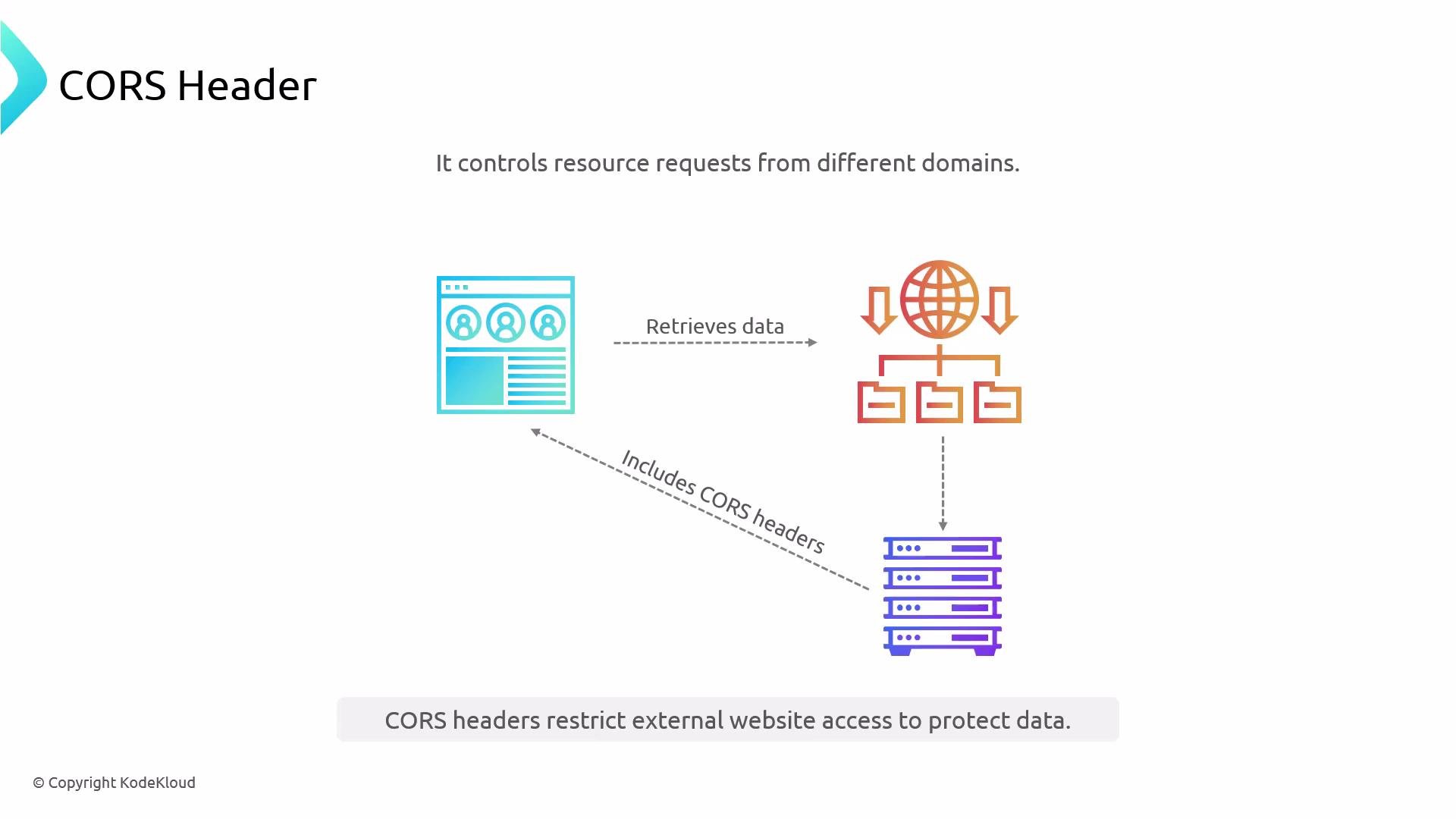
CORS is a browser security feature that restricts cross-origin HTTP requests. Servers explicitly allow cross-origin access using CORS response headers.
## Quick overview: header categories
| Category | Purpose | Examples |
| ---------------------- | ----------------------------------------------------------------- | ------------------------------------------------------------- |
| General headers | Metadata used in both requests and responses | `Date`, `Connection` |
| Request headers | Sent by the client to describe the request or client capabilities | `Accept`, `User-Agent`, `Cookie`, `Accept-Language` |
| Response headers | Sent by the server to describe the response | `Content-Type`, `Cache-Control`, `Set-Cookie` |
| Security headers | Help mitigate XSS, clickjacking, MIME sniffing, etc. | `Content-Security-Policy`, `X-Frame-Options` |
| Authentication headers | Carry credentials or tokens | `Authorization: Basic ...`, `Authorization: Bearer ...` |
| Caching headers | Control caching behavior across browsers and CDNs | `Cache-Control`, `Etag`, `Expires`, `Vary` |
| CORS headers | Control cross-origin resource access for browsers | `Access-Control-Allow-Origin`, `Access-Control-Allow-Methods` |
| Proxy headers | Preserve original client info when traffic flows through proxies | `X-Forwarded-For`, `X-Forwarded-Proto` |
| Custom headers | Application-specific metadata | `X-Custom-Build`, `X-Feature-Flag` |
## Request example (HTTP/1.1)
A typical browser request contains many request headers that describe the client, acceptable media types, language, caching preferences, and more.
```http theme={null}
GET / HTTP/1.1
Host: example.com
User-Agent: Mozilla/5.0 (Windows NT 10.0; Win64; x64) Firefox/103.0
Accept: text/html
Accept-Language: en-US
Connection: keep-alive
Pragma: no-cache
Cache-Control: no-cache
```
Key points:
* `Host` identifies the target host (required for virtual hosting).
* `User-Agent` identifies the client software and platform.
* `Accept` and `Accept-Language` guide content negotiation.
### HTTP/2 pseudo-headers + modern request example
Some transports (HTTP/2) include pseudo-headers (beginning with `:`) together with standard headers:
```http theme={null}
:authority: kodekloud.com
:method: GET
:path: /
:scheme: https
Accept: text/html,application/xhtml+xml,application/xml;q=0.9,image/avif,image/webp,*/*;q=0.8
Accept-Encoding: gzip, deflate, br, zstd
Accept-Language: en-US,en;q=0.9
Cache-Control: max-age=0
Cookie: session=abc123; preferences=lang=en
Referer: https://www.google.com/
Sec-CH-UA: "Google Chrome";v="131", "Chromium";v="131", "Not_A Brand";v="24"
Sec-CH-UA-Mobile: ?0
Sec-CH-UA-Platform: "macOS"
Sec-Fetch-Dest: document
Sec-Fetch-Mode: navigate
Sec-Fetch-Site: cross-site
User-Agent: Mozilla/5.0 (Macintosh; Intel Mac OS X 10_15_7) AppleWebKit/537.36 (KHTML, like Gecko) Chrome/131.0.0.0 Safari/537.36
```
* `Sec-CH-*` headers are part of Client Hints for improved server-side decisions.
* `Cookie` transmits session or user state to the server.
## Response example (common response headers)
Servers include response headers that describe the payload, caching, compression, and server metadata:
```http theme={null}
Age: 387887
Cf-Cache-Status: DYNAMIC
Content-Encoding: br
Content-Security-Policy: frame-ancestors 'self' https://*.webflow.com http://*.webflow.com
Content-Type: text/html; charset=utf-8
Date: Fri, 17 Jan 2025 18:44:46 GMT
Server: cloudflare
Vary: Accept-Encoding
X-Cache: HIT
X-Cache-Hits: 57
X-Served-By: cache-yyz4562-YYZ
```
Notable headers:
* `Content-Type` — MIME type and charset.
* `Content-Encoding` — compression used (gzip, br).
* `Vary` — instructs caches that different request headers produce different responses.
## Security headers — purpose and examples
Security headers defend against common web threats such as XSS, clickjacking, and protocol downgrade. Example of a secure application's headers (trimmed for clarity):
```http theme={null}
cache-control: no-cache, no-store, max-age=0, must-revalidate
content-encoding: gzip
content-security-policy: script-src 'nonce-6tC1Rsh6ZnR2cX-hVemx5A' 'strict-dynamic' https: http: 'unsafe-inline'; object-src 'none'; base-uri 'self'
content-type: text/html; charset=utf-8
cross-origin-resource-policy: same-site
date: Sat, 18 Jan 2025 17:03:06 GMT
expires: Mon, 01 Jan 1990 00:00:00 GMT
permissions-policy: geolocation=(), microphone=()
pragma: no-cache
server: ESF
strict-transport-security: max-age=10886400; includeSubDomains
vary: Sec-Fetch-Dest, Sec-Fetch-Mode, Sec-Fetch-Site
x-content-type-options: nosniff
x-frame-options: SAMEORIGIN
x-xss-protection: 0
```
Important security headers:
* `Content-Security-Policy` (CSP) — restricts sources for scripts, styles, frames, etc., and can use nonces or hashes for fine-grained control.
* `X-Content-Type-Options: nosniff` — prevents MIME sniffing, forcing the browser to obey `Content-Type`.
* `X-Frame-Options: SAMEORIGIN` — blocks framing by other origins (mitigates clickjacking).
* `Strict-Transport-Security` (HSTS) — enforces HTTPS for future requests.
Security headers like `Cache-Control`, `Pragma`, and `Expires` are often combined with CSP and HSTS to prevent sensitive pages from being cached and to harden the application against client-side attacks.
## Authentication headers
Authentication credentials are commonly passed in headers. Examples:
```http theme={null}
Authorization: Basic YWRtaW46c2VjcmV0
```
* `Authorization: Basic ` — legacy Basic Auth, where the base64 decodes to `username:password`. Only use over TLS and avoid in modern systems.
* `Authorization: Bearer ` — common for token-based authentication (OAuth2, JWT). Always protect tokens and avoid logging them.
Do not log full `Authorization` header values or other sensitive headers (tokens, passwords) in production logs. Mask or truncate these fields to prevent leakage.
## Caching headers and how caching works
Caching headers tell browsers and intermediaries how long to store responses and when to revalidate.
Key caching headers:
* `Cache-Control` — modern and flexible; supports `max-age`, `no-cache`, `no-store`, `must-revalidate`.
* `Expires` — older, date-based expiry.
* `Etag` — entity tag for versioning; used with `If-None-Match` to validate resources.
* `Vary` — lists request headers that affect the cache (e.g., `Accept-Encoding`).
Example response with cache-related fields:
```http theme={null}
Accept-Ranges: bytes
Cache-Control: max-age=0, must-revalidate
Content-Encoding: gzip
Content-Length: 44549
Content-Type: text/html; charset=UTF-8
Date: Sat, 18 Jan 2025 18:31:33 GMT
Etag: W/"e971e162bb5ef8926a2284952c25053292be8cdd"
Set-Cookie: edition-view=espn-en-us; Path=/; Expires=Sat, 25 Jan 2025 18:31:33 GMT
Vary: Accept-Encoding
Via: 1.1 varnish (Varnish/6.0), 1.1 cloudfront
X-Cache: Miss from cloudfront
```
* `Etag` enables conditional GETs: client sends `If-None-Match` and server may return `304 Not Modified`.
* CDNs and reverse proxies (Varnish, CloudFront) often add `X-Cache` or `Via` headers for debugging cache behavior.
When deploying behind a proxy/CDN, configure caching at the edge to reduce origin traffic and improve latency.
## CORS (Cross-Origin Resource Sharing)
CORS is a browser security feature that restricts cross-origin HTTP requests. Servers explicitly allow cross-origin access using CORS response headers.
 Example of an OPTIONS preflight response:
```http theme={null}
HTTP/1.1 204 No Content
Access-Control-Allow-Credentials: true
Access-Control-Allow-Headers: Content-Type, Authorization
Access-Control-Allow-Methods: GET, POST, PUT, DELETE
Access-Control-Allow-Origin: https://petexchangehk-frontend.vercel.app
Connection: keep-alive
Content-Length: 0
Date: Mon, 19 Sep 2022 13:23:51 GMT
Server: Cowboy
Vary: Origin, Access-Control-Request-Headers
```
Key CORS headers:
* `Access-Control-Allow-Origin` — allowed origin(s) or `*`.
* `Access-Control-Allow-Methods` — allowed HTTP methods for the cross-origin request.
* `Access-Control-Allow-Headers` — allowed request headers the client may send.
* `Access-Control-Allow-Credentials` — whether cookies/credentials are allowed.
CORS must be coordinated between client and server domains; incorrect CORS settings can break legitimate cross-domain interactions or, conversely, open up security exposure.
## Proxy headers
When requests traverse proxies or load balancers, they commonly add headers to preserve original client information. Handle these carefully and only trust them from known, internal proxies.
Common proxy headers:
* `X-Forwarded-For` — original client IP and proxy chain.
* `X-Forwarded-Host` — original `Host` header.
* `X-Forwarded-Proto` — original scheme (`http` or `https`).
* `X-Forwarded-Server` — proxy hostname.
* `X-Real-IP` — client IP (used when a single proxy exists).
Example (environment-style display):
```text theme={null}
HOST 'web:8001'
UPGRADE_INSECURE_REQUESTS '1'
USER_AGENT 'Mozilla/5.0 (Windows NT 6.1; Win64; x64) AppleWebKit/537.36 (KHTML, like Gecko) Chrome/65.0.3325.181 Safari/537.36'
X_FORWARDED_FOR '192.168.122.4'
X_FORWARDED_HOST 'web.domain.com'
X_FORWARDED_PROTO 'https'
X_FORWARDED_SERVER '172.19.0.5'
```
Best practices:
* Only trust these headers when they are set by your own proxies/load balancers.
* Use strict access controls and validation to avoid spoofed client IPs.
## Custom headers
You can define custom headers for application-specific metadata. Historically, they used an `X-` prefix but modern practice prefers descriptive, namespaced headers without the `X-` prefix.
Example:
```http theme={null}
GET /api HTTP/1.1
Host: example.com
User-Agent: curl/8.1.2
Accept: */*
X-Custom-Header1: Value1
```
Use cases: feature toggles, build/version identifiers, routing hints. Never put sensitive data in custom headers unless it is encrypted and protected.
## NGINX built-in variables (common ones)
NGINX exposes many dynamic variables that you can use in configuration files. These are prefixed with `$`.
| Variable | Description | Example value |
| --------------------- | ------------------------------------------------------ | -------------------------- |
| `$remote_addr` | Client IP address | `174.0.252.84` |
| `$remote_port` | Client source port | `52344` |
| `$server_addr` | IP of the server handling the request | `10.0.0.5` |
| `$request` | Full request line | `GET /index.html HTTP/1.1` |
| `$uri` | Current URI without arguments | `/index.html` |
| `$request_uri` | Full request URI including query string | `/index.html?user=Anthony` |
| `$request_method` | HTTP method | `GET` |
| `$args` | Query string | `id=1234&name=example` |
| `$http_` | Any HTTP header (lowercase, dashes become underscores) | `$http_user_agent` |
| `$http_referer` | Referer header | `https://google.com` |
| `$status` | Response status code | `200` |
| `$upstream_addr` | Upstream server that handled the request | `10.0.0.10:8080` |
| `$scheme` | Protocol scheme | `http` or `https` |
| `$host` | Original `Host` header | `www.kodekloud.com` |
| `$ssl_protocol` | TLS protocol used | `TLSv1.3` |
| `$ssl_cipher` | TLS cipher suite | `TLS_AES_256_GCM_SHA384` |
| `$http_cookie` | Cookie header | `session=abc123` |
To construct a full URL in NGINX:
```nginx theme={null}
$scheme://$host$request_uri
```
This results in `https://www.example.com/path?query`.
## Example NGINX configuration: set response headers + forward request headers
This concise NGINX example demonstrates how to add security and cache headers to responses and how to forward original request details to an upstream backend.
```nginx theme={null}
server {
listen 443 ssl;
server_name example.com;
location / {
# Response headers sent back to the client
add_header X-Content-Type-Options "nosniff" always;
add_header Strict-Transport-Security "max-age=31536000; includeSubDomains; preload" always;
add_header Cache-Control "public, max-age=86400" always;
# Proxy to upstream backend and pass original request info
proxy_pass http://backend_upstream;
proxy_set_header Host $host;
proxy_set_header X-Real-IP $remote_addr;
proxy_set_header X-Forwarded-For $proxy_add_x_forwarded_for;
proxy_set_header X-Forwarded-Proto $scheme;
}
}
```
Notes:
* `add_header` sets headers on NGINX responses. Use `always` to ensure headers are added even on error responses.
* `proxy_set_header` controls headers sent to upstream servers — useful for preserving client IP, host, and scheme.
## Summary
* HTTP headers are essential metadata used by clients, servers, and intermediaries to coordinate content negotiation, caching, authentication, security, and routing.
* Security and CORS headers are critical for protecting web applications; misconfiguration can lead to vulnerabilities or broken integrations.
* When using proxies and CDNs, pay attention to proxy headers and cache-related headers.
* In NGINX, use `add_header` to set response headers and `proxy_set_header` to preserve client/request info for upstreams.
## Links and references
* [MDN Web Docs — HTTP headers](https://developer.mozilla.org/en-US/docs/Glossary/HTTP_header)
* [RFC 7231 — HTTP/1.1 Semantics and Content](https://datatracker.ietf.org/doc/html/rfc7231)
* [OWASP Secure Headers Project](https://owasp.org/www-project-secure-headers/)
* [NGINX Documentation — Variables](https://nginx.org/en/docs/varindex.html)
* [MDN — CORS](https://developer.mozilla.org/en-US/docs/Web/HTTP/CORS)
In follow-up lessons you can inspect headers with browser devtools, curl (`curl -I` / `curl -v`), or network proxies, and practice configuring NGINX to add, modify, and strip headers for different environments.
Example of an OPTIONS preflight response:
```http theme={null}
HTTP/1.1 204 No Content
Access-Control-Allow-Credentials: true
Access-Control-Allow-Headers: Content-Type, Authorization
Access-Control-Allow-Methods: GET, POST, PUT, DELETE
Access-Control-Allow-Origin: https://petexchangehk-frontend.vercel.app
Connection: keep-alive
Content-Length: 0
Date: Mon, 19 Sep 2022 13:23:51 GMT
Server: Cowboy
Vary: Origin, Access-Control-Request-Headers
```
Key CORS headers:
* `Access-Control-Allow-Origin` — allowed origin(s) or `*`.
* `Access-Control-Allow-Methods` — allowed HTTP methods for the cross-origin request.
* `Access-Control-Allow-Headers` — allowed request headers the client may send.
* `Access-Control-Allow-Credentials` — whether cookies/credentials are allowed.
CORS must be coordinated between client and server domains; incorrect CORS settings can break legitimate cross-domain interactions or, conversely, open up security exposure.
## Proxy headers
When requests traverse proxies or load balancers, they commonly add headers to preserve original client information. Handle these carefully and only trust them from known, internal proxies.
Common proxy headers:
* `X-Forwarded-For` — original client IP and proxy chain.
* `X-Forwarded-Host` — original `Host` header.
* `X-Forwarded-Proto` — original scheme (`http` or `https`).
* `X-Forwarded-Server` — proxy hostname.
* `X-Real-IP` — client IP (used when a single proxy exists).
Example (environment-style display):
```text theme={null}
HOST 'web:8001'
UPGRADE_INSECURE_REQUESTS '1'
USER_AGENT 'Mozilla/5.0 (Windows NT 6.1; Win64; x64) AppleWebKit/537.36 (KHTML, like Gecko) Chrome/65.0.3325.181 Safari/537.36'
X_FORWARDED_FOR '192.168.122.4'
X_FORWARDED_HOST 'web.domain.com'
X_FORWARDED_PROTO 'https'
X_FORWARDED_SERVER '172.19.0.5'
```
Best practices:
* Only trust these headers when they are set by your own proxies/load balancers.
* Use strict access controls and validation to avoid spoofed client IPs.
## Custom headers
You can define custom headers for application-specific metadata. Historically, they used an `X-` prefix but modern practice prefers descriptive, namespaced headers without the `X-` prefix.
Example:
```http theme={null}
GET /api HTTP/1.1
Host: example.com
User-Agent: curl/8.1.2
Accept: */*
X-Custom-Header1: Value1
```
Use cases: feature toggles, build/version identifiers, routing hints. Never put sensitive data in custom headers unless it is encrypted and protected.
## NGINX built-in variables (common ones)
NGINX exposes many dynamic variables that you can use in configuration files. These are prefixed with `$`.
| Variable | Description | Example value |
| --------------------- | ------------------------------------------------------ | -------------------------- |
| `$remote_addr` | Client IP address | `174.0.252.84` |
| `$remote_port` | Client source port | `52344` |
| `$server_addr` | IP of the server handling the request | `10.0.0.5` |
| `$request` | Full request line | `GET /index.html HTTP/1.1` |
| `$uri` | Current URI without arguments | `/index.html` |
| `$request_uri` | Full request URI including query string | `/index.html?user=Anthony` |
| `$request_method` | HTTP method | `GET` |
| `$args` | Query string | `id=1234&name=example` |
| `$http_` | Any HTTP header (lowercase, dashes become underscores) | `$http_user_agent` |
| `$http_referer` | Referer header | `https://google.com` |
| `$status` | Response status code | `200` |
| `$upstream_addr` | Upstream server that handled the request | `10.0.0.10:8080` |
| `$scheme` | Protocol scheme | `http` or `https` |
| `$host` | Original `Host` header | `www.kodekloud.com` |
| `$ssl_protocol` | TLS protocol used | `TLSv1.3` |
| `$ssl_cipher` | TLS cipher suite | `TLS_AES_256_GCM_SHA384` |
| `$http_cookie` | Cookie header | `session=abc123` |
To construct a full URL in NGINX:
```nginx theme={null}
$scheme://$host$request_uri
```
This results in `https://www.example.com/path?query`.
## Example NGINX configuration: set response headers + forward request headers
This concise NGINX example demonstrates how to add security and cache headers to responses and how to forward original request details to an upstream backend.
```nginx theme={null}
server {
listen 443 ssl;
server_name example.com;
location / {
# Response headers sent back to the client
add_header X-Content-Type-Options "nosniff" always;
add_header Strict-Transport-Security "max-age=31536000; includeSubDomains; preload" always;
add_header Cache-Control "public, max-age=86400" always;
# Proxy to upstream backend and pass original request info
proxy_pass http://backend_upstream;
proxy_set_header Host $host;
proxy_set_header X-Real-IP $remote_addr;
proxy_set_header X-Forwarded-For $proxy_add_x_forwarded_for;
proxy_set_header X-Forwarded-Proto $scheme;
}
}
```
Notes:
* `add_header` sets headers on NGINX responses. Use `always` to ensure headers are added even on error responses.
* `proxy_set_header` controls headers sent to upstream servers — useful for preserving client IP, host, and scheme.
## Summary
* HTTP headers are essential metadata used by clients, servers, and intermediaries to coordinate content negotiation, caching, authentication, security, and routing.
* Security and CORS headers are critical for protecting web applications; misconfiguration can lead to vulnerabilities or broken integrations.
* When using proxies and CDNs, pay attention to proxy headers and cache-related headers.
* In NGINX, use `add_header` to set response headers and `proxy_set_header` to preserve client/request info for upstreams.
## Links and references
* [MDN Web Docs — HTTP headers](https://developer.mozilla.org/en-US/docs/Glossary/HTTP_header)
* [RFC 7231 — HTTP/1.1 Semantics and Content](https://datatracker.ietf.org/doc/html/rfc7231)
* [OWASP Secure Headers Project](https://owasp.org/www-project-secure-headers/)
* [NGINX Documentation — Variables](https://nginx.org/en/docs/varindex.html)
* [MDN — CORS](https://developer.mozilla.org/en-US/docs/Web/HTTP/CORS)
In follow-up lessons you can inspect headers with browser devtools, curl (`curl -I` / `curl -v`), or network proxies, and practice configuring NGINX to add, modify, and strip headers for different environments.