> ## Documentation Index
> Fetch the complete documentation index at: https://notes.kodekloud.com/llms.txt
> Use this file to discover all available pages before exploring further.
# Builds and Deployments
> Explains OpenShift build and deployment workflow, covering BuildConfig, ImageStream, S2I/Docker builds, image pushes, and DeploymentConfig triggered rollouts from Git repositories.
In this lesson we cover OpenShift build and deployment concepts: BuildConfig, ImageStream, builds (S2I/Docker/Custom), and DeploymentConfig. You'll learn how OpenShift converts application source from a Git repository into an image, tracks that image with an ImageStream, and deploys it automatically.
 Prerequisites
* Familiarity with Docker: what an image is and how to build one from source. See [Docker basics](https://learn.kodekloud.com/user/courses/docker-training-course-for-the-absolute-beginner).
* Basic OpenShift project (namespace) knowledge — how to create and switch projects. If needed, review OpenShift project creation first.
Where is the application?
OpenShift builds from application source stored in a source code management (SCM) repository such as GitHub, GitLab, or Bitbucket. When you add an application to OpenShift (via Web Console or CLI), you provide the repository URL. Example:
```text theme={null}
https://github.com/openshift/django-ex.git
```
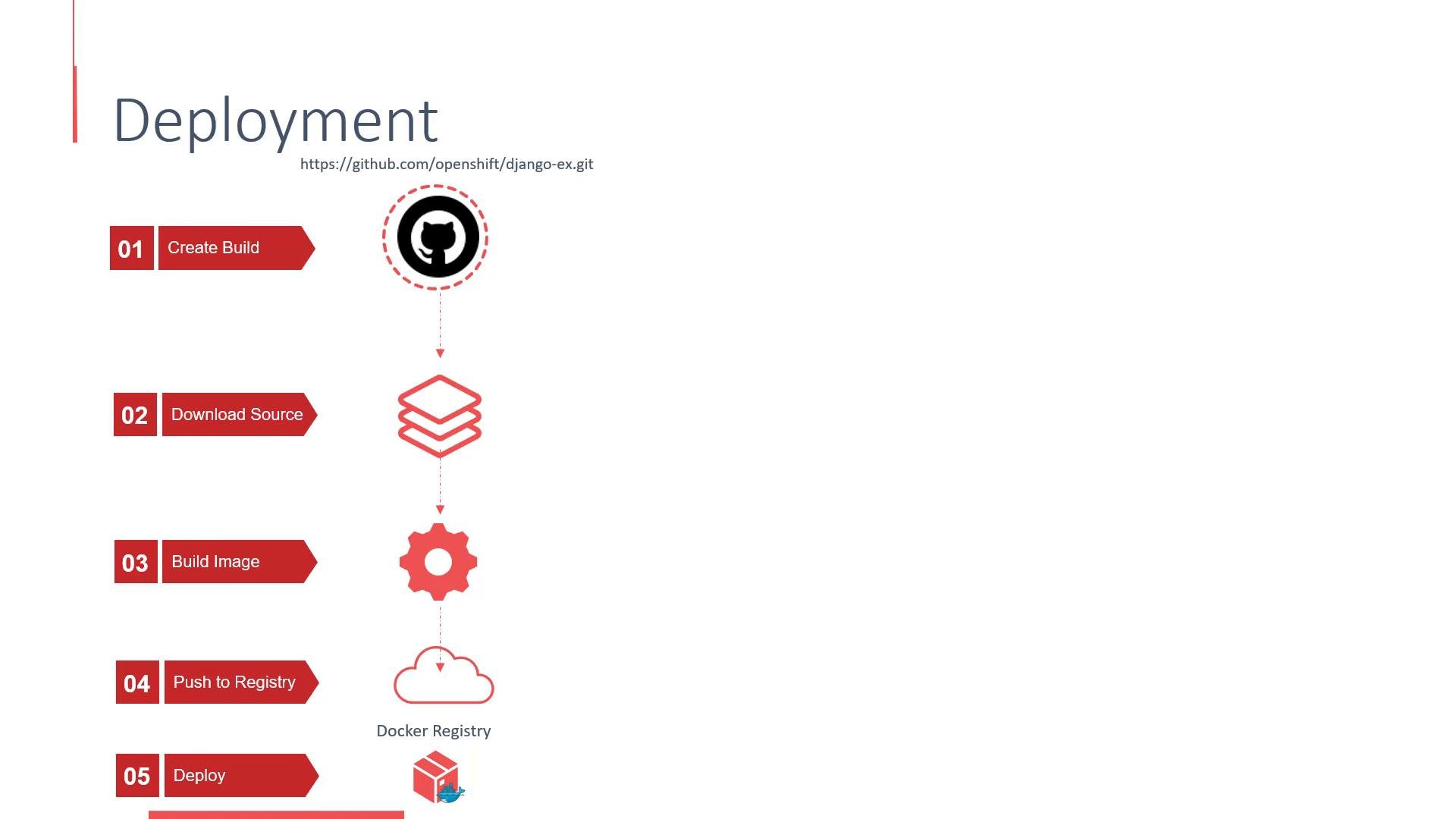
How OpenShift builds and deploys an application
When you add an application and point to a Git repo, OpenShift performs a sequence of automated steps:
1. Create BuildConfig (and start a Build) using the repository URL and chosen build strategy.
2. Clone the repository inside a build pod.
3. Build the application into a container image (S2I, Docker, or Custom strategy).
4. Push the resulting image to the internal OpenShift image registry.
5. Create (or update) an ImageStream to track the image.
6. Create a DeploymentConfig (by default) that references the ImageStream.
7. On image push, an image change trigger fires and the DeploymentConfig deploys the new image.
Key concepts and links
* BuildConfig: controls how builds are run and triggered.
* ImageStream: a reference to images in the OpenShift internal registry; used to trigger deployments.
* DeploymentConfig: OpenShift object for managing rollouts with OpenShift-specific triggers and hooks.
* Source-to-Image (S2I): S2I is a common builder for language runtimes. Learn more at [S2I](https://s2i.dev/).
Ensure your Git repository is reachable from the cluster network. If the repo is private, configure credentials (Secrets) in OpenShift and reference them from the BuildConfig before starting the build.
A sample build output
This excerpt shows the build lifecycle: cloning the repo, installing dependencies, collecting static files, and pushing the built image to the internal registry.
```console theme={null}
1 | Cloning "https://github.com/openshift/django-ex.git" ...
2 | Commit: 37f7fc41432b9c07265c5896a4fb226caa870427 (Merge pull request #115 from hhorak/python-3.6)
3 | Author: Honza Horak
4 | Date: Tue Apr 24 18:48:25 2018 +0200
5 | ---> Installing application source ...
6 | ---> Installing dependencies ...
21 | Installing collected packages: pytz, django, sqlparse, django-debug-toolbar, gunicorn, psycopg2, whitenoise
22 | Successfully installed django-1.11.12 django-debug-toolbar-1.8 gunicorn-19.4.5 psycopg2-2.7.3.1 pytz-2018.4 sqlparse-0.2.4 whitenoise-3.3.1
23 | You are using pip version 9.0.1, however version 10.0.1 is available.
24 | You should consider upgrading via the 'pip install --upgrade pip' command.
25 | ---> Collecting Django static files ...
205 | Pushing image 172.30.1.1:5000/test-project/django-ex:latest ...
206 | Pushed 0/10 layers, 10% complete
207 | Pushed 1/10 layers, 11% complete
208 | Pushed 2/10 layers, 21% complete
215 | Pushed 9/10 layers, 97% complete
216 | Pushed 10/10 layers, 100% complete
217 | Push successful
```
Deployment objects: OpenShift vs Kubernetes
OpenShift provides a deployment object with OpenShift-specific features. For comparison:
```yaml theme={null}
# Kubernetes native deployment (k8s)
apiVersion: apps/v1
kind: Deployment
# OpenShift-specific deployment
apiVersion: apps.openshift.io/v1
kind: DeploymentConfig
```
Both types manage pods and rollouts, but DeploymentConfig adds OpenShift features such as image change triggers and lifecycle hooks that integrate directly with ImageStreams.
Comparison summary
| Resource | Purpose | OpenShift-specific features |
| - | - | - |
| `Deployment` | Kubernetes-native rollout controller | Standard k8s strategy; works across k8s clusters |
| `DeploymentConfig` | OpenShift rollout controller | Image change triggers, lifecycle hooks, integrated with ImageStreams |
How triggers work
* ImageStream update → Image change trigger on DeploymentConfig → New rollout using the pushed image.
* BuildConfig completion can also trigger deployments when configured.
Quick CLI commands for builds and deployments
* Start a build (example using S2I/push):
```bash theme={null}
oc new-app python:3.6~https://github.com/openshift/django-ex.git --name=django-ex
```
* List builds:
```bash theme={null}
oc get builds
```
* View build logs:
```bash theme={null}
oc logs build/
```
* Watch DeploymentConfig rollouts:
```bash theme={null}
oc get dc
oc rollout status dc/
```
Summary
When you add an application and point OpenShift to a Git repository:
* OpenShift creates a BuildConfig and starts a build.
* The build clones the repository and builds the application (S2I, Docker, or Custom).
* The build produces a container image and pushes it to the internal registry.
* An ImageStream surfaces the image and, by default, a DeploymentConfig is created and triggered to deploy the updated image.
Prerequisites
* Familiarity with Docker: what an image is and how to build one from source. See [Docker basics](https://learn.kodekloud.com/user/courses/docker-training-course-for-the-absolute-beginner).
* Basic OpenShift project (namespace) knowledge — how to create and switch projects. If needed, review OpenShift project creation first.
Where is the application?
OpenShift builds from application source stored in a source code management (SCM) repository such as GitHub, GitLab, or Bitbucket. When you add an application to OpenShift (via Web Console or CLI), you provide the repository URL. Example:
```text theme={null}
https://github.com/openshift/django-ex.git
```
How OpenShift builds and deploys an application
When you add an application and point to a Git repo, OpenShift performs a sequence of automated steps:
1. Create BuildConfig (and start a Build) using the repository URL and chosen build strategy.
2. Clone the repository inside a build pod.
3. Build the application into a container image (S2I, Docker, or Custom strategy).
4. Push the resulting image to the internal OpenShift image registry.
5. Create (or update) an ImageStream to track the image.
6. Create a DeploymentConfig (by default) that references the ImageStream.
7. On image push, an image change trigger fires and the DeploymentConfig deploys the new image.
Key concepts and links
* BuildConfig: controls how builds are run and triggered.
* ImageStream: a reference to images in the OpenShift internal registry; used to trigger deployments.
* DeploymentConfig: OpenShift object for managing rollouts with OpenShift-specific triggers and hooks.
* Source-to-Image (S2I): S2I is a common builder for language runtimes. Learn more at [S2I](https://s2i.dev/).
Ensure your Git repository is reachable from the cluster network. If the repo is private, configure credentials (Secrets) in OpenShift and reference them from the BuildConfig before starting the build.
A sample build output
This excerpt shows the build lifecycle: cloning the repo, installing dependencies, collecting static files, and pushing the built image to the internal registry.
```console theme={null}
1 | Cloning "https://github.com/openshift/django-ex.git" ...
2 | Commit: 37f7fc41432b9c07265c5896a4fb226caa870427 (Merge pull request #115 from hhorak/python-3.6)
3 | Author: Honza Horak
4 | Date: Tue Apr 24 18:48:25 2018 +0200
5 | ---> Installing application source ...
6 | ---> Installing dependencies ...
21 | Installing collected packages: pytz, django, sqlparse, django-debug-toolbar, gunicorn, psycopg2, whitenoise
22 | Successfully installed django-1.11.12 django-debug-toolbar-1.8 gunicorn-19.4.5 psycopg2-2.7.3.1 pytz-2018.4 sqlparse-0.2.4 whitenoise-3.3.1
23 | You are using pip version 9.0.1, however version 10.0.1 is available.
24 | You should consider upgrading via the 'pip install --upgrade pip' command.
25 | ---> Collecting Django static files ...
205 | Pushing image 172.30.1.1:5000/test-project/django-ex:latest ...
206 | Pushed 0/10 layers, 10% complete
207 | Pushed 1/10 layers, 11% complete
208 | Pushed 2/10 layers, 21% complete
215 | Pushed 9/10 layers, 97% complete
216 | Pushed 10/10 layers, 100% complete
217 | Push successful
```
Deployment objects: OpenShift vs Kubernetes
OpenShift provides a deployment object with OpenShift-specific features. For comparison:
```yaml theme={null}
# Kubernetes native deployment (k8s)
apiVersion: apps/v1
kind: Deployment
# OpenShift-specific deployment
apiVersion: apps.openshift.io/v1
kind: DeploymentConfig
```
Both types manage pods and rollouts, but DeploymentConfig adds OpenShift features such as image change triggers and lifecycle hooks that integrate directly with ImageStreams.
Comparison summary
| Resource | Purpose | OpenShift-specific features |
| - | - | - |
| `Deployment` | Kubernetes-native rollout controller | Standard k8s strategy; works across k8s clusters |
| `DeploymentConfig` | OpenShift rollout controller | Image change triggers, lifecycle hooks, integrated with ImageStreams |
How triggers work
* ImageStream update → Image change trigger on DeploymentConfig → New rollout using the pushed image.
* BuildConfig completion can also trigger deployments when configured.
Quick CLI commands for builds and deployments
* Start a build (example using S2I/push):
```bash theme={null}
oc new-app python:3.6~https://github.com/openshift/django-ex.git --name=django-ex
```
* List builds:
```bash theme={null}
oc get builds
```
* View build logs:
```bash theme={null}
oc logs build/
```
* Watch DeploymentConfig rollouts:
```bash theme={null}
oc get dc
oc rollout status dc/
```
Summary
When you add an application and point OpenShift to a Git repository:
* OpenShift creates a BuildConfig and starts a build.
* The build clones the repository and builds the application (S2I, Docker, or Custom).
* The build produces a container image and pushes it to the internal registry.
* An ImageStream surfaces the image and, by default, a DeploymentConfig is created and triggered to deploy the updated image.
 Demo: add an application and observe the flow
Follow these steps to see builds and deployments in action:
1. Create or switch to a project:
```bash theme={null}
oc new-project test-project
```
2. Add the application (example):
```bash theme={null}
oc new-app python:3.6~https://github.com/openshift/django-ex.git --name=django-ex
```
3. Check builds:
```bash theme={null}
oc get builds -o wide
oc logs build/
```
4. Check ImageStreams and DeploymentConfig:
```bash theme={null}
oc get is
oc get dc
```
5. Watch the rollout:
```bash theme={null}
oc rollout status dc/django-ex
```
References
* OpenShift Builds & BuildConfigs: [https://docs.openshift.com](https://docs.openshift.com)
* Source-to-Image (S2I): [https://s2i.dev/](https://s2i.dev/)
* Kubernetes Deployments: [https://kubernetes.io/docs/concepts/workloads/controllers/deployment/](https://kubernetes.io/docs/concepts/workloads/controllers/deployment/)
Let's go through the demo and observe the build, image push, ImageStream update, and automatic deployment in your cluster.
This documentation is built and hosted on [Mintlify](https://mintlify.com), a developer documentation platform.
Demo: add an application and observe the flow
Follow these steps to see builds and deployments in action:
1. Create or switch to a project:
```bash theme={null}
oc new-project test-project
```
2. Add the application (example):
```bash theme={null}
oc new-app python:3.6~https://github.com/openshift/django-ex.git --name=django-ex
```
3. Check builds:
```bash theme={null}
oc get builds -o wide
oc logs build/
```
4. Check ImageStreams and DeploymentConfig:
```bash theme={null}
oc get is
oc get dc
```
5. Watch the rollout:
```bash theme={null}
oc rollout status dc/django-ex
```
References
* OpenShift Builds & BuildConfigs: [https://docs.openshift.com](https://docs.openshift.com)
* Source-to-Image (S2I): [https://s2i.dev/](https://s2i.dev/)
* Kubernetes Deployments: [https://kubernetes.io/docs/concepts/workloads/controllers/deployment/](https://kubernetes.io/docs/concepts/workloads/controllers/deployment/)
Let's go through the demo and observe the build, image push, ImageStream update, and automatic deployment in your cluster.
This documentation is built and hosted on [Mintlify](https://mintlify.com), a developer documentation platform.