> ## Documentation Index
> Fetch the complete documentation index at: https://notes.kodekloud.com/llms.txt
> Use this file to discover all available pages before exploring further.
# Demo Builds
> How to convert an OpenShift BuildConfig from Source S2I to Docker strategy by editing YAML, creating an ImageStream, and starting and troubleshooting builds
Welcome — in this lesson we'll explore OpenShift BuildConfigs and show how to create a new build configuration that switches from a Source (S2I) strategy to a Docker strategy.
We will:
* Inspect an existing BuildConfig in the web console
* Export and simplify the BuildConfig YAML
* Change the strategy to Docker and create a matching ImageStream
* Start the build and validate the result
## Inspect the existing BuildConfig
In the OpenShift console, navigate to the project and open Builds → Build Configs. For this demo the existing BuildConfig is `simple-webapp-docker`. Clicking the build shows each run, logs, and the Configuration tab where you can inspect details such as:
* Build strategy (e.g. Source / Source-to-Image)
* Source repository (Git URL)
* Output location (ImageStreamTag)
* Webhooks that can trigger builds
* Environment variables and build events
Example configuration summary visible in the console:
```text theme={null}
Build Strategy: Source
Source Repo: http://192.168.56.150/root/simple-webapp.git
Source Ref: master
Builder Image: openshift/python:3.6
Output To: my-webapplication/simple-webapp:latest
Run Policy: Serial
```
## Export the BuildConfig YAML and simplify it
Use the console Actions → Edit YAML to export the BuildConfig. The exported YAML contains generated metadata and many fields you don't need for creating a new BuildConfig (annotations, `creationTimestamp`, `resourceVersion`, `selfLink`, `uid`, etc.). Strip out these generated fields and keep only the fields required for your new BuildConfig.
Example of an exported BuildConfig (full of generated metadata):
```yaml theme={null}
apiVersion: build.openshift.io/v1
kind: BuildConfig
metadata:
annotations:
openshift.io/generated-by: OpenShiftWebConsole
creationTimestamp: '2018-04-30T09:38:40Z'
labels:
app: simple-webapp
name: simple-webapp
namespace: my-webapplication
resourceVersion: '6089'
selfLink: >-
/apis/build.openshift.io/v1/namespaces/my-webapplication/buildconfigs/simple-webapp
uid: 442c5b3c-4c5a-11e8-aaf2-8e9d9a82d1a9
spec:
nodeSelector: null
output:
to:
kind: ImageStreamTag
name: 'simple-webapp:latest'
postCommit: {}
resources: {}
runPolicy: Serial
source:
git:
ref: master
uri: 'http://192.168.56.150/root/simple-webapp.git'
```
Table — Common BuildConfig fields you should keep or change:
| Field | Purpose | Example / Action |
| - | - | - |
| `metadata.name` | BuildConfig name | Change to `simple-webapp-docker` |
| `metadata.namespace` | Project namespace | `my-webapplication` |
| `spec.source` | Source repo settings | Keep Git URL and `ref: master` |
| `spec.strategy` | Build strategy | Change to `type: Docker` |
| `spec.output.to` | ImageStreamTag target | `simple-webapp-docker:latest` |
| `spec.triggers` | How builds are started | ImageChange, ConfigChange, Generic (webhook) |
## Prepare the repository
Before switching to Docker strategy, ensure your Git repo contains a Dockerfile at the repository root (or at the path you reference). DockerStrategy builds use the repository Dockerfile to perform the build.
DockerStrategy builds require a Dockerfile in the repository. Make sure your repo has a valid Dockerfile committed before triggering the Docker build.
## Minimal BuildConfig using Docker strategy
After removing unnecessary metadata and updating fields, create a minimal BuildConfig that:
* Uses the same Git repository
* Outputs to `simple-webapp-docker:latest`
* Uses `Docker` as the build strategy
```yaml theme={null}
apiVersion: build.openshift.io/v1
kind: BuildConfig
metadata:
name: simple-webapp-docker
namespace: my-webapplication
spec:
runPolicy: Serial
source:
type: Git
git:
uri: 'http://192.168.56.150/root/simple-webapp.git'
ref: master
output:
to:
kind: ImageStreamTag
name: 'simple-webapp-docker:latest'
strategy:
type: Docker
dockerStrategy: {}
triggers:
- type: ImageChange
- type: ConfigChange
- type: Generic
generic:
secret: d933479692089006
```
Notes:
* `strategy.type: Docker` specifies the Docker build strategy.
* `dockerStrategy: {}` is acceptable when the Dockerfile in the repo defines the build. Add properties such as `forcePull` if needed.
* The `output.to` image stream tag must exist (or be creatable) in the project before the BuildConfig can start a build.
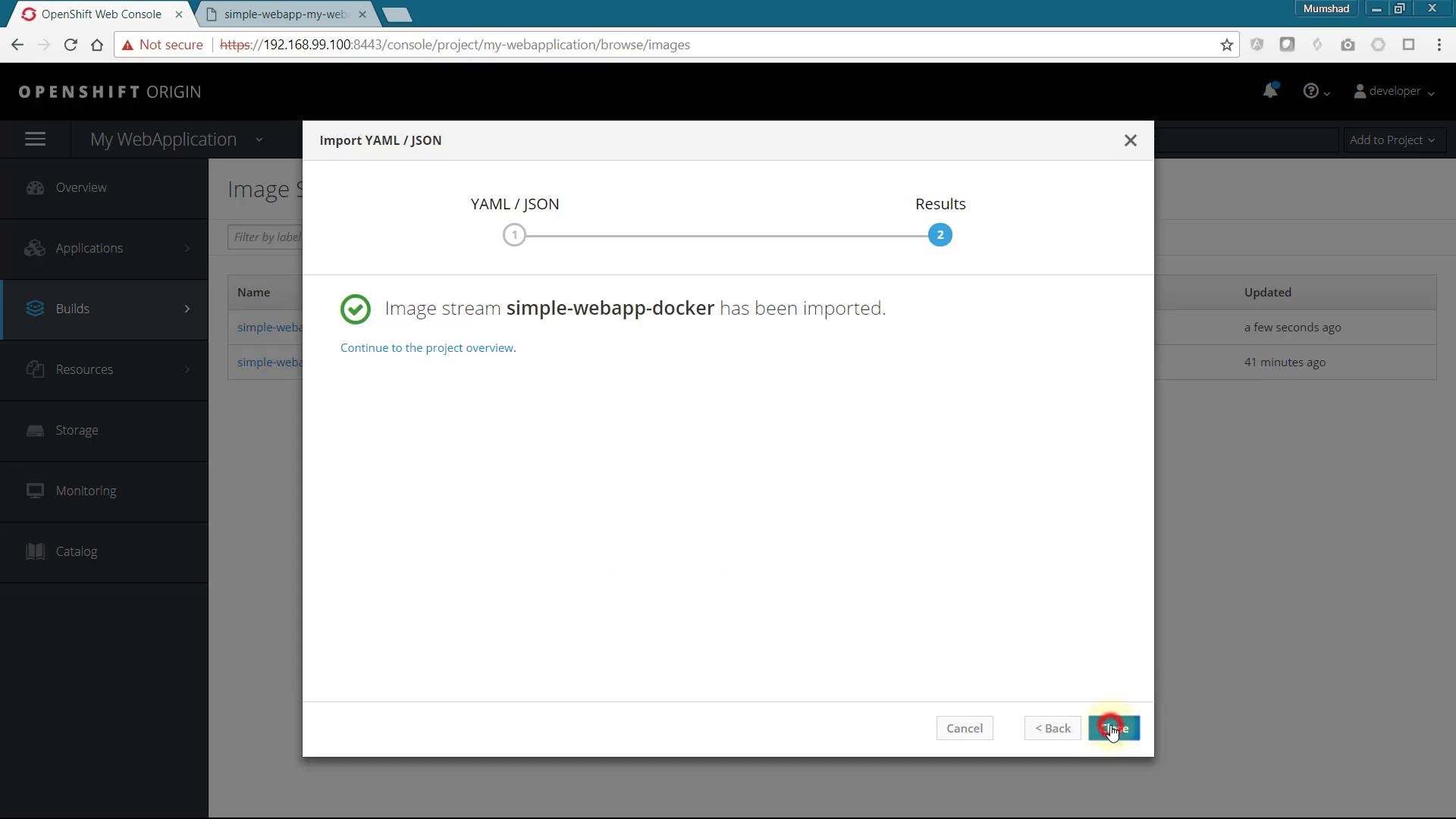
## Create the ImageStream for the output
If the BuildConfig refers to an ImageStreamTag that doesn't yet exist (e.g. `simple-webapp-docker:latest`), the web console may show an error like "invalid output reference" when you try to import the BuildConfig YAML. Create the ImageStream first.
Minimal ImageStream YAML:
```yaml theme={null}
apiVersion: image.openshift.io/v1
kind: ImageStream
metadata:
name: simple-webapp-docker
namespace: my-webapplication
```
Import or create the ImageStream in the console (Add to Project → Import YAML/JSON → paste YAML → Create) or apply it with `oc apply -f imagestream.yaml`.
 ## Start the build
Once the ImageStream exists and the BuildConfig is applied, start the build manually or wait for a webhook/trigger:
```bash theme={null}
oc start-build simple-webapp-docker -n my-webapplication
```
Watch the build logs in the console or with:
```bash theme={null}
oc logs -f bc/simple-webapp-docker -n my-webapplication
```
The logs should show Docker build steps executed by OpenShift. When the build finishes successfully, the image will be pushed to the `simple-webapp-docker:latest` ImageStreamTag and can be consumed by DeploymentConfigs or other resources.
## Troubleshooting
* Error importing BuildConfig: create the referenced ImageStream first.
* Docker builds failing: verify the repository contains a valid Dockerfile and the Dockerfile path matches `spec.source.contextDir` if used.
* Image pull or push permission issues: ensure the project has permissions and the internal registry is reachable.
## Links and references
* OpenShift Builds overview: [https://docs.openshift.com/container-platform/latest/builds/understanding-builds.html](https://docs.openshift.com/container-platform/latest/builds/understanding-builds.html)
* OpenShift BuildConfig API: [https://docs.openshift.com/container-platform/latest/rest\_api/build\_apis/buildconfig-build-openshift-io-v1.html](https://docs.openshift.com/container-platform/latest/rest_api/build_apis/buildconfig-build-openshift-io-v1.html)
* oc CLI reference: [https://docs.openshift.com/container-platform/latest/cli\_reference/openshift\_cli/getting-started-cli.html](https://docs.openshift.com/container-platform/latest/cli_reference/openshift_cli/getting-started-cli.html)
This process lets you convert an existing Source (S2I) BuildConfig into a Docker strategy BuildConfig with minimal YAML changes and the required ImageStream in place.
This documentation is built and hosted on [Mintlify](https://mintlify.com), a developer documentation platform.
## Start the build
Once the ImageStream exists and the BuildConfig is applied, start the build manually or wait for a webhook/trigger:
```bash theme={null}
oc start-build simple-webapp-docker -n my-webapplication
```
Watch the build logs in the console or with:
```bash theme={null}
oc logs -f bc/simple-webapp-docker -n my-webapplication
```
The logs should show Docker build steps executed by OpenShift. When the build finishes successfully, the image will be pushed to the `simple-webapp-docker:latest` ImageStreamTag and can be consumed by DeploymentConfigs or other resources.
## Troubleshooting
* Error importing BuildConfig: create the referenced ImageStream first.
* Docker builds failing: verify the repository contains a valid Dockerfile and the Dockerfile path matches `spec.source.contextDir` if used.
* Image pull or push permission issues: ensure the project has permissions and the internal registry is reachable.
## Links and references
* OpenShift Builds overview: [https://docs.openshift.com/container-platform/latest/builds/understanding-builds.html](https://docs.openshift.com/container-platform/latest/builds/understanding-builds.html)
* OpenShift BuildConfig API: [https://docs.openshift.com/container-platform/latest/rest\_api/build\_apis/buildconfig-build-openshift-io-v1.html](https://docs.openshift.com/container-platform/latest/rest_api/build_apis/buildconfig-build-openshift-io-v1.html)
* oc CLI reference: [https://docs.openshift.com/container-platform/latest/cli\_reference/openshift\_cli/getting-started-cli.html](https://docs.openshift.com/container-platform/latest/cli_reference/openshift_cli/getting-started-cli.html)
This process lets you convert an existing Source (S2I) BuildConfig into a Docker strategy BuildConfig with minimal YAML changes and the required ImageStream in place.
This documentation is built and hosted on [Mintlify](https://mintlify.com), a developer documentation platform.