> ## Documentation Index
> Fetch the complete documentation index at: https://notes.kodekloud.com/llms.txt
> Use this file to discover all available pages before exploring further.
# Deployments
> Overview of OpenShift DeploymentConfigs, deployment strategies, image triggers, rollouts, history and CLI commands for managing application deployment lifecycle
In this lesson we examine deployments in OpenShift: what they are, how they relate to Kubernetes concepts, and how to manage them using the console and CLI. Key topics covered: DeploymentConfig, image-based triggers, deployment strategies (Rolling, Recreate, Blue/Green, A/B), and common rollout commands.
## Deployment concept recap
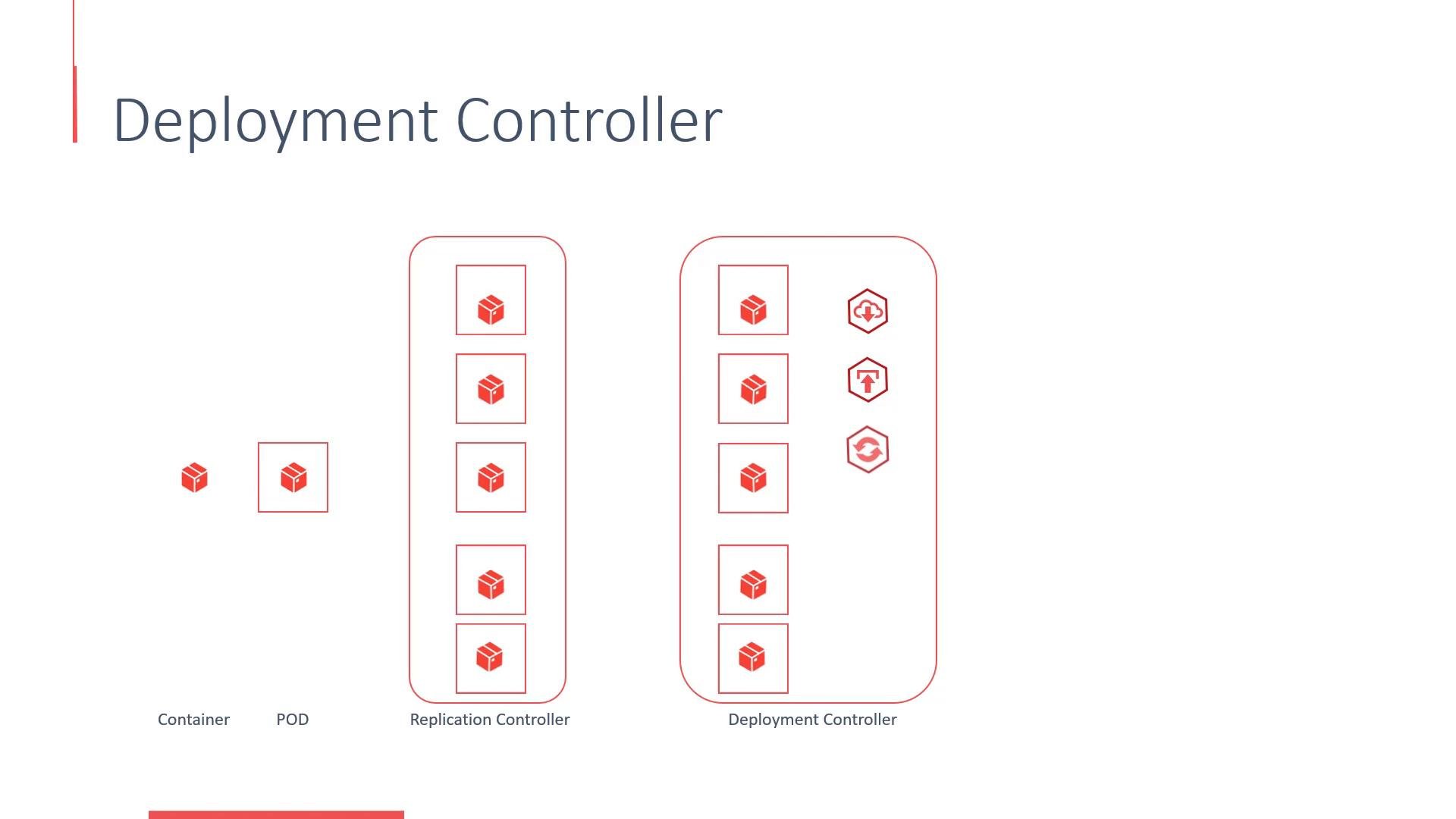
Deployments in OpenShift map closely to Kubernetes deployments but use OpenShift-specific API kinds and features. Briefly, the object hierarchy is:
* Container image (built with Docker or S2I)
* Pod — the smallest deployable unit (one or more containers)
* ReplicaSet / ReplicationController — ensures the desired number of Pod replicas
* Deployment / DeploymentConfig — manages lifecycle (rolling upgrades, rollbacks, revision history)
Most apps run a single container per Pod, meaning a Pod is typically a single instance of your application. Replication ensures high availability by running multiple Pod instances.
 ## OpenShift workflow: BuildConfig, ImageStream, DeploymentConfig
When you add an application to a project in OpenShift, the platform typically creates:
* A BuildConfig — defines how the image is built.
* An ImageStream — a logical reference to images produced by builds.
* A DeploymentConfig — controls application deployment and lifecycle.
In the web console you’ll find deployments under Applications → Deployments. A DeploymentConfig commonly references the image produced by a BuildConfig via an ImageStream tag, declares the replica count, and defines the deployment strategy (for example, Rolling).
Triggers determine how deployments run:
* Manual: Click Deploy in the UI or use the CLI to trigger.
* Automatic: An image change trigger starts a deployment when the ImageStream tag referenced by the DeploymentConfig is updated (for example, when a build completes).
Example console output and a manual trigger:
```bash theme={null}
# Sample build/deploy information (console-style)
Image: myproject/sample-webapp-docker:08b7500 211.1 MiB
Build: sample-webapp-docker #5
Source: Update app.py ca92a69 authored by Administrator
Ports: 8080/TCP
# Manually trigger the latest rollout for the DeploymentConfig
oc rollout latest dc/sample-webapp-docker -n myproject
# Image stream reference
myproject/sample-webapp-docker:latest
```
You can inspect or edit a DeploymentConfig as YAML from the UI (Actions → Edit YAML). The structure resembles a Kubernetes Deployment but uses the OpenShift API group and kind.
```yaml theme={null}
apiVersion: apps.openshift.io/v1
kind: DeploymentConfig
metadata:
name: sample-webapp-docker
spec:
replicas: 1
selector:
deploymentconfig: sample-webapp-docker
strategy:
type: Rolling
template:
metadata:
labels:
app: sample-webapp-docker
deploymentconfig: sample-webapp-docker
spec:
containers:
- image: myproject/sample-webapp-docker
imagePullPolicy: Always
name: sample-webapp-docker
ports:
- containerPort: 8080
protocol: TCP
triggers:
- imageChangeParams:
automatic: true
containerNames:
- sample-webapp-docker
from:
kind: ImageStreamTag
name: 'sample-webapp-docker:latest'
namespace: myproject
lastTriggeredImage: >-
172.30.1.1:5000/myproject/sample-webapp-docker@sha256:08b750083d53e8fdfc09ab99bc30549141ea44c90763d3e972be264fbec8d706
type: ImageChange
- type: ConfigChange
```
DeploymentConfig (kind: `DeploymentConfig`) is OpenShift-specific and provides image-change triggers and lifecycle hooks. Kubernetes uses kind: `Deployment`; many fields are similar, but the API kinds and some behaviors differ.
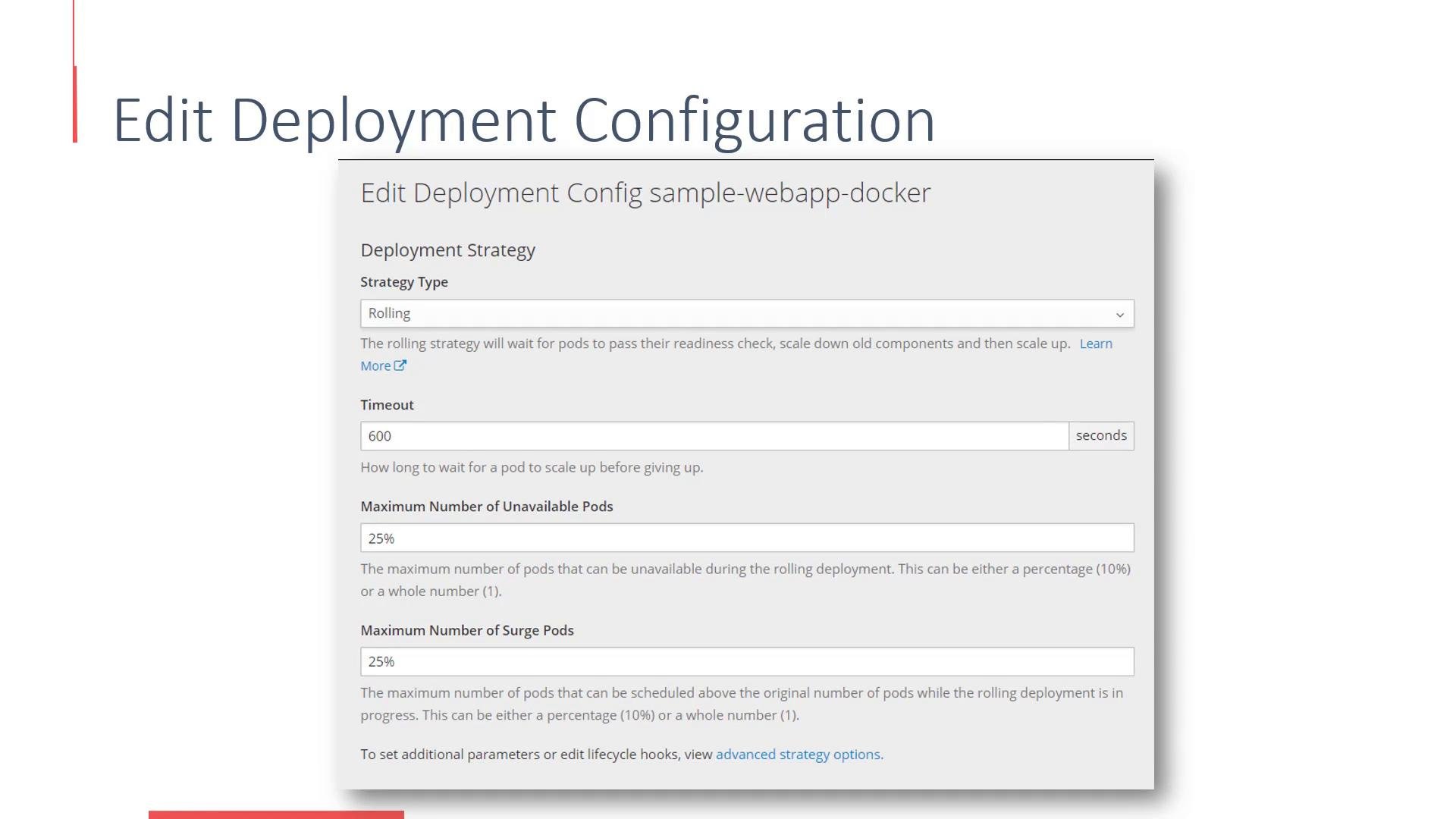
You can view and edit strategy-related settings (timeout, `maxUnavailable`, `maxSurge`, etc.) from the console when configuring rolling or recreate behavior.
## OpenShift workflow: BuildConfig, ImageStream, DeploymentConfig
When you add an application to a project in OpenShift, the platform typically creates:
* A BuildConfig — defines how the image is built.
* An ImageStream — a logical reference to images produced by builds.
* A DeploymentConfig — controls application deployment and lifecycle.
In the web console you’ll find deployments under Applications → Deployments. A DeploymentConfig commonly references the image produced by a BuildConfig via an ImageStream tag, declares the replica count, and defines the deployment strategy (for example, Rolling).
Triggers determine how deployments run:
* Manual: Click Deploy in the UI or use the CLI to trigger.
* Automatic: An image change trigger starts a deployment when the ImageStream tag referenced by the DeploymentConfig is updated (for example, when a build completes).
Example console output and a manual trigger:
```bash theme={null}
# Sample build/deploy information (console-style)
Image: myproject/sample-webapp-docker:08b7500 211.1 MiB
Build: sample-webapp-docker #5
Source: Update app.py ca92a69 authored by Administrator
Ports: 8080/TCP
# Manually trigger the latest rollout for the DeploymentConfig
oc rollout latest dc/sample-webapp-docker -n myproject
# Image stream reference
myproject/sample-webapp-docker:latest
```
You can inspect or edit a DeploymentConfig as YAML from the UI (Actions → Edit YAML). The structure resembles a Kubernetes Deployment but uses the OpenShift API group and kind.
```yaml theme={null}
apiVersion: apps.openshift.io/v1
kind: DeploymentConfig
metadata:
name: sample-webapp-docker
spec:
replicas: 1
selector:
deploymentconfig: sample-webapp-docker
strategy:
type: Rolling
template:
metadata:
labels:
app: sample-webapp-docker
deploymentconfig: sample-webapp-docker
spec:
containers:
- image: myproject/sample-webapp-docker
imagePullPolicy: Always
name: sample-webapp-docker
ports:
- containerPort: 8080
protocol: TCP
triggers:
- imageChangeParams:
automatic: true
containerNames:
- sample-webapp-docker
from:
kind: ImageStreamTag
name: 'sample-webapp-docker:latest'
namespace: myproject
lastTriggeredImage: >-
172.30.1.1:5000/myproject/sample-webapp-docker@sha256:08b750083d53e8fdfc09ab99bc30549141ea44c90763d3e972be264fbec8d706
type: ImageChange
- type: ConfigChange
```
DeploymentConfig (kind: `DeploymentConfig`) is OpenShift-specific and provides image-change triggers and lifecycle hooks. Kubernetes uses kind: `Deployment`; many fields are similar, but the API kinds and some behaviors differ.
You can view and edit strategy-related settings (timeout, `maxUnavailable`, `maxSurge`, etc.) from the console when configuring rolling or recreate behavior.
 ## Deployment history and rollback
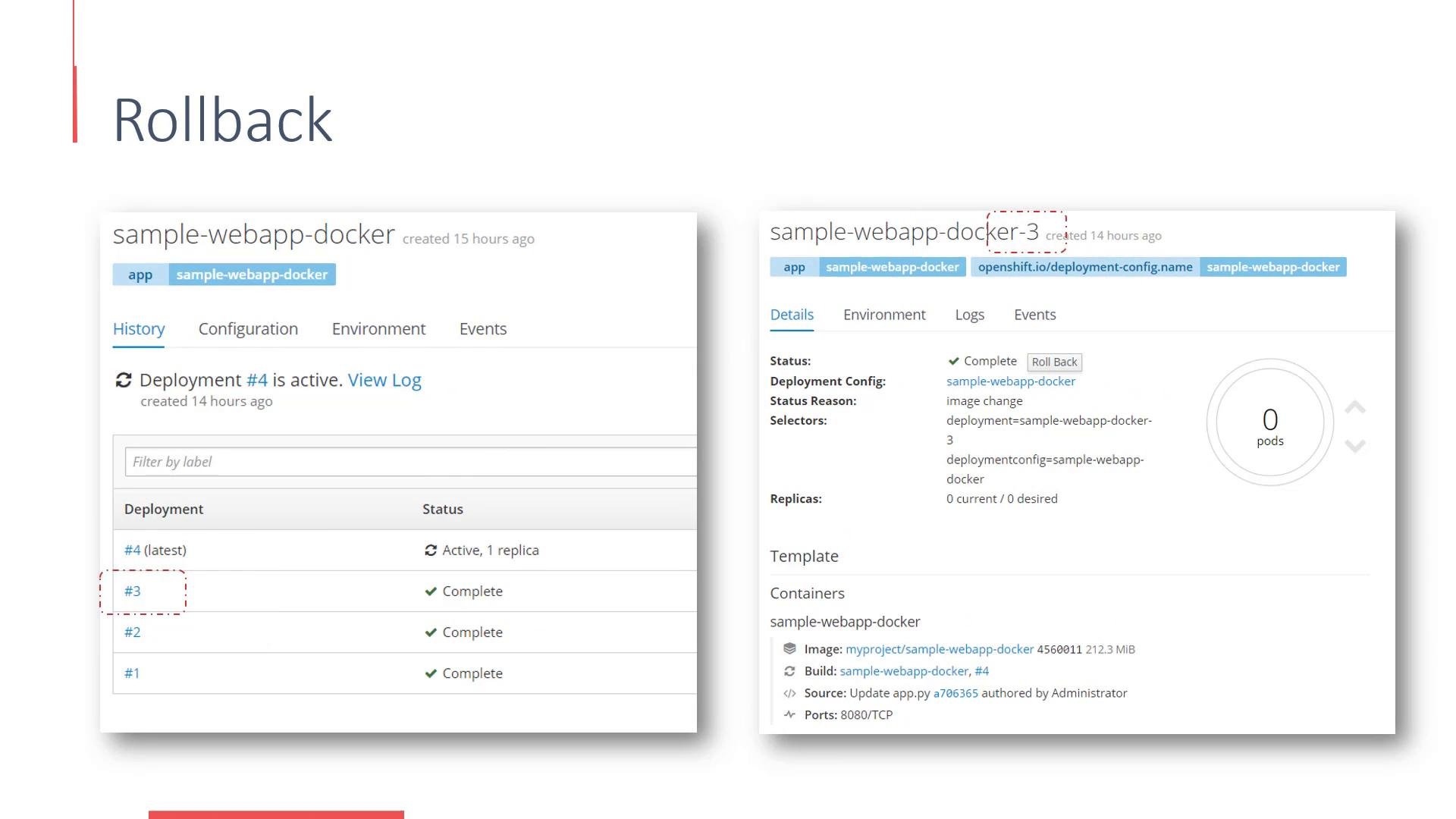
The OpenShift web console preserves deployment history. Each deployment increments an internal version number. To roll back, choose an earlier version in the history and select Roll Back.
## Deployment history and rollback
The OpenShift web console preserves deployment history. Each deployment increments an internal version number. To roll back, choose an earlier version in the history and select Roll Back.
 ## Deployment strategies
* Recreate: Terminates all existing Pods, then creates new Pods for the updated version. Suitable when you cannot run multiple versions concurrently, but it causes downtime during the transition.
* Rolling (default): Updates Pods incrementally so the application remains available. If you don't choose a strategy, OpenShift uses Rolling by default.
Advanced approaches for safer rollouts:
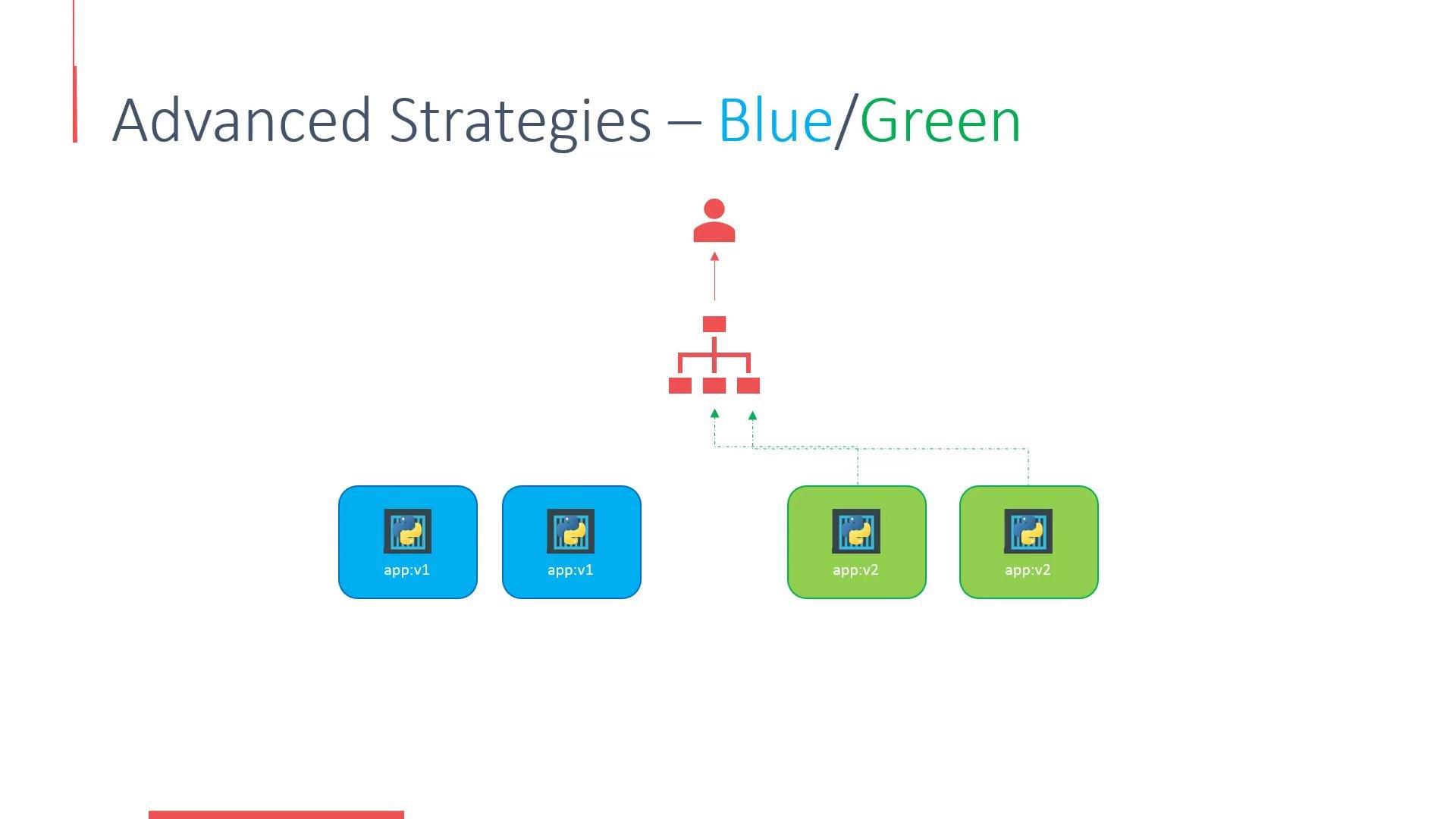
* Blue/Green: Deploy a separate "green" environment alongside the current "blue" one. Test green, then switch traffic from blue to green (for example, via router or load balancer configuration).
## Deployment strategies
* Recreate: Terminates all existing Pods, then creates new Pods for the updated version. Suitable when you cannot run multiple versions concurrently, but it causes downtime during the transition.
* Rolling (default): Updates Pods incrementally so the application remains available. If you don't choose a strategy, OpenShift uses Rolling by default.
Advanced approaches for safer rollouts:
* Blue/Green: Deploy a separate "green" environment alongside the current "blue" one. Test green, then switch traffic from blue to green (for example, via router or load balancer configuration).
 * A/B (traffic-splitting): Route a small percentage of real traffic to the new version and monitor metrics. Gradually increase traffic until the new version receives full load.
Table: comparison of common strategies
| Strategy | Availability during update | Use case |
| -: | -: | - |
| Rolling | High (incremental updates) | Default; minimal downtime and continuous availability |
| Recreate | Low (downtime) | When multiple versions cannot run simultaneously |
| Blue/Green | High (explicit switch) | Complete environment testing before switching traffic |
| A/B | High (gradual traffic shift) | Canary/testing new behavior with partial traffic |
Automatic image-change triggers can start deployments as soon as a build finishes. If you need predictable rollout timing, consider disabling the automatic trigger and triggering deployments manually with `oc rollout latest`.
## Common rollout commands
* Trigger a manual rollout
* View rollout history or status
* Roll back to a prior revision
* Inspect the DeploymentConfig resource
| Command | Purpose |
| -: | - |
| `oc rollout latest dc/simple-webapp-docker` | Trigger a new deployment (manual rollout) |
| `oc rollout history dc/simple-webapp-docker` | Show rollout history (revisions) |
| `oc rollout status dc/simple-webapp-docker` | Show the current rollout status |
| `oc rollout undo dc/simple-webapp-docker` | Roll back to the previous revision |
| `oc describe dc/simple-webapp-docker` | Inspect the DeploymentConfig resource |
Example CLI summary:
```bash theme={null}
# Trigger a new deployment (manual rollout)
oc rollout latest dc/simple-webapp-docker
# Show the rollout history (revisions)
oc rollout history dc/simple-webapp-docker
# Show the current rollout status
oc rollout status dc/simple-webapp-docker
# Roll back to the previous revision
oc rollout undo dc/simple-webapp-docker
# Inspect the DeploymentConfig resource
oc describe dc/simple-webapp-docker
```
## Further reading
* OpenShift Documentation: [https://docs.openshift.com/](https://docs.openshift.com/)
* Kubernetes deployments reference: [https://kubernetes.io/docs/concepts/workloads/controllers/deployment/](https://kubernetes.io/docs/concepts/workloads/controllers/deployment/)
* ImageStream & BuildConfig concepts in OpenShift
That’s it for this lesson — you now understand how OpenShift DeploymentConfigs manage application lifecycle, how image-based triggers and strategies affect rollouts, and the commands you’ll use to control deployments.
This documentation is built and hosted on [Mintlify](https://mintlify.com), a developer documentation platform.
* A/B (traffic-splitting): Route a small percentage of real traffic to the new version and monitor metrics. Gradually increase traffic until the new version receives full load.
Table: comparison of common strategies
| Strategy | Availability during update | Use case |
| -: | -: | - |
| Rolling | High (incremental updates) | Default; minimal downtime and continuous availability |
| Recreate | Low (downtime) | When multiple versions cannot run simultaneously |
| Blue/Green | High (explicit switch) | Complete environment testing before switching traffic |
| A/B | High (gradual traffic shift) | Canary/testing new behavior with partial traffic |
Automatic image-change triggers can start deployments as soon as a build finishes. If you need predictable rollout timing, consider disabling the automatic trigger and triggering deployments manually with `oc rollout latest`.
## Common rollout commands
* Trigger a manual rollout
* View rollout history or status
* Roll back to a prior revision
* Inspect the DeploymentConfig resource
| Command | Purpose |
| -: | - |
| `oc rollout latest dc/simple-webapp-docker` | Trigger a new deployment (manual rollout) |
| `oc rollout history dc/simple-webapp-docker` | Show rollout history (revisions) |
| `oc rollout status dc/simple-webapp-docker` | Show the current rollout status |
| `oc rollout undo dc/simple-webapp-docker` | Roll back to the previous revision |
| `oc describe dc/simple-webapp-docker` | Inspect the DeploymentConfig resource |
Example CLI summary:
```bash theme={null}
# Trigger a new deployment (manual rollout)
oc rollout latest dc/simple-webapp-docker
# Show the rollout history (revisions)
oc rollout history dc/simple-webapp-docker
# Show the current rollout status
oc rollout status dc/simple-webapp-docker
# Roll back to the previous revision
oc rollout undo dc/simple-webapp-docker
# Inspect the DeploymentConfig resource
oc describe dc/simple-webapp-docker
```
## Further reading
* OpenShift Documentation: [https://docs.openshift.com/](https://docs.openshift.com/)
* Kubernetes deployments reference: [https://kubernetes.io/docs/concepts/workloads/controllers/deployment/](https://kubernetes.io/docs/concepts/workloads/controllers/deployment/)
* ImageStream & BuildConfig concepts in OpenShift
That’s it for this lesson — you now understand how OpenShift DeploymentConfigs manage application lifecycle, how image-based triggers and strategies affect rollouts, and the commands you’ll use to control deployments.
This documentation is built and hosted on [Mintlify](https://mintlify.com), a developer documentation platform.