> ## Documentation Index
> Fetch the complete documentation index at: https://notes.kodekloud.com/llms.txt
> Use this file to discover all available pages before exploring further.
# OpenShift Architectural Overview
> Concise overview of OpenShift architecture and features, explaining how it extends Kubernetes for builds, deployments, control plane operations, registry management, security, and developer workflows.
Welcome — this lesson gives a concise, high-level overview of OpenShift architecture and how it extends Kubernetes for enterprise and developer workflows. You’ll learn the core components, how container images and builds flow through the platform, and which services maintain cluster state and security.
 ## Core concepts — Kubernetes primitives + OpenShift features
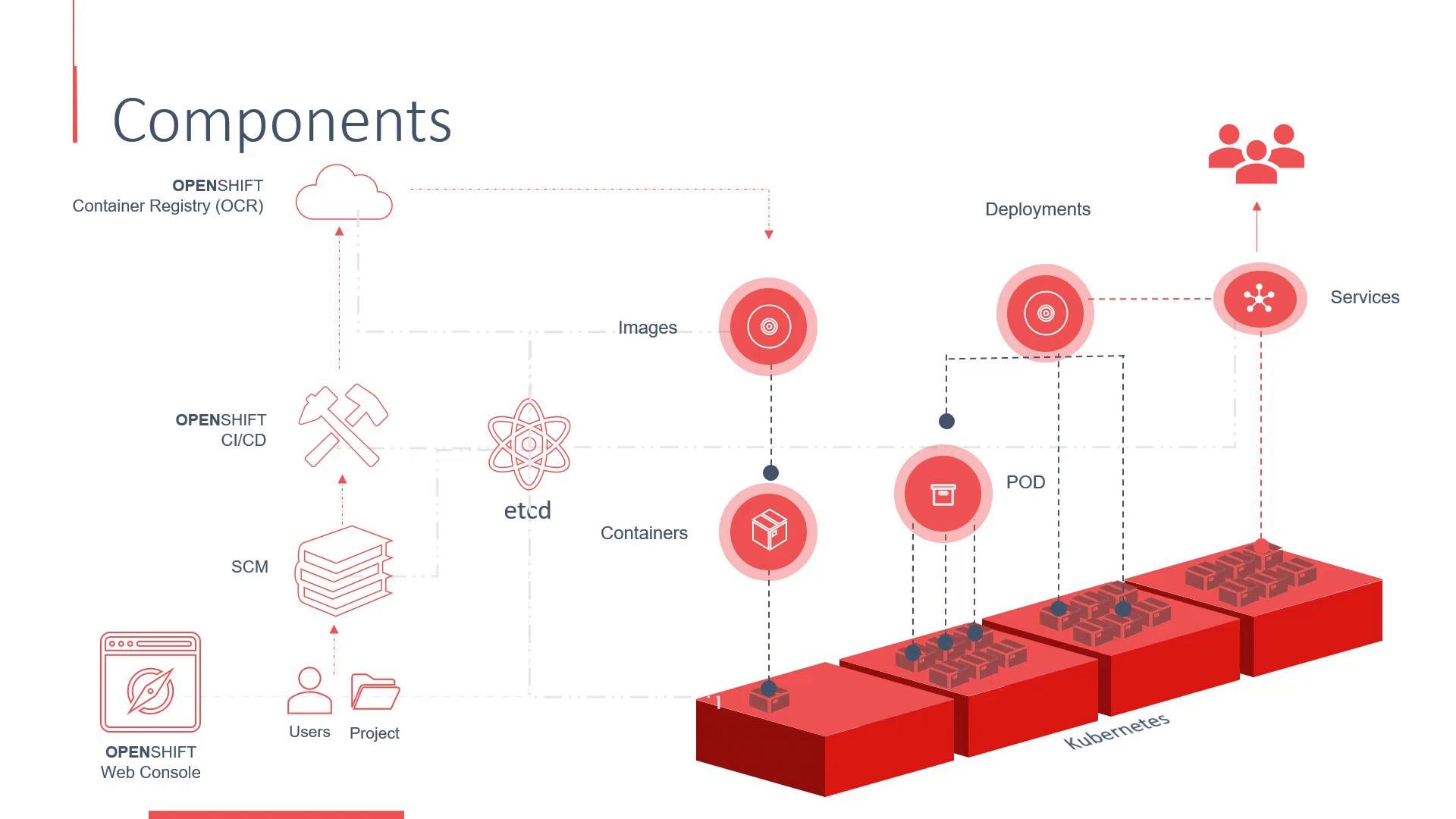
OpenShift is built on Kubernetes and inherits its core primitives for running containerized applications:
* Containers — runtime instances of OCI-compatible images.
* Container images — stored in registries (public or private), used to create containers.
* Pods — the smallest deployable unit; one or more containers that share network and storage.
* Controllers (Deployments, ReplicaSets, etc.) — manage the desired number of pod replicas.
* Services — stable network endpoints to expose pods inside the cluster or externally.
OpenShift adds developer- and enterprise-focused features on top of Kubernetes:
* Integrated web console and CLI for developers and operators.
* Build and CI/CD primitives (BuildConfigs, ImageStreams, pipeline integrations) to import source, build images, and push them to a registry.
* Project-based organization that extends Kubernetes namespaces with access controls and metadata.
Container images can come from public registries such as [Docker Hub](https://hub.docker.com) or from OpenShift’s integrated registry. The open-source upstream distribution, OKD (formerly Origin), may include a built-in registry for storing and serving images to the cluster.
## Build & deployment flow (high level)
Developers typically follow this flow:
1. Push or import source code into a repository integrated with OpenShift’s build system.
2. A BuildConfig or pipeline builds the source into a container image.
3. The image is pushed to the cluster registry (or an external registry).
4. A Deployment or DeploymentConfig creates pods from the image.
5. Services and Routes expose the application internally and externally.
6. The control plane reconciles desired state, ensuring replicas and networking are maintained.
## Core concepts — Kubernetes primitives + OpenShift features
OpenShift is built on Kubernetes and inherits its core primitives for running containerized applications:
* Containers — runtime instances of OCI-compatible images.
* Container images — stored in registries (public or private), used to create containers.
* Pods — the smallest deployable unit; one or more containers that share network and storage.
* Controllers (Deployments, ReplicaSets, etc.) — manage the desired number of pod replicas.
* Services — stable network endpoints to expose pods inside the cluster or externally.
OpenShift adds developer- and enterprise-focused features on top of Kubernetes:
* Integrated web console and CLI for developers and operators.
* Build and CI/CD primitives (BuildConfigs, ImageStreams, pipeline integrations) to import source, build images, and push them to a registry.
* Project-based organization that extends Kubernetes namespaces with access controls and metadata.
Container images can come from public registries such as [Docker Hub](https://hub.docker.com) or from OpenShift’s integrated registry. The open-source upstream distribution, OKD (formerly Origin), may include a built-in registry for storing and serving images to the cluster.
## Build & deployment flow (high level)
Developers typically follow this flow:
1. Push or import source code into a repository integrated with OpenShift’s build system.
2. A BuildConfig or pipeline builds the source into a container image.
3. The image is pushed to the cluster registry (or an external registry).
4. A Deployment or DeploymentConfig creates pods from the image.
5. Services and Routes expose the application internally and externally.
6. The control plane reconciles desired state, ensuring replicas and networking are maintained.
 ## Cluster control plane and data store
At the center of cluster state is etcd, a distributed key-value store that holds the desired and current state for Kubernetes and OpenShift resources.
Typical control plane (master) components:
* API server (`kube-apiserver` plus OpenShift aggregated APIs) — the central entry point for cluster operations and automation.
* Controller manager — runs controllers that reconcile resources (replicas, endpoints, etc.).
* Scheduler — decides which worker node should run a pod.
* etcd — persistent datastore for all cluster state.
Worker (compute) nodes:
* Run the node agent (`kubelet`) which manages pod lifecycle on each node.
* Use a container runtime (for example, `containerd` or `CRI-O`) to run containers.
* Host network plugins, CSI drivers, and other node-level services.
## Security, identity, and access control
OpenShift integrates authentication and authorization on top of Kubernetes:
* Authentication integrates with identity providers (LDAP, OAuth, etc.).
* Role-Based Access Control (RBAC) defines permissions.
* The web console and CLI require authentication; projects (namespaces) enforce scoped access.
A "project" in OpenShift is a Kubernetes namespace with added metadata and access controls. Use projects to organize resources by application, team, or environment and to apply project-level policies.
## Quick reference table
| Component type | Purpose | Examples / Notes |
| - | -: | - |
| Control plane | Manages cluster state and scheduling | API server, controller manager, scheduler, `etcd` |
| Worker node | Runs application workloads | `kubelet`, container runtime (`containerd` / `CRI-O`) |
| Registry | Stores container images | Integrated OpenShift registry, Docker Hub |
| Build / CI | Automates build and image creation | `BuildConfig`, `ImageStream`, pipelines |
| Networking | Service discovery and external access | `Service`, `Route`, Ingress / CNI plugins |
| Security / identity | Authentication and access control | LDAP/OAuth integration, RBAC, Project quotas |
## Useful links and references
* [OpenShift (product)](https://www.openshift.com)
* [OKD (OpenShift Origin)](https://www.okd.io)
* [Kubernetes documentation](https://kubernetes.io/docs/)
* [etcd project](https://etcd.io/)
* [Docker Hub](https://hub.docker.com/)
Next steps: follow the hands-on lessons to set up an OpenShift cluster, create a project, build an application, and deploy it using the integrated build and registry. See you in the next lesson.
This documentation is built and hosted on [Mintlify](https://mintlify.com), a developer documentation platform.
## Cluster control plane and data store
At the center of cluster state is etcd, a distributed key-value store that holds the desired and current state for Kubernetes and OpenShift resources.
Typical control plane (master) components:
* API server (`kube-apiserver` plus OpenShift aggregated APIs) — the central entry point for cluster operations and automation.
* Controller manager — runs controllers that reconcile resources (replicas, endpoints, etc.).
* Scheduler — decides which worker node should run a pod.
* etcd — persistent datastore for all cluster state.
Worker (compute) nodes:
* Run the node agent (`kubelet`) which manages pod lifecycle on each node.
* Use a container runtime (for example, `containerd` or `CRI-O`) to run containers.
* Host network plugins, CSI drivers, and other node-level services.
## Security, identity, and access control
OpenShift integrates authentication and authorization on top of Kubernetes:
* Authentication integrates with identity providers (LDAP, OAuth, etc.).
* Role-Based Access Control (RBAC) defines permissions.
* The web console and CLI require authentication; projects (namespaces) enforce scoped access.
A "project" in OpenShift is a Kubernetes namespace with added metadata and access controls. Use projects to organize resources by application, team, or environment and to apply project-level policies.
## Quick reference table
| Component type | Purpose | Examples / Notes |
| - | -: | - |
| Control plane | Manages cluster state and scheduling | API server, controller manager, scheduler, `etcd` |
| Worker node | Runs application workloads | `kubelet`, container runtime (`containerd` / `CRI-O`) |
| Registry | Stores container images | Integrated OpenShift registry, Docker Hub |
| Build / CI | Automates build and image creation | `BuildConfig`, `ImageStream`, pipelines |
| Networking | Service discovery and external access | `Service`, `Route`, Ingress / CNI plugins |
| Security / identity | Authentication and access control | LDAP/OAuth integration, RBAC, Project quotas |
## Useful links and references
* [OpenShift (product)](https://www.openshift.com)
* [OKD (OpenShift Origin)](https://www.okd.io)
* [Kubernetes documentation](https://kubernetes.io/docs/)
* [etcd project](https://etcd.io/)
* [Docker Hub](https://hub.docker.com/)
Next steps: follow the hands-on lessons to set up an OpenShift cluster, create a project, build an application, and deploy it using the integrated build and registry. See you in the next lesson.
This documentation is built and hosted on [Mintlify](https://mintlify.com), a developer documentation platform.