> ## Documentation Index
> Fetch the complete documentation index at: https://notes.kodekloud.com/llms.txt
> Use this file to discover all available pages before exploring further.
# Networking Overview
> Overview of OpenShift networking covering Kubernetes pod IPs, SDN implementations like OVS and OVN, services and DNS for stable connectivity, plugins, and external access via Services and Routes
Welcome to this lesson on OpenShift networking. We'll first recap the Kubernetes networking model so you can better understand how OpenShift implements networking with its Software-Defined Network (SDN).
## Kubernetes networking model — quick recap
A Kubernetes cluster consists of master and worker nodes. Each node is a physical or virtual machine with its own IP address (for example: `192.168.1.10`, `192.168.1.11`, `192.168.1.12`, `192.168.1.13`). When applications run in containers inside pods, each pod also receives a unique IP address.
Pods commonly host different components of an application (for example, a web server pod and a database pod). For these components to communicate reliably, each pod must have a unique, routable IP and the cluster must provide routing between nodes.
OpenShift implements this with a software-defined network (SDN) that creates a virtual overlay spanning all nodes.
## OpenShift SDN basics
* OpenShift 3.x: default SDN implementations are based on Open vSwitch (OVS).
* OpenShift 4.x: uses OVN-Kubernetes by default.
* Default overlay CIDR (OpenShift 3.x example): `10.128.0.0/14`.
* Typically, each node gets a dedicated subnet from that range (commonly a `/24`), and pods on that node receive IPs from the node's subnet.
Example node subnet allocation:
| Node | Node subnet (example) |
| - | - |
| Node 1 | `10.128.0.0/24` |
| Node 2 | `10.128.1.0/24` |
| Node 3 | `10.128.2.0/24` |
Example pod IP assignment:
| Pod | Example IP | Node subnet |
| - | - | - |
| my-web-app | `10.128.0.5` | `10.128.0.0/24` |
| my-sql-db | `10.128.1.2` | `10.128.1.0/24` |
To list pods and see their IPs:
```bash theme={null}
oc get pods -o wide
```
Example output:
```bash theme={null}
NAME READY STATUS RESTARTS AGE IP NODE
my-web-app 1/1 Running 0 2d 10.128.0.5 localhost
my-sql-db 1/1 Running 0 1d 10.128.1.2 localhost
```
Avoid relying on pod IPs directly in production. Pod IPs are ephemeral and can change when pods are restarted, rescheduled, or replaced.
## Stable networking: Services and DNS
To provide stable connectivity, OpenShift offers Services and an internal DNS service (historically SkyDNS; newer clusters typically run CoreDNS). The cluster datastore (etcd) backs DNS records so services and endpoints are discoverable by name.
Always prefer connecting to a Service or DNS name instead of a pod IP. For example, instead of `mysql.connect('10.128.1.2')`, use a service DNS name like `mysql.default.svc.cluster.local` or the service environment variables provided to pods.
## OpenShift network plugins (3.x examples)
OpenShift 3.x supported multiple SDN plugins:
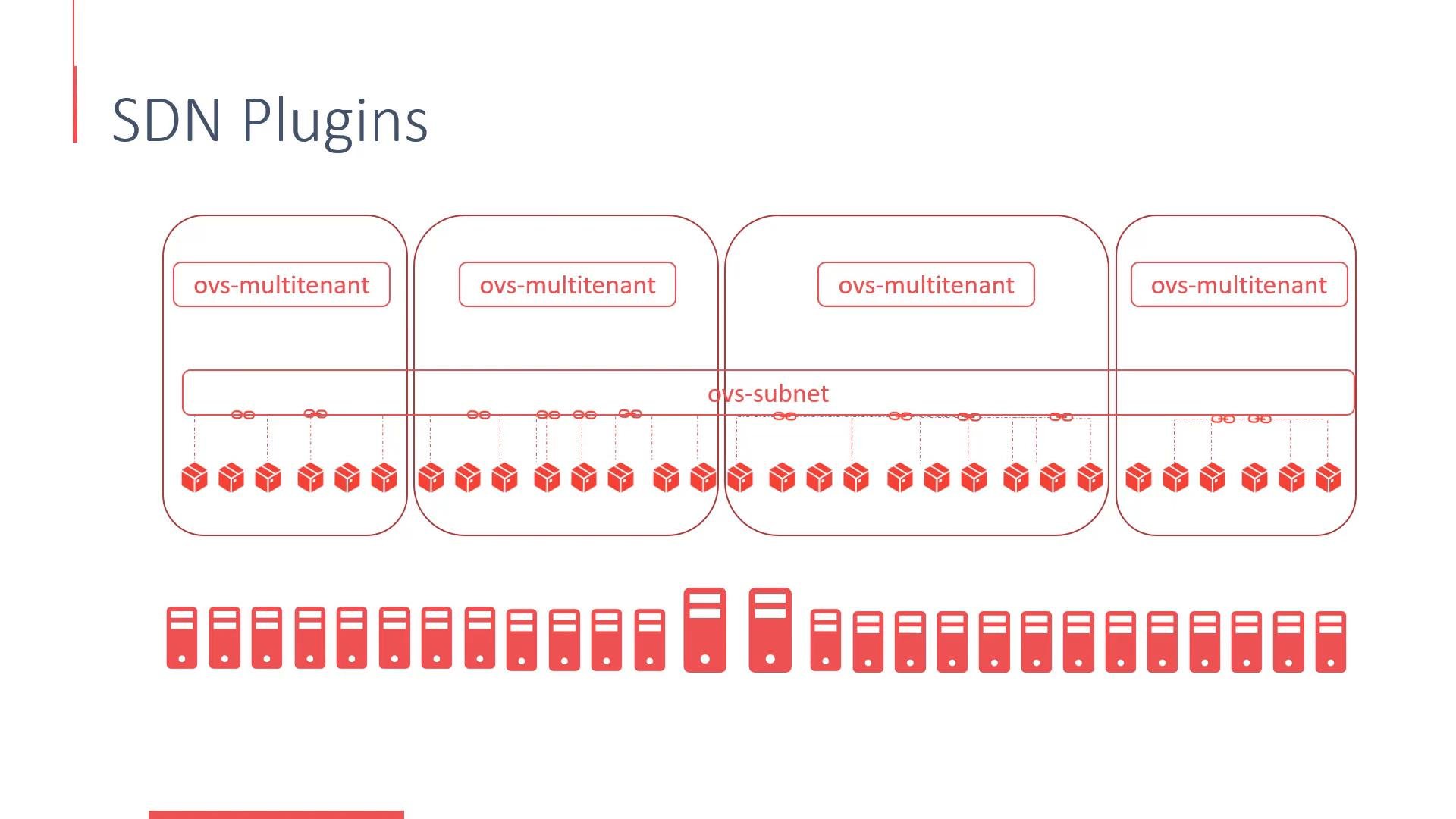
* `ovs-subnet` — the default OVS-based plugin that provides connectivity across all pods.
* `ovs-multitenant` — enforces network isolation between projects (namespaces) by providing project-scoped virtual network segments (VLAN-like behavior) so that pods in different projects are isolated by policy.
 Other network providers supported by OpenShift include:
* Flannel — simple VXLAN-based overlay.
* Contiv — more advanced policy and CNI features.
* Nuage — vendor-specific SDN with advanced features for carrier and enterprise networks.
Each provider implements networking differently and presents trade-offs (performance, policy model, operational complexity). Choose the provider that best fits your environment and requirements.
## External access — Services vs Routes
OpenShift exposes in-cluster applications to external clients using Services and Routes:
| Mechanism | Purpose | Typical use |
| - | - | - |
| `ClusterIP` Service | Internal cluster access only | Microservice-to-microservice communication |
| `NodePort` / `LoadBalancer` | Expose service via node ports or cloud LB | External access when using cloud provider integrations |
| Route (OpenShift) | OpenShift-specific HTTP(S) routing with hostname | Public-facing web applications; integrates with OpenShift router/HAProxy |
Routes are an OpenShift abstraction that map hostnames to in-cluster Services and provide HTTP(S) routing, TLS termination, and host-based routing features.
## Quick references
* Open vSwitch (OVS): [https://www.openvswitch.org/](https://www.openvswitch.org/)
* OVN-Kubernetes: [https://github.com/ovn-org/ovn-kubernetes](https://github.com/ovn-org/ovn-kubernetes)
* CoreDNS: [https://coredns.io/](https://coredns.io/)
* etcd: [https://etcd.io/](https://etcd.io/)
* OpenShift networking docs: [https://docs.openshift.com/](https://docs.openshift.com/)
That's it for this lesson.
This documentation is built and hosted on [Mintlify](https://mintlify.com), a developer documentation platform.
Other network providers supported by OpenShift include:
* Flannel — simple VXLAN-based overlay.
* Contiv — more advanced policy and CNI features.
* Nuage — vendor-specific SDN with advanced features for carrier and enterprise networks.
Each provider implements networking differently and presents trade-offs (performance, policy model, operational complexity). Choose the provider that best fits your environment and requirements.
## External access — Services vs Routes
OpenShift exposes in-cluster applications to external clients using Services and Routes:
| Mechanism | Purpose | Typical use |
| - | - | - |
| `ClusterIP` Service | Internal cluster access only | Microservice-to-microservice communication |
| `NodePort` / `LoadBalancer` | Expose service via node ports or cloud LB | External access when using cloud provider integrations |
| Route (OpenShift) | OpenShift-specific HTTP(S) routing with hostname | Public-facing web applications; integrates with OpenShift router/HAProxy |
Routes are an OpenShift abstraction that map hostnames to in-cluster Services and provide HTTP(S) routing, TLS termination, and host-based routing features.
## Quick references
* Open vSwitch (OVS): [https://www.openvswitch.org/](https://www.openvswitch.org/)
* OVN-Kubernetes: [https://github.com/ovn-org/ovn-kubernetes](https://github.com/ovn-org/ovn-kubernetes)
* CoreDNS: [https://coredns.io/](https://coredns.io/)
* etcd: [https://etcd.io/](https://etcd.io/)
* OpenShift networking docs: [https://docs.openshift.com/](https://docs.openshift.com/)
That's it for this lesson.
This documentation is built and hosted on [Mintlify](https://mintlify.com), a developer documentation platform.