> ## Documentation Index
> Fetch the complete documentation index at: https://notes.kodekloud.com/llms.txt
> Use this file to discover all available pages before exploring further.
# Scaling
> How to scale applications in OpenShift using the web console, oc CLI, YAML edits, patches, and Horizontal Pod Autoscaling plus traffic distribution and troubleshooting tips
Welcome to this lesson from [OpenShift 3 for the Absolute Beginners](https://learn.kodekloud.com/user/courses/openshift-3-for-the-absolute-beginners). In this article we cover how to scale applications in OpenShift — manually, from the CLI, and automatically (autoscaling).
A DeploymentConfig (OpenShift) manages a ReplicationController; a Kubernetes Deployment manages a ReplicaSet. Both a ReplicationController and a ReplicaSet are responsible for maintaining multiple replicas of a Pod. Scaling an application means changing the number of replicas in the resource's `spec.replicas` field.
In demos so far we used a single replica. You can change the replica count by editing the object's YAML, but the OpenShift web console provides a quick interactive way to scale up or down with one click. Traffic is automatically distributed to replicas by a Service (for cluster-internal traffic) or by the Router (for external traffic).
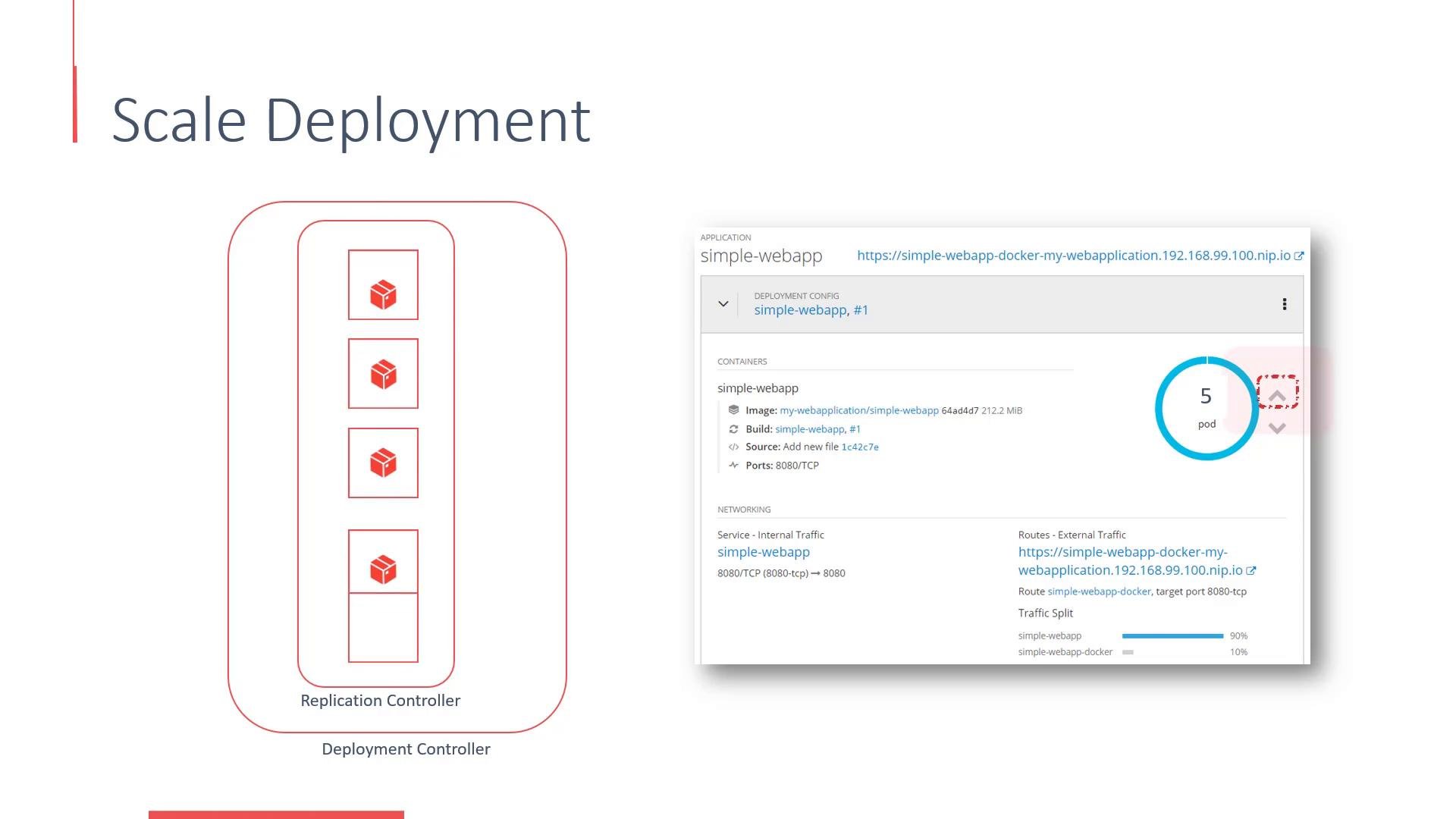 You can scale interactively in the web console for quick changes. Use the `oc` CLI for repeatable, scriptable operations and automation.
## Common methods to scale
This section shows common ways to scale a DeploymentConfig or a Deployment in OpenShift: using the web console, using `oc` to scale/edit/patch, and enabling Horizontal Pod Autoscaling.
### 1) Scale using the oc CLI
Scale a DeploymentConfig directly:
```bash theme={null}
oc scale dc/simple-webapp --replicas=5
```
If you use Kubernetes Deployments instead of DeploymentConfigs:
```bash theme={null}
oc scale deployment/simple-webapp --replicas=5
```
After scaling, verify new pods:
```bash theme={null}
oc get pods
```
Example output:
```text theme={null}
NAME READY STATUS RESTARTS AGE
simple-webapp-1-abcd 1/1 Running 0 5m
simple-webapp-2-abcd 1/1 Running 0 2m
simple-webapp-3-abcd 1/1 Running 0 1m
simple-webapp-4-abcd 1/1 Running 0 30s
simple-webapp-5-abcd 1/1 Running 0 10s
```
### 2) Edit the YAML directly
Open the resource in your editor, change the `spec.replicas` value, save and exit. OpenShift will reconcile and create or terminate pods as needed.
Edit a DeploymentConfig:
```bash theme={null}
oc edit dc/simple-webapp
```
Edit a Deployment:
```bash theme={null}
oc edit deployment/simple-webapp
```
Alternatively, apply a modified YAML file:
```bash theme={null}
oc apply -f simple-webapp-dc.yaml
```
Ensure `spec.replicas` in the file contains the desired count.
### 3) Patch the resource (quick one-liner)
Use `oc patch` to update replicas without opening an editor:
```bash theme={null}
oc patch dc/simple-webapp -p '{"spec":{"replicas":5}}'
```
### 4) Enable autoscaling (Horizontal Pod Autoscaler)
OpenShift supports Horizontal Pod Autoscaling for DeploymentConfigs and Deployments. The `oc autoscale` command creates a HorizontalPodAutoscaler that scales based on metrics such as CPU utilization.
Example:
```bash theme={null}
oc autoscale dc/simple-webapp --min=2 --max=10 --cpu-percent=80
```
This instructs the autoscaler to keep average CPU utilization near 80%, scaling between 2 and 10 replicas as needed.
Check existing autoscalers:
```bash theme={null}
oc get hpa
```
## Commands quick reference
| Action | Command |
| - | - |
| Scale a DeploymentConfig | `oc scale dc/simple-webapp --replicas=5` |
| Scale a Deployment | `oc scale deployment/simple-webapp --replicas=5` |
| Edit YAML (DeploymentConfig) | `oc edit dc/simple-webapp` |
| Apply modified YAML | `oc apply -f simple-webapp-dc.yaml` |
| Patch replicas (JSON patch) | `oc patch dc/simple-webapp -p '{"spec":{"replicas":5}}'` |
| Create an HPA | `oc autoscale dc/simple-webapp --min=2 --max=10 --cpu-percent=80` |
| List pods | `oc get pods` |
| List HPAs | `oc get hpa` |
When editing live resources, be mindful of production traffic. Changing replicas may disrupt session-affine workloads unless you use sticky sessions or an external session store.
## Notes on traffic distribution
* A Service that fronts your pods will automatically load-balance traffic across available replicas.
* For externally exposed applications, the Router (OpenShift's ingress point) distributes requests across Service endpoints (the pods).
* Ensure readiness probes are configured so traffic is only sent to healthy pods.
## Troubleshooting tips
* If new pods remain in Pending, check node capacity with `oc get nodes` and pod events with `oc describe pod `.
* If pods start but never become Ready, inspect logs and probe configurations:
* `oc logs `
* `oc describe pod `
* For HPA issues, confirm metrics are available (metrics-server or Prometheus adapter as required).
## Summary
* Scaling changes the `spec.replicas` value of a DeploymentConfig or Deployment.
* Web console scaling is convenient for ad-hoc changes; the `oc` CLI is best for automation.
* Use `oc scale`, `oc edit`, or `oc patch` to adjust replicas from the CLI.
* Use `oc autoscale` to add Horizontal Pod Autoscaling based on CPU (or other supported metrics).
* Services and the Router handle traffic distribution across replicas automatically.
## Links and references
* [OpenShift Documentation](https://docs.openshift.com/)
* [Kubernetes Horizontal Pod Autoscaler](https://kubernetes.io/docs/tasks/run-application/horizontal-pod-autoscale/)
* [oc CLI reference](https://docs.openshift.com/container-platform/latest/cli_reference/openshift_cli/getting-started-cli.html)
This documentation is built and hosted on [Mintlify](https://mintlify.com), a developer documentation platform.
You can scale interactively in the web console for quick changes. Use the `oc` CLI for repeatable, scriptable operations and automation.
## Common methods to scale
This section shows common ways to scale a DeploymentConfig or a Deployment in OpenShift: using the web console, using `oc` to scale/edit/patch, and enabling Horizontal Pod Autoscaling.
### 1) Scale using the oc CLI
Scale a DeploymentConfig directly:
```bash theme={null}
oc scale dc/simple-webapp --replicas=5
```
If you use Kubernetes Deployments instead of DeploymentConfigs:
```bash theme={null}
oc scale deployment/simple-webapp --replicas=5
```
After scaling, verify new pods:
```bash theme={null}
oc get pods
```
Example output:
```text theme={null}
NAME READY STATUS RESTARTS AGE
simple-webapp-1-abcd 1/1 Running 0 5m
simple-webapp-2-abcd 1/1 Running 0 2m
simple-webapp-3-abcd 1/1 Running 0 1m
simple-webapp-4-abcd 1/1 Running 0 30s
simple-webapp-5-abcd 1/1 Running 0 10s
```
### 2) Edit the YAML directly
Open the resource in your editor, change the `spec.replicas` value, save and exit. OpenShift will reconcile and create or terminate pods as needed.
Edit a DeploymentConfig:
```bash theme={null}
oc edit dc/simple-webapp
```
Edit a Deployment:
```bash theme={null}
oc edit deployment/simple-webapp
```
Alternatively, apply a modified YAML file:
```bash theme={null}
oc apply -f simple-webapp-dc.yaml
```
Ensure `spec.replicas` in the file contains the desired count.
### 3) Patch the resource (quick one-liner)
Use `oc patch` to update replicas without opening an editor:
```bash theme={null}
oc patch dc/simple-webapp -p '{"spec":{"replicas":5}}'
```
### 4) Enable autoscaling (Horizontal Pod Autoscaler)
OpenShift supports Horizontal Pod Autoscaling for DeploymentConfigs and Deployments. The `oc autoscale` command creates a HorizontalPodAutoscaler that scales based on metrics such as CPU utilization.
Example:
```bash theme={null}
oc autoscale dc/simple-webapp --min=2 --max=10 --cpu-percent=80
```
This instructs the autoscaler to keep average CPU utilization near 80%, scaling between 2 and 10 replicas as needed.
Check existing autoscalers:
```bash theme={null}
oc get hpa
```
## Commands quick reference
| Action | Command |
| - | - |
| Scale a DeploymentConfig | `oc scale dc/simple-webapp --replicas=5` |
| Scale a Deployment | `oc scale deployment/simple-webapp --replicas=5` |
| Edit YAML (DeploymentConfig) | `oc edit dc/simple-webapp` |
| Apply modified YAML | `oc apply -f simple-webapp-dc.yaml` |
| Patch replicas (JSON patch) | `oc patch dc/simple-webapp -p '{"spec":{"replicas":5}}'` |
| Create an HPA | `oc autoscale dc/simple-webapp --min=2 --max=10 --cpu-percent=80` |
| List pods | `oc get pods` |
| List HPAs | `oc get hpa` |
When editing live resources, be mindful of production traffic. Changing replicas may disrupt session-affine workloads unless you use sticky sessions or an external session store.
## Notes on traffic distribution
* A Service that fronts your pods will automatically load-balance traffic across available replicas.
* For externally exposed applications, the Router (OpenShift's ingress point) distributes requests across Service endpoints (the pods).
* Ensure readiness probes are configured so traffic is only sent to healthy pods.
## Troubleshooting tips
* If new pods remain in Pending, check node capacity with `oc get nodes` and pod events with `oc describe pod `.
* If pods start but never become Ready, inspect logs and probe configurations:
* `oc logs `
* `oc describe pod `
* For HPA issues, confirm metrics are available (metrics-server or Prometheus adapter as required).
## Summary
* Scaling changes the `spec.replicas` value of a DeploymentConfig or Deployment.
* Web console scaling is convenient for ad-hoc changes; the `oc` CLI is best for automation.
* Use `oc scale`, `oc edit`, or `oc patch` to adjust replicas from the CLI.
* Use `oc autoscale` to add Horizontal Pod Autoscaling based on CPU (or other supported metrics).
* Services and the Router handle traffic distribution across replicas automatically.
## Links and references
* [OpenShift Documentation](https://docs.openshift.com/)
* [Kubernetes Horizontal Pod Autoscaler](https://kubernetes.io/docs/tasks/run-application/horizontal-pod-autoscale/)
* [oc CLI reference](https://docs.openshift.com/container-platform/latest/cli_reference/openshift_cli/getting-started-cli.html)
This documentation is built and hosted on [Mintlify](https://mintlify.com), a developer documentation platform.