> ## Documentation Index
> Fetch the complete documentation index at: https://notes.kodekloud.com/llms.txt
> Use this file to discover all available pages before exploring further.
# Pre Requisite Docker Overview
> Overview of Docker containers, differences from virtual machines, common docker commands, images versus containers, and why containers matter before learning Kubernetes
Hello, and welcome to this lesson/article on Kubernetes overview. My name is Mumshad Mannambeth.
Kubernetes (K8s) was originally developed at Google from years of running containers in production. Today it's an open source project and one of the most widely used container orchestration platforms. Before diving into Kubernetes, we need to understand two foundational concepts: containers and orchestration. This article begins with containers — specifically Docker — and explains why containers matter and how they differ from virtual machines. If you're already comfortable with Docker, you can skip the Docker sections and proceed to Kubernetes-focused lessons.
## Why Docker? A motivating example
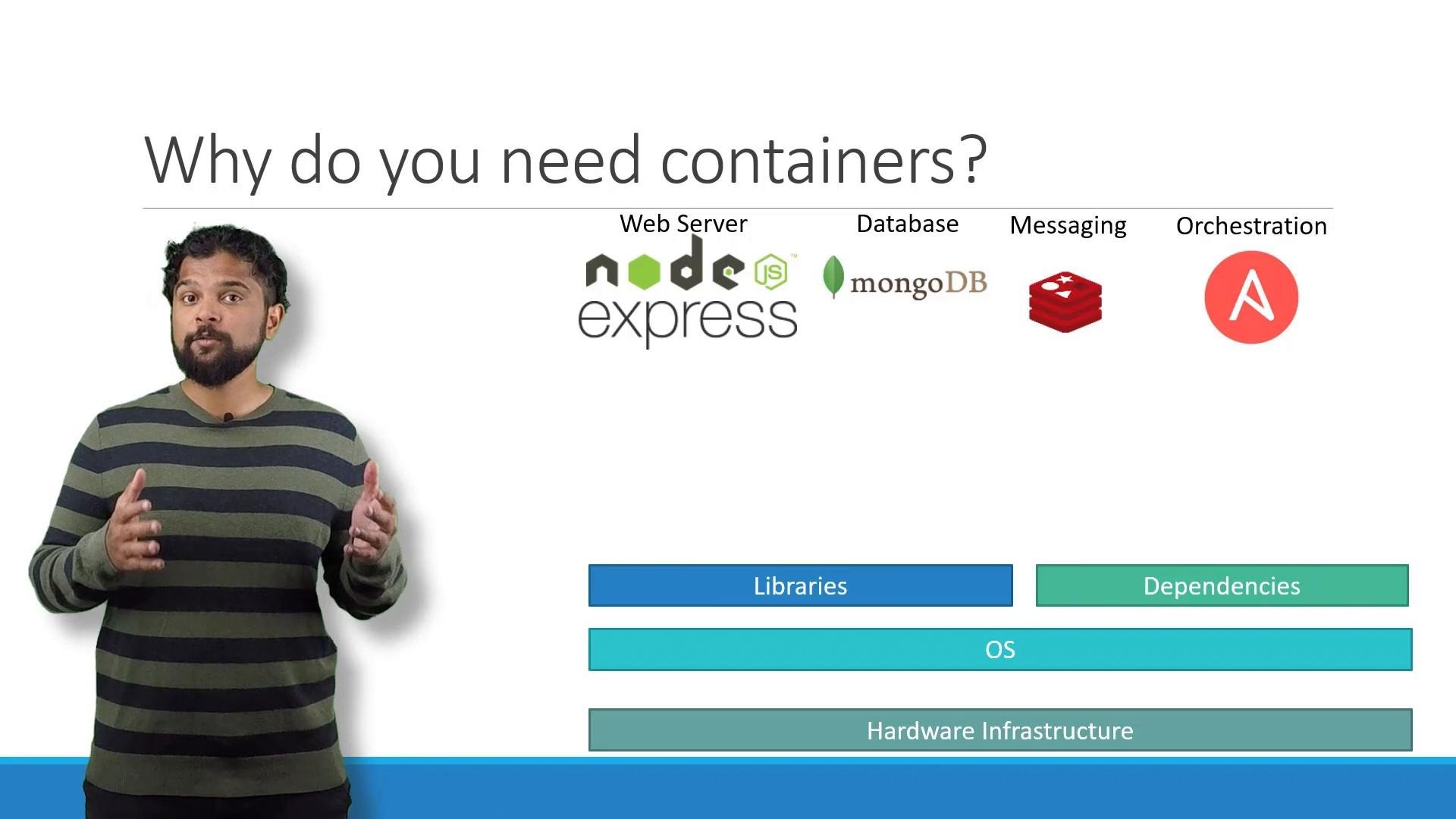
In one project I had to run an end-to-end stack with multiple technologies: a Node.js web server, MongoDB, Redis, and an orchestration tool such as Ansible. Running and developing this stack across different machines and teams created several real-world problems:
* Operating system compatibility issues between services and host OS.
* Dependency conflicts when different services required different library versions.
* Re-validating the full compatibility matrix whenever a component changed.
* Slow, error-prone onboarding due to lengthy local setup instructions.
* Inconsistent behavior across developer machines and environments (dev, test, prod).
I needed a way to isolate components so they could be modified independently and run consistently across different hosts and environments. That led me to Docker: package an app with its dependencies and run it consistently anywhere.
 ## What are containers?
Containers are isolated user-space environments that include their own processes, network namespaces, and filesystem mounts. Unlike virtual machines, containers share the host operating system kernel, which makes them lightweight and fast to start.
Key points:
* Containers isolate applications using kernel features such as namespaces (process, network, mount, PID, user) and cgroups (resource limits and accounting).
* Containers share the host kernel, so Linux containers require a Linux host; Windows containers require a Windows host.
* Docker made containers developer-friendly by providing tooling for building, distributing, and running images. Historically Docker used LXC; modern Docker relies on a standardized runtime architecture (containerd and runC).
To understand containers, recall that a Linux distribution consists of the kernel and user-space components (utilities, libraries, runtime). Containers reuse the host kernel and provide an isolated user-space, so containers can be based on different Linux distributions while still sharing a common kernel ABI.
## Containers vs Virtual Machines
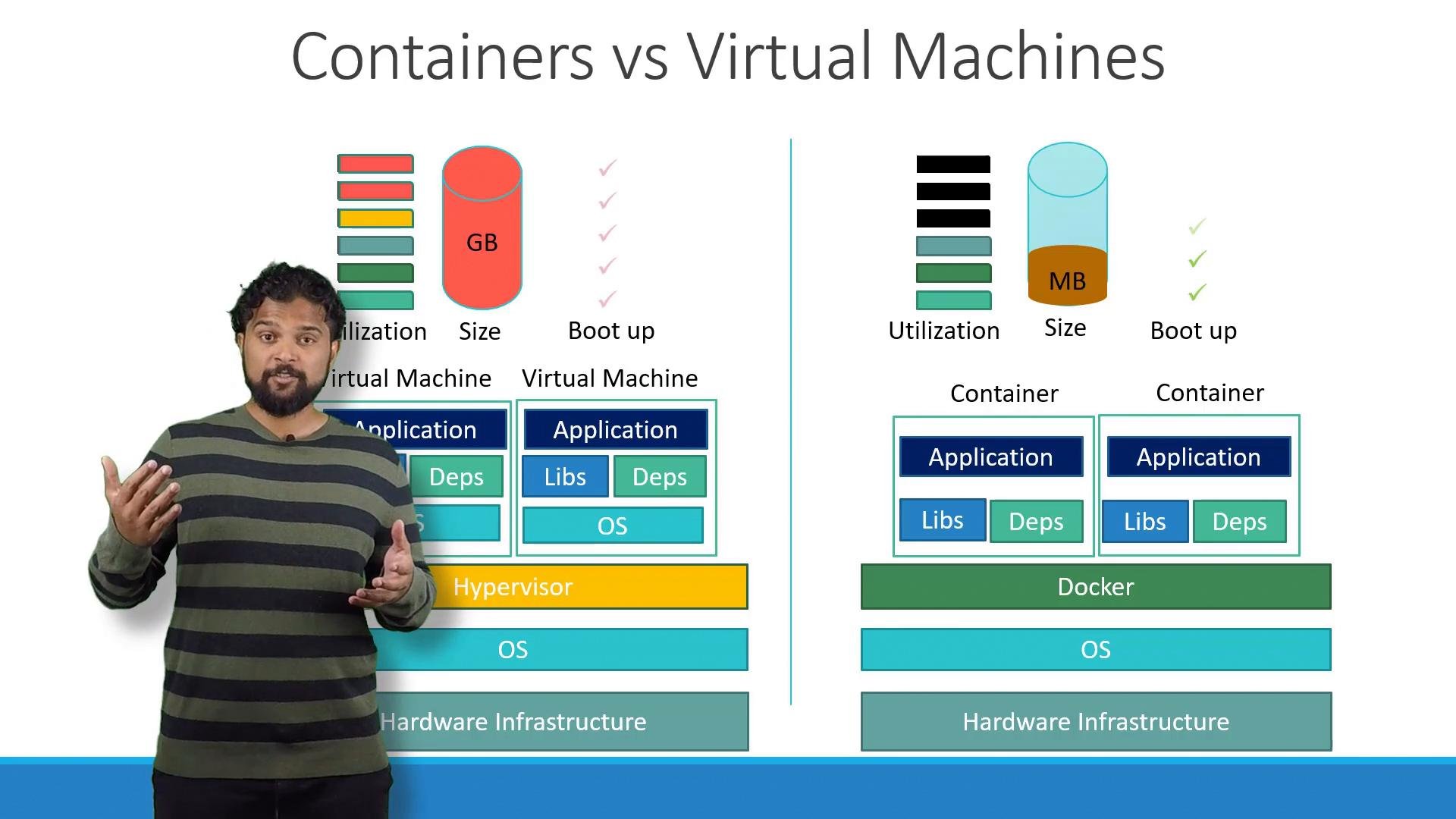
Containers and virtual machines solve different problems and make different trade-offs:
| Characteristic | Containers | Virtual Machines |
| - | -: | - |
| Kernel usage | Share host kernel | Include guest kernel |
| Size | Lightweight (MBs) | Heavy (GBs) |
| Startup time | Seconds | Minutes |
| Isolation level | Process-level, less isolation than VMs | Stronger isolation (hardware-level) |
| Use case | Microservices, fast scaling, resource efficiency | Running different OS kernels, strong tenant isolation |
## What are containers?
Containers are isolated user-space environments that include their own processes, network namespaces, and filesystem mounts. Unlike virtual machines, containers share the host operating system kernel, which makes them lightweight and fast to start.
Key points:
* Containers isolate applications using kernel features such as namespaces (process, network, mount, PID, user) and cgroups (resource limits and accounting).
* Containers share the host kernel, so Linux containers require a Linux host; Windows containers require a Windows host.
* Docker made containers developer-friendly by providing tooling for building, distributing, and running images. Historically Docker used LXC; modern Docker relies on a standardized runtime architecture (containerd and runC).
To understand containers, recall that a Linux distribution consists of the kernel and user-space components (utilities, libraries, runtime). Containers reuse the host kernel and provide an isolated user-space, so containers can be based on different Linux distributions while still sharing a common kernel ABI.
## Containers vs Virtual Machines
Containers and virtual machines solve different problems and make different trade-offs:
| Characteristic | Containers | Virtual Machines |
| - | -: | - |
| Kernel usage | Share host kernel | Include guest kernel |
| Size | Lightweight (MBs) | Heavy (GBs) |
| Startup time | Seconds | Minutes |
| Isolation level | Process-level, less isolation than VMs | Stronger isolation (hardware-level) |
| Use case | Microservices, fast scaling, resource efficiency | Running different OS kernels, strong tenant isolation |
 ## How to run containerized applications
Many common applications are available as container images in public registries such as Docker Hub (official images for OS base, databases, runtimes, etc.). After installing Docker, you can pull and run images with `docker run`.
Common examples:
* Run an NGINX container:
```bash theme={null}
docker run -d --name web -p 80:80 nginx
```
* Run a MongoDB container:
```bash theme={null}
docker run -d --name db -p 27017:27017 mongo
```
* Run a Redis container:
```bash theme={null}
docker run -d --name cache -p 6379:6379 redis
```
* Run a Node.js container and mount local source code:
```bash theme={null}
docker run -d --name my-node -v /path/to/app:/usr/src/app -w /usr/src/app node:14 node server.js
```
To scale the same service manually, run multiple container instances and place a load balancer in front:
```bash theme={null}
docker run -d --name web1 -p 8081:80 nginx
docker run -d --name web2 -p 8082:80 nginx
```
If a container fails, you can stop and remove it, then start a new instance. Orchestration tools (Docker Swarm, Kubernetes) automate scaling, service discovery, health checks, and failover — essential for production clusters.
### Quick reference — common `docker run` options
| Option | Meaning |
| - | - |
| `-d` | Run in detached (background) mode |
| `--name ` | Assign a container name |
| `-p host:container` | Map host port to container port |
| `-v host:container` | Mount a host directory or volume into container |
| `-w ` | Working directory inside container |
## Images vs Containers
* Image: an immutable, static template (filesystem + metadata) used to create containers. Think of it as a VM template.
* Container: a running, writable instance of an image. Containers run processes defined by the image.
Developers can capture build and runtime steps in a `Dockerfile`. Once an image is built, it becomes a portable artifact that can be deployed unchanged across any compatible Docker host — simplifying handoffs between development and operations.
## How to run containerized applications
Many common applications are available as container images in public registries such as Docker Hub (official images for OS base, databases, runtimes, etc.). After installing Docker, you can pull and run images with `docker run`.
Common examples:
* Run an NGINX container:
```bash theme={null}
docker run -d --name web -p 80:80 nginx
```
* Run a MongoDB container:
```bash theme={null}
docker run -d --name db -p 27017:27017 mongo
```
* Run a Redis container:
```bash theme={null}
docker run -d --name cache -p 6379:6379 redis
```
* Run a Node.js container and mount local source code:
```bash theme={null}
docker run -d --name my-node -v /path/to/app:/usr/src/app -w /usr/src/app node:14 node server.js
```
To scale the same service manually, run multiple container instances and place a load balancer in front:
```bash theme={null}
docker run -d --name web1 -p 8081:80 nginx
docker run -d --name web2 -p 8082:80 nginx
```
If a container fails, you can stop and remove it, then start a new instance. Orchestration tools (Docker Swarm, Kubernetes) automate scaling, service discovery, health checks, and failover — essential for production clusters.
### Quick reference — common `docker run` options
| Option | Meaning |
| - | - |
| `-d` | Run in detached (background) mode |
| `--name ` | Assign a container name |
| `-p host:container` | Map host port to container port |
| `-v host:container` | Mount a host directory or volume into container |
| `-w ` | Working directory inside container |
## Images vs Containers
* Image: an immutable, static template (filesystem + metadata) used to create containers. Think of it as a VM template.
* Container: a running, writable instance of an image. Containers run processes defined by the image.
Developers can capture build and runtime steps in a `Dockerfile`. Once an image is built, it becomes a portable artifact that can be deployed unchanged across any compatible Docker host — simplifying handoffs between development and operations.
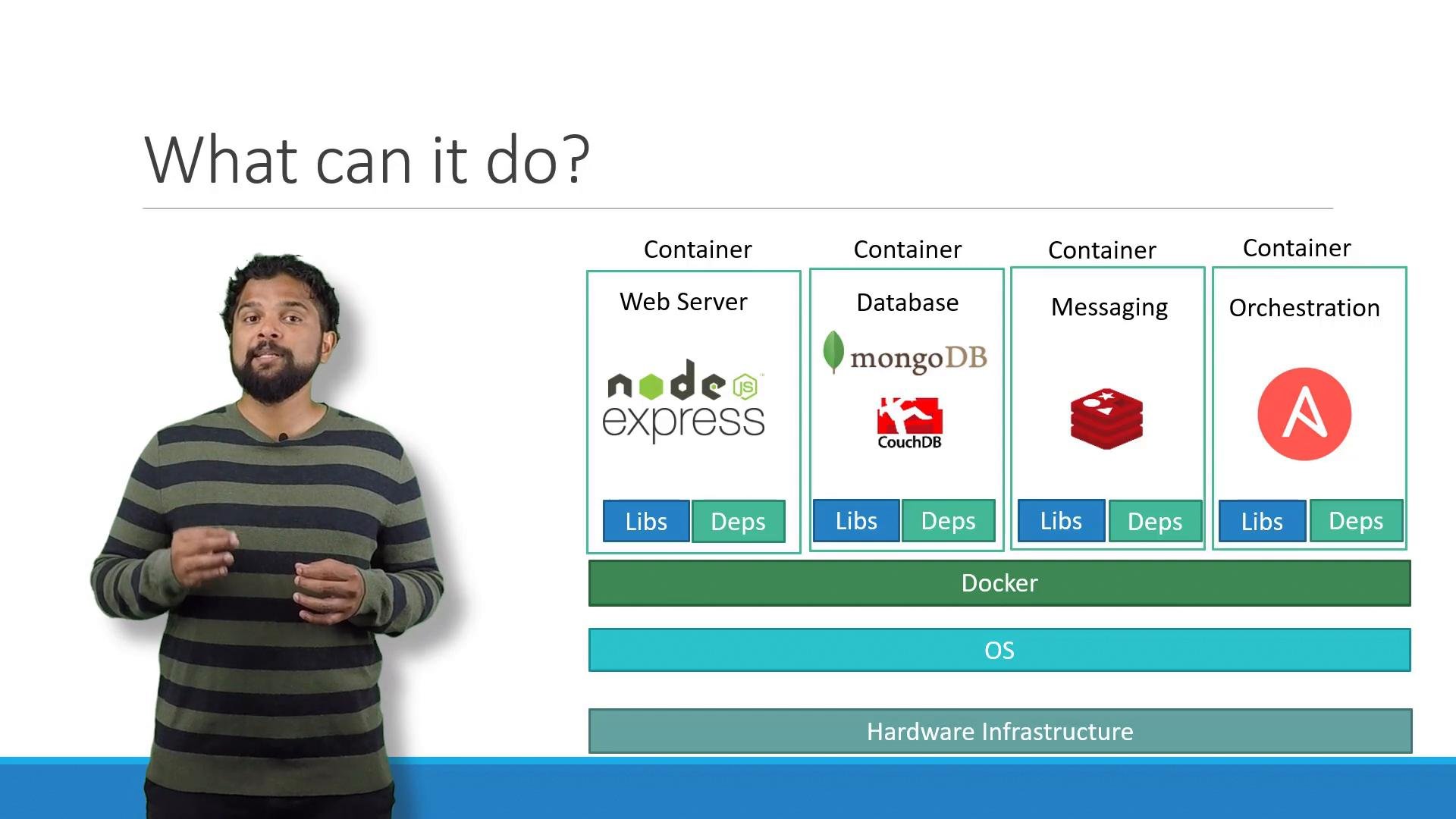 Docker popularized container-based development and shipping. Modern container tooling uses standardized runtimes (containerd, runC) and relies on kernel features such as namespaces and cgroups for isolation and resource control.
## Next steps and learning resources
If you'd like hands-on practice with Docker (commands, Dockerfile authoring, Swarm services and stacks), consider these courses and resources:
* [Docker Training Course for the Absolute Beginner](https://learn.kodekloud.com/user/courses/docker-training-course-for-the-absolute-beginner)
* [Docker - SWARM | SERVICES | STACKS - Hands-on](https://learn.kodekloud.com/user/courses/docker-swarm-services-stacks-hands-on)
* [Docker Documentation](https://docs.docker.com/)
* [Docker Hub](https://hub.docker.com/)
That concludes this Docker overview. Next, we'll build on these container concepts when we explore Kubernetes and container orchestration.
This documentation is built and hosted on [Mintlify](https://mintlify.com), a developer documentation platform.
Docker popularized container-based development and shipping. Modern container tooling uses standardized runtimes (containerd, runC) and relies on kernel features such as namespaces and cgroups for isolation and resource control.
## Next steps and learning resources
If you'd like hands-on practice with Docker (commands, Dockerfile authoring, Swarm services and stacks), consider these courses and resources:
* [Docker Training Course for the Absolute Beginner](https://learn.kodekloud.com/user/courses/docker-training-course-for-the-absolute-beginner)
* [Docker - SWARM | SERVICES | STACKS - Hands-on](https://learn.kodekloud.com/user/courses/docker-swarm-services-stacks-hands-on)
* [Docker Documentation](https://docs.docker.com/)
* [Docker Hub](https://hub.docker.com/)
That concludes this Docker overview. Next, we'll build on these container concepts when we explore Kubernetes and container orchestration.
This documentation is built and hosted on [Mintlify](https://mintlify.com), a developer documentation platform.