> ## Documentation Index
> Fetch the complete documentation index at: https://notes.kodekloud.com/llms.txt
> Use this file to discover all available pages before exploring further.
# Demo Example Voting Application
> Step-by-step OpenShift guide to deploy a multi-tier voting app with Redis, Python front-end, PostgreSQL, Node.js results service, and a Docker-built worker.
Hello — this guide walks through deploying the multi-tier example voting application on an OpenShift cluster. The app is forked from the canonical example voting app on GitHub with a few small changes to add basic authentication between services.
We will deploy the microservices in the correct order so dependencies are available when needed:
1. Redis (required by the voting front-end)
2. Voting front-end (Python)
3. PostgreSQL (results DB) and the results app (Node.js)
4. Worker (processes votes) — built with Docker
Create a new OpenShift project/namespace (this guide uses `voting-application`) and follow the sections below.
Before you begin: ensure you have cluster access and permissions to create projects, import templates, and start builds. You can use the OpenShift web console or the `oc` CLI. For reference, see the [OpenShift documentation](https://docs.openshift.com/).
## Overview of repository and application design
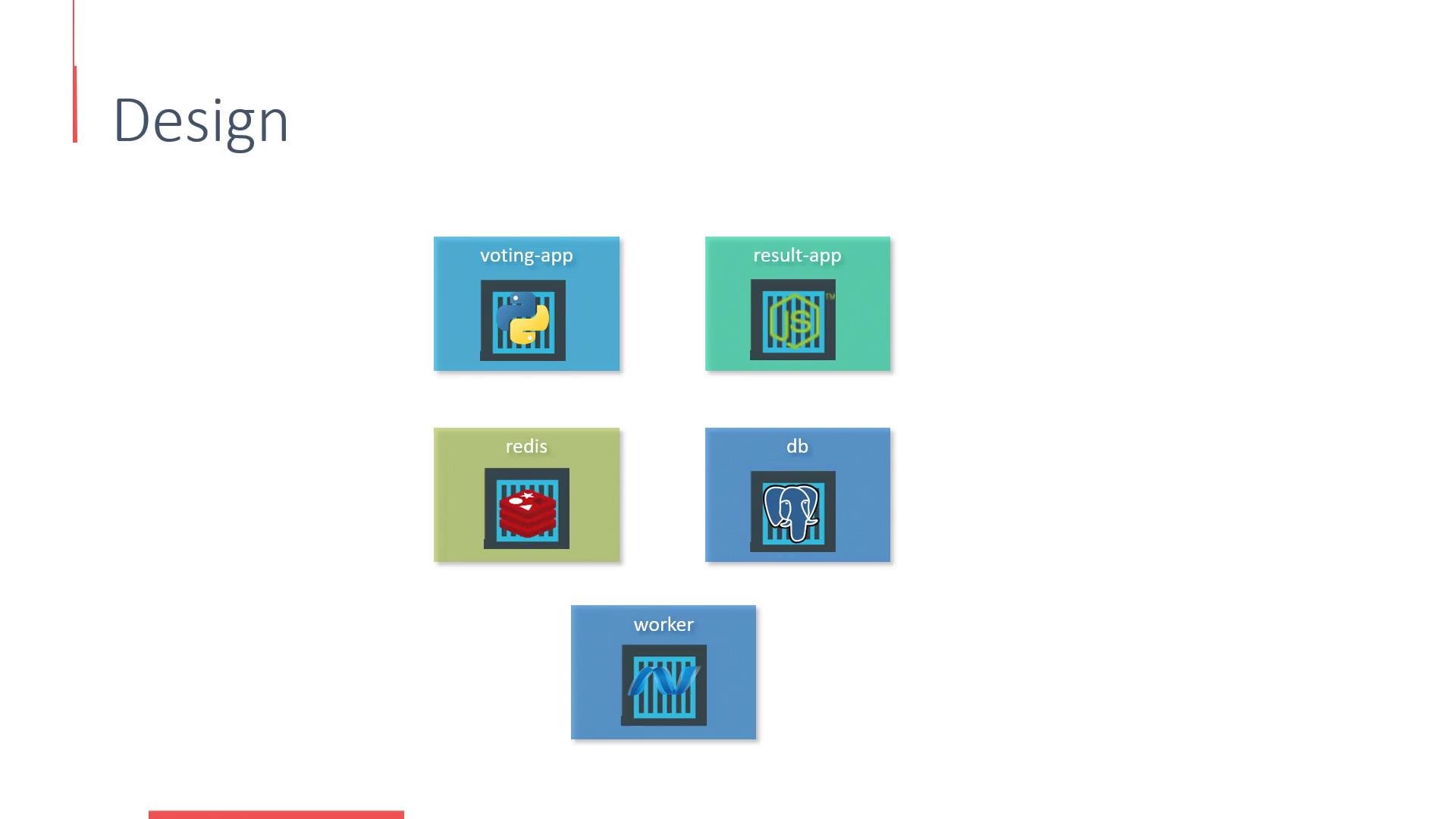
The application source is organized into service-specific context directories in the repository. The primary services:
| Service | Language/Runtime | Context Dir | Default Port |
| - | - | - | - |
| voting front-end | Python (Flask) | `/vote` | 80 (via route) |
| results app | Node.js (Express + socket.io) | `/result` | 4000 (set `PORT=8080` for OpenShift) |
| worker | Java (jar) | `/worker` | N/A (background process) |
| redis | Redis service/template | n/a | 6379 |
| db | PostgreSQL service/template | n/a | 5432 |
Design diagram (microservices and how they interact):
 1. Redis template and adding it to the Catalog
***
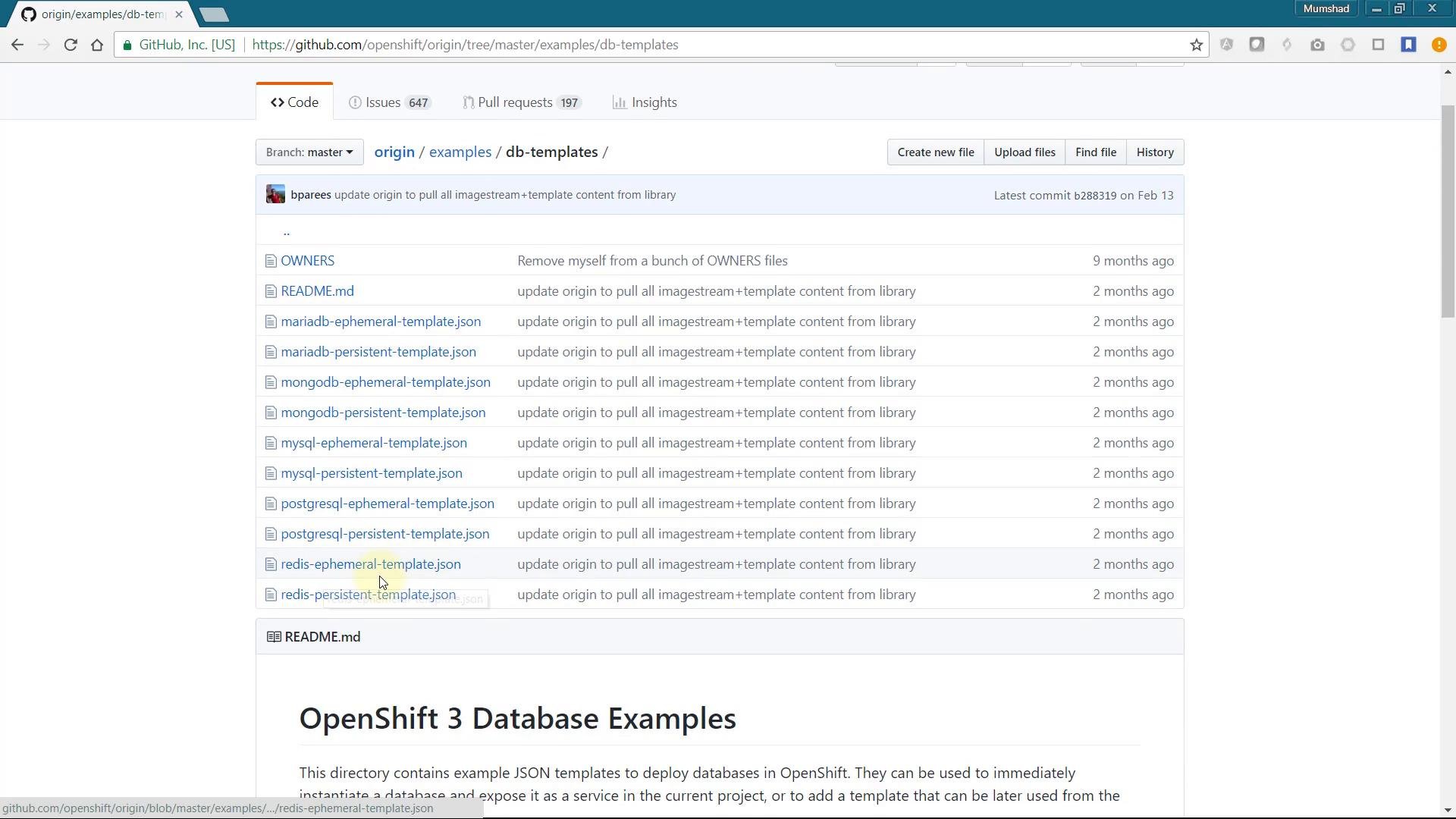
If a required service (like Redis) is not already visible in the Service Catalog, you can import an existing template into your project catalog. The OpenShift Origin examples repository contains database templates, including Redis.
Search the repository for database examples and pick the Redis template — copy the JSON/YAML and import it into the web console using Import YAML/JSON. When creating the template from YAML, choose **Save Template** to add it to your catalog so users can instantiate it on demand.
1. Redis template and adding it to the Catalog
***
If a required service (like Redis) is not already visible in the Service Catalog, you can import an existing template into your project catalog. The OpenShift Origin examples repository contains database templates, including Redis.
Search the repository for database examples and pick the Redis template — copy the JSON/YAML and import it into the web console using Import YAML/JSON. When creating the template from YAML, choose **Save Template** to add it to your catalog so users can instantiate it on demand.
 The Redis template includes parameter generation for a Redis password. Example (trimmed to the Redis password parameter):
```json theme={null}
[
{
"description": "Password for the Redis connection user.",
"displayName": "Redis Connection Password",
"from": "[a-zA-Z0-9]{16}",
"generate": "expression",
"name": "REDIS_PASSWORD",
"required": true
},
{
"description": "Version of Redis image to be used (3.2 or latest).",
"displayName": "Version of Redis Image",
"name": "REDIS_VERSION",
"required": true,
"value": "3.2"
}
]
```
After saving the template and refreshing the Catalog, you should see a Redis catalog item ready to deploy.
2. Deploying Redis from the Catalog
***
Deploy the Redis (Ephemeral) catalog item. Leave defaults, but provide a Redis password — remember this password, you will set the same value in the voting front-end environment variables.
The Redis template includes parameter generation for a Redis password. Example (trimmed to the Redis password parameter):
```json theme={null}
[
{
"description": "Password for the Redis connection user.",
"displayName": "Redis Connection Password",
"from": "[a-zA-Z0-9]{16}",
"generate": "expression",
"name": "REDIS_PASSWORD",
"required": true
},
{
"description": "Version of Redis image to be used (3.2 or latest).",
"displayName": "Version of Redis Image",
"name": "REDIS_VERSION",
"required": true,
"value": "3.2"
}
]
```
After saving the template and refreshing the Catalog, you should see a Redis catalog item ready to deploy.
2. Deploying Redis from the Catalog
***
Deploy the Redis (Ephemeral) catalog item. Leave defaults, but provide a Redis password — remember this password, you will set the same value in the voting front-end environment variables.
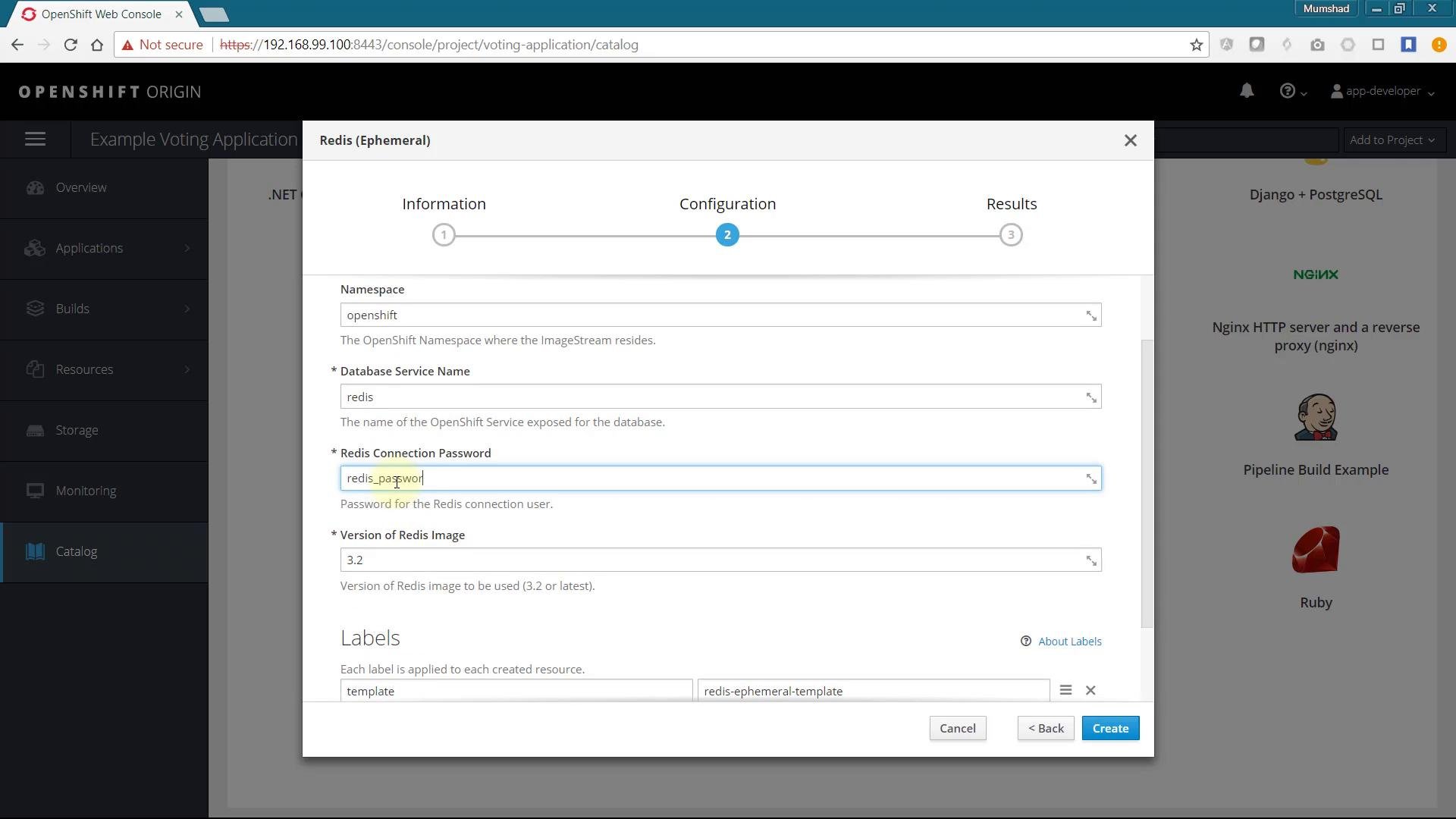 Click **Create** to deploy Redis. The template prints the connection info when creation completes. Example output:
```text theme={null}
The following service(s) have been created in your project: redis.
Password: redis_password
Connection URL: redis://redis:6379/
For more information about using this template, including OpenShift considerations, see https://github.com/sclorg/redis-container/blob/master/3.2.
```
Take note of the service name (commonly `redis`), password, and connection URL — the front-end and worker services will use these values to connect.
3. Deploy the voting front-end (Python)
***
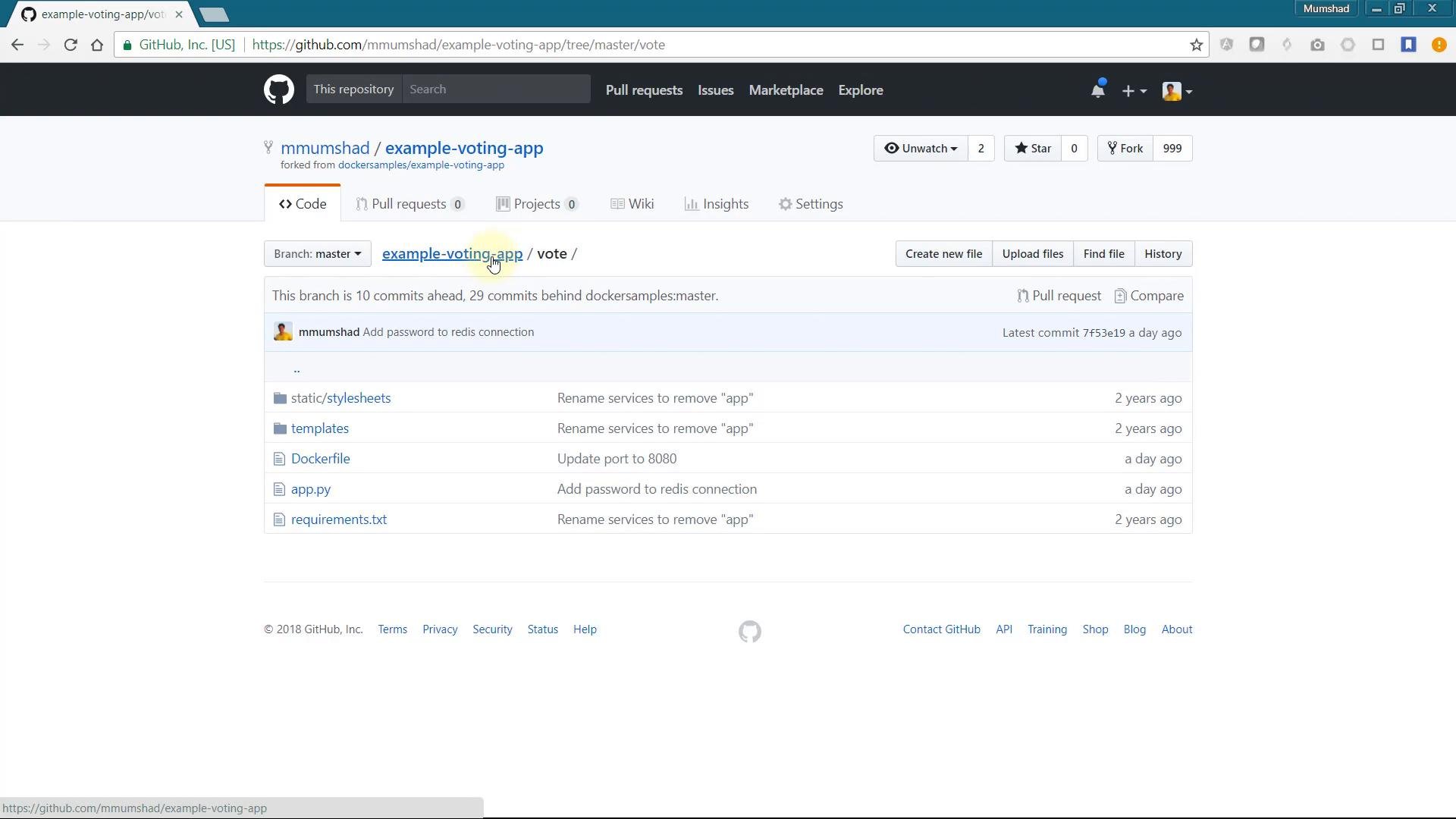
The voting UI lives under the `vote` directory. In the OpenShift web console choose "Add > From Git" (or create an application) and use Advanced Options to set:
* Git repository URL: the example voting app repo
* Context directory: `/vote`
* Application name: e.g. `vote`
OpenShift will create a BuildConfig and DeploymentConfig and start an S2I build for the Python app.
Repository view of the vote app (for reference):
Click **Create** to deploy Redis. The template prints the connection info when creation completes. Example output:
```text theme={null}
The following service(s) have been created in your project: redis.
Password: redis_password
Connection URL: redis://redis:6379/
For more information about using this template, including OpenShift considerations, see https://github.com/sclorg/redis-container/blob/master/3.2.
```
Take note of the service name (commonly `redis`), password, and connection URL — the front-end and worker services will use these values to connect.
3. Deploy the voting front-end (Python)
***
The voting UI lives under the `vote` directory. In the OpenShift web console choose "Add > From Git" (or create an application) and use Advanced Options to set:
* Git repository URL: the example voting app repo
* Context directory: `/vote`
* Application name: e.g. `vote`
OpenShift will create a BuildConfig and DeploymentConfig and start an S2I build for the Python app.
Repository view of the vote app (for reference):
 Monitor the build in the Overview page. Example build push output (truncated):
```text theme={null}
Pushing image 172.30.1.1:5000/voting-application/vote:latest ...
Pushed 0/10 layers, 1% complete
Pushed 3/10 layers, 31% complete
Pushed 6/10 layers, 65% complete
Pushed 9/10 layers, 91% complete
Push successful
```
## Configure the Redis password in the front-end environment
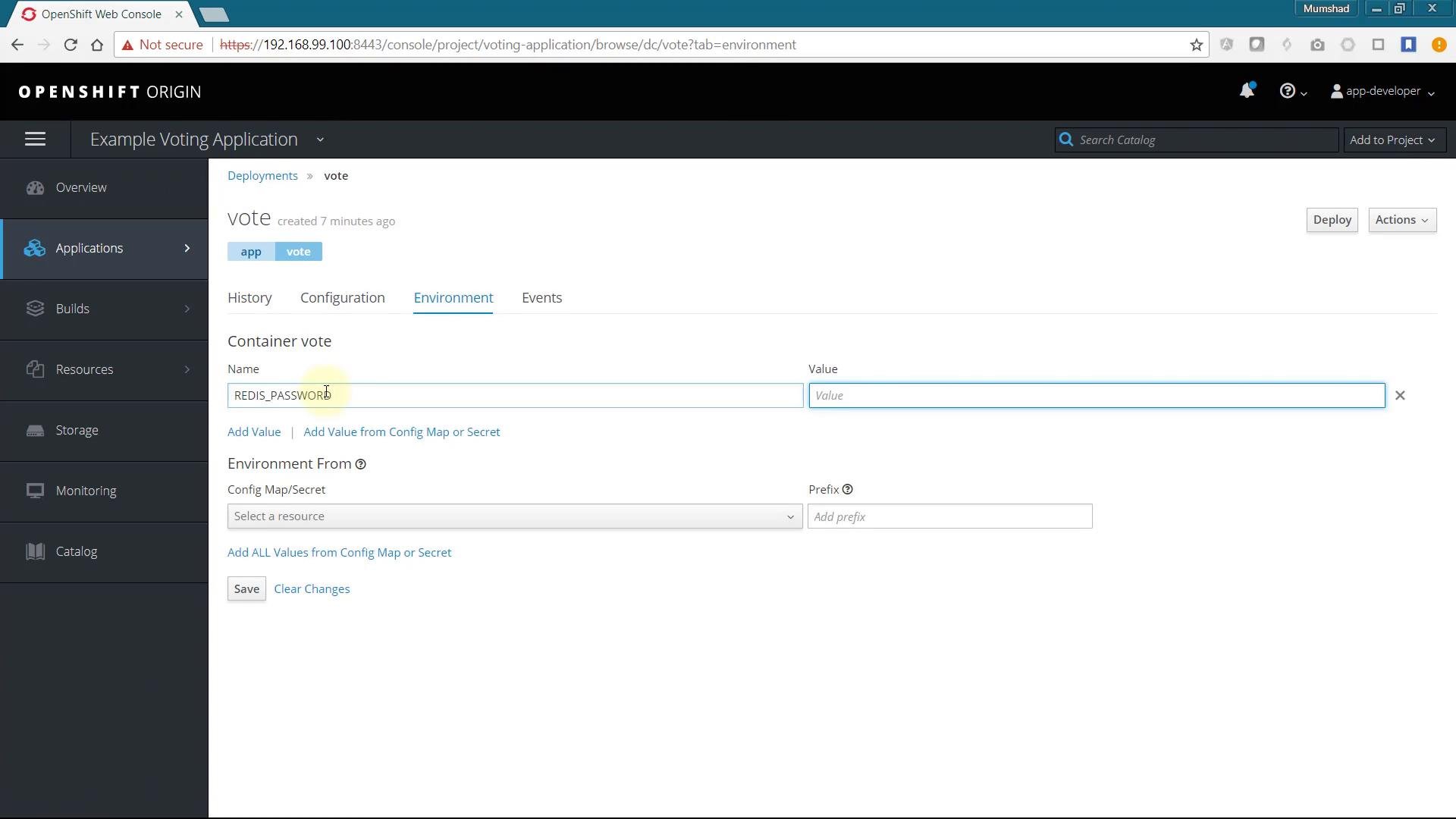
If the voting action fails with an authentication error, the front-end typically lacks the Redis password. The code expects the Redis password in the `REDIS_PASSWORD` environment variable:
```python theme={null}
from flask import Flask, render_template, request, make_response, g
from redis import Redis
import os
import socket
import random
import json
option_a = os.getenv('OPTION_A', "Cats")
option_b = os.getenv('OPTION_B', "Dogs")
redis_password = os.getenv('REDIS_PASSWORD', "")
hostname = socket.gethostname()
app = Flask(__name__)
def get_redis():
if not hasattr(g, 'redis'):
g.redis = Redis(host='redis', db=0, password=redis_password, socket_timeout=5)
return g.redis
@app.route('/', methods=['POST','GET'])
def hello():
voter_id = request.cookies.get('voter_id')
...
```
Add `REDIS_PASSWORD` to the DeploymentConfig/Deployment environment for the `vote` container and set it to the same password used when creating Redis. After updating the environment, redeploy the front-end. Once the environment is set correctly, casting votes should succeed.
Monitor the build in the Overview page. Example build push output (truncated):
```text theme={null}
Pushing image 172.30.1.1:5000/voting-application/vote:latest ...
Pushed 0/10 layers, 1% complete
Pushed 3/10 layers, 31% complete
Pushed 6/10 layers, 65% complete
Pushed 9/10 layers, 91% complete
Push successful
```
## Configure the Redis password in the front-end environment
If the voting action fails with an authentication error, the front-end typically lacks the Redis password. The code expects the Redis password in the `REDIS_PASSWORD` environment variable:
```python theme={null}
from flask import Flask, render_template, request, make_response, g
from redis import Redis
import os
import socket
import random
import json
option_a = os.getenv('OPTION_A', "Cats")
option_b = os.getenv('OPTION_B', "Dogs")
redis_password = os.getenv('REDIS_PASSWORD', "")
hostname = socket.gethostname()
app = Flask(__name__)
def get_redis():
if not hasattr(g, 'redis'):
g.redis = Redis(host='redis', db=0, password=redis_password, socket_timeout=5)
return g.redis
@app.route('/', methods=['POST','GET'])
def hello():
voter_id = request.cookies.get('voter_id')
...
```
Add `REDIS_PASSWORD` to the DeploymentConfig/Deployment environment for the `vote` container and set it to the same password used when creating Redis. After updating the environment, redeploy the front-end. Once the environment is set correctly, casting votes should succeed.
 Common Redis connection error (example)
```text theme={null}
Traceback (most recent call last):
File "/opt/app-root/lib/python3.6/site-packages/flask/app.py", line 2309, in __call__
return self.wsgi_app(environ, start_response)
...
File "/opt/app-root/src/app.py", line 32, in hello
redis.rpush('votes', data)
File "/opt/app-root/lib/python3.6/site-packages/redis/client.py", line 1388, in rpush
return self.execute_command('RPUSH', name, *values)
File "/opt/app-root/lib/python3.6/site-packages/redis/client.py", line 667, in execute_command
connection.send_command(*args)
redis.exceptions.ResponseError: invalid password
```
4. Deploy PostgreSQL for the results app
***
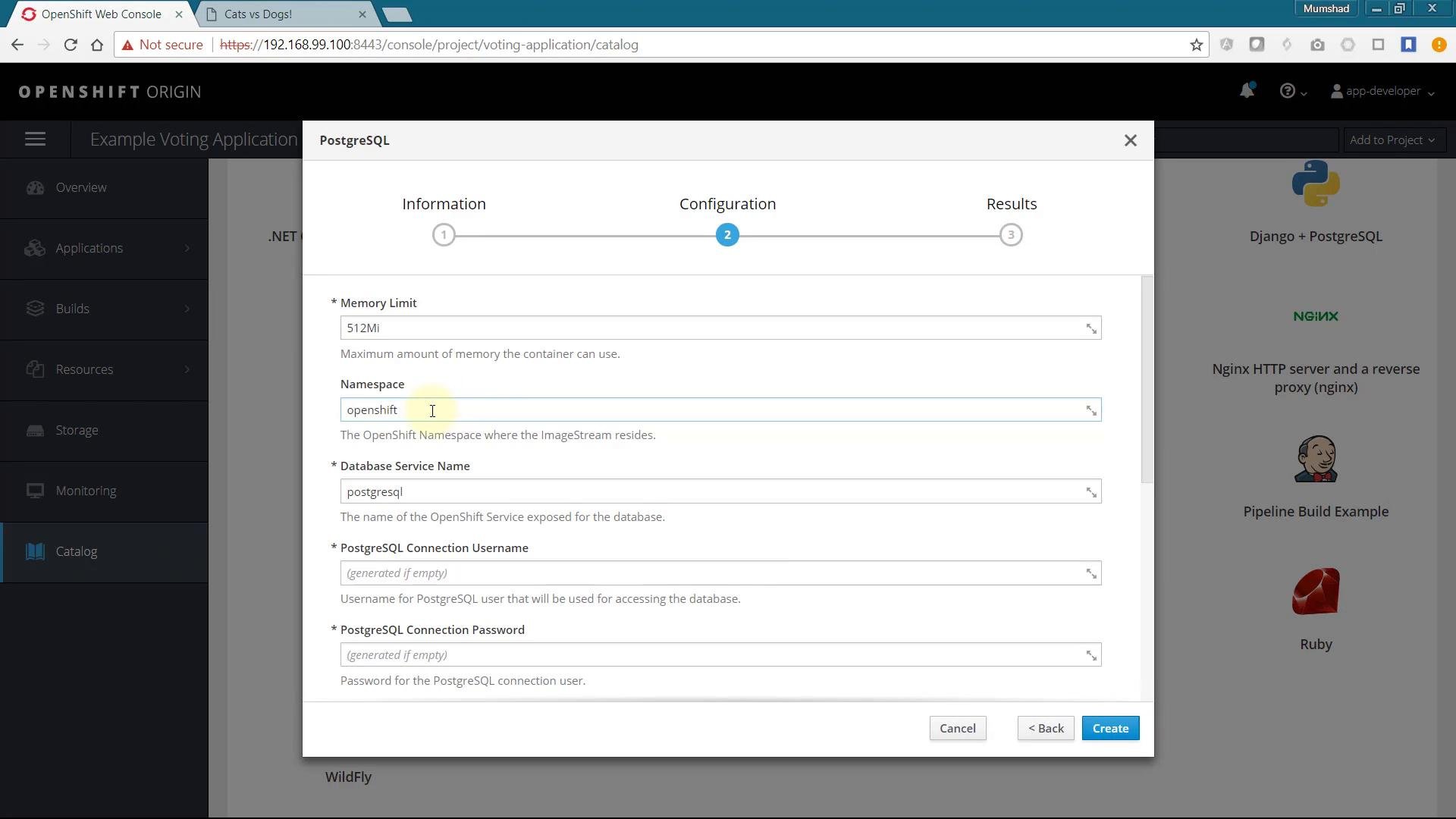
The results application requires PostgreSQL. The DB template is normally available in the Catalog; deploy it and make sure the resulting service name matches what the `result` app expects (commonly `db`).
Provide the database name, username, and password when deploying. For production use, store credentials in Kubernetes/OpenShift `Secrets` and inject them into pods; for this demo environment variables are used for simplicity.
For production deployments, use Secrets and ConfigMaps to manage credentials and configuration. Avoid placing plaintext credentials directly in Deployment/Pod environment variables.
Common Redis connection error (example)
```text theme={null}
Traceback (most recent call last):
File "/opt/app-root/lib/python3.6/site-packages/flask/app.py", line 2309, in __call__
return self.wsgi_app(environ, start_response)
...
File "/opt/app-root/src/app.py", line 32, in hello
redis.rpush('votes', data)
File "/opt/app-root/lib/python3.6/site-packages/redis/client.py", line 1388, in rpush
return self.execute_command('RPUSH', name, *values)
File "/opt/app-root/lib/python3.6/site-packages/redis/client.py", line 667, in execute_command
connection.send_command(*args)
redis.exceptions.ResponseError: invalid password
```
4. Deploy PostgreSQL for the results app
***
The results application requires PostgreSQL. The DB template is normally available in the Catalog; deploy it and make sure the resulting service name matches what the `result` app expects (commonly `db`).
Provide the database name, username, and password when deploying. For production use, store credentials in Kubernetes/OpenShift `Secrets` and inject them into pods; for this demo environment variables are used for simplicity.
For production deployments, use Secrets and ConfigMaps to manage credentials and configuration. Avoid placing plaintext credentials directly in Deployment/Pod environment variables.
 5. Deploy the results application (Node.js)
***
The results app is implemented in Node.js and lives under the `/result` context directory. Add a Node.js application via Advanced Options:
* Git repository: example voting repo
* Context directory: `/result`
* Application name: e.g. `result`
The app listens on port 4000 by default (`PORT` environment variable can override it). The socket and port configuration in the app:
```javascript theme={null}
var express = require('express'),
async = require('async'),
pg = require("pg"),
cookieParser = require('cookie-parser'),
bodyParser = require('body-parser'),
methodOverride = require('method-override'),
app = express(),
server = require('http').Server(app),
io = require('socket.io')(server);
io.set('transports', ['polling']);
var port = process.env.PORT || 4000;
io.sockets.on('connection', function (socket) {
socket.emit('message', { text : 'Welcome!' });
socket.on('subscribe', function (data) {
socket.join(data.channel);
});
});
```
Set an environment variable `PORT=8080` so OpenShift routes the app on port 8080 inside the container. Create and monitor the build/deployment in the Overview page and open the route to view real-time results.
If votes appear missing after you submit them (for example, counts remain 50-50), that indicates the worker is not processing queued votes.
6. Deploy the worker using a Docker build
***
The worker consumes the votes queue from Redis and persists counts into PostgreSQL. For the worker we use a Docker build strategy (Dockerfile-based) rather than S2I.
Steps:
1. Create an app in the console using the `/worker` context directory (this generates a BuildConfig for S2I by default).
2. Edit the BuildConfig YAML and change:
* `strategy` from `Source` to `Docker`
* Remove the `from` (builder image) field so the build uses the Dockerfile in the repo
3. Save the BuildConfig and trigger a build (`oc start-build worker -n voting-application`).
Example BuildConfig summary before changing (informational):
```text theme={null}
Build Strategy: Source
Source Repo: https://github.com/mmumshad/example-voting-app.git
Source Ref: master
Source Context Dir: /worker
Builder Image: openshift/httpd:2.4
Output To: voting-application/worker:latest
Run Policy: Serial
Manual (CLI): oc start-build worker -n voting-application
```
After switching to Docker and starting the build, the Docker build output will push the built image to the internal registry:
```text theme={null}
Step 9 : CMD java -jar target/worker-jar-with-dependencies.jar
---> Using cache
Successfully built a818f483a745
Pushing image 172.30.1.1:5000/voting-application/worker:latest ...
Pushed 0/10 layers, 9% complete
Pushed 3/10 layers, 33% complete
Pushed 6/10 layers, 65% complete
Pushed 9/10 layers, 91% complete
Push successful
```
After deployment, check the worker logs to confirm it's connecting to Redis and the DB and processing votes:
```text theme={null}
Connected to redis
Connected to db
Watching vote queue
Processing vote for 'a' by 'a44ff790cd088d2'
Processing vote for 'b' by 'a44ff790cd088d2'
Processing vote for 'a' by 'a44ff790cd088d2'
Processing vote for 'b' by 'a44ff790cd088d2'
```
When the worker is running, votes pushed to Redis by the front-end are consumed and persisted to PostgreSQL, and the results app will update in real time.
## Application design recap
The end-to-end system includes:
* voting front-end (Python) — pushes votes into Redis
* redis — ephemeral queue for votes
* worker (Docker-built) — consumes Redis queue and writes to PostgreSQL
* db (PostgreSQL) — persistent store for results
* result-app (Node.js) — reads results from PostgreSQL and broadcasts via socket.io
## Troubleshooting tips
* Invalid password errors in Redis logs indicate mismatched `REDIS_PASSWORD` values between the Redis instance and the front-end/worker environment.
* If results are not updating, confirm the worker pod is running and check its logs for connectivity errors to Redis or PostgreSQL.
* For production, store secrets in `Secrets` and use restricted RBAC rules.
## Conclusion
You have deployed a multi-tier voting application on OpenShift: imported templates into the Catalog, deployed Redis, added the Python voting front-end, provisioned PostgreSQL and the Node.js results app, and built/deployed a Docker-based worker. You also learned how to add environment variables, switch build strategies (S2I -> Docker), and validate connections via logs.
## Further reading and references
* OpenShift Documentation: [https://docs.openshift.com/](https://docs.openshift.com/)
* OpenShift Origin examples (db templates): [https://github.com/openshift/origin/tree/master/examples/db-templates](https://github.com/openshift/origin/tree/master/examples/db-templates)
* Redis container examples: [https://github.com/sclorg/redis-container](https://github.com/sclorg/redis-container)
* Kubernetes Concepts: [https://kubernetes.io/docs/concepts/](https://kubernetes.io/docs/concepts/)
This documentation is built and hosted on [Mintlify](https://mintlify.com), a developer documentation platform.
5. Deploy the results application (Node.js)
***
The results app is implemented in Node.js and lives under the `/result` context directory. Add a Node.js application via Advanced Options:
* Git repository: example voting repo
* Context directory: `/result`
* Application name: e.g. `result`
The app listens on port 4000 by default (`PORT` environment variable can override it). The socket and port configuration in the app:
```javascript theme={null}
var express = require('express'),
async = require('async'),
pg = require("pg"),
cookieParser = require('cookie-parser'),
bodyParser = require('body-parser'),
methodOverride = require('method-override'),
app = express(),
server = require('http').Server(app),
io = require('socket.io')(server);
io.set('transports', ['polling']);
var port = process.env.PORT || 4000;
io.sockets.on('connection', function (socket) {
socket.emit('message', { text : 'Welcome!' });
socket.on('subscribe', function (data) {
socket.join(data.channel);
});
});
```
Set an environment variable `PORT=8080` so OpenShift routes the app on port 8080 inside the container. Create and monitor the build/deployment in the Overview page and open the route to view real-time results.
If votes appear missing after you submit them (for example, counts remain 50-50), that indicates the worker is not processing queued votes.
6. Deploy the worker using a Docker build
***
The worker consumes the votes queue from Redis and persists counts into PostgreSQL. For the worker we use a Docker build strategy (Dockerfile-based) rather than S2I.
Steps:
1. Create an app in the console using the `/worker` context directory (this generates a BuildConfig for S2I by default).
2. Edit the BuildConfig YAML and change:
* `strategy` from `Source` to `Docker`
* Remove the `from` (builder image) field so the build uses the Dockerfile in the repo
3. Save the BuildConfig and trigger a build (`oc start-build worker -n voting-application`).
Example BuildConfig summary before changing (informational):
```text theme={null}
Build Strategy: Source
Source Repo: https://github.com/mmumshad/example-voting-app.git
Source Ref: master
Source Context Dir: /worker
Builder Image: openshift/httpd:2.4
Output To: voting-application/worker:latest
Run Policy: Serial
Manual (CLI): oc start-build worker -n voting-application
```
After switching to Docker and starting the build, the Docker build output will push the built image to the internal registry:
```text theme={null}
Step 9 : CMD java -jar target/worker-jar-with-dependencies.jar
---> Using cache
Successfully built a818f483a745
Pushing image 172.30.1.1:5000/voting-application/worker:latest ...
Pushed 0/10 layers, 9% complete
Pushed 3/10 layers, 33% complete
Pushed 6/10 layers, 65% complete
Pushed 9/10 layers, 91% complete
Push successful
```
After deployment, check the worker logs to confirm it's connecting to Redis and the DB and processing votes:
```text theme={null}
Connected to redis
Connected to db
Watching vote queue
Processing vote for 'a' by 'a44ff790cd088d2'
Processing vote for 'b' by 'a44ff790cd088d2'
Processing vote for 'a' by 'a44ff790cd088d2'
Processing vote for 'b' by 'a44ff790cd088d2'
```
When the worker is running, votes pushed to Redis by the front-end are consumed and persisted to PostgreSQL, and the results app will update in real time.
## Application design recap
The end-to-end system includes:
* voting front-end (Python) — pushes votes into Redis
* redis — ephemeral queue for votes
* worker (Docker-built) — consumes Redis queue and writes to PostgreSQL
* db (PostgreSQL) — persistent store for results
* result-app (Node.js) — reads results from PostgreSQL and broadcasts via socket.io
## Troubleshooting tips
* Invalid password errors in Redis logs indicate mismatched `REDIS_PASSWORD` values between the Redis instance and the front-end/worker environment.
* If results are not updating, confirm the worker pod is running and check its logs for connectivity errors to Redis or PostgreSQL.
* For production, store secrets in `Secrets` and use restricted RBAC rules.
## Conclusion
You have deployed a multi-tier voting application on OpenShift: imported templates into the Catalog, deployed Redis, added the Python voting front-end, provisioned PostgreSQL and the Node.js results app, and built/deployed a Docker-based worker. You also learned how to add environment variables, switch build strategies (S2I -> Docker), and validate connections via logs.
## Further reading and references
* OpenShift Documentation: [https://docs.openshift.com/](https://docs.openshift.com/)
* OpenShift Origin examples (db templates): [https://github.com/openshift/origin/tree/master/examples/db-templates](https://github.com/openshift/origin/tree/master/examples/db-templates)
* Redis container examples: [https://github.com/sclorg/redis-container](https://github.com/sclorg/redis-container)
* Kubernetes Concepts: [https://kubernetes.io/docs/concepts/](https://kubernetes.io/docs/concepts/)
This documentation is built and hosted on [Mintlify](https://mintlify.com), a developer documentation platform.