> ## Documentation Index
> Fetch the complete documentation index at: https://notes.kodekloud.com/llms.txt
> Use this file to discover all available pages before exploring further.
# Demo Config Maps
> This article explores using ConfigMaps in Kubernetes Deployments, covering definitions, integration, troubleshooting, and resolution through command-line and UI feedback.
In this lesson, we will explore the structure and implementation of a ConfigMap using a sample CartsDB Deployment. The walkthrough includes definitions, integration steps, troubleshooting, and resolution using command-line operations and UI feedback from the OpenShift console.
## ConfigMap Definition
Begin by reviewing the following ConfigMap definition. In this example, a ConfigMap named `cartsdb-config` is created, containing key-value pairs that specify configuration values for our database connection:
```yaml theme={null}
apiVersion: v1
kind: ConfigMap
metadata:
name: cartsdb-config
data:
MONGODB_USER: "sock-user"
MONGODB_DATABASE: "data"
```
The `data` section holds simple key-value pairs. Here, `MONGODB_USER` is set to `"sock-user"` and `MONGODB_DATABASE` is set to `"data"`. This ConfigMap will later be referenced in our Deployment to provide environment variables.
## Integrating the ConfigMap in a Deployment
Consider the standard Deployment configuration for CartsDB. The most crucial part is how the ConfigMap values are injected into container environment variables using the `valueFrom` directive with `configMapKeyRef`.
First, here is the base Deployment configuration:
```yaml theme={null}
apiVersion: apps/v1
kind: Deployment
metadata:
name: carts-db
labels:
name: carts-db
spec:
replicas: 1
selector:
matchLabels:
name: carts-db
template:
metadata:
labels:
name: carts-db
spec:
containers:
- name: carts-db
image: centos/mongodb-34-centos7
ports:
```
Now, in the container specification, the environment variables are populated as shown below:
```yaml theme={null}
spec:
containers:
- name: carts-db
image: centos/mongodb-34-centos7
ports:
- name: mongo
containerPort: 27017
env:
- name: MONGODB_USER
valueFrom:
configMapKeyRef:
name: cartsdb-config
key: MONGODB_USER
- name: MONGODB_PASSWORD
value: password
- name: MONGODB_DATABASE
valueFrom:
configMapKeyRef:
name: cartsdb-config
key: MONGODB_DATABASE
- name: MONGODB_ADMIN_PASSWORD
valueFrom:
configMapKeyRef:
name: cartsdb-config
key: MONGODB_ADMIN_PASSWORD
```
The environment variable `MONGODB_ADMIN_PASSWORD` references a key that is not defined in the provided ConfigMap. Ensure that this key is added to the ConfigMap, or consider using a Secret to handle sensitive data and prevent runtime errors.
Before deploying the Deployment, confirm that the ConfigMap is successfully applied in the cluster.
## Deploying the ConfigMap and Deployment
To simulate deploying without the necessary ConfigMap, apply the following command to create the ConfigMap:
```bash theme={null}
oc apply -f carts-config-map.yaml
```
Afterwards, the Deployment can be defined similarly as follows:
```yaml theme={null}
apiVersion: apps/v1
kind: Deployment
metadata:
name: carts-db
labels:
name: carts-db
spec:
replicas: 1
selector:
matchLabels:
name: carts-db
template:
metadata:
labels:
name: carts-db
spec:
containers:
- name: carts-db
image: my-carts-db-image
ports:
- containerPort: 5432
```
Apply the Deployment using:
```bash theme={null}
oc apply -f .yaml
```
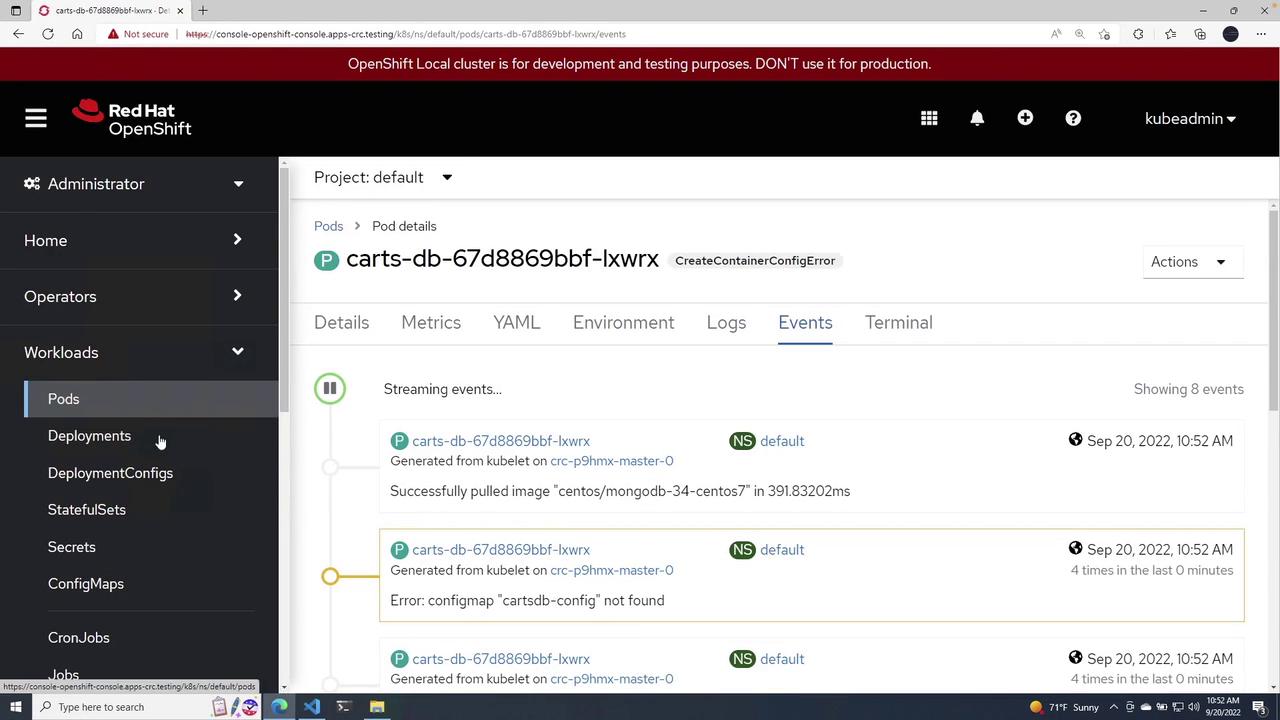
After deploying, refresh the cluster view. You might observe that although the Deployment is running, the Pod displays a status of `CreateContainerConfigError`. Investigating the events will reveal an error indicating a missing ConfigMap, such as "ConfigMap carts-db-config-9 not found."
## Troubleshooting and Resolution
If you encounter errors related to the ConfigMap, inspect your Deployment file in VS Code and review the OpenShift console for additional error details. An example screenshot from the OpenShift console illustrating the error is shown below:
To resolve the misconfiguration, delete the problematic Deployment using:
```bash theme={null}
oc delete -f cartsconfigmap.yml
```
The console output may include warnings such as:
| Warning Message | Details |
| -------------------------- | ----------------------------------------------------------------------------------------------------------- |
| Allow Privilege Escalation | container "carts-db" must set securityContext.allowPrivilegeEscalation=false |
| Unrestricted Capabilities | container "carts-db" must set securityContext.capabilities.drop=\["ALL"] |
| Non-root User Requirement | pod or container "carts-db" must set securityContext.runAsNonRoot=true |
| Seccomp Profile Setting | pod or container "carts-db" must set securityContext.seccompProfile.type to "RuntimeDefault" or "Localhost" |
An example output after deletion:
```bash theme={null}
PS C:\Users\mike\Desktop> oc delete -f .\cartsconfigmap.yml
deployment.apps "carts-db" deleted
```
After correcting configuration issues, redeploy the ConfigMap:
```bash theme={null}
oc apply -f carts-config-map.yaml
```
The Deployment will then be recreated successfully, and a Pod will start running as it finds the required ConfigMap.
## Verifying the Configuration in the Pod
After the Pod is running, inspect its YAML to confirm that the ConfigMap references are present. An extract of the Pod's configuration might look like:
```yaml theme={null}
[{
"name": "openshift-sdn",
"interface": "eth0",
"ips": [
"10.217.0.183"
],
"default": true,
"dns": {}
}]
resourceVersion: "83802"
name: carts-db-67d8869bbf-nk974
id: ce589273-9e0a-4639-8866-e277bca35641
```
In this snippet, along with other metadata, you can verify that the ConfigMap values have been successfully injected into the Pod environment.
## Conclusion
This demonstration showcased how to use a ConfigMap to inject environment variables into a Kubernetes Deployment. For further reading and advanced deployment techniques, check out the following resources:
* [Kubernetes Documentation](https://kubernetes.io/docs/)
* [OpenShift Documentation](https://docs.openshift.com/)
By confirming that the ConfigMap is properly deployed before applying the Deployment, you can avoid runtime configuration errors and ensure a smooth deployment process.