OpenTofu: A Beginners Guide to a Terraform Fork Including Migration From Terraform
Getting Started with OpenTofu
Installing OpenTofu and HashiCorp Configuraton Language HCL Basics
In this lesson, you’ll learn how to install OpenTofu—the community-driven fork of Terraform—and get up to speed with writing configuration files in HashiCorp Configuration Language (HCL). We’ll cover:
- Installing the
tofuCLI - Writing HCL
.tffiles - Examples for local and AWS resources
- A step-by-step OpenTofu workflow
Table of Contents
- Installing OpenTofu
- HCL Configuration Files
- AWS Resource Examples
- What Is a Resource?
- OpenTofu Workflow
- Viewing Resource Arguments
- Links and References
Installing OpenTofu
OpenTofu ships as a single binary. Download the appropriate archive for your OS, unpack it, and move tofu into your system PATH:
wget https://github.com/opentofu/opentofu/releases/download/v1.6.1/tofu_1.6.1_linux_amd64.zip
unzip tofu_1.6.1_linux_amd64.zip
mv tofu /usr/local/bin/
tofu version
Expected output:
OpenTofu v1.6.1
on linux_amd64
You’re now ready to write HCL configuration files and provision resources.
HCL Configuration Files
HCL .tf files consist of blocks (grouping of settings) and arguments (key-value pairs) that define the desired state of your infrastructure.
Example: Managing Local Files
Create local.tf to manage a simple text file:
resource "local_file" "pet" {
  filename = "/root/pets.txt"
  content  = "We love pets!"
}
resource: Block type"local_file": Providerlocal, resourcefile"pet": Logical name- Inside
{}: Arguments likefilenameandcontent
AWS Resource Examples
HCL syntax stays consistent across providers. Here are two common AWS examples:
| Resource Type | HCL Snippet | Description |
|---|---|---|
| EC2 Instance | resource "aws_instance" "web" { ... } | Launches a virtual server |
| S3 Bucket | resource "aws_s3_bucket" "data" { ... } | Creates object storage |
EC2 Instance
resource "aws_instance" "web" {
  ami           = "ami-0c2f25c1f66a1ff4d"
  instance_type = "t2.micro"
}
S3 Bucket
resource "aws_s3_bucket" "data" {
  bucket = "webserver-bucket-org-2207"
  acl    = "private"
}
What Is a Resource?
A resource is any object OpenTofu manages—either locally or in the cloud. Examples include:
| Scope | Examples |
|---|---|
| Local | files, directories |
| AWS | EC2 instances, S3 buckets, IAM users, Lambda |
| GCP | Compute Engine instances, App Engine applications |
| Azure | SQL Databases, Azure Active Directory resources |
OpenTofu Workflow
Provisioning with OpenTofu follows four main steps:
- Write your HCL configuration files.
- Initialize with
tofu init. - Review changes using
tofu plan. - Apply changes via
tofu apply.
1. Initialize the Directory
tofu init
Output:
Initializing the backend...

Initializing provider plugins...
- Finding latest version of hashicorp/local...
- Installing hashicorp/local v2.4.1...
- Installed hashicorp/local v2.4.1 (signed, key ID 0C0AF313E5FD9F80)

Providers are signed by their developers.
If you'd like to know more about provider signing, see:
  https://opentofu.org/docs/cli/plugins/signing/

A lock file (.terraform.lock.hcl) has been created. Commit it to version control.
OpenTofu has been successfully initialized!
Note
The generated lock file (.terraform.lock.hcl) ensures repeatable installs of provider versions.
2. Preview the Execution Plan
tofu plan
+ resource "local_file" "pet" {
    + filename = "/root/pets.txt"
    + content  = "We love pets!"
}
Plan: 1 to add, 0 to change, 0 to destroy.
3. Apply the Changes
tofu apply
OpenTofu will perform the following actions:
  + resource "local_file" "pet" {
      + content              = "We love pets!"
      + filename             = "/root/pets.txt"
      + id                   = (known after apply)
    }

Plan: 1 to add, 0 to change, 0 to destroy.
Enter a value: yes
local_file.pet: Creating...
local_file.pet: Creation complete after 0s [id=cba595b7d9f94ba…]
Apply complete! Resources: 1 added, 0 changed, 0 destroyed.
Warning
Using -auto-approve skips the confirmation prompt. Always review your plan before auto-approving:
tofu apply -auto-approve
4. Verify and Inspect
cat /root/pets.txt
tofu show local_file.pet
# (Displays state details)
Viewing Resource Arguments
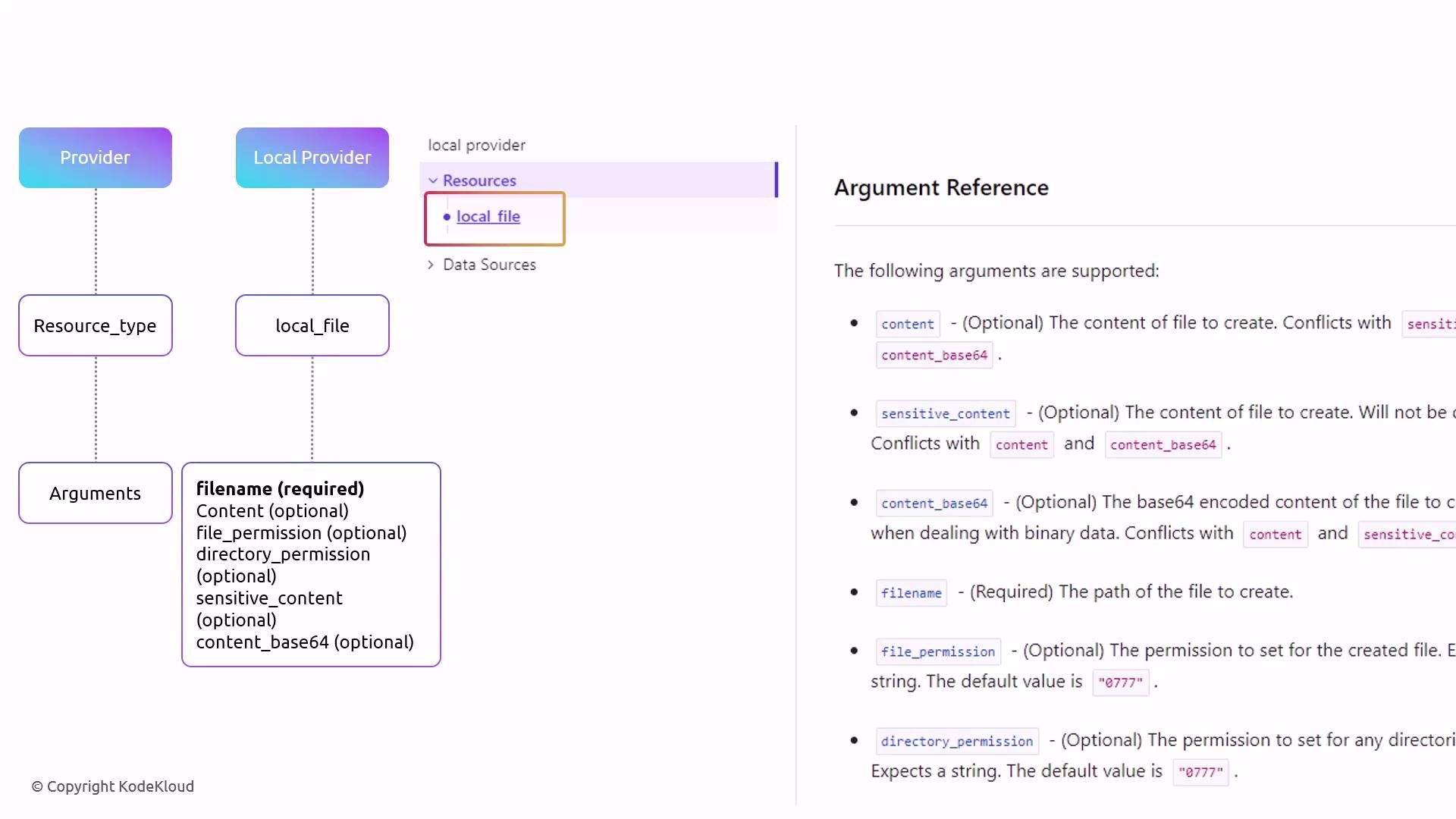
Each resource has required and optional arguments. Consult the provider’s official docs to discover available fields. For example, the local provider’s local_file resource lists filename as required, with optional settings like directory_permission.
That’s it for this lesson! Next, we’ll dive into updating and destroying resources with OpenTofu.
Links and References
- OpenTofu CLI Documentation
- HashiCorp Configuration Language (HCL) Spec
- Registry: hashicorp/local
- AWS Provider Docs
Watch Video
Watch video content