> ## Documentation Index
> Fetch the complete documentation index at: https://notes.kodekloud.com/llms.txt
> Use this file to discover all available pages before exploring further.
# Dynamic Blocks and Splat Expressions
> This guide explores streamlining Terraform configurations in OpenTofu using dynamic blocks and splat expressions for efficient resource management.
In this guide, we’ll explore how to streamline repetitive Terraform configurations in OpenTofu using **dynamic blocks** and **splat expressions**. You’ll learn to replace verbose nested blocks with a DRY, scalable approach, and extract attributes efficiently from generated resources.
## Looping with `count` and `for_each`
Traditionally, you can create multiple resources by using the `count` or `for_each` arguments:
```hcl theme={null}
resource "aws_instance" "backend" {
ami = var.ami
instance_type = var.instance_type
count = length(var.backend_servers)
tags = {
Name = var.backend_servers[count.index]
}
}
variable "ami" {
default = "ami-06178cf087598769c"
}
variable "instance_type" {
default = "m5.large"
}
variable "backend_servers" {
type = list(string)
default = ["server1", "server2"]
}
```
Here, two EC2 instances (`server1` and `server2`) are instantiated by leveraging `count`.
***
## Building a VPC, Subnet, and Security Group
Let’s set up:
1. A new VPC
2. A private subnet
3. A security group allowing SSH (port 22) and HTTP (port 8080)
A VPC provides an isolated network (`10.0.0.0/16`), and the subnet uses `10.0.2.0/24`. The security group acts as a virtual firewall.
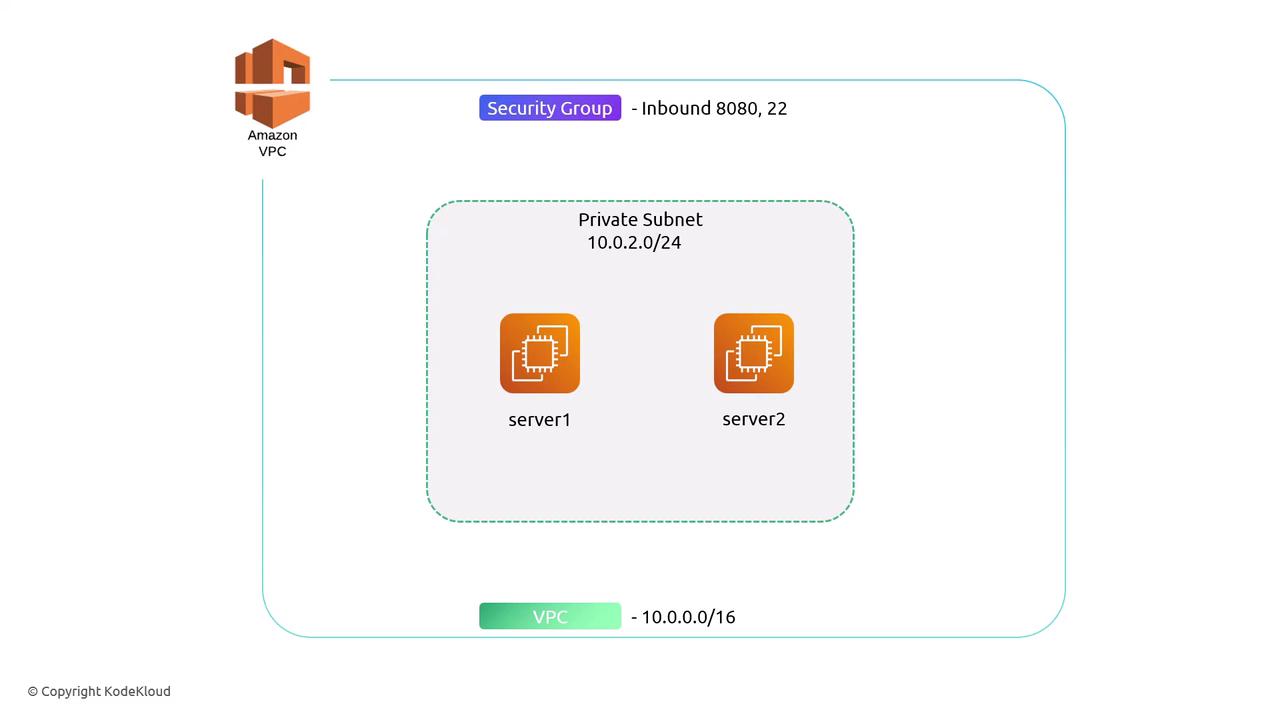
First, declare the VPC and subnet:
```hcl theme={null}
resource "aws_vpc" "backend_vpc" {
cidr_block = "10.0.0.0/16"
tags = {
Name = "backend-vpc"
}
}
resource "aws_subnet" "private_subnet" {
vpc_id = aws_vpc.backend_vpc.id
cidr_block = "10.0.2.0/24"
tags = {
Name = "private-subnet"
}
}
```
Next, define a security group with two hard-coded `ingress` blocks:
```hcl theme={null}
resource "aws_security_group" "backend_sg" {
name = "backend-sg"
vpc_id = aws_vpc.backend_vpc.id
ingress {
from_port = 22
to_port = 22
protocol = "tcp"
cidr_blocks = ["0.0.0.0/0"]
}
ingress {
from_port = 8080
to_port = 8080
protocol = "tcp"
cidr_blocks = ["0.0.0.0/0"]
}
}
```
Adding more ports would require additional nested `ingress` blocks, quickly becoming repetitive.
***
## Simplifying with Dynamic Blocks
With a **dynamic block**, you can loop over a list of ports and generate as many `ingress` entries as needed.
Declare an input variable for ports:
```hcl theme={null}
variable "ingress_ports" {
type = list(number)
default = [22, 8080]
}
```
Replace the static blocks with one dynamic block:
```hcl theme={null}
resource "aws_security_group" "backend_sg" {
name = "backend-sg"
vpc_id = aws_vpc.backend_vpc.id
dynamic "ingress" {
for_each = var.ingress_ports
content {
from_port = ingress.value
to_port = ingress.value
protocol = "tcp"
cidr_blocks = ["0.0.0.0/0"]
}
}
}
```
You can rename the default iterator (`ingress`) to anything meaningful.\
Example:
```hcl theme={null}
dynamic "ingress" {
iterator = port
for_each = var.ingress_ports
content {
from_port = port.value
to_port = port.value
protocol = "tcp"
cidr_blocks = ["0.0.0.0/0"]
}
}
```
## Splat Expressions
After generating multiple ingress rules, you might want to output all `to_port` values at once. Use a splat expression:
```hcl theme={null}
output "to_ports" {
value = aws_security_group.backend_sg.ingress[*].to_port
}
```
Be aware that splat expressions return a list. If your security group has no `ingress` rules, you’ll get an empty list rather than a single value.
## Compare Approaches
| Approach | Description | Pros |
| ----------------- | ------------------------------------------ | -------------------- |
| Static Blocks | Individual `ingress` blocks for each port | Simple for few ports |
| Dynamic Blocks | One block looping over `var.ingress_ports` | DRY, maintainable |
| Splat Expressions | Extracts list of attributes from resources | Concise outputs |
***
## Apply and Inspect
Execute your plan:
```bash theme={null}
$ tofu apply --auto-approve
aws_vpc.backend_vpc: Creating...
aws_vpc.backend_vpc: Creation complete after 0s [id=vpc-593470c0]
aws_subnet.private_subnet: Creating...
aws_security_group.backend_sg: Creating...
aws_subnet.private_subnet: Creation complete after 1s [id=subnet-fdd6b762]
aws_security_group.backend_sg: Creation complete after 1s [id=sg-a5aa3b711157d4a2b]
Apply complete! Resources: 3 added, 0 changed, 0 destroyed.
```
Retrieve the generated ports:
```bash theme={null}
$ tofu output
to_ports = [
22,
8080,
]
```
By leveraging dynamic blocks and splat expressions, your OpenTofu configurations become more **expressive**, **concise**, and **easier to maintain**.
## References
* [OpenTofu Documentation](https://docs.opentofu.org/)
* [Terraform Dynamic Blocks](https://www.terraform.io/language/expressions/dynamic-blocks)
* [Terraform Splat Expressions](https://www.terraform.io/language/expressions/splat)