> ## Documentation Index
> Fetch the complete documentation index at: https://notes.kodekloud.com/llms.txt
> Use this file to discover all available pages before exploring further.
# Tofu Import
> This lesson explains how to use the OpenTofu import command to manage existing resources like AWS EC2 instances.
In this lesson, we’ll walk through how to use the OpenTofu `import` command to bring existing resources—provisioned manually or via tools like Ansible—under OpenTofu management. We’ll use an AWS EC2 instance as our example.
## Import Workflow Overview
| Step | Description |
| --------------------------------- | ---------------------------------------------------------- |
| 1. Define an empty resource block | Create a placeholder in your `.tf` file. |
| 2. Import into state | Run `tofu import` with the resource address and ID. |
| 3. Populate the resource block | Fill in all required arguments based on the real resource. |
| 4. Plan and verify | Use `tofu plan` to ensure no drift exists. |
## Prerequisites
Before you begin, gather:
* The **instance ID** of the EC2 instance (e.g., `i-02613be10d5326f7`).
* A working OpenTofu project initialized with `tofu init`.
* AWS credentials configured in your environment.
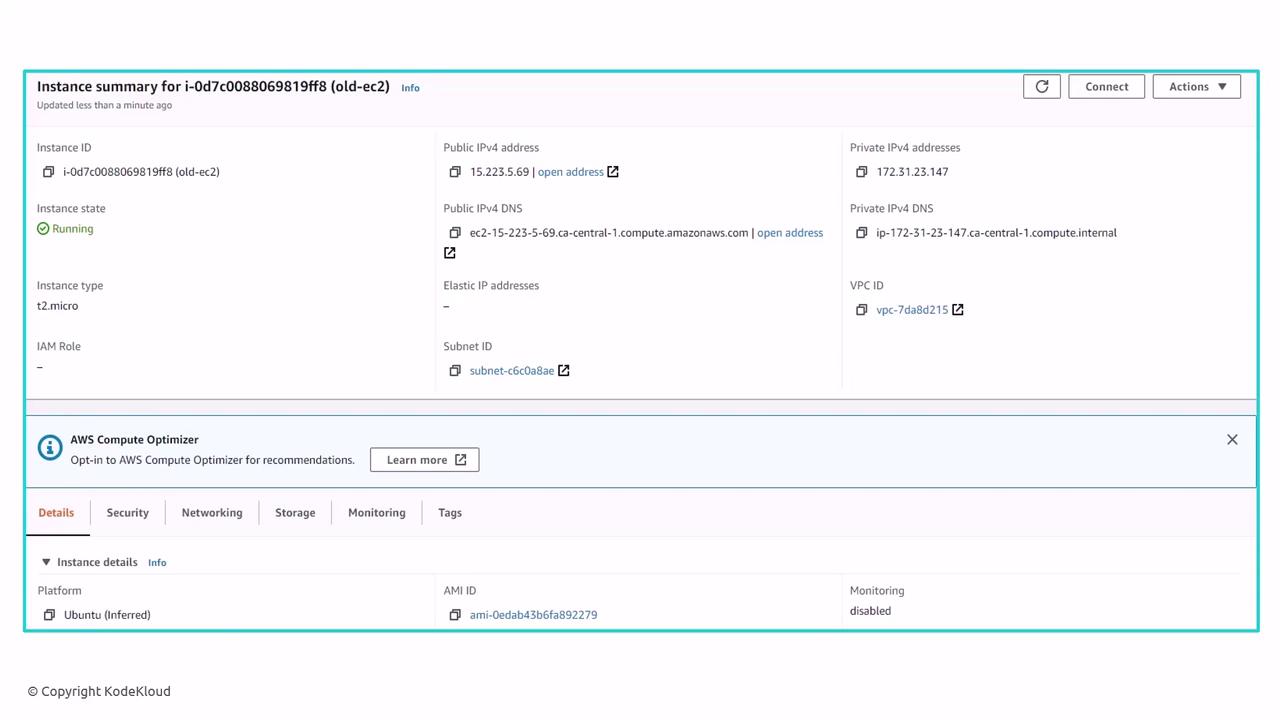
Copy the instance ID from the AWS Console; you’ll need it for the import command.
The resource name (`webserver-2` in our example) must be unique within your state. Choose a descriptive identifier to avoid collisions.
***
## 1. Define an Empty Resource Block
Create a placeholder in your configuration file (e.g., `main.tf`). The block will remain empty until you import the real attributes.
```hcl theme={null}
resource "aws_instance" "webserver-2" {
# Arguments will be populated after import
}
```
***
## 2. Import into the State
Run the `tofu import` command, specifying:
* The resource address: `.`
* The real resource ID from AWS.
```bash theme={null}
$ tofu import aws_instance.webserver-2 i-02613be10d5326f7
aws_instance.webserver-2: Importing from ID "i-02613be10d5326f7"...
aws_instance.webserver-2: Import prepared!
Prepared aws_instance for import
aws_instance.webserver-2: Refreshing state... [id=i-02613be10d5326f7]
Import successful!
```
At this point, the EC2 instance exists in your state file, but the configuration block in `main.tf` is still empty.
***
## 3. Populate the Resource Block
Inspect the AWS Console or view the state file (`terraform.tfstate`) to retrieve required arguments. Update your configuration with those values:
```hcl theme={null}
resource "aws_instance" "webserver-2" {
ami = "ami-0edab43b6fa892279"
instance_type = "t2.micro"
key_name = "ws"
vpc_security_group_ids = ["sg-8064fdee"]
}
```
***
## 4. Plan and Verify
Run a plan to ensure there’s no drift between your configuration and real infrastructure:
```bash theme={null}
$ tofu plan
aws_instance.webserver-2: Refreshing state... [id=i-02613be10d5326f7]
-------------------------------------------------------------------------------
No changes. Your infrastructure matches the configuration.
OpenTofu has compared your real infrastructure against your configuration and found no differences, so no changes are needed.
```
Your EC2 instance is now managed by OpenTofu. For future changes:
1. Modify the `.tf` file.
2. Run `tofu plan` to preview.
3. Apply with `tofu apply`.
***
OpenTofu also supports the `import` block directly in your configuration. During `tofu plan`, it prepares the import; during `tofu apply`, it brings the resource into state automatically.
```hcl theme={null}
import {
to = aws_instance.example
id = "i-abcd1234"
}
resource "aws_instance" "example" {
name = "my_instance"
# other arguments...
}
```
After applying, you can remove the `import` block or leave it as documentation of the resource’s origin.
***
## Links and References
* [OpenTofu Documentation](https://github.com/opentofu/opentofu)
* [Terraform Import Guide](https://www.terraform.io/cli/import)
* [AWS EC2 User Guide](https://docs.aws.amazon.com/ec2/)