> ## Documentation Index
> Fetch the complete documentation index at: https://notes.kodekloud.com/llms.txt
> Use this file to discover all available pages before exploring further.
# Demo OpenTofu Modules
> This article covers managing OpenTofu modules to create and configure an AWS IAM user.
Welcome to this hands-on lesson on managing OpenTofu modules. You’ll learn how to inspect, configure, and apply a module to create an AWS IAM user.
## 1. Inspecting the Module Configuration
First, navigate to the project directory and open `main.tf`:
```bash theme={null}
cd /root/OpenTofu/projects/Project\ Sapphire
```
```hcl theme={null}
module "iam_iam-user" {
source = "terraform-aws-modules/iam/aws//modules/iam-user"
version = "5.28.0"
# insert the 1 required variable here
}
```
Key details:
* A single `module` block named `iam_iam-user`.
* Source: `terraform-aws-modules/iam/aws//modules/iam-user`
* Version: `5.28.0`
* Requires one input: `name` ([registry docs][iam-user module docs]).
## 2. Supplying the Required Input
To create an IAM user named **max**, update the block:
```hcl theme={null}
module "iam_iam-user" {
source = "terraform-aws-modules/iam/aws//modules/iam-user"
version = "5.28.0"
name = "max"
}
```
## 3. Initializing and Planning
Initialize your working directory and generate a plan:
```bash theme={null}
openTofu init
openTofu plan
```
You’ll see three resources slated for creation:
```plaintext theme={null}
module.iam_iam-user.aws_iam_access_key.this_no_pgp[0] will be created
module.iam_iam-user.aws_iam_user.this[0] will be created
module.iam_iam-user.aws_iam_user_login_profile.this[0] will be created
Plan: 3 to add, 0 to change, 0 to destroy.
```
The extra resources result from default boolean inputs.
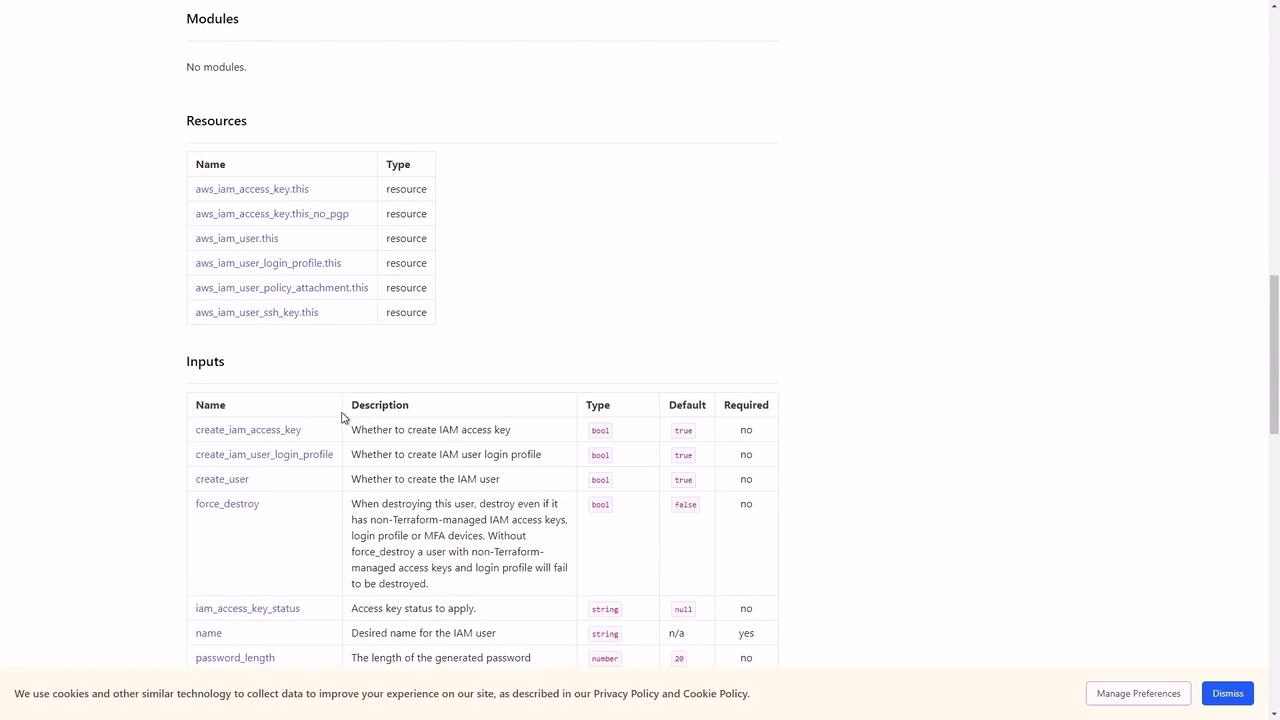
By default, the `iam-user` module defines these inputs:
| Variable | Type | Default | Required |
| --------------------------------- | ------ | ------- | -------- |
| name | string | — | yes |
| create\_iam\_access\_key | bool | true | no |
| create\_iam\_user\_login\_profile | bool | true | no |
## 4. Restricting Resource Creation
To limit the module to only create the IAM user, disable the access key and login profile:
```hcl theme={null}
module "iam_iam-user" {
source = "terraform-aws-modules/iam/aws//modules/iam-user"
version = "5.28.0"
name = "max"
create_iam_access_key = false
create_iam_user_login_profile = false
}
```
Reinitialize and apply:
```bash theme={null}
openTofu init
openTofu apply
```
The new plan shows only the user resource:
```plaintext theme={null}
Plan: 1 to add, 0 to change, 0 to destroy.
module.iam_iam-user.aws_iam_user.this[0]: Creating...
module.iam_iam-user.aws_iam_user.this[0]: Creation complete after 0s [id=max]
Apply complete! Resources: 1 added, 0 changed, 0 destroyed.
```
## 5. Summary
You have now configured the `iam-user` module to create a single IAM user, controlling exactly which resources are deployed.
## References
* [IAM User Module Documentation][iam-user module docs]
[iam-user module docs]: https://registry.terraform.io/modules/terraform-aws-modules/iam/aws/latest