> ## Documentation Index
> Fetch the complete documentation index at: https://notes.kodekloud.com/llms.txt
> Use this file to discover all available pages before exploring further.
# What is Remote State and State Locking
> This article explains remote state management and state locking in OpenTofu for efficient infrastructure as code practices.
Managing infrastructure as code with OpenTofu relies on state files to map configurations to real resources and track metadata, such as dependencies, for proper creation and deletion order. While local state works for small setups, it becomes a bottleneck in larger teams and complex environments. Remote state backends solve these challenges by providing shared storage, locking, and encryption.
## Local State Files
When you initialize a project locally, you’ll see:
```bash theme={null}
$ ls
main.tf variables.tf terraform.tfstate
```
A simple resource in `main.tf` might look like:
```hcl theme={null}
resource "aws_instance" "dev-ec2" {
ami = var.ami
instance_type = var.instance_type
}
```
The corresponding snippet from `terraform.tfstate`:
```json theme={null}
{
"mode": "managed",
"type": "aws_instance",
"name": "dev-ec2",
"provider": "provider[\"registry.opentofu.org/hashicorp/aws\"]",
"instances": [
{
"schema_version": 1,
"attributes": {
"ami": "ami-0a634ae95e11c6f91",
"private_ip": "172.31.7.21",
"public_ip": "54.71.34.19",
"root_block_device": [
{
"delete_on_termination": true,
"device_name": "/dev/sda1",
"volume_type": "gp2",
"iops": 100,
"volume_size": 8
}
]
}
}
]
}
```
Local state files often contain sensitive data. Do **not** commit `terraform.tfstate` or any `.tfstate` files to version control.
### Built-in State Locking
OpenTofu locks the local state file during operations to prevent concurrent writes:
```bash theme={null}
$ tofu apply
Plan: 2 to add, 0 to change, 0 to destroy.
Enter a value: yes
aws_s3_bucket.finance-2020: Creating...
...
```
If you run another `tofu apply` in parallel, you’ll encounter:
```bash theme={null}
$ tofu apply
Error: Error acquiring the state lock
Error message: resource temporarily unavailable
Lock Info:
ID: fefe3806-007c-084b-be61-cef4cdc77dee
Path: terraform.tfstate
Operation: OperationTypeApply
Who: root@iac-server
Version: 1.6.1
Created: 2024-02-10
Info:
OpenTofu acquires a state lock to protect
the state from concurrent writes.
Please resolve the issue or retry without
locking (-lock=false), though this is not recommended.
```
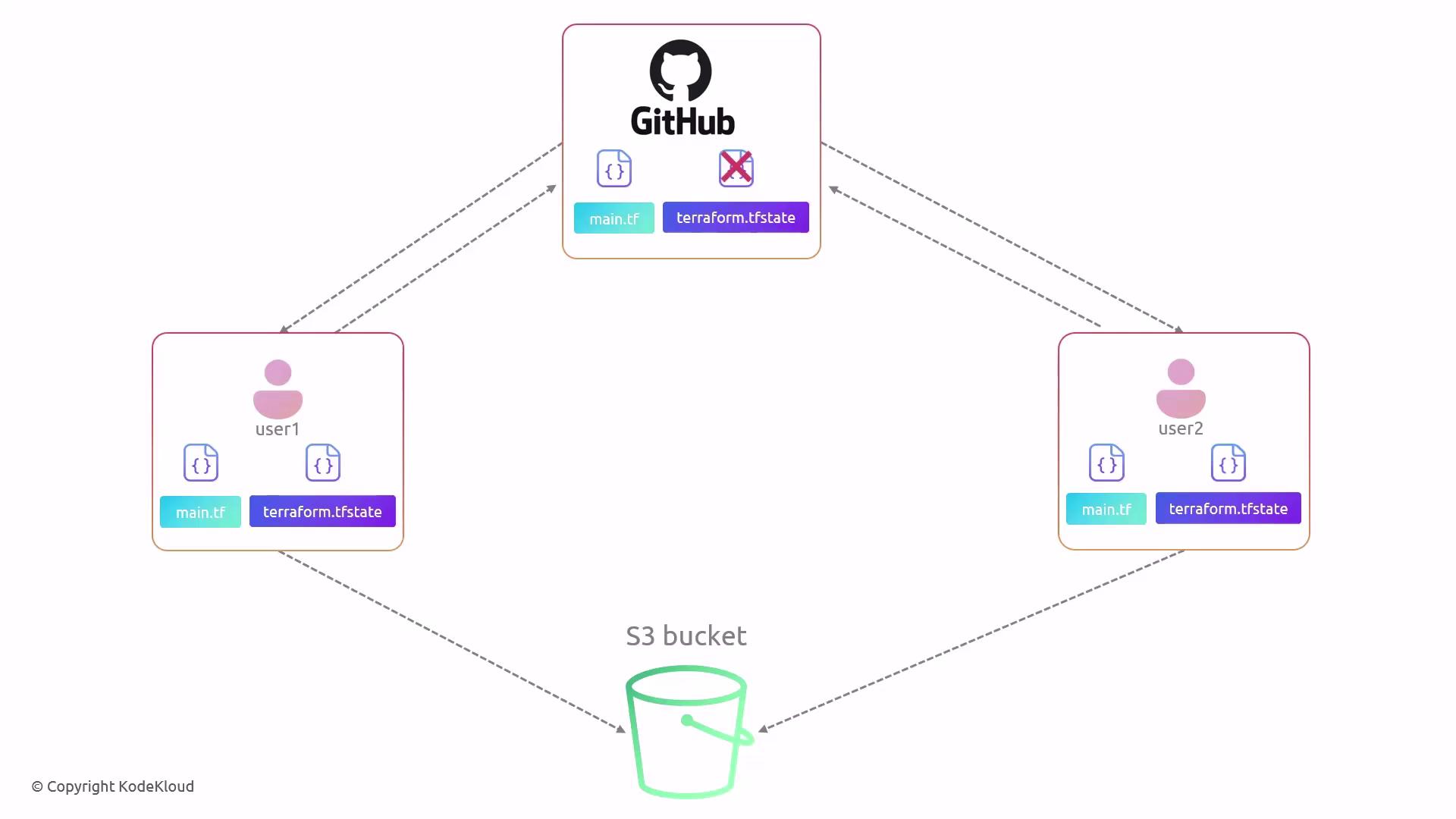
However, version control platforms like GitHub do *not* support file-level locking, leading to potential merge conflicts and corrupted state:
## Benefits of Remote State Backends
Remote backends centralize state storage, enable reliable locking, and secure data at rest and in transit. They integrate with popular cloud services:
| Backend | Storage | State Locking | Encryption |
| -------------------- | -------------------------- | ------------- | ---------------- |
| AWS S3 + DynamoDB | S3 bucket + DynamoDB table | Yes | SSE-S3 / SSE-KMS |
| Google Cloud Storage | GCS bucket | No | CMEK |
| HashiCorp Consul | Consul K/V store | Yes | TLS |
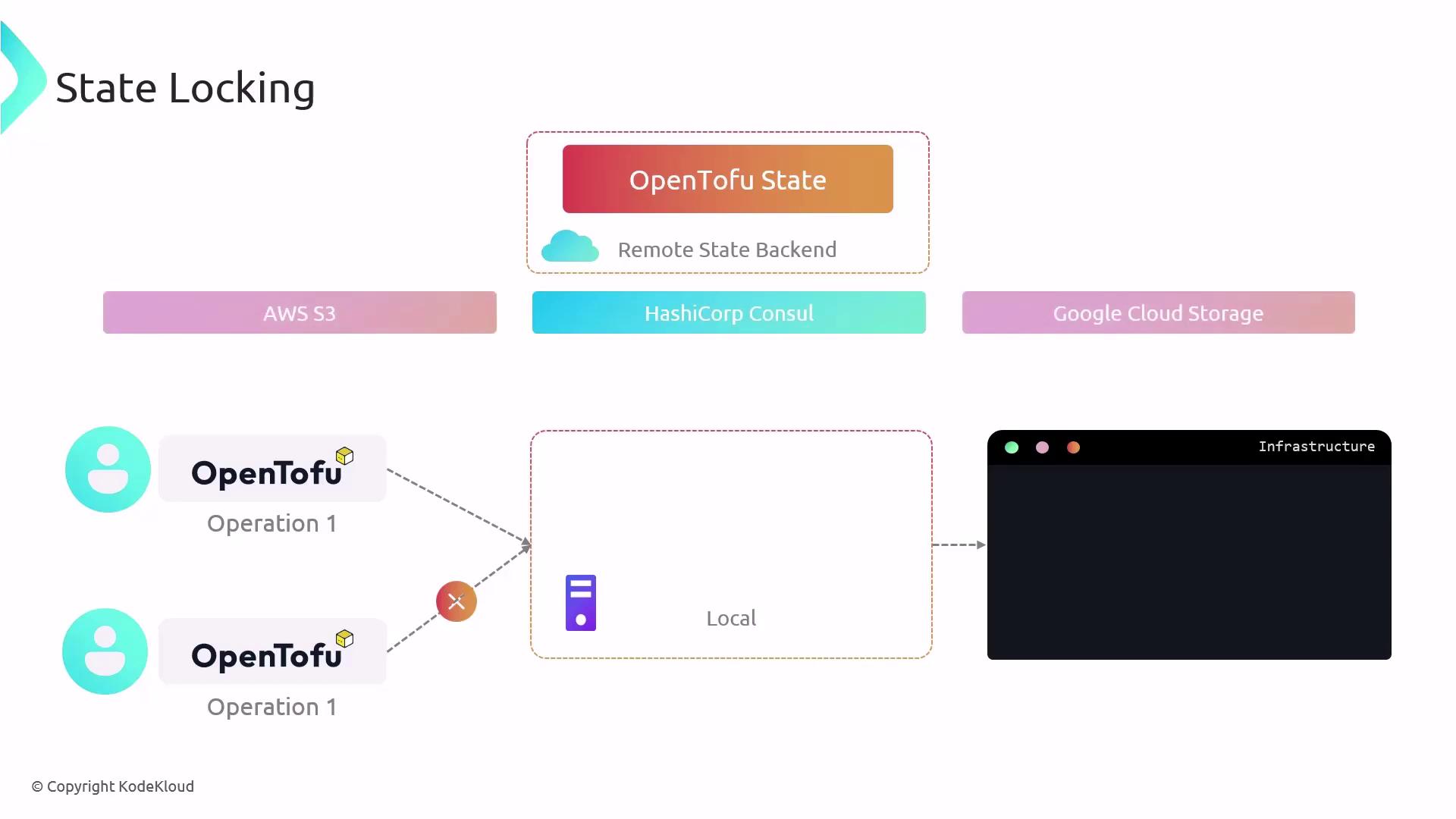
Once configured, OpenTofu automatically loads state from the remote backend and uploads updates after each apply:

## Configuring AWS S3 as a Remote Backend
Ensure you have:
* An existing S3 bucket for storing state
* (Optional) A DynamoDB table for locking
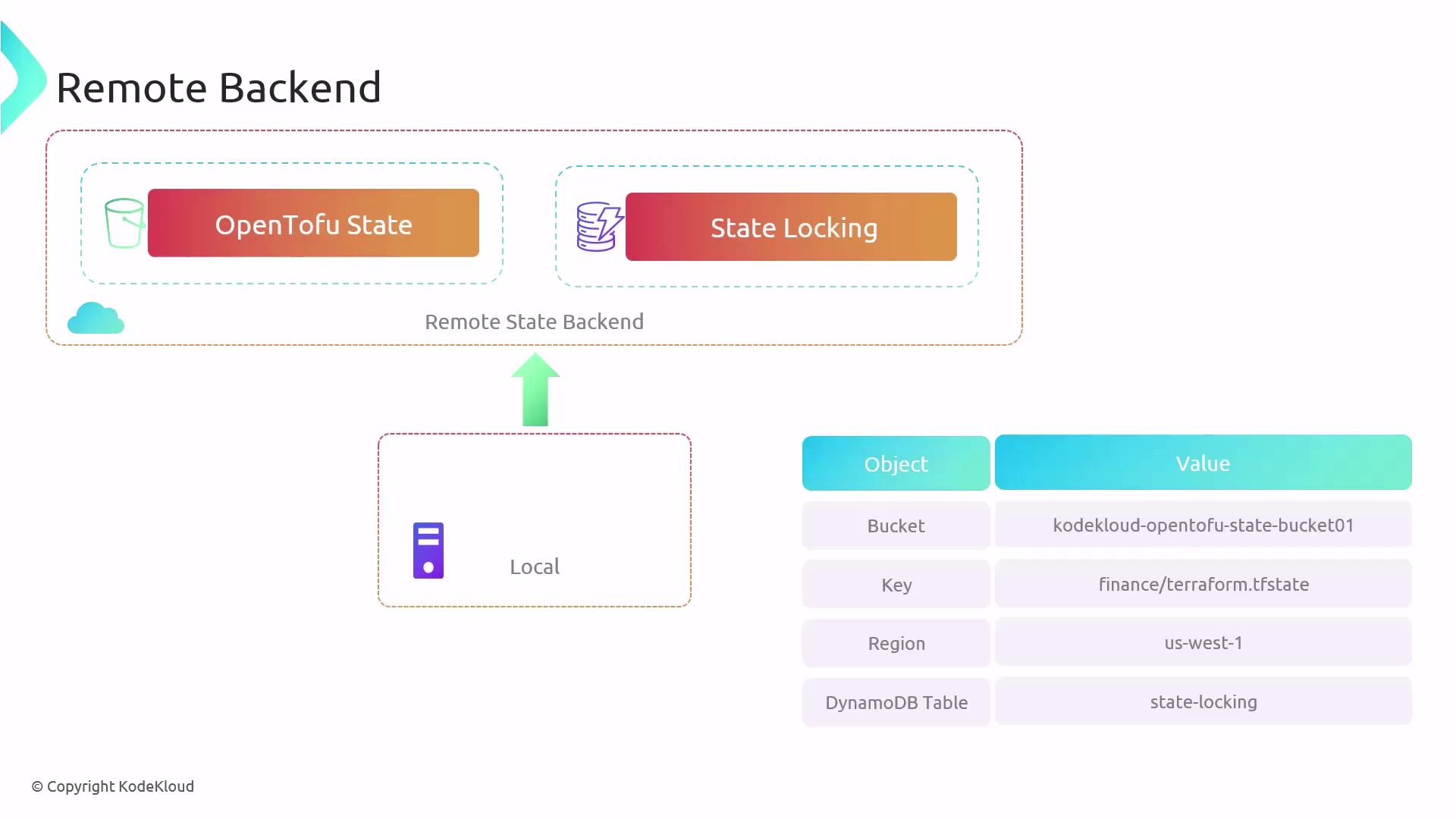
1. In your project directory, you’ll see:
```bash theme={null}
$ ls
main.tf terraform.tfstate
```
2. Update `main.tf` to add an S3 backend:
```hcl theme={null}
resource "local_file" "pet" {
filename = "/root/pets.txt"
content = "We love pets!"
}
terraform {
backend "s3" {
bucket = "kodekloud-opentofu-state-bucket01"
key = "finance/terraform.tfstate"
region = "us-west-1"
dynamodb_table = "state-locking"
}
}
```
3. Run `tofu apply` and note the backend initialization error:
```plaintext theme={null}
$ tofu apply
Error: Backend initialization required, please run "tofu init"
Reason: Initial configuration of the requested backend "s3"
```
4. Initialize and migrate your state:
```bash theme={null}
$ tofu init
Initializing the backend...
Pre-existing state was found while migrating the previous "local" backend to the newly configured "s3" backend. No existing state was found in the new "s3" backend. Do you want to copy this state to the new "s3" backend? Enter "yes" to copy and "no" to start with an empty state.
Enter a value: yes
Successfully configured the backend "s3"! OpenTofu will automatically use this backend unless the configuration changes.
Initializing provider plugins...
- Using previously-installed hashicorp/aws v3.7.0
...
```
Responding with `yes` migrates your local state to S3. You can then remove the local `terraform.tfstate` file.
5. Future applies use the remote backend:
```bash theme={null}
$ tofu apply
Acquiring state lock. This may take a few moments...
local_file.pet: Refreshing state... [id=a676sd5665sd]
Apply complete! Resources: 0 added, 0 changed, 0 destroyed.
Releasing state lock. This may take a few moments.
```
## Inspecting and Modifying State
OpenTofu provides the `tofu state` command group for safe state inspection and modifications. Avoid editing state files manually.
| Command | Description |
| ---------------------------- | --------------------------------- |
| `tofu state list` | List all resources in the state |
| `tofu state list ` | Filter by resource address |
| `tofu state show ` | Show detailed resource attributes |
| `tofu state mv` | Move items within the state file |
| `tofu state rm` | Remove items from the state file |
Examples:
```bash theme={null}
$ tofu state show aws_s3_bucket.finance
```
```bash theme={null}
$ tofu state list
aws_dynamodb_table.cars
aws_s3_bucket.finance-202922
```
```bash theme={null}
$ tofu state list aws_s3_bucket.finance
aws_s3_bucket.finance-202922
```
Understanding and implementing remote state with state locking ensures a secure, collaborative, and reliable infrastructure lifecycle management workflow.