> ## Documentation Index
> Fetch the complete documentation index at: https://notes.kodekloud.com/llms.txt
> Use this file to discover all available pages before exploring further.
# Demo Lifecycle Rules
> This hands-on lesson covers OpenTofu lifecycle rules, including resource dependencies, forced replacements, and destruction control using lifecycle blocks.
Welcome to this hands-on lesson covering OpenTofu lifecycle rules. You’ll learn how OpenTofu determines creation order through resource dependencies, how changing certain arguments forces resource replacement, and how to control destruction using lifecycle blocks.
## 1. Initial Setup for OpenTofu Resources
In the `root/opentofu-projects/project-mysterio` directory, your `main.tf` already defines two resources:
```hcl theme={null}
resource "local_file" "file" {
filename = var.filename
file_permission = var.permission
content = random_string.string.id
}
resource "random_string" "string" {
length = var.length
keepers = {
length = var.length
}
}
```
Initialize and apply:
```bash theme={null}
cd ~/opentofu-projects/project-mysterio
tofu init
tofu plan
tofu apply
# Enter a value: yes
# random_string.string: Creating...
# random_string.string: Creation complete [id=...]
# local_file.file: Creating...
# local_file.file: Creation complete [id=...]
```
Because `local_file.file` references `random_string.string.id`, OpenTofu automatically creates the string resource first.
## 2. Forcing Replacement by Changing `keepers`
Open `variables.tf` and adjust the default length:
```hcl theme={null}
variable "length" {
default = 12
}
```
Run another plan:
```bash theme={null}
tofu plan
# Plan: 2 to add, 0 to change, 2 to destroy.
```
Changing anything in the `keepers` map forces the `random_string.string` resource—and thus `local_file.file`—to be replaced on the next apply.
## 3. Ensuring Continuity with `create_before_destroy`
To create the replacement before destroying the old resource, add a lifecycle block:
```hcl theme={null}
resource "random_string" "string" {
length = var.length
keepers = { length = var.length }
lifecycle {
create_before_destroy = true
}
}
```
Apply the update:
```bash theme={null}
tofu apply
# New string is created first, then the old one is removed.
```
You can apply the same pattern to the file resource:
```hcl theme={null}
resource "local_file" "file" {
filename = var.filename
file_permission = var.permission
content = random_string.string.id
lifecycle {
create_before_destroy = true
}
}
```
On disk, you cannot have two files with the same name simultaneously. The old file is destroyed immediately after the new one appears.
## 4. Inspecting Resource State with `tofu show`
To view the details of your current resources, run:
```bash theme={null}
tofu show
# or
tofu state show local_file.file
```
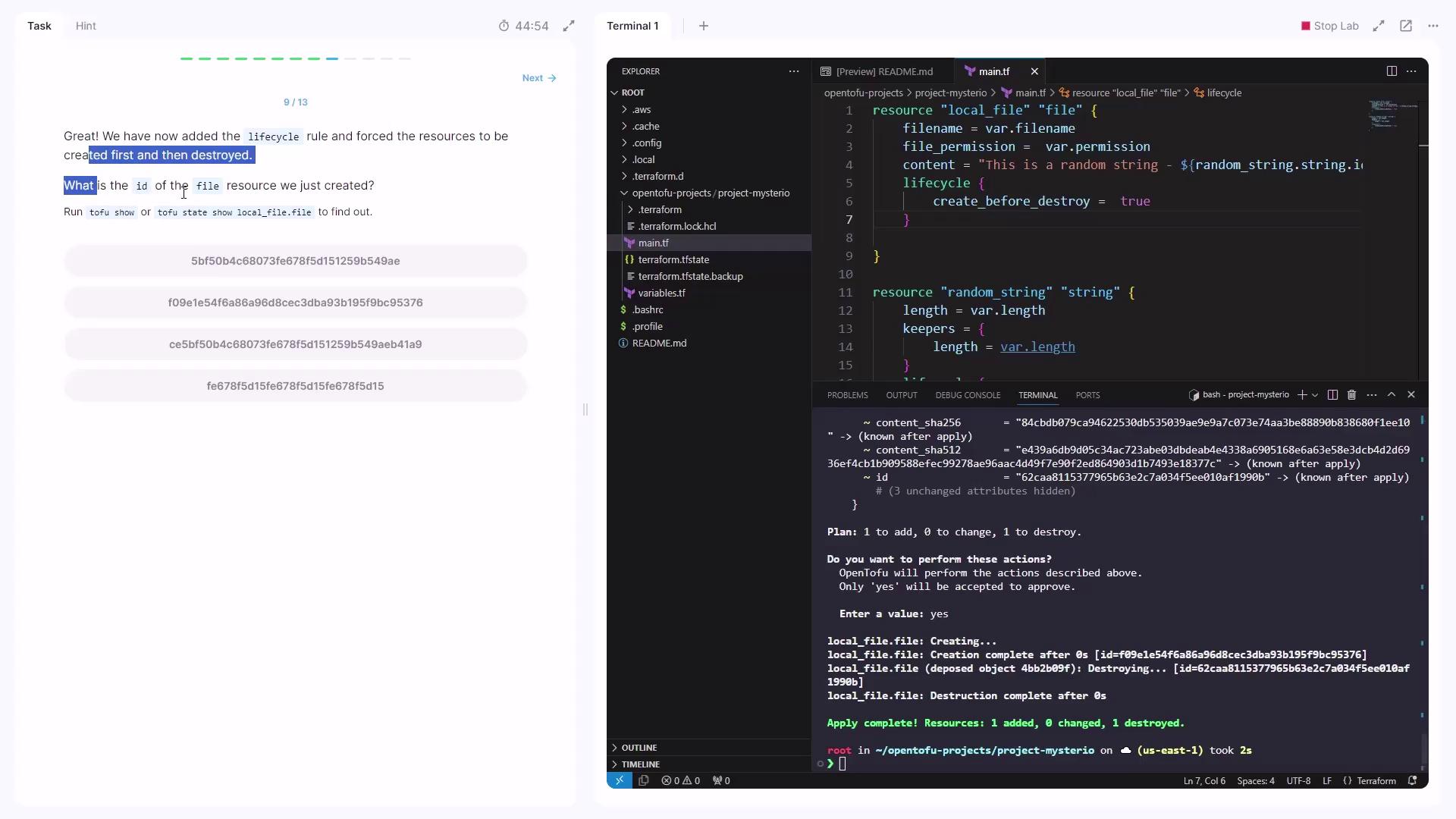
Look for the `id` attribute under the `local_file.file` block.
## 5. Protecting Critical Resources with `prevent_destroy`
First, destroy or clean up existing resources. Then replace your configuration in `main.tf`:
```hcl theme={null}
resource "random_pet" "super_pet" {
length = var.length
prefix = var.prefix
lifecycle {
prevent_destroy = true
}
}
```
Define the variables:
```hcl theme={null}
variable "length" {
default = 12
}
variable "prefix" {
default = "Mrs"
}
```
Apply:
```bash theme={null}
tofu plan
tofu apply
# Creates the pet resource.
```
Now modify `length` or `prefix`, then run:
```bash theme={null}
tofu apply
```
You’ll encounter:
```plaintext theme={null}
Error: Instance cannot be destroyed
on main.tf line 1:
1: resource "random_pet" "super_pet" {
Resource random_pet.super_pet has lifecycle.prevent_destroy set, but the plan calls for this resource to be destroyed. ...
```
The `prevent_destroy` rule blocks any deletion, protecting must-keep resources from accidental removal.
## Lifecycle Arguments Comparison
| Lifecycle Argument | Purpose | Use Case |
| ----------------------- | --------------------------------------------- | ----------------------------------------- |
| create\_before\_destroy | Create the new resource before destroying old | Zero-downtime upgrades |
| prevent\_destroy | Block any resource deletion | Safeguard critical data or infrastructure |
***
You’ve now mastered:
1. How OpenTofu orders resource creation via dependencies
2. Why changing `keepers` forces replacement
3. Using `create_before_destroy` for seamless updates
4. Applying `prevent_destroy` to protect vital resources
***
## Links and References
* [OpenTofu Documentation](https://opentofu.io/docs/)
* [Terraform Fork Overview](https://opentofu.io/)
* [Resource Lifecycle Meta-Arguments](https://www.terraform.io/language/meta-arguments/lifecycle)