> ## Documentation Index
> Fetch the complete documentation index at: https://notes.kodekloud.com/llms.txt
> Use this file to discover all available pages before exploring further.
# Demo Trigger Conditions
> Explains Argo Events sensor trigger conditions, boolean expressions for dependencies, examples using MinIO and webhook, and RBAC considerations for workflow triggers.
Overview
Trigger conditions let you control which trigger templates execute based on the status of a sensor's dependencies in Argo Events. A sensor can declare multiple dependencies and multiple triggers; each trigger may include a boolean expression that references dependency names to determine when it should run.
This guide explains how condition expressions work, shows examples, and walks through a practical sensor that uses a MinIO event and a webhook to drive two triggers: one that submits an Argo Workflow and another that sends an HTTP request.
Relevant links and references
* [Argo Events — Sensors](https://argoproj.github.io/argo-events/sensors/)
* [Argo Workflows](https://argoproj.github.io/argo-workflows/)
* [Kubernetes RBAC](https://kubernetes.io/docs/reference/access-authn-authz/rbac/)
Trigger conditions explained
* Conditions are boolean expressions referencing dependency names defined in the sensor's `dependencies` list.
* Supported operators: && (AND), || (OR). Parentheses are supported for grouping.
* If a trigger template omits `conditions`, it defaults to requiring all dependencies (implicit AND across all declared dependencies).
Operators summary
| Operator | Meaning | Example | | | | |
| -------- | -------- | -------------- | -- | --------------- | - | ------ |
| && | AND | `depA && depB` | | | | |
| | | | OR | \`depA | | depB\` |
| ( ) | Grouping | \`(depA | | depB) && depC\` | | |
Simple example: sensor with three dependencies and three triggers
```yaml theme={null}
apiVersion: argoproj.io/v1alpha1
kind: Sensor
metadata:
name: example
spec:
dependencies:
- name: dep01
eventSourceName: webhook-a
eventName: example01
- name: dep02
eventSourceName: webhook-a
eventName: example02
- name: dep03
eventSourceName: webhook-b
eventName: example03
triggers:
- template:
name: trigger01
conditions: "dep02"
http:
url: http://abc.com/hello1
method: GET
- template:
name: trigger02
conditions: "dep02 && dep03"
http:
url: http://abc.com/hello2
method: GET
- template:
name: trigger03
conditions: "(dep01 || dep02) && dep03"
http:
url: http://abc.com/hello3
method: GET
```
Example evaluations
* `conditions: "dep02"` — trigger runs when dependency `dep02` is satisfied.
* `conditions: "dep02 && dep03"` — trigger runs when both `dep02` and `dep03` are satisfied.
* `conditions: "(dep01 || dep02) && dep03"` — trigger runs when `dep03` is satisfied and at least one of `dep01` or `dep02` is satisfied.
Practical multi-dependency sensor (MinIO + webhook)
Below is a real-world sensor manifest that demonstrates two dependencies and two triggers:
* `hello-workflow-trigger` submits an Argo Workflow and only fires when the MinIO dependency is satisfied.
* `http-trigger` posts to an external HTTP endpoint and fires when either dependency is satisfied.
```yaml theme={null}
apiVersion: argoproj.io/v1alpha1
kind: Sensor
metadata:
name: multi-dependency-sensor-2
namespace: argo-events
spec:
dependencies:
- name: test-dep
eventSourceName: minio
eventName: example
- name: my-webhook-dep
eventSourceName: webhook
eventName: my-webhook
triggers:
- template:
name: hello-workflow-trigger
# Use a service account that has permission to create Workflows in the 'argo' namespace
serviceAccountName: workflow-trigger-sa
conditions: "test-dep"
argoWorkflow:
source:
resource:
apiVersion: argoproj.io/v1alpha1
kind: Workflow
metadata:
generateName: hello-kodekloud-
namespace: argo
spec:
entrypoint: whalesay
templates:
- name: whalesay
container:
image: rancher/cowsay
command: ["cowsay"]
args: ["Triggering workflow from Argo Events"]
- template:
name: http-trigger
conditions: "test-dep || my-webhook-dep"
http:
url: https://httpdump.app/inspect/ee487aa0-994f-4b9f-83dd-a65e668ccfc8
method: POST
payload: |
{
"bucket": "{{dependency.test-dep.data.notification.0.s3.bucket.name}}",
"type": "{{dependency.test-dep.context.type}}"
}
retryStrategy:
steps: 3
duration: 3s
```
Notes about the workflow trigger and RBAC
* The workflow trigger sets `serviceAccountName: workflow-trigger-sa`. That service account must have RBAC permissions (Role/ClusterRole and corresponding RoleBinding/ClusterRoleBinding) that allow creating Workflows in the `argo` namespace.
* If the trigger uses the default service account (or a service account lacking permissions), the Workflow creation will fail with a permission error.
Testing the configuration
1. Expose the webhook event source locally (port-forward) and send a test event:
```bash theme={null}
kubectl -n argo-events port-forward svc/webhook-eventsource-svc 13000:13000
# In another terminal:
curl -d '{"message":"hello"}' -H "Content-Type: application/json" -X POST http://localhost:13000/push
# Expected response:
# success
```
2. Create a MinIO credentials secret in the `argo-events` namespace:
```bash theme={null}
kubectl -n argo-events create secret generic minio-creds \
--from-literal=accesskey=admin \
--from-literal=secretkey=password
# Output:
# secret/minio-creds created
```
3. Trigger the external HTTP endpoint used by the HTTP trigger (example using httpdump):
```bash theme={null}
curl --header "Content-Type: application/json" \
--request POST \
--data '{"username":"Marcel","password":"supersecret","this is a":"test"}' \
https://httpdump.app/dumps/6758c612-9d34-486f-b82a-63c0a7dc4054
```
Sensor logs and troubleshooting
When triggers run or fail, inspect sensor logs to diagnose behavior:
* Successful HTTP trigger logs (example):
```text theme={null}
namespace=argo-events, sensorName=multi-dependency-sensor-2, triggerName=http-trigger, level=info, time=2025-10-25T11:41:03Z, msg=Making a http request...
namespace=argo-events, sensorName=multi-dependency-sensor-2, level=info, time=2025-10-25T11:45:16Z, msg=Successfully processed trigger 'http-trigger'
```
* RBAC/permission error for Workflow trigger (example):
```text theme={null}
time="2025-10-25T11:43:28.979Z" level=error msg="Create request failed" error="workflows.argoproj.io is forbidden: User \"system:serviceaccount:argo-events:default\" cannot create resource \"workflows\" in API group \"argoproj.io\" in the namespace \"argo\""
Error: Failed to submit workflow: rpc error: code = PermissionDenied desc = "workflows.argoproj.io is forbidden: User \"system:serviceaccount:argo-events:default\" cannot create resource \"workflows\" in API group \"argoproj.io\" in the namespace \"argo\""
```
Fixes:
* Ensure the trigger template includes `serviceAccountName` (as shown in the sensor YAML).
* Grant that service account the necessary RBAC roles to create Workflows in the target namespace.
Event flow and UI
A visual graph helps map how event sources, sensors, dependencies, conditions, and triggers relate. The UI shows nodes for event sources, sensors, each dependency, and the triggers that fire when conditions are met.
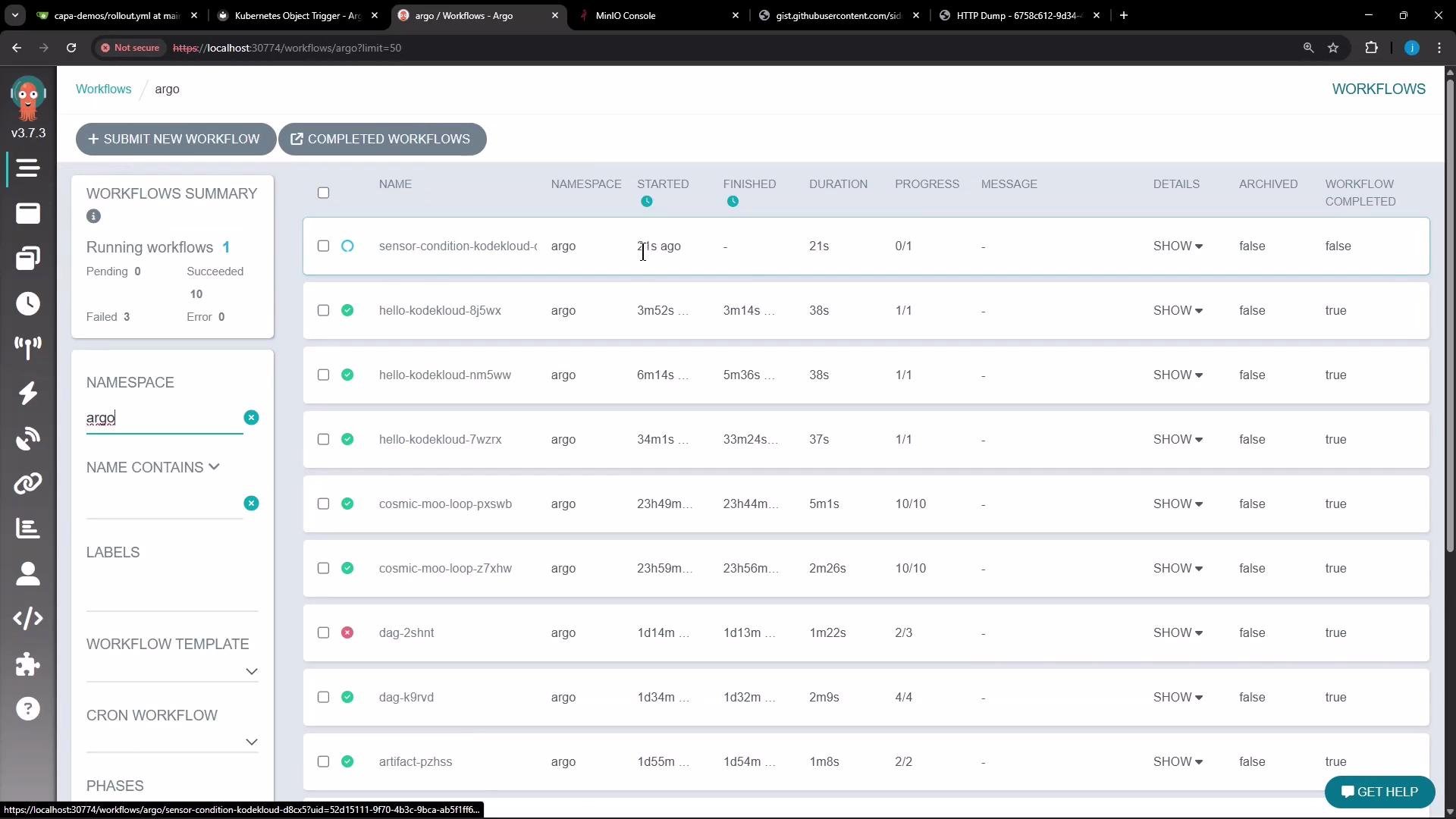
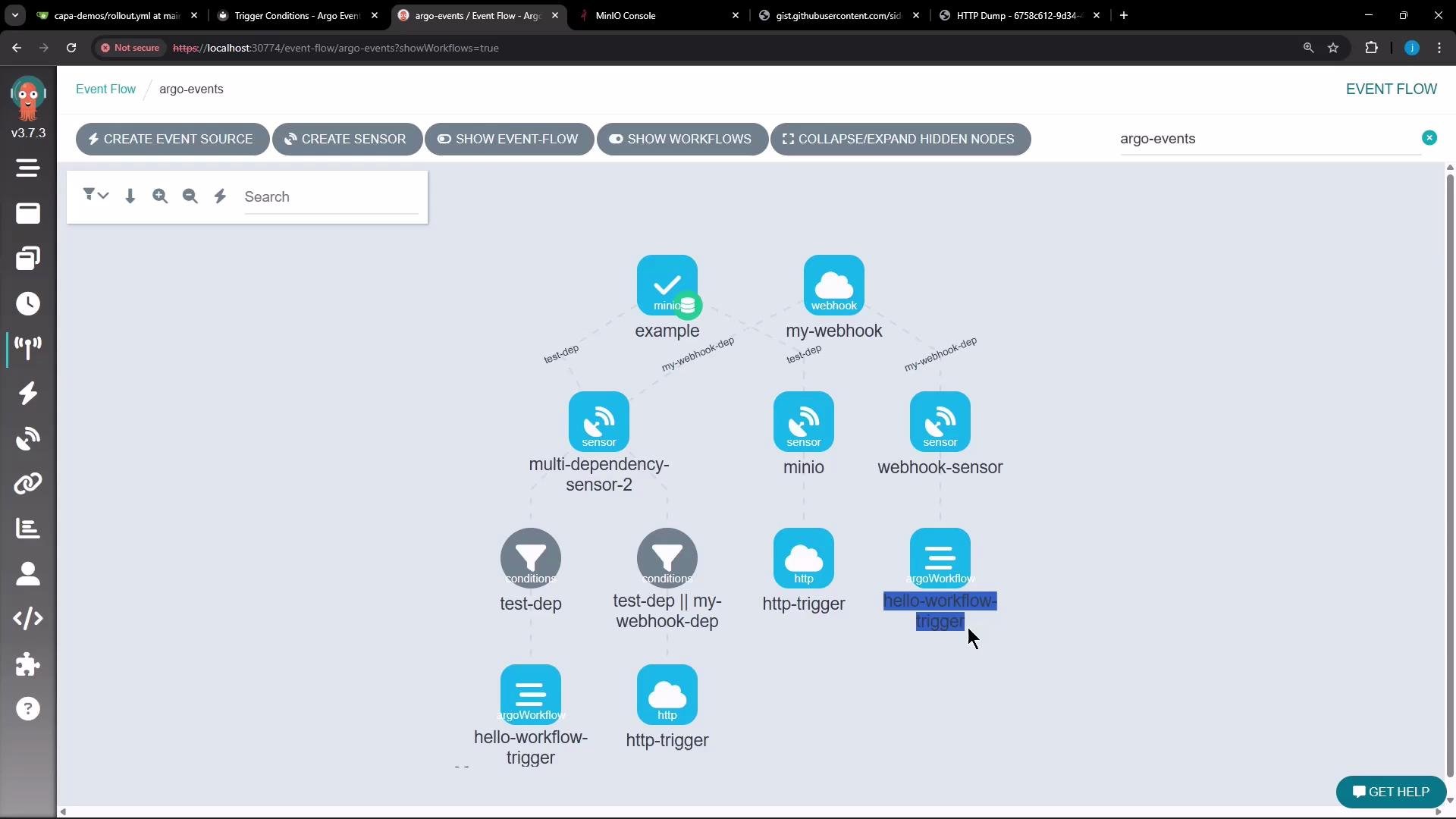 When everything is configured and RBAC is correct, triggers will execute and generate expected outputs — for example, HTTP dumps and Argo Workflows. After updating the sensor to include the proper service account, a new workflow should appear in the Argo Workflows list.
 Summary
* Use dependency names inside `conditions` expressions to control trigger execution.
* Use && and || to combine dependency conditions; parentheses support grouping.
* If `conditions` is omitted, all sensor dependencies must be satisfied (implicit AND).
* For Argo Workflow triggers, set `serviceAccountName` and ensure the service account has RBAC permissions to create Workflows in the target namespace.
Tip: When testing triggers, inspect sensor logs (kubectl -n \ logs \) to see why a trigger did or didn't execute. Permission errors and missing dependency events are common causes for trigger failures.
Summary
* Use dependency names inside `conditions` expressions to control trigger execution.
* Use && and || to combine dependency conditions; parentheses support grouping.
* If `conditions` is omitted, all sensor dependencies must be satisfied (implicit AND).
* For Argo Workflow triggers, set `serviceAccountName` and ensure the service account has RBAC permissions to create Workflows in the target namespace.
Tip: When testing triggers, inspect sensor logs (kubectl -n \ logs \) to see why a trigger did or didn't execute. Permission errors and missing dependency events are common causes for trigger failures.