> ## Documentation Index
> Fetch the complete documentation index at: https://notes.kodekloud.com/llms.txt
> Use this file to discover all available pages before exploring further.
# Event Source
> Describes Argo Events event sources that watch external services, normalize events to CloudEvents, and publish them via Kubernetes CRDs
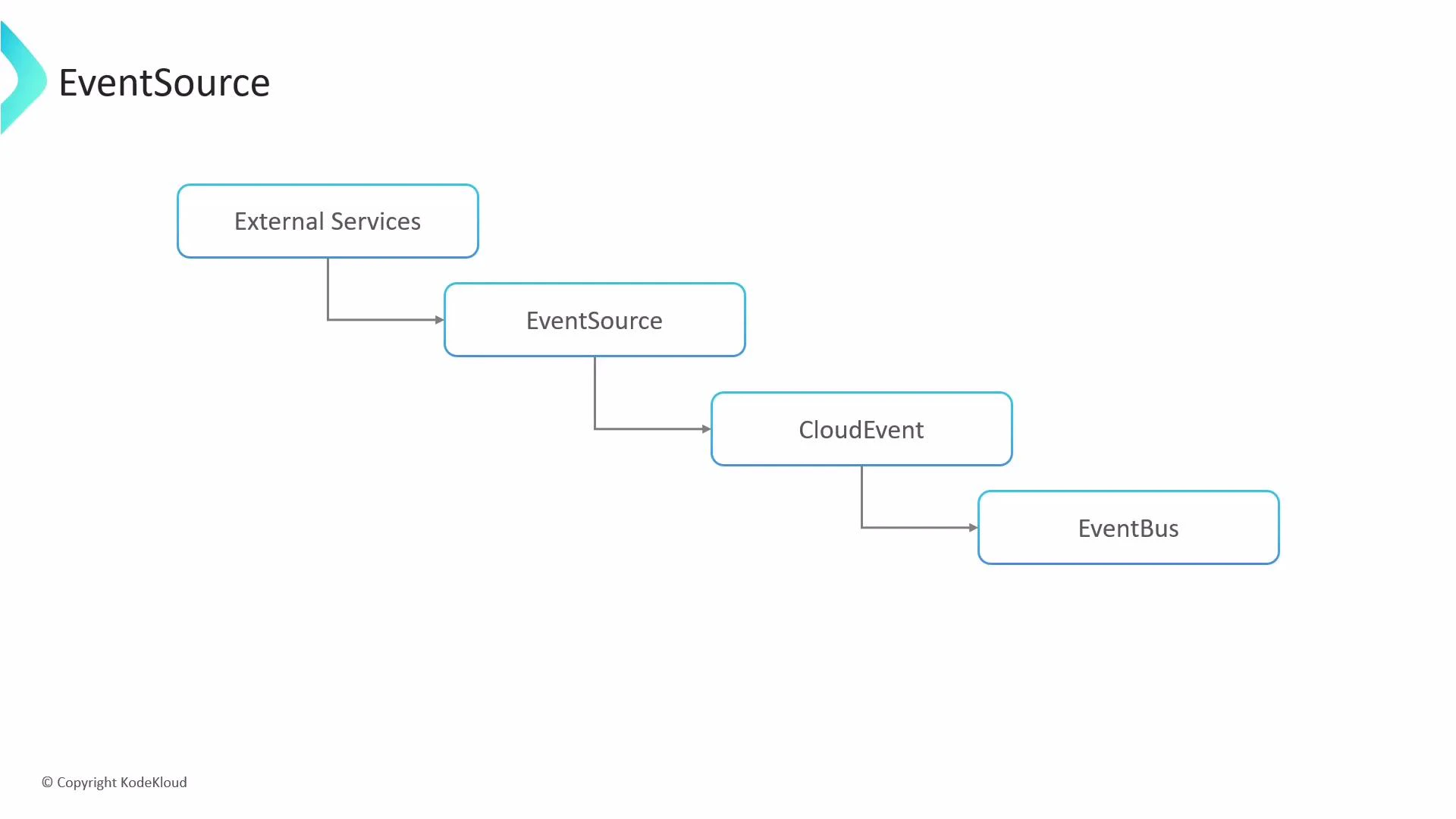
An event source is the component that watches the outside world — the eyes and ears of your event-driven system. It listens for events from external services (S3, GitHub, webhooks, etc.), normalizes them into the CloudEvents format, and publishes them to the event bus. You can declare multiple event source objects, each listening for a specific kind of event, enabling scalable, decoupled architectures and clear separation of concerns.
 Event sources are declared as Kubernetes custom resources (CRDs) with a spec that lists different listener types. Each key under `spec` defines a listener (for example: `webhook`, `calendar`, `s3`, `github`, `kafka`, etc.). Below are concise, searchable examples showing common configurations and how they behave.
Quick reference: common listener types and use cases
| Resource type | Typical use case | When to use |
| ------------- | -------------------------------- | --------------------------------------------------- |
| webhook | Receive generic HTTP events | Integrate third-party webhooks or custom services |
| calendar | Scheduled events (cron/interval) | Periodic tasks, polling triggers |
| s3 | Object storage events | React to uploads or deletes in S3-compatible stores |
| github/gitlab | SCM push/pull/PR events | CI/CD triggers, automation on repo events |
| kafka | Streaming events | High-throughput pub/sub pipelines |
Relevant links:
* [Argo Events — Event Sources](https://argoproj.github.io/projects/argo-events/)
* [CloudEvents specification](https://cloudevents.io/)
* [Kubernetes documentation](https://kubernetes.io/docs/)
## Webhook example
A webhook event source declares a logical listener name and the HTTP details to use (port, endpoint, method). Use webhooks to accept HTTP POST/GET notifications from external services.
```yaml theme={null}
apiVersion: argoproj.io/v1alpha1
kind: EventSource
metadata:
name: webhook-eventsource
spec:
webhook:
example-webhook:
port: 12000
endpoint: /example
method: POST
# Optional: create a ClusterIP Service for testing
service:
ports:
- port: 12000
```
Key points:
* `example-webhook` is the logical listener name.
* This listener accepts POST requests on port `12000` at the `/example` path.
* The `service` block can auto-generate a ClusterIP service for internal testing; it is not intended for production exposure.
## Calendar (scheduler) example
Calendar (or scheduler) event sources support simple intervals and cron-style schedules. Use intervals for frequent, simple triggers and cron schedules for precise timing.
```yaml theme={null}
apiVersion: argoproj.io/v1alpha1
kind: EventSource
metadata:
name: calendar-eventsource
spec:
calendar:
every-10-seconds:
interval: 10s
timezone: "UTC"
hourly-cron:
schedule: "0 * * * *"
timezone: "America/Los_Angeles"
```
Notes:
* `interval` uses simple durations such as `10s`, `5m`, `1h`.
* `schedule` accepts cron expressions for more complex timing.
* `timezone` is optional; specify it to ensure scheduling aligns with the intended zone.
## S3 example
When watching S3 (or S3-compatible) buckets, declare the bucket, events to monitor, optional filters for object keys, and credentials (via Kubernetes Secrets).
```yaml theme={null}
apiVersion: argoproj.io/v1alpha1
kind: EventSource
metadata:
name: s3-eventsource
spec:
s3:
watch-bucket:
bucket: my-bucket-name
event: s3:ObjectCreated:*
# Optional prefix/suffix filters to limit matching objects
filter:
prefix: uploads/
suffix: .csv
accessKey:
key: accesskey
name: aws-creds
secretKey:
key: secretkey
name: aws-creds
```
Highlights:
* `bucket` names the S3 bucket to watch.
* `event` specifies which S3 events to react to (for example: object created or deleted).
* `filter` restricts matches to object keys with a `prefix` and/or `suffix`.
* `accessKey` and `secretKey` reference a Kubernetes Secret (`aws-creds`) containing the AWS credentials.
The generated ClusterIP Service (via the `service` field) is intended for internal/testing use only. If you need external exposure, use Kubernetes-native objects (Ingress, LoadBalancer) or an API gateway rather than relying on the testing service.
Never store plain-text credentials in your YAML. Always reference credentials via Kubernetes Secrets and follow least-privilege principles for IAM keys. Rotate and audit credentials regularly.
Some event sources (Webhooks, GitHub, GitLab, SNS, etc.) require a reachable HTTP endpoint to receive events. The `service` field in an EventSource spec provides a convenience ClusterIP service for internal testing, but it isn’t a replacement for a production-grade exposure strategy.
Using these patterns, you can declaratively add multiple listeners to an EventSource resource. Each listener converts incoming external events into CloudEvents and publishes them to the event bus for downstream consumers to process.
References and further reading:
* Argo Events documentation: [https://argoproj.github.io/projects/argo-events/](https://argoproj.github.io/projects/argo-events/)
* CloudEvents: [https://cloudevents.io/](https://cloudevents.io/)
* Kubernetes Secrets: [https://kubernetes.io/docs/concepts/configuration/secret/](https://kubernetes.io/docs/concepts/configuration/secret/)
Event sources are declared as Kubernetes custom resources (CRDs) with a spec that lists different listener types. Each key under `spec` defines a listener (for example: `webhook`, `calendar`, `s3`, `github`, `kafka`, etc.). Below are concise, searchable examples showing common configurations and how they behave.
Quick reference: common listener types and use cases
| Resource type | Typical use case | When to use |
| ------------- | -------------------------------- | --------------------------------------------------- |
| webhook | Receive generic HTTP events | Integrate third-party webhooks or custom services |
| calendar | Scheduled events (cron/interval) | Periodic tasks, polling triggers |
| s3 | Object storage events | React to uploads or deletes in S3-compatible stores |
| github/gitlab | SCM push/pull/PR events | CI/CD triggers, automation on repo events |
| kafka | Streaming events | High-throughput pub/sub pipelines |
Relevant links:
* [Argo Events — Event Sources](https://argoproj.github.io/projects/argo-events/)
* [CloudEvents specification](https://cloudevents.io/)
* [Kubernetes documentation](https://kubernetes.io/docs/)
## Webhook example
A webhook event source declares a logical listener name and the HTTP details to use (port, endpoint, method). Use webhooks to accept HTTP POST/GET notifications from external services.
```yaml theme={null}
apiVersion: argoproj.io/v1alpha1
kind: EventSource
metadata:
name: webhook-eventsource
spec:
webhook:
example-webhook:
port: 12000
endpoint: /example
method: POST
# Optional: create a ClusterIP Service for testing
service:
ports:
- port: 12000
```
Key points:
* `example-webhook` is the logical listener name.
* This listener accepts POST requests on port `12000` at the `/example` path.
* The `service` block can auto-generate a ClusterIP service for internal testing; it is not intended for production exposure.
## Calendar (scheduler) example
Calendar (or scheduler) event sources support simple intervals and cron-style schedules. Use intervals for frequent, simple triggers and cron schedules for precise timing.
```yaml theme={null}
apiVersion: argoproj.io/v1alpha1
kind: EventSource
metadata:
name: calendar-eventsource
spec:
calendar:
every-10-seconds:
interval: 10s
timezone: "UTC"
hourly-cron:
schedule: "0 * * * *"
timezone: "America/Los_Angeles"
```
Notes:
* `interval` uses simple durations such as `10s`, `5m`, `1h`.
* `schedule` accepts cron expressions for more complex timing.
* `timezone` is optional; specify it to ensure scheduling aligns with the intended zone.
## S3 example
When watching S3 (or S3-compatible) buckets, declare the bucket, events to monitor, optional filters for object keys, and credentials (via Kubernetes Secrets).
```yaml theme={null}
apiVersion: argoproj.io/v1alpha1
kind: EventSource
metadata:
name: s3-eventsource
spec:
s3:
watch-bucket:
bucket: my-bucket-name
event: s3:ObjectCreated:*
# Optional prefix/suffix filters to limit matching objects
filter:
prefix: uploads/
suffix: .csv
accessKey:
key: accesskey
name: aws-creds
secretKey:
key: secretkey
name: aws-creds
```
Highlights:
* `bucket` names the S3 bucket to watch.
* `event` specifies which S3 events to react to (for example: object created or deleted).
* `filter` restricts matches to object keys with a `prefix` and/or `suffix`.
* `accessKey` and `secretKey` reference a Kubernetes Secret (`aws-creds`) containing the AWS credentials.
The generated ClusterIP Service (via the `service` field) is intended for internal/testing use only. If you need external exposure, use Kubernetes-native objects (Ingress, LoadBalancer) or an API gateway rather than relying on the testing service.
Never store plain-text credentials in your YAML. Always reference credentials via Kubernetes Secrets and follow least-privilege principles for IAM keys. Rotate and audit credentials regularly.
Some event sources (Webhooks, GitHub, GitLab, SNS, etc.) require a reachable HTTP endpoint to receive events. The `service` field in an EventSource spec provides a convenience ClusterIP service for internal testing, but it isn’t a replacement for a production-grade exposure strategy.
Using these patterns, you can declaratively add multiple listeners to an EventSource resource. Each listener converts incoming external events into CloudEvents and publishes them to the event bus for downstream consumers to process.
References and further reading:
* Argo Events documentation: [https://argoproj.github.io/projects/argo-events/](https://argoproj.github.io/projects/argo-events/)
* CloudEvents: [https://cloudevents.io/](https://cloudevents.io/)
* Kubernetes Secrets: [https://kubernetes.io/docs/concepts/configuration/secret/](https://kubernetes.io/docs/concepts/configuration/secret/)