> ## Documentation Index
> Fetch the complete documentation index at: https://notes.kodekloud.com/llms.txt
> Use this file to discover all available pages before exploring further.
# Blue Green Deployment Strategy
> Explains Blue Green deployment strategy with Argo Rollouts for zero downtime releases, preview validation, safe instant rollbacks, and configurable promotion and scale down controls.
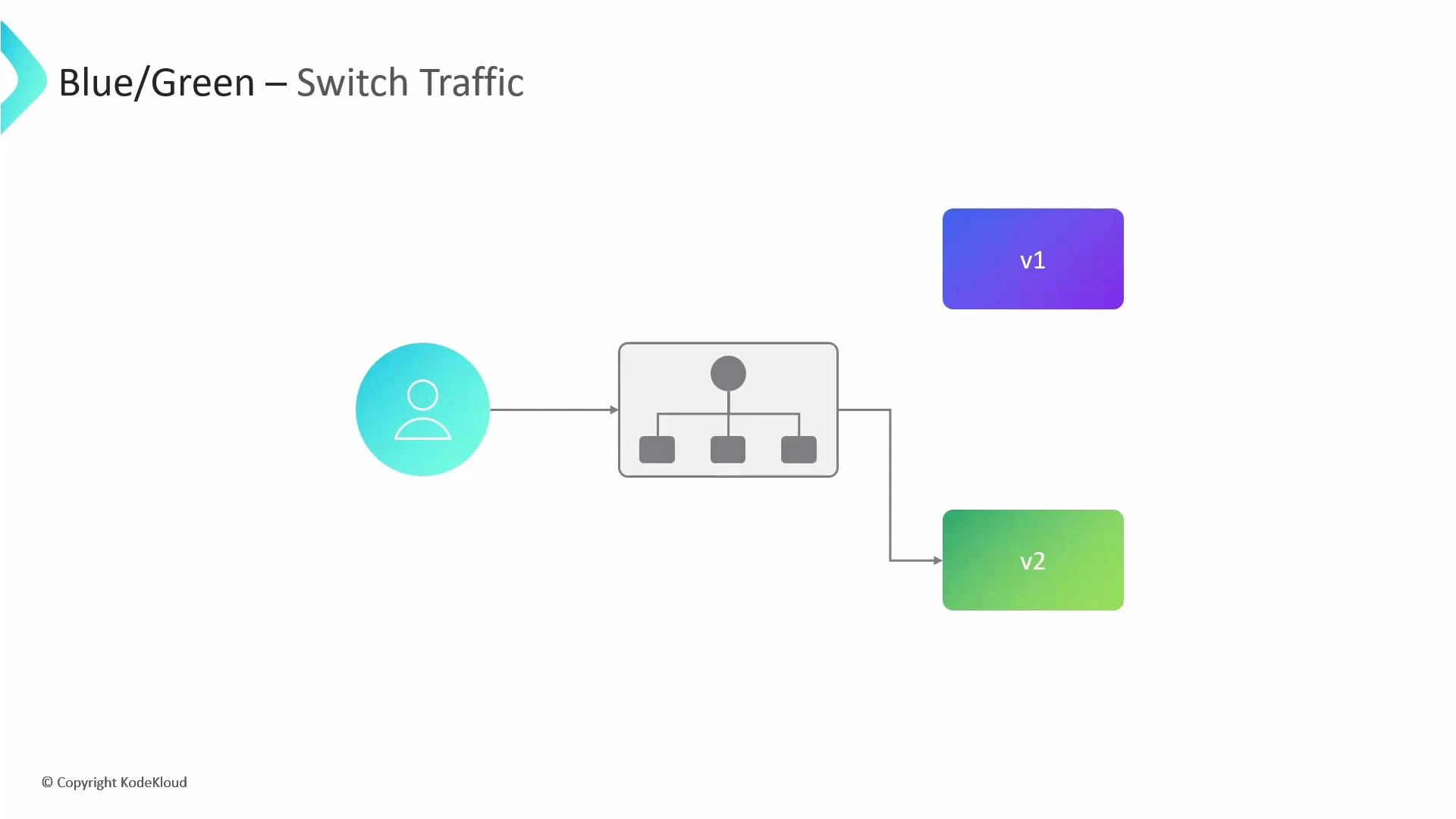
This guide explains the Blue-Green deployment strategy as implemented by [Argo Rollouts](https://argoproj.github.io/argo-rollouts/). Blue-Green deployments use two identical production environments—Blue (current live) and Green (standby). At any time, only one environment receives user traffic. When a new version is ready, deploy it to Green, verify it, and then switch traffic from Blue to Green. This enables zero-downtime releases and instant rollbacks by routing traffic back to the previous environment if issues occur.
 Benefits
* Zero-downtime deployments: the live environment remains unchanged until verification completes.
* Fast, safe rollbacks: switch traffic back to the previous environment instantly.
* Safe testing surface: preview endpoints enable QA and automated checks without affecting users.
High-level Blue-Green rollout configuration
| Parameter | Purpose | Example / Notes |
| ---------------------------- | ------------------------------------------------------------------------------------------------------------------------------------- | ------------------------------------ |
| `activeService` | Kubernetes Service that routes live production traffic to the currently active ReplicaSet. | Required. |
| `previewService` | Optional internal Service that points to the Green ReplicaSet during preview. Useful for tests and QA. | `web-api-preview-svc` |
| `previewReplicaCount` | Number of replicas the Green ReplicaSet runs during the preview phase to conserve resources while allowing verification. | `1` or small number. |
| `autoPromotionEnabled` | If `true`, the rollout auto-promotes Green to receive live traffic when health checks pass. If `false`, manual promotion is required. | Defaults to `true` if not specified. |
| `postPromotionAnalysis` | Automated analysis to run after Green receives 100% traffic (e.g., Prometheus queries to validate SLOs). | Can reference analysis templates. |
| `scaleDownDelaySeconds` | Delay before scaling down old Blue pods after traffic is switched to Green; provides a rollback window. | e.g., `30` |
| `abortScaleDownDelaySeconds` | Delay before terminating faulty Green pods after a manual abort so you can collect diagnostics. | e.g., `10` |
Example Rollout manifest
```yaml theme={null}
apiVersion: argoproj.io/v1alpha1
kind: Rollout
metadata:
name: web-api-rollout
spec:
replicas: 4
selector:
matchLabels:
app: web-api
template:
metadata:
labels:
app: web-api
spec:
containers:
- name: web-api-container
image: my-repo/web-api:v1
ports:
- containerPort: 8080
strategy:
blueGreen:
activeService: web-api-active-svc
previewService: web-api-preview-svc
previewReplicaCount: 1
autoPromotionEnabled: false
postPromotionAnalysis:
templates:
- templateName: check-error-rate
scaleDownDelaySeconds: 30
abortScaleDownDelaySeconds: 10
```
When `autoPromotionEnabled` is set to `false`, you must manually promote the rollout once verification succeeds:
```bash theme={null}
kubectl argo rollouts promote web-api-rollout
```
Note: If `autoPromotionEnabled` is omitted, Argo Rollouts defaults it to `true` (automatic promotion). For controlled releases or manual QA gates, explicitly set it to `false`.
Post-promotion analysis
* Runs after the Green ReplicaSet receives 100% of traffic.
* Use it to validate error rates, latency, throughput, and other SLOs.
* Common integrations: [Prometheus](https://prometheus.io/) queries, synthetic checks, or custom analysis templates.
Best practices and operational tips
* Use a small `previewReplicaCount` (1–2) to save resources while allowing meaningful verification.
* Set `scaleDownDelaySeconds` long enough to allow rollback but short enough to avoid resource waste.
* Configure `abortScaleDownDelaySeconds` to give developers time to fetch logs and metrics if you abort a rollout.
* Automate post-promotion checks to catch regressions quickly and reduce manual intervention.
Warning: If you set `scaleDownDelaySeconds` or `abortScaleDownDelaySeconds` too low, you may not have sufficient time to collect logs or metrics for debugging. Choose values that balance fast cleanup with operational troubleshooting needs.
Links and references
* [Argo Rollouts Documentation](https://argoproj.github.io/argo-rollouts/)
* [Kubernetes kubectl reference](https://kubernetes.io/docs/reference/kubectl/overview/)
* [Prometheus](https://prometheus.io/)
Benefits
* Zero-downtime deployments: the live environment remains unchanged until verification completes.
* Fast, safe rollbacks: switch traffic back to the previous environment instantly.
* Safe testing surface: preview endpoints enable QA and automated checks without affecting users.
High-level Blue-Green rollout configuration
| Parameter | Purpose | Example / Notes |
| ---------------------------- | ------------------------------------------------------------------------------------------------------------------------------------- | ------------------------------------ |
| `activeService` | Kubernetes Service that routes live production traffic to the currently active ReplicaSet. | Required. |
| `previewService` | Optional internal Service that points to the Green ReplicaSet during preview. Useful for tests and QA. | `web-api-preview-svc` |
| `previewReplicaCount` | Number of replicas the Green ReplicaSet runs during the preview phase to conserve resources while allowing verification. | `1` or small number. |
| `autoPromotionEnabled` | If `true`, the rollout auto-promotes Green to receive live traffic when health checks pass. If `false`, manual promotion is required. | Defaults to `true` if not specified. |
| `postPromotionAnalysis` | Automated analysis to run after Green receives 100% traffic (e.g., Prometheus queries to validate SLOs). | Can reference analysis templates. |
| `scaleDownDelaySeconds` | Delay before scaling down old Blue pods after traffic is switched to Green; provides a rollback window. | e.g., `30` |
| `abortScaleDownDelaySeconds` | Delay before terminating faulty Green pods after a manual abort so you can collect diagnostics. | e.g., `10` |
Example Rollout manifest
```yaml theme={null}
apiVersion: argoproj.io/v1alpha1
kind: Rollout
metadata:
name: web-api-rollout
spec:
replicas: 4
selector:
matchLabels:
app: web-api
template:
metadata:
labels:
app: web-api
spec:
containers:
- name: web-api-container
image: my-repo/web-api:v1
ports:
- containerPort: 8080
strategy:
blueGreen:
activeService: web-api-active-svc
previewService: web-api-preview-svc
previewReplicaCount: 1
autoPromotionEnabled: false
postPromotionAnalysis:
templates:
- templateName: check-error-rate
scaleDownDelaySeconds: 30
abortScaleDownDelaySeconds: 10
```
When `autoPromotionEnabled` is set to `false`, you must manually promote the rollout once verification succeeds:
```bash theme={null}
kubectl argo rollouts promote web-api-rollout
```
Note: If `autoPromotionEnabled` is omitted, Argo Rollouts defaults it to `true` (automatic promotion). For controlled releases or manual QA gates, explicitly set it to `false`.
Post-promotion analysis
* Runs after the Green ReplicaSet receives 100% of traffic.
* Use it to validate error rates, latency, throughput, and other SLOs.
* Common integrations: [Prometheus](https://prometheus.io/) queries, synthetic checks, or custom analysis templates.
Best practices and operational tips
* Use a small `previewReplicaCount` (1–2) to save resources while allowing meaningful verification.
* Set `scaleDownDelaySeconds` long enough to allow rollback but short enough to avoid resource waste.
* Configure `abortScaleDownDelaySeconds` to give developers time to fetch logs and metrics if you abort a rollout.
* Automate post-promotion checks to catch regressions quickly and reduce manual intervention.
Warning: If you set `scaleDownDelaySeconds` or `abortScaleDownDelaySeconds` too low, you may not have sufficient time to collect logs or metrics for debugging. Choose values that balance fast cleanup with operational troubleshooting needs.
Links and references
* [Argo Rollouts Documentation](https://argoproj.github.io/argo-rollouts/)
* [Kubernetes kubectl reference](https://kubernetes.io/docs/reference/kubectl/overview/)
* [Prometheus](https://prometheus.io/)